Send MySQL changes to a REST API with Courier
When the system that needs your data is an application with a REST API, not a database, Gluesync can call that API for every change. You describe the API once in Courier, the REST editor of the Control Plane: its base URL, its authentication, and an endpoint with the values it expects. Then a pipeline maps the columns of a source table onto those values. This guide sends the changes of a MySQL table to a CRM API, one PUT per row, and shows what happens when the API answers with an error.
In this guide
You will learn how to create a Courier collection and an endpoint with PATH and BODY bindings, send a test request, add the Gluesync Courier agent to a pipeline, create the entity from Courier with Map to pipeline, read the requests the API receives for a snapshot and for inserts, updates and deletes, and see how a failed call is retried with the same idempotency key.
The steps were run on MySQL 8.4 as the source and a test HTTP API that echoes every request.
Quick information
Goal |
Deliver every change of a MySQL table to a REST API as an HTTP request |
Audience |
Data engineers and integration developers |
Level |
Intermediate |
Time required |
About 30 minutes |
Area |
Control Plane → Courier → Outbound; Control Plane → Pipelines |
Applies to |
Gluesync 2.3 |
Before you begin
Make sure that:
-
A MySQL source is ready for CDC: binary log in
ROWformat withFULLrow images, and a user withREPLICATION SLAVE,REPLICATION CLIENTandSELECT. See Set up MySQL and MariaDB CDC; -
The API is reachable from the host that runs Core Hub, on an address that is not loopback, link-local or a cloud metadata service (see the egress rule in HTTP Target);
-
You have the credentials the API expects, here a bearer token;
-
You are a Manager or a Super Admin, to create collections in Courier.
How a row becomes a request
| Part of the request | Where it comes from |
|---|---|
URL |
The Base URL of the collection and the Path of the endpoint, with |
Headers |
|
Body ( |
The field |
One HTTP method serves every operation: the API tells them apart by the operation field.
Guide steps
SQL
Skip this step if you use your own table. On MySQL:
CREATE TABLE crm.customers (
  customer_id INT PRIMARY KEY,
  name        VARCHAR(60) NOT NULL,
  email       VARCHAR(120),
  tier        VARCHAR(10) NOT NULL,
  active      TINYINT(1) NOT NULL DEFAULT 1
);
INSERT INTO crm.customers VALUES
  (1,'Rossi Costruzioni','info@rossi.example','gold',1),
  (2,'Bianchi Srl','sales@bianchi.example','silver',1),
(3,'Verdi Logistica',NULL,'bronze',0);UI
-
In the Control Plane, open Courier. On Outbound, select Create your first collection (or New collection);
-
Fill in Name (
crm, the target schema in pipelines) and Base URL (http://crm-api:8080). In Authentication, choose Bearer token and paste the token. Select Create; -
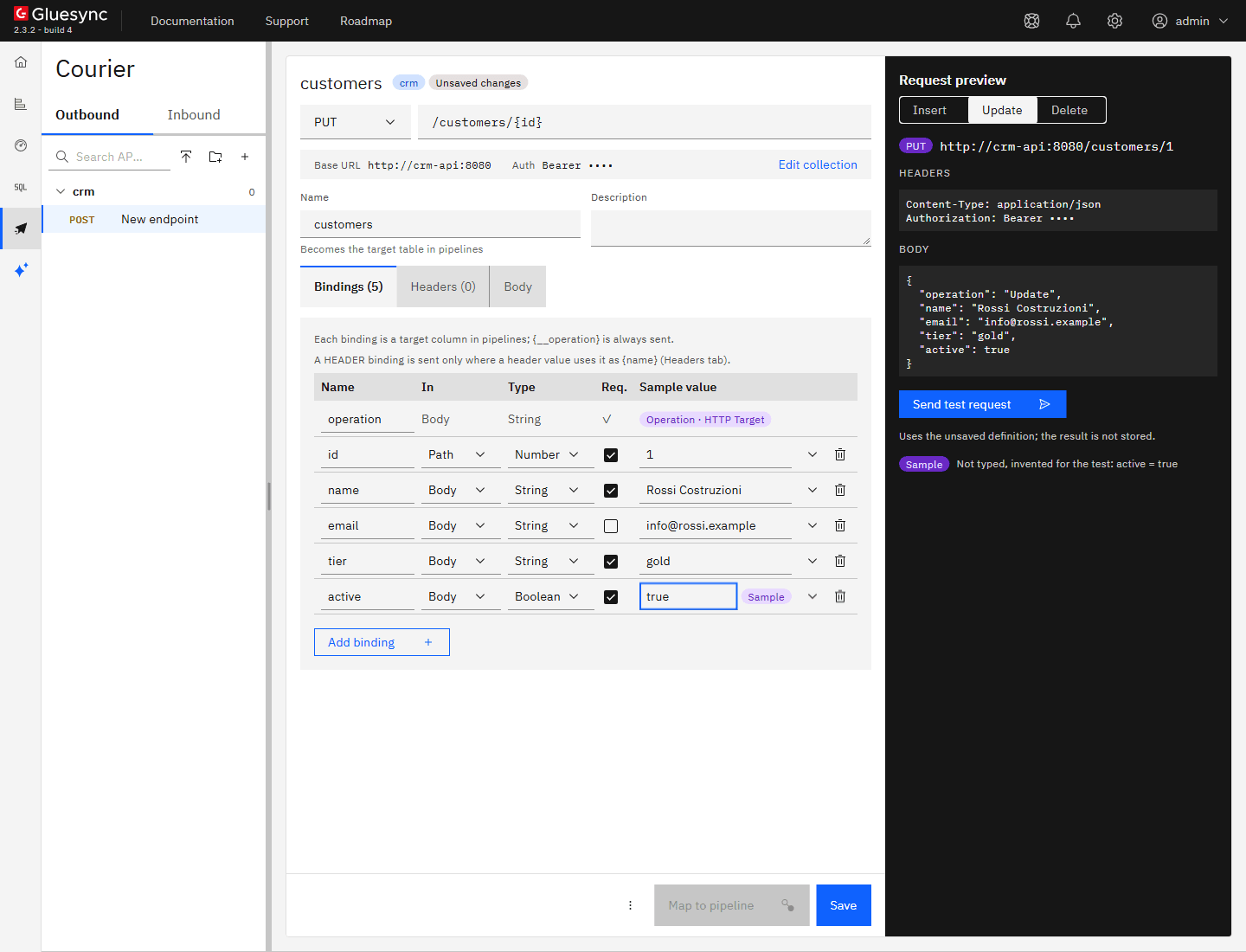
Select New endpoint. Choose the method
PUT, type the path/customers/{id}and the Namecustomers(the target table in pipelines); -
The path is marked Placeholders without a PATH binding: id. Select Add PATH binding "id" and set its Type to
Number; -
Select Add binding for each value of the body, with Location
Body:name(String, required),email(String, not required),tier(String, required) andactive(Boolean, required).
-
Select Send test request. It sends the unsaved definition with the sample values;
-
Select Save.
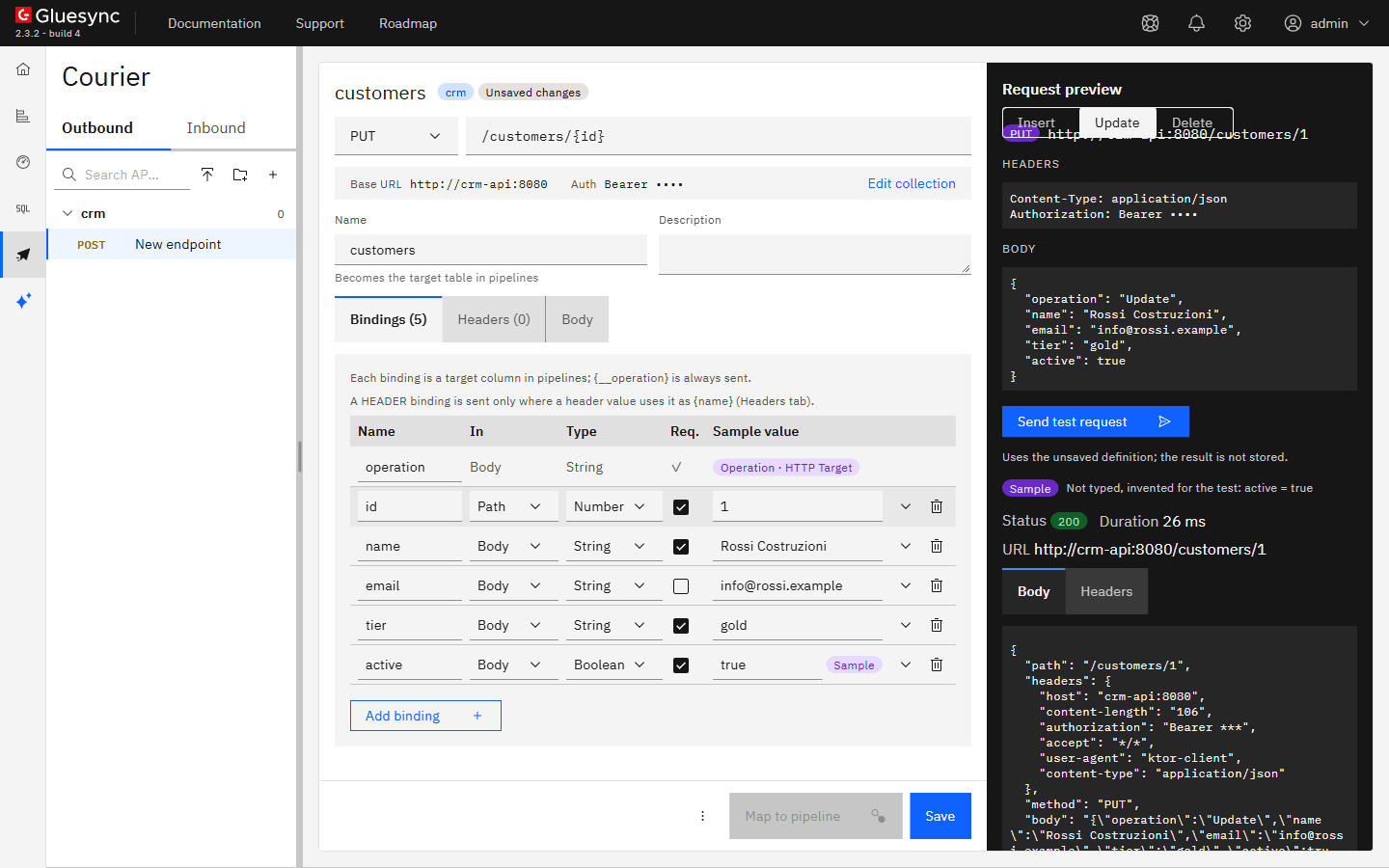
200. A credential the API echoes back is shown as ***.|
An endpoint without a required PATH binding gets the synthetic key column |
UI
-
Select Create pipeline and choose the MySQL CDC agent. Fill in the connection and select Test and continue;
-
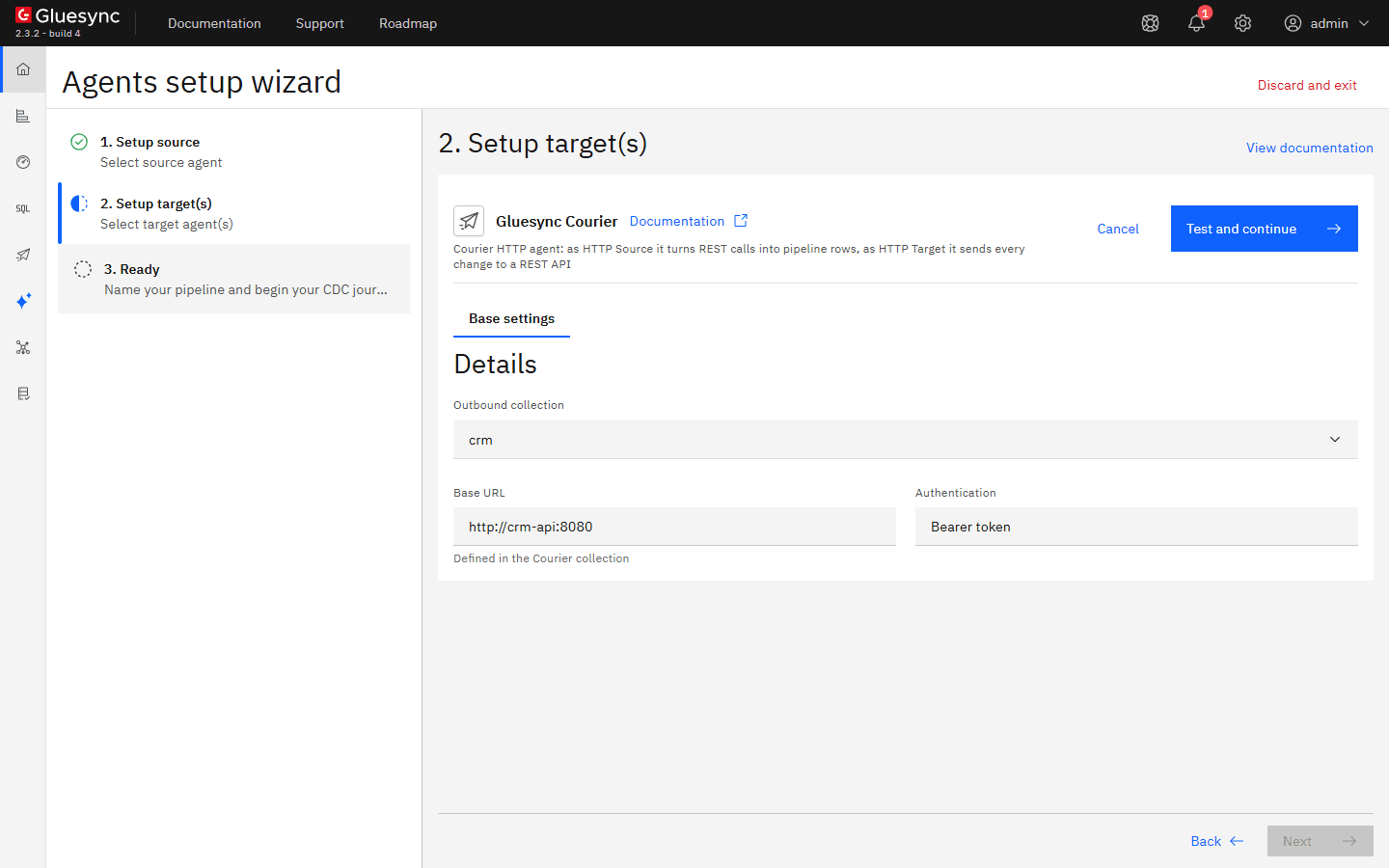
In Select target agent, search for
Courierand select Gluesync Courier. Searching forHTTPorRESTfinds nothing: the agent is listed under this name; -
In Outbound collection, choose
crm. Base URL and Authentication are read from the collection; -
Select Test and continue, name the pipeline (
CustomersToCRM) and select Finish.
|
On MySQL 8.4, where users authenticate with |
UI
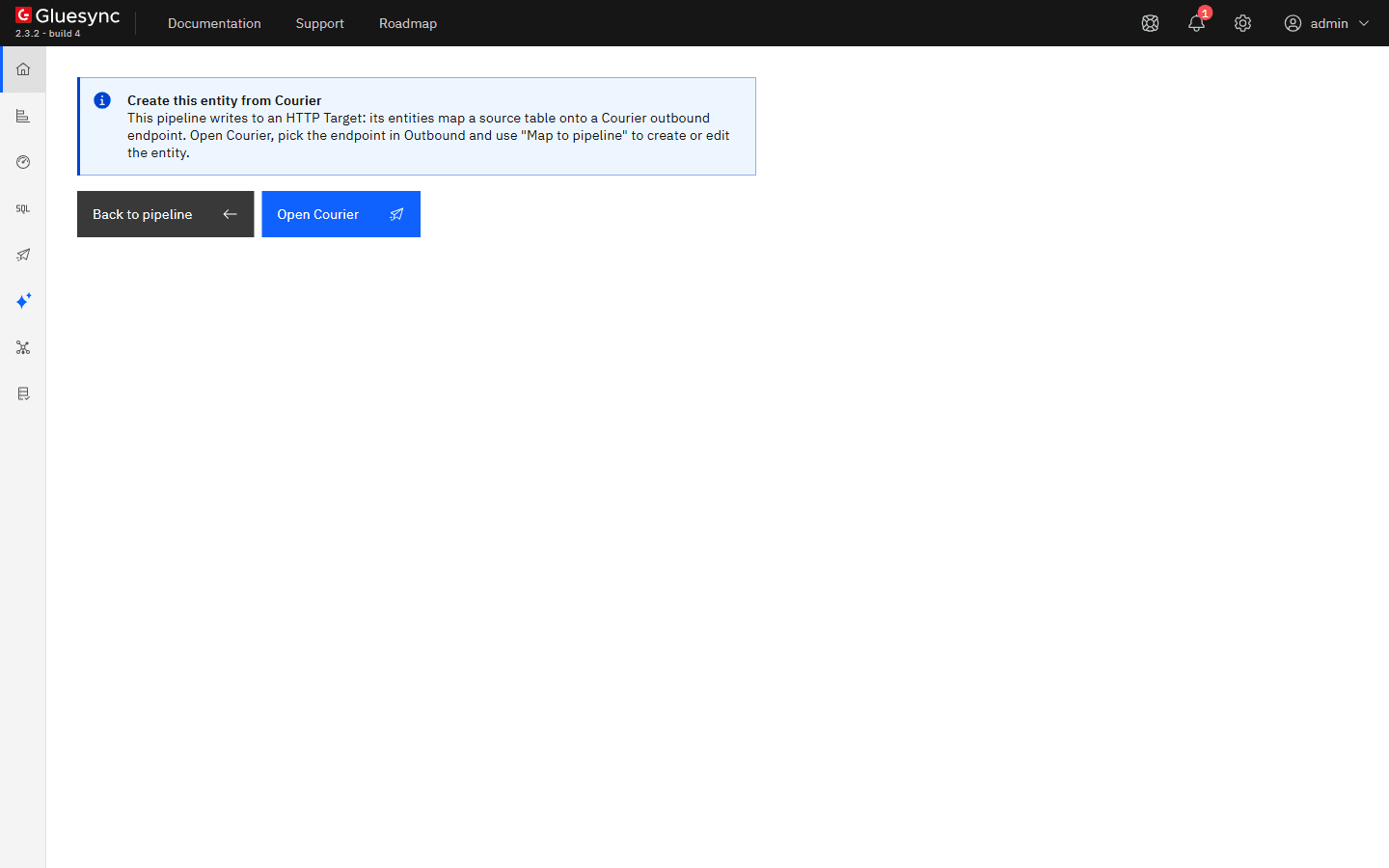
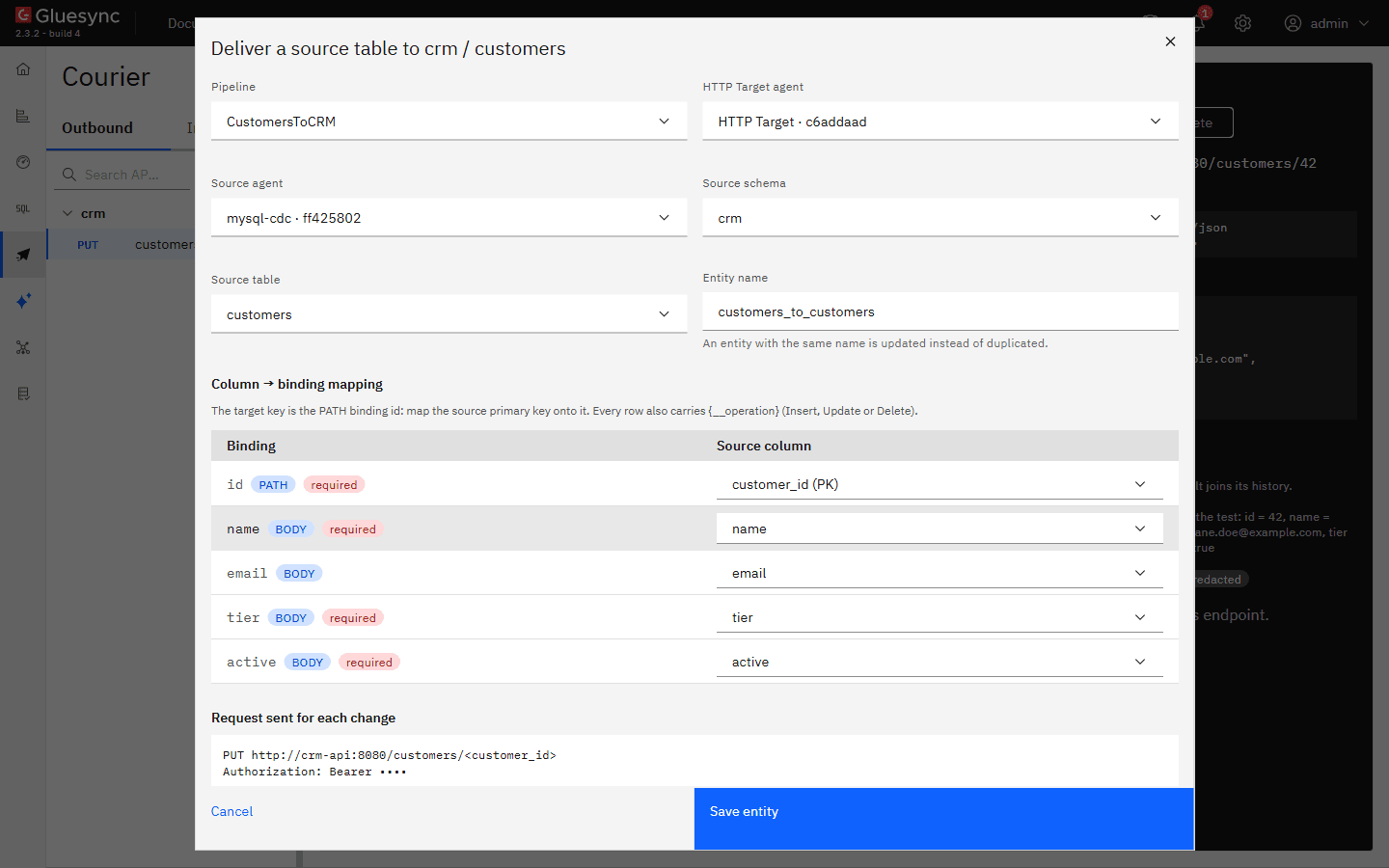
The entities of a pipeline with the Courier agent are created from the endpoint. Entities on the pipeline page says so and offers Open Courier.
-
In Courier, select the endpoint
customers, then Map to pipeline; -
Pipeline, HTTP Target agent and Source agent are filled in. Choose Source schema
crmand Source tablecustomers; -
Under Column → binding mapping, the bindings with the same name as a column are mapped. Map
idtocustomer_id (PK); -
Select Save entity.
|
While |
UI + SQL
-
Open the entity on the pipeline page, select Start, keep Full copy and Keep and merge, and select Start entity;
-
Check the requests your API received;
-
On MySQL, insert, update and delete a row, and check the requests again:
INSERT INTO crm.customers VALUES (4,'Neri Consulting','hello@neri.example','silver',1);
UPDATE crm.customers SET tier = 'platinum' WHERE customer_id = 1;
DELETE FROM crm.customers WHERE customer_id = 2;
|
Known limitation: a MySQL |
UI + SQL
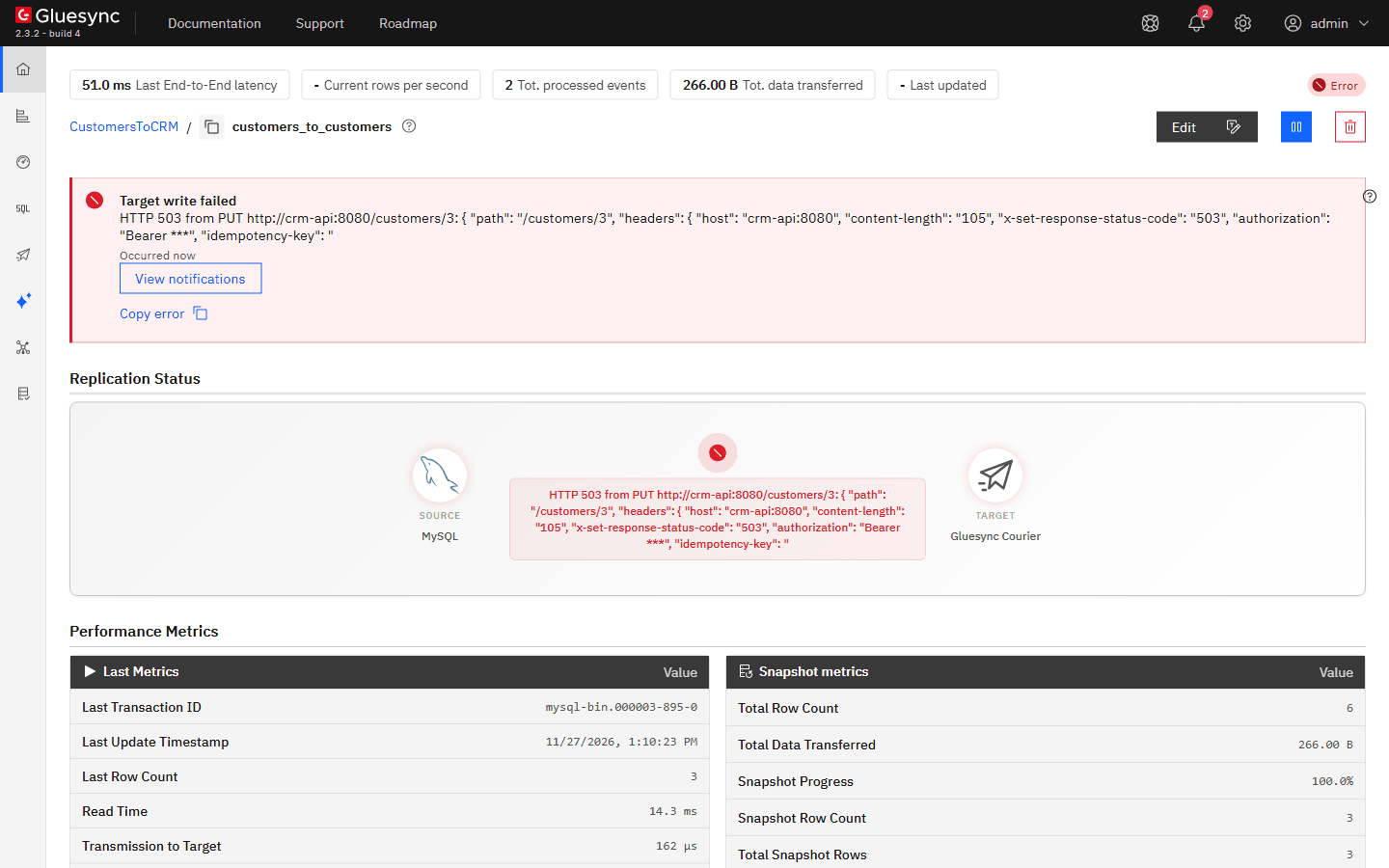
A call that does not get a 2xx answer stops the entity, and Core Hub tries the change again from its checkpoint. To see it, make any API you can control return 503 for a while. The test used the open-source echo server mendhak/http-https-echo, which answers with the status given in the request header x-set-response-status-code:
-
In Courier, on the endpoint, open Headers, select Add header, and add
x-set-response-status-codewith the value503. Select Save. With another API, make it answer503in its own way; -
On MySQL, update a row:
UPDATE crm.customers SET email = 'team@verdi.example' WHERE customer_id = 3;; -
Open the entity.
-
Remove the header in Courier and select Save;
-
Wait for the entity.
Troubleshooting
| Problem | Possible cause | What to do |
|---|---|---|
|
The base URL resolves to a loopback, link-local or metadata address, or to Core Hub itself |
Use an address the Core Hub host reaches on your network. Set |
Target write failed: |
The API refused the call |
Read the status and the answer in the error, fix the API side, and wait: Core Hub retries the change |
Entities on the pipeline page shows Create this entity from Courier |
A Courier pipeline creates entities from the endpoint |
Select Open Courier, then Map to pipeline on the endpoint |
Save entity is disabled in Map to pipeline |
A required binding has no source column, or the source key is not mapped |
Map the source primary key onto the PATH binding, and every required binding onto a column |
Placeholders without a PATH binding: id |
The path uses a placeholder that has no binding |
Select Add PATH binding "id" |
No agent found when you search for |
The agent is listed as Gluesync Courier |
Search for |
A Boolean binding receives |
The source column is a MySQL |
Accept both forms in the API |