Set up Oracle LogMiner CDC end to end
This guide takes you from an Oracle database that is not ready for change data capture to a running Gluesync pipeline that copies an Oracle schema to PostgreSQL with a snapshot and live changes. The database work is written for the DBA and is done once. The rest is done in the Control Plane. The last part shows what you see when a grant is missing, when supplemental logging is off, when the archived redo logs are gone, and after a database restart, and how to recover each time.
In this guide
You will learn how to enable ARCHIVELOG mode and supplemental logging, create a dedicated LogMiner user and a data user with only the grants Gluesync needs, create an Oracle LogMiner source connection and a PostgreSQL target connection, map two tables, run a snapshot followed by CDC, check inserts, updates and deletes with SQL, choose between service name, SID, a custom connection string and a TNS alias with a wallet, and recover from the failures that customers meet most often.
Quick information
Goal |
Replicate an Oracle multitenant database (CDB with a PDB) to PostgreSQL with Oracle LogMiner, using users that have only the required grants |
Audience |
Oracle DBAs and Gluesync users who set up and operate Oracle sources |
Level |
Intermediate |
Time required |
About 60 minutes |
Area |
Oracle database → Control Plane → Data pipelines → Oracle LogMiner source |
Applies to |
Gluesync 2.3 |
Before you begin
Make sure that:
-
You have an Oracle Database 19c or later with a container database (CDB) and a pluggable database (PDB), and you can connect to it as
SYSDBA(the guide uses the CDBORCLCDBand the PDBORCL); -
The Oracle listener accepts connections from the host that runs Core Hub, on the port that you will enter in Gluesync (the guide uses
oracle-logminer-docs:1521); -
You have a schema with the tables to replicate. The examples use the tables
CUSTOMERSandORDERSin the schemaSHOP(see the optional first step if you want to create them); -
You have a PostgreSQL target that Core Hub can reach, with a schema that already contains empty tables with matching columns (the examples use the schema
ora_cdc); -
You can sign in to the Gluesync Control Plane with a role that can create pipelines;
-
You can run SQL against the Oracle database and the PostgreSQL target, for example with SQL*Plus and
psql.
|
Enabling ARCHIVELOG mode needs a restart of the Oracle instance. Plan it with the owners of the database. Do not follow the troubleshooting experiments in this guide (deleting archived logs, switching supplemental logging off, restarting the instance) on a production database. |
|
This guide covers a CDB with a PDB, which is the default layout of Oracle 19c. For a database without containers (single instance) the steps are the same except that the LogMiner user is an ordinary user (without the |
Guide steps
SQL
Skip this step if you already have the tables to replicate. It creates the schema SHOP in the PDB, with 200 customers and 1,000 orders, and the empty target tables in PostgreSQL.
-
Connect to the CDB as
SYSDBAand run the Oracle script; -
Connect to the PostgreSQL target and run the PostgreSQL script.
-- Oracle, as SYSDBA, in the PDB
ALTER SESSION SET CONTAINER = ORCL;

CREATE USER SHOP IDENTIFIED BY "<shop password>" DEFAULT TABLESPACE USERS QUOTA UNLIMITED ON USERS;
GRANT CREATE SESSION TO SHOP;

CREATE TABLE SHOP.CUSTOMERS (
  ID           NUMBER(10)    PRIMARY KEY,
  FULL_NAME    VARCHAR2(100) NOT NULL,
  EMAIL        VARCHAR2(150),
  COUNTRY      VARCHAR2(2),
  TIER         VARCHAR2(10),
  STATUS       VARCHAR2(10),
  CREDIT_LIMIT NUMBER(12,2),
  CREATED_AT   TIMESTAMP DEFAULT SYSTIMESTAMP
);

CREATE TABLE SHOP.ORDERS (
  ID          NUMBER(10)    PRIMARY KEY,
  CUSTOMER_ID NUMBER(10)    NOT NULL,
  AMOUNT      NUMBER(12,2),
  CURRENCY    VARCHAR2(3),
  STATUS      VARCHAR2(10),
  ORDER_DATE  DATE
);

INSERT INTO SHOP.CUSTOMERS
SELECT LEVEL, 'Customer '||LEVEL, 'customer'||LEVEL||'@example.com',
  CASE MOD(LEVEL,8) WHEN 0 THEN 'IT' WHEN 1 THEN 'DE' WHEN 2 THEN 'US' WHEN 3 THEN 'FR'
                    WHEN 4 THEN 'ES' WHEN 5 THEN 'GB' WHEN 6 THEN 'JP' ELSE 'BR' END,
  CASE MOD(LEVEL,4) WHEN 0 THEN 'bronze' WHEN 1 THEN 'silver' WHEN 2 THEN 'gold' ELSE 'platinum' END,
  CASE WHEN MOD(LEVEL,7)=0 THEN 'suspended' WHEN MOD(LEVEL,5)=0 THEN 'inactive' ELSE 'active' END,
  1000 + MOD(LEVEL,10)*500, SYSTIMESTAMP
FROM DUAL CONNECT BY LEVEL <= 200;

INSERT INTO SHOP.ORDERS
SELECT LEVEL, MOD(LEVEL,200)+1, ROUND(10 + MOD(LEVEL*37,490) + MOD(LEVEL,100)/100,2),
  CASE MOD(LEVEL,3) WHEN 0 THEN 'EUR' WHEN 1 THEN 'USD' ELSE 'GBP' END,
  CASE MOD(LEVEL,5) WHEN 0 THEN 'new' WHEN 1 THEN 'paid' WHEN 2 THEN 'shipped'
                    WHEN 3 THEN 'delivered' ELSE 'cancelled' END,
  TRUNC(SYSDATE) - MOD(LEVEL,90)
FROM DUAL CONNECT BY LEVEL <= 1000;
COMMIT;
-- PostgreSQL target
CREATE SCHEMA IF NOT EXISTS ora_cdc;
CREATE TABLE ora_cdc.customers (
id numeric(10,0) PRIMARY KEY,
full_name varchar(100) NOT NULL,
email varchar(150),
country varchar(2),
tier varchar(10),
status varchar(10),
credit_limit numeric(12,2),
created_at timestamp
);
CREATE TABLE ora_cdc.orders (
id numeric(10,0) PRIMARY KEY,
customer_id numeric(10,0) NOT NULL,
amount numeric(12,2),
currency varchar(3),
status varchar(10),
order_date timestamp
);|
With a PostgreSQL target, if you pick a target table that does not exist, the field mapping dialog shows Target table has no columns and you cannot continue. Create the tables first, as above. |
SQL
LogMiner reads the redo that Oracle writes. Oracle keeps that redo available after the online redo logs are reused only when the database archives them, so the database must run in ARCHIVELOG mode.
-
Connect to the CDB root as
SYSDBA(for example withsqlplus / as sysdba); -
Check the current mode. If it already returns
ARCHIVELOG, skip the next two actions; -
Restart the instance in the mount state and switch the mode;
-
Open the database and the pluggable databases, and save the state of the pluggable databases, so that they open again after a restart.
SELECT log_mode FROM v$database;

SHUTDOWN IMMEDIATE
STARTUP MOUNT
ALTER DATABASE ARCHIVELOG;
ALTER DATABASE OPEN;

ALTER PLUGGABLE DATABASE ALL OPEN;
ALTER PLUGGABLE DATABASE ALL SAVE STATE;

ARCHIVE LOG LIST|
|
SQL
Supplemental logging makes Oracle write extra columns into the redo, so that LogMiner can tell which row a change belongs to. Database-level logging is required.
-
In the CDB root, enable minimal and primary key supplemental logging;
-
Check the result.
ALTER DATABASE ADD SUPPLEMENTAL LOG DATA;
ALTER DATABASE ADD SUPPLEMENTAL LOG DATA (PRIMARY KEY) COLUMNS;

SELECT supplemental_log_data_min, supplemental_log_data_pk FROM v$database;|
If database-level supplemental logging is off, Gluesync does not report an error and the entities stay Active, but no insert, update or delete reaches the target. See Supplemental logging is off. |
SQL
Gluesync uses two Oracle users. The LogMiner user connects to the CDB root and reads the redo of every PDB, so it is a common user (its name starts with C##). The data user connects to the PDB and reads the tables for the snapshot. Keeping them separate lets you give each one the least privilege.
-
In the CDB root, create the common user;
-
Grant it the five privileges below, for all containers.
CREATE USER C##GS_LOGMINER IDENTIFIED BY "<LogMiner password>" CONTAINER=ALL;

GRANT CREATE SESSION,
      LOGMINING,
      SELECT ANY TRANSACTION,
      EXECUTE_CATALOG_ROLE,
      SELECT_CATALOG_ROLE
TO C##GS_LOGMINER CONTAINER=ALL;| Grant | What Gluesync uses it for | What you see without it |
|---|---|---|
|
Log in to the CDB root. |
|
|
Start a LogMiner session and read the changes. |
|
|
Run the |
|
|
Read the |
|
|
The agent checks for it and the agent reference pages list it. In our test on Oracle 19c Gluesync replicated inserts, updates and deletes also with this privilege revoked, so it is the one grant that you can drop if your security team requires the strictest minimum. |
Nothing visible in our test. |
|
You do not need |
SQL
-
Switch to the PDB;
-
Create the data user, with the right to log in only;
-
Enable full (all columns) supplemental logging on every table that you replicate;
-
Grant
SELECTon those tables to the data user and to the LogMiner user.
ALTER SESSION SET CONTAINER = ORCL;

CREATE USER GS_READER IDENTIFIED BY "<data user password>";
GRANT CREATE SESSION TO GS_READER;

ALTER TABLE SHOP.CUSTOMERS ADD SUPPLEMENTAL LOG DATA (ALL) COLUMNS;
ALTER TABLE SHOP.ORDERS    ADD SUPPLEMENTAL LOG DATA (ALL) COLUMNS;

GRANT SELECT ON SHOP.CUSTOMERS TO GS_READER;
GRANT SELECT ON SHOP.ORDERS    TO GS_READER;
GRANT SELECT ON SHOP.CUSTOMERS TO C##GS_LOGMINER;
GRANT SELECT ON SHOP.ORDERS TO C##GS_LOGMINER;|
Full table-level logging is recommended, not mandatory. Without it Oracle writes only the changed columns of an update, and Gluesync reads the full row again from the source for every update. In our test that returned correct data. It costs one extra read for each update, so use it for every table that changes often. |
UI
-
Open Data pipelines;
-
Select the + button (Create pipeline) above the list of pipelines. The Agents setup wizard opens on 1. Setup source;
-
Select the Oracle Database tile. The tile shows 4 connectors available;
-
Select Oracle LogMiner agent.
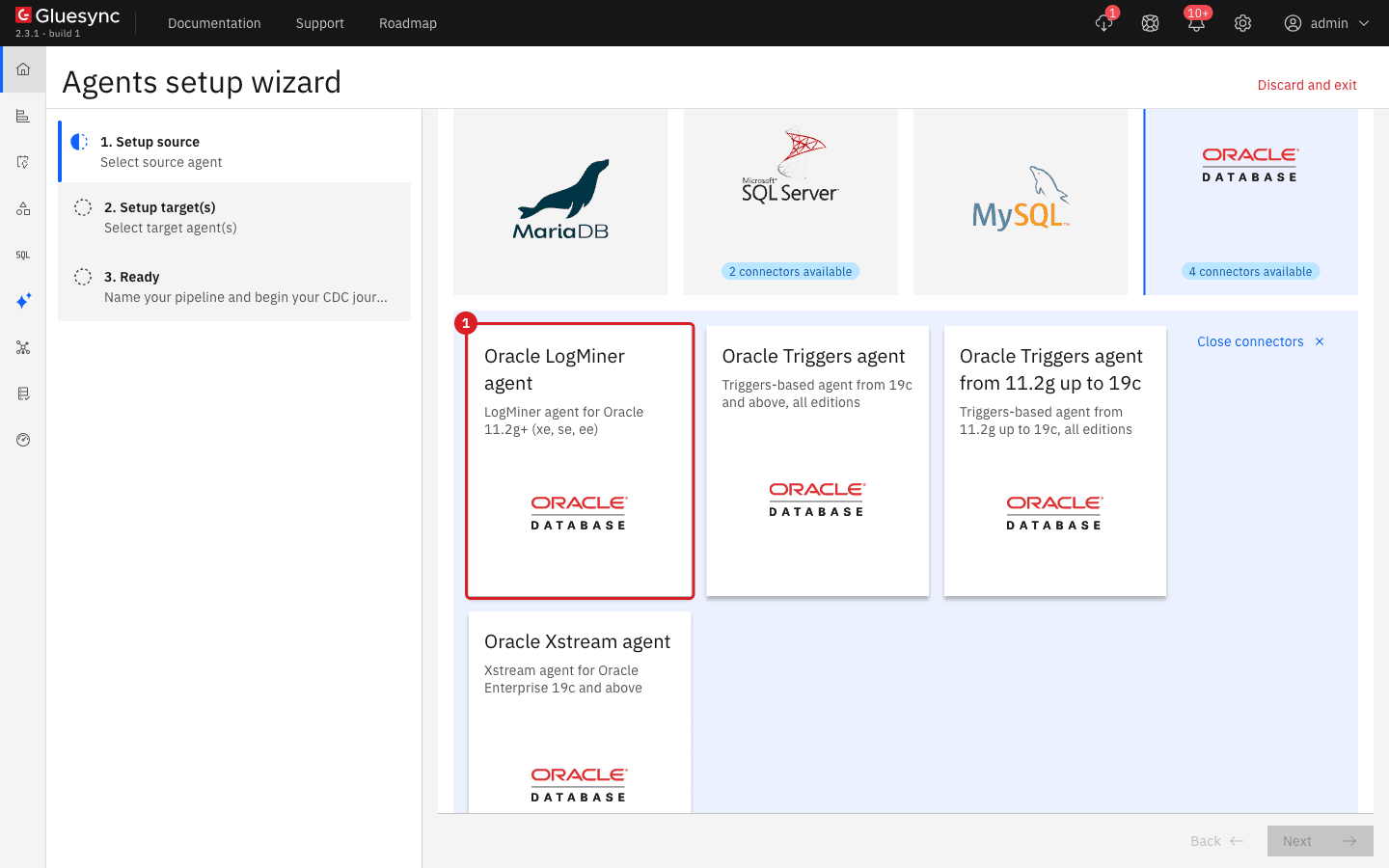
UI
-
In Host name / Address and Port, enter the Oracle listener (
oracle-logminer-docsand1521); -
In Database name, enter the service name of the PDB (
ORCL); -
In Username and Password, enter the data user (
GS_READER); -
In LogMiner username and LogMiner password, enter the common user (
C##GS_LOGMINER); -
In LogMiner database, enter the service name of the CDB root (
ORCLCDB); -
Optional: under Advanced connection properties select Add property, select the key Connection type and check the value. The default is
SERVICE_NAME; -
Select Test and continue.
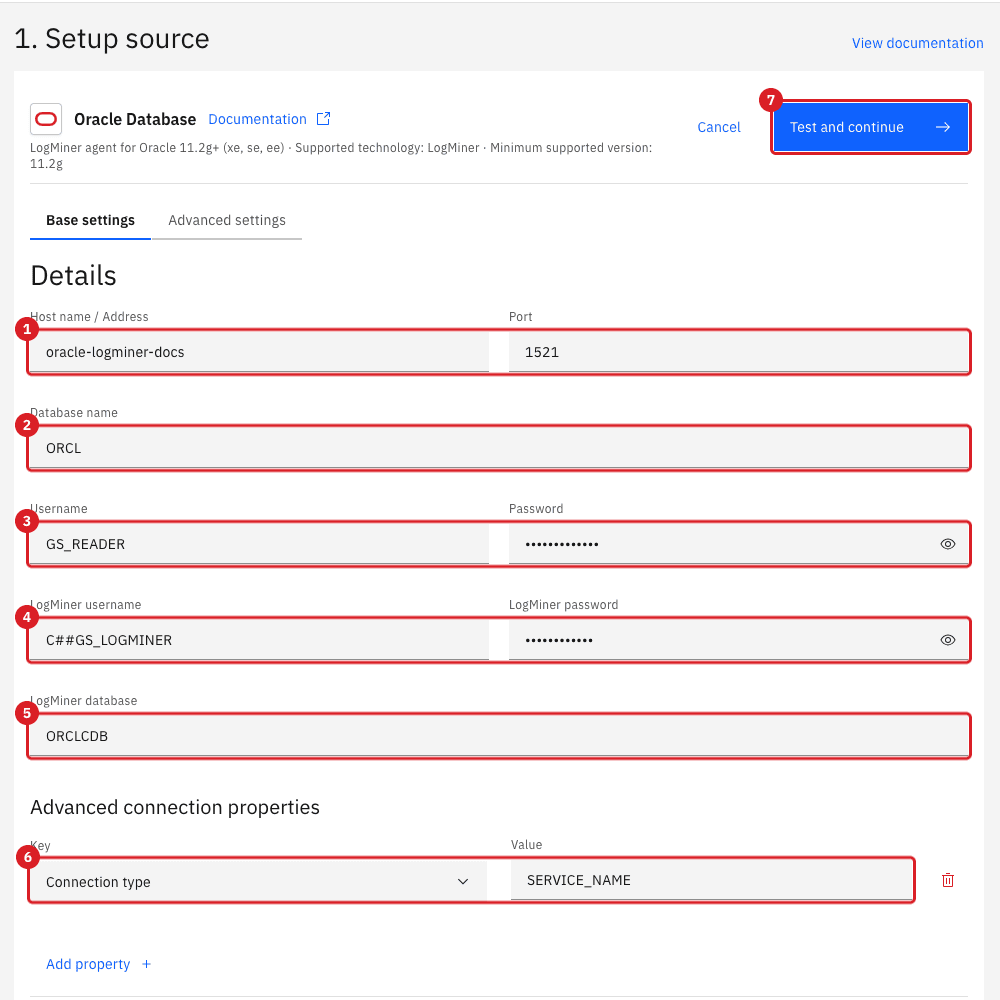
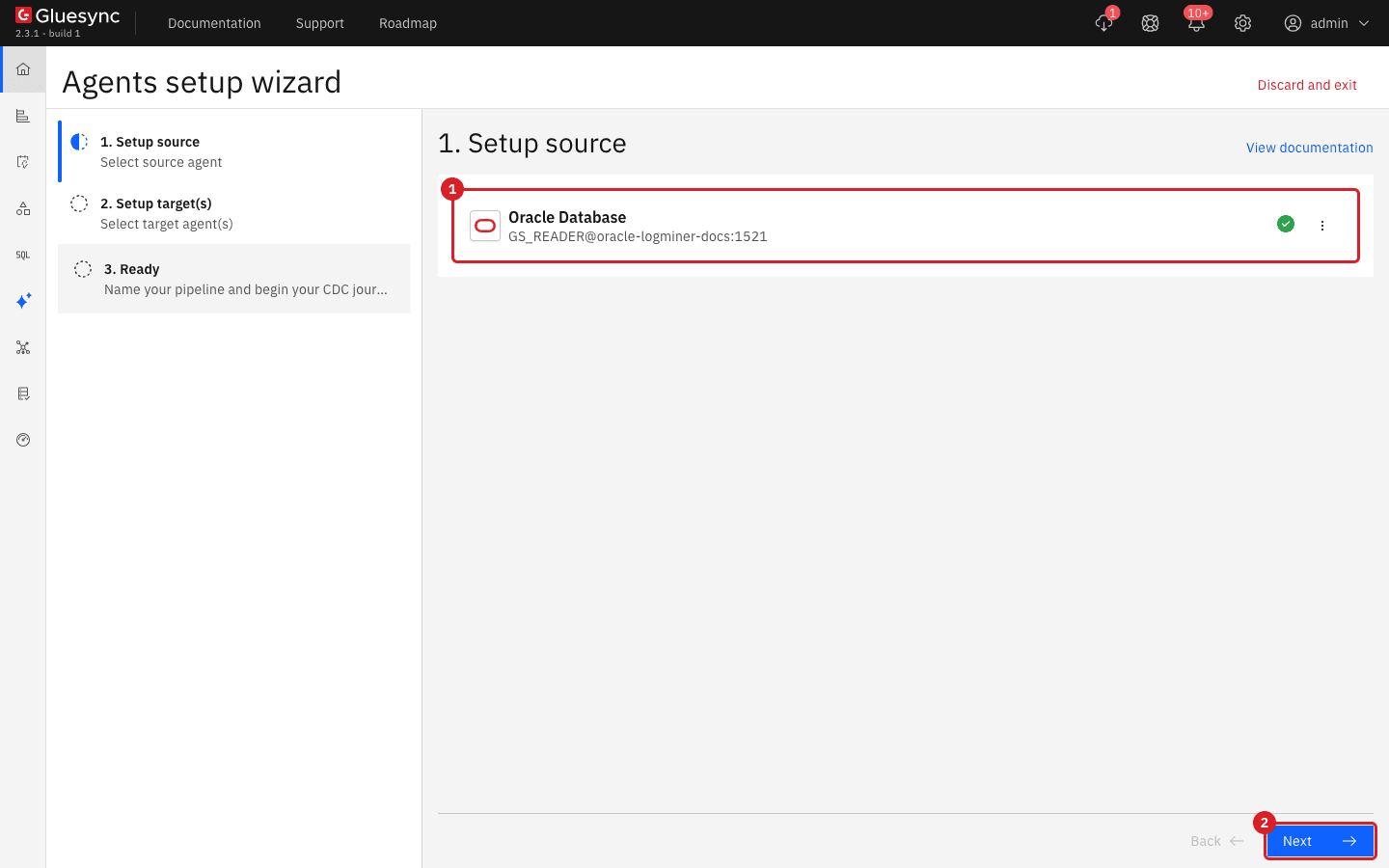
|
The test checks the data user only. In our test a wrong LogMiner password also passed it, so the green check does not prove that the LogMiner credentials are right. Before you continue, connect as the LogMiner user to the CDB root service (for example |
|
Do not leave an empty row in Advanced settings (an Add property row without a key). Test and continue then does nothing and the error is shown only on the Advanced settings tab, which is easy to miss. Delete the empty row with its trash icon. |
UI
-
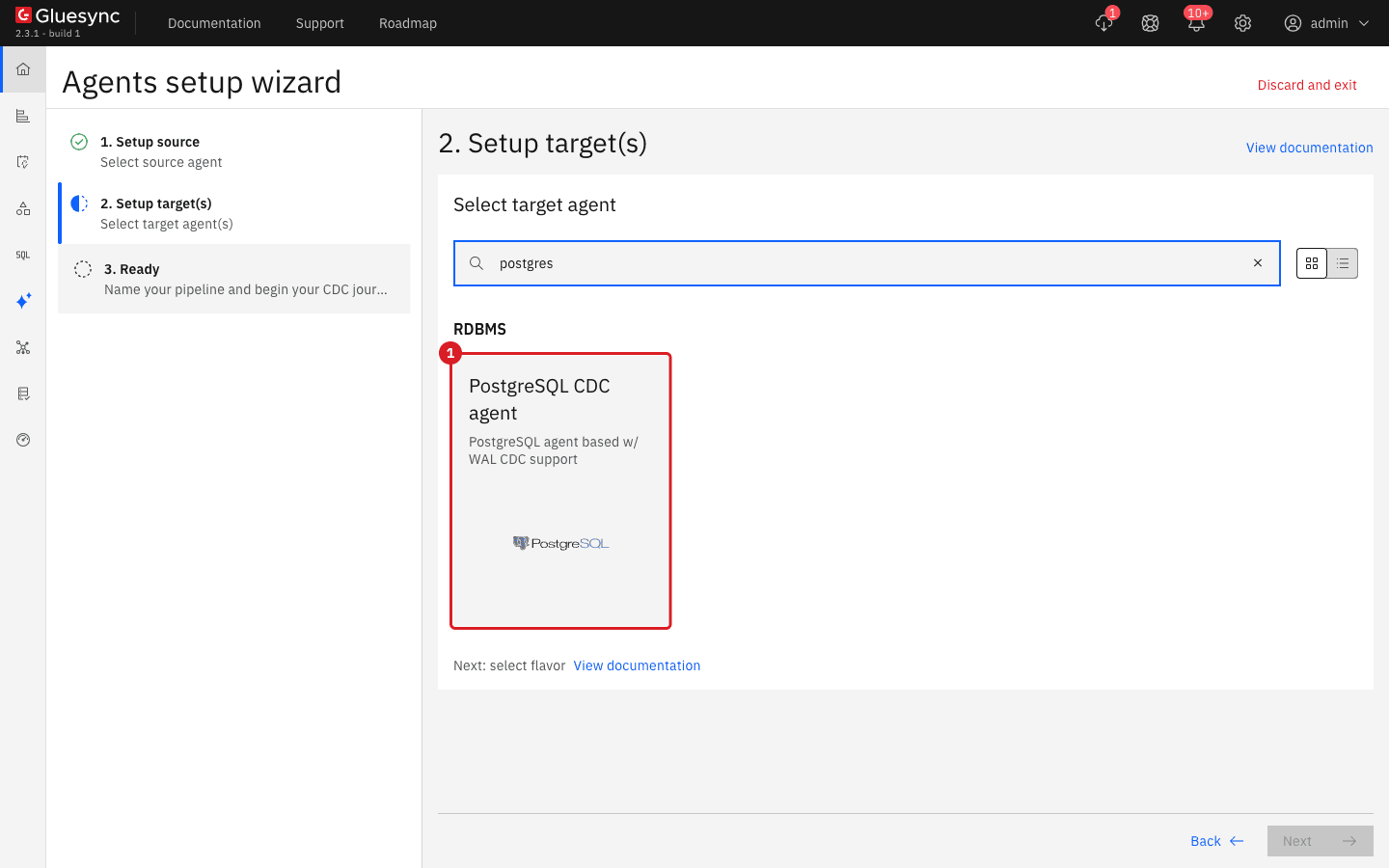
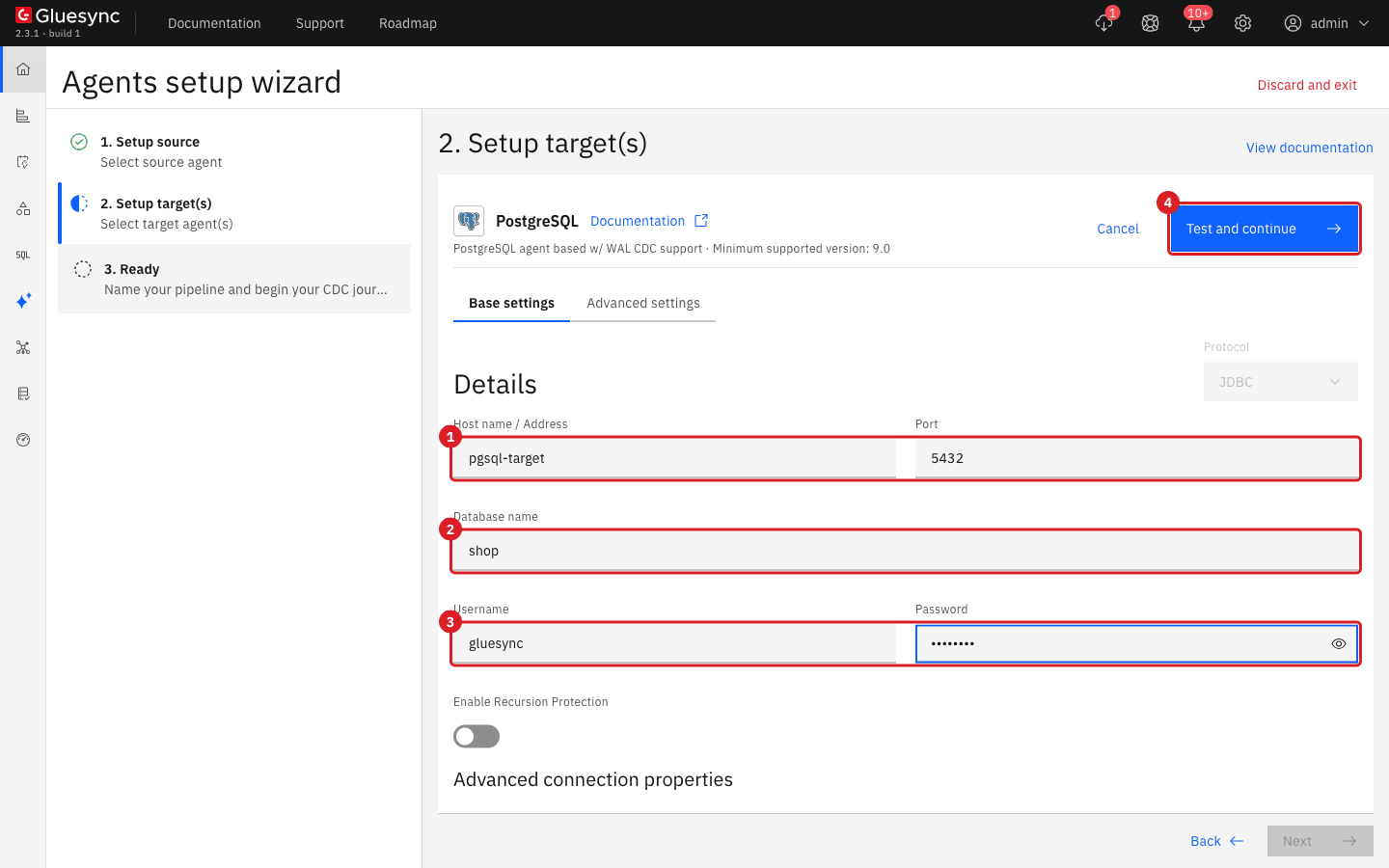
On 2. Setup target(s), search for
postgresand select PostgreSQL CDC agent; -
Enter Host name / Address, Port, Database name, Username and Password of the target (the examples use
pgsql-target,5432andshop); -
Select Test and continue, then Next;
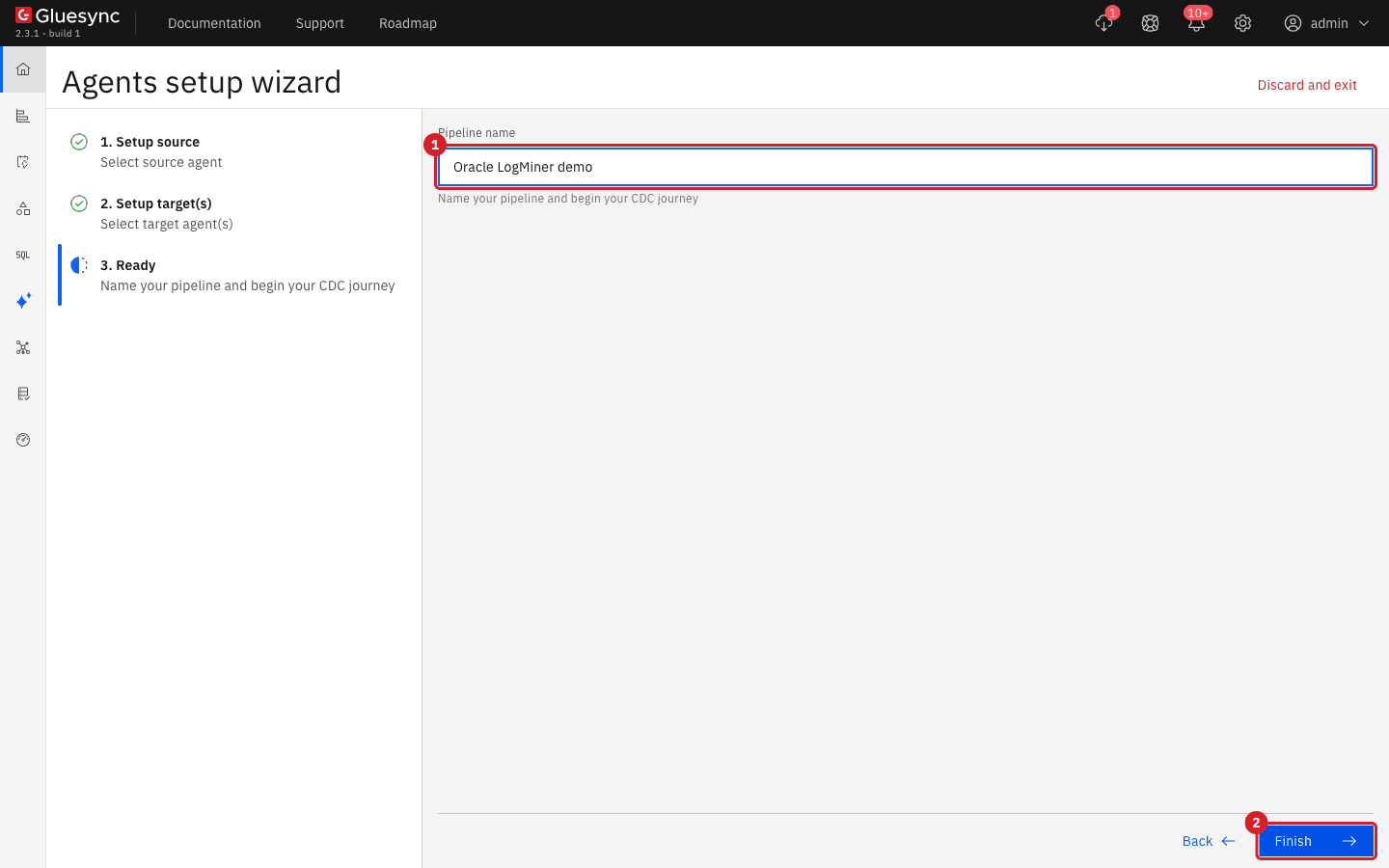
-
On 3. Ready, enter
Oracle LogMiner demoin Pipeline name; -
Select Finish.
UI
-
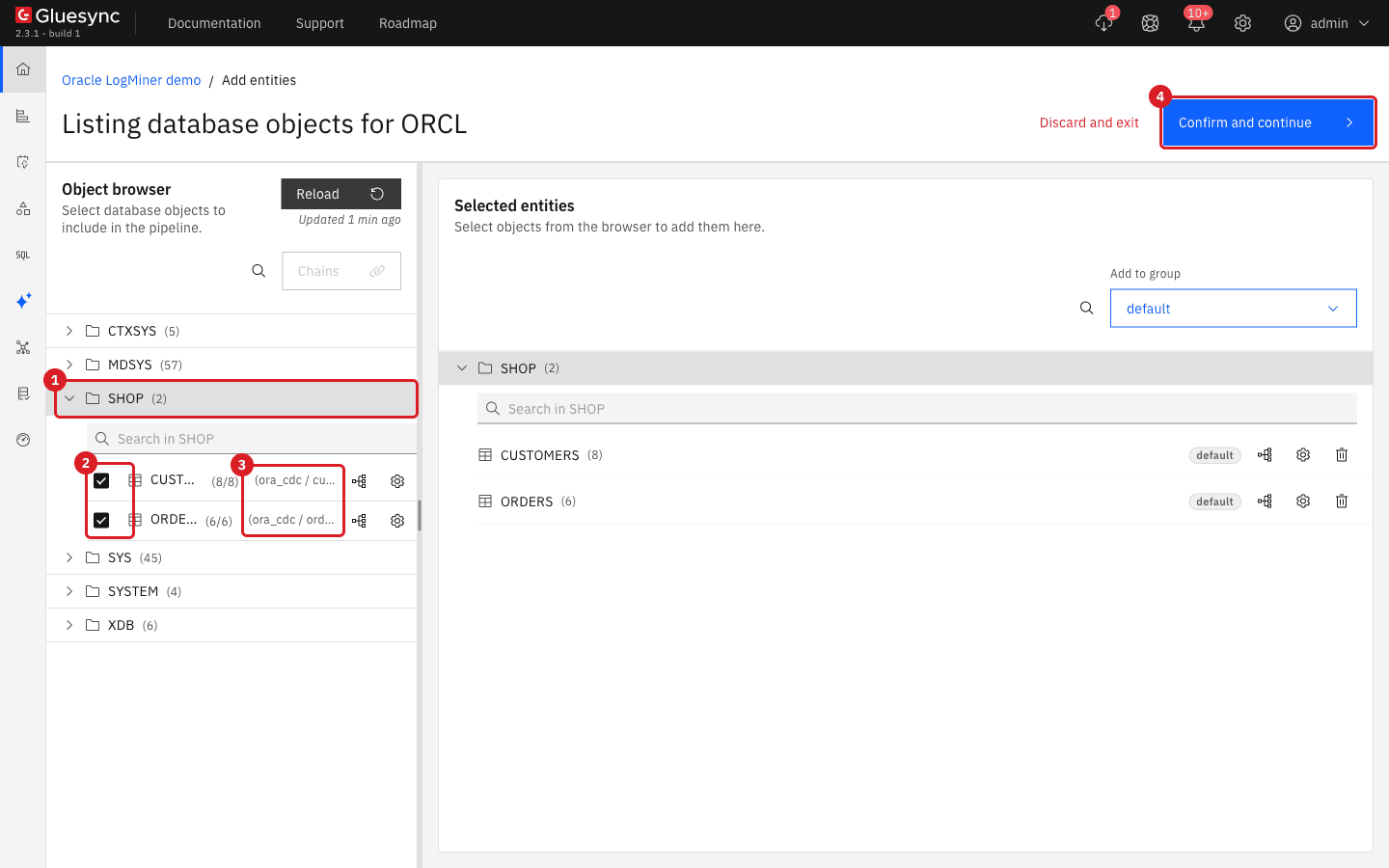
In the pipeline, select Entities. The page Listing database objects for ORCL opens;
-
In the Object browser, expand the schema
SHOPand tickCUSTOMERSandORDERS; -
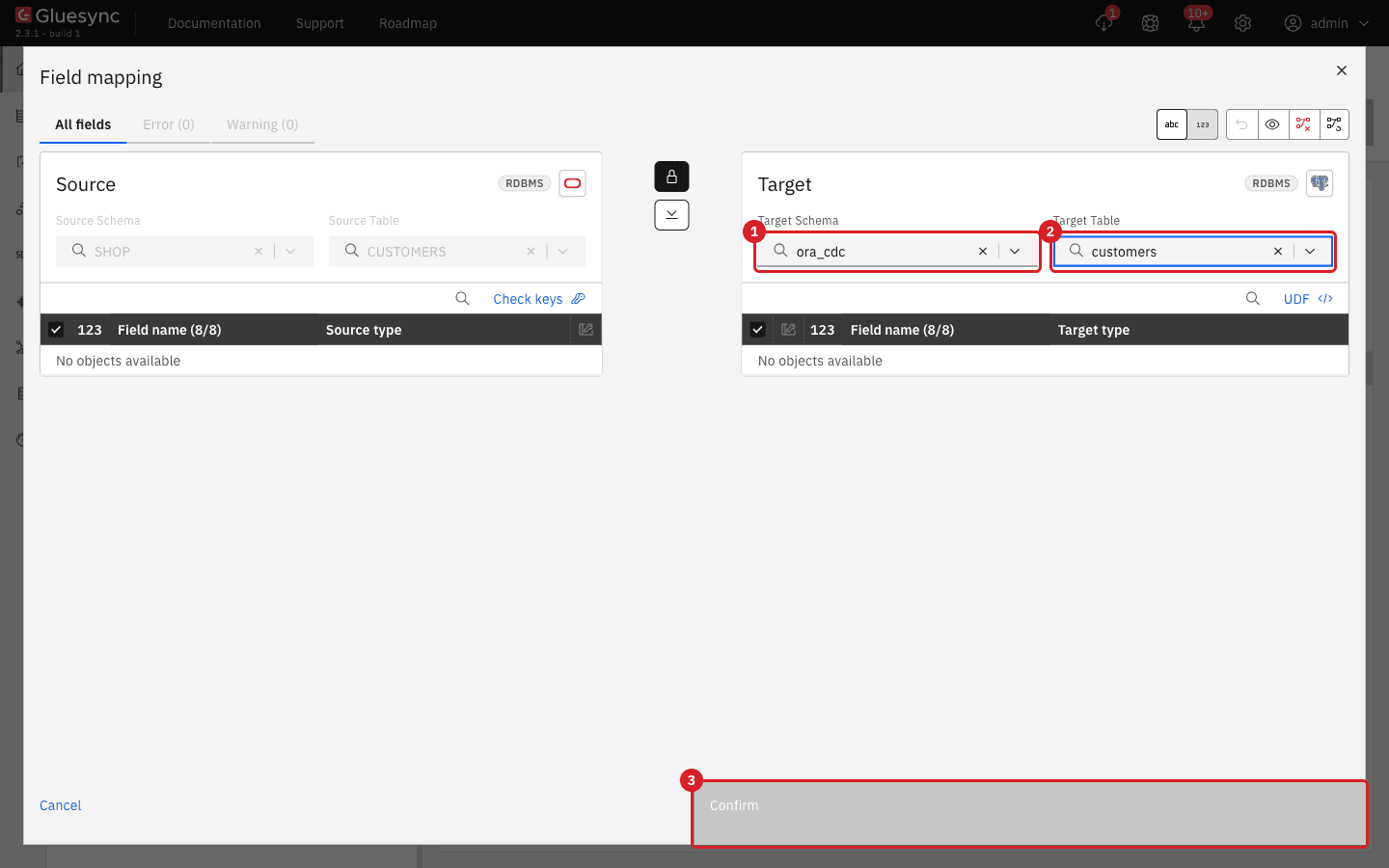
In Selected entities, select the Field mapping icon of
CUSTOMERS; -
In Target Schema, enter
ora_cdcand select it from the list. In Target Table, selectcustomers; -
Check that every field of the source is linked to a field of the target, then select Confirm;
-
Repeat for
ORDERS, with the target tableorders; -
Select Confirm and continue.
|
Check the Target Schema of every entity. The dialog suggests a target schema that matches the name of the source schema ( |
UI
-
Select the checkbox in the header of the entity table to select both entities;
-
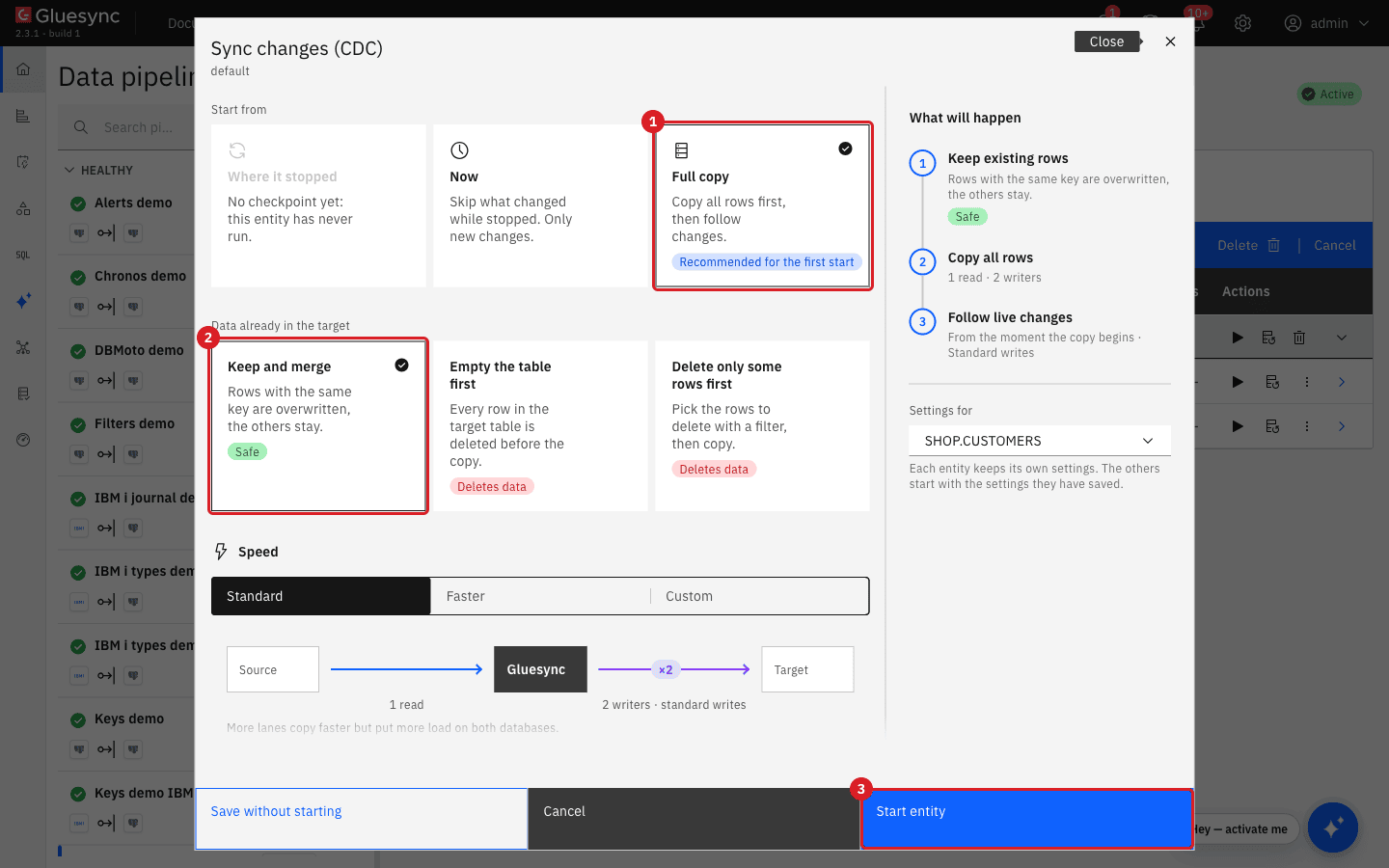
Select Start CDC in the blue bar. The dialog Sync changes (CDC) opens;
-
In Start from, keep Full copy (Recommended for the first start);
-
In Data already in the target, keep Keep and merge;
-
Select Start entity.
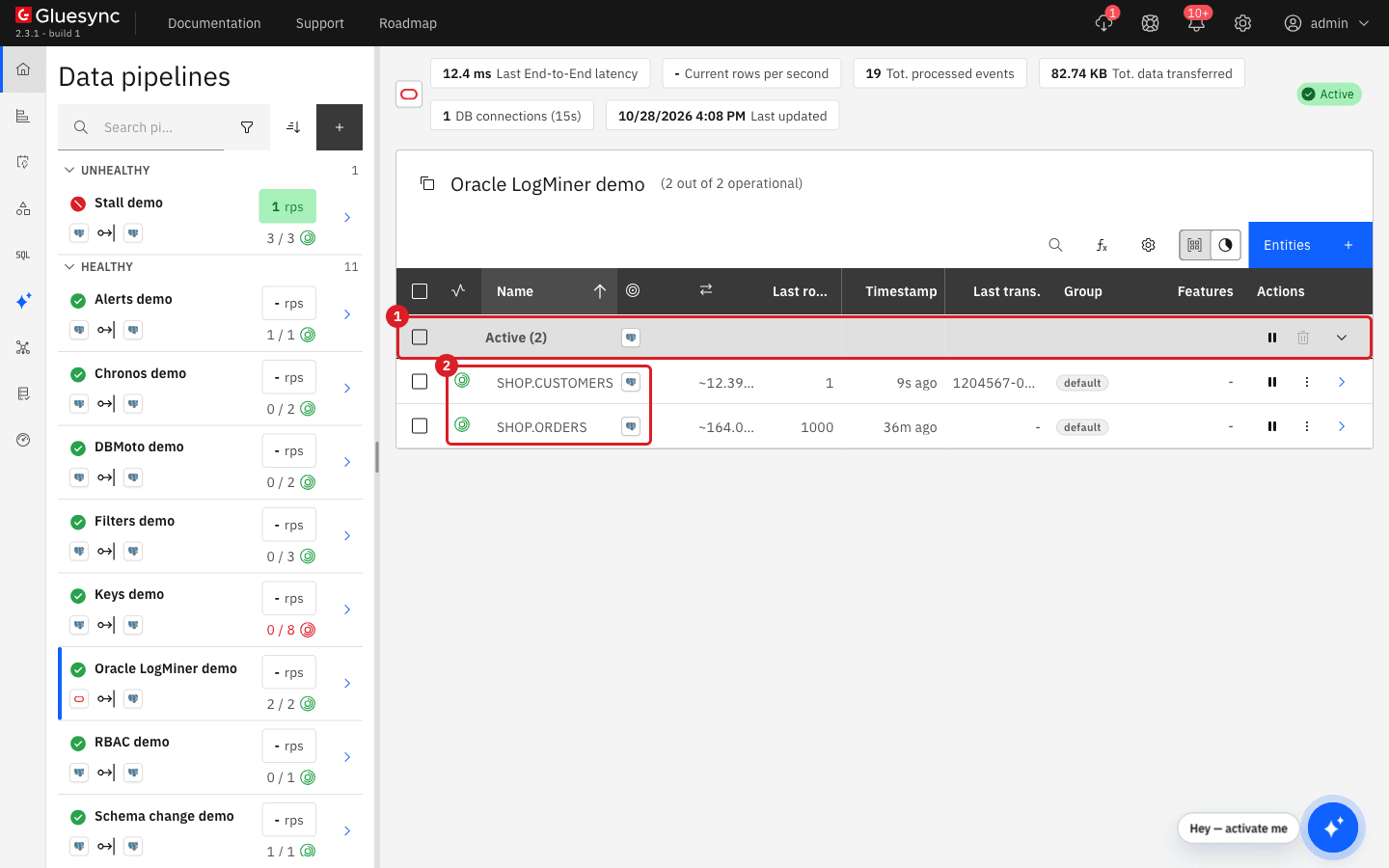
UI + SQL
-
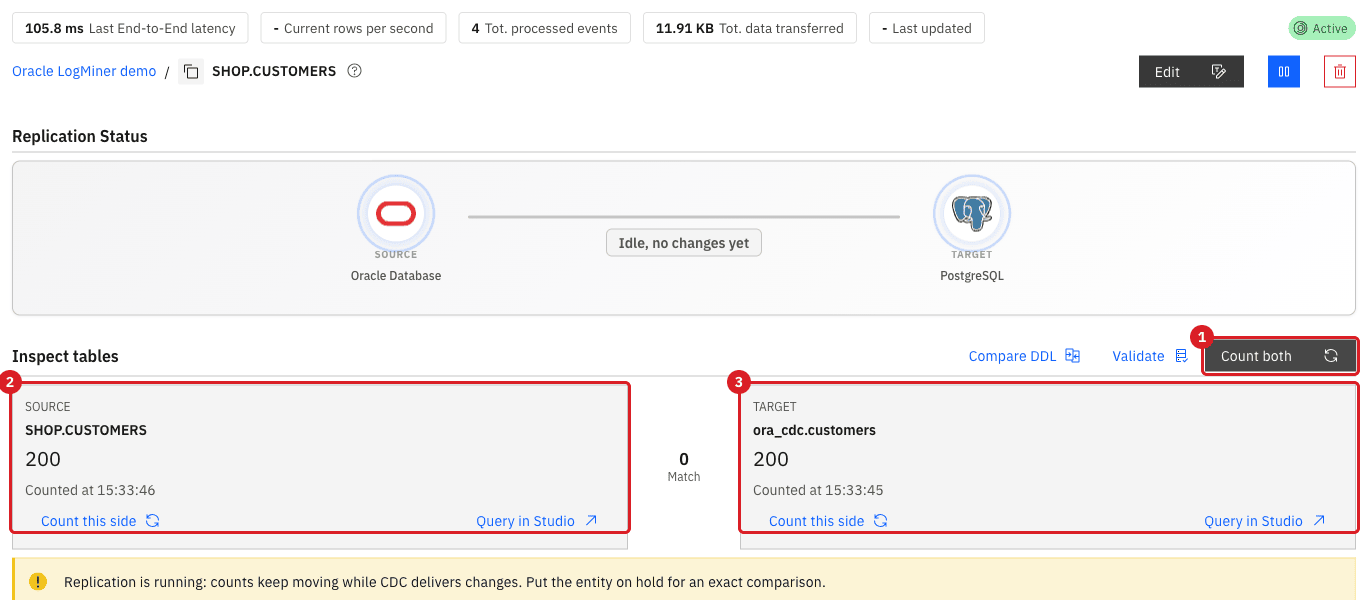
Open the entity
SHOP.CUSTOMERS(the chevron at the end of its row); -
In Inspect tables, select Count both;
-
In PostgreSQL, count the rows of both tables.
SELECT 'customers' AS table_name, count(*) FROM ora_cdc.customers
UNION ALL
SELECT 'orders', count(*) FROM ora_cdc.orders;SQL
Run each Oracle statement as the owner of the tables (here SHOP), then run the PostgreSQL query. Put each statement on its own line, and run COMMIT as its own statement, so that the transaction is committed. Gluesync reads the redo only after the commit.
-
Insert a customer in Oracle and look for it in PostgreSQL;
-
Update the same customer and check the target;
-
Delete the customer and check that it is gone.
-- Oracle
INSERT INTO SHOP.CUSTOMERS (ID, FULL_NAME, EMAIL, COUNTRY, TIER, STATUS, CREDIT_LIMIT)
  VALUES (201, 'Ada Lovelace', 'ada@example.com', 'GB', 'gold', 'active', 5000);
COMMIT;

-- PostgreSQL, after about 10 seconds
SELECT id, full_name, tier, credit_limit FROM ora_cdc.customers WHERE id = 201;
-- Oracle
UPDATE SHOP.CUSTOMERS SET TIER = 'platinum', CREDIT_LIMIT = 9000 WHERE ID = 201;
COMMIT;
-- PostgreSQL
SELECT id, full_name, tier, credit_limit FROM ora_cdc.customers WHERE id = 201;-- Oracle
DELETE FROM SHOP.CUSTOMERS WHERE ID = 201;
COMMIT;
-- PostgreSQL
SELECT count(*) FROM ora_cdc.customers WHERE id = 201;Choose how Gluesync connects to Oracle
The connection form has more than the fields that you filled in. This table lists what we tested.
| Option | How to set it | What we observed |
|---|---|---|
Service name |
Database name holds the service name of the PDB ( |
Works with a listener that registers the services dynamically, which is the default of Oracle 19c. |
SID |
Under Advanced connection properties, add Connection type and enter |
A PDB has no SID. With |
Custom connection string |
In Base settings, under Settings, enter a JDBC descriptor in Connection string, for example |
Test and continue succeeds. The string replaces the connection of the data user. The LogMiner connection is built from the host, the port and LogMiner database. |
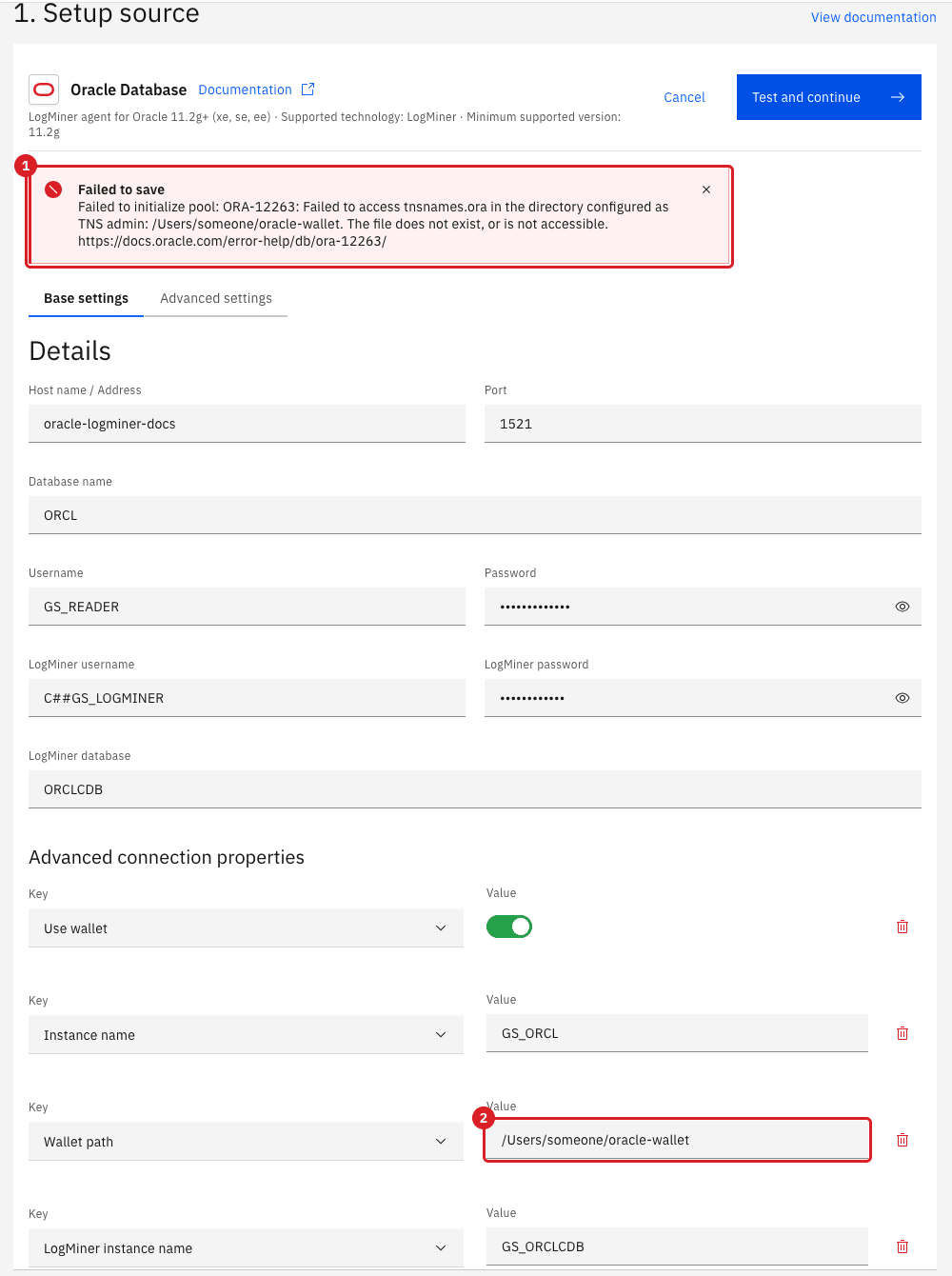
TNS alias with a wallet folder |
Under Advanced connection properties add Use wallet (switch on), Instance name (the TNS alias of the data user’s database, for example |
The alias is resolved from the |
|
Wallet path is a path inside the Core Hub container, not on the machine that runs Docker. If you enter a path of the host, Test and continue fails with |
Recover from the failures you are most likely to meet
Gluesync reports these problems as notifications, and most of them leave the entities Active. Open the bell icon and select Open notifications hub, then search for Oracle LogMiner (see Notifications and alerts). Expand a row with its arrow to read the full message. Gluesync collapses a repeated error into one row with a counter, for example Oracle LogMiner error (7).
A grant is missing
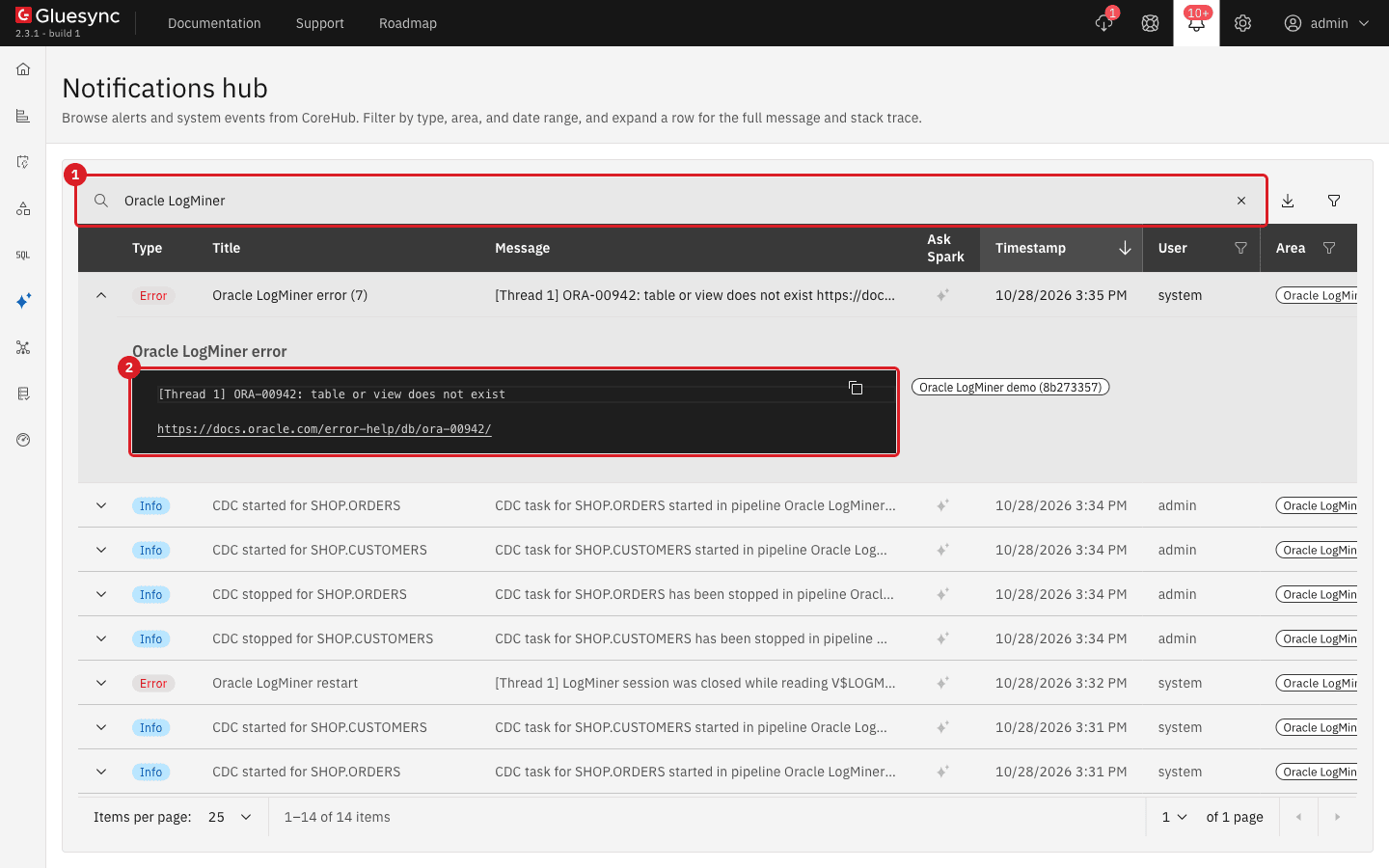
When you remove a grant from C##GS_LOGMINER and start the entities again, the entities stay Active and the notification Oracle LogMiner error appears, repeated at every retry. The message tells you which grant is missing:
| Message in the notification | Missing grant |
|---|---|
|
|
|
|
|
|
-
As
SYSDBAin the CDB root, grant the missing privilege again, for exampleGRANT SELECT_CATALOG_ROLE TO C##GS_LOGMINER CONTAINER=ALL;; -
Wait. Gluesync retries with a growing delay (up to 60 seconds by default), so replication resumes by itself within about a minute. You do not need to restart the pipeline;
-
Make a change in Oracle and check that it reaches the target. Changes made while the grant was missing are not lost: in our test a row inserted while
SELECT_CATALOG_ROLEwas revoked reached the target about 30 seconds after the grant was restored.
Supplemental logging is off
There are two cases, with different effects.
| What is missing | What happens | What to do |
|---|---|---|
Table-level logging ( |
Replication keeps working. Gluesync reads the full row again from Oracle for each update, which is slower. Nothing is shown in the Control Plane. |
Run |
Database-level logging ( |
No error, no notification, entities stay Active, but no insert, update or delete is captured, even on tables that have table-level logging. Changes made in that period are lost for good when you enable the logging again. |
Enable the logging again (see step "Enable supplemental logging for the database"), then run a Full copy with Empty the table first on every entity that changed in the meantime. |
Re-sync an entity with a Full copy
Use this to bring the target back in line after missing changes: after a redo gap, after database-level supplemental logging was off, or after a Not null violation caused by missing table-level logging.
-
In the entity table, select the entities and select Pause, then Pause entity. Gluesync keeps the checkpoint and deletes nothing;
-
Select the paused entities and select Start CDC;
-
In Start from, select Full copy;
-
In Data already in the target, select Empty the table first if rows may have been deleted on the source in the meantime, or Keep and merge if only inserts and updates were missed. Keep and merge leaves behind rows that were deleted on the source;
-
If you chose Empty the table first, tick I understand that rows in the target will be deleted;
-
Select Start entity.
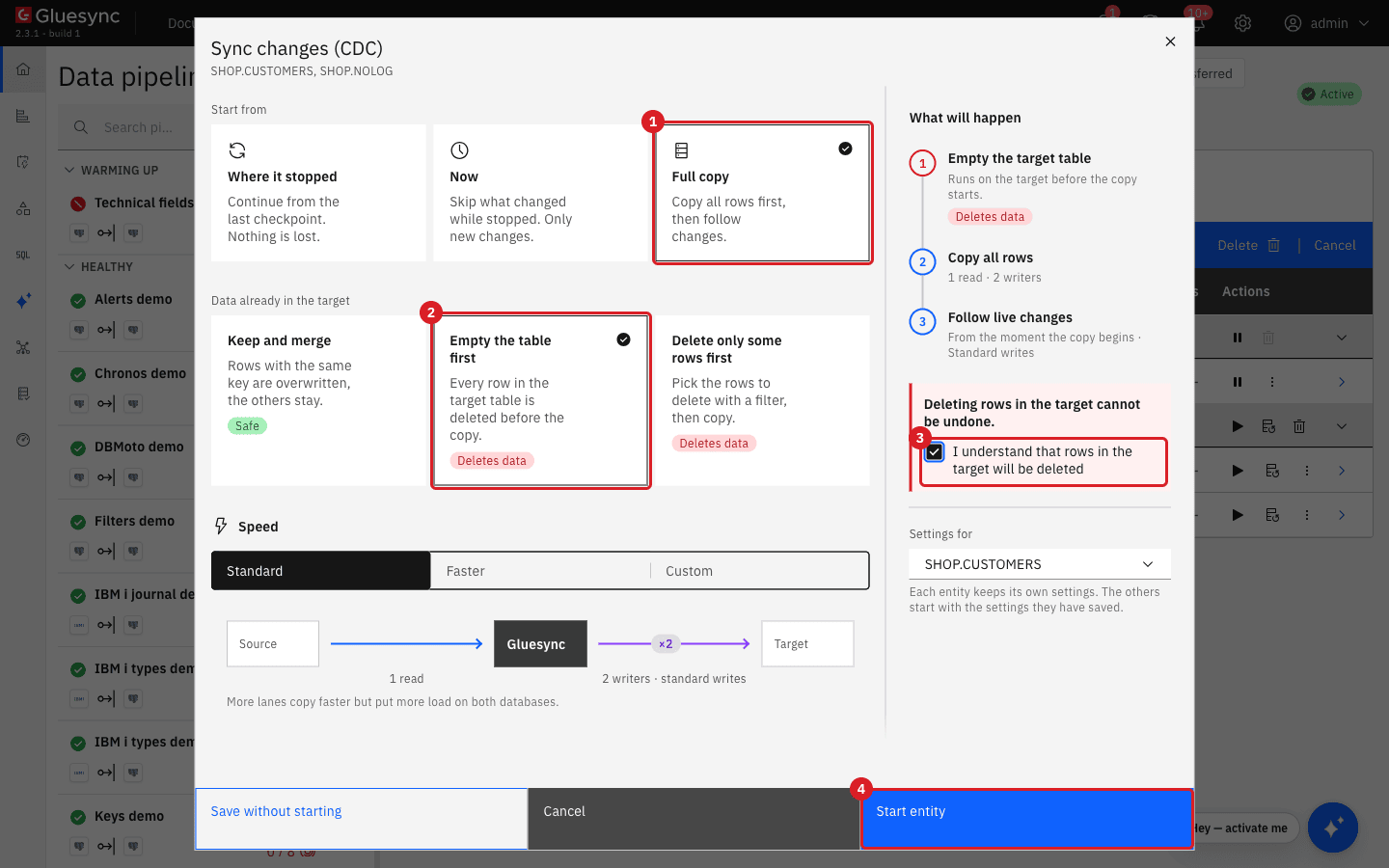
When the copy finishes, compare the counts with Count both and check the rows that you know changed. In our test the target had again the same rows, values and count as the source (a deleted row gone, an updated value restored).
The archived redo logs are gone (lost SCN)
Gluesync stores the position it has read (the SCN) and resumes from it after a pause or a restart. If Oracle no longer has the redo for that position, because the archived logs were deleted or the retention was too short, LogMiner cannot read it.
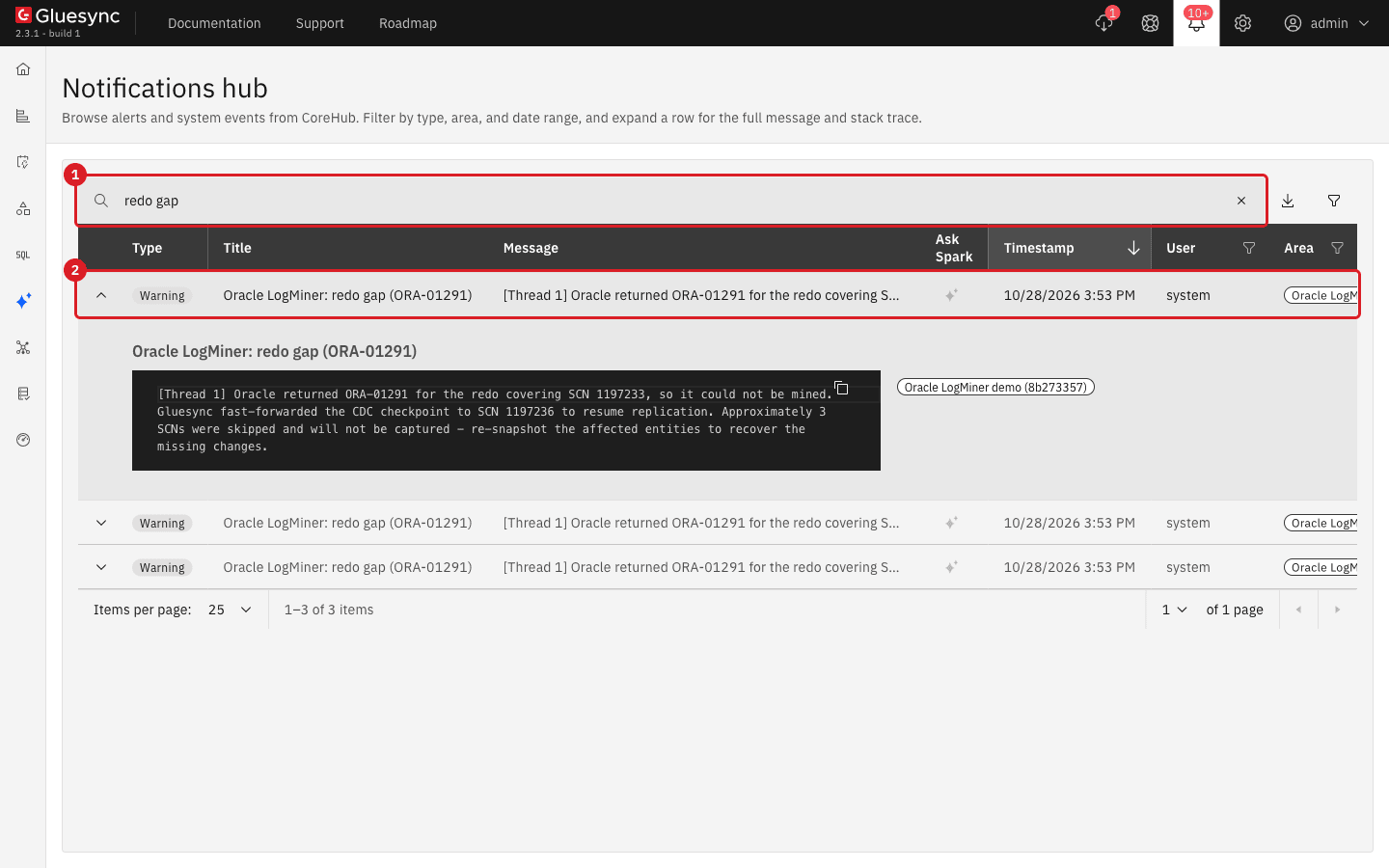
What you see, in our test (we paused the pipeline, changed rows, switched the log file five times and removed the archived logs, once at the operating system and once with RMAN):
-
The entities start and stay Active;
-
One or more warnings Oracle LogMiner: redo gap (ORA-01291) appear. Each one says that Gluesync could not mine the redo for an SCN, moved its checkpoint forward to the next archived log that still exists (or to the current SCN when none exists) and skipped "approximately N SCNs";
-
The changes in the skipped range never reach the target. New changes after the gap do.
To recover:
-
Treat every redo gap warning as data loss on the affected entities;
-
Run a Full copy of the entities that read tables changed in the gap, as described in Re-sync an entity with a Full copy. You do not need to reset any checkpoint: Gluesync has already moved it past the gap, and the Full copy starts a new snapshot and follows the live changes from there;
-
Fix the cause (see Keep the archived logs, and free space safely).
Keep the archived logs, and free space safely
Gluesync needs an archived log until it has read it. Keep the logs for longer than the longest time an entity can be paused or stopped, and monitor the free space of the Archive destination that ARCHIVE LOG LIST shows. If the disk fills up and the database stops archiving, you can purge the logs with RMAN. Purge only logs that every entity has already read: the number at the beginning of Last Transaction ID on the entity detail page is the SCN that the entity has reached, and V$ARCHIVED_LOG.NEXT_CHANGE# tells you which log ends before that SCN.
SELECT sequence#, first_change#, next_change#, deleted
FROM v$archived_log
ORDER BY sequence#;
Keep these RMAN commands at hand. Run them in rman target / as the Oracle owner:
LIST ARCHIVELOG ALL;
CROSSCHECK ARCHIVELOG ALL;
DELETE NOPROMPT EXPIRED ARCHIVELOG ALL;
DELETE NOPROMPT ARCHIVELOG ALL COMPLETED BEFORE 'SYSDATE-1';
DELETE NOPROMPT ARCHIVELOG UNTIL SEQUENCE 120 THREAD 1;
CROSSCHECK followed by DELETE EXPIRED removes the records of logs that were deleted at the operating system, which otherwise keep showing as available. COMPLETED BEFORE and UNTIL SEQUENCE delete the old logs and keep the recent ones. Replace 120 with the first sequence that you want to keep.
|
|
After a database restart
When you restart Oracle while the pipeline runs, Gluesync shows Oracle LogMiner Critical Error notifications while the instance is down or starting, with messages such as ORA-01089: immediate shutdown or close in progress, ORA-12528: TNS:listener: all appropriate instances are blocking new connections and ORA-12514: Cannot connect to database. Service ORCLCDB is not registered with the listener. The entities stay Active. When the instance is open, Gluesync reconnects by itself and continues from its checkpoint: in our test a row inserted after the restart reached the target within 10 seconds, with no action in the Control Plane.
If the PDB stays closed after the restart (the PDB state was not saved), the notification changes to ORA-16331: container "ORCL" is not open. Open the PDB and save its state, and Gluesync recovers by itself:
ALTER PLUGGABLE DATABASE ORCL OPEN;
ALTER PLUGGABLE DATABASE ORCL SAVE STATE;Troubleshooting
| Problem | Possible cause | What to do |
|---|---|---|
Test and continue fails with |
The user name or the password of the data user is wrong, or (with a wallet) you rely on the credentials stored in the wallet. |
Enter the real user name and password in the form. Gluesync sends what you type. |
Test and continue fails with |
Connection type is |
Use |
Test and continue fails with |
Wallet path is a path of the host, or the folder is not readable by Core Hub. |
Use the path as Core Hub sees it (for example |
The notification Oracle LogMiner error repeats with |
A grant of the LogMiner user is missing. |
See A grant is missing. Grant it again and wait for the retry. |
Entities are Active but nothing reaches the target and there is no error |
Database-level supplemental logging is off. |
See Supplemental logging is off, then run a Full copy. |
The warning Oracle LogMiner: redo gap (ORA-01291) appears |
The archived logs for the position of the entity were deleted. |
|
Oracle LogMiner Critical Error with |
The Oracle instance is down or starting. |
Wait. Gluesync reconnects by itself. See After a database restart. |
Oracle LogMiner error with |
The PDB did not open after a restart. |
Open the PDB and save its state, as in After a database restart. |
The entity is in Error with Not null violation Error and rows with empty columns |
Table-level supplemental logging was removed while the entity was running. |
Add the logging again and run a Full copy. See Supplemental logging is off. |
Related guides
Contact MOLO17 Support if you need assistance with Oracle LogMiner.