Gluesync Architecture
Gluesync’s architecture is built on a flexible, agent-based system centered around the Core Hub, with extensibility through SDKs and modules. This design enables real-time data integration across diverse platforms while ensuring scalability, reliability, and security.
Architecture Overview
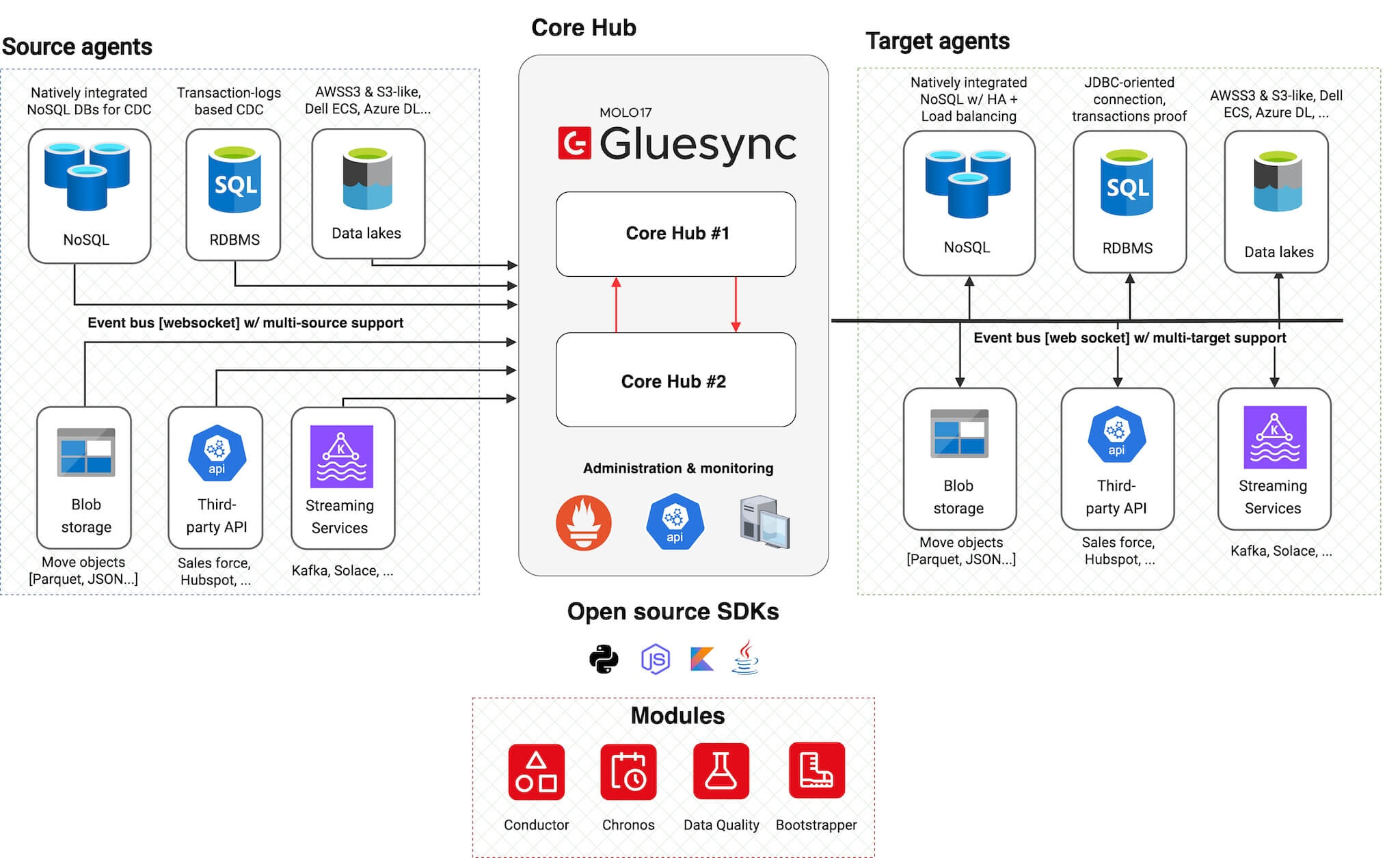
The architecture consists of five main components:
-
Source Agents: Handle data extraction and change capture
-
Core Hub: Orchestrates data flow and system operations
-
Target Agents: Manage data loading and transformation
-
SDKs: Enable developer integration with Core Hub
-
Modules: Extend platform functionality through SDK-based components
Cloud-native containerized platform
Gluesync is shipped as Docker containers and designed as a cloud-native platform:
-
Container-based deployment
-
All components distributed as Docker images
-
Consistent deployment across environments
-
Easy version management and updates
-
-
Multi-platform support
-
Linux: Full support for all major distributions
-
Windows Server: Native support using Windows nanoserver images (no WSL required)
-
Cross-platform compatibility ensures flexibility in deployment choices
-
-
No-brainer installation and lifecycle management
-
Simplified installation process with pre-configured kits
-
Built-in update mechanism through the Control Plane UI
-
Complete platform lifecycle managed via web interface
-
Automated agent deployment and configuration
-
-
Built-in monitoring stack
-
Prometheus for metrics collection and storage
-
Grafana dashboards for historical performance visualization
-
Pre-configured monitoring for pipelines, latencies, and data transfer volumes
-
Control Plane UI for immediate visibility into system health and management
-
Communication Flow
Data Flow Diagram
|
Source agent caching layer (ArenaCache)
Overview
Starting from Gluesync 2.1.9, supported source agents include an embedded, persistent caching layer. Instead of streaming changes directly from the source database to Core Hub, those agents first write inbound changes to a local, ordered store on the agent host.
From Gluesync 2.2.11.2 that store is ArenaCache, Gluesync’s own caching technology. ArenaCache replaces Chronicle Queue, which filled the same role from 2.1.9 through 2.2.11.1.
ArenaCache was first deployed in the Oracle LogMiner source agent and ran there in production for about six months before it became the default cache for every source agent that persists changes locally.
At a high level, this caching layer:
-
Decouples the source database from the Core Hub consumer
-
Reduces load on the source system by minimizing long-lived cursors and connections
-
Stores changes durably on disk, so pipelines can pause and resume without asking the source to re-serve the same window
-
Provides a retention window you can size with Source change retention in hours
What ArenaCache is
ArenaCache is an append-oriented, disk-backed cache that lives inside the source agent process. Change events are written locally as they are captured, then a separate worker in the same agent reads them in order and forwards them to Core Hub.
Compared with Chronicle Queue, ArenaCache is purpose-built for this Gluesync path:
-
Lower disk and IOPS cost — cache files are denser and do not pre-allocate large roll-cycle segments.
-
Per-entity files — each entity has its own cache file, so a busy or paused table does not contend for a single shared queue file.
-
Safer restarts — recovery and shutdown barriers skip or isolate a truncated or corrupted file instead of spinning CPU or stalling the agent.
-
Better Windows behavior — the earlier Chronicle metadata lock issues on Windows hosts no longer apply.
The cache is not a substitute for CDC checkpoints. As of 2.2.11, cache-based readers persist their source position in Core Hub (see Core Hub-managed CDC checkpoints). ArenaCache holds the in-flight backlog between capture and delivery; Core Hub holds where the reader is in the source log.
How it fits in the architecture
-
The source agent ingests changes from the database (journal, transaction logs, or CDC API) and appends them to ArenaCache.
-
A separate internal worker reads from ArenaCache and forwards events to Core Hub over the plugin channel.
-
If Core Hub or the network is temporarily unavailable, the agent keeps caching new changes until the connection is restored, then drains the backlog.
This keeps Core Hub stateless with respect to source-side buffering and gives operators a predictable buffer at the edge of each source system.
Which agents use it
ArenaCache is the local cache for source agents that previously used Chronicle Queue. In 2.2.11.2 that includes:
-
IBM i (AS/400) (standard journal reader mode)
-
Oracle LogMiner (already on ArenaCache; 2.2.11.2 splits the cache one file per entity)
Agents that never persisted a local source cache are unchanged. IBM i dedicated journal reader mode still bypasses the local cache and streams straight to the target — see IBM i journal data capture architecture.
Operating ArenaCache
-
Retention.
"Source change retention in hours"(default24) is the purge clock. Raise it if targets or Core Hub can be offline longer than a day; lower it if disk is tight and lag is always small. -
Disk. Size the agent working volume for peak backlog × row size × retention, on local SSD. ArenaCache is still disk-backed; a slow volume becomes CDC latency.
-
Pause / throttle. Paused or slow entities keep receiving captured rows into their own cache file. Delivery resumes from that file when the entity is played again. Retention still applies while paused — if an entity stays paused longer than the retention window, those cached rows expire.
-
Checkpoints. Do not treat cache files as the CDC cursor. Use pipeline checkpoint reset in the Control Plane when you need to rewind the source reader.
Upgrading from Chronicle Queue (2.2.11.2)
ArenaCache is not a file-format compatible replacement for Chronicle Queue. After the agent starts on 2.2.11.2:
-
New cache files are created in ArenaCache format. Existing Chronicle Queue files are not reused.
-
For cache-based readers that persist position in Core Hub (IBM i, MySQL, MariaDB, Informix, Oracle LogMiner), the source cursor survives the upgrade. The agent re-reads from that checkpoint if a local backlog cannot be carried over.
-
Upgrade when pipelines are caught up (low lag, no large unconsumed local backlog). That avoids depending on Chronicle files that the new agent will not read.
Benefits
-
Lower source footprint — fewer active connections and less dependence on database-side staging artifacts.
-
Operational resilience — short Core Hub or network outages do not force a resynchronization; changes remain in ArenaCache until they are delivered or they expire.
-
Configurable retention — tune disk usage against the recovery window you actually need.
-
Isolated entities — per-entity files keep a noisy table from blocking the rest of the cache.
-
Simplified scaling — agents buffer locally, so Core Hub can scale independently for processing and routing.
Advanced Features
SDKs and Developer Integration
Open Source SDKs
Gluesync provides open source SDKs that enable developers to build custom integrations and extensions:
| SDK | Features |
|---|---|
Python SDK |
* Core Hub handshake protocol implementation * Authentication and authorization * Event handling and processing * Available at GitLab |
Node.js SDK |
* JavaScript-based Core Hub integration * Real-time event processing * Promise-based API design * Available at GitLab |
Coming Soon |
* Java SDK * Kotlin SDK |
Modules
Platform Extensions
Modules are platform extensions built on top of Gluesync SDKs that enhance system capabilities:
| Module | Functionality |
|---|---|
Chronos |
* Advanced scheduling capabilities * Time-based job orchestration * Recurring task management * Available at GitLab |
Bootstrapper |
* System initialization * Configuration management * Deployment automation * Available at GitLab |
Conductor |
* Automated agent deployment * Resource allocation policies * Container lifecycle orchestration * See Conductor documentation |
Whisperer |
* Automated database operations * Multi-database connectivity * Load testing and PillowFight tooling * Available at GitLab |
Automator |
* Web-based Bootstrapper execution * Graphical configuration management * Cross-platform packaged executable * See Automator documentation |
Convert DBMoto Metadata XML |
* Syniti metadata.xml conversion * Bootstrapper template generation * Migration workflow guidance * See Conversion guide |
Monitoring & Administration
Built-in Monitoring
-
Real-time metrics collection
-
Performance monitoring
-
Resource utilization tracking
-
Alert management
Administration Tools
-
Web-based admin interface
-
REST API access
-
Configuration management
-
System health monitoring
|
For detailed deployment instructions, see our Deployment Guide for Docker Compose and Kubernetes. |
Resilience and disaster recovery
-
Configuration portability – Core Hub, agents, and pipelines can be snapshotted via Automator backups, making it easy to rehydrate the platform in a new cluster or region.
-
Environment cloning – Export configs from staging or QA and restore them into production-like sandboxes to validate releases.
-
Disaster recovery workflows – Pair Automator backups with infrastructure-as-code and database snapshots so you can rebuild a standby Core Hub with predictable results.
|
Backups contain configuration data, not live replication offsets. Combine Automator exports with database or message-queue checkpoints for full recovery coverage. |