Set up an IBM Db2 LUW source with log-based CDC
Gluesync has two source agents for IBM Db2 for Linux, UNIX and Windows (LUW). The transaction logs-based agent reads the Db2 recovery log through a native library that runs inside the Db2 server. The triggers-based agent adds triggers to your tables. This guide helps you choose, then sets up the log-based agent end to end: archive logging, the two database users, the library, the connection, a snapshot, live changes, and the failures you are most likely to meet.
In this guide
You will compare the two Db2 LUW agents and pick one. You will switch the database to archive logging, create a Gluesync user and a log reader user, and set up the credentials that the log reader library needs. You will create the source connection in the Control Plane, add an entity, start it with a full copy followed by live changes, and check what Gluesync created inside Db2. You will end with the checks and fixes for the errors that stop CDC.
Quick information
Goal |
Replicate a Db2 LUW table with a snapshot followed by change data capture (CDC) read from the transaction log |
Audience |
Data engineers and database administrators who own a Db2 LUW database |
Level |
Advanced |
Time required |
About 60 minutes, plus a database backup and an instance restart |
Area |
Db2 database configuration; Control Plane → Pipelines → IBM Db2 for LUW → Transaction logs-based CDC agent; entity → start dialog |
Applies to |
Gluesync 2.3 |
Before you begin
Make sure that:
-
You have an IBM Db2 for LUW database, version 11.5.8.0 or later, on Linux. Db2 11.5.0.0 to 11.5.7.0 leak engine memory in the log read call, so they are not supported for CDC. This guide was tested with Db2 11.5.8.0;
-
You can run commands as the instance owner (here
db2inst1) on the Db2 server, and you haveSYSADMorDBADMin the database; -
You can run an offline backup of the database, and you can restart the Db2 instance. Both are part of the steps below. Plan a maintenance window;
-
You have the
libdb2.solibrary that matches your Db2 version, from the reference page, and you can copy it to the Db2 server host. The library must sit on the Db2 server, not on the Core Hub host; -
Core Hub can reach the Db2 port,
50000by default; -
You have a target to write to. This guide uses a PostgreSQL database: any target works, and the steps for the source are the same;
-
You can sign in to the Control Plane with a role that can create pipelines;
-
You have a source table with a primary key. This guide uses
SALES.ORDERSwith 1,000 rows (ID INTEGERprimary key,CUSTOMER VARCHAR(50),STATUS VARCHAR(20),AMOUNT DECIMAL(10,2),CREATED_AT TIMESTAMP).
|
The messages quoted in this guide were captured in the Control Plane and in the Core Hub log with Db2 11.5.8.0 as the source and PostgreSQL 16 as the target. The options of the agent are listed in the Db2 LUW CDC reference. |
Guide steps
UI
The Control Plane lists one IBM Db2 for LUW tile with the label 2 connectors available. Select it to see the two source agents. Choose with this table:
| Transaction logs-based CDC agent | Triggers-based CDC agent | |
|---|---|---|
How it captures changes |
A native library, |
Triggers on the source tables write the key of each changed row to a CDC table |
What you install on the Db2 server |
The library file, a log reader user with |
Nothing. The agent creates the triggers |
Database settings |
Archive logging must be on, which needs an offline backup. The instance is restarted once |
No log settings |
Db2 version |
11.5.8.0 or later, including 12.1 |
11.5 or later |
Objects on the source tables |
No triggers. The log is read behind the writes |
Triggers on every source table, which fire on inserts, updates and deletes |
Transaction details |
Transaction ids, operation timestamps and the user that made the change |
Row ids and the type of change |
Choose the log-based agent when you can change the database settings and install a file on the server, and when you do not want triggers on your tables. Choose the triggers-based agent when you cannot do either. The rest of this guide uses the log-based agent. The triggers agent is described in the triggers setup page.
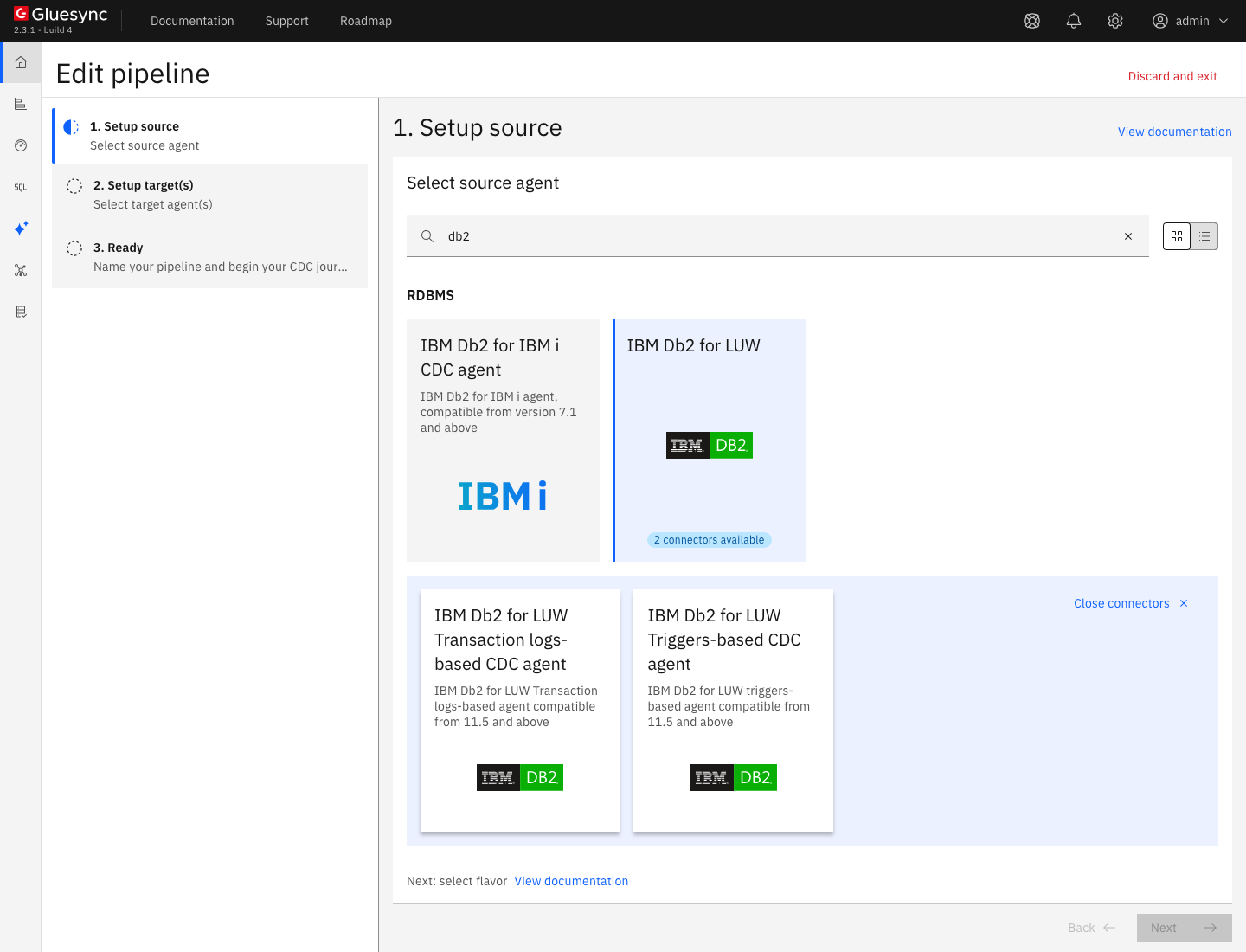
CLI
The log reader needs a database that keeps its logs, which Db2 calls archive logging, or log retain. Without it the read call is refused, see the troubleshooting table. Sign in as the instance owner and check the setting:
su - db2inst1
db2 connect to DEMO
db2 get db cfg for DEMO | grep -E "LOGARCHMETH1|LOGPRIMARY|LOGFILSIZ"
LOGARCHMETH1 = OFF means circular logging. Set an archive method. This example archives to a directory on the server. Use the method your backup policy needs, for example a vendor or a TSM target:
mkdir -p /database/logs /database/backup
db2 update db cfg for DEMO using LOGARCHMETH1 DISK:/database/logs
Db2 now puts the database in backup pending state. Connect again and read the message, then take an offline backup:
db2 connect to DEMO
db2 backup db DEMO to /database/backup
db2 connect to DEMO|
Changes made while the database used circular logging cannot be read later. In the test, a row inserted while archive logging was off never reached the target, and CDC kept running after logging was on again. Turn archive logging on before you start the entity, and keep it on. |
The log size settings (LOGFILSIZ, LOGPRIMARY, LOGSECOND) decide how large a transaction your database can hold, and are not specific to Gluesync. Keep the archive directory on a disk with room for the logs that your backup policy keeps.
SQL
Db2 does not store passwords. A Db2 user is an operating system user on the Db2 server, or a user of the directory you use for authentication. Create the operating system user first, for example gluesync in the group of the instance owner, then grant the privileges. Run the SQL as the instance owner, connected to the database:
-- the schema that holds the CDC tables, owned by the Gluesync user
CREATE SCHEMA GLUESYNC AUTHORIZATION GLUESYNC;

GRANT CONNECT ON DATABASE TO USER GLUESYNC;

-- read the source tables, and let Gluesync switch DATA CAPTURE on for them
GRANT SELECTIN, INSERTIN, UPDATEIN, DELETEIN, EXECUTEIN, ALTERIN
ON SCHEMA SALES TO USER GLUESYNC;

-- read and write what the log reader creates in the GLUESYNC schema
GRANT SELECTIN, INSERTIN, UPDATEIN, DELETEIN, EXECUTEIN
ON SCHEMA GLUESYNC TO USER GLUESYNC;

-- create the external stored procedure on top of the library
GRANT CREATE_EXTERNAL_ROUTINE ON DATABASE TO USER GLUESYNC;
Repeat the SALES grant for every schema you replicate. Why each grant is there:
-
The user creates the
GLUESYNCschema if it does not exist, and one CDC table for each source table in it. TheCREATE SCHEMAstatement above does it for you with the right owner; -
For each source table of a started entity, Gluesync runs
ALTER TABLE <schema>.<table> DATA CAPTURE CHANGES. This makes Db2 write the full row to the log for updates and deletes, so the library can read the old and the new row. The statement needs theALTERprivilege on the table, orALTERINon its schema. A table you only copy once, without CDC, is not altered; -
CREATE_EXTERNAL_ROUTINEis an elevated privilege. Without it, Gluesync cannot createGS_SP_LOGMINER. If you create the procedure yourself, setautoCreateStoredProceduretofalseand keep the privilege away from the user, see the reference page; -
The
GLUESYNCschema grant is needed because the library creates its state tables as the log reader user of the next step. Without it, Gluesync cannot read them, see the troubleshooting table.
CLI
The library opens a second Db2 connection to read the log. That connection does not inherit the Gluesync user, so it signs in with a dedicated user whose credentials come from environment variables of the Db2 instance. The log read call needs DBADM or SYSADM, so give the user DBADM. Create the operating system user, for example cdc_reader, then as the instance owner:
su - db2inst1
. ~/sqllib/db2profile
db2 connect to DEMO
db2 "GRANT DBADM ON DATABASE TO USER CDC_READER"
db2 connect reset
Put the credentials in a file that only the instance owner can read. Use the home directory of the instance owner (~db2inst1; on some images it is not /home/db2inst1). DB_HOST must be an address that the Db2 server itself can reach, and localhost works when the library and the database run on the same host:
cat > ~/.db2-cdc.env <<'EOF'
export DBNAME='DEMO'
export DB_HOST='localhost'
export DB_PORT='50000'
export DB_USER='cdc_reader'
export DB_PASSWORD='<a strong password>'
EOF
chmod 600 ~/.db2-cdc.env
echo '[ -r "$HOME/.db2-cdc.env" ] && . "$HOME/.db2-cdc.env"' >> ~/sqllib/userprofile
db2set DB2ENVLIST="DBNAME DB_HOST DB_PORT DB_USER DB_PASSWORD"
If db2set DB2ENVLIST already returns names, append the five new ones instead of replacing the list. Then copy the library to the server, name it libdb2.so, and restart the instance so that it picks up the variables:
mkdir -p /function
cp libdb2.so /function/libdb2.so
chmod 755 /function/libdb2.so
. ~/.db2-cdc.env
db2stop force
db2start
db2 connect to DEMO user cdc_reader using '<a strong password>'
db2stop force ends every connection to the instance. Do it in a maintenance window. Running entities reconnect by themselves when the instance is back: the Core Hub log shows Error while starting entity SALES.ORDERS sync. Retrying… with the JDBC message A communication error occurred during operations on the connection’s underlying socket, and the entity continues without a new copy.
|
UI
-
In the Control Plane, select Create your first pipeline, or the + button of the pipeline list if you already have pipelines. The Agents setup wizard opens;
-
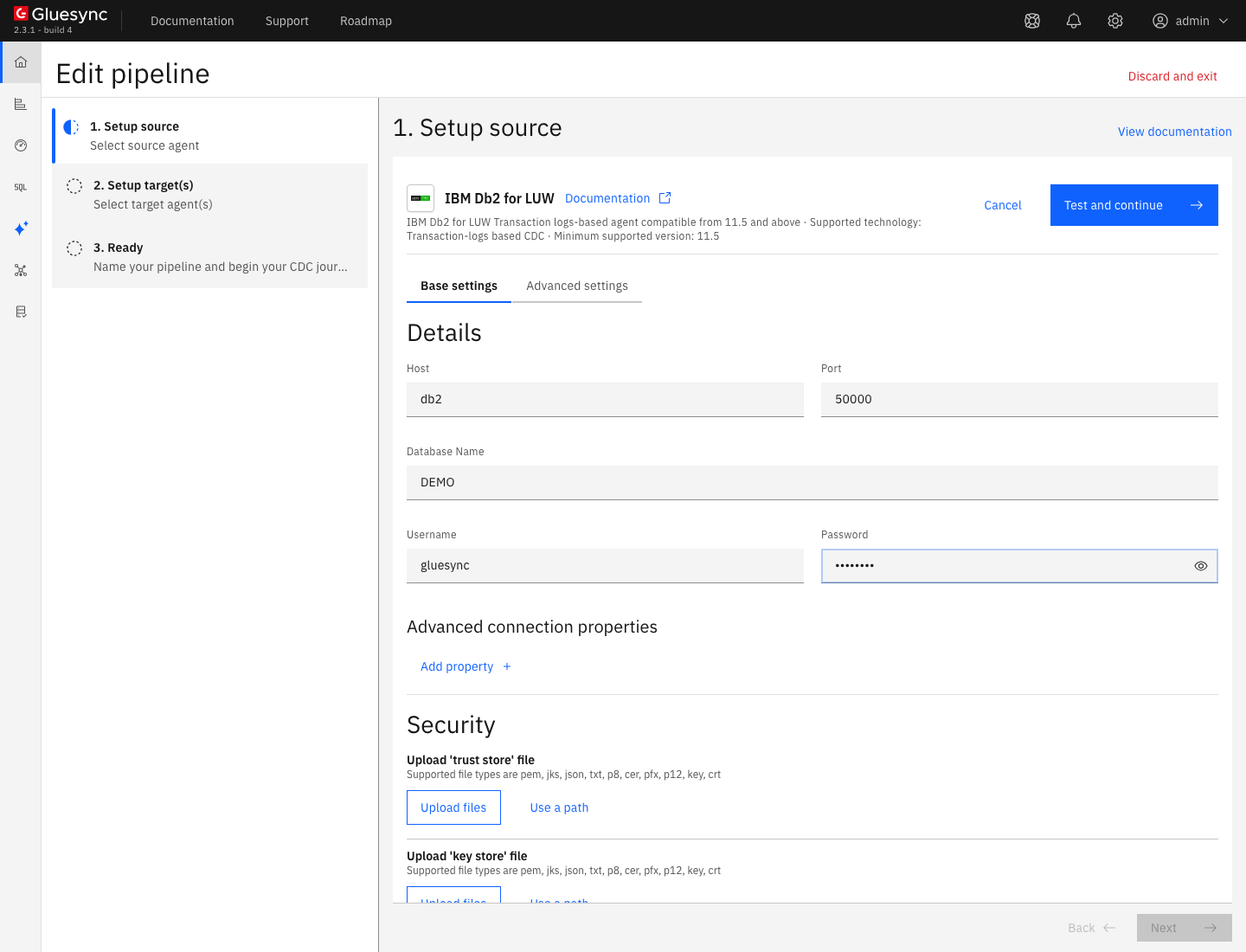
In 1. Setup source, search for
db2, select the IBM Db2 for LUW tile, then the IBM Db2 for LUW Transaction logs-based CDC agent tile; -
In Base settings, fill the form:
-
Host: the DNS name or address of the Db2 server, as Core Hub sees it;
-
Port:
50000, or the port of your instance; -
Database Name: the database of step 2;
-
Username and Password: the Gluesync user of step 3, not the log reader user;
-
-
Leave Min connections count (at least 3) and Max connections count at their defaults for now. The tab Advanced settings takes properties by name. Add one only when you need it, for example
storedProcedureLibraryPathfor a library outside/function, orstoredProcedurePollingIntervalSecondsfor the polling interval. The names and defaults are in the reference page; -
Select Test and continue. The source appears with a green check mark. Select Next.
-
In 2. Setup target(s), choose your target agent and fill its connection. For the PostgreSQL target of this guide, choose the PostgreSQL CDC agent tile, enter the host name,
5432, the database, the user and the password, then select Test and continue and Next; -
Enter a Pipeline name and select Finish.
UI
-
In the pipeline, select Entities. The Add entities page opens with the Object browser. Expand the schema
SALESand tick the tableORDERS. The Field mapping dialog opens. The browser also lists the system schemas such asSYSCAT, so search for your own schema; -
Under Target, choose the Target Schema, for example
public, then typeordersin Target Table and choose Create table "orders". The dialog shows New table orders will be created on confirm. and the proposed target types; -
Select Confirm. The Create table orders dialog shows the read-only SQL statement. Read it, then select Create table orders to run it on the target;
-
Back on the Add entities page, select Confirm and continue.
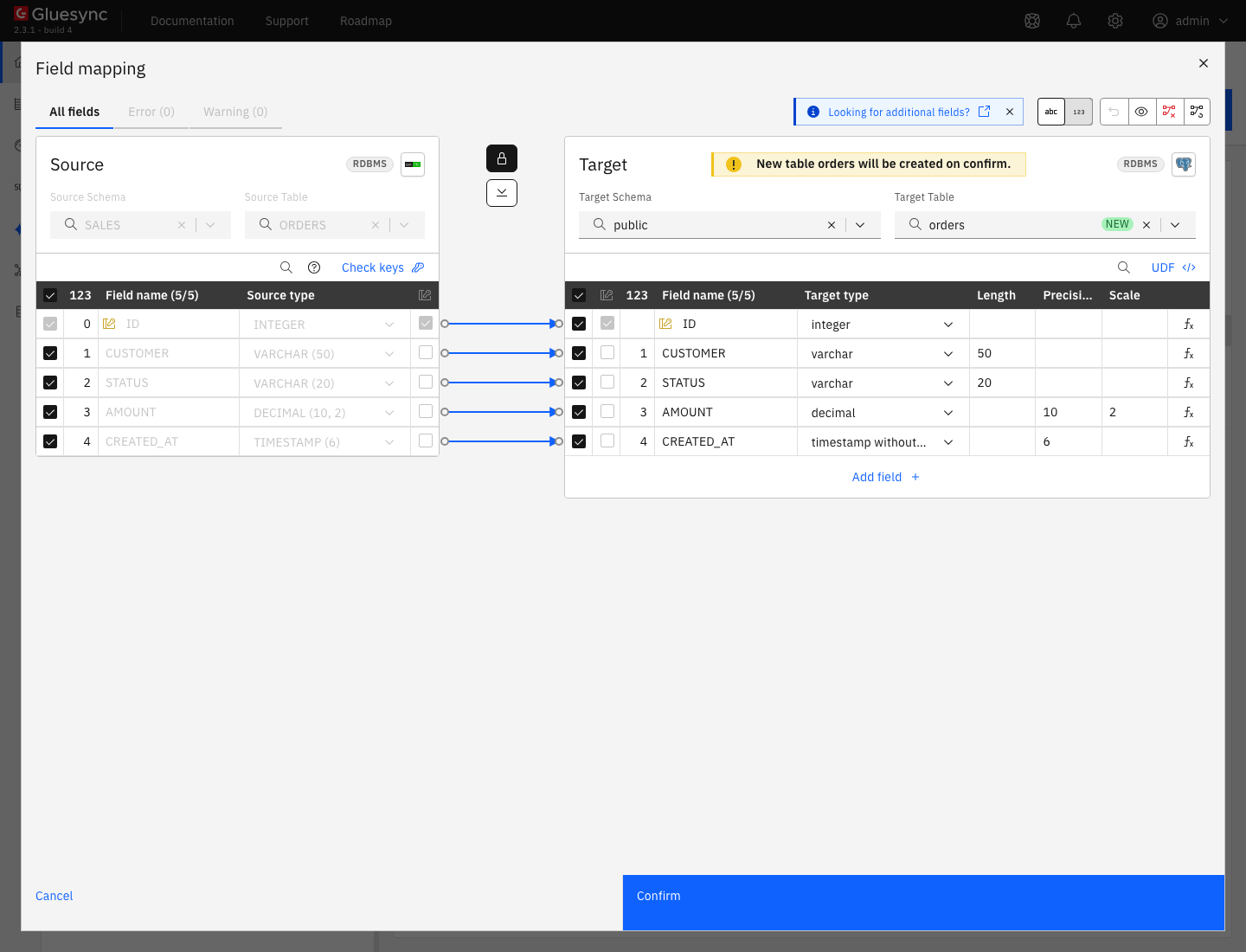
Db2 XML columns are left out of the CDC table by the agent. Other types follow the target. A target that cannot hold a type shows it in the Field mapping dialog, where you change the target type or add a conversion. See Fix target length and truncation errors.
|
UI + SQL
-
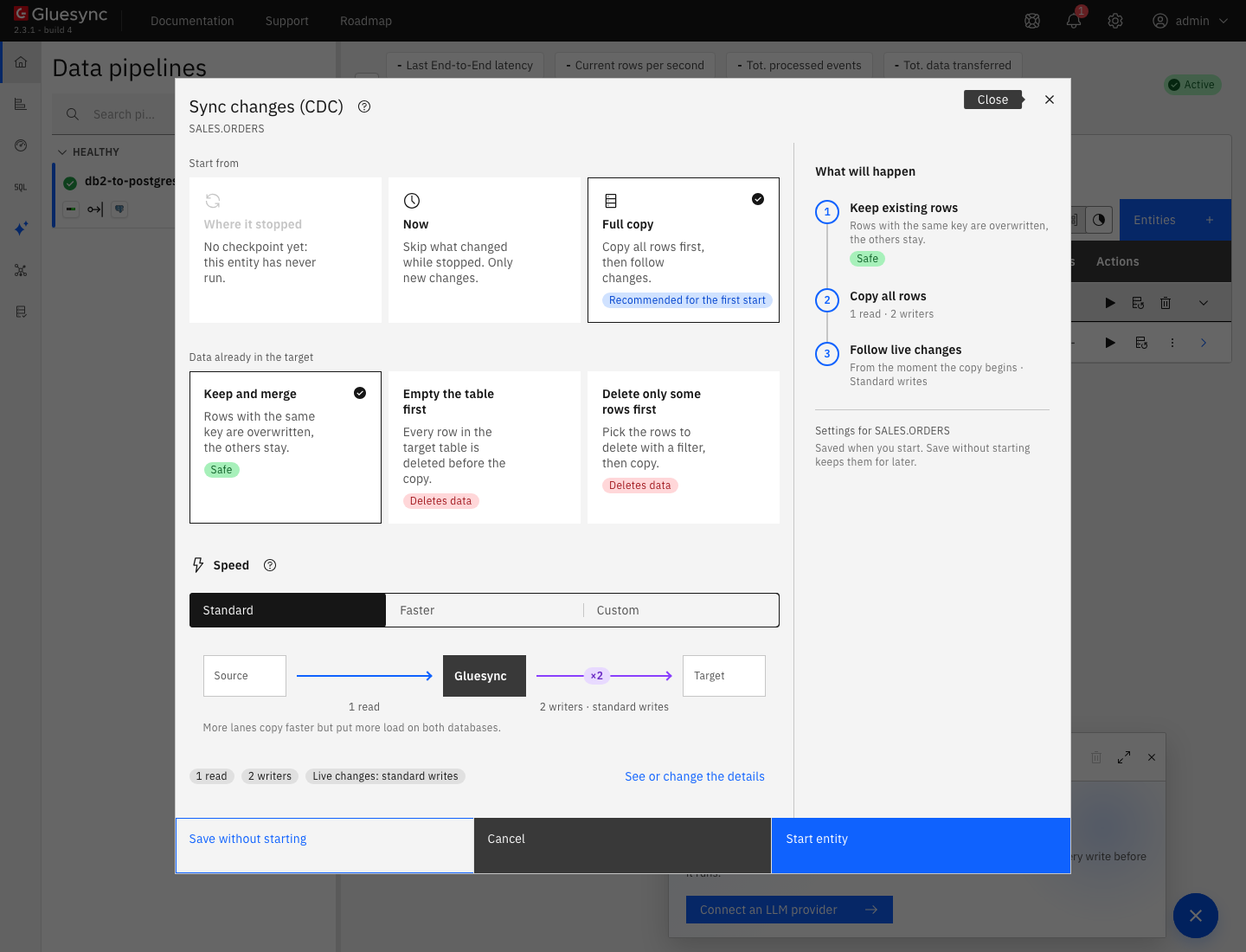
On the row of the entity, select the play button. The Sync changes (CDC) dialog opens;
-
Under Start from keep Full copy, Recommended for the first start. It copies all the rows, then follows the changes. Where it stopped is not available before the first run, and Now skips what changed before the start;
-
Under Data already in the target keep Keep and merge, and under Speed keep Standard;
-
Select Start entity.
When the entity is active, read what Gluesync created in Db2, connected as the instance owner:
SELECT TABSCHEMA, TABNAME, DATACAPTURE FROM SYSCAT.TABLES
WHERE TABSCHEMA IN ('SALES', 'GLUESYNC') ORDER BY 1, 2;

SELECT ROUTINENAME, LANGUAGE, FENCED, IMPLEMENTATION FROM SYSCAT.ROUTINES
WHERE ROUTINESCHEMA = 'GLUESYNC';
And the row count on the target:
-- on the target
SELECT count(*) FROM public.orders;The Core Hub log shows one line each time the procedure runs, every 10 seconds by default. An idle database gives GS_SP_LOGMINER result - status='SUCCESS:EMPTY:...' and a run that read changes gives a status that starts with SUCCESS: and carries counters, for example rows=1. Any status that starts with ERROR: is a failure, see the troubleshooting table.
SQL
On the source, insert, update and delete one row each. Commit them:
INSERT INTO SALES.ORDERS VALUES (1001, 'customer-new', 'new', 19.90, CURRENT TIMESTAMP);
UPDATE SALES.ORDERS SET STATUS = 'paid', AMOUNT = 25.00 WHERE ID = 1;
DELETE FROM SALES.ORDERS WHERE ID = 2;
After a few seconds, read the three keys on the target:
SELECT "ID", "STATUS", "AMOUNT" FROM public.orders WHERE "ID" IN (1, 2, 1001) ORDER BY 1;
SELECT count(*) FROM public.orders;
You can also read the CDC table in Db2, to see what the log reader wrote:
SELECT GS_TRANSACTION_ID, GS_OPERATION, ID, GS_SESSION_USER_NAME, GS_TRANSACTION_READ, GS_TRANSACTION_CONSUMED
FROM GLUESYNC.SALES_ORDERS_CDC ORDER BY GS_TRANSACTION_ID;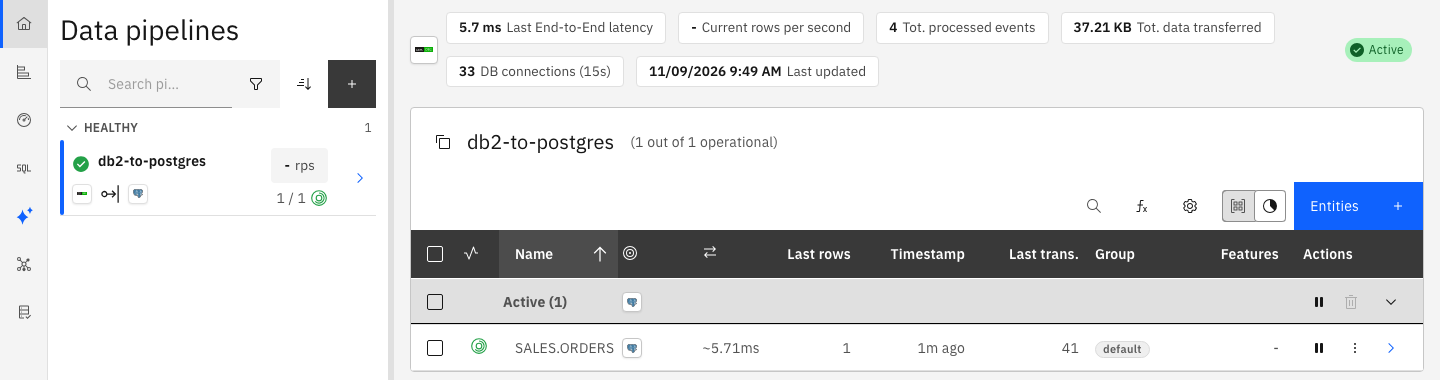
An uncommitted change is not replicated, and a rolled back change never is. A change appears on the target after its commit is in the log and after the next poll.
UI
-
The agent polls the log every 10 seconds by default (
storedProcedurePollingIntervalSeconds, minimum1). A shorter interval lowers the latency and adds load on the Db2 server. A latency of a few seconds is normal with the default; -
sourceChangeRetentionkeeps the rows of the CDC tables for 24 hours by default, andcdcBatchSizeis the size of the batches that mark rows as read and consumed. Both are in the reference page; -
For the copy, raise the lanes in the start dialog under Speed, or choose Custom. More lanes copy faster and put more load on both databases. The Db2 LUW CDC agent does not support bulk load, so the speed of live changes is set by the polling interval and by the target. See Tune replication throughput;
-
Keep the CDC tables in mind when you size the database: each one holds the old and the new image of every changed row for the retention time.
Troubleshooting
| Symptom or message | Cause | Fix |
|---|---|---|
The Core Hub log shows |
The database uses circular logging. Db2 returns |
Do step 2: set |
|
You changed |
Run |
|
The library creates its state tables as the log reader user, so the Gluesync user does not own them. The Gluesync user has no privilege on the |
Run |
The status of the procedure is |
The library cannot open its own connection. The five variables are missing, wrong, or not passed to the procedure. |
Check |
Gluesync cannot create |
The Gluesync user has no |
Check the grants of step 3, check that |
|
The operating system user does not exist on the Db2 server, or the password is wrong. |
Create or reset the operating system user on the server, then edit the source connection. |
The Core Hub log shows |
The Db2 instance was stopped or restarted, or the network dropped. The connections of the pool are gone. |
Nothing, when the server comes back. The agent retries and the entity goes on from its checkpoint. If it does not recover, see Diagnose and recover a stalled pipeline or entity. |
Updates and deletes of a table do not carry the old values, or the CDC rows are incomplete |
|
Run |
The |
The server runs a Db2 release before 11.5.8.0. The engine leaks memory in the log read call. |
Upgrade Db2 to 11.5.8.0 or later. Tuning |
The CDC tables in the |
Retention is long, an entity is paused, or a long transaction keeps changes open. |
Lower |