Upgrade Gluesync safely
This guide shows how to move a Gluesync installation on Linux to a newer version without losing configuration or changes. You write down what runs now, back up the data folder, pick one of three ways to upgrade (the Control Plane, Gluesync Control or an offline package), check that your pipelines resume, and know how to go back if something is wrong.
In this guide
You will learn what to check before you upgrade, how to back up the data folder, whether to pause your pipelines, how the three upgrade paths differ, how to confirm that the new version runs and that change data capture (CDC) continues, which of your settings an upgrade keeps, and how to roll back with Gluesync Control and your backup.
Quick information
Goal |
Upgrade Core Hub and the platform modules and be able to prove that nothing was lost |
Audience |
Gluesync administrators with |
Level |
Intermediate |
Time required |
About 45 minutes, including the backup and the checks. The upgrade itself took 3 to 20 minutes in the lab, depending on the path |
Area |
Control Plane → Platform updates; Gluesync Control ( |
Applies to |
Gluesync 2.3 |
Before you begin
Make sure that:
-
Gluesync was installed with the Linux installer, so that
gluesyncis on thePATH(check withgluesync --version). See Install Gluesync on Linux and size the host; -
You can use
sudoon the server and sign in to the Control Plane as a user who may update the platform; -
The disk has room for the new images next to the old ones:
gluesync update --dry-runprints the rough amount (4.7 GB for a full update, 6.3 GB for the offline package of the lab); -
You have read the release notes of the version you are going to, in Release notes, especially any upgrade note at the top;
-
You have a maintenance window: Core Hub restarts during the upgrade, and the Control Plane is unavailable for a short time. Use a test system first if you can, as the 2.3 release is large.
Core Hub migrates its database the first time it starts with a newer version, and that migration is one-way. Gluesync copies the database before it migrates it (gluesync.db.pre-v<old version>.bak in the database folder), but only your own backup of the whole data folder brings you back to the exact state before the upgrade.
|
|
This guide was tested on Rocky Linux 9.8 with Gluesync 2.3.0.1 going to 2.3.1.1, on a pipeline from PostgreSQL to PostgreSQL that received one change per second during every upgrade, and on a server that went from 2.2.11.12 to 2.3.1.1. Your version numbers will differ. |
Guide steps
CLI
-
On the server, print the state of Gluesync and the versions it can move to:
sudo gluesync status sudo gluesync update --list sudo gluesync update --services sudo gluesync update --pins -
In the Control Plane, open Settings → About and note the version shown;
-
Copy the output of the commands and the values of the settings you changed (Settings → Global settings and Support) into your change record.
|
The Control Plane shows the version under the logo: |
CLI
-
Check the free space where Docker keeps its images and where Gluesync lives:
df -h /opt/gluesync /var/lib/docker -
Ask Gluesync Control what it would do. Nothing changes:
sudo gluesync update --dry-run
CLI
A copy of the whole installation folder is the backup that lets you go back. It holds the compose file, .env and the data of Core Hub, which has its databases in data/core-hub/database. Copy it while Gluesync is stopped, so that the databases are not changing while you copy.
-
Stop Gluesync. Your data and your images stay:
sudo gluesync stop -
Make the archive, and keep a copy off this server:
sudo mkdir -p /var/backups/gluesync sudo tar czf /var/backups/gluesync/gluesync-$(date +%Y%m%d)-pre-upgrade.tar.gz -C /opt gluesync ls -lh /var/backups/gluesync -
Start Gluesync again:
sudo gluesync start
You can also keep a configuration backup of your pipelines, agents and user-defined functions with Gluesync Automator, see Platform configuration backup and restore, or an encrypted backup with Gluesync Connect, see Backups with Gluesync Connect. They do not replace the copy above: they hold configuration, not the exact state of the databases.
| The source and target databases are not part of Gluesync and are not in this backup. |
UI
You do not have to pause pipelines for an upgrade. In the lab, a source table received one insert per second during every upgrade, while Core Hub restarted and the platform updated. When Core Hub was back, the pipeline was active again, and the target held the same number of rows as the source, with the last inserted row present. Core Hub continues from the position it stored.
Still, wait before you start in these cases:
-
An entity is running its initial snapshot: let it finish (this was not tested);
-
You have a large backlog on a source agent and little time: the restart adds to the time the backlog needs to drain.
If you want to pause anyway, use Pause Section on the pipeline in the Control Plane (see Play and pause entities) and resume the entities after the upgrade.
UI + CLI
The three paths end in the same place: the images of the services in docker-compose.yml have new tags and the containers were recreated. They differ in how you drive them and in what they update.
| Path | Where you run it | What it updates | What to expect in the lab |
|---|---|---|---|
Control Plane: Platform updates |
Browser, no shell. Needs internet access from the server |
Every service in the list: Conductor, Chronos, the reverse proxy, Grafana, Portainer, Prometheus and Core Hub, one at a time |
About 20 minutes with image pulls. The window said "Update failed" for the Conductor and for the reverse proxy although both were updated, and the whole list needed three clicks of Update all. Comments in |
Gluesync Control: |
Terminal, with |
All seven images by default, or one service or one pin with options |
About 2 minutes 40 seconds. Prints the plan first, makes a backup of |
Offline package: |
Terminal, with |
Only what the package carries: Core Hub and Chronos |
About 4 minutes for a 3.2 GB package, which is read twice. Comments in |
Use the Control Plane when nobody can use a shell and the server is online. Use Gluesync Control when you can, because it shows the plan, keeps a backup of the compose file, rolls back a failed update and can be scripted. Use the offline package when the server cannot reach the internet.
CLI
-
Update to the newest version of your release channel. Add
--version <x.y.z.w>to choose another one, or--service <name>to update a single service:sudo gluesync update -
Answer Yes when it asks for confirmation (the installed version, the new one and the warning about the one-way migration). Add
-yin a script; -
Wait for the five steps to finish: checking the installation, backing up the configuration, downloading the new images, restarting the services and checking that they run.
You can do the same in the terminal screen: run sudo gluesync with no arguments, press 2 for the Update tab, choose Check for updates, then select a version to see the plan and confirm it.
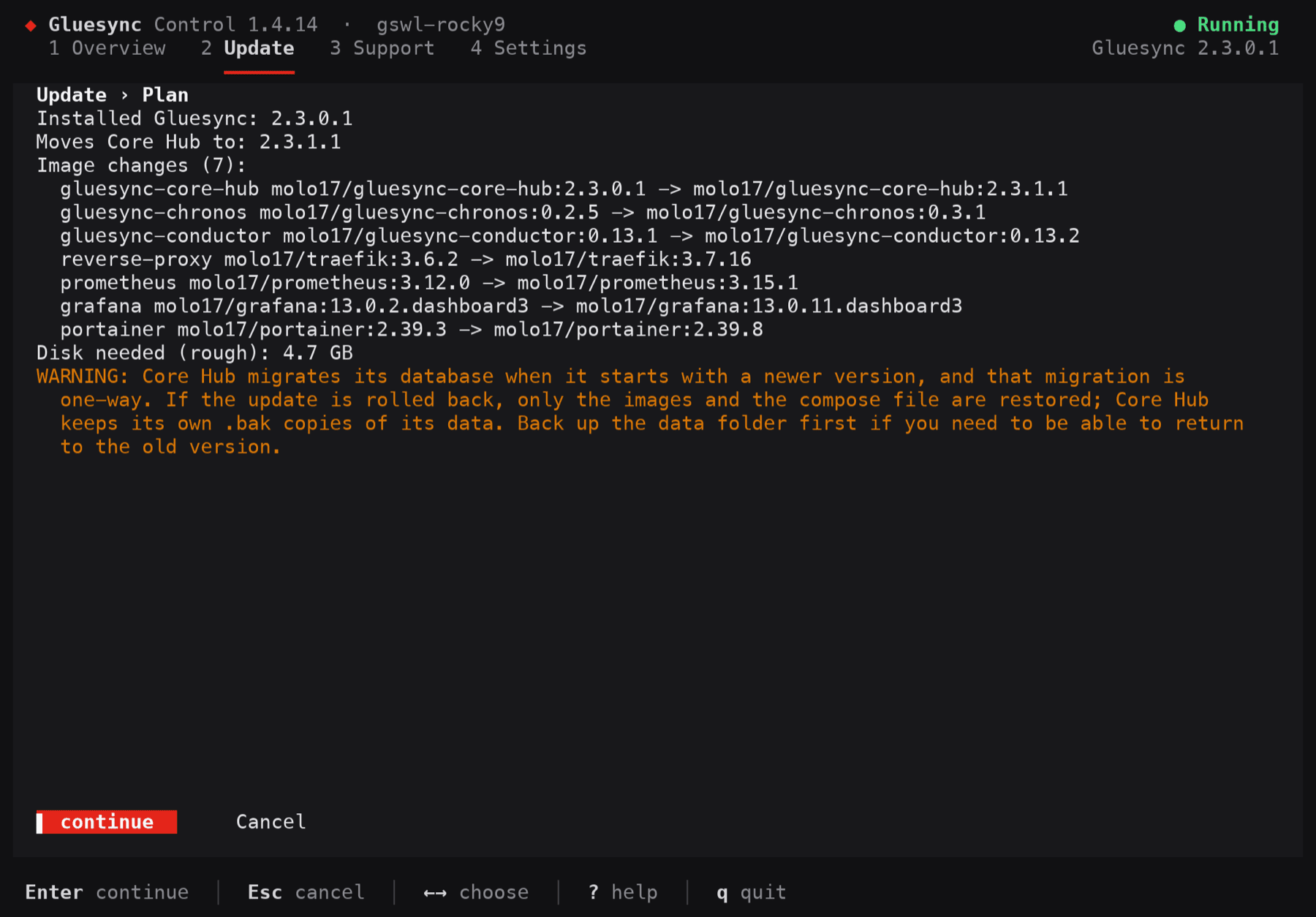
If the update cannot complete, Gluesync Control puts the previous images and files back and says so. It does not roll back the database, see the last step.
UI
-
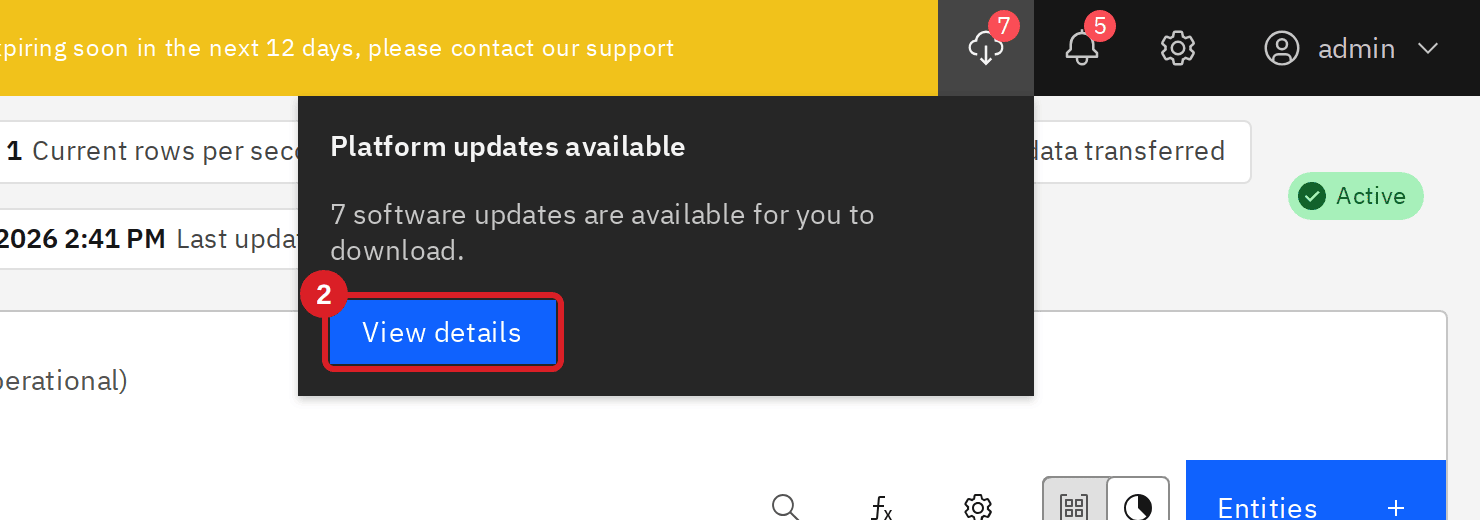
Sign in to the Control Plane. When updates are available, Platform updates shows a counter next to the notification icon. Select it;
-
In the alert, select View details;
-
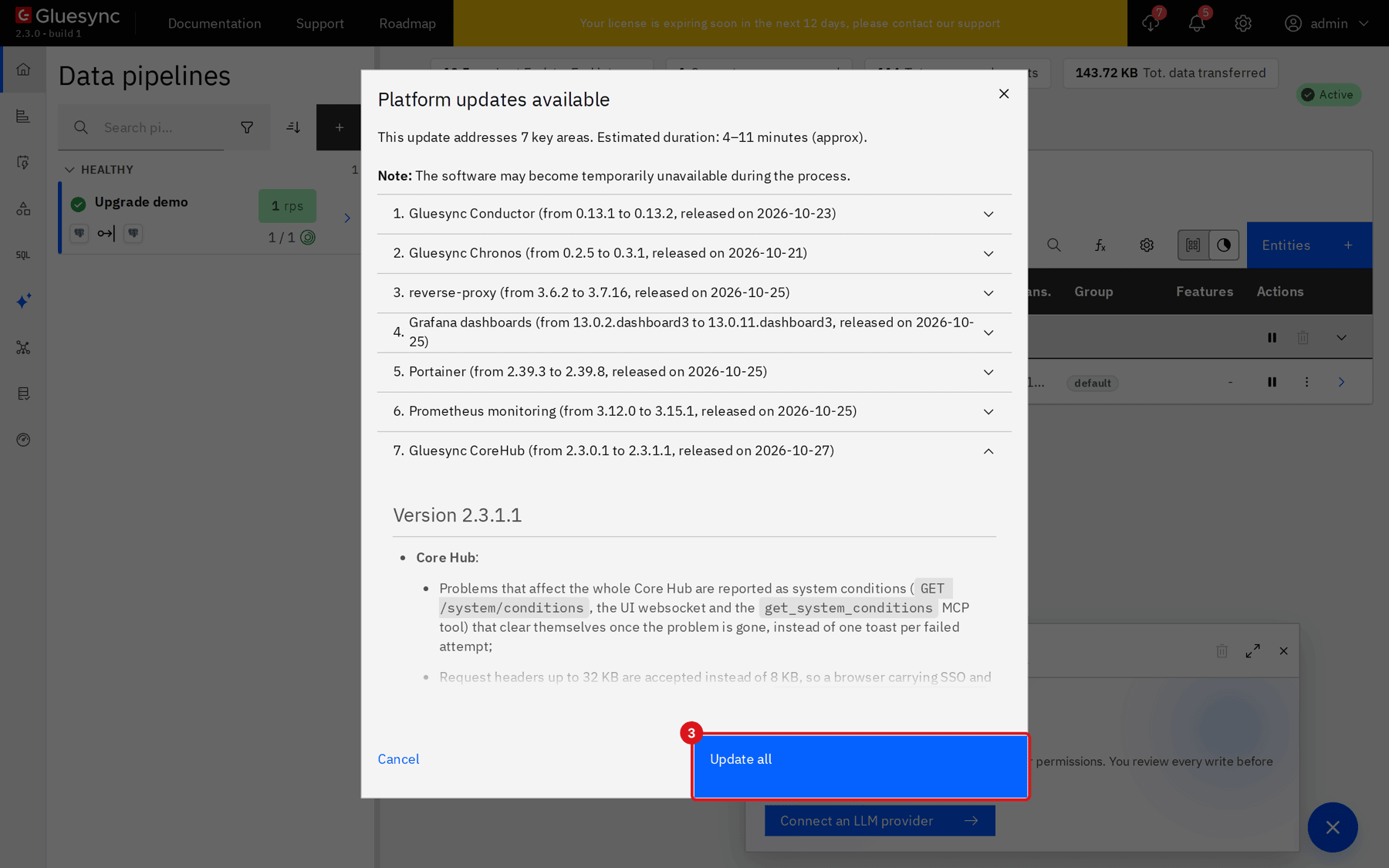
Open an item to read its changelog, then select Update all;
-
Leave the window open and do not refresh the page until every item has a green check. Core Hub signs you out when it restarts;
-
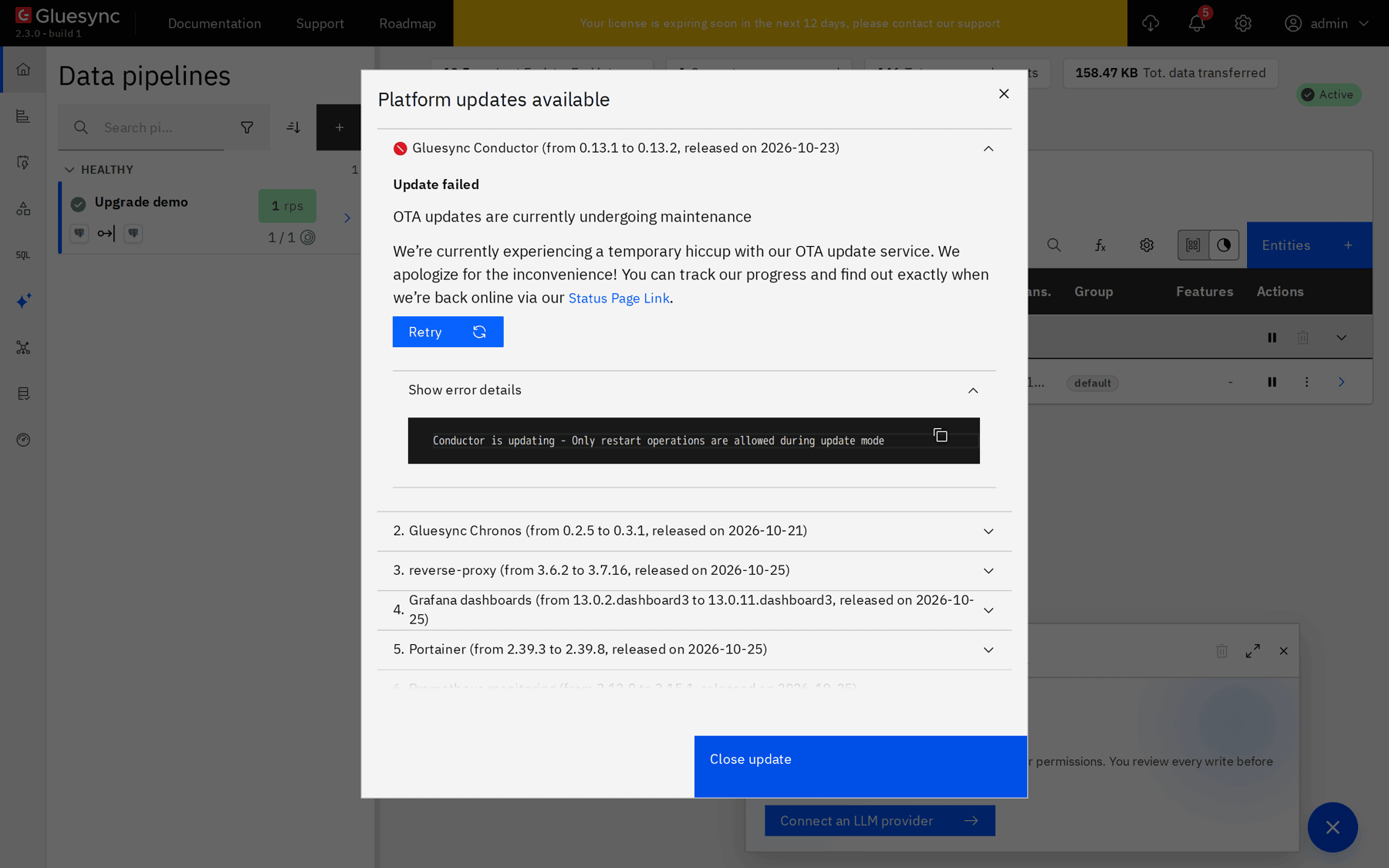
If an item shows Update failed, open Show error details, check with
docker pson the server which version runs, then select Retry or Update all again.

CLI
-
On a computer with internet access, download
gluesync-update-linux-<amd64|arm64>-<version>.tar.gzfor the CPU of the server from Get Gluesync - offline downloads. Copy it to the server; -
Check what it would do. This reads the whole package once:
sudo gluesync update --package ~/offline/gluesync-update-linux-amd64-2.3.1.1.tar.gz --dry-run -
Run the update:
sudo gluesync update --package ~/offline/gluesync-update-linux-amd64-2.3.1.1.tar.gz -y
CLI + UI
-
Check the version and the services:
sudo gluesync status docker ps --format '{{.Names}} {{.Image}}' -
In the Control Plane, open Settings → About and compare the version with the one you wrote down;
-
Open Data pipelines and check that your entities are active and that new changes arrive: change a row in the source and look at the target, or compare the counts of the source and target tables;
-
Check that the settings you noted are unchanged (Settings → Global settings and Support);
-
Compare the compose file with the copy that Gluesync Control kept, which is in the folder it printed:
sudo diff /var/lib/gluesync/backups/<date-time>/docker-compose.yml /opt/gluesync/docker-compose.yml

What an upgrade keeps
Customers sometimes report that settings were cleared after an upgrade. In the lab these were set before the upgrade and read back afterwards, through the Control Plane API and the files of the installation:
| What | Control Plane update | gluesync update |
Offline package |
|---|---|---|---|
Support → log retention (Max history (Days), Total size cap (GB)) and log level |
Kept |
Kept |
Kept |
Global settings → Grafana URL and release channel |
Kept |
Kept |
Kept |
Your own lines in |
Kept |
Kept |
Kept |
Comments in |
Removed |
Kept |
Kept |
|
Kept |
Kept |
Kept |
Pipelines, entities, connections |
Kept |
Kept |
Kept |
The same values were also kept when a server went from 2.2.11.12 straight to 2.3.1.1 with gluesync update (log retention, log level, Grafana URL, your lines and comments in docker-compose.yml, and .env). No pipeline was running on that server, so the pipeline row of the table was not tested for the 2.2 to 2.3 step.
Two things can still look like a lost setting:
-
The Control Plane update rewrites
docker-compose.yml. Your changes stay, but the comments do not, so keep your own notes outside the file. A change that you make by editing a service block is only applied when Gluesync recreates the container; -
A pin of a service survives updates and stops that service from moving. If a service did not update, run
sudo gluesync update --pins, andsudo gluesync update --unpin <service>or--unpin allwhen the pin is no longer wanted.
Gluesync Control writes the previous docker-compose.yml and .env to /var/lib/gluesync/backups/<date-time> on every update and keeps the last five, so you can always compare.
CLI
Do this only if the new version does not work for you. Rolling back needs the data backup of the earlier step. Going back to an older image is not enough: the older Core Hub cannot read a database that the newer one migrated. So you first put the older image back, then you put the old data back.
-
Pin Core Hub to the previous version.
--allow-downgradeis required, and the pin copies Core Hub’s data folder to a backup folder first:sudo gluesync update --pin core-hub=<previous version> --i-understand-pinning --allow-downgrade -yExpect the command to report success and
gluesync statusto show the older version, while the Control Plane still answers502 Bad Gateway. Core Hub is running the older image on the migrated database and cannot open it; -
Stop Gluesync:
sudo gluesync stop -
Put the data of Core Hub from your backup back. Move the current folder aside rather than deleting it:
sudo mv /opt/gluesync/data/core-hub /opt/gluesync/data/core-hub.after-upgrade sudo tar xzf /var/backups/gluesync/gluesync-<date>-pre-upgrade.tar.gz -C /opt gluesync/data/core-hub -
Start Gluesync:
sudo gluesync start -
Check the result as in the previous step.
|
Changes you made in Gluesync after the backup are gone after a rollback, because the databases of Core Hub are the ones of the backup. The source and target databases are not touched. |
When you are ready to move forward again, remove the pin with sudo gluesync update --unpin core-hub, then upgrade as above.
Troubleshooting
| Problem | Possible cause | What to do |
|---|---|---|
Update failed on the Conductor or the reverse proxy in Platform updates, with |
The service restarted itself while the Control Plane was waiting for its answer |
Check the version with |
A service does not move to the new version |
A pin of Gluesync Control |
|
After going back to an older Core Hub, the Control Plane answers |
Core Hub cannot open a database that a newer version migrated. |
Restore the data of Core Hub from your backup (the rollback step) |
Related guides
Contact MOLO17 Support if you need assistance with upgrading Gluesync.