Choose keys for tables without a primary key
Gluesync needs a key to find the same row again on the target when it applies an update or a delete. When the source table has no primary key you choose that key yourself, and the choice decides whether changes arrive correctly. This guide shows how to choose and set the key on PostgreSQL and on IBM i, what happens when the key has duplicate values, NULL values, or does not exist, and how to verify the result with SQL.
In this guide
You will learn how Gluesync asks for a key, how to test a candidate key with SQL and with Check keys, how to set a logical key in the Field mapping dialog, why a PostgreSQL source needs REPLICA IDENTITY FULL, and what the target does with duplicate, NULL, or missing key values. Then you will use the same ideas on IBM i: the DDS keys, the relative record number (RRN) and its caveats, logical files, and multi-member files. A decision table at the end maps what your table looks like to the key to use.
Quick information
Goal |
Choose, set, and verify a key for tables that have no primary key |
Audience |
Data engineers and Gluesync administrators |
Level |
Intermediate |
Time required |
About 60 minutes for both parts |
Area |
Control Plane → pipeline → Entities → Field mapping; IBM i source → Edit source |
Applies to |
Gluesync 2.3 |
Before you begin
Make sure that:
-
A pipeline exists with a PostgreSQL source and a PostgreSQL target, and, for the IBM i part, a second pipeline with an IBM Db2 for IBM i source and a PostgreSQL target (the examples use the pipelines Keys demo and Keys demo IBM i);
-
The source has a table without a primary key, and the target has a table for it. The examples use
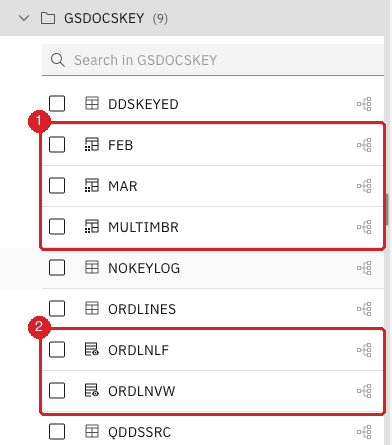
shop_keys.order_lines, withorder_noandline_nothat are unique together,shop_keys.stock_moves, whosemove_refrepeats,shop_keys.contacts, whoseemailis sometimes NULL, and the journaled IBM i filesORDLINES,DDSKEYED,ORDLNLFandMULTIMBR; -
You can change the source table (
ALTER TABLE) and, on IBM i, you know the library and journal of your files; -
You can edit pipelines in the Control Plane.
|
Changing the key of an entity that already replicates stops it and asks for a new copy of the data, so choose the key before the first snapshot. Setting a logical key does not change any table: it is a Gluesync setting only, and it does not add a primary key to the target. |
Guide steps
Part 1: PostgreSQL
SQL
Skip this step if you already have your own tables. Run it on the source database; the target needs the same columns, without a primary key.
CREATE SCHEMA shop_keys;
CREATE TABLE shop_keys.order_lines (order_no integer NOT NULL, line_no integer NOT NULL,
  sku text NOT NULL, qty integer NOT NULL, note text);
CREATE TABLE shop_keys.stock_moves (move_ref text, warehouse text, qty integer);
CREATE TABLE shop_keys.contacts (email text, full_name text, phone text);
INSERT INTO shop_keys.order_lines
  SELECT o, l, 'SKU-' || o || '-' || l, l, NULL
  FROM generate_series(1,5) o, generate_series(1,3) l;
INSERT INTO shop_keys.stock_moves VALUES ('M-1','W1',10),('M-3','W2',7),('M-3','W3',9);
INSERT INTO shop_keys.contacts VALUES ('a@example.com','Ann','1'),(NULL,'Cleo','3'),(NULL,'Dan','4');SQL
A good key is present in every row and never repeats. Test your candidate on the source before you configure anything.
-
Look for repeated values; every row returned is a problem;
-
Count the rows where a key column is NULL; the result must be
0.
SELECT order_no, line_no, count(*)
FROM shop_keys.order_lines
GROUP BY order_no, line_no
HAVING count(*) > 1;

SELECT count(*) FROM shop_keys.order_lines
WHERE order_no IS NULL OR line_no IS NULL;SQL
Gluesync reads PostgreSQL changes from the write-ahead log. For a table without a primary key, PostgreSQL logs the old values of an updated or deleted row only when the table has REPLICA IDENTITY FULL.
-
Run
ALTER TABLEfor every table that has no primary key; -
If the table has a unique index on columns that are
NOT NULL, you can use that index instead of the full row.
ALTER TABLE shop_keys.order_lines REPLICA IDENTITY FULL;

-- alternative, smaller log: a unique index on NOT NULL columns
ALTER TABLE shop_keys.products_uq REPLICA IDENTITY USING INDEX products_uq_sku;|
Without this step nothing fails. With the default replica identity, inserts reach the target but updates and deletes are silently missing: Gluesync shows no error and no notification, and the target slowly drifts away from the source. In the test, an update and a delete on a table with the default setting left the target unchanged, and the deleted row stayed on the target. |
UI
Gluesync does not choose a key for you on a table without a primary key. A unique index does not count either, so a table with only a unique index is asked for a key in the same way.
-
Open the pipeline and select Entities;
-
Expand the schema in the Object browser and select the table;
-
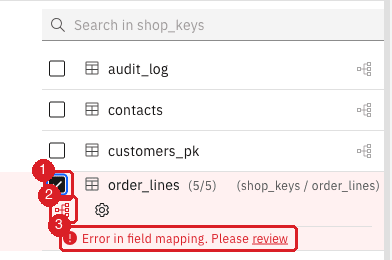
Select the field mapping icon of the table, or the review link, to open the Field mapping dialog;
-
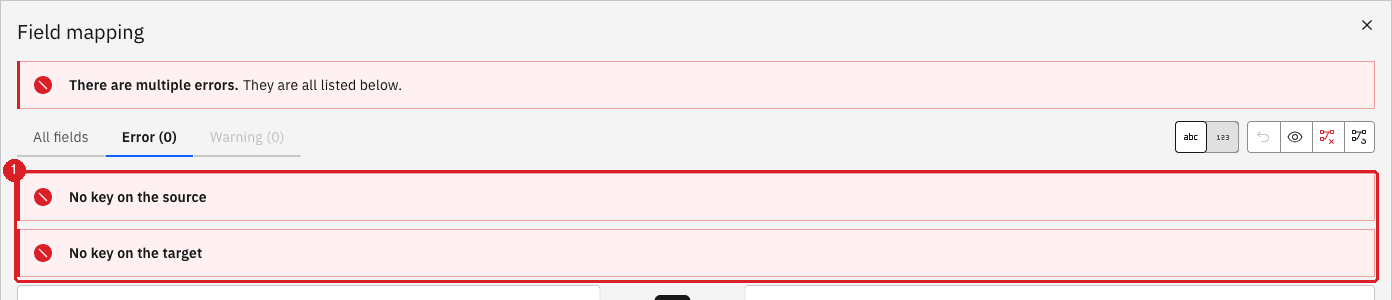
If the dialog says There are multiple errors, select View errors.
UI
-
Select All fields;
-
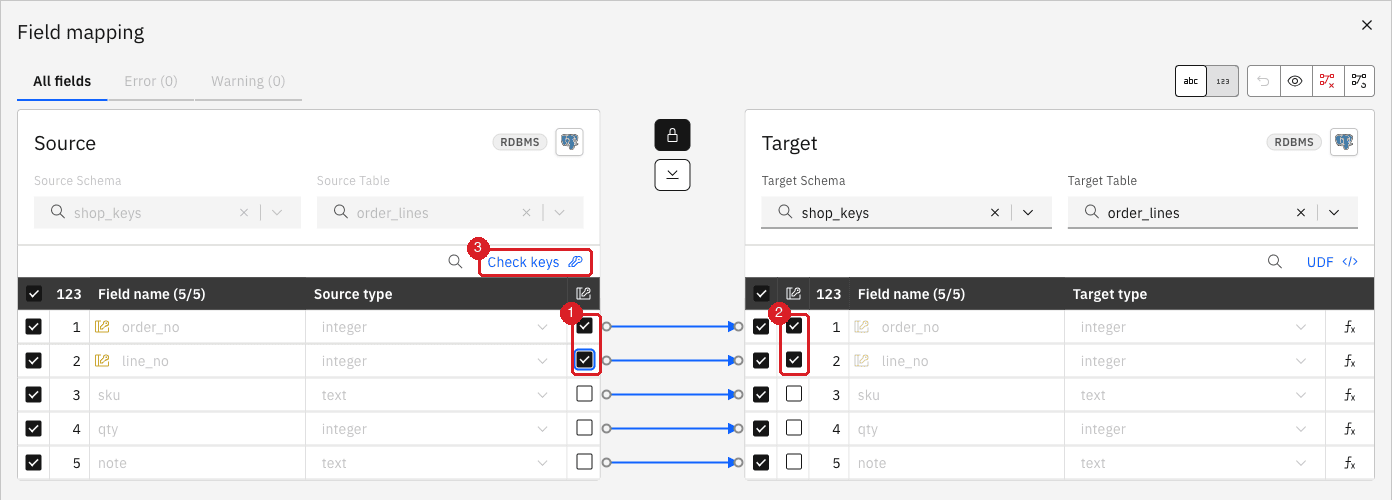
In the Key column of the source, select the checkbox of every column that makes up the key, here
order_noandline_no; -
Look at the target: the columns linked by the arrows become keys too;
-
Select Confirm, and then Confirm and continue.
|
Use as few columns as are needed to be unique. A key with many columns is compared on every update and every delete, and a long text column makes that slower. |
UI
-
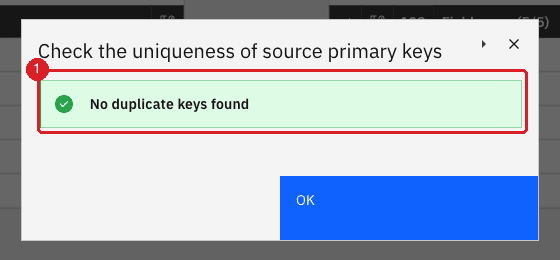
In Field mapping, select Check keys;
-
Read the result and select OK.
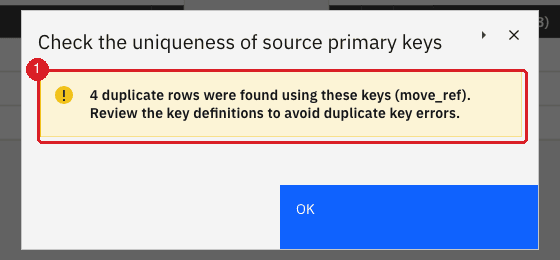
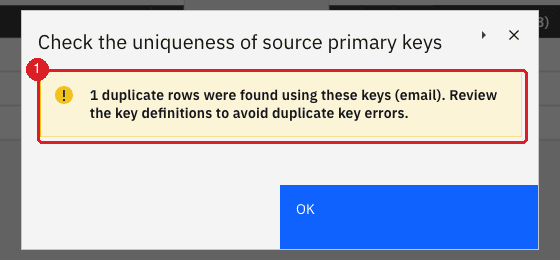
|
Check keys looks for repeated key values on the source. It does not tell you that a single row has a NULL key; run the NULL query from the earlier step for that. |
UI + SQL
-
Select Start sync, choose Full copy, and select Start entity;
-
Make a change on the source for each kind of statement;
-
Run the same query on the source and on the target.
INSERT INTO shop_keys.order_lines VALUES (20,1,'SKU-20-1',1,'x');
UPDATE shop_keys.order_lines SET qty = 42 WHERE order_no = 1 AND line_no = 1;
DELETE FROM shop_keys.order_lines WHERE order_no = 2 AND line_no = 3;

SELECT count(*),
       md5(string_agg(order_no||'-'||line_no||'-'||sku||'-'||qty||'-'||coalesce(note,''),
                      ',' ORDER BY order_no, line_no))
FROM shop_keys.order_lines;|
On the entity page, Count both in Inspect tables compares the row counts of the two sides without SQL. It does not see a changed value, so keep the checksum for that. |
What the target does with duplicate, NULL, or missing keys
These results were observed with a PostgreSQL source and a PostgreSQL target. The key columns were marked as a logical key and the source had REPLICA IDENTITY FULL.
| Situation | What you see | What happens to the data |
|---|---|---|
No key on the source or on the target |
No key on the source and No key on the target in Field mapping; the entity cannot be saved |
Nothing is replicated. Through the API the entity is refused with "The source table declares no primary key". |
Duplicate key values in the source, target without a constraint |
No error and no notification |
The snapshot may write one row or several for the same key. A new insert adds another row. An update with that key changes every target row with the key, so the copies become identical. A delete removes every target row with the key, even when the source still has a row left. |
The same, target with a primary key on the key columns |
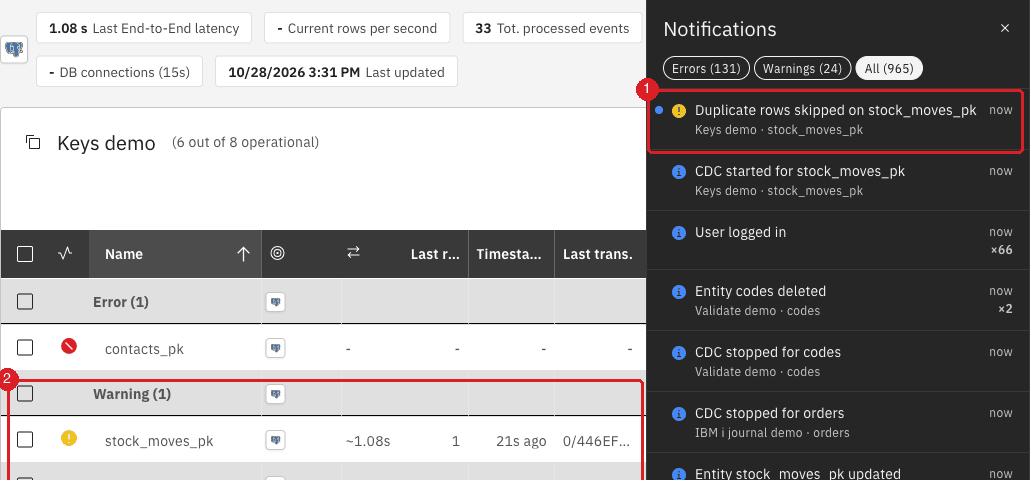
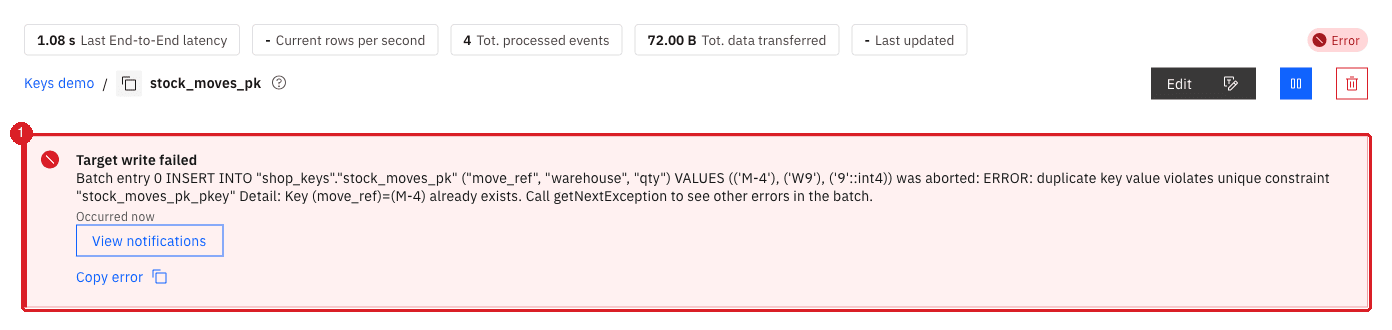
By default none, because the setting On duplicate key is Upsert. With Skip, a warning Duplicate rows skipped on the entity. With Fail, the entity stops with Target write failed. |
Upsert overwrites the target row with the new one. Skip keeps the target row and drops the new one. Fail writes nothing and the entity stays stopped until you fix the data. |
NULL key values, target without a constraint |
No error and no notification |
An insert arrives. An update does not find the old row, so it adds a new row and the old one stays. A delete does not remove anything. The target fills with stale rows. |
NULL key value, target column is a primary key or |
The entity stops with Target write failed and a message such as |
The row is not written, and the entity keeps failing on it until you fix the key or the data. |
Key is every column, and the table has identical rows |
No error and no notification |
Identical rows count as one row: a delete of one copy on the source removes all the copies on the target. |
The two failures that stop an entity are easy to see. The two that do not, a missing replica identity and NULL or duplicate keys, are the dangerous ones, which is why the earlier steps check for them before the first start.
UI
Only for a target that enforces a key (a primary key or a unique index). The setting is per entity.
-
On the pipeline page, select Options on the entity, and then Edit settings;
-
Open Fine tuning and set On duplicate key to Upsert, Skip, or Fail;
-
Save the settings.
Part 2: IBM i
On IBM i a physical file that has no primary key is also "no key" for Gluesync, so the No key on the source errors appear in the same way. IBM i gives you three more ways to get a key: the DDS keys of the file, the relative record number (RRN), and your own logical key on real columns. The rules from Part 1 apply to a logical key unchanged, and Check keys works on IBM i columns.
UI
A file created with DDS and a key (K field) has a key on IBM i, but not a primary key in the SQL catalog. Gluesync reads that key only when the discovery is on.
-
Open the IBM i pipeline, select the source agent, and open Edit source;
-
In Base settings, find Advanced connection properties;
-
Add the property Enable DDS keys discovery and switch it on;
-
Select Test and continue.

|
The same discovery applies to a logical file: its DDS key becomes the key of that entity, and you cannot replace it with a different logical key. |
UI
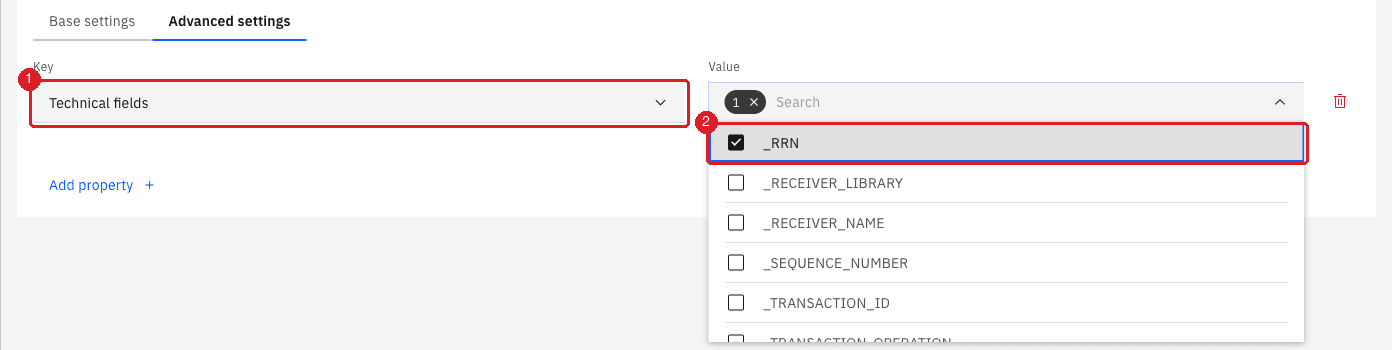
The RRN is a technical field, off by default. This is the usual reason why _RRN is missing from Field mapping.
-
Open Edit source for the IBM i source agent;
-
Open the Advanced settings tab;
-
In Key select Technical fields;
-
In Value select _RRN and select Test and continue.
UI
-
Add the physical file in Entities, and in Field mapping choose the target schema and table;
-
In the Key column of the source select
_RRN; -
Check that the target has a column for it, named
_RRNas in the example, and select Confirm.
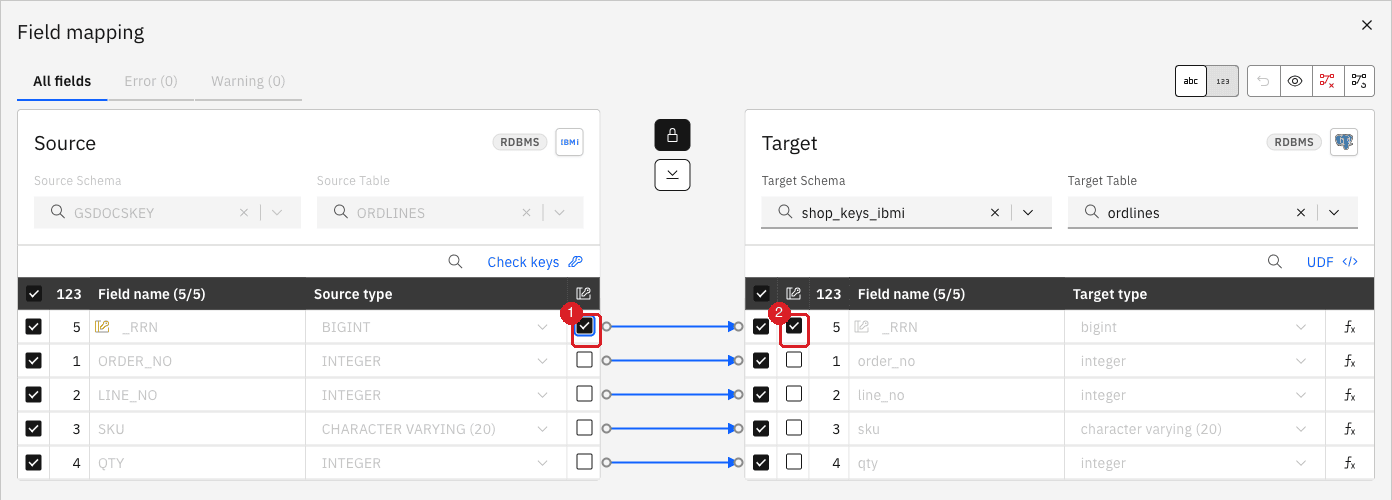
_RRN is the key on the source (1) and on the target (2).|
The RRN is the position of a row in the file, not a value of the row. It changes when the file is reorganized, and a new row can take the place of a deleted one. Prefer a logical key on real columns, as in Part 1, whenever you have one. Use the RRN only when no column or combination of columns is unique. |
Check keys does not work on _RRN: it reports the error [SQL0206] … _RRN not found, because _RRN is not a column of the file. You do not need it, as an RRN is unique in a file.
Reorganize and deleted records.
-
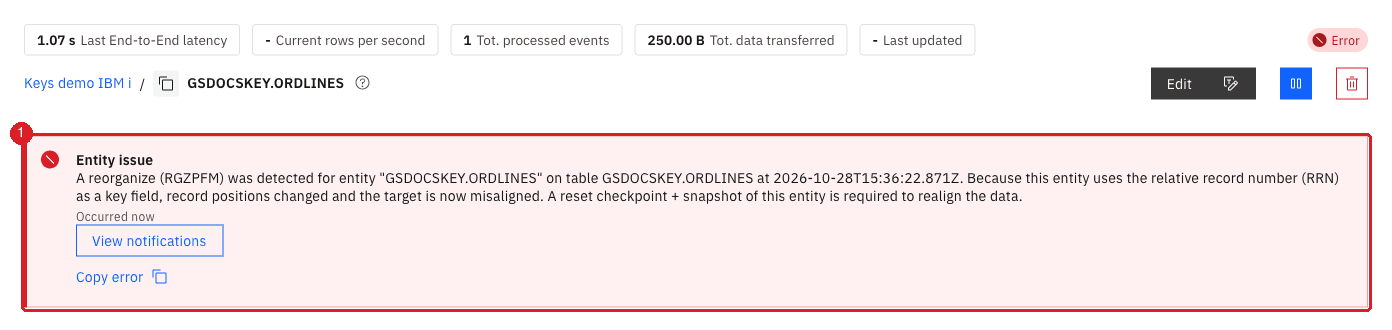
RGZPFMmoves rows and gives them new RRNs. Gluesync detects it from the journal and stops the entity with the notification Physical file reorganized (RGZPFM), because every row key on the target is now wrong. An entity that uses a logical key is not affected byRGZPFM; -
A deleted row leaves a gap in the file. The next insert takes the next free number, unless the file has
REUSEDLT(*YES), in which case it can take the number of a deleted row. Replication still works, because Gluesync applies the delete before the new insert, but an RRN is then not a permanent identity of a row, and you cannot use it as such downstream.
UI
-
On the entity page, select Pause entity and confirm;
-
Select Start sync;
-
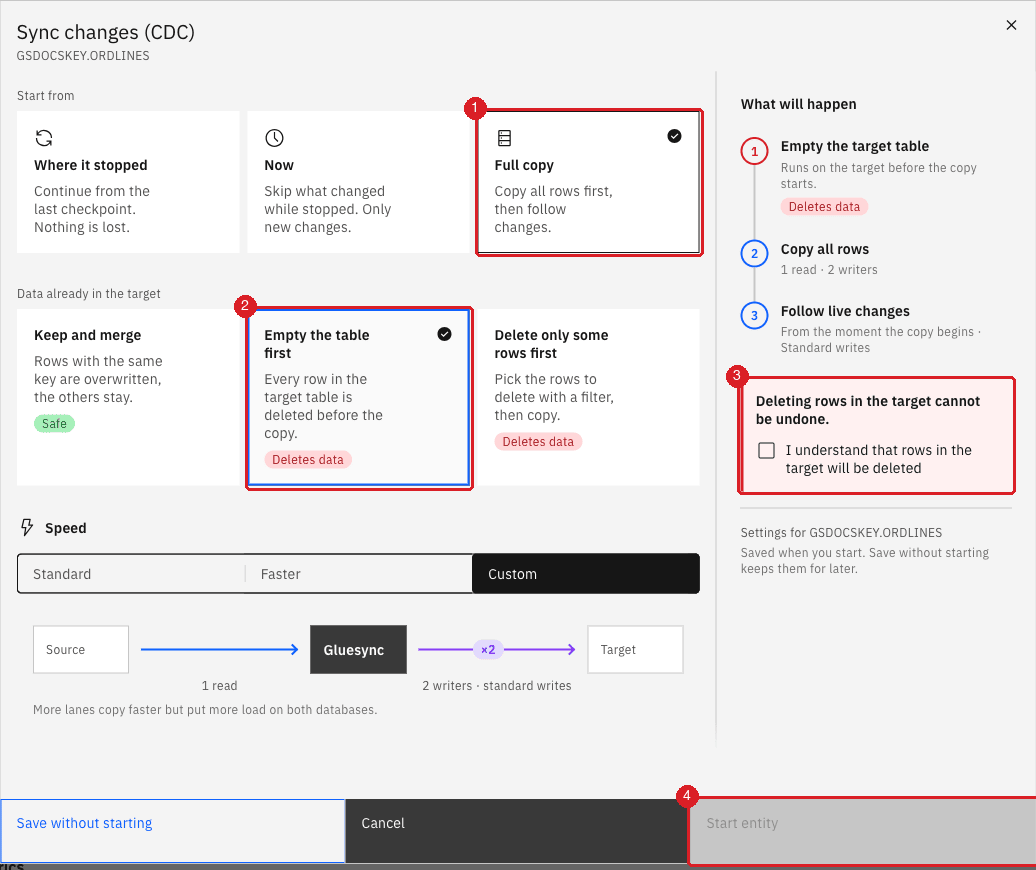
Under Start from select Full copy;
-
Under Data already in the target select Empty the table first and the I understand that rows in the target will be deleted checkbox;
-
Select Start entity.
UI
Logical files and views. In the Object browser they have the view icon. Gluesync copies their rows in a snapshot and applies their select/omit rule, but it never starts change capture on them, because the journal records the changes of the physical file. A change made after the snapshot does not reach the target. To keep the target in step, create the entity on the underlying physical file. To find it, use DSPFD FILE(library/file) TYPE(*MBR) for the base file.
Multi-member files. A file can hold several members, each with its own rows. By default Gluesync reads only the first member of the file, and a change in another member is not replicated.
-
Open Edit source for the IBM i source agent and open Advanced settings;
-
Add the property Enable multi-member physical file support and switch it on, then select Test and continue;
-
Open Entities: each member of the file now appears as its own entry;
-
Add one entity for each member you need, and choose a separate target table for each;
-
Mark a key that is unique inside a member, in the usual way.
UI
If the target column is not named _RRN (for example RRN), the arrow is not drawn automatically, and the key of the target has no source.
-
In Field mapping, read the errors Field function is required or define a UDF and No key on the source;
-
Draw an arrow from
_RRNon the source to the key column on the target; -
Check that the errors disappear, and select Confirm.
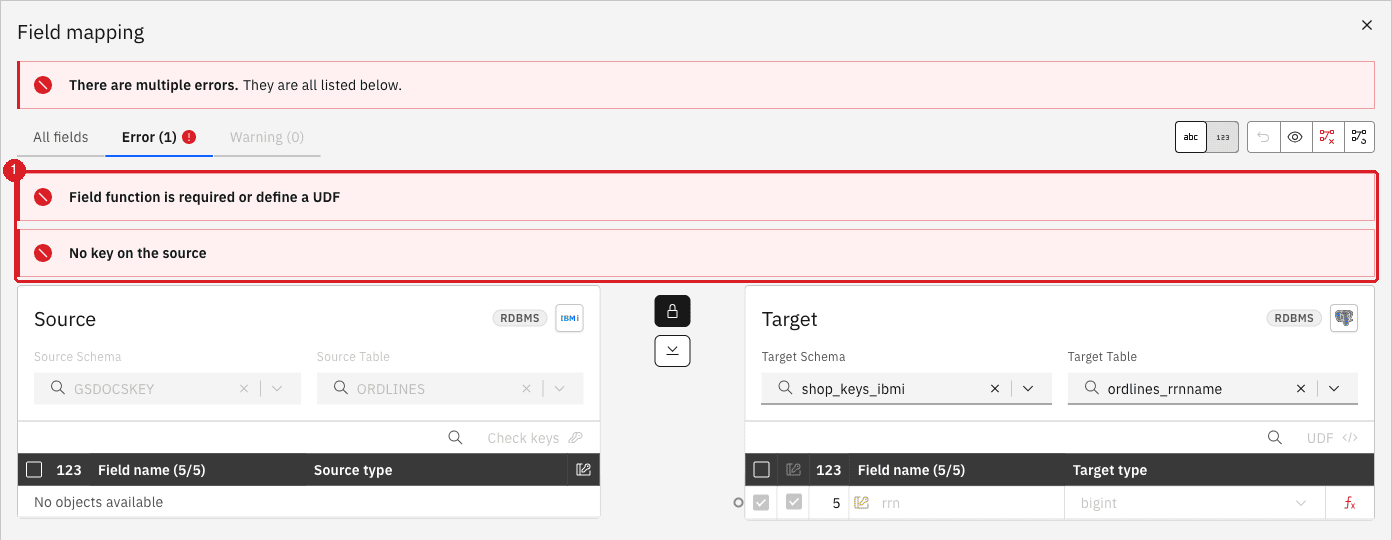
rrn has no source.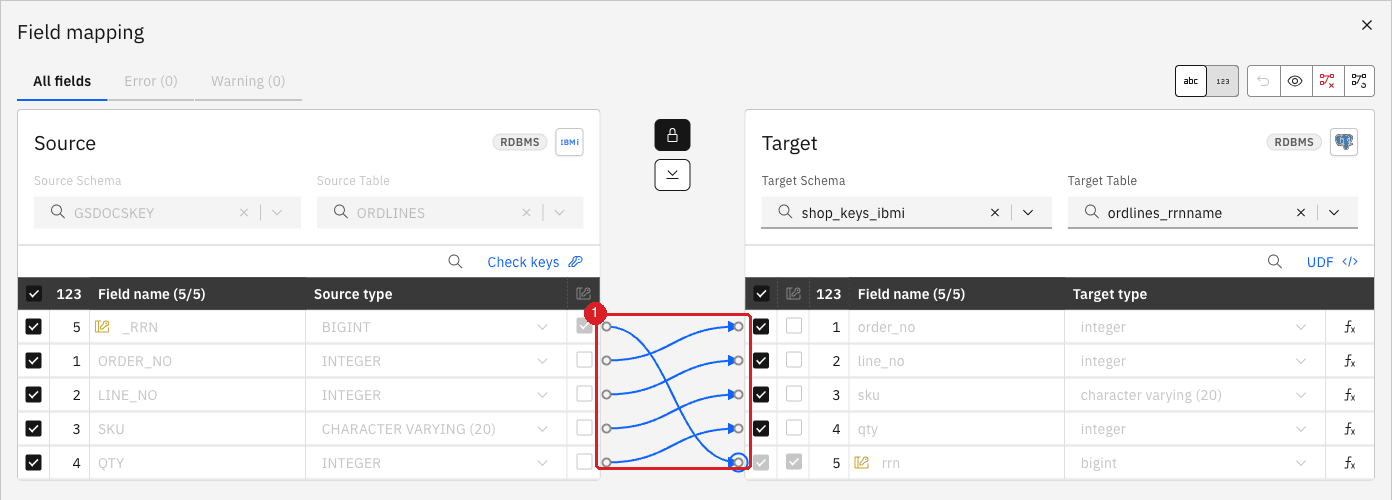
_RRN to rrn, both keys are set and the errors are gone.Choose the key for your table
| Your table looks like | Use this key | Watch out |
|---|---|---|
Has a primary key |
Nothing to do: Gluesync uses it |
On a PostgreSQL target, do not mix it with a logical key on the same table. |
No primary key, but one column or a few columns are always filled and unique together (order number and line) |
A logical key on those columns |
Run the SQL tests and Check keys. On PostgreSQL set |
No primary key, only a unique index |
A logical key on the indexed columns. Gluesync does not use a unique index as a key. |
On PostgreSQL you can set |
The candidate column is sometimes NULL (email) |
Not that column alone: add a column that is always filled, or fix the data so that the key is never NULL |
NULL keys never find their row again: updates add rows, deletes do nothing. |
The candidate column repeats (a reference with several lines) |
Add columns until Check keys says there are no duplicates |
Rows with the same key collapse on update and delete. |
A log or history table with no natural key |
Add an identity or sequence column on the source and use it as the key. All columns is the last resort. |
With all columns as the key, identical rows cannot be told apart. |
IBM i file with a DDS key |
The DDS key, with Enable DDS keys discovery on |
Without the discovery the file looks like it has no key. |
IBM i file without any key, no unique columns, not reorganized |
|
Rows move on |
IBM i file without any key, with unique columns |
A logical key on the columns, not the RRN |
Not affected by |
IBM i logical file or view |
Snapshot only: any key. For changes, use the underlying physical file. |
No change capture, and the DDS key of the logical file is its key. |
IBM i file with several members |
Enable multi-member physical file support, one entity per member, a key unique inside the member |
With the setting off only the first member is read. |
Troubleshooting
| Problem | Possible cause | What to do |
|---|---|---|
No key on the source and No key on the target |
The table has no primary key, or only a unique index |
Mark the key columns in the Key column of the source, as in the step Mark the logical key. |
Inserts arrive but updates and deletes do not, and there is no error |
The PostgreSQL table has the default replica identity |
Run |
The target has more rows than the source |
Duplicate key values, NULL key values, or old rows that a delete did not remove |
Run the SQL tests. Fix the key, then copy the data again with Empty the table first. |
Target write failed with |
The target enforces the key and On duplicate key is Fail, or a row with that key already exists |
Delete or fix the target row, or choose Skip or Upsert. |
Target write failed with |
A source row has a NULL key |
Fix the data, or key on columns that are never NULL. |
|
The Technical fields property does not list _RRN on the source agent, or the object is a view or logical file |
Select _RRN in Edit source → Advanced settings, and use the physical file. |
The target column that receives the RRN is empty or the insert fails with NULL |
The target column has a different name, so there is no arrow |
Draw an arrow from |
Physical file reorganized (RGZPFM) |
The file was reorganized and the entity keys on |
Copy the data again with Full copy and Empty the table first, or switch to a logical key. |
Changes in some members of a file never arrive |
Enable multi-member physical file support is off, so only the first member is read |
Turn it on and add one entity per member. |
A logical file or view stops receiving changes after the snapshot |
Logical files and views are snapshot only |
Create the entity on the underlying physical file. |
Related guides
Contact MOLO17 Support if you need assistance with keys for tables without a primary key.