Troubleshoot IBM i journals and receivers
Changes of an IBM i table stop reaching the target, an entity will not start, or a notification says that a journal checkpoint is outdated. This guide shows how to find out which part of the journal chain is at fault, what the Control Plane shows for each failure, which CL commands the IBM i administrator runs, and how to recover without guessing which data is missing.
In this guide
You will learn how to see where Gluesync is in the journal, fix a table that is not journaled or is journaled with the wrong images, recover when a journal receiver was deleted before Gluesync read it, choose how to restart CDC (there is no timestamp option), check that the receiver number wrap from 9999 to 0000 is harmless, decide whether an entity needs the dedicated journal reader, and see what the Gluesync work library holds and which settings make it grow.
Quick information
Goal |
Find the cause of an IBM i CDC problem from the journal side, fix it and resynchronize only the data that is really missing |
Audience |
Gluesync users and IBM i administrators who run Db2 for IBM i as a source |
Level |
Intermediate |
Time required |
About 45 minutes to read, less to apply one fix |
Area |
Control Plane → Pipelines, Settings → Danger zone, Query Studio; IBM i CL commands |
Applies to |
Gluesync 2.3 |
Before you begin
Make sure that:
-
You have a pipeline with a Db2 for IBM i source and at least one entity on a journaled physical file (the examples use the pipeline IBM i journal demo, the library
GSDOCSJRN, the journalJRNDEMOand the tableORDERS; replace them with your own names); -
You can run CL commands on the IBM i, from a 5250 session or with
CALL QSYS2.QCMDEXC('<command>')from any SQL client, or you can ask the IBM i administrator to run them; -
You can pause and start entities and open Settings in the Control Plane.
|
Several commands in this guide delete or end journaling ( |
How Gluesync follows a journal
Gluesync reads the journal with the IBM i journal APIs. It does not lock or keep any receiver, and it never deletes one. These facts explain every failure in this guide:
-
The read position of a journal is a checkpoint: library and name of the journal, library and name of the receiver, and the 20-digit sequence number. Core Hub stores it, not the IBM i. One checkpoint serves every entity whose table is in the same journal;
-
To move from one receiver to the next, Gluesync follows the link that the IBM i keeps between receivers (the
NEXT_JOURNAL_RECEIVERof the receiver it is reading), not the receiver name; -
The Last trans. column of the entity table shows the last transaction as
<library>-<receiver>-<sequence>. The value is cut in the table, but the same three parts are in the_RECEIVER_LIBRARY,_RECEIVER_NAMEand_SEQUENCE_NUMBERtechnical fields, if you enabled them (see Technical fields); -
A changed row needs the table to be journaled with before and after images (
IMAGES(*BOTH)). The images belong to the journaled file, not to the journal.
Guide steps
UI + API + SQL
Skip this step if you already know the journal position. It gives you the two facts every later step compares: where Gluesync stands, and which receivers exist.
-
Read the journal position of the pipeline from the Core Hub REST API.
<pipelineId>is the identifier shown in the pipeline URL (for example9fc6ac3b) and<token>is a valid API token (see Core Hub APIs):curl -k -H "Authorization: Bearer <token>" \ https://<core-hub-host>/pipelines/<pipelineId>/read-checkpointsThe answer has one item for each journal. The
fieldsobject holdsreceiverLibrary,receiverNameandsequenceNumber; -
In the Control Plane, open Query Studio;
-
In SQL-capable Agent, select your pipeline and then its (SOURCE) agent;
-
Run the query that lists the receivers of your journal library, oldest first:
SELECT JOURNAL_RECEIVER_NAME AS RECEIVER, STATUS,
       FIRST_SEQUENCE_NUMBER AS FIRST_SEQ,
       LAST_SEQUENCE_NUMBER AS LAST_SEQ,
       NEXT_JOURNAL_RECEIVER AS NEXT_RECEIVER
FROM QSYS2.JOURNAL_RECEIVER_INFO
WHERE JOURNAL_RECEIVER_LIBRARY = 'GSDOCSJRN'
ORDER BY CAST(FIRST_SEQUENCE_NUMBER AS BIGINT)
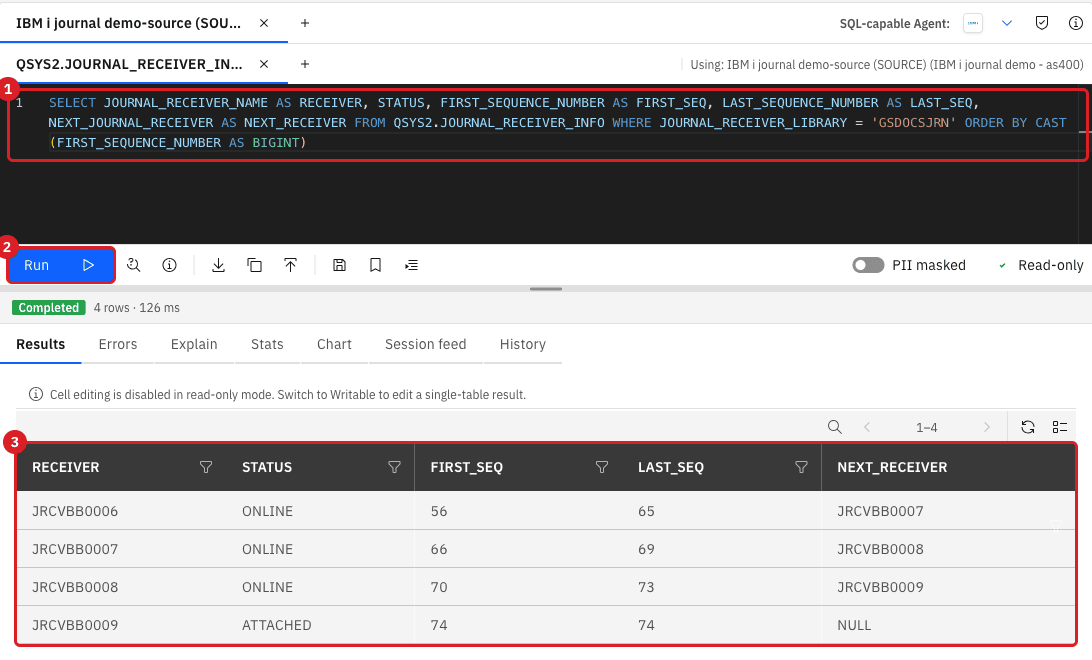
Query Studio opens the source in read-only mode. To list the files of a journal and their images, run SELECT OBJECT_NAME, JOURNAL_NAME, IMAGES FROM QSYS2.JOURNALED_OBJECTS WHERE JOURNAL_LIBRARY = 'GSDOCSJRN'. See Query data with Query Studio.
UI + CL
-
Start the entity (Start sync, then Start entity). If the table is not journaled for CDC, the start fails and a red notification appears;
-
Read the notification. Its title is Missing Journal Table Definition and its text starts with
Missing journal configuration for entity <name> and table <LIBRARY.TABLE>. Sync cannot be started. Only snapshot can be executed.The entity stays in the Hold group; -
Ask the IBM i administrator for the journaling of the file:
SELECT OBJECT_LIBRARY, OBJECT_NAME, JOURNAL_LIBRARY, JOURNAL_NAME, IMAGES FROM QSYS2.JOURNALED_OBJECTS WHERE OBJECT_LIBRARY = 'GSDOCSJRN' AND OBJECT_NAME = 'NOJRN' -
If the query returns no row, the file is not journaled. Start journaling with both images:
STRJRNPF FILE(GSDOCSJRN/NOJRN) JRN(GSDOCSJRN/JRNDEMO) IMAGES(*BOTH) OMTJRNE(*OPNCLO) -
If
IMAGESis*AFTER, end journaling and start it again with both images:ENDJRNPF FILE(GSDOCSJRN/AFTERONLY) JRN(GSDOCSJRN/JRNDEMO) STRJRNPF FILE(GSDOCSJRN/AFTERONLY) JRN(GSDOCSJRN/JRNDEMO) IMAGES(*BOTH) OMTJRNE(*OPNCLO) -
Start the entity again with Full copy, so that rows changed while the file was not journaled reach the target (see [resync-entities]).
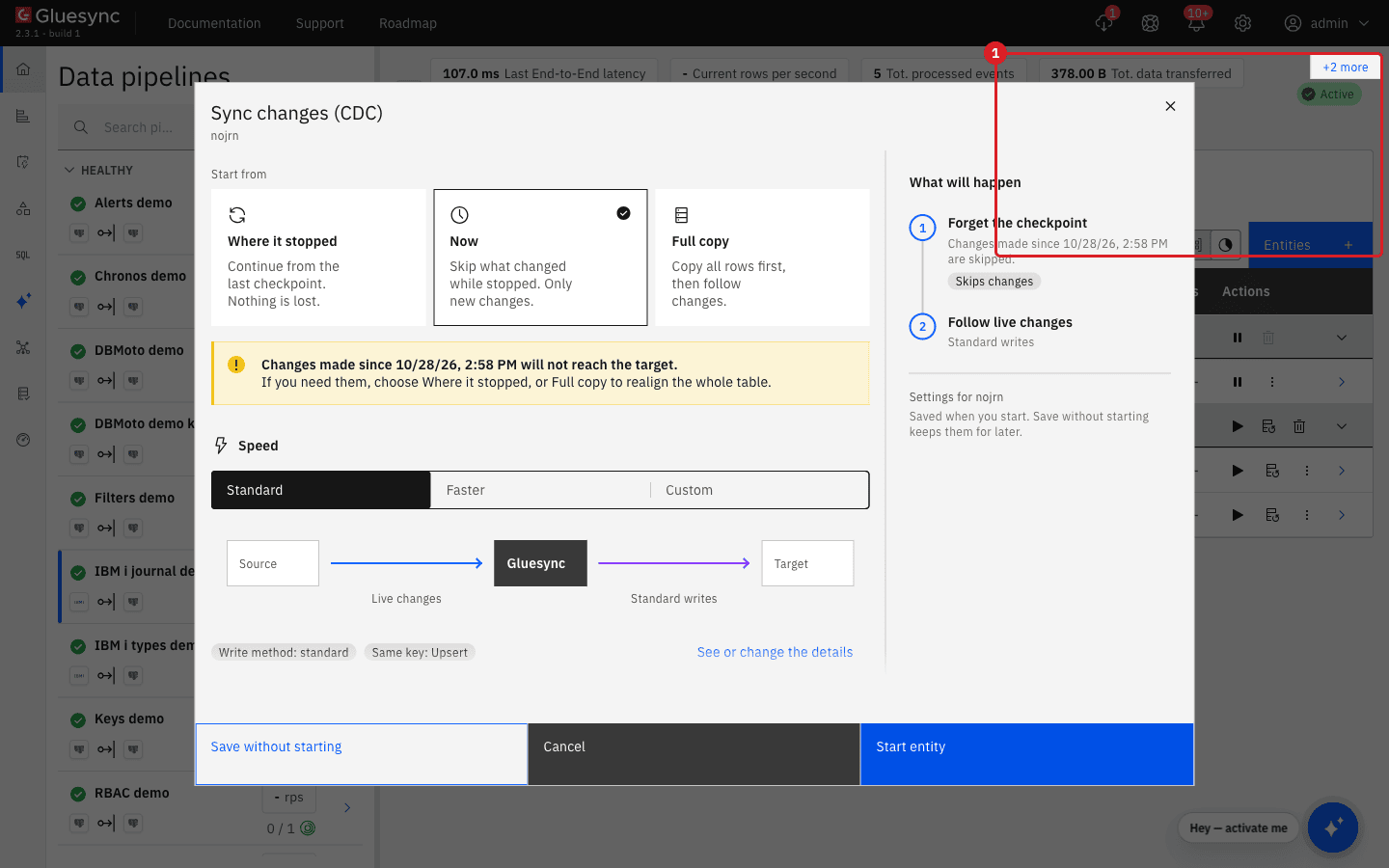
|
A table created with SQL |
|
Ending journaling on a file whose entity is running does not raise any error. The entity stays Active, but changes are not captured. After |
UI + CL
This happens when a receiver that Gluesync has not finished reading is deleted, for example by a housekeeping job, while the entities are stopped or the reader is behind. Receivers are deleted in the order in which they were attached: DLTJRNRCV of a receiver fails with CPF7023 while older receivers still exist. This is the command that was used for the test (DLTOPT(*IGNINQMSG) answers the "not saved" inquiry):
DLTJRNRCV JRNRCV(GSDOCSJRN/JRCVBB0003) DLTOPT(*IGNINQMSG)-
With the receiver deleted, start the entity with Where it stopped (the default for an entity that has run);
-
Wait for the first journal read, then open the notification Journal checkpoint outdated.
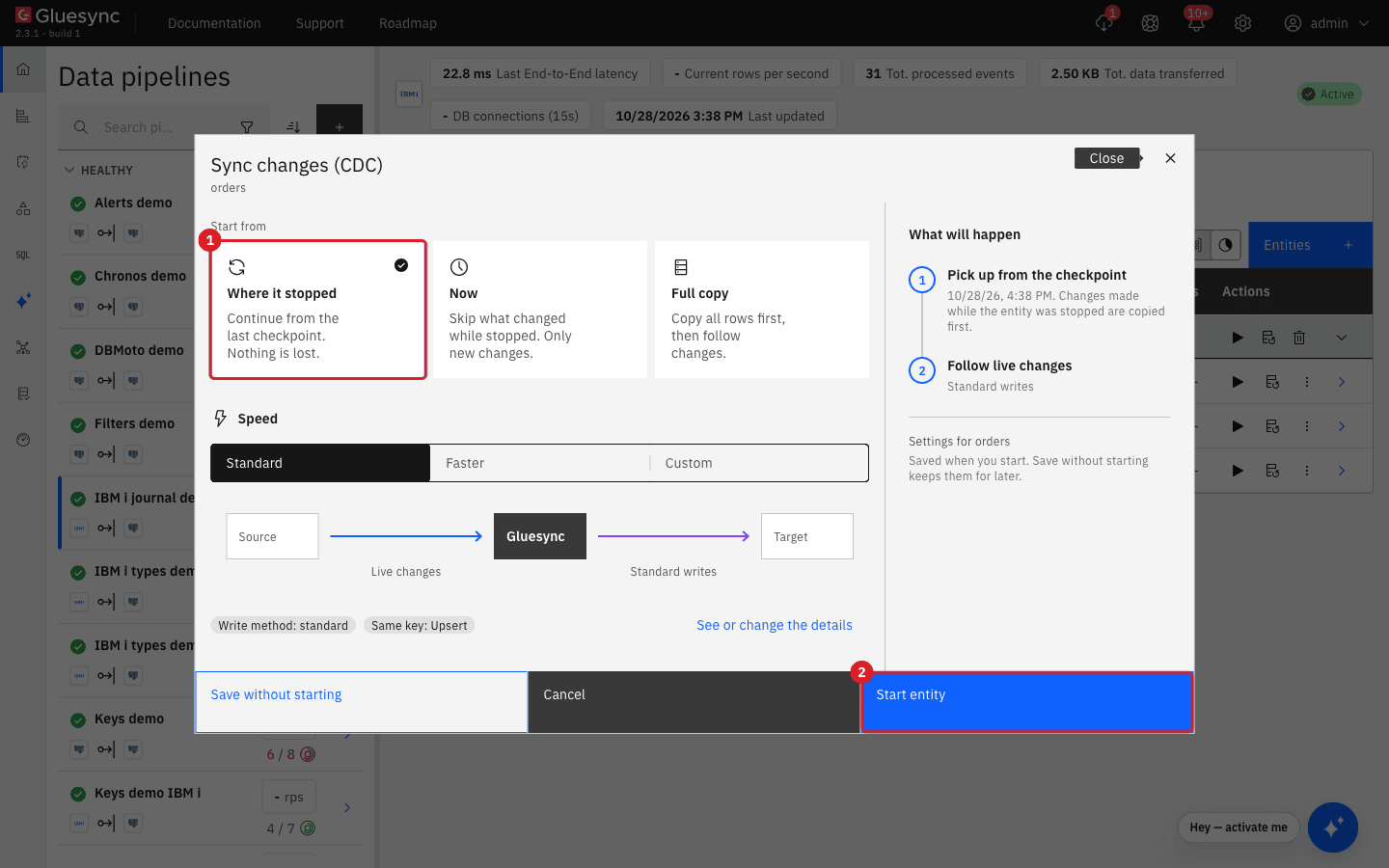
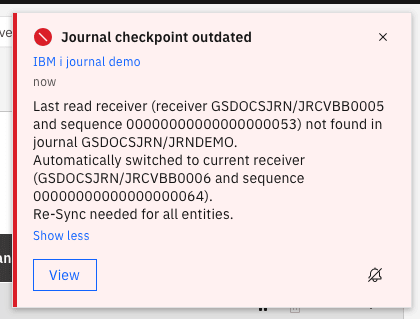
What the entity did and what is lost:
-
Gluesync moves the checkpoint to the end of the current receiver at that moment. Everything before that point is not read: the changes stored in the deleted receivers, and also the changes already written in the receivers that still exist. In the test, a row inserted after the rotation, in the surviving receiver, was lost together with the rows of the deleted one;
-
The data to resynchronize is every entity whose table is in that journal. Entities on other journals are not affected;
-
Gluesync does not resynchronize by itself.
To resynchronize every entity of the journal:
-
Pause the entity (Stop sync, then Pause entity);
-
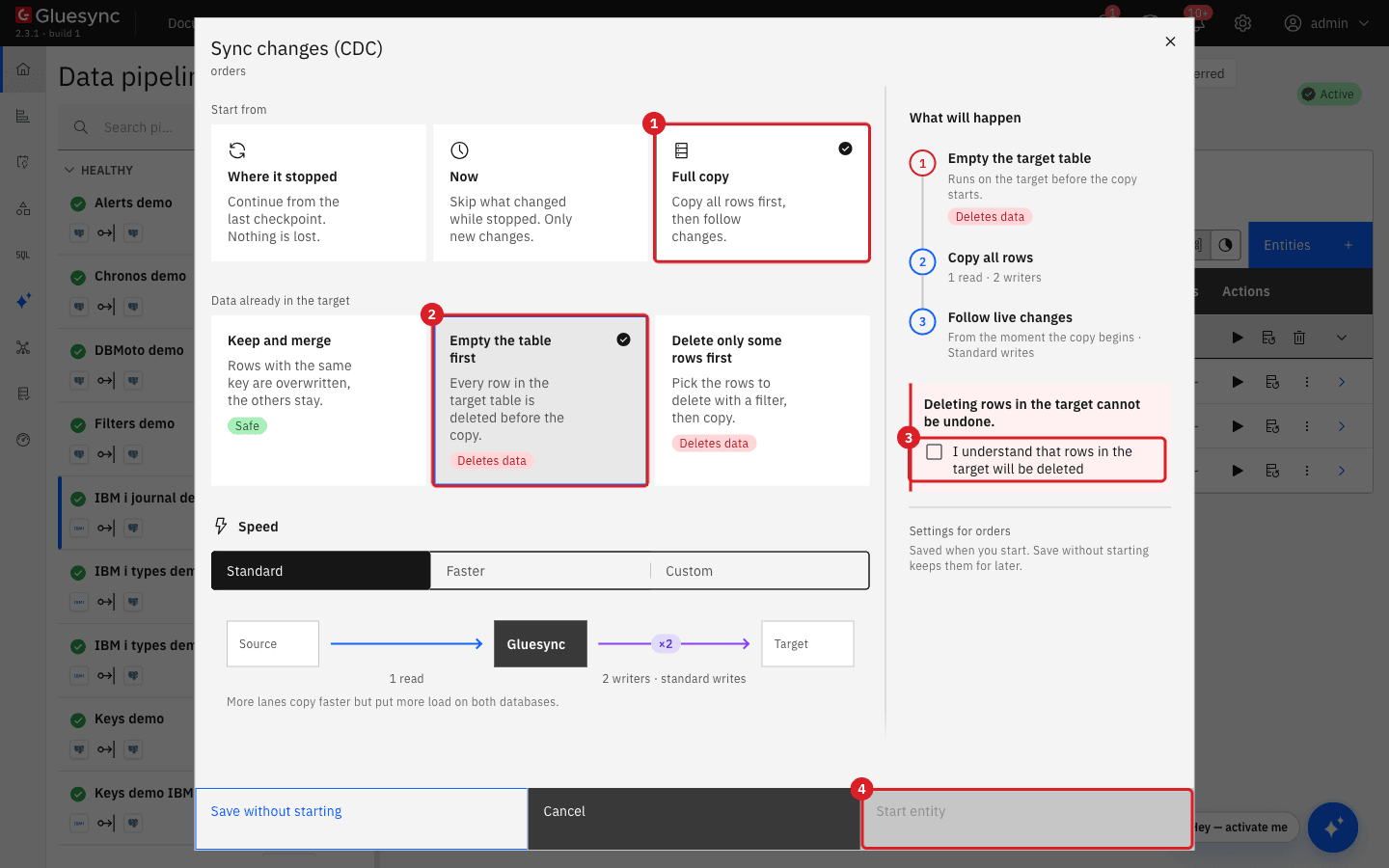
Select Start sync and, in Start from, select Full copy;
-
In Data already in the target, select Keep and merge if no row was deleted on the IBM i in the meantime, or Empty the table first if rows may have been deleted;
-
When you empty the table, tick I understand that rows in the target will be deleted. Start entity stays disabled until you tick it. If you do not see the box, scroll the dialog;
-
Select Start entity.
|
To prevent the problem, keep every receiver from the one named in the |
UI
Gluesync 2.3 cannot start CDC from a timestamp or from a sequence number that you type: neither the start dialog nor the start API has such a field. Choose the closest option:
| Option | What it does | Use it when |
|---|---|---|
Where it stopped |
Continues from the last checkpoint. Changes written while the entity was paused are delivered; in the test, rows written while the entity was stopped across three receiver changes arrived in order. |
The journal still holds every receiver since the entity stopped. |
Now |
Forgets the checkpoint and follows only new changes. A row written while the entity was stopped never reaches the target; a row written after the start does. |
You do not need the changes made while the entity was stopped, or the target is already aligned. |
Full copy |
Copies every row, then follows live changes from the moment the copy begins. |
You must realign the table, for example after a deleted receiver. |
Settings → Danger zone → Pipeline checkpoint reset |
Pauses every entity of the pipeline, deletes the disk cache and the stored read checkpoint of the journal. |
The position of the journal itself is wrong for the whole pipeline. The Control Plane advises using it only under the supervision of MOLO17 Support. |
To reset the checkpoint of the pipeline:
-
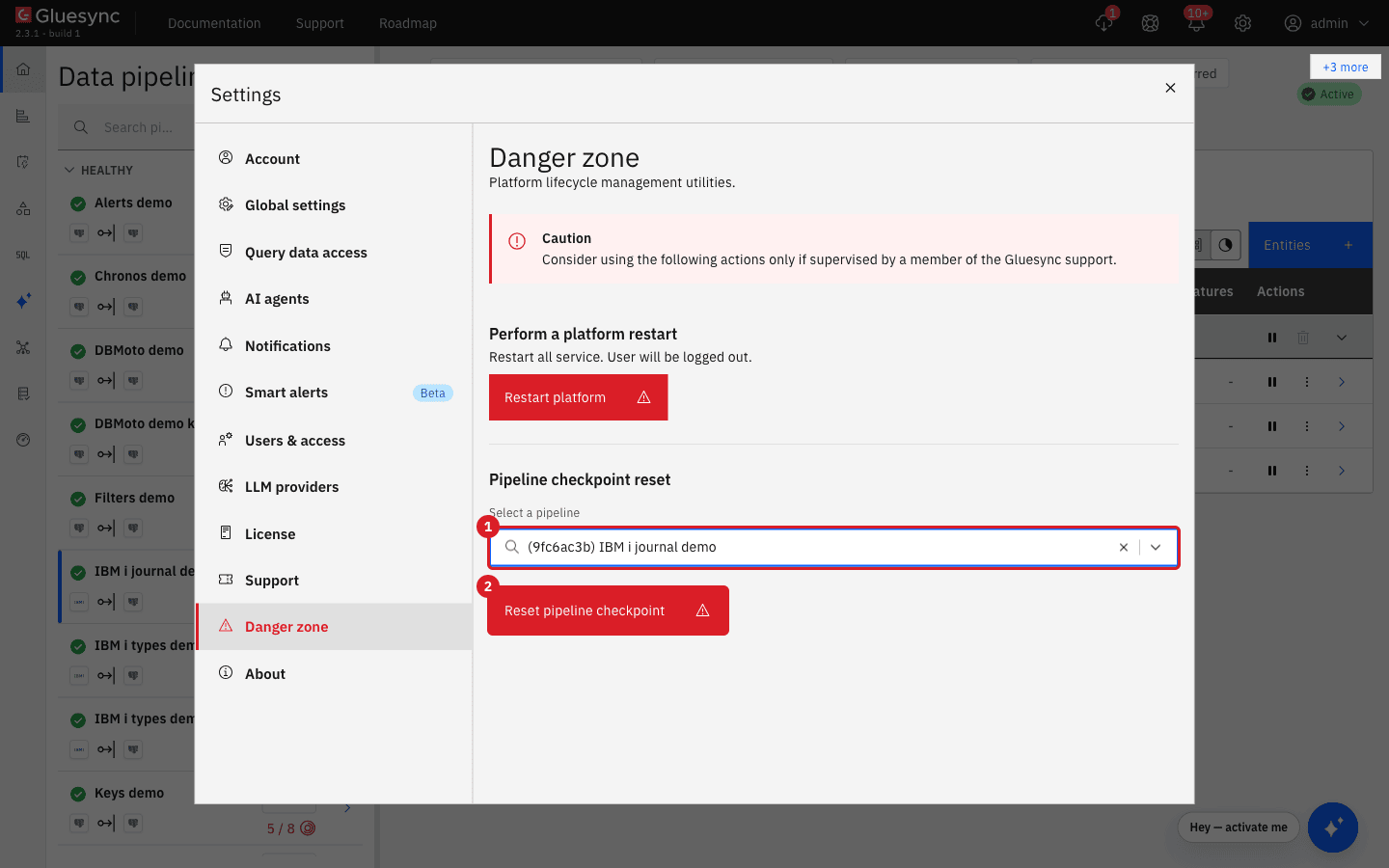
Select Settings (the gear icon) and then Danger zone;
-
In Pipeline checkpoint reset, select the pipeline in Select a pipeline;
-
Select Reset pipeline checkpoint;
-
Read the dialog Confirm Reset and select Confirm.
|
Use Pipeline checkpoint reset only when no other option works. The dialog states that every entity must be resynchronized, because changes not yet replicated may be lost. After the reset, start the entities with Now or Full copy, the two options that were checked after a reset. |
CL + SQL
The receiver name does not matter to Gluesync: it follows the chain of links, so a name that goes from 9999 back to 0000 needs no action. To check it on your system:
-
Look at how the IBM i names the next receiver (
CHGJRN … JRNRCV(*GEN)generates it). With a short name such asJRCV9999the number simply gets longer (JRCV10000). With a name that already has ten characters, such asJRCVAA9999, the number wraps toJRCVAA0000; -
Run the receiver query of step 1 and check that every receiver except the attached one names its successor, also across the wrap.
CRTJRNRCV JRNRCV(GSDOCSJRN/JRCVAA9998)
CHGJRN JRN(GSDOCSJRN/JRNDEMO) JRNRCV(GSDOCSJRN/JRCVAA9998)
CHGJRN JRN(GSDOCSJRN/JRNDEMO) JRNRCV(*GEN)
CHGJRN JRN(GSDOCSJRN/JRNDEMO) JRNRCV(*GEN)UI
By default, all entities of one journal share one reader: it reads the journal once and keeps the changes in a disk cache for each entity. With Use Dedicated Journal Reader an entity reads the journal on its own, directly to the target, without the shared reader and its cache, and without saving its position in the checkpoint of the journal.
Enable it for a table that needs isolated, high-throughput reading. Every dedicated entity opens its own journal reads on the IBM i, so enable it only where needed (see the journal architecture page).
-
Pause the entity;
-
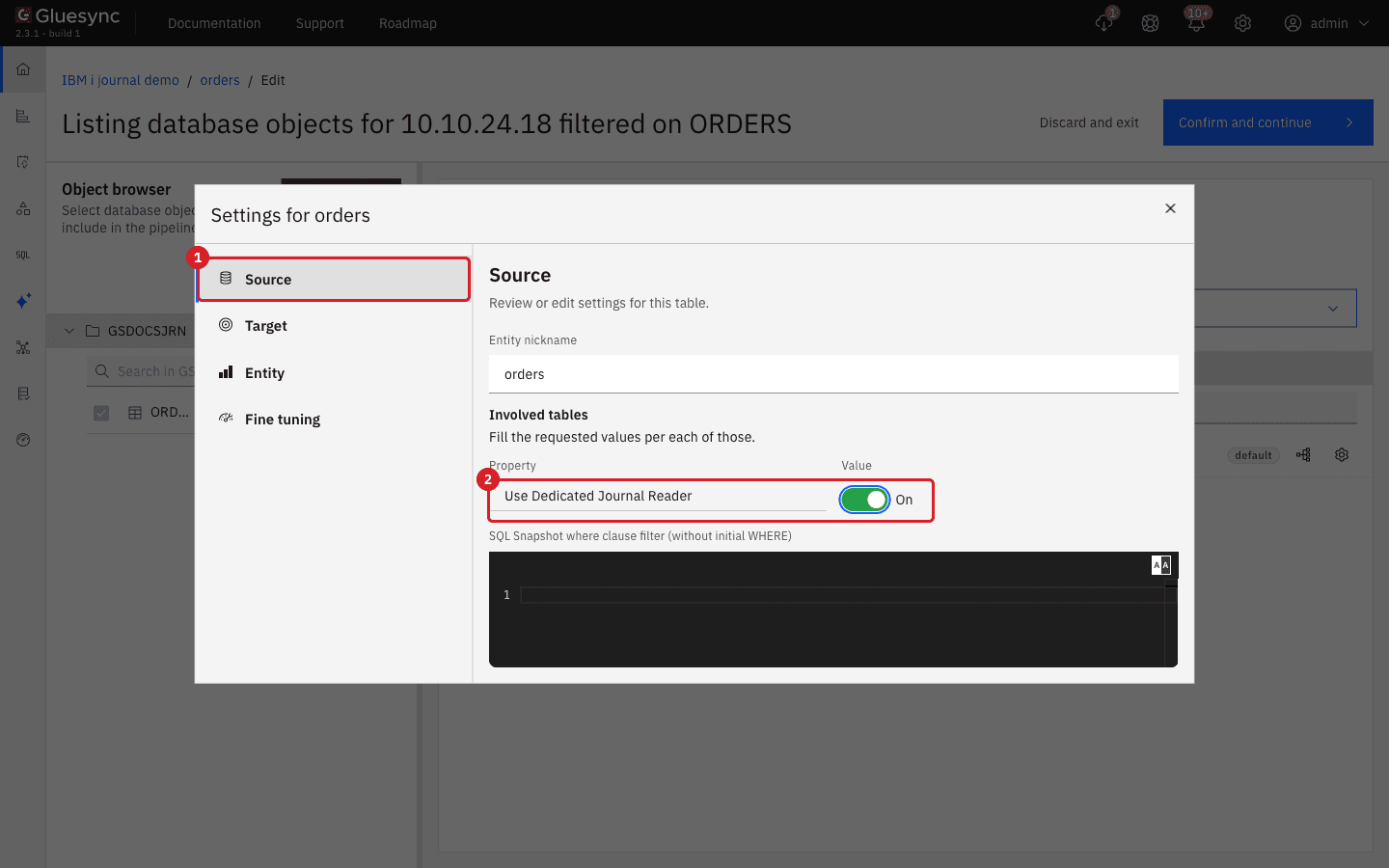
In the entity row, select Options (the three-dot icon) and then Edit settings;
-
On the Source tab, switch Use Dedicated Journal Reader to On;
-
Close the dialog and select Confirm and continue;
-
Start the entity with Where it stopped.
Config + SQL
Gluesync keeps service objects in the library named in Gluesync library of the source connection (default GLUESYNC; the test used GSDOCSJWK). It never stores application data there. List its objects:
SELECT OBJNAME, OBJTYPE, OBJSIZE, OBJCREATED
FROM TABLE(QSYS2.OBJECT_STATISTICS('GSDOCSJWK', '*ALL')) X| Setting or mode | What appears in the library |
|---|---|
Default settings (journal reader on the IBM i journal APIs) |
Nothing. In the test the library was empty while entities captured changes. |
Legacy mode journal reader (use DSPJRN command) on |
One |
Enable DDS Discovery and Enable multi-member physical file support |
|
Delete objects of the library only while all the entities of the pipeline are paused. What can really grow on the IBM i is the set of journal receivers that your housekeeping keeps, not this library.
Symptom, cause and fix
| Symptom | Cause | Fix |
|---|---|---|
Start fails with Missing Journal Table Definition; the entity stays on hold |
The file is not journaled, or is journaled with |
Run |
The entity is Active and green, but changes do not reach the target |
Journaling of the file was ended ( |
Check |
Journal checkpoint outdated with Re-Sync needed for all entities |
The receiver named in the checkpoint no longer exists on the IBM i |
Resynchronize every entity of the journal with Full copy; keep receivers until Gluesync has read them |
After the notification, the target misses rows, also rows that are still in existing receivers |
Gluesync moved to the end of the current receiver |
Full copy of every entity of the journal; rows deleted on the source need Empty the table first |
You need CDC from a given time or sequence number |
The Control Plane offers Where it stopped, Now and Full copy only |
Pick the closest option from the table in "Restart CDC from a chosen point" |
After Pipeline checkpoint reset the entities do not resume as before |
The reset deletes the stored position and the cache of the pipeline |
Start each entity with Now or Full copy |
The receiver name goes from |
IBM i naming of the next receiver |
Nothing: Gluesync follows the chain. Check the chain with the receiver query |
Start entity stays disabled in the Full copy dialog |
Empty the table first needs the confirmation box |
Scroll the dialog and tick I understand that rows in the target will be deleted |
CL commands for the IBM i administrator
| Task | Command or query |
|---|---|
Journal the file with both images |
|
End journaling of the file |
|
List the journaled files and their images |
|
Create a receiver and attach it to the journal |
|
Attach a new receiver with a generated name |
|
Attach a new receiver and restart the sequence number |
|
Delete a detached receiver (oldest first) |
|
List the receivers, their range and successor |
|
Show the attached receiver and the receiver management options |
|
Run a CL command from SQL with CALL QSYS2.QCMDEXC('<command>').
|
|
Contact MOLO17 Support if the notification keeps coming back or the journal position does not move.