Send platform events to webhooks
Core Hub can call an HTTP endpoint every time something happens on the platform: an entity starts, an entity stops, a pipeline fails. This guide creates a webhook in the Control Plane, explains every field, and then shows real payloads arriving at a test receiver, together with the delivery log and the dead-letter queue that Core Hub keeps for each attempt.
In this guide
You will learn how to prepare a receiver, create and test a webhook, choose the events and severities it receives, verify its signature, trigger real events, read the payloads, review the delivery log, and retry a failed delivery.
Quick information
Goal |
Deliver Gluesync platform events to an HTTP endpoint and verify them |
Audience |
Gluesync administrators and integration developers |
Level |
Intermediate |
Time required |
About 40 minutes |
Area |
Control Plane → Settings → Notifications → Webhooks |
Applies to |
Gluesync 2.3 |
Before you begin
Make sure that:
-
You can sign in to the Gluesync Control Plane with a user that can change platform settings;
-
You have an HTTP endpoint that Core Hub can reach from its own network, and a way to see the requests it receives;
-
A test pipeline with a running entity is available, and you can change its target in a database tool. The guide makes a target table reject writes on purpose, so do not use a production pipeline.
|
This guide was tested with webhook-tester, a receiver that shows every request it gets. You open it in your browser at |
Guide steps
UI
-
Open the receiver in your browser (here
http://localhost:8091). It creates a session with a unique URL; -
Note the session ID, the last part of the URL;
-
Build the address that Core Hub must call: the host and port that Core Hub uses to reach the receiver, followed by the session ID. For webhook-tester that is
http://webhook-tester:8080/<session-id>;.

UI
-
Select the Settings gear icon in the header;
-
Select Notifications;
-
Select the Webhooks tab;
-
Select Add webhook.
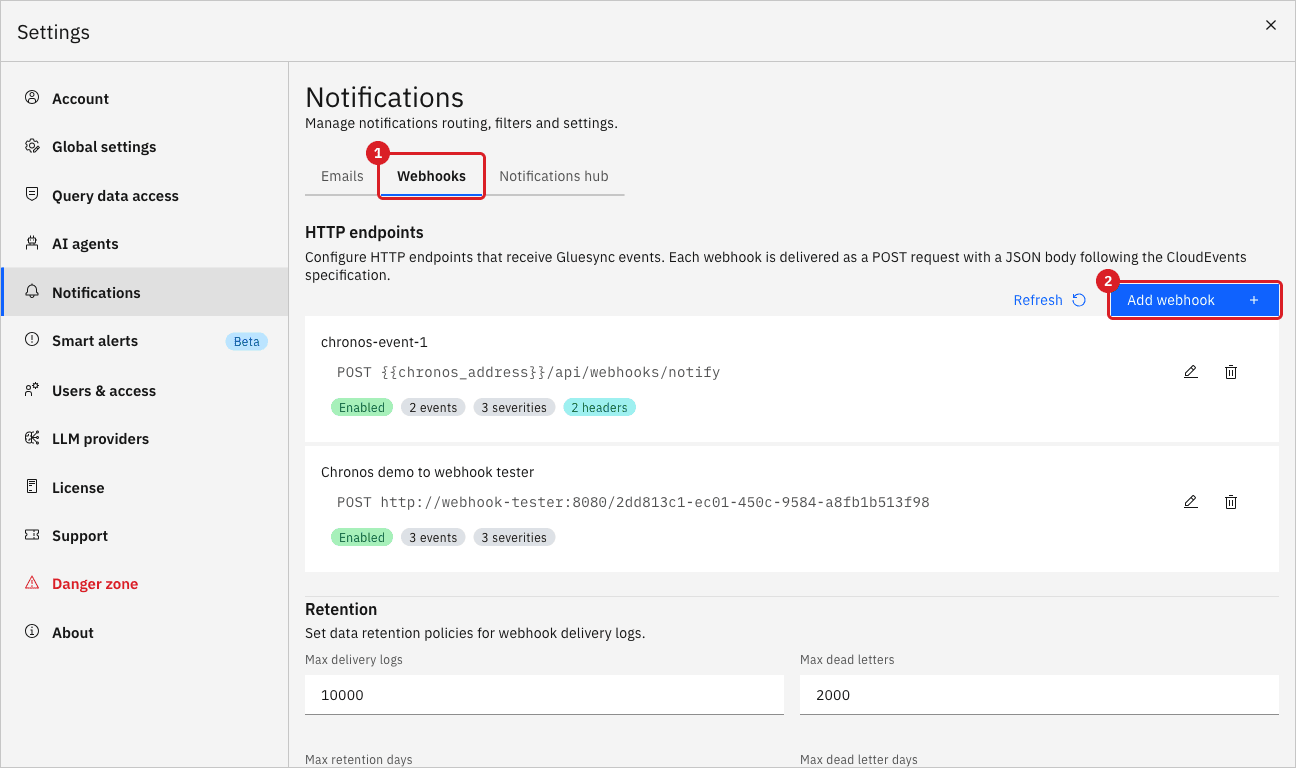
UI
-
Keep Webhook enabled selected;
-
Select Include exception stack trace in payload (error/critical events) if the receiver should get the stack trace of failures;
-
In Name, enter a label for the list and for the delivery logs. This guide uses
Alerts demo webhook; -
In Endpoint URL, enter the address of the receiver;
-
In Signing secret (optional), enter a secret if the receiver must verify that a request comes from Core Hub. This guide uses a dummy value;
-
In Description (optional), enter a note for your colleagues.
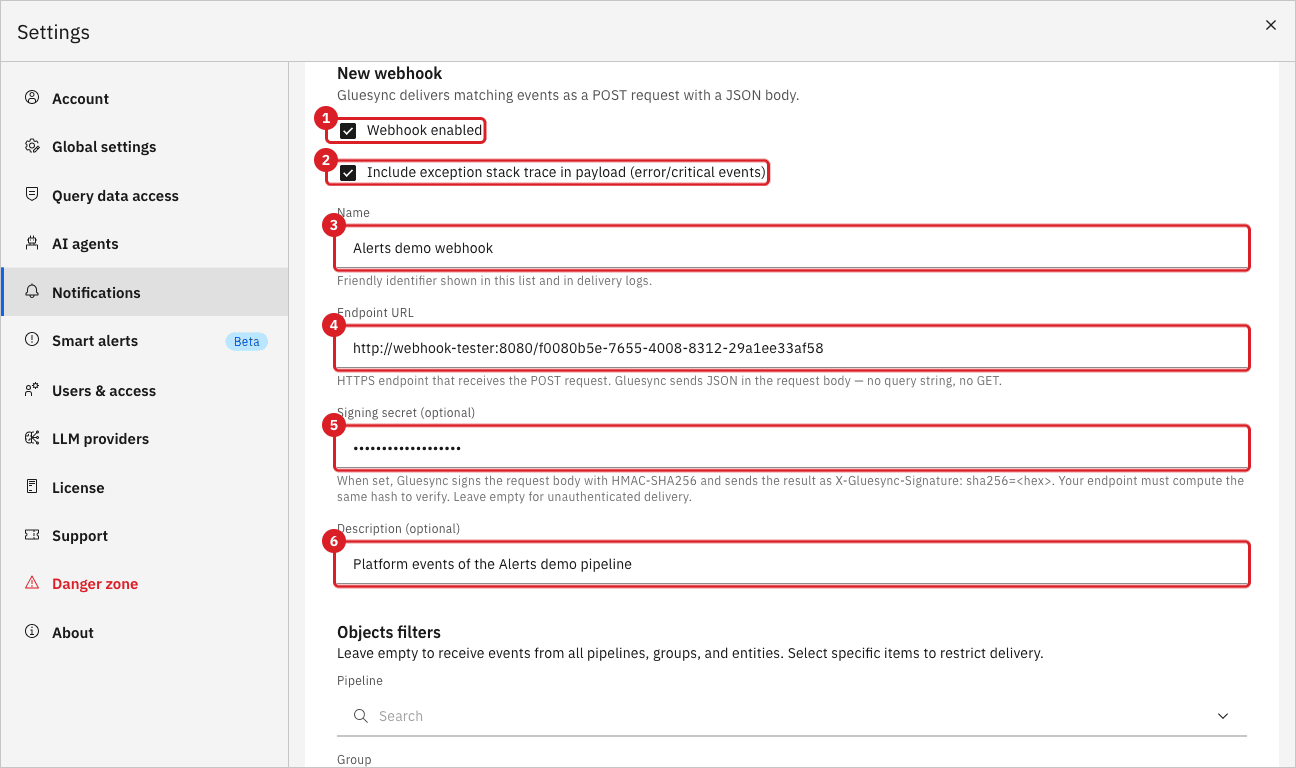
| Field | What it does |
|---|---|
Webhook enabled |
When cleared, Core Hub sends nothing to this webhook, but keeps its configuration. |
Include exception stack trace in payload (error/critical events) |
Adds the |
Name |
Friendly identifier shown in the list and in the Webhook column of the delivery logs. |
Endpoint URL |
Address that receives the |
Signing secret (optional) |
When set, Core Hub signs the request body with HMAC-SHA256 and sends the result in the |
Description (optional) |
Free text. It is not sent to the endpoint. |
UI
-
In Objects filters, select a Pipeline, Group, or Entity to restrict the webhook to those objects. This guide selects the pipeline Alerts demo. With the three filters empty, events from every object are delivered;
-
In Enabled events, open the list and tick the event types to deliver. This guide ticks Entity Snapshot Started, Entity Snapshot Completed, Entity CDC Started, Entity CDC Stopped, Pipeline Error, and Pipeline Error Resolved. Select Select all or Clear to change every entry at once;
-
In Severity filter, tick Critical, Info, and Warning.
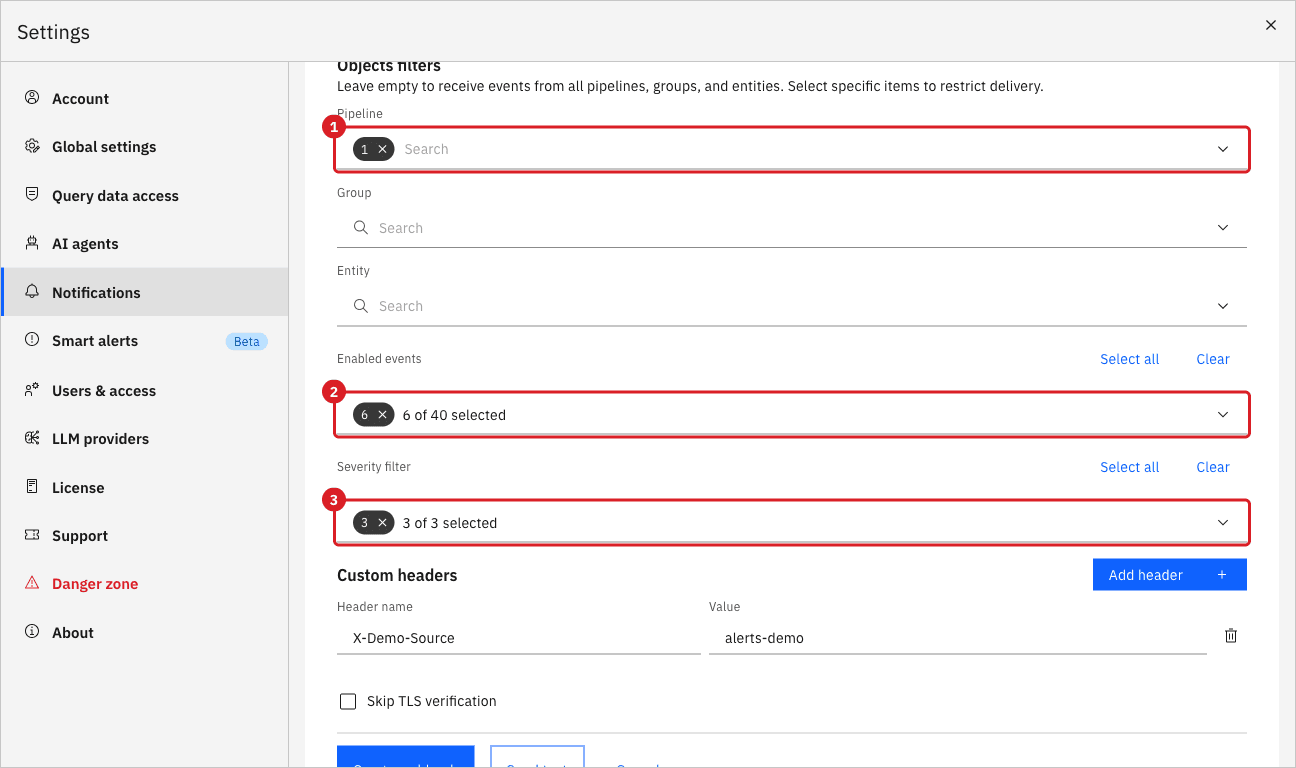
|
Select at least one severity. A webhook with no severity selected receives no events at all, not every event. The same applies to Enabled events: select the types you need. |
UI
-
Select Add header;
-
In Header name, enter
X-Demo-Source, and in Value, enteralerts-demo. Core Hub adds every header you define to each request. It ignores the reserved namesX-Gluesync-Event,X-Gluesync-Delivery,X-Gluesync-Signature,Host,Content-Length, andContent-Type; -
Leave Skip TLS verification cleared. Select it only for an HTTPS endpoint with a self-signed or internal certificate that the Core Hub trust store does not know;
-
Select Send test;
-
Scroll up to the top of the Webhooks tab.
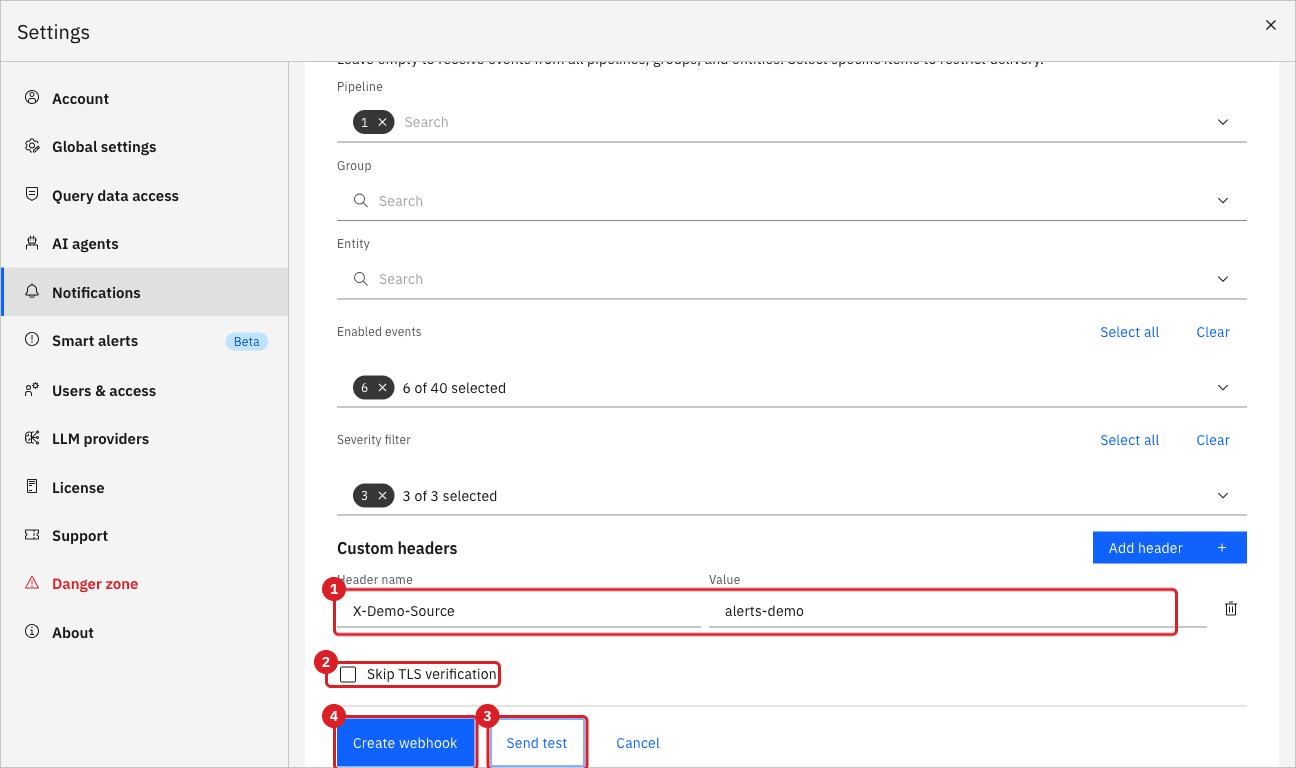
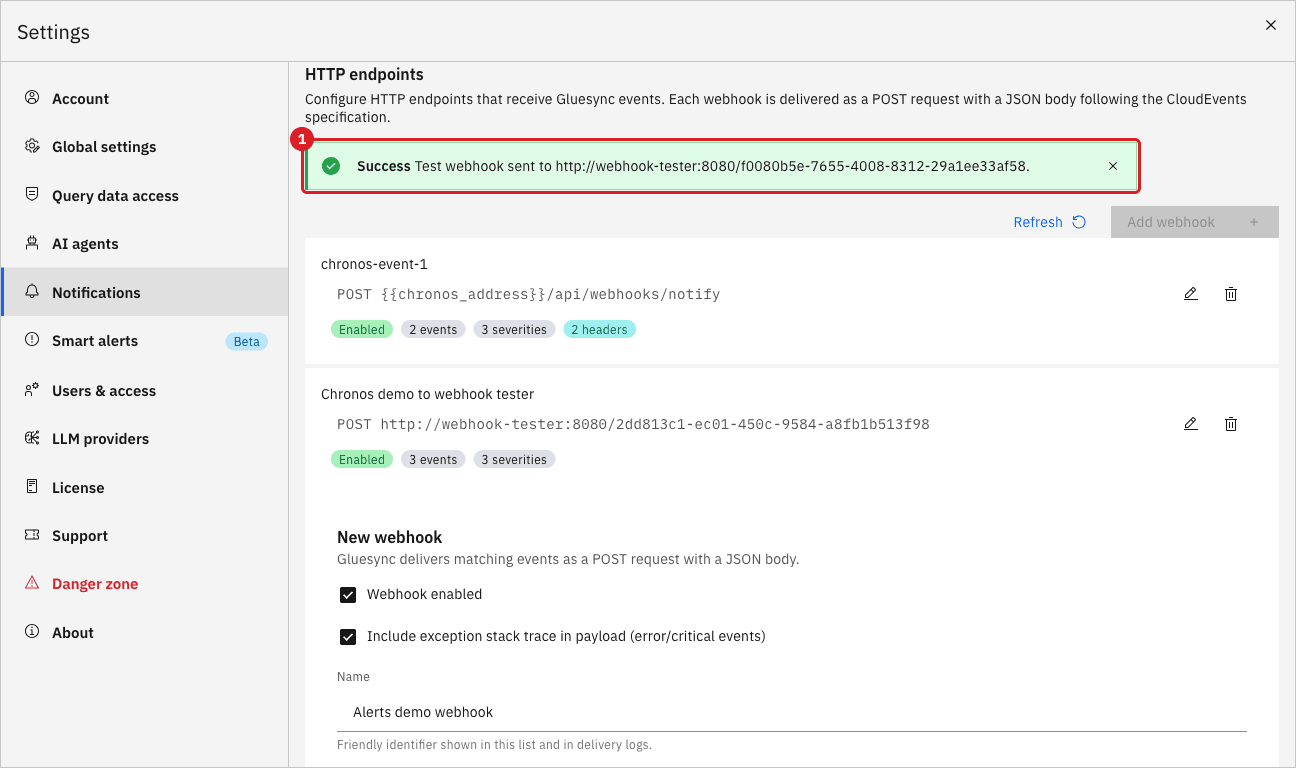
|
The Success message does not prove that the endpoint received the event. In this release it also appears when the endpoint refuses the connection (the request is retried for about 7 seconds first). Always confirm the test in the receiver. |
UI
-
Scroll down to the end of the form;
-
Select Create webhook.
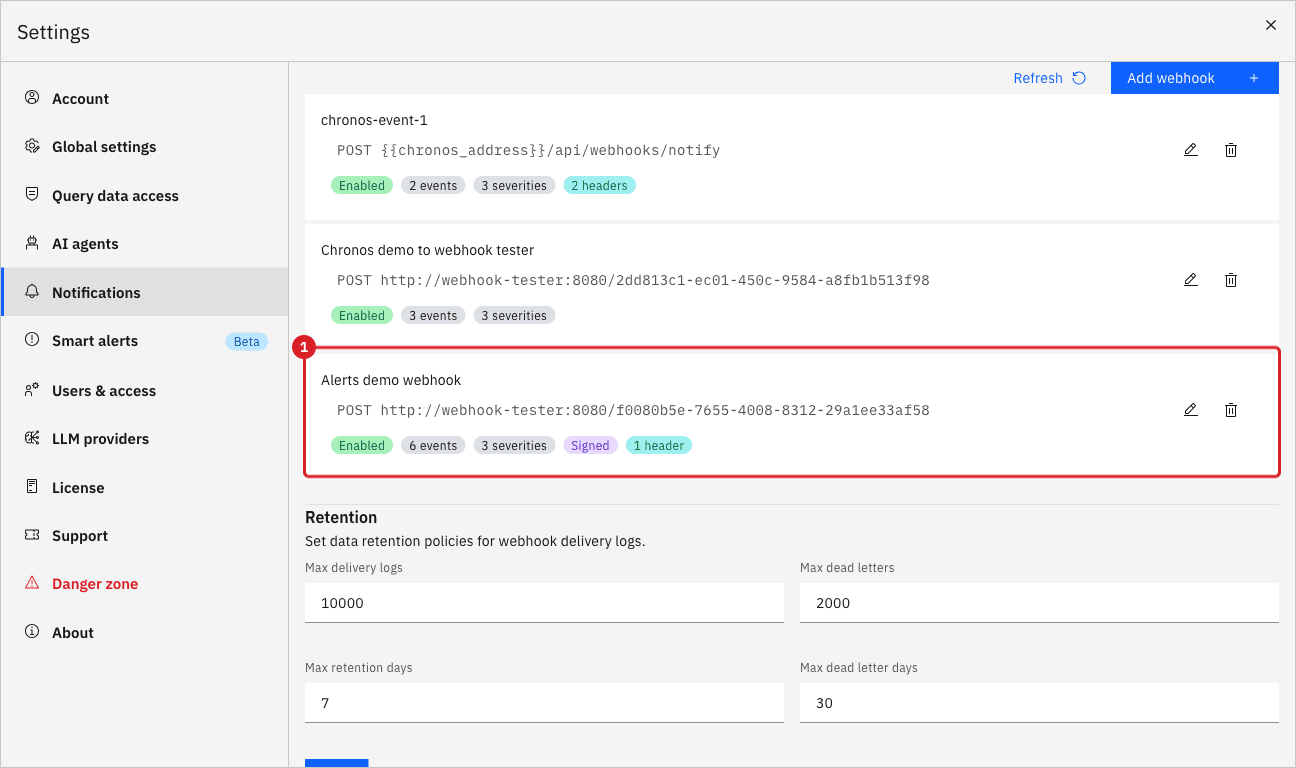
|
The Retention section below the list applies to the delivery logs and dead letters of every webhook, not only yours. This guide leaves its values unchanged. |
UI
-
In the receiver, select the request that arrived;
-
Review the HTTP headers. Select Show all headers if the list is cut;
-
Review the request body.
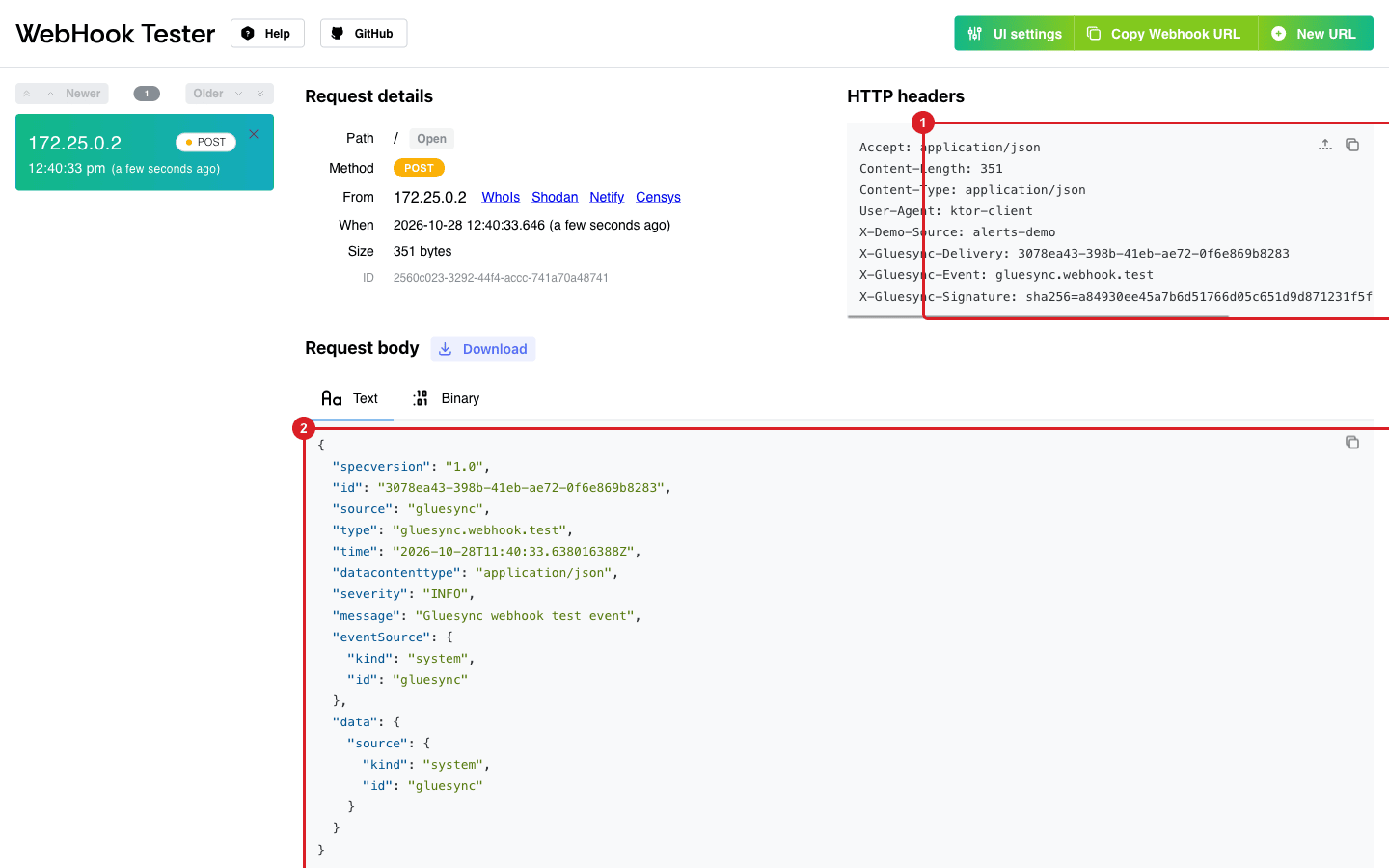
Every delivery carries these headers:
| Header | Value |
|---|---|
|
The event type, for example |
|
A unique identifier of the delivery. It equals the |
|
|
|
The custom header that you defined. |
To verify a signature, compute the HMAC-SHA256 of the raw body with the same secret and compare it with the header:
import hashlib, hmac

def is_valid(body: bytes, secret: str, header: str) -> bool:
    expected = "sha256=" + hmac.new(secret.encode(), body, hashlib.sha256).hexdigest()
return hmac.compare_digest(expected, header)UI
Use the pipeline that the webhook is scoped to.
-
Open the pipeline and select the play icon in the row of a paused entity;
-
In the start dialog, keep Where it stopped and select Start entity;
-
Wait a few seconds, then select the pause icon in the same row;
-
In the Pause customers dialog, select Pause entity.
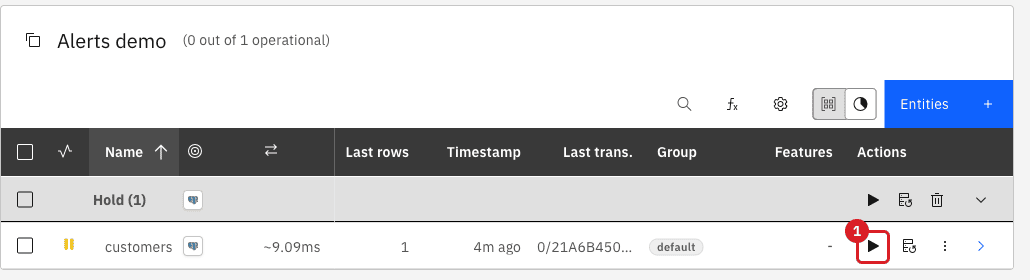
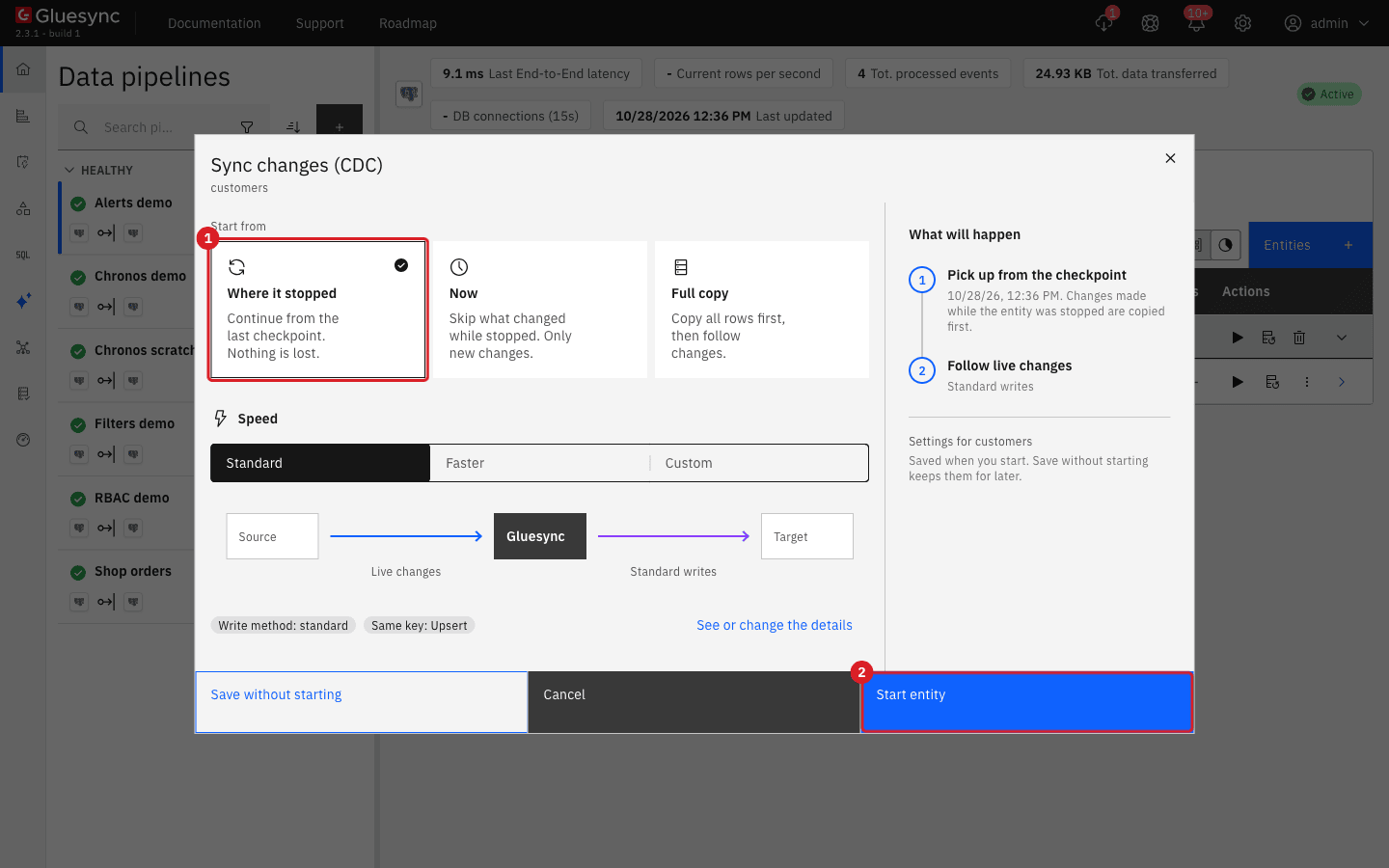
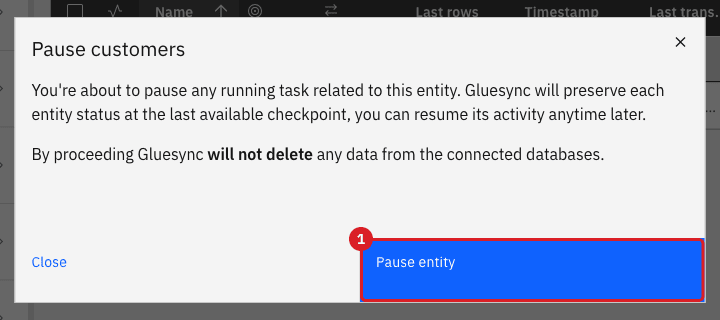
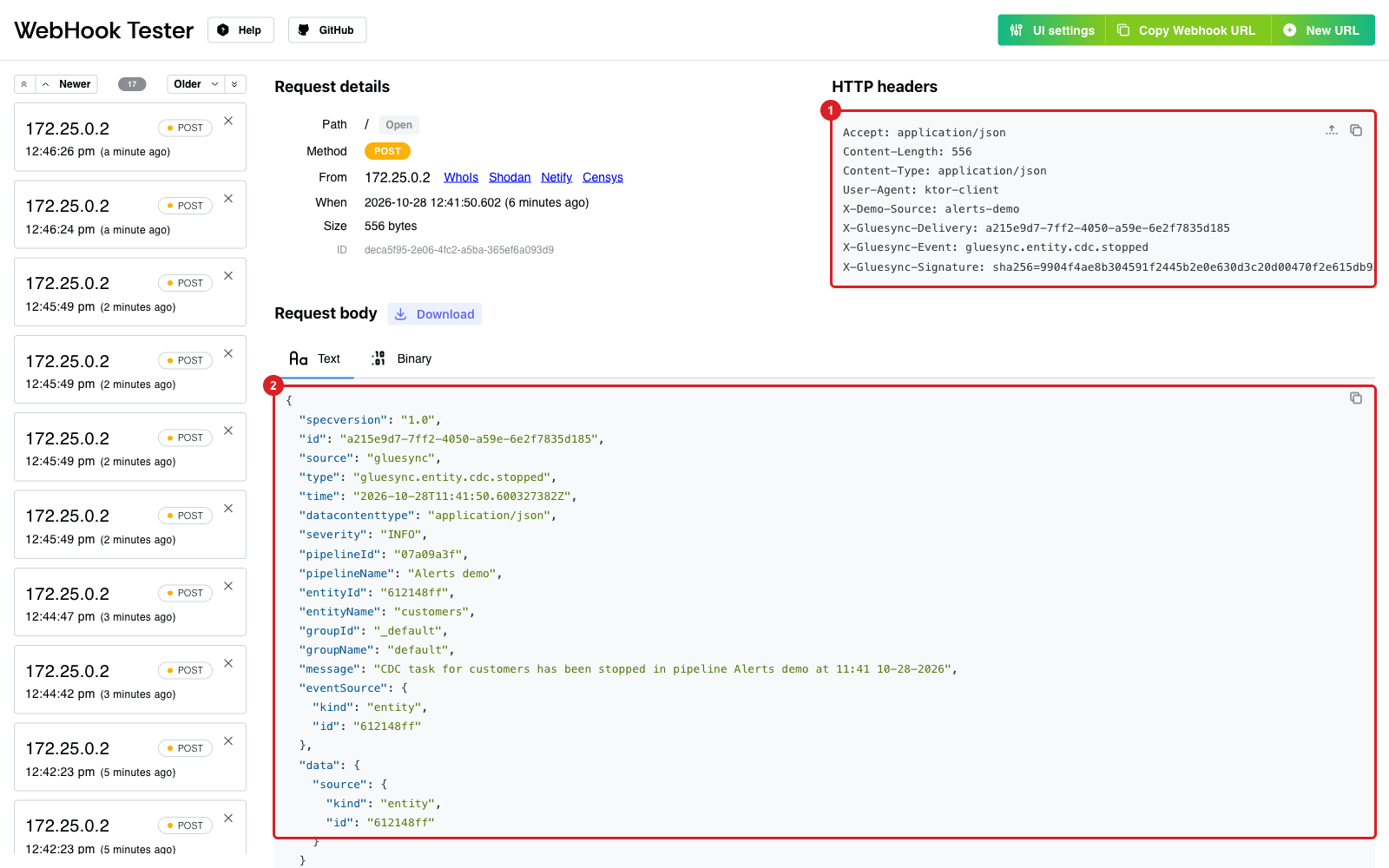
gluesync.entity.cdc.stopped: headers (1) and body (2).UI SQL
Make the target table reject writes, then start the entity so that it must write.
-
In your database tool, connect to the target database of the test pipeline and run:
ALTER TABLE shop_alerts.customers
  ADD CONSTRAINT alerts_demo_block CHECK (false) NOT VALID;
NOT VALIDleaves existing rows alone and rejects every new or updated row; -
In the Control Plane, select the play icon of the paused entity;
-
In the start dialog, select Full copy, keep Keep and merge, and select Start entity;
-
Wait about 20 seconds and review the receiver.
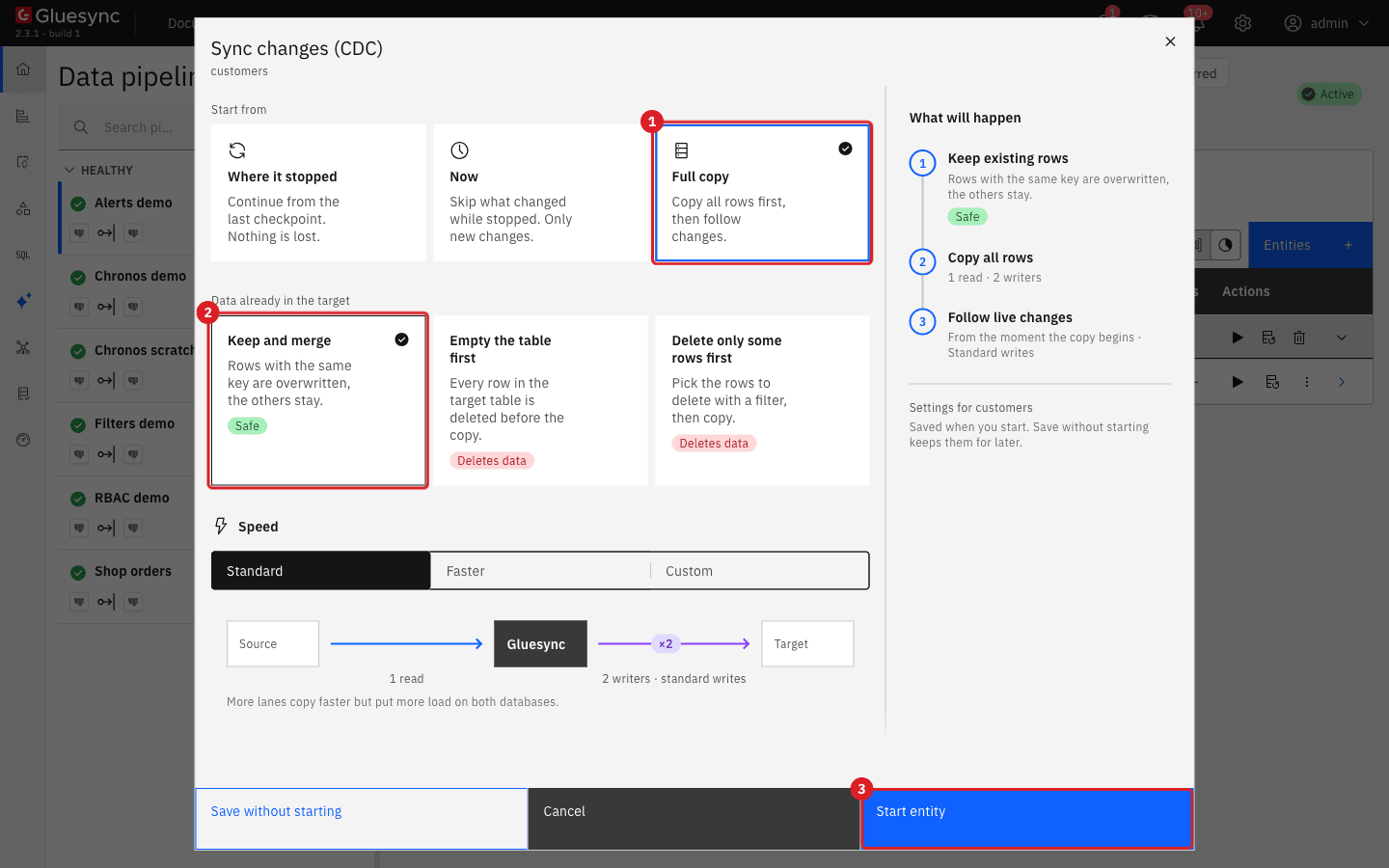
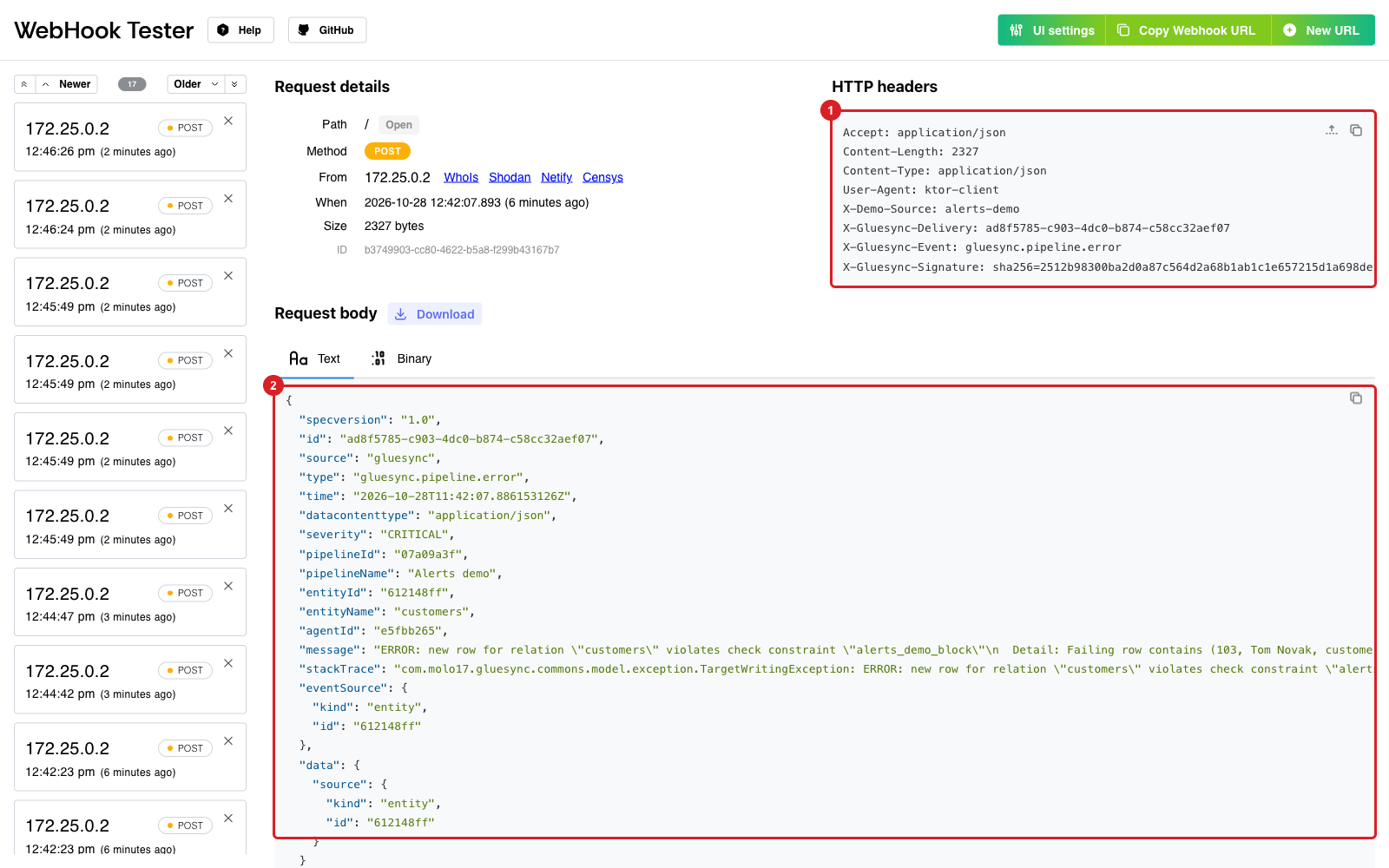
gluesync.pipeline.error has the severity CRITICAL.|
The database message can include the values of the row that failed. The payload leaves Core Hub and reaches every system you configure, so use the stack trace option and the receiver with the same care as the data itself. |
SQL
-
In your database tool, run:
ALTER TABLE shop_alerts.customers DROP CONSTRAINT alerts_demo_block; -
Watch the receiver and the entity row.
UI
-
In Settings, open Notifications and the Webhooks tab;
-
Scroll to Delivery logs;
-
Compare the rows with the requests that the receiver got. Select Refresh to load the latest attempts.
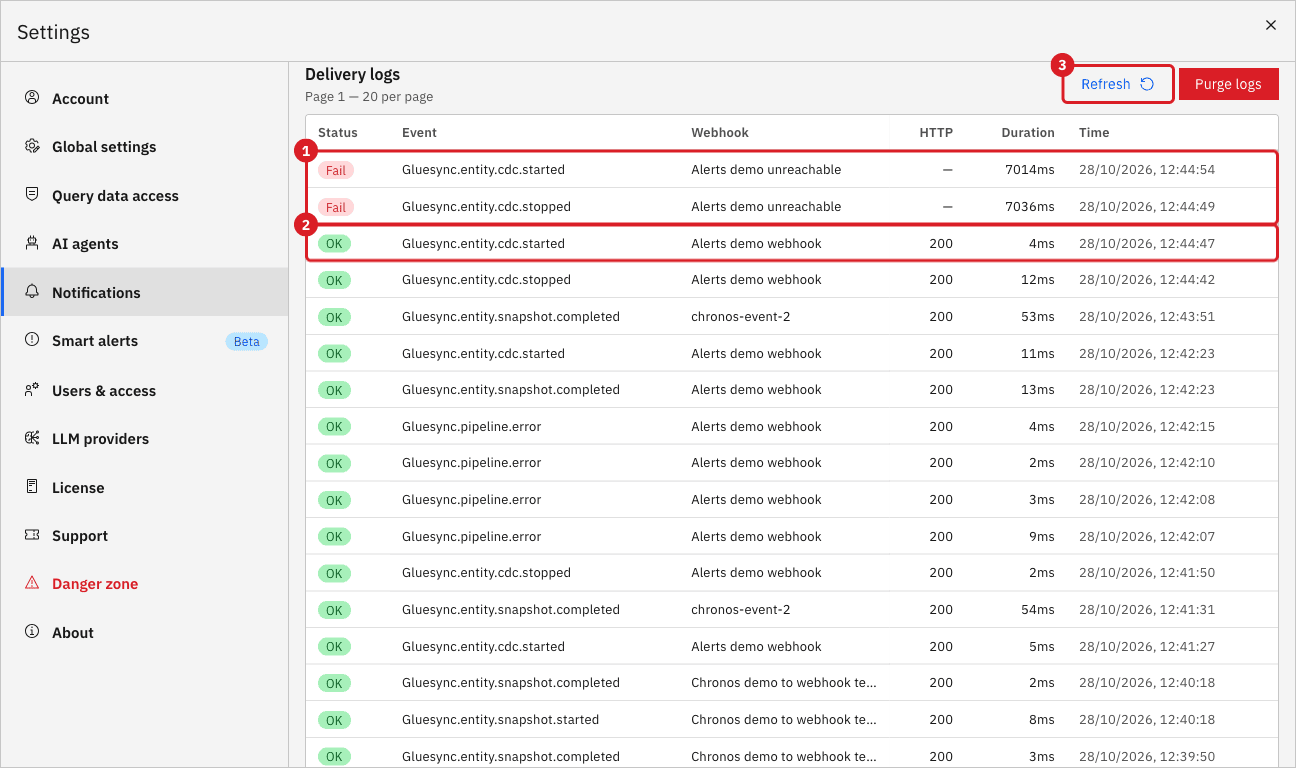
200. Select Refresh (3) to reload.| Column | What it shows |
|---|---|
Status |
OK when the endpoint answered with a |
Event |
The event type of the delivery, for example |
Webhook |
The Name of the webhook that received the delivery. |
HTTP |
The status code of the last answer, or a dash when the endpoint never answered. |
Duration |
The time of the whole delivery, retries included. |
Time |
The moment of the delivery. |
|
The delivery log is shared: it lists the deliveries of every webhook and every pipeline on the platform, 20 rows per page. Use the Webhook column to find your rows. Purge logs deletes the log of everyone, so do not use it on a shared system. |
UI
When an endpoint does not answer, Core Hub retries the delivery and, if every attempt fails, moves it to the dead letters. To see one, create a temporary second webhook.
-
Select Add webhook and enter
Alerts demo unreachableas the Name andhttp://webhook-tester:9/unreachableas the Endpoint URL, an address where nothing listens; -
Scope it to the pipeline Alerts demo, tick Entity CDC Started and Entity CDC Stopped, tick all three severities, and select Create webhook;
-
Pause and start the entity again, as before;
-
Wait about 10 seconds and select Refresh under Dead letters;
-
Open the temporary webhook with its pencil icon, replace the Endpoint URL with the working address of your receiver, and select Save changes;
-
In Dead letters, select Retry in each row.
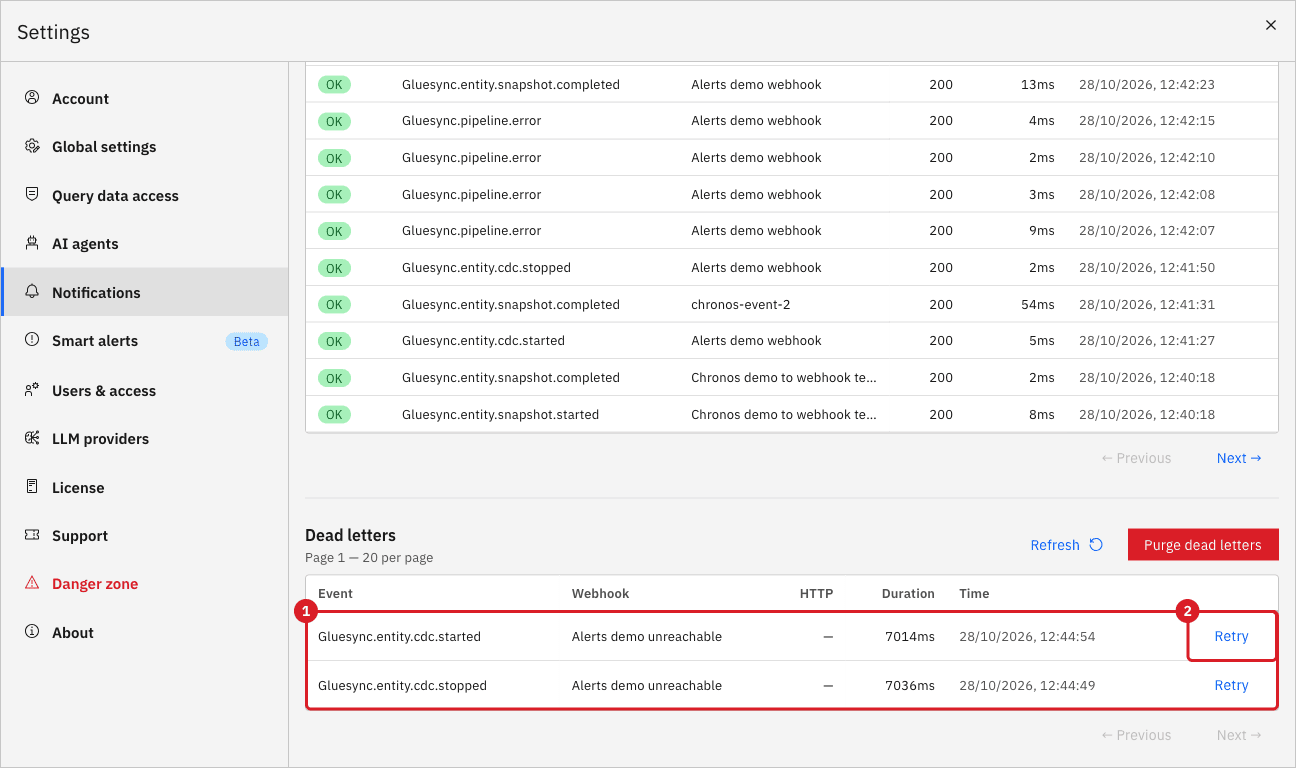
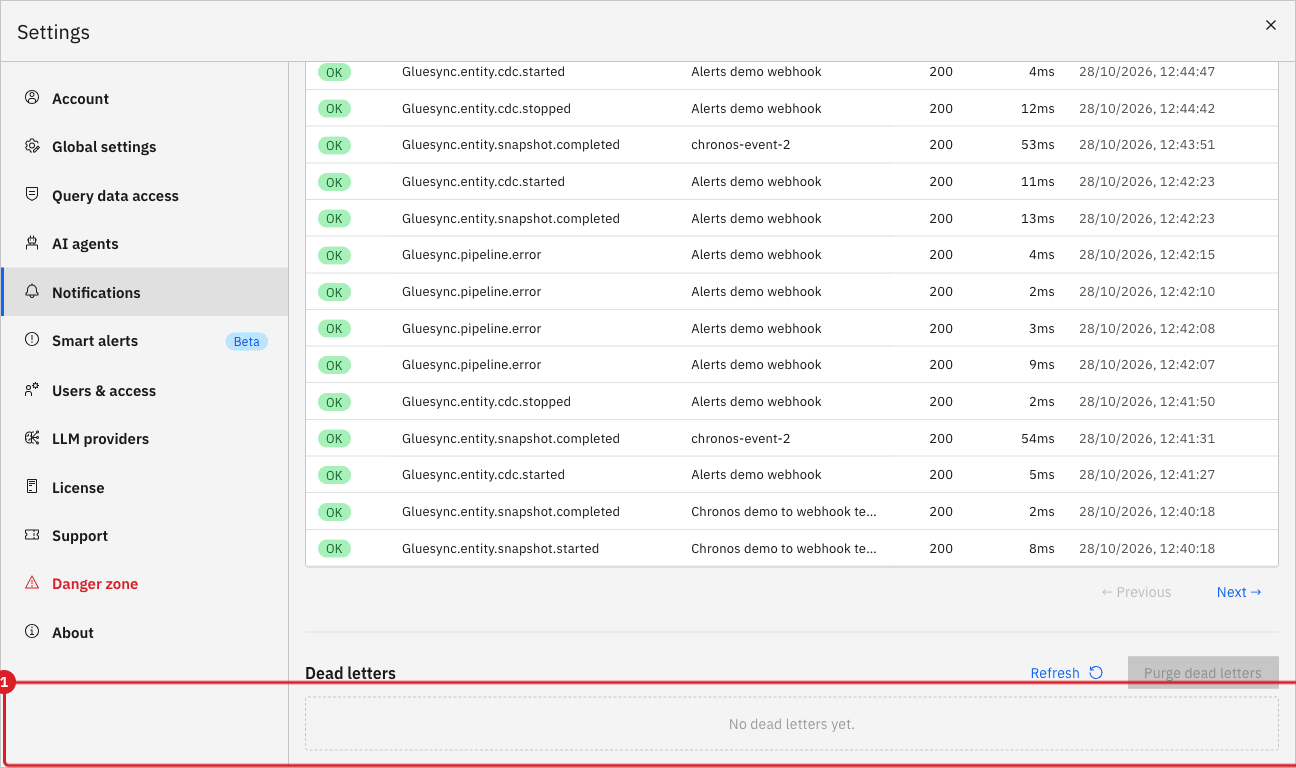
When you are done, select the bin icon of the temporary webhook and select Confirm to delete it. Dead letters are shared like the delivery log, and Purge dead letters removes the entries of every webhook.
Read the payload
Every delivery is a JSON document that follows the CloudEvents structure. This is the request that Core Hub sent when the entity was paused, as the receiver showed it:
{
  "specversion": "1.0",
  "id": "a215e9d7-7ff2-4050-a59e-6e2f7835d185",
  "source": "gluesync",
  "type": "gluesync.entity.cdc.stopped",
  "time": "2026-10-28T11:41:50.600327382Z",
  "datacontenttype": "application/json",
  "severity": "INFO",
  "pipelineId": "07a09a3f",
  "pipelineName": "Alerts demo",
  "entityId": "612148ff",
  "entityName": "customers",
  "groupId": "_default",
  "groupName": "default",
  "message": "CDC task for customers has been stopped in pipeline Alerts demo at 11:41 10-28-2026",
  "eventSource": { "kind": "entity", "id": "612148ff" },
  "data": { "source": { "kind": "entity", "id": "612148ff" } }
}
And this is the failure, trimmed (message and stackTrace shortened):
{
  "specversion": "1.0",
  "id": "ad8f5785-c903-4dc0-b874-c58cc32aef07",
  "source": "gluesync",
  "type": "gluesync.pipeline.error",
  "time": "2026-10-28T11:42:07.886153126Z",
  "datacontenttype": "application/json",
  "severity": "CRITICAL",
  "pipelineId": "07a09a3f",
  "pipelineName": "Alerts demo",
  "entityId": "612148ff",
  "entityName": "customers",
  "agentId": "e5fbb265",
  "message": "ERROR: new row for relation \"customers\" violates check constraint \"alerts_demo_block\" ...",
  "stackTrace": "com.molo17.gluesync.commons.model.exception.TargetWritingException: ERROR: new row ...",
  "eventSource": { "kind": "entity", "id": "612148ff" },
  "data": { "source": { "kind": "entity", "id": "612148ff" } }
}| Field | Meaning |
|---|---|
|
Unique identifier of the delivery, the same as |
|
Event type, the same as |
|
When Core Hub created the event, in UTC. |
|
|
|
The objects the event belongs to. A field is missing when the event has no such object. |
|
Human-readable text of the event. |
|
The exception stack trace. Present only on error events of webhooks that have Include exception stack trace in payload (error/critical events) selected. |
|
The kind and the identifier of the object that raised the event. |
Pausing an entity raises gluesync.entity.cdc.stopped with the severity INFO, not WARNING. Select Info in the Severity filter if you want to react to it.
Troubleshooting
| Problem | Possible cause | What to do |
|---|---|---|
Send test shows Success but the receiver shows no request |
The endpoint is unreachable from Core Hub. The message appears even when the delivery failed |
Use the address that Core Hub can reach, not the one your browser uses (for a container, the container network name), then send the test again |
The test arrives but real events do not |
The event type or the severity is not selected, or the Objects filters exclude the pipeline |
Open the webhook, check Enabled events, Severity filter, and Objects filters, and select Save changes |
The webhook receives no event and shows 0 severities |
No severity is selected, which delivers nothing |
Select Critical, Info, and Warning, or the severities you need, and save |
Pausing an entity does not reach a webhook that accepts only Warning and Critical |
Entity CDC Stopped has the severity |
Add Info to the Severity filter |
The receiver cannot verify the signature |
The secret differs, or the body was parsed and serialized again before hashing |
Hash the raw request body, byte for byte, with the same Signing secret (optional) |
A delivery shows Fail in the delivery log |
The endpoint did not answer or returned a status outside |
Fix the endpoint, then select Retry on the row in Dead letters |
Related guides
Contact MOLO17 Support if you need assistance with webhooks.