 Snowflake agent
Target Snowflake
Prerequisites
To have Gluesync working on your Snowflake instance you will need to have:
-
Valid user credentials with permission to read, and write to the target tables and respective database;
-
A valid RSA key pair for the user;
-
-
In case of MFA enabled, the user must have generated a Programmatic Access Token, this must be then used as user password;
-
Warehouse name.
Generating a Programmatic Access Token
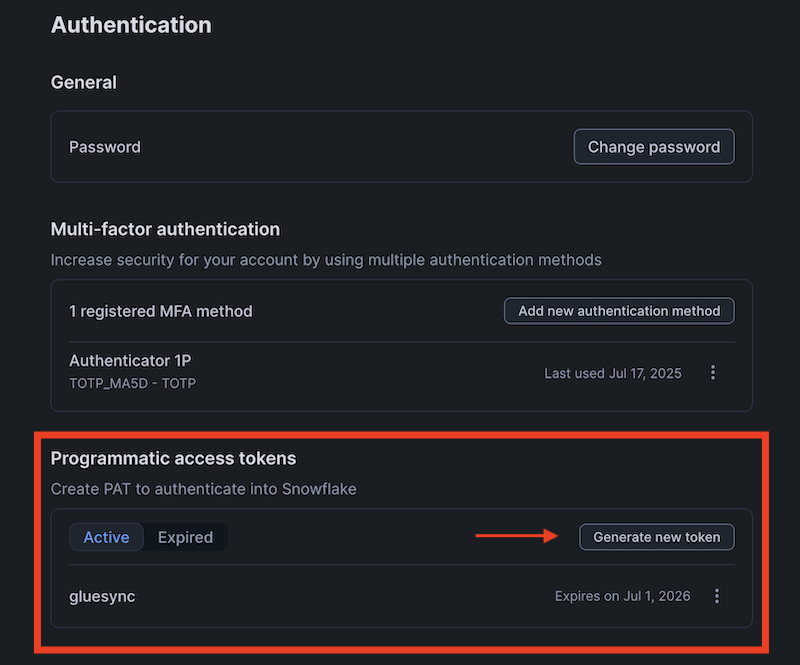
To generate a Programmatic Access Token, follow the instructions in the Snowflake documentation by looking for Programmatic Access Token or go to the user Authentication settings in the Snowflake console and generate a Programmatic Access Token.
Creating a Snowflake user with the required permissions
If you don’t have a user with the required permissions, you can create one by running the following SQL commands:
USE ACCOUNTADMIN;

CREATE WAREHOUSE IF NOT EXISTS INGEST;
CREATE ROLE IF NOT EXISTS INGEST;
GRANT USAGE ON WAREHOUSE INGEST TO ROLE INGEST;
GRANT OPERATE ON WAREHOUSE INGEST TO ROLE INGEST;
CREATE DATABASE IF NOT EXISTS INGEST;
USE DATABASE INGEST;
CREATE SCHEMA IF NOT EXISTS INGEST;
USE SCHEMA INGEST;
GRANT OWNERSHIP ON DATABASE INGEST TO ROLE INGEST;
GRANT OWNERSHIP ON SCHEMA INGEST.INGEST TO ROLE INGEST;

CREATE USER INGEST PASSWORD='<REDACTED>' LOGIN_NAME='INGEST' MUST_CHANGE_PASSWORD=FALSE, DISABLED=FALSE, DEFAULT_WAREHOUSE='INGEST', DEFAULT_NAMESPACE='INGEST.INGEST', DEFAULT_ROLE='INGEST';
GRANT ROLE INGEST TO USER INGEST;
SET USERNAME=CURRENT_USER();
GRANT ROLE INGEST TO USER IDENTIFIER($USERNAME);
Assign the RSA key pair to the user:
openssl genrsa 4096 | openssl pkcs8 -topk8 -inform PEM -out rsa_key.p8 -nocrypt
openssl rsa -in rsa_key.p8 -pubout -out rsa_key.pub
echo "ALTER USER INGEST SET RSA_PUBLIC_KEY='`cat ./rsa_key.pub`';"
Run the SQL from the output to set the RSA_PUBLIC_KEY for the INGEST user, like:
ALTER USER INGEST SET RSA_PUBLIC_KEY='xyz-----BEGIN PUBLIC KEY-----
xyz==
-----END PUBLIC KEY-----';
Use the private key, rsa_key.p8, for the user in the agent configuration.
Setup via Web UI
-
Hostname / IP Address: DNS record or IP Address of your Snowflake tenant;
-
Database name: Name of your target database;
-
Username: Username with read & write access to the target tables;
-
Password: Password belonging to the given username;
-
RSA key: the RSA .p8 private key.
Updates with bulk operations during CDC
|
The Snowflake agent writes the changes of a single-table entity through a staging table, whatever the bulk operations settings of the entity. An update is not applied as an For the target table this has the following effects:
|
Setup via Rest APIs
Here following an example of calling the Core Hub’s Rest API via curl to setup the connection for this Agent.
Connect the agent
curl --location --request PUT 'http://core-hub-ip-address/pipelines/{pipelineId}/agents/{agentId}/config/credentials' \
--header 'Content-Type: application/json' \
--header 'Authorization: ••••••' \
--data '{
        "hostCredentials": {
        "connectionName": "myAgentNickName",
        "host": "XYZ-123.snowflakecomputing.com",
        "port": 443,
        "databaseName": "db_name",
        "username": "",
        "password": "",
        "maxConnectionsCount": 100,
        "enableTls": true,
        "certificatePath": "/myPath/cert.p8"
      },
      "customHostCredentials": {
        "warehouse": "COMPUTE_WH"
      }
}'