Set up Apache CouchDB as a source and a target
Apache CouchDB works in Gluesync as a source and as a target, with the same agent. This guide takes you from two CouchDB servers to a running pipeline that copies a database with a snapshot and then follows its changes. You prepare a least-privilege user on each server, create the connections, map the key, start the entity and check the documents on the other side. The last part covers the settings that decide the write speed and the errors you are most likely to meet.
In this guide
You will learn how to create a CouchDB user that can read the source with no administrator rights, create a target database with the number of shards you choose, connect CouchDB as a source and as a target in the Control Plane, set _id as the key, start a snapshot with live changes, check inserts, updates and deletes with curl, change the shards and the write settings of the target, avoid the field names that CouchDB refuses, and fix the 401 and 403 answers of the server. A table of data type notes and a symptom, cause and fix table close the guide.
Quick information
Goal |
Replicate a CouchDB database to a second CouchDB with a snapshot and CDC, using users that have only the rights Gluesync needs |
Audience |
Data engineers and database administrators who own a CouchDB source or target |
Level |
Intermediate |
Time required |
About 45 minutes |
Area |
CouchDB → |
Applies to |
Gluesync 2.3 |
Before you begin
Make sure that:
-
You have two Apache CouchDB 3.3, 3.4 or 3.5 servers that Core Hub can reach over HTTP, one for the source and one for the target. Single node or cluster both work. This guide was tested on CouchDB 3.5.1 with one single-node server for each role. The guide calls them
couchdb-sourceandcouchdb-target, on port5984; -
You can run
curlagainst both servers with a server administrator account. The examples write that account asadmin:<admin password>; -
You can sign in to the Control Plane with a role that can create pipelines;
-
You know that CouchDB replicates documents, not tables: one entity is one database. Every entity sits under the fixed schema
_default.
|
The |
Guide steps
CLI
Skip this step if you already have a database to replicate. It creates a small database with an array, a nested object, a null, a decimal and a design document. The design document shows that CouchDB internals are not replicated.
-
On the source server, create the database
shop_ordersand add four documents:curl -u admin:<admin password> -X PUT "http://couchdb-source:5984/shop_orders?q=2" curl -u admin:<admin password> -X POST http://couchdb-source:5984/shop_orders/_bulk_docs \ -H 'Content-Type: application/json' -d '{"docs":[ {"_id":"order-1001","customer":"Acme Spa","total":1500.5,"items":3,"paid":true, "placed":"2026-10-28T10:00:00Z","tags":["gold","eu"],"shipping":{"city":"Rome","zip":"00100"}}, {"_id":"order-1002","customer":"Globex","total":42,"items":1,"paid":false, "placed":"2026-10-29T09:30:00Z","tags":[],"shipping":{"city":"Berlin","zip":"10115"}}, {"_id":"order-1003","customer":"Initech","total":99.99,"items":2,"paid":true, "placed":"2026-10-30T14:15:00Z","tags":["new"],"shipping":null}, {"_id":"_design/app","views":{}}]}'
CLI
Gluesync reads the changes feed and the documents of a database. It does not need an administrator for that. It needs a user that is a member of every database to replicate.
-
Create the user in the
_usersdatabase:curl -u admin:<admin password> -X PUT \ http://couchdb-source:5984/_users/org.couchdb.user:gluesync \ -H 'Content-Type: application/json' \ -d '{"name":"gluesync","password":"<a strong password>","roles":[],"type":"user"}' -
Make the user a member of the database. The request replaces the whole
_securityobject, so add the user to the members that the database already has:curl -u admin:<admin password> -X PUT http://couchdb-source:5984/shop_orders/_security \ -H 'Content-Type: application/json' \ -d '{"admins":{"names":[],"roles":[]},"members":{"names":["gluesync"],"roles":[]}}'Repeat the second request for every database you want to replicate;
-
Check that the user can read the database but cannot list the server:
curl -u gluesync:<password> http://couchdb-source:5984/shop_orders/_all_docs
curl -u gluesync:<password> http://couchdb-source:5984/_all_dbs
CLI
The target agent reads the current revision of the documents it updates and then writes, replaces and deletes them. The user needs read and write access to the database. Creating a database is a server administrator action, so you have two choices:
-
Create the database yourself, with the number of shards you want, and give Gluesync a user that is only a member of it. This guide does that;
-
Connect Gluesync as a server administrator and let the agent create the missing databases. The agent then uses the Shards (q) setting,
8by default.-
Create the user, the database with eight shards, and the membership:
curl -u admin:<admin password> -X PUT \ http://couchdb-target:5984/_users/org.couchdb.user:gluesync \ -H 'Content-Type: application/json' \ -d '{"name":"gluesync","password":"<a strong password>","roles":[],"type":"user"}' curl -u admin:<admin password> -X PUT "http://couchdb-target:5984/shop_orders?q=8" curl -u admin:<admin password> -X PUT http://couchdb-target:5984/shop_orders/_security \ -H 'Content-Type: application/json' \ -d '{"admins":{"names":[],"roles":[]},"members":{"names":["gluesync"],"roles":[]}}' -
Read the database back:
curl -u admin:<admin password> http://couchdb-target:5984/shop_orders
-
|
The name of the target database is the name of the entity, lowercased, with every character outside |
UI
-
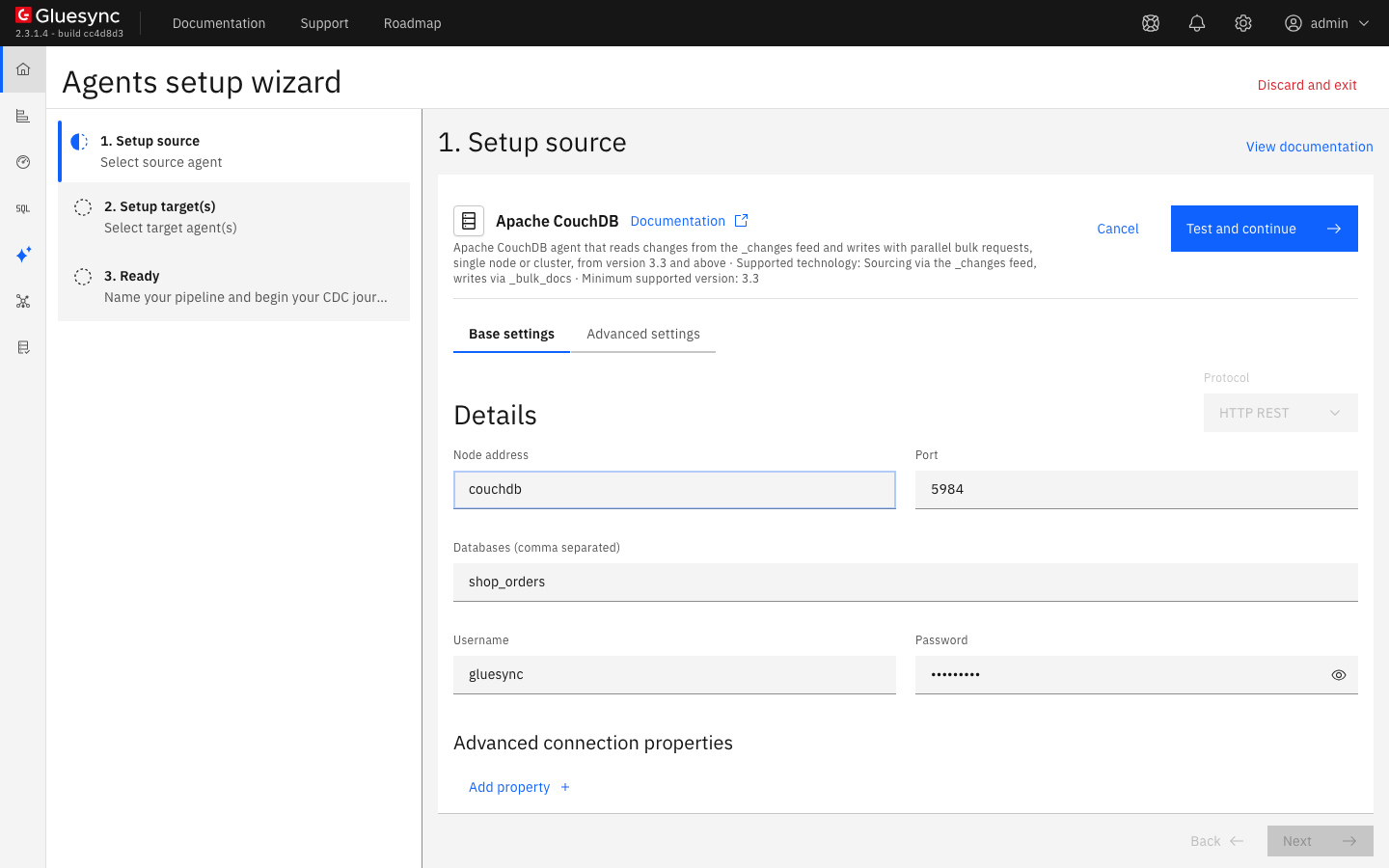
Open Data pipelines and select Create your first pipeline, or the + button when you already have pipelines. The Agents setup wizard opens on 1. Setup source;
-
In the search field, type
couchand select the Apache CouchDB agent; -
In Node address, enter the server without the scheme (
couchdb-source, nothttp://couchdb-source). Keep the port5984; -
In Databases (comma separated), enter
shop_orders. The agent lists exactly these databases, because the user cannot call_all_dbs; -
In Username and Password, enter the user of step 2;
-
Select Test and continue.
|
TLS, a private certificate authority, more nodes of a cluster and a path prefix behind a reverse proxy are all options of the same form. See Setup via Web UI in the agent reference. Turn TLS on for any CouchDB that is not on a private network. The server certificate is always validated. |
UI
-
Select Next. On 2. Setup target(s), search for
couchand select Apache CouchDB; -
Enter Node address
couchdb-target, Databases (comma separated)shop_orders, and the user and password of the target user. On a target, the Databases field only fills the object browser, so it does not limit what the agent writes; -
Select Test and continue, then Next;
-
On 3. Ready, enter
CouchDB ordersin Pipeline name and select Finish.
_id as the keyUI
-
Select Entities. The page Listing database objects for shop_orders opens;
-
In the Object browser, expand
_defaultand tickshop_orders. The row shows Error in field mapping. Please review, because the entity has no key yet; -
In Selected entities, select the Field mapping icon of
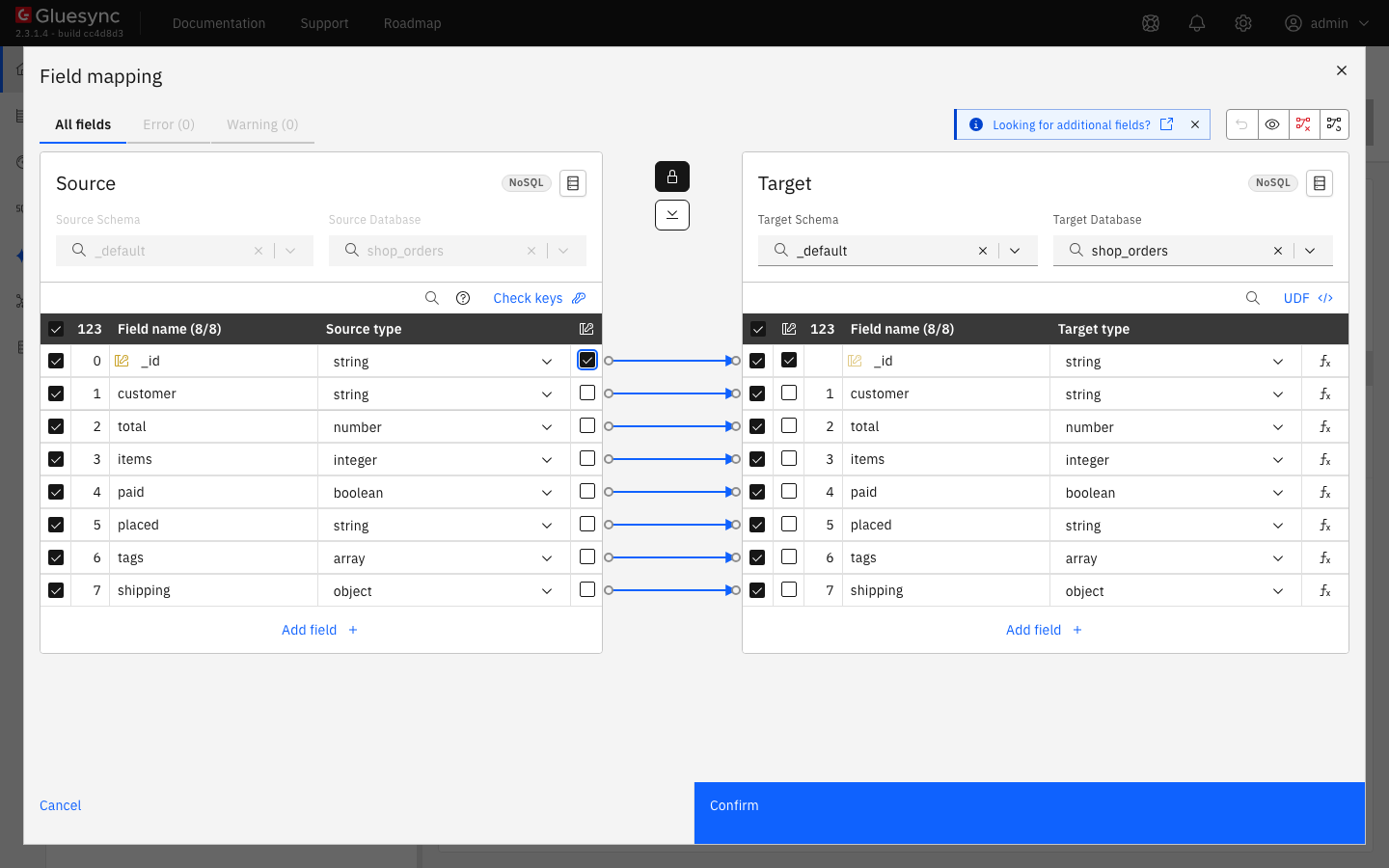
shop_orders. The dialog lists the fields that the agent inferred from a sample of the documents:_idand the seven fields of the example; -
On the source side, tick the key checkbox of
_id. The target side follows; -
Select Confirm, then Confirm and continue.
_id as the key.|
Keep |
UI
-
In the entity table, tick
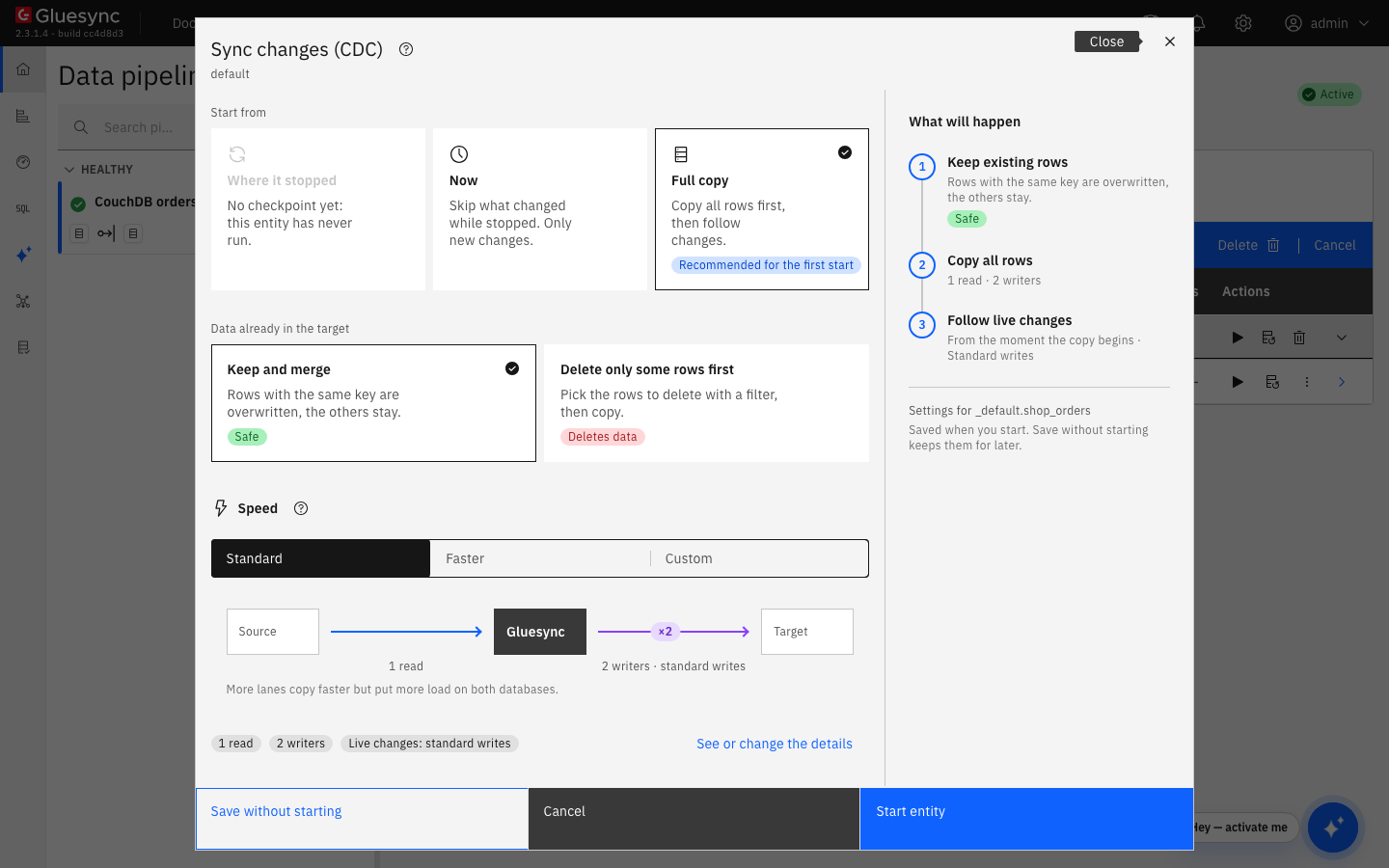
_default.shop_ordersand select Start CDC in the blue bar. The dialog Sync changes (CDC) opens; -
In Start from, keep Full copy (Recommended for the first start);
-
In Data already in the target, keep Keep and merge. Keep the default insert conflict strategy of the entity, Upsert: the snapshot and CDC overlap on purpose, and the upsert absorbs the overlap. See Insert conflict strategy;
-
Select Start entity.
For the snapshot and CDC start options in detail, see Start a snapshot and CDC replication from the Control Plane.
CLI
-
List the documents of the target database:
curl -u admin:<admin password> http://couchdb-target:5984/shop_orders/_all_docs -
Read one document on both sides and compare them:
curl -u admin:<admin password> http://couchdb-source:5984/shop_orders/order-1001
curl -u admin:<admin password> http://couchdb-target:5984/shop_orders/order-1001
CLI
-
On the source, insert a document, update another one and delete a third:
# insert curl -u admin:<admin password> -X PUT http://couchdb-source:5984/shop_orders/order-1004 \ -H 'Content-Type: application/json' \ -d '{"customer":"Umbrella","total":10,"items":1,"paid":false,"placed":"2026-11-02T08:00:00Z","tags":["x"],"shipping":{"city":"Milan","zip":"20100"}}' # update: send the current _rev of order-1002 REV=$(curl -s -u admin:<admin password> http://couchdb-source:5984/shop_orders/order-1002 | jq -r ._rev) curl -u admin:<admin password> -X PUT http://couchdb-source:5984/shop_orders/order-1002 \ -H 'Content-Type: application/json' \ -d "{\"_rev\":\"$REV\",\"customer\":\"Globex\",\"total\":42,\"items\":1,\"paid\":true,\"placed\":\"2026-10-29T09:30:00Z\",\"tags\":[\"paid\"],\"shipping\":{\"city\":\"Berlin\",\"zip\":\"10115\"}}" # delete: send the current _rev of order-1003 REV=$(curl -s -u admin:<admin password> http://couchdb-source:5984/shop_orders/order-1003 | jq -r ._rev) curl -u admin:<admin password> -X DELETE "http://couchdb-source:5984/shop_orders/order-1003?rev=$REV" -
Wait a few seconds and read the target:
curl -u admin:<admin password> http://couchdb-target:5984/shop_orders/_all_docs
curl -u admin:<admin password> http://couchdb-target:5984/shop_orders/order-1002
curl -u admin:<admin password> http://couchdb-target:5984/shop_orders/order-1003
UI
The target settings are properties of the agent connection. Open them when you let the agent create databases, or when you need more write speed.
-
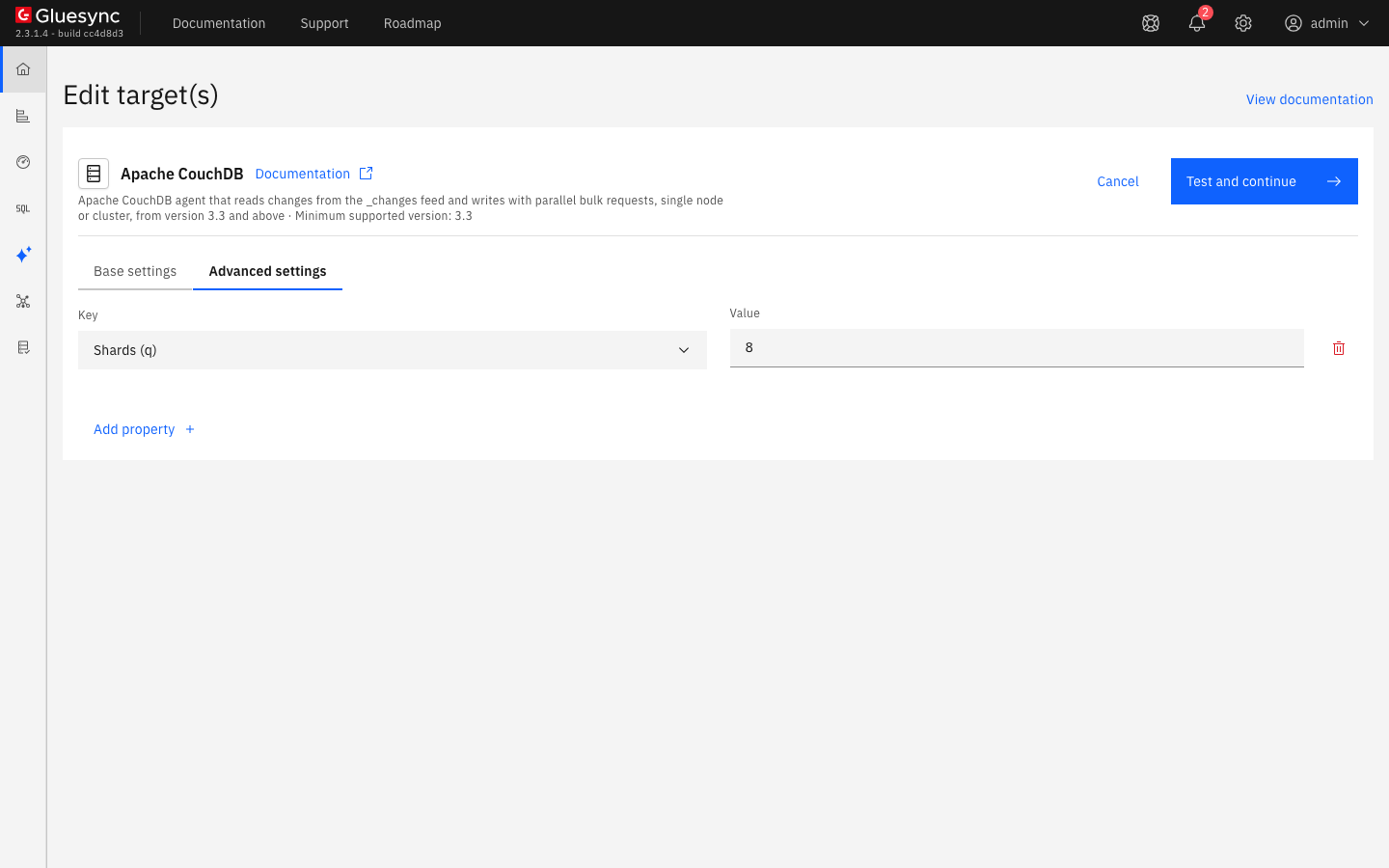
In the pipeline, select the gear icon above the entity table, then Edit target;
-
Open Advanced settings and select Add property;
-
In Key, select Shards (q). The field shows the default,
8. Enter the value you want, for example16; -
Add more properties if you need them, for example Create database if missing, Write concurrency or Write batch size;
-
Select Test and continue.
The write throughput grows with the number of shards and with the requests in flight (Write concurrency). See Throughput and shards for the measurements and for how a snapshot upsert skips the revision lookup. The source has its own properties, for example Snapshot read concurrency, in Edit source → Advanced settings. See Snapshot.
Data type notes
CouchDB stores JSON. The source agent gives every field a type from the JSON kinds in a sample of its documents (Schema discovery sample size, 1000 by default), and the target writes the natural JSON form of each type.
| In the CouchDB document | Gluesync type | What to know |
|---|---|---|
String |
|
Written back as a string. For a target column of type |
Integer |
|
A value that is not an exact 64-bit integer fails the row and names the field. Integers keep every digit. |
Decimal or exponent |
|
CouchDB stores a decimal as an IEEE double, so |
|
|
Written as a JSON boolean. |
Object |
|
Converted recursively. A target column of type |
Array |
|
Converted element by element, including |
A field with two or more kinds, or only |
|
The type is |
A field that a document lacks |
Absent |
The absent field policy of the entity decides what the target receives. |
Names that start with an underscore |
Not a field |
|
A field that appears only in documents outside the sample is not discovered. Raise Schema discovery sample size in the source properties for a database whose documents have different shapes. The complete matrices are in Data types of the source and Data types of the target.
Recover from the failures you are most likely to meet
The target database does not exist and the user is not an administrator
With Create database if missing on (the default), the first write creates a database that is not there. CouchDB reserves that to server administrators. A target user that is only a member gets this error on the entity:
Authentication Failed
PUT /shop_customers failed with HTTP 401 (unauthorized): You are not a server admin.
To fix it, create the database as an administrator, with the shards you want, and add the user as a member (step 3). You do not restart the entity: it keeps retrying, and in our test it wrote its documents to the new database within a minute. The other choice is to connect the target as a server administrator.
|
A database that the agent creates gets CouchDB’s default security object, with the role |
A technical field is refused on a CouchDB target
The source property Technical fields adds columns such as _TRANSACTION_ID. CouchDB reserves the names that start with an underscore, and _bulk_docs rejects a whole request that carries one. The agent refuses the entity when you save it:
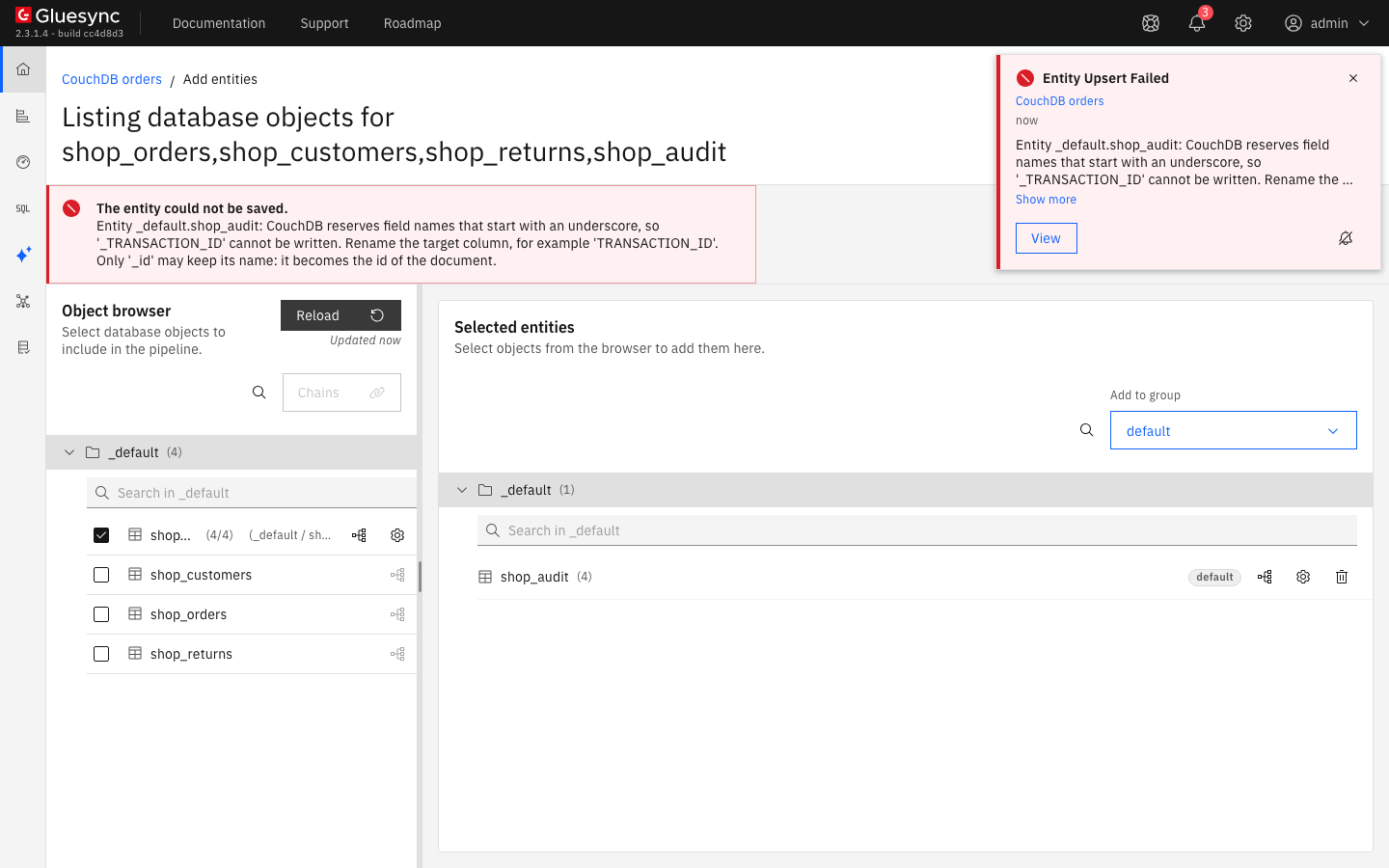
The entity could not be saved.
Entity _default.shop_audit: CouchDB reserves field names that start with an underscore,
so '_TRANSACTION_ID' cannot be written. Rename the target column, for example
'TRANSACTION_ID'. Only '_id' may keep its name: it becomes the id of the document.
To fix it, open the Field mapping of the entity, type TRANSACTION_ID in the Target (name) field of that row, and confirm. In our test the snapshot wrote "TRANSACTION_ID":null, because the snapshot has no change position, and every change read by CDC carried the position of the changes feed. See Technical fields.
Troubleshooting
| Problem | Possible cause | What to do |
|---|---|---|
Host Credentials Update Failed or Failed to save: |
The user name or the password is wrong. The connection is saved before the agent tests it |
Correct the user and the password in Edit source or Edit target, then select Test and continue again. Do not leave the wrong values saved |
|
The node address is wrong, has a scheme ( |
Enter the host name without the scheme, and test it from the machine or container that runs Core Hub. For a cluster, add the other nodes in Additional nodes |
The object browser stays empty and a Schemas Fetch notification says |
The user is not a member of one of the databases in Databases (comma separated). One such name stops the whole list |
Add the user to the |
The object browser is empty and Databases is blank |
The user is not a server administrator, so |
Type the database names in Databases (comma separated), or connect with a server administrator |
Error in field mapping. Please review, with No key on the source and No key on the target |
The entity has no key. CouchDB documents have no declared key |
Tick the key checkbox of |
Authentication Failed: |
The target database does not exist and the user cannot create it |
Create the database as an administrator and add the user as a member. The entity recovers without a restart |
Permission Denied (HTTP |
The user is not a member of the target database, or the database was created by the agent with the default security |
Add the user to the |
Database Not Found (HTTP |
Create database if missing is off and the database does not exist, or the Path prefix is wrong |
Create the database with the name the agent computes (see the note in step 3), or turn the setting on with a server administrator |
|
A technical field, or another column, starts with an underscore on a CouchDB target |
Rename the target column in the Field mapping, for example |
Deletes do not arrive on the target |
The entity key is not |
Make |
CDC fails and asks for a new snapshot (HTTP |
The changes feed no longer knows the position that the entity holds |
Start the entity again with Full copy |
Documents Rejected with ids and reasons |
A |
Read the reasons in the message, fix the document or the function. The documents that CouchDB accepted stay written |
Document Conflict or conflicts that keep changing after the retries |
Another writer updates the same documents while Gluesync writes them |
Stop the other writer, or raise Conflict retries in the target properties |
The snapshot or the writes are slow |
Few shards on the target database, few requests in flight, or a busy server |
Create the target databases with more shards (step 3), raise Write concurrency (step 10) and, on the source, Snapshot read concurrency |
A field that a document has is missing on the target |
The field appears only in documents outside the discovery sample |
Raise Schema discovery sample size in the source properties and map the entity again |
Related guides
Contact MOLO17 Support if you need assistance with Apache CouchDB.