Set up bidirectional replication with recursion protection
Two databases that must both accept changes need two pipelines, one per direction, and Enable Recursion Protection on every connection of both pipelines. Without it a change bounces between the databases for ever. This guide shows which connections need the setting and how it works on PostgreSQL and on IBM i, proves with counts that a change arrives once and does not come back, shows what happens when both sides change the same row, when a delete meets an update, and when one direction is paused, and ends with a pre-flight checklist and a troubleshooting table.
In this guide
You will learn which four connections need Enable Recursion Protection, how to turn it on for PostgreSQL and for IBM i, how to detect an echo with an audit trigger on PostgreSQL and with the journal on IBM i, why the first start needs one restart, how conflicts and deletes behave, how to pause one direction and resume it safely, and how to stop and repair a loop.
Quick information
Goal |
Run two pipelines in opposite directions on the same table, with no change bouncing back, and know what to do when both sides change the same row |
Audience |
Gluesync administrators and database administrators |
Level |
Advanced |
Time required |
About 90 minutes |
Area |
Control Plane → Data pipelines → pipeline → Edit source / Edit target |
Applies to |
Gluesync 2.3 |
How recursion protection works
The two pipelines are independent. Pipeline 1 reads database A and writes database B. Pipeline 2 reads database B and writes database A. Pipeline 1 writes into B, pipeline 2 reads B, so without protection pipeline 2 reads what pipeline 1 just wrote and sends it back to A, where pipeline 1 reads it again, and so on.
Recursion protection lets a source recognise the changes that Gluesync itself wrote and skip them. The way it recognises them depends on the agent:
| Agent | How a Gluesync write is recognised | Where you turn it on |
|---|---|---|
PostgreSQL |
The connection that writes tags its sessions with a PostgreSQL replication origin whose name starts with |
Edit source or Edit target, tab Base settings, switch Enable Recursion Protection |
IBM Db2 for IBM i |
The source agent skips every journal entry written by the same user that the Gluesync connection signs in with. |
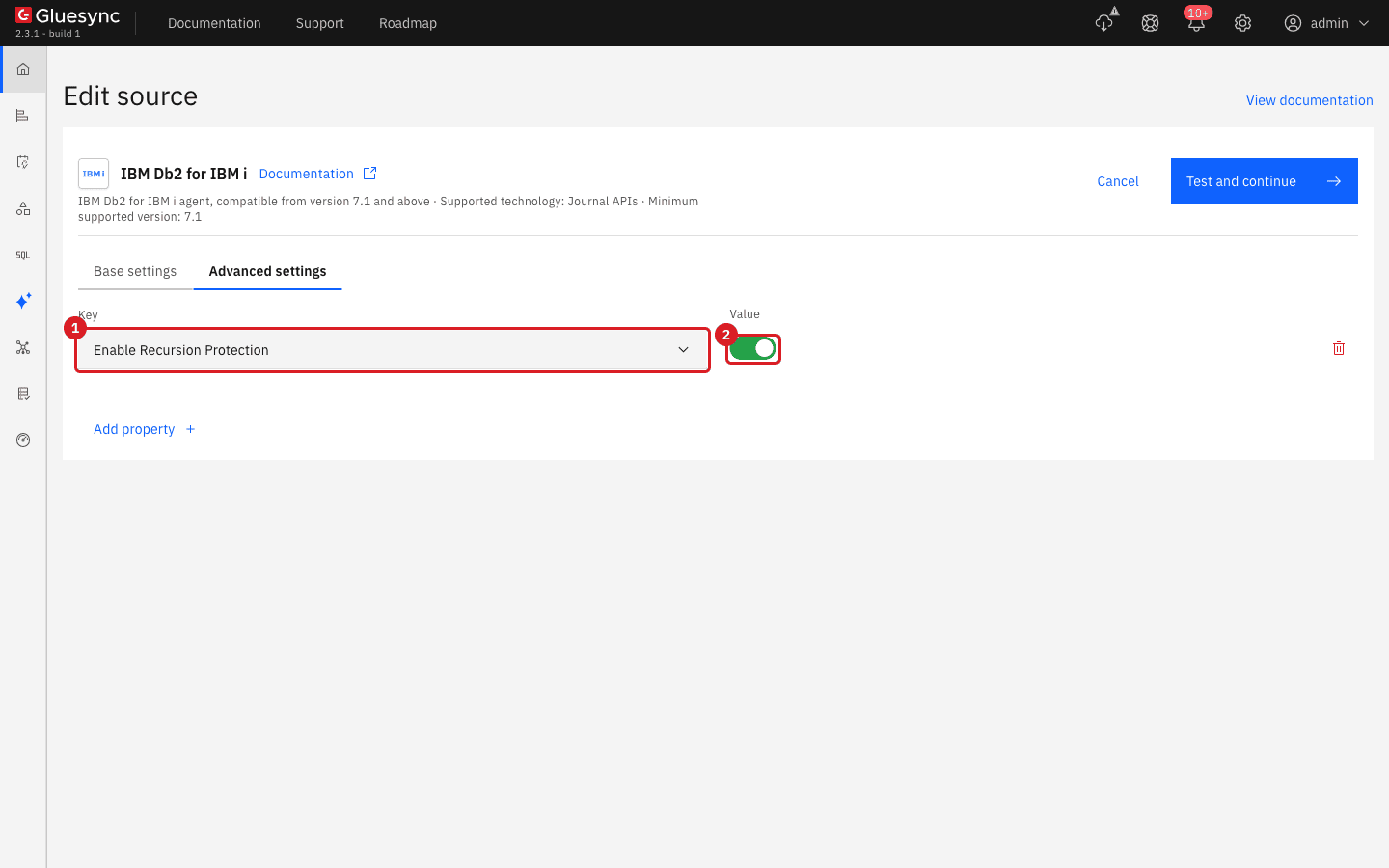
Edit source or Edit target, tab Advanced settings, Add property, key Enable Recursion Protection |
Both pipelines have a source and a target, so a two-way pair has four connections. Set the property on all four: when a database is both read and written by Gluesync, the writing side and the reading side must both be protected.
Before you begin
Make sure that:
-
Both databases exist, each one holds the table to synchronise, and the table has the same primary key on both sides. The example uses the table
bidi.items(id,name,qty,updated_at) in two PostgreSQL databases called A and B, and the tableITEMS(ID,NAME,QTY) in two IBM i libraries called A and B; -
Two pipelines exist, one from A to B and one from B to A, each with one entity for the table. The example pipelines are Bidi A to B and Bidi B to A for PostgreSQL, and IBM i A to B and IBM i B to A for IBM i. Neither pipeline has ever replicated changes of the table you test with;
-
On PostgreSQL,
wal_levelislogicalon both servers and the Gluesync user can read the WAL and create replication origins (see the pre-flight checklist); -
On IBM i, the table is journaled with both images (
IMAGES(*BOTH)), and the application changes the table with a user that is not the Gluesync user; -
Your Gluesync role can edit connections and start and stop entities;
-
You can run SQL on both databases with your own client. The steps tell you on which side each statement runs.
|
Try the steps of this guide on a test table first. A loop writes to both databases at full speed until you stop it. |
Pre-flight checklist
Go through it before the first start, in this order.
-
Two pipelines, A to B and B to A, with the same key columns on both sides, and the same Allowed operations in both (see Allowed operations);
-
Enable Recursion Protection is on for the source and the target of pipeline 1 and for the source and the target of pipeline 2: four connections;
-
PostgreSQL: the Gluesync user is a superuser, or it has
EXECUTEon the four replication origin functions. A user that only has theREPLICATIONattribute is refused (permission denied for function pg_replication_origin_create); -
PostgreSQL: protection does not depend on the user name (in the lab your application and Gluesync used the same database user and only Gluesync’s writes were skipped). IBM i: the Gluesync user is used by Gluesync only, no application and no job signs in with it, because every change that user makes is skipped;
-
Nobody changes the same rows on both sides in the same few seconds: the later change of each side wins on the other side, and the two databases can end up with swapped values (see Conflicts and deletes);
-
Both databases hold the same rows before you start both pipelines (copy once in one direction with Full copy, then start the other direction with Now);
-
You know how to stop an entity quickly (the Stop sync pause icon of the entity row) and how to start it again with Where it stopped.
SQL
Skip this step if you already have a way to count how often a row was written. It turns an invisible loop into numbers. Run it on database A and on database B:
CREATE TABLE bidi.items_audit (
  audit_id   bigserial PRIMARY KEY,
  seen_at    timestamp NOT NULL DEFAULT clock_timestamp(),
  op         text NOT NULL,
  item_id    integer,
  qty        integer,
  app        text NOT NULL,
  has_origin boolean NOT NULL
);
CREATE FUNCTION bidi.audit_items() RETURNS trigger LANGUAGE plpgsql AS $$
BEGIN
  INSERT INTO bidi.items_audit(op, item_id, qty, app, has_origin)
  VALUES (TG_OP, COALESCE(NEW.id, OLD.id), NEW.qty,
          current_setting('application_name'),
          pg_replication_origin_session_is_setup());
  RETURN NULL;
END $$;
CREATE TRIGGER items_audit AFTER INSERT OR UPDATE OR DELETE ON bidi.items
  FOR EACH ROW EXECUTE FUNCTION bidi.audit_items();
Every write to bidi.items now leaves one audit row. has_origin is true when the writer is a Gluesync connection with recursion protection on, and false for your application. Make your own application sessions identifiable, for example with SET application_name = 'crm';.
To see how many times each row was written, run this on both sides at any moment:
SELECT item_id, op, app, has_origin, count(*)
FROM bidi.items_audit GROUP BY 1,2,3,4 ORDER BY 1,2,3;UI
Repeat the following for the source and the target of both pipelines.
-
In the left menu, select Data pipelines and select the pipeline, for example Bidi A to B;
-
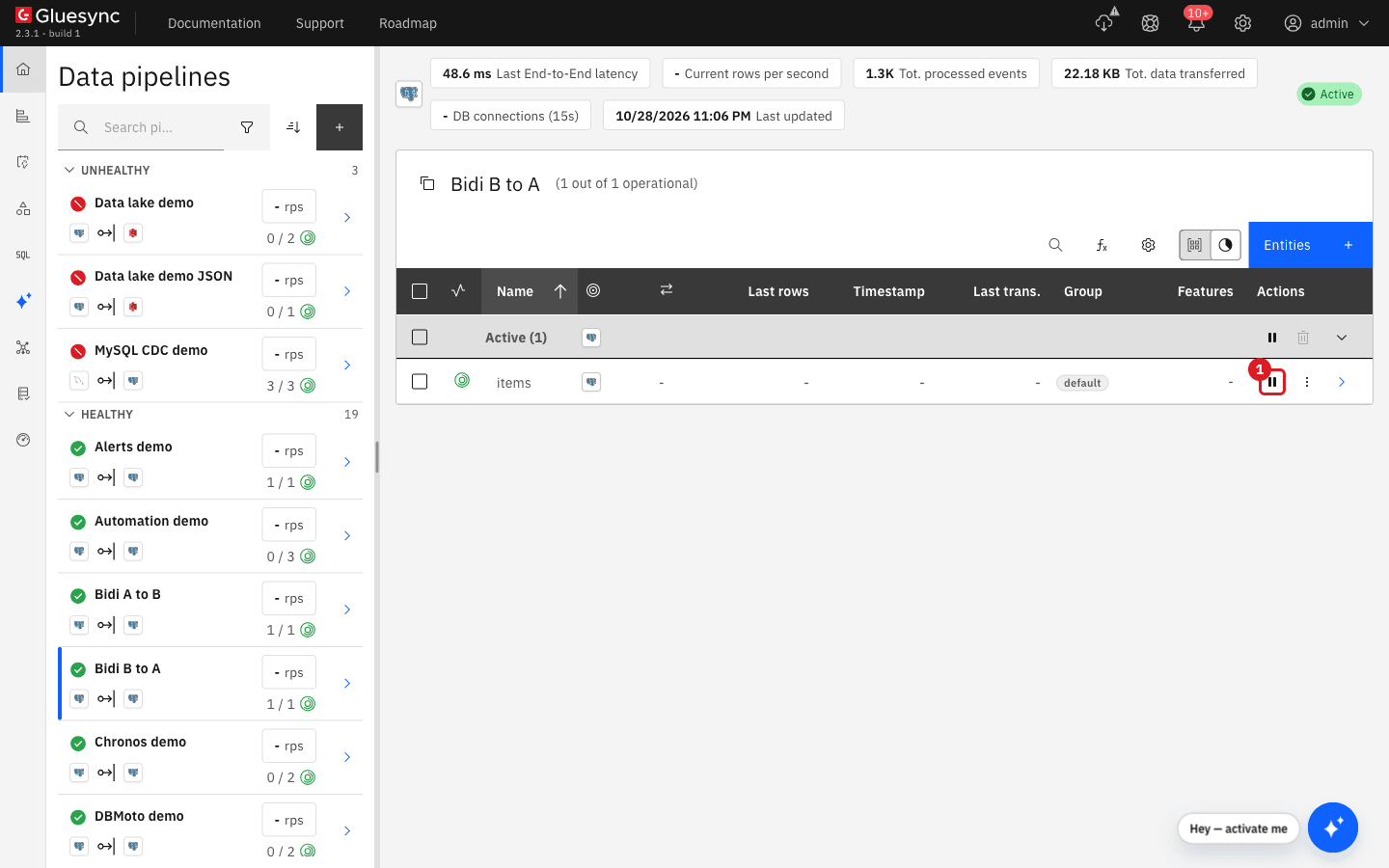
Stop its entity first if it is running: select Stop sync (the pause icon) in the entity row;
-
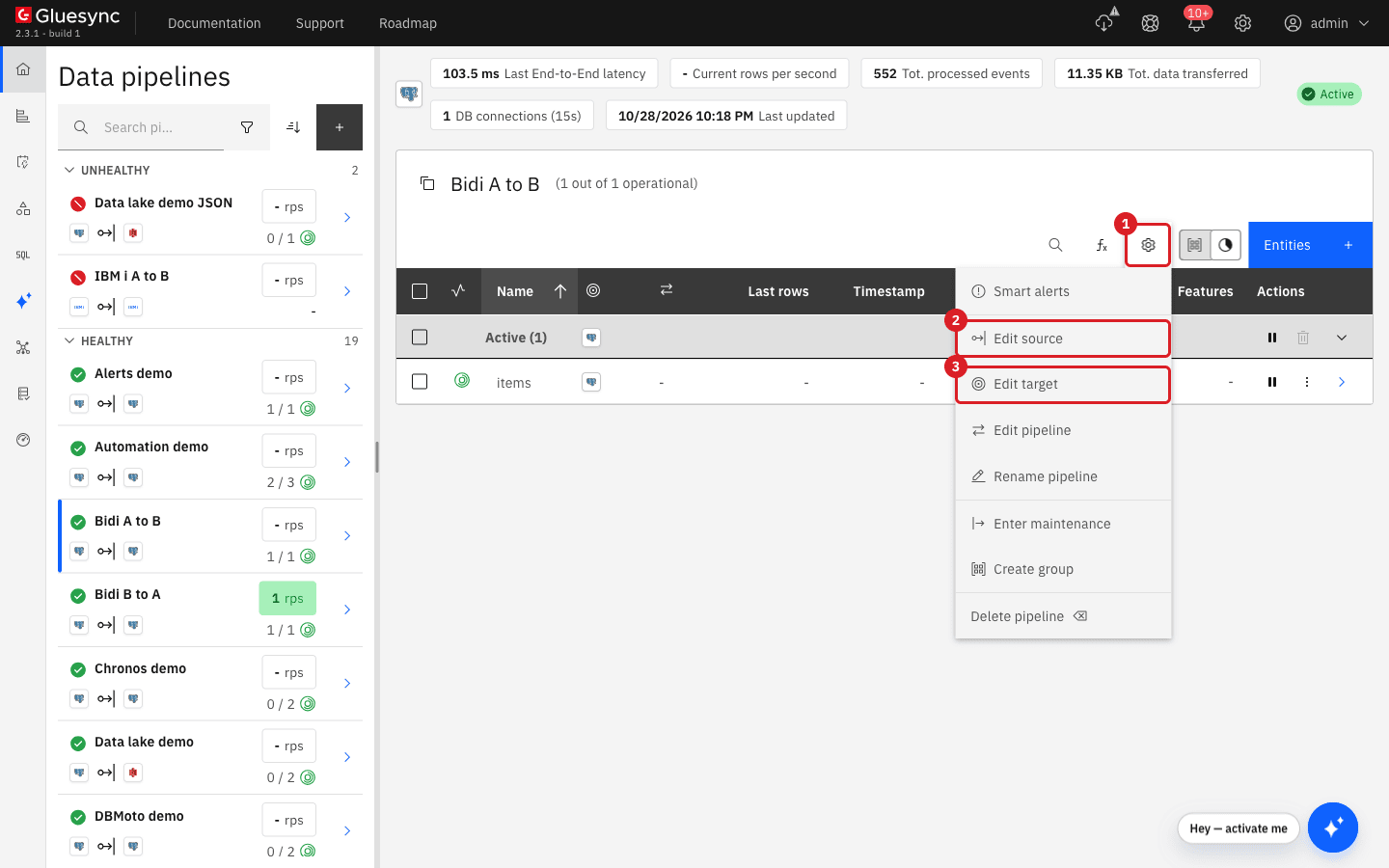
Select the gear button (annotation 1 in the first screenshot) and then Edit source (2) or Edit target (3);
-
On the tab Base settings, switch Enable Recursion Protection on;
-
Select Test and continue.
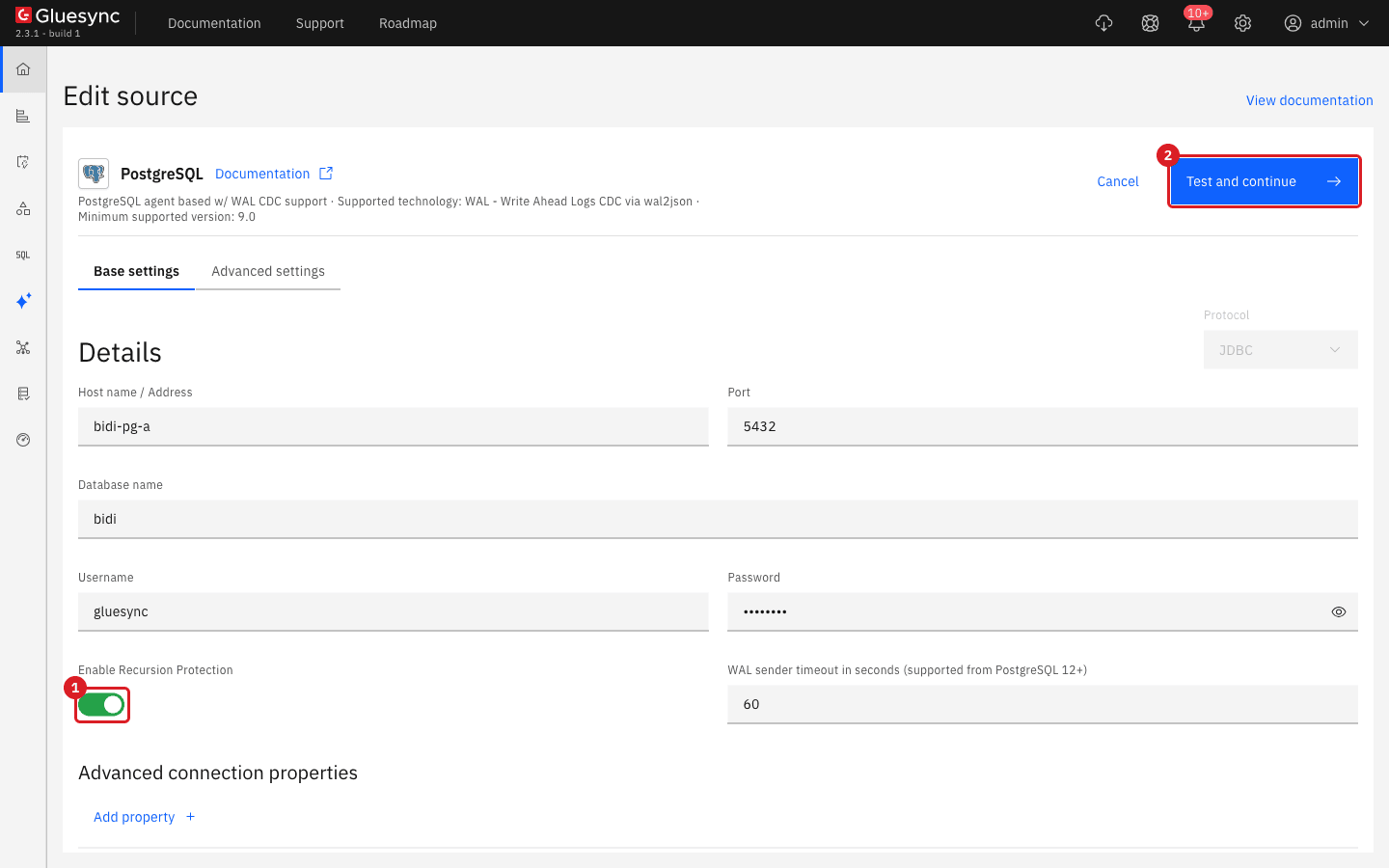
Do it for Edit source and Edit target of Bidi A to B, then for Edit source and Edit target of Bidi B to A.
|
The same database appears in two pipelines (the target of one and the source of the other) but each pipeline keeps its own connection settings. Editing one does not change the other. A forgotten connection is the usual reason why a loop continues. |
UI
The origin that tags Gluesync’s writes is created in the database by the first write. A source reads the list of origins when it opens its stream, so a source that was already running when the first write happened does not know that origin yet and does not skip it. Restart both entities once after the first writes.
-
If you need the first copy, start one direction with Full copy and wait for it to become Active. Start the other direction with Now (or Where it stopped if it has a checkpoint);
-
With both entities Active, change one row on A and one row on B with your application (test rows, for example
id901 on A andid902 on B); -
Watch the audit counts (or the entity counters). If the counts of the same row keep growing, stop both entities at once with Stop sync;
-
Start both entities again. In the dialog, keep Where it stopped and select Start entity.
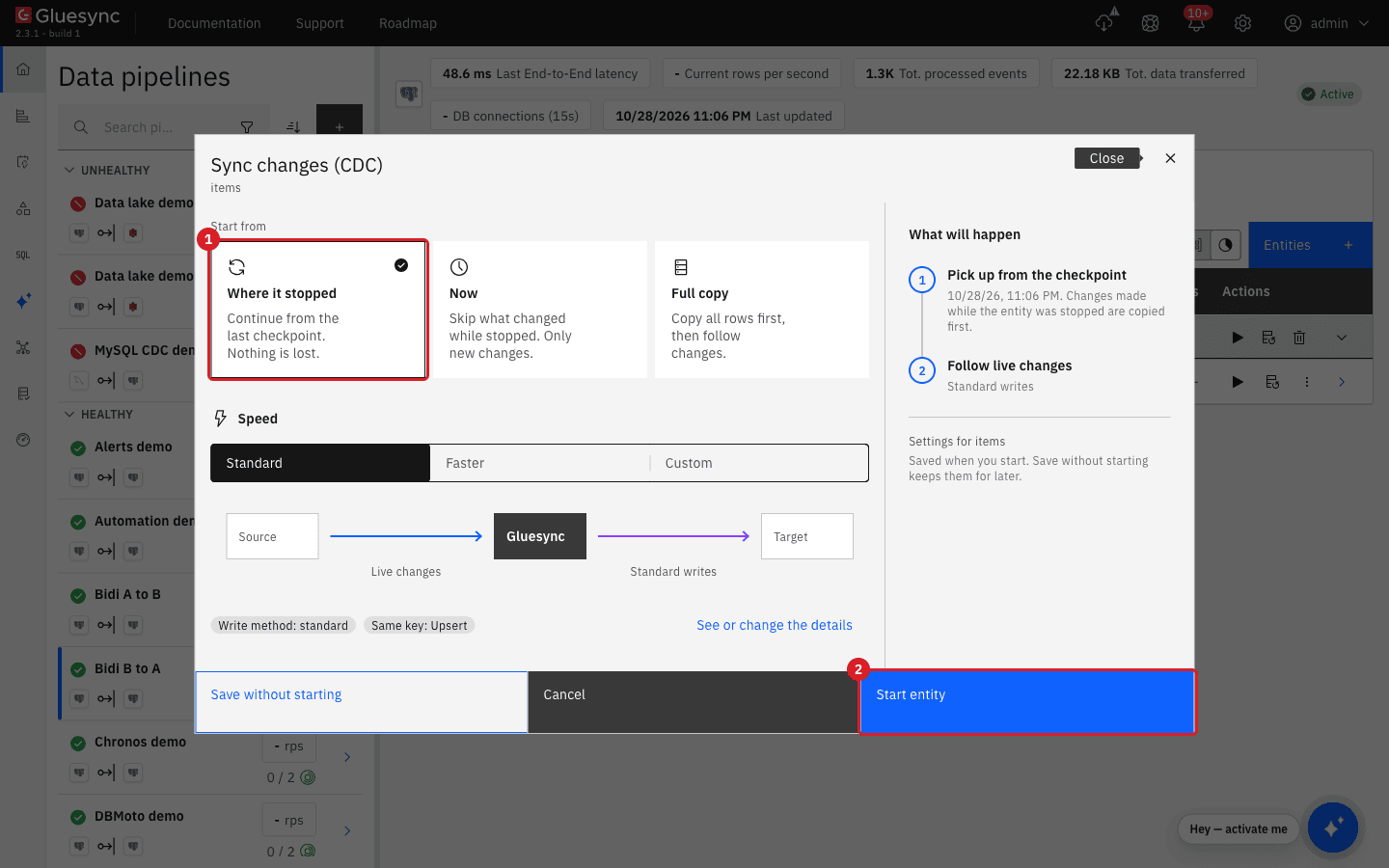
In the lab, the first change made after the protection was switched on, with no origin in the databases, started a loop: the row inserted on A was written 118 times on each side within 30 seconds. After one stop and one start of both entities the counts stopped growing, and a new row created on B arrived on A once.
SQL
Run an insert, an update and a delete from each side and count the writes.
-- on A
SET application_name = 'crm';
INSERT INTO bidi.items(id, name, qty) VALUES (101, 'from A', 10);
-- on B
SET application_name = 'crm';
INSERT INTO bidi.items(id, name, qty) VALUES (102, 'from B', 20);
Wait 30 seconds, then run the count query of the previous step on A and on B. Then update and delete:
-- on A
UPDATE bidi.items SET qty = 11 WHERE id = 101;
DELETE FROM bidi.items WHERE id = 102;To see what each combination of settings does, the same two inserts were run with other combinations of the four connections (one row created on each side, counts after about a minute):
| Recursion protection on | What the audit tables showed |
|---|---|
All four connections |
No echo. Each row written once on the other side |
None |
A loop. Over 100 |
Only the two targets |
A loop. 22 and 13 echoes (counts grow for as long as it runs) |
Only the two sources |
A loop. 47 and 24 echoes |
Only the source and the target of one database (the connections that read and write database B) |
One echo: the row created in B came back to B once, as one extra |
Only the source and the target of the other database |
One echo: the row created in A came back to A once. The row created in B did not |
A row written by your application in a protected database echoes once if the other database is not protected, and for ever if neither is. Protect all four.
SQL
Gluesync applies on each side the last change it read from the other side. It does not compare the two values. Create three rows (701, 702, 703, qty 10) and let them replicate. Then run the pairs below within the same second, one statement on A and one on B:
-- on A
UPDATE bidi.items SET qty = 111 WHERE id = 701;
-- on B, at the same time
UPDATE bidi.items SET qty = 222 WHERE id = 701;
Check the three outcomes:
| Change | Result in the lab | Meaning |
|---|---|---|
Same row updated on A ( |
A holds |
The values are swapped, not merged. Neither database is "right" |
A sets |
A holds |
The later change wins on both sides |
A deletes a row, B updates the same row at the same time |
The delete reached B and removed the row there. The update reached A and re-created the row there (it was written as an insert), with the new value. A holds the row ( |
The databases disagree about whether the row exists |
A deletes a row, nobody else touches it |
The row is deleted on B once. No echo on A |
Deletes are protected like inserts and updates |
Repair a row that is different on the two sides in one of two ways:
-
While both pipelines run, decide which database is right and change the row again on that database with your application, for example
UPDATE bidi.items SET qty = 2 WHERE id = 823;on B. The change is a normal change and replicates to the other side. In the lab the two sides heldqty2 and 1 after a pause and both held 2 a few seconds after the change was repeated on B; -
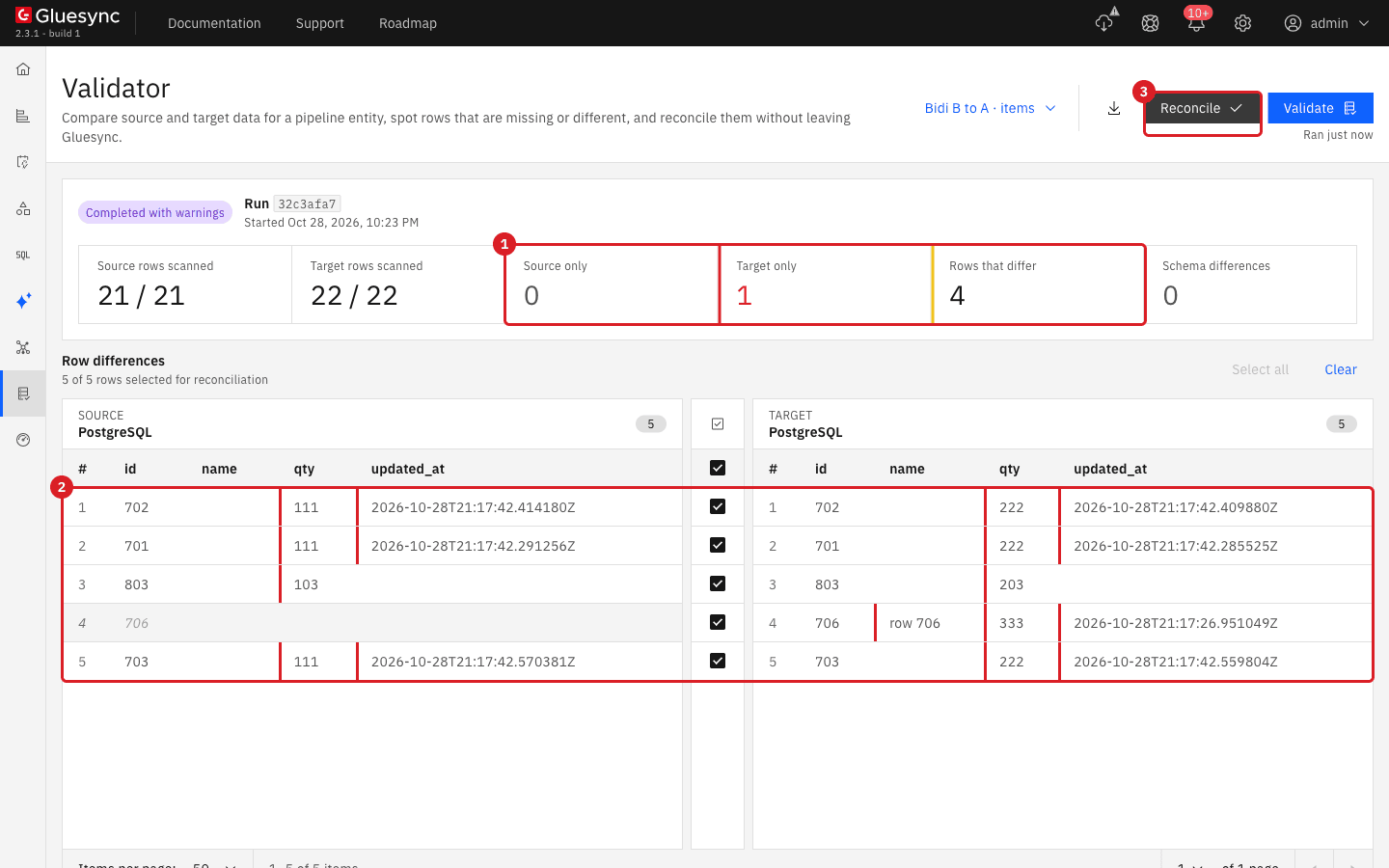
With both pipelines stopped, compare the pipeline whose source is the right database with Validator and select Reconcile. Follow Find and fix row differences between source and target. In the lab the reconcile wrote the source values to the other database (
Inserted: 0, deleted: 1, updated: 4) and both databases matched. Reconcile writes are not tagged as Gluesync writes (has_originfalse), so start the pipelines afterwards with Where it stopped and check that the counts settle.
|
The best protection against conflicts is a design rule: let each row be changed on one side only, for example by key range or by owning application. Gluesync cannot choose a winner for you. |
UI
A paused direction does not lose changes. Its source keeps them (on PostgreSQL the replication slot keeps the WAL, in the lab a few thousand bytes for a few changes) and delivers them when the entity starts again with Where it stopped. What can go wrong is the same as in the conflict step: rows changed on both sides during the pause.
In the lab, five rows 801 to 805 existed on both sides and the direction B to A was paused:
-
In the entity row of Bidi B to A, select Stop sync (the pause icon) and select Pause entity;
-
On B:
801set to 201,804deleted,806inserted,803set to 203. Three seconds later on A:803set to 103 and802set to 102. The direction A to B kept running; -
Start the entity of Bidi B to A: select the play icon, keep Where it stopped, select Start entity.
| Row | Before the resume (A / B) | After the resume (A / B) | Why |
|---|---|---|---|
|
|
|
Changed on B only: delivered to A |
|
|
|
Changed on A only: it had already reached B |
|
|
|
Changed on both sides: each side received the other side’s value. The databases differ |
|
row exists / row deleted |
row deleted / row deleted |
Delete on B delivered to A |
|
missing / row exists |
row exists / row exists |
Insert on B delivered to A |
No change bounced: each row was written once by Gluesync on the other side. Only 803 was wrong, and it is the row both sides changed.
The safe procedure:
-
Decide before you pause which database is allowed to change which rows during the pause. Do not change the same row on both sides;
-
Prefer pausing both directions together, make your edits, then start both with Where it stopped. In the lab, with both directions paused, the rows changed on one side only (
821,822) arrived correctly. The row changed on both sides (823) ended with swapped values (qty2 on A and 1 on B) and was repaired by changing it again on the right database; -
Always start with Where it stopped. Now skips what changed while the entity was stopped (see Start a snapshot and CDC replication from the Control Plane) and leaves the two databases different;
-
After the resume, wait until the entities are Active, then compare each direction with Validator and repair the rows that differ as in the previous step;
-
Do not leave a direction paused for long. A paused PostgreSQL source keeps WAL on the server until the entity runs again.
UI
This step uses two journaled libraries on an IBM i system as A and B. Run it on a test table and stop the loop within a minute.
Optional: create the test objects. Skip this if you already have two journaled tables. Run on the IBM i with your SQL client (change LIBA, LIBB, JRNA, JRNB to your names):
CALL QSYS2.QCMDEXC('CRTLIB LIB(LIBA)');
CALL QSYS2.QCMDEXC('CRTLIB LIB(LIBB)');
CALL QSYS2.QCMDEXC('CRTJRNRCV JRNRCV(LIBA/JRCV0001)');
CALL QSYS2.QCMDEXC('CRTJRN JRN(LIBA/JRNA) JRNRCV(LIBA/JRCV0001) MNGRCV(*USER) DLTRCV(*NO)');
CALL QSYS2.QCMDEXC('CRTJRNRCV JRNRCV(LIBB/JRCV0001)');
CALL QSYS2.QCMDEXC('CRTJRN JRN(LIBB/JRNB) JRNRCV(LIBB/JRCV0001) MNGRCV(*USER) DLTRCV(*NO)');
CREATE TABLE LIBA.ITEMS (ID INTEGER NOT NULL PRIMARY KEY, NAME VARCHAR(30) NOT NULL, QTY INTEGER NOT NULL);
CREATE TABLE LIBB.ITEMS (ID INTEGER NOT NULL PRIMARY KEY, NAME VARCHAR(30) NOT NULL, QTY INTEGER NOT NULL);
CALL QSYS2.QCMDEXC('STRJRNPF FILE(LIBA/ITEMS) JRN(LIBA/JRNA) IMAGES(*BOTH)');
CALL QSYS2.QCMDEXC('STRJRNPF FILE(LIBB/ITEMS) JRN(LIBB/JRNB) IMAGES(*BOTH)');
Create the pipelines IBM i A to B (LIBA.ITEMS to LIBB.ITEMS) and IBM i B to A (LIBB.ITEMS to LIBA.ITEMS) as described in Pipelines, or use your own pair. When both libraries are on the same IBM i system the two pipelines can use the same connection, so editing it affects both pipelines.
Count journal entries. This query counts the data entries of a library by type and by the user that wrote them. Run it for each journal:
SELECT JOURNAL_ENTRY_TYPE, USER_NAME, COUNT(*) AS N
FROM TABLE(QSYS2.DISPLAY_JOURNAL('LIBA', 'JRNA')) X
WHERE JOURNAL_CODE = 'R' AND JOURNAL_ENTRY_TYPE IN ('PT','PX','UP','DL')
GROUP BY JOURNAL_ENTRY_TYPE, USER_NAME ORDER BY 1,2;
1. Show the loop (protection off). Start both entities with Now. Insert one row with an application user (not the Gluesync user), for example INSERT INTO LIBA.ITEMS VALUES (11, 'x', 5) from a job that runs under that user. Count the journal entries of both libraries every 8 seconds. Then stop both entities.
In the lab one insert grew the two journals from 4 and 0 entries to 10 and 7 after 48 seconds and 12 and 9 after the stop, and every entry after the first was written by the Gluesync user. The row was inserted and deleted in turn on both sides, and both tables were empty when the loop was stopped.
2. Turn protection on (four agents). For the source and the target of both pipelines:
-
Select the gear button of the pipeline, then Edit source or Edit target;
-
Select the tab Advanced settings and select Add property;
-
In Key, choose Enable Recursion Protection and switch its Value on;
-
Select Test and continue.
3. Run the same test with protection on. Empty both tables, start both entities, then make three application changes with the application user and count the entries after each one:
INSERT INTO LIBA.ITEMS VALUES (21, '21', 5);   -- on A
UPDATE LIBB.ITEMS SET QTY = 6 WHERE ID = 21;   -- on B
DELETE FROM LIBA.ITEMS WHERE ID = 21; -- on A4. Prove that the Gluesync user is ignored. With protection on, insert a row with the Gluesync user itself, and another with the application user:
Troubleshooting
| Problem | Possible cause | What to do |
|---|---|---|
One insert makes the same row update again and again on both sides, or the journals grow without new application changes |
Enable Recursion Protection is off on at least one of the four connections, or it is on only for the sources or only for the targets |
Stop both entities. Turn the property on for the source and the target of both pipelines, then start both with Where it stopped |
Protection is on everywhere and the loop starts with the very first change |
On PostgreSQL the origin did not exist when the sources opened their streams, so they do not skip it yet |
Stop both entities and start them again with Where it stopped. Check |
The loop is stopped but the two tables differ |
The loop inserted and deleted the row in turn, and the entities were stopped at different moments |
Compare each direction with Validator and repair with Reconcile with both pipelines stopped (see Find and fix row differences between source and target) |
Same row, different value on A and B after both sides changed it |
Each side applied the other side’s change last. Gluesync does not merge values |
Choose the right value and change the row again on that database. Avoid changing the same rows on both sides |
A row deleted on one side exists on the other side |
A delete and an update of the same row crossed. The update re-created the row |
Delete the row again on the side where it should not exist, or reconcile |
A change made by an application is not replicated (IBM i) |
The application signs in with the Gluesync user, and protection skips that user |
Use a different user for the application, or a different user for Gluesync, and keep the Gluesync user for Gluesync only |
The property Enable Recursion Protection is not on the tab Base settings (IBM i) |
On IBM i the property is an advanced property |
Select the tab Advanced settings, Add property, and choose the key Enable Recursion Protection |
The connection is refused with |
The Gluesync user has only the |
Use a superuser, or run |
Changes made while a direction was paused are missing on the other side |
The entity was started with Now or Full copy instead of Where it stopped |
Compare with Validator, repair the rows, and use Where it stopped next time |
The databases hold different data when you start both pipelines |
The first copy was not done in one direction before the second direction started |
Stop both, copy one direction with Full copy, check with Validator, then start the other direction with Now |
One direction stays Hold after the resume |
The entity was not started, or it stopped with an error |
Open the entity detail page, read the message, and follow Diagnose and recover a stalled pipeline or entity |
Related guides
Contact MOLO17 Support if you need assistance with bidirectional replication.