Prepare a SQL Server target so snapshots and CDC run without truncation or type errors
Most problems on a SQL Server target come from the table, not from Gluesync: a column that is narrower than the source data, a type that cannot hold the value, a collation that treats two keys as one, or a database user that may write rows but not create a table. This guide shows how to give Gluesync the right permissions, let it create the table with the right types or check one you created yourself, find the column behind String or binary data would be truncated, and fix the type, reserved-word and collation problems that show up later.
In this guide
You will learn how to grant the SQL Server user only what Gluesync needs, create the target table from the Field mapping dialog with the right lengths, compare a table you created yourself with the source, find and fix a truncated column without restarting the entity, resolve the type pairs that the dialog marks as incompatible with a field function or a UDF, check that reserved words such as order, user, key and group work as column names, and decide how keys that differ only by case, accents or trailing spaces behave. A type mapping table and a symptom, cause and fix table close the guide.
Quick information
Goal |
Replicate to SQL Server without truncation, overflow, conversion, permission or duplicate-key errors, and know where each one comes from |
Audience |
Data engineers and database administrators who own a SQL Server target |
Level |
Intermediate |
Time required |
About 60 minutes |
Area |
Control Plane → Pipelines → Entities → Field mapping; entity page → Compare DDL; SQL Server → T-SQL |
Applies to |
Gluesync 2.3 |
Before you begin
Make sure that:
-
A pipeline already has a source that Core Hub can read, for example PostgreSQL, and a MS SQL Server target whose connection works. This guide was tested with a PostgreSQL source and SQL Server 2022 as the target;
-
You can sign in to the Control Plane with a role that can edit pipelines, and you can run T-SQL on the target database with an administrative login;
-
The source tables you want to replicate exist. The target tables may or may not exist yet: both cases are covered;
-
You know which database, schema and user the target connection uses. This guide uses the database
gsdemo, the schemademoand the usergluesync_writer.
|
The T-SQL in this guide is plain SQL Server syntax and works in any client, for example Query Studio on the target connection, |
Guide steps
SQL
Skip this step if you already have your own tables and pipeline. It creates the source and target objects that the next steps use, with columns that are deliberately hard to map.
-
On the source PostgreSQL database, run:
CREATE SCHEMA mt_demo; CREATE TABLE mt_demo.customers_demo ( id integer PRIMARY KEY, name varchar(100), notes text, ref uuid, payload jsonb, photo bytea, credit numeric(12,2), created_at timestamp, active boolean); INSERT INTO mt_demo.customers_demo VALUES (1,'Acme Spa','first notes','2f8c7d2e-6b1a-4c5e-9d0f-1a2b3c4d5e6f', '{"tier":"gold"}','\xdeadbeef',1500.50,'2026-10-28 10:00:00',true); CREATE TABLE mt_demo.trunc_demo ( id integer PRIMARY KEY, name varchar(200), note text, city varchar(30), price numeric(12,2), big bigint, born timestamp, active boolean); INSERT INTO mt_demo.trunc_demo VALUES (1,'Short name','short note','Rome',10.50,100,'2026-01-01 10:00:00',true); CREATE TABLE mt_demo.reserved_demo ( id integer PRIMARY KEY, "order" integer, "user" varchar(50), "key" varchar(50), "group" varchar(50), "begin" varchar(50), "my col" varchar(50)); INSERT INTO mt_demo.reserved_demo VALUES (1,10,'alice','k1','g1','b1','m1'); CREATE TABLE mt_demo.case_demo (code varchar(30) PRIMARY KEY, label varchar(60)); INSERT INTO mt_demo.case_demo VALUES ('abc','lower'),('ABC','upper'),('ábc','accent'); -
On the target SQL Server, create the database and the schema, and a table that is narrower than the source on purpose:
CREATE DATABASE gsdemo COLLATE SQL_Latin1_General_CP1_CI_AS;
GO
USE gsdemo;
GO
CREATE SCHEMA demo;
GO
CREATE TABLE demo.trunc_demo (
  id int NOT NULL PRIMARY KEY,
  name varchar(30) NULL, note varchar(100) NULL, city nvarchar(30) NULL,
  price numeric(6,2) NULL, big int NULL, born datetime NULL, active bit NULL);
CREATE TABLE demo.reserved_demo (
  id int NOT NULL PRIMARY KEY,
  [order] int NULL, [user] varchar(50) NULL, [key] varchar(50) NULL,
  [group] varchar(50) NULL, [begin] varchar(50) NULL, [my col] varchar(50) NULL);
CREATE TABLE demo.case_demo (code varchar(30) NOT NULL PRIMARY KEY, label varchar(60) NULL);
SQL
The target page asks for a user that can read and write the target tables. That is enough only when every target table already exists and the entity never truncates it. Each extra capability below is needed for one thing, and missing it produces one specific error.
-
Connect to the target database as an administrator and create the user:
USE gsdemo; CREATE LOGIN gluesync_writer WITH PASSWORD = '<a strong password>'; CREATE USER gluesync_writer FOR LOGIN gluesync_writer; ALTER ROLE db_datareader ADD MEMBER gluesync_writer; ALTER ROLE db_datawriter ADD MEMBER gluesync_writer; -
If Gluesync creates tables for you (step 3), grant the right to create a table and to use the schema:
GRANT CREATE TABLE TO gluesync_writer; GRANT ALTER ON SCHEMA::demo TO gluesync_writer; -
If you turn on bulk operations (Use bulk operations during CDC or Use bulk operations during Snapshot), Gluesync keeps its staging tables in a schema named
gluesync. Create it once, owned by the same user, so that Gluesync does not need the right to create schemas:CREATE SCHEMA gluesync AUTHORIZATION gluesync_writer; -
In the Control Plane, set this user as Username of the MS SQL Server target connection.
The same grant also covers the truncate that precedes a snapshot that inserts rows.
Each missing permission has its own symptom. All of them were reproduced by removing one grant at a time:
| What you see | Missing permission | Grant |
|---|---|---|
The table is not created, and the error says |
|
|
The same message, now |
|
|
Entity Upsert Failed with |
The user cannot create the |
|
A snapshot that inserts rows fails with |
|
|
UI
Use this step when the target table does not exist. If you created the table yourself, go to step 4.
-
In the Control Plane, open the pipeline and select Entities (the blue button with the plus sign above the entity list). The Add entities page opens with the Object browser;
-
Expand the source schema, for example
mt_demo, and select the check box of the tablecustomers_demo. The Field mapping dialog opens; -
In Target Schema select
demo; -
In Target Table type
customersand select Create table "customers". The banner New table customers will be created on confirm. appears and every source column gets a proposed target type; -
Look at the Length column. The cells of
notes,ref,payloadandphotoshow0with a red mark, the banner says Missing required field and Confirm is disabled.
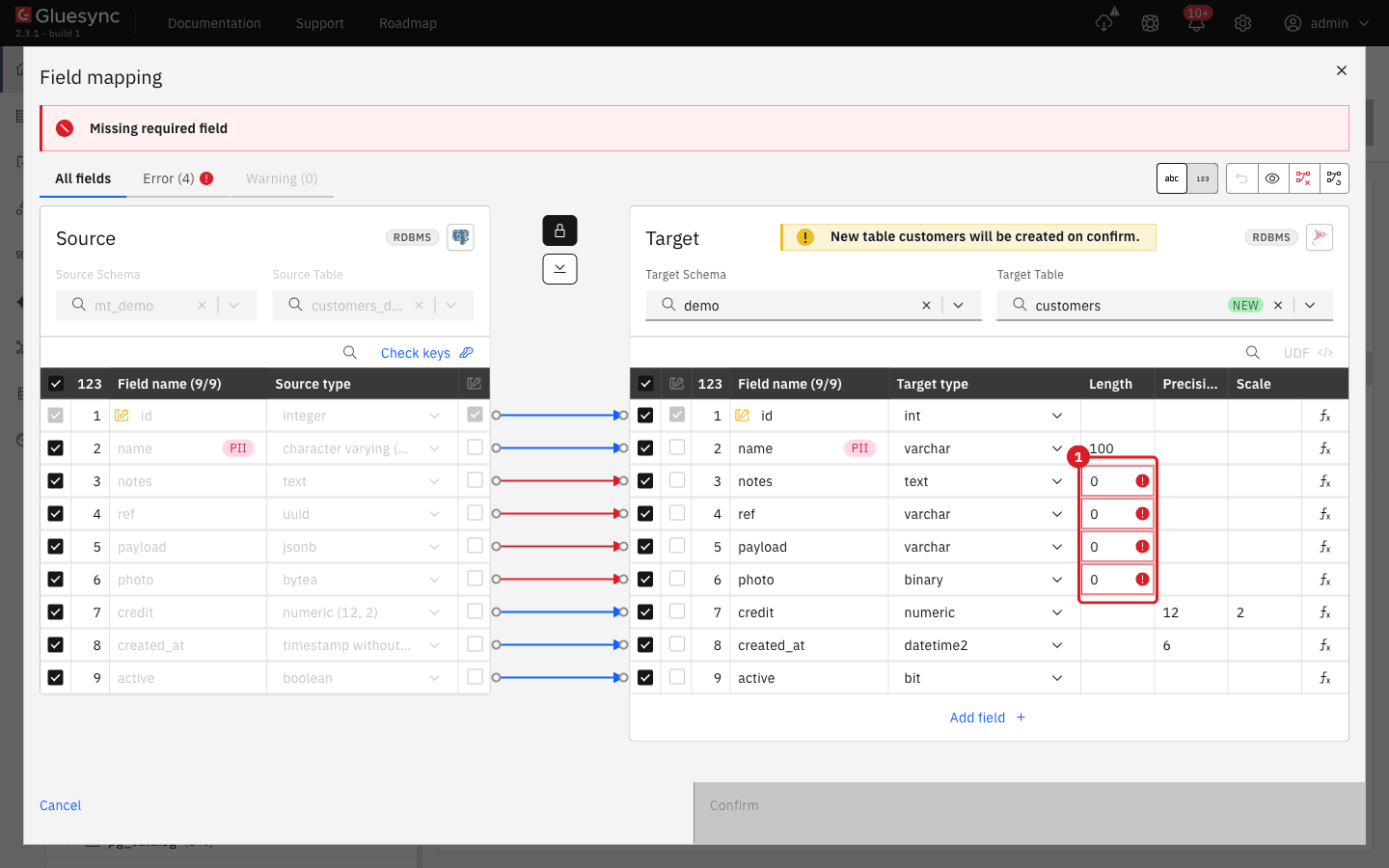
text, uuid, jsonb and bytea has no length (1), so the dialog cannot be confirmed.-
For each of the four columns, open the Target type list and choose the SQL Server type from the type mapping table in this guide:
nvarcharwith Length-1fornotesandpayload,uniqueidentifierforref, andvarbinarywith Length-1forphoto. A length of-1meansMAX; -
Check that the Error tab reads Error (0), then select Confirm.
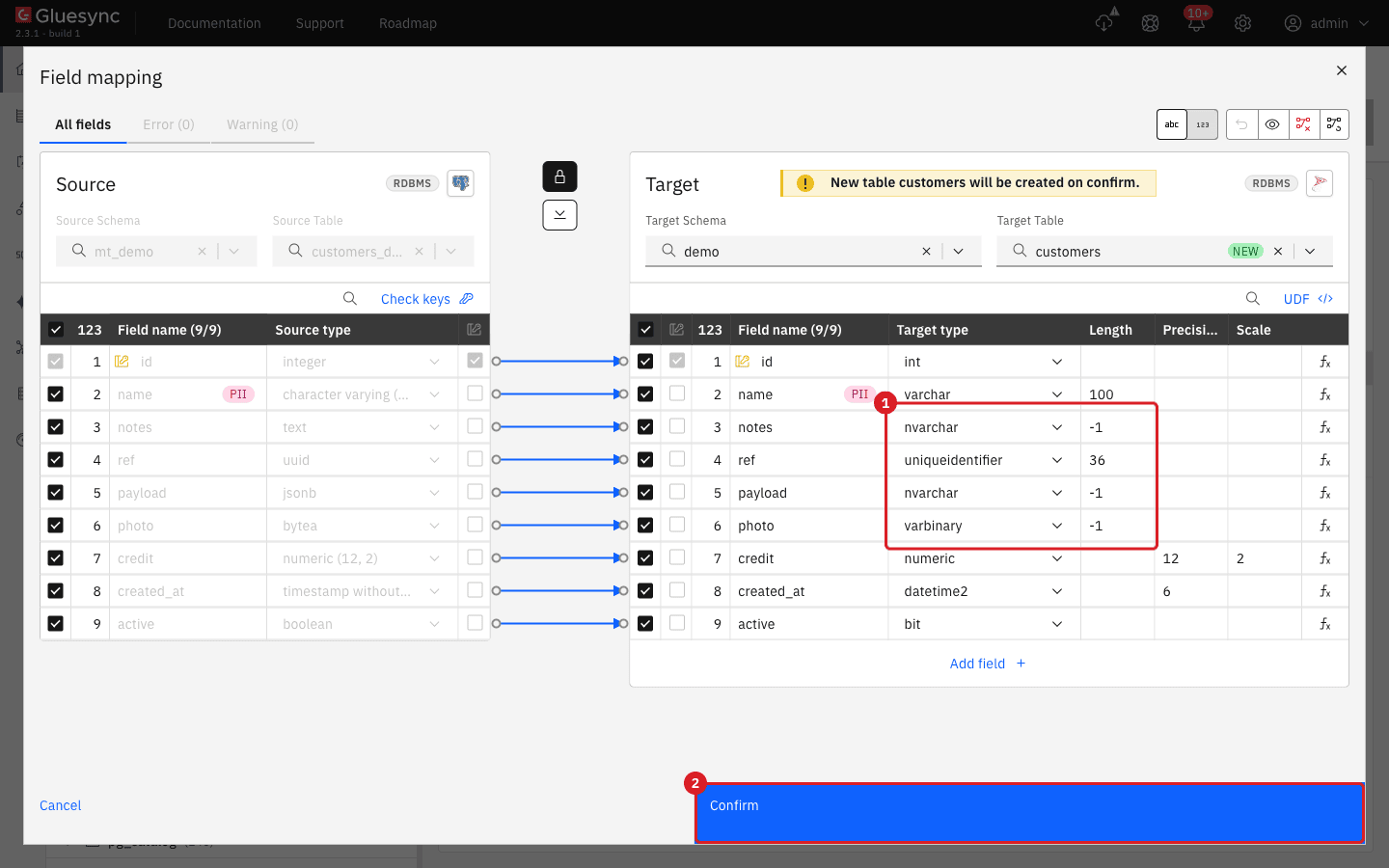
-
A second dialog, Create table customers, shows the exact statement. Read it, then select Create table customers. Select Copy snippet instead if your DBA must run the statement.
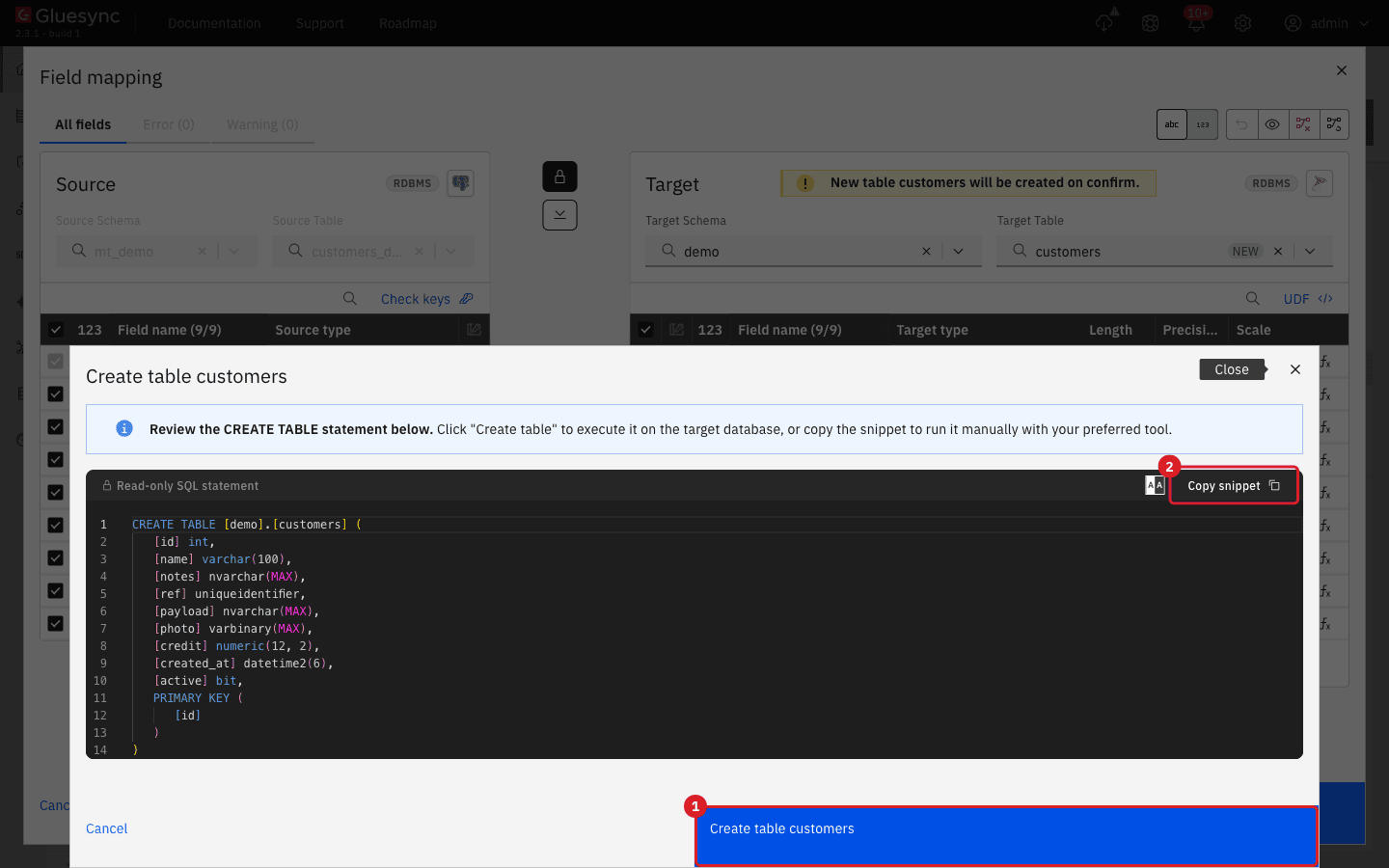
CREATE TABLE (1); Copy snippet (2) copies it for a manual run.-
Select Confirm and continue to save the entity.
|
Do not accept the proposal blindly. The wizard proposes |
UI + SQL
Use this step when the target table already exists, or after step 3 to double-check it.
-
In the Field mapping dialog choose the existing table in Target Table instead of Create table;
-
Open the Error and Warning tabs. Each entry is a source and target type that do not fit, and the dialog cannot be confirmed while the Error tab is not empty (step 7 explains how to clear it);
-
For lengths, which the dialog does not judge, list the real target widths in T-SQL:
SELECT c.name AS col, t.name AS type, CASE WHEN c.max_length = -1 THEN 'MAX' WHEN t.name IN ('nvarchar','nchar') THEN CAST(c.max_length/2 AS varchar(10)) ELSE CAST(c.max_length AS varchar(10)) END AS length_in_chars, c.precision, c.scale FROM sys.columns c JOIN sys.types t ON t.user_type_id = c.user_type_id WHERE c.object_id = OBJECT_ID('demo.trunc_demo') ORDER BY c.column_id; -
On the source, list the longest value of each text column and the largest number of each numeric column. For PostgreSQL:
SELECT max(length(name)) AS name_chars, max(length(note)) AS note_chars, max(octet_length(note)) AS note_bytes, max(price) AS max_price FROM mt_demo.trunc_demo; -
Compare the two results column by column. Every target column must be at least as wide as the longest source value, with room to grow, and every numeric target must have at least the source precision and scale.
|
|
UI + SQL
A target table that is too narrow works for weeks and then fails when the first longer value arrives. Reproduce it with the table from step 1.
-
Create an entity from
mt_demo.trunc_demoto the existingdemo.trunc_demoand start it with change data capture (CDC). Then, on the source, insert a long value:INSERT INTO mt_demo.trunc_demo (id, name, note) VALUES (40, 'Order 40', repeat('long note ', 15)); -
Open the entity. A red banner Target write failed names the table and the column, and shows the value that did not fit. Select Copy error to copy it, or View notifications for the notification String or binary data found truncated.
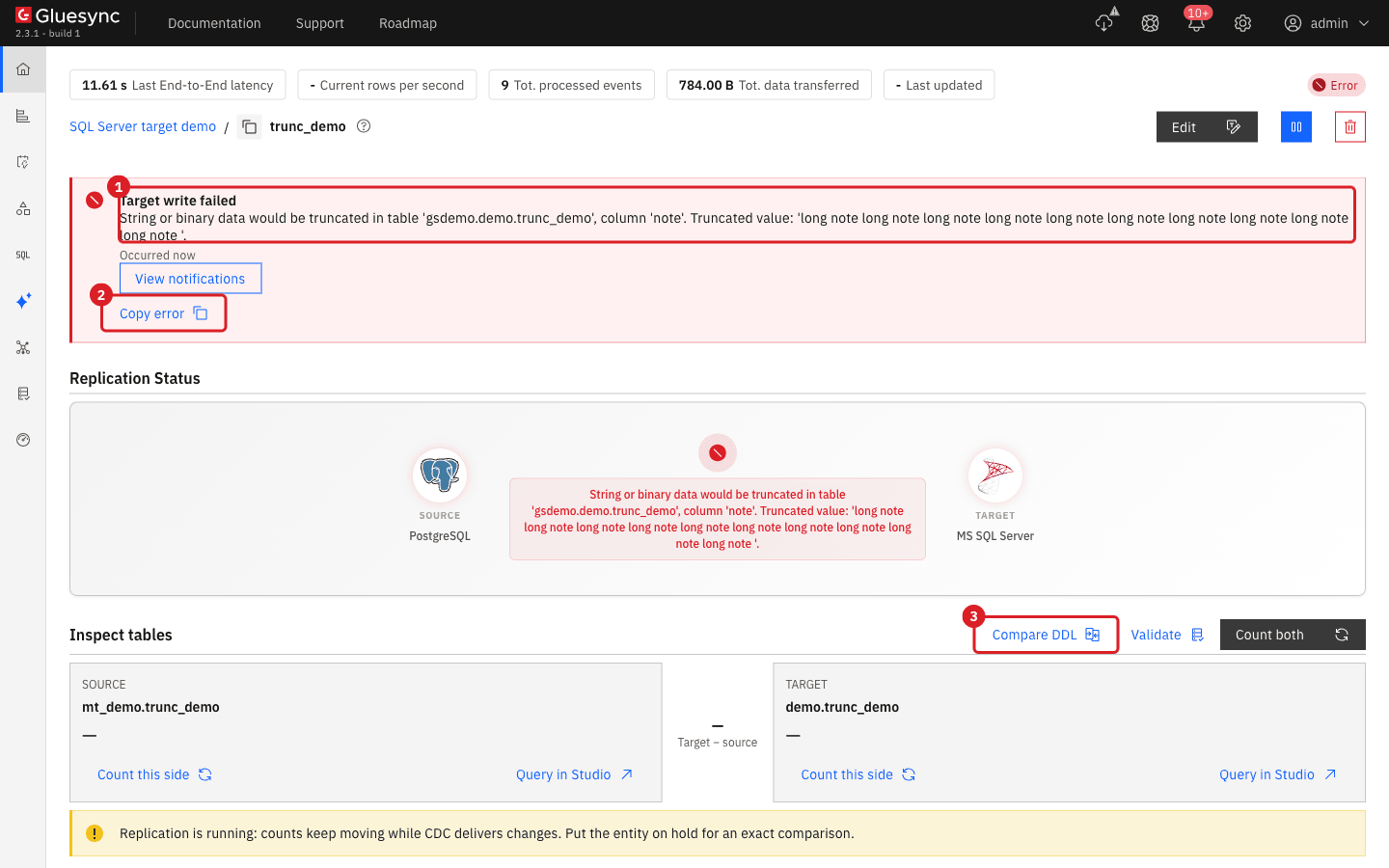
-
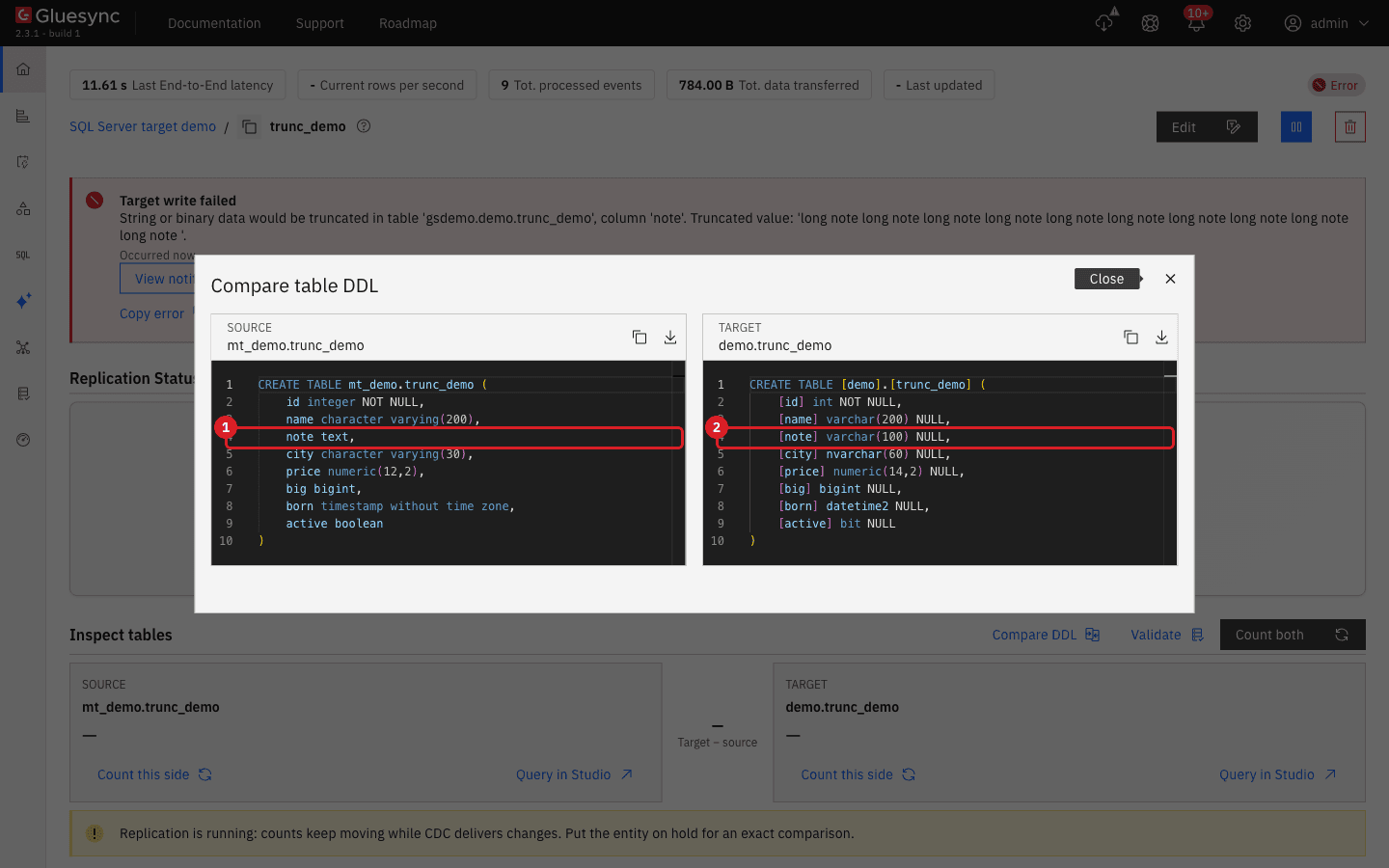
Select Compare DDL. The source
CREATE TABLEis on the left and the target on the right. The row of the column in the error is the one where the target is shorter, herenote textagainstnote varchar(100).
-
Widen the column in SQL Server, to the longest source value with room to grow, or to
MAX:ALTER TABLE demo.trunc_demo ALTER COLUMN note varchar(300) NULL; -
Do not restart anything. Wait a few seconds and check the row:
SELECT id, len(note) AS l FROM demo.trunc_demo WHERE id = 40;
If you cannot or do not want to widen the column, the other ways out are to shorten the value in transit with a UDF (there is no built-in function that shortens text), or to filter the long rows out with data filters.
|
If the message does not name a column, for example on an older SQL Server, run the two queries of step 4 and compare the widths, as there. Characters that need two code units count twice: ten emoji do not fit in |
|
Changing the mapping from the Control Plane (Edit mapping, then Confirm) is a different operation: it stops the entity with the warning Entity Configuration Changed and asks for a new resync. Widening a column in SQL Server does not. |
SQL
Three more value errors look like truncation but are not. They were reproduced on the same table, one value at a time.
-
For a number that does not fit, for example inserting
99999.99intoprice numeric(6,2), the notification readsArithmetic overflow error converting numeric to data type numeric.Widen the column:ALTER TABLE demo.trunc_demo ALTER COLUMN price numeric(12,2) NULL; -
For a
bigintsource and aninttarget, inserting9000000000givesArithmetic overflow error converting expression to data type int.Usebigint:ALTER TABLE demo.trunc_demo ALTER COLUMN big bigint NULL; -
For a
timestampsource and adatetimetarget, a date before 1753 gives Batch Update withThe conversion of a datetime2 data type to a datetime data type resulted in an out-of-range value.(SQL Server error 242). Usedatetime2, which also keeps microseconds:ALTER TABLE demo.trunc_demo ALTER COLUMN born datetime2(6) NULL;
UI
When you point an entity at a table you created, the Field mapping dialog compares the type of every source and target column. The comparison below is for a source table with 29 typed columns mapped to a target table whose types were chosen on purpose to be wrong.
| Source to target | Dialog shows | What it means |
|---|---|---|
|
Error (red) |
Needs a field function that turns the value into text (below) |
|
Error (red) |
Needs a field function or a UDF |
|
Warning (yellow) |
Written, but |
|
No mark |
Written; a |
|
No mark |
Written while every value is a valid GUID; |
The Error and Warning tabs list the pairs. Apply a field function to each red pair:
-
Select the fx button at the end of the target row;
-
Open Functions collection and choose the function that produces the target type: Convert Int to String for
integertovarchar, Convert Boolean to String (true/false) forbooleantovarchar, Convert Date and Time to String and Convert Date to String (both with a pattern) fortimestampanddate, Convert Decimal to String fornumerictovarchar, Convert String to Boolean fortexttobit, Convert String to Date (with a pattern) fortexttodate, String to Byte Array (charsetUTF-8) fortexttovarbinary, and Convert String to Decimal fortextto adecimalcolumn; -
Repeat for every red row, then select Confirm.
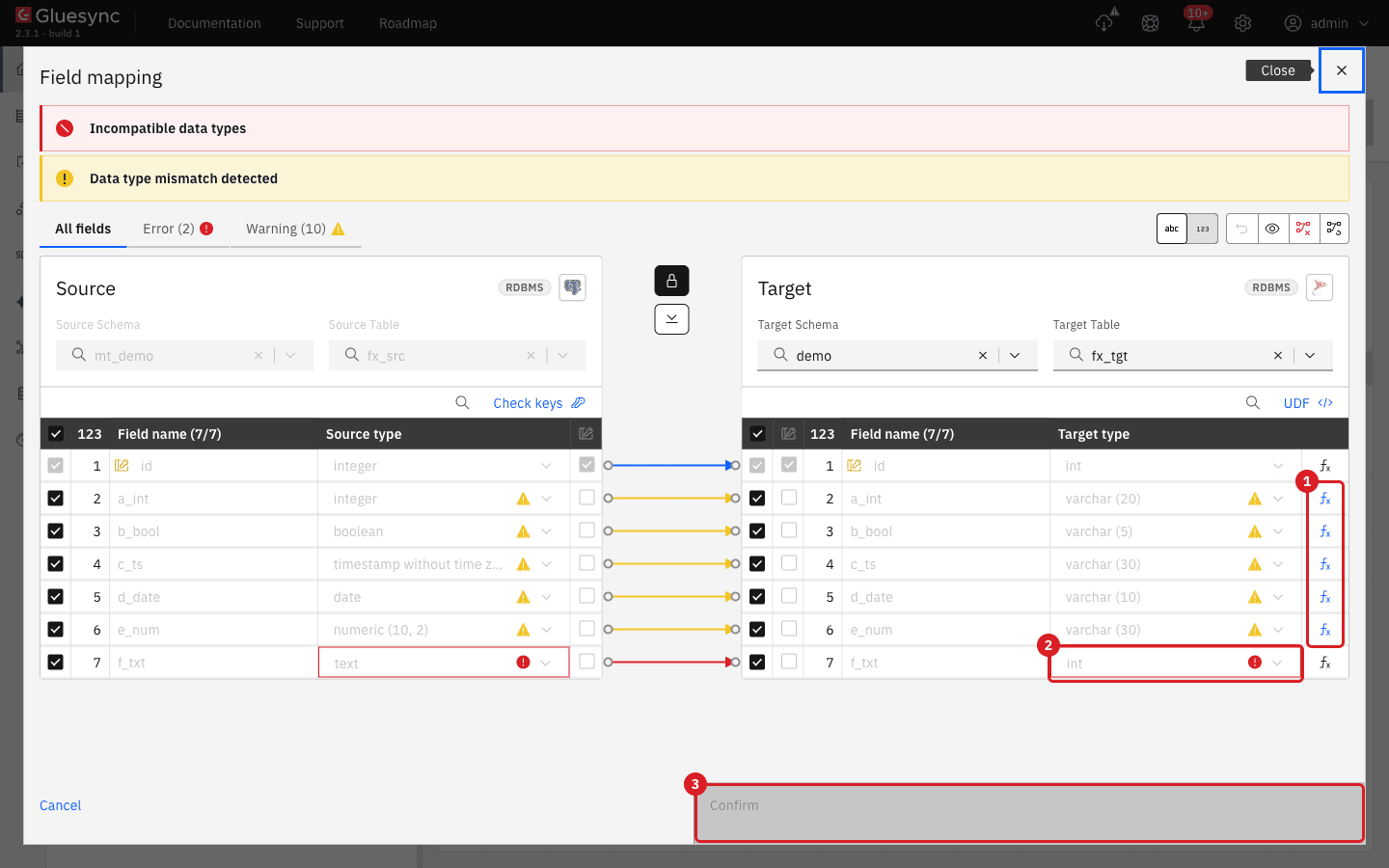
A built-in function cannot return the wrong type: Convert String to Decimal is refused for an int column with the message Field function STRING_TO_BIG_DECIMAL returns BIG_DECIMAL, but target column 't_int' is INT. A text value that must become an int therefore needs a UDF, written as in Write and test a UDF to convert dates, times, and names, or a decimal(10,0) target column. Without either, the dialog stays red, and a non-numeric value that arrives later fails with Conversion failed when converting the nvarchar value 'abc' to data type int. (SQL Server error 245).
UI + SQL
Words such as order, user, key, group, check, begin, select and table are reserved in SQL Server. A statement that writes them without brackets fails with Incorrect syntax near the keyword, and that error appears on one statement type only: an older build bracketed the columns in the snapshot INSERT and the CDC INSERT and UPDATE, but not the key columns of the CDC DELETE. Gluesync 2.3 brackets every column name.
-
Create an entity from
mt_demo.reserved_demoto the existingdemo.reserved_demo, and start it with a snapshot; -
On the source, run an insert, an update and a delete:
INSERT INTO mt_demo.reserved_demo VALUES (2,20,'bob','k2','g2','b2','m2'); UPDATE mt_demo.reserved_demo SET "order" = 11, "begin" = 'b1-upd' WHERE id = 1; DELETE FROM mt_demo.reserved_demo WHERE id = 2; -
On the target, read the table:
SELECT * FROM demo.reserved_demo ORDER BY id;
If the failing statement in your logs shows a bare reserved word and the error Incorrect syntax near the keyword, you run a build that is older than 2.3: upgrade. You can reproduce the failure by hand: DELETE FROM demo.reserved_demo WHERE (begin = 'x') fails, DELETE FROM demo.reserved_demo WHERE ([begin] = 'x') does not.
|
A column name that contains a closing bracket, such as |
SQL + UI
SQL Server compares keys with the collation of the key column. The default collation of the example database, SQL_Latin1_General_CP1_CI_AS, is case insensitive and accent sensitive, so the key values abc and ABC are the same key, while abc and ábc are not. A PostgreSQL source treats all three as different keys.
-
Create an entity from
mt_demo.case_demotodemo.case_demoand run a snapshot. On the target, read it:SELECT code, label FROM demo.case_demo; -
To keep all three keys, make the key column case sensitive. Drop the primary key, change the collation and add the key again, then delete the entity and add it again so that Gluesync reads the new collation:
DECLARE @pk sysname = (SELECT name FROM sys.key_constraints WHERE parent_object_id = OBJECT_ID('demo.case_demo') AND type = 'PK'); EXEC('ALTER TABLE demo.case_demo DROP CONSTRAINT ' + @pk); ALTER TABLE demo.case_demo ALTER COLUMN code varchar(30) COLLATE Latin1_General_100_CS_AS NOT NULL; ALTER TABLE demo.case_demo ADD CONSTRAINT PK_case_demo PRIMARY KEY (code); DELETE FROM demo.case_demo; -
Run the snapshot of the new entity and read the table again.
Two more differences between SQL Server and the source do not depend on the collation:
-
A trailing space is ignored when SQL Server compares strings, so the keys
abcandabc ` are the same key even with a case-sensitive collation. A snapshot that inserts both stops with `Violation of PRIMARY KEY constraint … The duplicate key value is (abc )., and in CDC the rowabc ` overwrites the row `abcinstead of adding one; -
Text is stored with the code page of the column. A
varcharcolumn with a non-UTF-8 collation changes the characters it cannot hold:Łódź ĄĘwas stored asLódz AE, and Russian and Japanese text as??????and???, with no error. Annvarcharcolumn, or avarcharcolumn with a_UTF8collation, stores all of them. The columns created by the wizard take the collation of the database, so usenvarcharfor text that is not Western European.
Type mapping for a PostgreSQL source
The first column is the source type. The second is what the Field mapping dialog proposes when it creates the table. The third is the type to choose.
| PostgreSQL source | Wizard proposal | Recommended SQL Server type | Checked result |
|---|---|---|---|
|
|
The proposal |
Values written unchanged |
|
|
|
|
|
|
|
With |
|
|
|
Stored without limit; |
|
|
|
Stored as a GUID; SQL Server shows it in upper case |
|
|
|
The JSON text is kept; |
|
|
|
The bytes are kept |
|
|
The proposal |
|
|
|
|
|
|
|
|
Microseconds kept; |
|
|
|
Stored in UTC: |
|
|
The proposal |
Values written unchanged |
Arrays such as |
|
|
|
For other sources, the same rule applies: choose the SQL Server type from the value, not from the name of the source type, and check the Length column.
Troubleshooting
| Problem | Possible cause | What to do |
|---|---|---|
Target write failed with |
A value is longer than the target column, or needs more bytes than characters |
Compare the widths (steps 4 and 5) and |
The same error, but the message names no column |
An older SQL Server does not report the column |
Run the width queries of step 4 on both sides, and compare |
|
The target precision or scale is smaller than the source |
|
|
A |
Change the column to |
Batch Update with |
A timestamp before 1753 in a |
Change the column to |
|
A text source column mapped to a number column and a value is not numeric |
Fix the data, or write a UDF that returns |
|
A |
Apply String to Byte Array (charset |
Incompatible data types banner and a disabled Confirm |
A source and target type pair that is not compatible |
Open the Error tab, apply a field function or a UDF to each row (step 7), or change the target type |
Missing required field when creating a table, with |
The proposal for |
Choose |
|
The proposed |
Choose |
|
The user cannot create tables, or cannot use the target schema |
|
Entity Upsert Failed with |
Bulk operations are on and the user cannot create the schema |
|
|
The snapshot truncates the target table and the user lacks |
|
|
A reserved word written without brackets, by an older build |
Upgrade to Gluesync 2.3 and confirm with the test in step 8 |
|
A closing bracket in a column name is not escaped |
Rename the column in the source, or replicate from a view |
|
Two source keys are equal for SQL Server: |
Clean the keys in the source, or use a case-sensitive collation and add the entity again (step 9). A trailing space stays a duplicate in every collation |
Rows are missing on the target and there is no error |
Source keys that differ only by case collapsed into one on a case-insensitive key column |
Use a case-sensitive collation on the key column, then delete the entity and add it again (step 9) |
|
The collation of the column cannot store the characters |
Use |
Related guides
Contact MOLO17 Support if you need assistance with a SQL Server target.