Read Gluesync logs and diagnose errors
Most Gluesync problems explain themselves in the Control Plane: the entity shows an error, the notification carries the stack trace, and Copy error gives you a message that support can read. This advanced guide starts there, and then shows what to do when that is not enough: where each Gluesync component writes its log, how to read a line, how to filter by pipeline, entity and agent, how to find the first real error, how to set the time zone, the level and the retention, and what the most common error messages mean.
In this guide
You will learn how to read what the Control Plane already tells you, collect a support bundle, find the log of each component on Linux and Windows, read the format of a line, filter a log by pipeline, entity and agent, find the first real error above a stack trace, fix the time zone of the logs, set the log level, retention and rollover, move the logs to another disk, and look up 20 common error messages.
Quick information
Goal |
Diagnose a Gluesync problem from the Control Plane first, then from the logs, and send support what it needs |
Audience |
Administrators and support engineers who run Gluesync with Docker Compose on Linux or Windows Server |
Level |
Advanced |
Time required |
About 45 minutes to read and try, 5 minutes to use as a reference |
Area |
Control Plane → entity page, Notifications hub, Settings → Support; host shell |
Applies to |
Gluesync 2.3 |
Before you begin
Make sure that:
-
Gluesync runs from the Docker Compose kit, in a folder that contains
docker-compose.yml(for example/opt/gluesyncon Linux orC:\Program Files\Gluesyncon Windows Server). The paths below are relative to it; -
You can sign in to the Control Plane with a role that can change settings;
-
For the steps marked CLI, you have a shell on the host:
bashon Linux, PowerShell on Windows Server. The Control Plane steps need only a browser.
|
The commands use the kit service names: |
Guide steps
UI
Do this before you open any file. The entity page and the Notifications hub already hold the error, its stack trace and the ids you need to search the logs.
-
Open the pipeline and select the entity whose status is Error;
-
Read the red banner. Its title tells which side failed: Target write failed, Source read failed, Connection pool couldn’t start or Agent unhealthy. The text below it is the message of the database or the driver;
-
Select Copy error and paste the text into your ticket or your notes;
-
Select View notifications to open the Notifications hub filtered on this entity;
-
Expand the row of the error and select Stack trace.

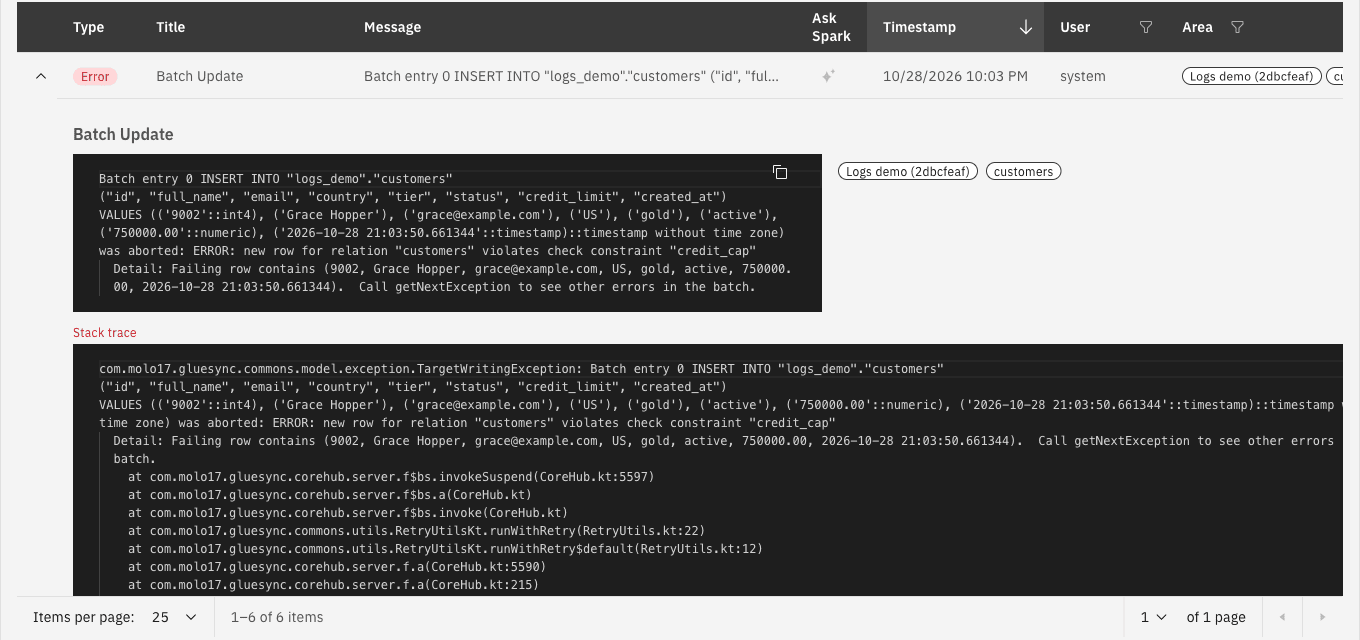
The banner title and the message usually point to one row of the error table. Many problems end here: a constraint on the target, a wrong password, a stopped database.
|
Error messages can contain row values. In the lab, a rejected row appeared as |
UI CLI
When support asks for logs, send a compressed archive made by Gluesync, never single .log files or screenshots.
-
Open Settings (the gear icon in the top bar) and select Support;
-
Scroll to Log collection for support;
-
To send the logs to a ticket, enter your Email and the Ticket ID (
GSSD-and digits) and select Upload Logs to Support. The Core Hub host needs access towebdav.molo17.comorftp.molo17.com; -
To keep the archive on your side, select Include database only if support asked for it, and select Collect Local;
-
When Archive created appears, select the file name to download it.
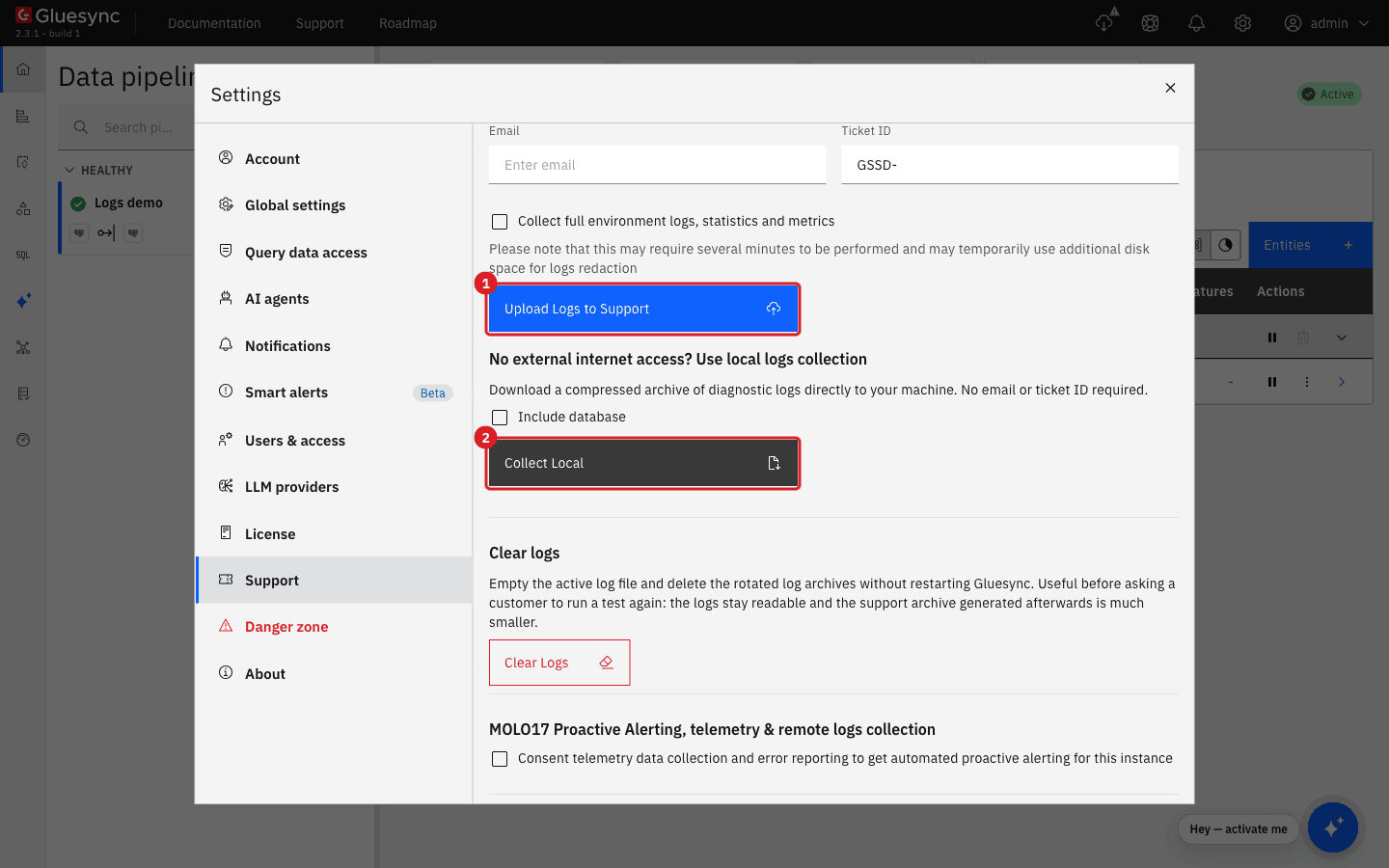
What is inside the archive from Collect Local:
| File | Content |
|---|---|
|
The Core Hub log, as it is on disk, with no change to the lines |
|
A Time block (the zone, the UTC offset, local and UTC time, and the |
|
Pipelines, agents and entities with host and database names. It holds no passwords |
|
Auxiliary files found on disk, for example a custom |
|
The Docker details. Inside the Core Hub container it says that Docker is not available |
When the Conductor is connected, the page also shows Collect full environment logs, statistics and metrics. Tick it when support needs the logs of the other modules. The collection can take several minutes and uses extra disk space while it redacts the logs.
If the Control Plane is not available, use the command line of the kit. These collect the logs of the Compose services, the installer logs and the configuration with the passwords replaced by *:
# Linux
sudo gluesync collect-logs --local-only
# Windows Server, elevated PowerShell
gluesync collect-logs --local-only
Read Exporting / Uploading logs to support for the options, and Gluesync Control for Linux and Gluesync Control for the folder where the bundle is written.
CLI
Gluesync is several containers. Each one writes to a different place, and not every one writes a file. Paths are relative to the Gluesync folder.
| Component | File on the host (Linux and Windows Server) | Command that always works |
|---|---|---|
Core Hub (agents run inside it) |
|
|
Chronos (schedules) |
|
|
Conductor (modules, updates) |
|
|
Traefik (the reverse proxy) |
None. It writes to the container output only, and the kit has no access log. The level is |
|
Prometheus and Grafana |
None in the kit. Prometheus keeps its data inside the container |
|
Docker (what a container printed) |
Linux: |
|
Linux and Windows differ only in the Gluesync folder and in the shell. Inside the Core Hub container the folder is always /opt/gluesync/logs (on Windows containers, C:\opt\gluesync\logs), and the kit maps it to logs/core-hub.
The docker compose logs options you need most:
docker compose logs --since 30m gluesync-core-hub          # the last 30 minutes
docker compose logs -t --tail 50 gluesync-core-hub         # add Docker's own UTC time
docker compose logs -f gluesync-core-hub gluesync-chronos  # follow two services
docker compose logs --no-log-prefix gluesync-core-hub > core-hub.txt|
|
CLI
This is a line from the Core Hub log file in the lab. The lab used the pattern of the next step, which adds the pipeline and entity ids (the line is cut at the end):
2026-10-28T20:51:15.578Z [DefaultDispatcher-worker-1 @coroutine#223] [2dbcfeaf] 50adb808 c.m.g.p.t.[postgresql] PgSqlTargetAgentService ERROR - Error writing transaction on target for entity customers and transaction message -1305519641: java.sql.BatchUpdateException: ...| Part | Meaning |
|---|---|
|
Time. |
|
The thread. Lines of one operation share the thread or the coroutine number |
|
The pipeline id and the entity id. |
|
The logger. The part in square brackets is the agent: |
|
The level: |
|
The message. A long message, and a Java stack trace, continue on the next lines, which do not start with a date |
The container output (docker compose logs) has no offset and prints the logger in a shorter form. With the same pattern, a line looks like this:
2026-10-28T20:46:26.594Z [DefaultDispatcher-worker-14 @coroutine#73] [2dbcfeaf] - [postgresql] PgSqlSourceAgentService INFO - Loading existing bootstrap file...|
Lines of the first seconds after a start can use an older layout, without the thread and without the offset: Core Hub rewrites the file layout once it has read its settings. Do not read that as a different time zone. |
CLI
Search for the ids, and for the agent tag. All the commands below read the file. Replace the ids with yours. With the logback.xml of the kit, only some lines name the ids in their text, so start with the plain id and the agent tag. Add the ids to the pattern (see below) to get every line of a pipeline or an entity.
LOG=logs/core-hub/gluesync-core-hub.log

grep -F '2dbcfeaf' "$LOG"                        # the lines that name the pipeline (kit pattern)
grep -F '[2dbcfeaf]' "$LOG"                      # everything of one pipeline (pattern with ids)
grep -F '[2dbcfeaf] 50adb808' "$LOG"             # one entity of that pipeline
grep -F '[postgresql]' "$LOG"                    # one agent type: [oracle-cdc], [ibm-iseries], ...
grep -E ' (WARN|ERROR) ' "$LOG"                  # only warnings and errors
grep -F 'd1454a92' "$LOG"                        # one agent, by agent id (in the text)
awk '$1 >= "2026-10-28T20:50" && $1 <= "2026-10-28T20:55"' "$LOG"   # a time window (UTC)
zgrep -F '[2dbcfeaf]' logs/core-hub/archived/*.gz   # the rolled files
On Windows Server, in PowerShell:
$Log = 'logs\core-hub\gluesync-core-hub.log'
Select-String -Path $Log -SimpleMatch '[2dbcfeaf] 50adb808'
Select-String -Path $Log -Pattern ' (WARN|ERROR) '
The ids of the pipeline, entity and agent are in the URL of the entity page, in Copy error, and in the notification tags. The agent id also appears in text such as Entity customers (50adb808) of agent d1454a92 for pipeline 2dbcfeaf encountered and exception. The [pipeline] entity fields are filled only for work that belongs to one pipeline or entity: a request from the browser, or Core Hub start-up, shows [core].
Add the pipeline and entity fields. The logback.xml of the kit does not write them. In the lab, its file wrote 2026-10-28T17:31:55.491 c.m.g.Ktor DEBUG … with no ids. Add them to the pattern of both appenders in shared/logback.xml:
<pattern>%d{yyyy-MM-dd'T'HH:mm:ss.SSSXXX} [%t] [%X{pipelineId:-core}] %X{entityId:--} %c{1} %p - %m%X{requestInfo:-}%n</pattern>%X{requestInfo:-} adds ` | req=<id> by <user> (<ROLE>) via <method>` to the lines of a REST call, so you can tell who started an action. Core Hub reads the file again within about a minute, with no restart. Restart Core Hub afterwards (see the retention step).
CLI
An error is rarely one line. A failed write printed about 200 lines in the lab, about 90 of them a stack trace: the first line is the cause, and the rest is the stack trace and the retries.
-
List the errors with their line numbers and read the first one, not the last:
grep -n ' ERROR ' "$LOG" | head -n 5 -
Read what follows the first line. A stack trace is made of lines that do not start with a date:
sed -n '944,960p' "$LOG" | cut -c1-240 -
Find the root cause of a stack trace. It is the last
Caused byof the chain:grep -n 'Caused by' "$LOG" | head -
Look at the lines just before the first error. Core Hub logs a
WARNwhen it retries, and the firstWARNis often older than the firstERROR.
In the lab the order was:
20:51:15.070Z ... PgSqlTargetOperations ERROR - Error executing batch for entity customers and table logs_demo.customers from ... Clear batch before throw exception.
20:51:15.578Z ... PgSqlTargetAgentService ERROR - Error writing transaction on target for entity customers ...: java.sql.BatchUpdateException: Batch entry 0 INSERT INTO "logs_demo"."customers" ...
    ... was aborted: ERROR: new row for relation "customers" violates check constraint "credit_cap"
  Detail: Failing row contains (9001, ...)
Caused by: org.postgresql.util.PSQLException: ERROR: new row for relation "customers" violates check constraint "credit_cap"
20:51:16.486Z ... EntitySyncManager WARN  - Coroutine context no more active for entity customers, retrying...
20:51:16.503Z ... EntitySyncManager ERROR - Entity customers (50adb808) of agent d1454a92 for pipeline 2dbcfeaf encountered and exception
The first line names the side (the target operation), the table and the transaction range. The text after ERROR: is the message of the database: here, a CHECK constraint on the target. The lines that follow are consequences: the retry (Retrying…) and the generic encountered and exception line. A message about a stack trace deep inside Gluesync classes is almost never the cause; the cause is the message of the database or of the driver.
|
Optional, for advanced users
|
UI
-
Open Settings → Support and scroll to Log level settings;
-
Select the level in Log level:
TRACE,DEBUG,INFO,WARNorERROR. It applies at once, with no Save and no restart, and it is kept after a restart.
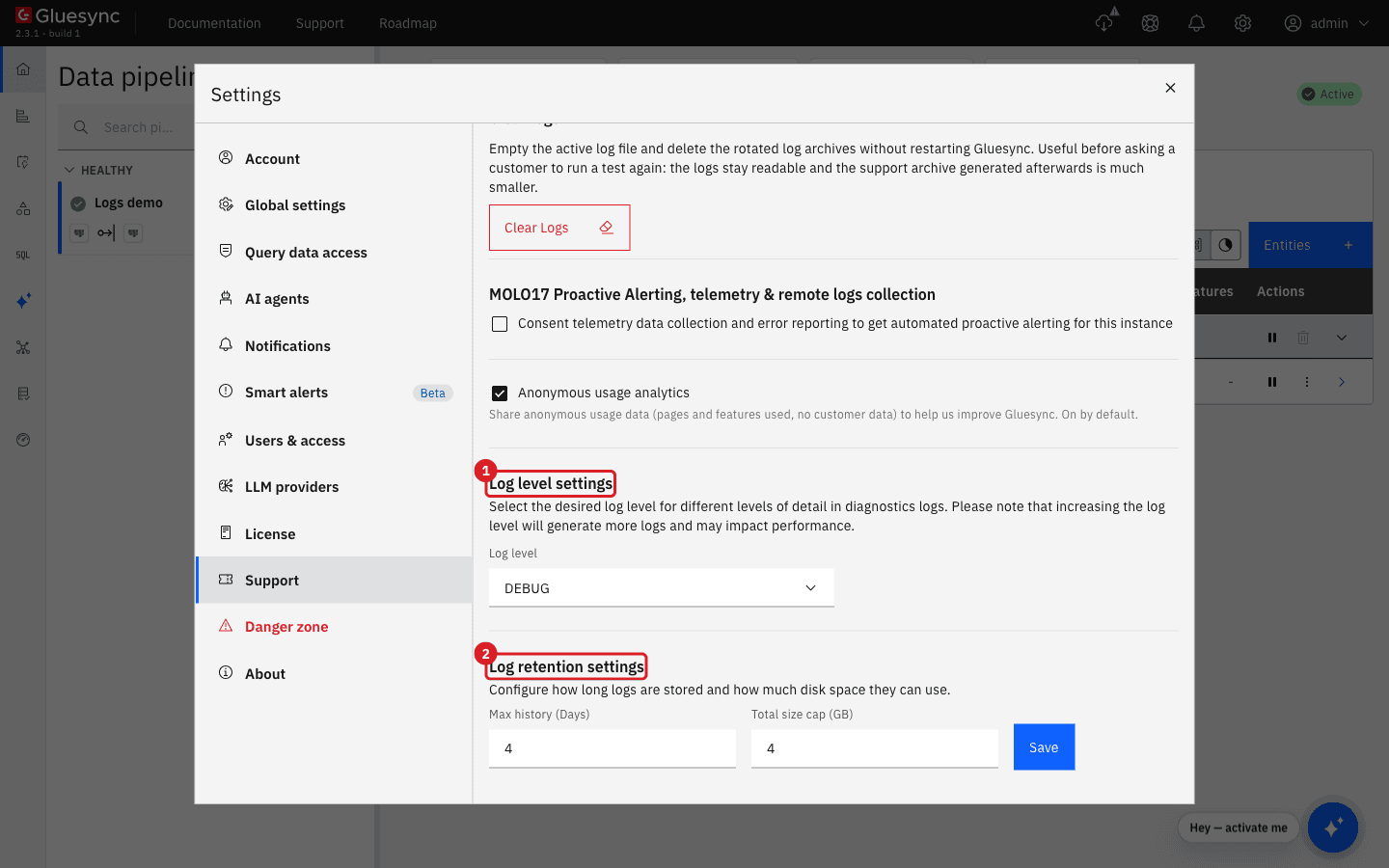
The default in the kit is DEBUG. This is what each level wrote in the lab, for a Core Hub with one idle pipeline and Prometheus scraping every 5 seconds:
| Level | Lines per minute | Size per minute | What you lose by choosing it |
|---|---|---|---|
|
77 |
10.6 KB |
Nothing. The most detail, for a short test |
|
39 |
6.1 KB |
Nothing. It adds every REST call ( |
|
12 |
0.6 KB |
The REST calls and the details of each batch. Start, stop and error lines stay |
|
0 |
0 |
Everything that happens normally, such as |
A busy pipeline writes far more. Use INFO in production, and switch to DEBUG for the time that you reproduce a problem. Support often asks for DEBUG; set it, reproduce the problem, collect the bundle, and set the level back.
UI CLI
-
In Settings → Support, scroll to Log retention settings;
-
Enter Max history (Days) and Total size cap (GB), and select Save;
-
Check the Core Hub log. At the next start Core Hub writes
Configuring log retention: maxHistory=4 days, totalSizeCap=4GB.
How the files roll over, as observed in the lab:
-
The active file is
gluesync-core-hub.log. When it reaches the size limit, Core Hub moves it toarchived/gluesync-core-hub.<date>.<n>.log.gz, compressed, and starts a new file; -
The values of Log retention settings are applied at once, and again at every start. They win over the
maxHistoryandtotalSizeCapwritten inshared/logback.xml; -
The size limit of a file is fixed by Core Hub. A
maxFileSizeinlogback.xmlis not used after the start (see the result below); -
Archives older than Max history (Days), or beyond Total size cap (GB), are deleted;
-
Clear Logs, in the same page, empties the active file in place and deletes the archives, without a restart. It works even when the disk is full. Do not delete the active file with
rm. See Free disk space and manage cache and logs.
|
Editing |
Config
Use a second volume, and tell Core Hub the new path in shared/logback.xml. The Control Plane has no setting for the path.
-
In
docker-compose.yml, add a volume togluesync-core-hub(on Windows, a folder on the other drive):volumes: - ./logs/core-hub:/opt/gluesync/logs - /mnt/bigdisk/gluesync-logs:/opt/gluesync/logs-custom -
In
shared/logback.xml, change the two paths of theFILEappender:<file>/opt/gluesync/logs-custom/${JAR_NAME:-gluesync}.log</file> ... <fileNamePattern>/opt/gluesync/logs-custom/archived/${JAR_NAME:-gluesync}.%d{yyyy-MM-dd}.%i.log</fileNamePattern> -
Recreate the service:
docker compose up -d gluesync-core-hub
Docker’s own copy of the container output is separate. Cap it with max-size and max-file as described in Log rotation. In one support case a Windows Core Hub left a 100 GB *-json.log for this reason.
Config
The logs of every container are in UTC unless you set TZ. In the lab all five containers reported UTC with no setting, and the same time with TZ=America/Montevideo (UTC-3):
| Component | Setting | What the log shows |
|---|---|---|
Core Hub |
|
File: |
Chronos |
|
|
Conductor |
|
|
Traefik |
|
|
Prometheus and Grafana |
|
|
-
Add
TZto each service ofdocker-compose.yml, with a value in the formRegion/City:environment: - SSL_ENABLED=true - TZ=America/Montevideo -
Recreate the services:
docker compose up -d; -
Check with
docker compose exec gluesync-core-hub date.
|
Write the value without quotes in the list form. |
What else does not follow TZ, and is worth knowing when you compare times:
-
The Control Plane shows times in the time zone of your browser (the Timestamp column of the Notifications hub), and Copy error ends with a UTC time. The lab showed
9:51 PMin the table for the log line20:51:15.578Z, from a browser one hour ahead of UTC; -
The text of a notification is written with the time of the Core Hub zone. In the lab,
CDC task for customers started in pipeline Logs demo at 17:12 10-28-2026withTZ=America/Montevideo, and… at 20:00 10-28-2026without it. The stored time stamp of the notification is always UTC; -
Schedules in Chronos run in the time zone set for the schedule in the Control Plane.
TZchanges the log lines, not the schedules.
IBM i. The time of a journal entry is the wall-clock time of the IBM i, not UTC. In the lab, an IBM i in UTC+1 (QUTCOFFSET +0100, QTIMZON QP0100CET4) wrote a journal entry at 2026-10-28 21:22:56.077584 when the UTC time of the host was 20:22:56. The Gluesync log line about the same change shows the Core Hub zone, so the two differ by the offset of the IBM i. Gluesync corrects the lag figure by the clock difference between the IBM i and Core Hub, but not the times that it stores in checkpoints and in the technical timestamp column. The agent logs As400 system timezone: … at start.
Oracle. LogMiner returns a time without a zone, in the time zone of the database server. The agent compares it with the clock of the Core Hub host and corrects it. When the two clocks differ, it logs Database clock is <offset> from this host. Redo timestamps carry no time zone, so they are corrected by that amount before any age is computed from them. A visible gap between a commit in Oracle and the log line means that the clock of the database server or of the host is wrong, not that the zone is wrong. Fix the clock with NTP.
Look up a common error
The table lists messages from the Control Plane and from the logs, with what each one means and the first thing to do. Each row names a guide for the details. The messages are as they appear in Gluesync 2.3; the names of tables, hosts and ids are examples.
| Message | Meaning | What to do |
|---|---|---|
|
The agent cannot open a connection to its database: it is stopped, the name or port is wrong, or a firewall or TLS setting blocks it |
Test the host and port from the Core Hub host, then start the database or fix the address in Edit source or Edit target and select Test and continue. See Diagnose a stalled pipeline or entity |
|
The database refuses the user name or password, often after a password rotation |
Enter the new password in Edit source or Edit target and select Test and continue. See Diagnose a stalled pipeline or entity |
|
The host does not answer: wrong host name or port, or the database is down. The edit is saved even when the test fails |
Correct the host and port and test again. An entity without changes can stay Active while it does not replicate, so check with Count both |
|
The pool of the target could not get a connection in 30 seconds: the target database is stopped or unreachable |
Start the target. Changes wait in the source cache and are written when it is back. See Free disk space and manage cache and logs for what a long outage costs |
|
A source or target agent could not start its connection after a restart or after maintenance. Core Hub retries after 10, 20 and 30 seconds, then every 5 minutes |
Read the Check connection failed notification that came with it, fix the database, and wait for the next attempt or toggle maintenance mode. See Pipeline maintenance mode |
|
The PostgreSQL replication slot of the entity was dropped, so Gluesync cannot continue from where it stopped |
Start the entity with a full copy, which creates the slot again. See Start a snapshot and CDC replication from the Control Plane |
|
The target database refused a row. The row is in the message ( |
Fix the constraint or the row on the target, and the entity writes the row at the next retry. See Find and fix row differences and Insert conflict strategy |
|
The target column is shorter than the source value |
Widen the target column. Recreating the replication helps only until the next long value. See Map IBM i data types |
|
A field function (UDF) failed on a row, often on a null or an empty value |
Test the function on the failing value, and handle null. See Write and test a UDF for common conversions |
|
The LogMiner user lacks a grant on a catalog view or on |
Grant the privileges listed in Set up Oracle LogMiner end to end |
Oracle LogMiner: redo gap (ORA-01291) |
The redo that holds some changes is no longer available (archive logs were removed). Gluesync moved to the current position and skipped the changes |
Run a new snapshot of the affected entities, and keep archive logs until Gluesync has read them. See Set up Oracle LogMiner end to end |
|
The Oracle listener or the database is shutting down or starting |
Wait. In the lab the entities stayed Active and replicated again within seconds of the restart |
|
The connection type or the service name is wrong, or the wallet folder is |
Choose Service name or SID to match the database. See Set up Oracle LogMiner end to end |
|
A query ran longer than the read timeout. In one case the indexes of the Gluesync log table were |
Rebuild unusable indexes ( |
Journal checkpoint outdated: |
IBM i: the journal receiver that Gluesync read last was deleted before it was read |
Run a new snapshot, and keep receivers until they are read. See Troubleshoot IBM i journals and receivers |
|
The saved position is inside a logical log that was removed, for example after the logical logs were replaced |
Do not remove logical logs before Gluesync has read past them. To restart from the current position, work with MOLO17 Support: the pipeline checkpoint reset is in Settings → Danger zone |
|
A start was requested while the pipeline is in maintenance mode. A schedule that fires during maintenance gets the same answer |
Exit maintenance, then start again. See Pipeline maintenance mode |
|
The agent has no connection to its database yet, so it cannot change entities. Older versions wrote |
Open Edit source or Edit target, select Test and continue, and check Check connection failed in the notifications |
|
The license file is expired, was changed, or is damaged. In the lab a damaged file made Core Hub start, but every start of an entity was refused |
Install a valid license file and restart Core Hub. See Licensing and license management |
|
The disk of the Core Hub data folder is full |
Free space in the order of Free disk space and manage cache and logs |
Chronos: |
Chronos or the Conductor cannot reach Core Hub, which is stopped, still starting, or on another address |
Check |
|
The time zone variable holds quotes or a name that does not exist |
Use |
|
The reverse proxy tried to route to a container that was not running yet |
Wait for Core Hub to start, then check |
Troubleshooting
| Problem | Possible cause | What to do |
|---|---|---|
The log file has no lines for hours, or |
The log level is |
Check Log level settings and the |
After deleting the log with |
Core Hub keeps the deleted file open |
Restart |
The lines of the file have no offset and no thread name |
|
Restart |
|
The service of the kit is called |
Run |
The log shows |
The value has quotes, or the container was not recreated |
Remove the quotes, run |
Chronos restarts in a loop after you set a time zone |
|
Use |
Notifications show a time one or two hours different from the log |
The Notifications hub uses the time of your browser, the log uses UTC or |
Compare with the UTC time at the end of Copy error |
The Core Hub archive is much larger than the log |
The logs of many days are on disk |
Lower Max history (Days) and Total size cap (GB), or use Clear Logs before you reproduce a problem |
Related guides
Contact MOLO17 Support if you need assistance with logs or with an error that is not in the table.