Set up MySQL and MariaDB CDC and fix binlog errors
This guide takes a MySQL 8 or a MariaDB database from "binary logging is not ready" to a running Gluesync pipeline that copies two tables to PostgreSQL with a snapshot and live changes. It shows the binlog settings Gluesync needs, the grants of a least-privilege user, and how to read and fix the errors that customers report most often: a missing grant, a binlog format that is not ROW, binlogs that were purged while an entity was stopped, errors after a restart or a schema change, and zero dates such as 0000-00-00.
In this guide
You will learn how to check and set the binlog options (log_bin, binlog_format, binlog_row_image, server_id, retention), create a user with only REPLICATION SLAVE, REPLICATION CLIENT (BINLOG MONITOR on MariaDB) and SELECT, create a MySQL or MariaDB source and a PostgreSQL target, run a snapshot followed by CDC, check inserts, updates and deletes with SQL, recover when the position in the binlog is lost, handle zero and invalid dates, and use a table that maps each symptom to its cause and fix.
Quick information
Goal |
Replicate a MySQL or MariaDB schema to PostgreSQL with binlog-based CDC, using a user that has only the required grants, and know how to recover from binlog errors |
Audience |
Database administrators and Gluesync users who operate MySQL or MariaDB sources |
Level |
Intermediate |
Time required |
About 45 minutes |
Area |
MySQL or MariaDB server → Control Plane → Data pipelines → MySQL CDC or MariaDB CDC source |
Applies to |
Gluesync 2.3 |
Before you begin
Make sure that:
-
You have a MySQL 8 or a MariaDB 10.11 or later server and an account that can change its configuration (
my.cnfor50-server.cnf) and create users (the guide uses a databaseshopwith the tablescustomersandorders, and the host namesmysql-sourceandmariadb-source); -
The server can be restarted: some binlog options need a restart (see the optional step on the sample tables if you want to build a lab);
-
The tables to replicate have a primary key (the examples use
id); -
You have a PostgreSQL target that Core Hub can reach, with a schema that already contains empty tables with matching columns (the examples use the schemas
mysql_cdcandmariadb_cdc); -
You can sign in to the Gluesync Control Plane with a role that can create pipelines;
-
You can run SQL against the source and the target, for example with
mysql,mariadbandpsql.
|
The recovery experiments in this guide (purging binlogs, resetting binlog numbering, changing the binlog format) lose changes on purpose. Run them only on a test database. |
|
The two agents are very close: the options, the grants and the recovery are the same unless the guide says otherwise. The differences are collected in What is different on MariaDB. |
Guide steps
SQL
Skip this step if you already have the tables to replicate. It creates the schema shop with 200 customers and 1,000 orders in MySQL (the same SQL runs on MariaDB), and the empty target tables in PostgreSQL.
-
Connect to the source as an administrator and run the first script;
-
Connect to the PostgreSQL target and run the second script.
-- MySQL or MariaDB
CREATE DATABASE IF NOT EXISTS shop;
USE shop;

CREATE TABLE customers (
  id           INT NOT NULL PRIMARY KEY,
  full_name    VARCHAR(100) NOT NULL,
  email        VARCHAR(150),
  country      CHAR(2),
  tier         VARCHAR(10),
  status       VARCHAR(10),
  credit_limit DECIMAL(12,2),
  created_at   DATETIME DEFAULT CURRENT_TIMESTAMP
);

CREATE TABLE orders (
  id          INT NOT NULL PRIMARY KEY,
  customer_id INT NOT NULL,
  amount      DECIMAL(12,2),
  currency    CHAR(3),
  status      VARCHAR(10),
  order_date  DATE
);

INSERT INTO customers (id, full_name, email, country, tier, status, credit_limit)
WITH RECURSIVE n(i) AS (SELECT 1 UNION ALL SELECT i+1 FROM n WHERE i < 200)
SELECT i, CONCAT('Customer ', i), CONCAT('customer', i, '@example.com'),
  ELT(1 + MOD(i,8), 'DE','US','FR','ES','GB','JP','BR','IT'),
  ELT(1 + MOD(i,4), 'silver','gold','platinum','bronze'),
  IF(MOD(i,7)=0, 'suspended', IF(MOD(i,5)=0, 'inactive', 'active')),
  1000 + MOD(i,10)*500
FROM n;

INSERT INTO orders (id, customer_id, amount, currency, status, order_date)
WITH RECURSIVE n(i) AS (SELECT 1 UNION ALL SELECT i+1 FROM n WHERE i < 1000)
SELECT i, MOD(i,200)+1, ROUND(10 + MOD(i*37,490) + MOD(i,100)/100, 2),
  ELT(1 + MOD(i,3), 'EUR','USD','GBP'),
  ELT(1 + MOD(i,5), 'paid','shipped','delivered','cancelled','new'),
  DATE_SUB(CURDATE(), INTERVAL MOD(i,90) DAY)
FROM n;
-- PostgreSQL target
CREATE SCHEMA IF NOT EXISTS mysql_cdc;
CREATE TABLE mysql_cdc.customers (
id integer PRIMARY KEY, full_name varchar(100) NOT NULL, email varchar(150),
country char(2), tier varchar(10), status varchar(10),
credit_limit numeric(12,2), created_at timestamp
);
CREATE TABLE mysql_cdc.orders (
id integer PRIMARY KEY, customer_id integer NOT NULL, amount numeric(12,2),
currency char(3), status varchar(10), order_date date
);|
With a PostgreSQL target, if you pick a target table that does not exist, the field mapping shows Target table has no columns and you cannot continue. Create the tables first, as above. For MariaDB, create the same tables in a second schema (the examples use |
SQL
Gluesync reads the binary log as if it were a replica. The log must exist, it must record the full row and it must be kept for as long as an entity can be stopped.
-
Read the current values;
-
Compare them with the table below;
-
If something differs, add the options to the server configuration file and restart the server.
-- MySQL
SELECT @@version, @@log_bin, @@binlog_format, @@binlog_row_image,
       @@server_id, @@gtid_mode, @@binlog_expire_logs_seconds;

-- MariaDB
SELECT @@version, @@log_bin, @@binlog_format, @@binlog_row_image,
@@server_id, @@binlog_expire_logs_seconds;| Option | Value for Gluesync | Why |
|---|---|---|
|
|
Without it the entity does not start CDC and the notification reads Cannot start CDC for entity … because BinLog is not enabled on your database. |
|
|
Only row events carry the changed values. With |
|
|
With |
|
A number that is not used by any other server or replica of the same topology |
Required by the replication protocol. Gluesync does not use the value of your server: each connection of Gluesync registers itself with a random server id. |
|
At least the longest time an entity can stay stopped, plus a margin |
Binlog files older than this are deleted. If the file with the position of an entity is deleted, the entity cannot resume (see The position in the binlog is lost). MySQL 8 keeps 30 days by default, MariaDB 11.4 keeps 10 days. |
|
Either value |
Gluesync keeps a file name and a position, not a GTID. With |
For MySQL, put the options in the [mysqld] section:
[mysqld]
server_id=100
log_bin=mysql-bin
binlog_format=ROW
binlog_row_image=FULL
binlog_expire_logs_seconds=1209600
For MariaDB, put them in the [mariadb] section. expire_logs_days is the older name of the same retention:
[mariadb]
server_id=100
log_bin=mariadb-bin
binlog_format=ROW
binlog_row_image=FULL
binlog_expire_logs_seconds=1209600|
Choose the file name of |
SQL
-
Connect as an administrator;
-
Create the user and grant the replication privileges on all databases and
SELECTon the database to replicate; -
Show the grants to confirm that nothing else is granted.
CREATE USER 'gluesync'@'%' IDENTIFIED BY '<strong password>';
GRANT SELECT ON shop.* TO 'gluesync'@'%';
GRANT REPLICATION SLAVE, REPLICATION CLIENT ON *.* TO 'gluesync'@'%';
SHOW GRANTS FOR 'gluesync'@'%';| Grant | What Gluesync does with it |
|---|---|
|
Opens the binlog stream (the same connection a replica opens). Without it CDC does not deliver changes. |
|
Reads the current binlog position and the list of binlog files ( |
|
Reads the rows of the snapshot and the table definitions. Without it the snapshot fails. |
|
The reference pages MySQL CDC and MariaDB CDC use |
UI
-
Open the Control Plane and select Data pipelines, then the + (Create pipeline) button;
-
In Setup source select the MySQL CDC agent (or the MariaDB agent);
-
Enter Host name / Address, Port, Database name, Username and Password;
-
If the server is MySQL 8 with the default
caching_sha2_passwordplugin and you do not use TLS, switch Allow public key retrieval on; -
Leave Zero date time behavior on
CONVERT_TO_NULLfor now (see Zero dates and invalid dates); -
Select Test and continue;
-
In Setup target(s) create the PostgreSQL target connection (host, port, database, user and password of the target);
-
In Ready enter the pipeline name (for example
MySQL CDC demo) and select Finish.
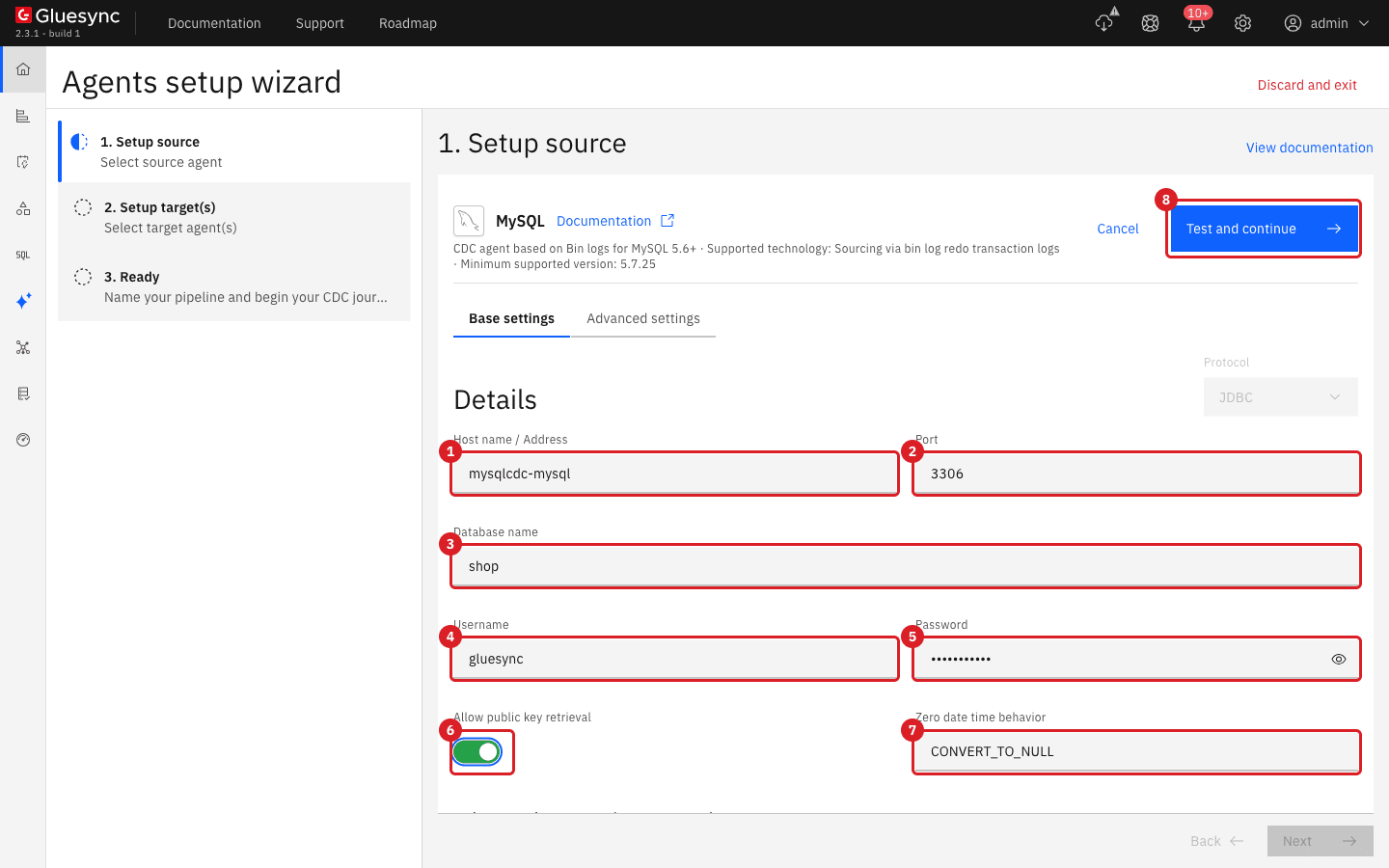
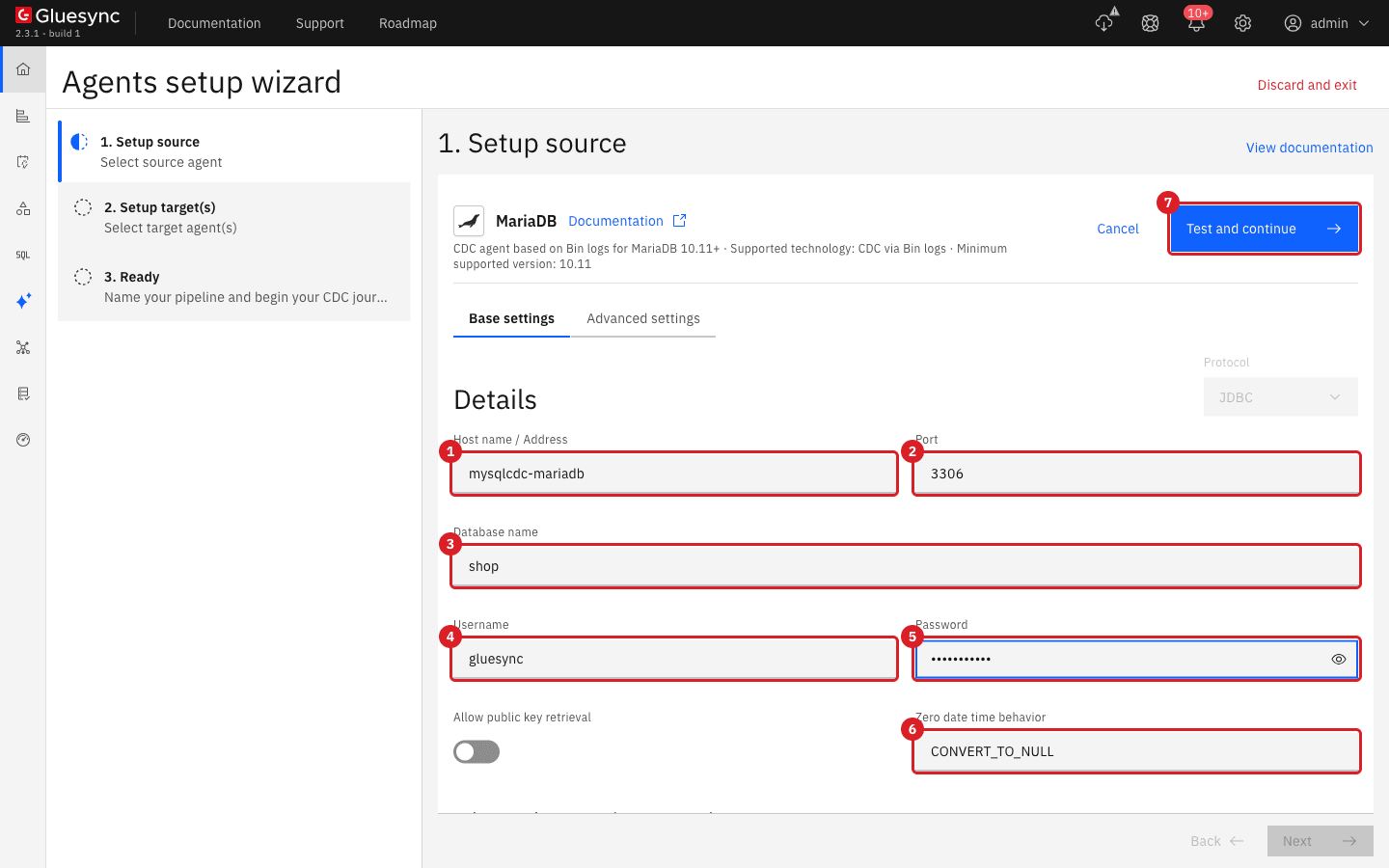
For MariaDB the form is the same. Allow public key retrieval stays off because MariaDB does not use the MySQL 8 authentication plugin:
|
With MySQL 8 and no TLS, a connection that fails with |
|
When you save a connection, the agent checks the binlog format. If it is not |
UI
-
In the pipeline, select Entities and then +;
-
In the object browser open the database
shop; -
Select the tables
customersandorders; -
Select the mapping icon next to each table. In Field mapping choose Target Schema (
mysql_cdc) and Target Table (customers, thenorders) and select Confirm; -
Select Confirm and continue.
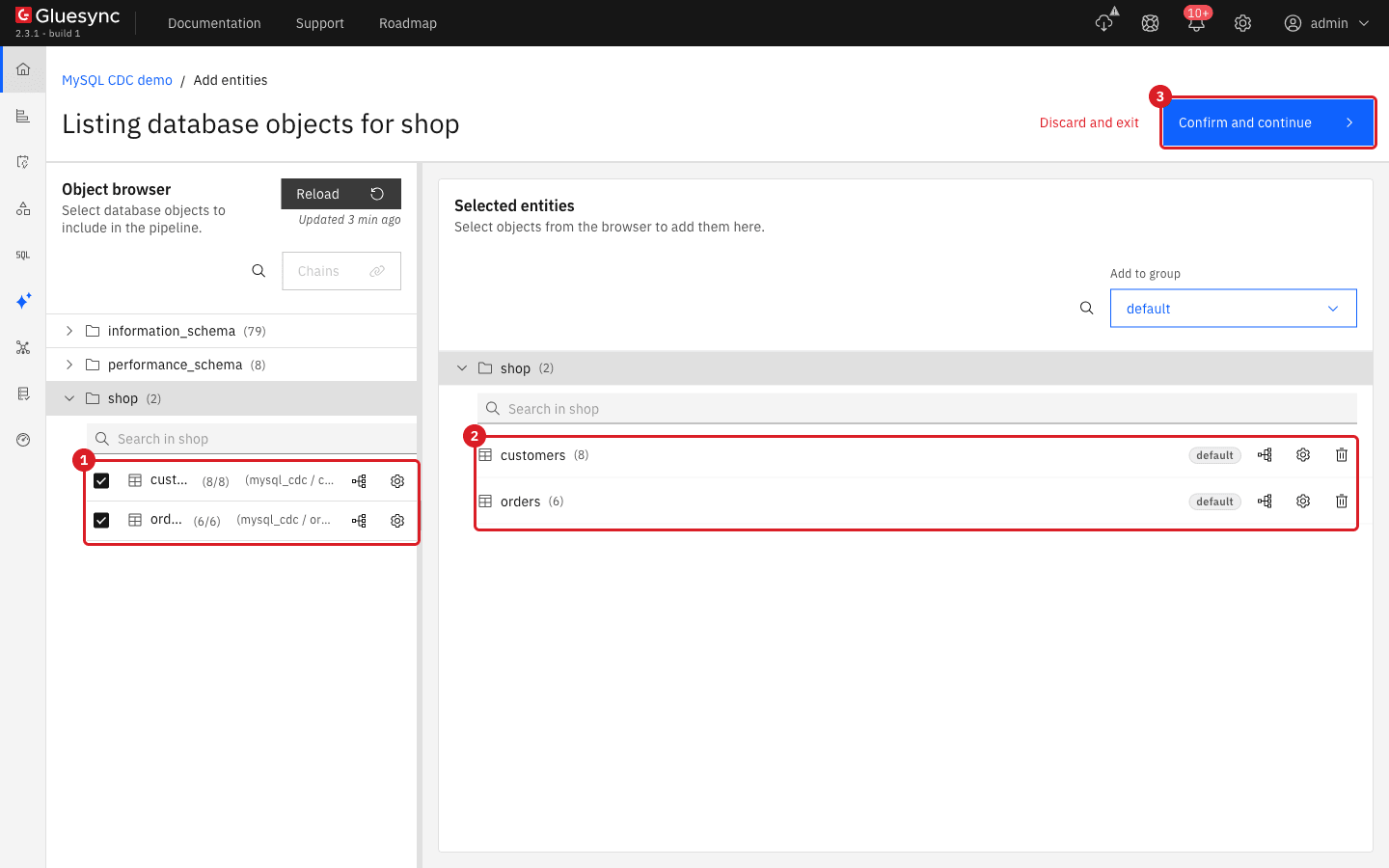
UI
-
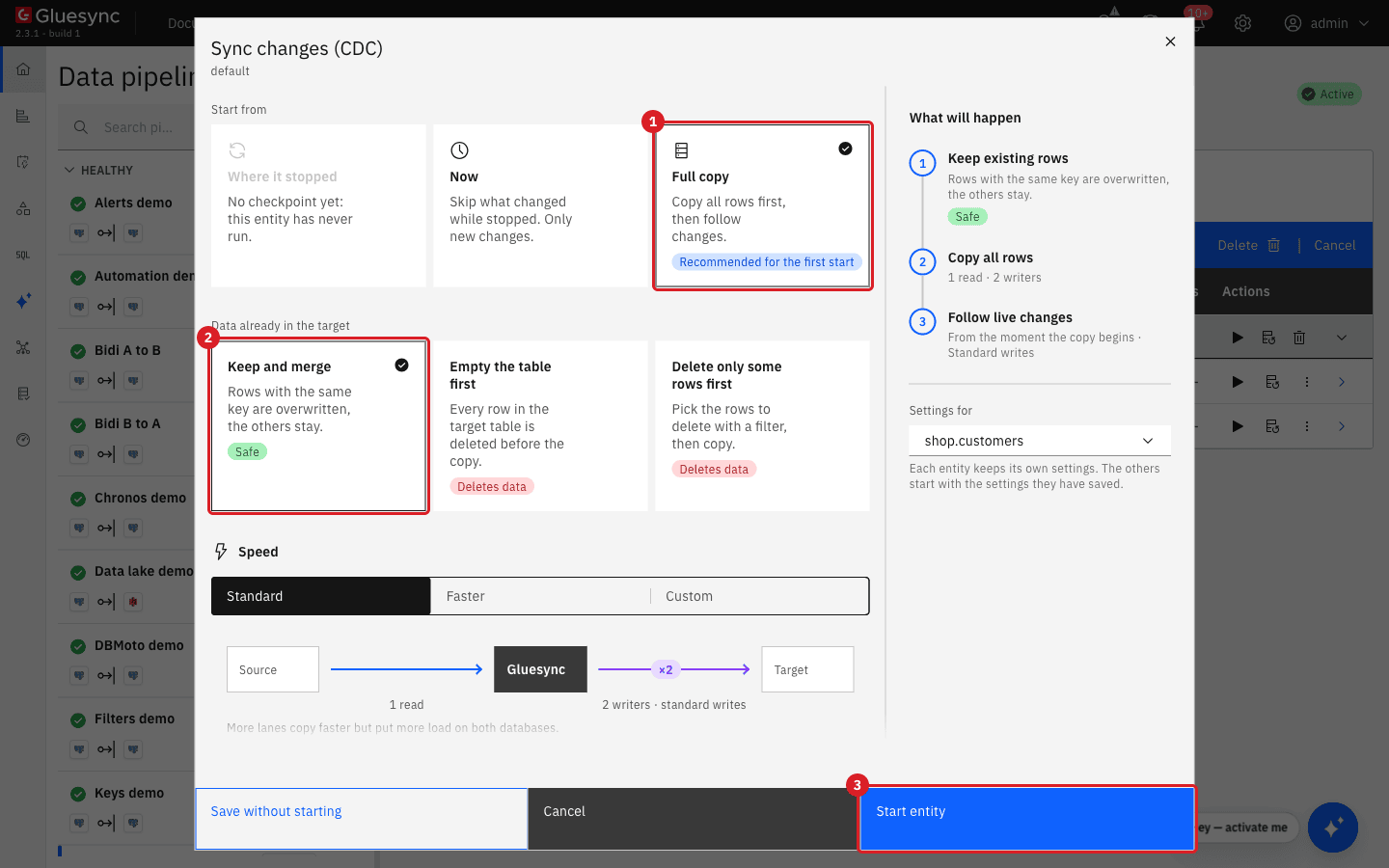
Select the play icon of the entity (Start sync);
-
In Sync changes (CDC), under Start from, choose Full copy. Under Data already in the target keep Keep and merge;
-
Select Start entity. Repeat for the second entity.
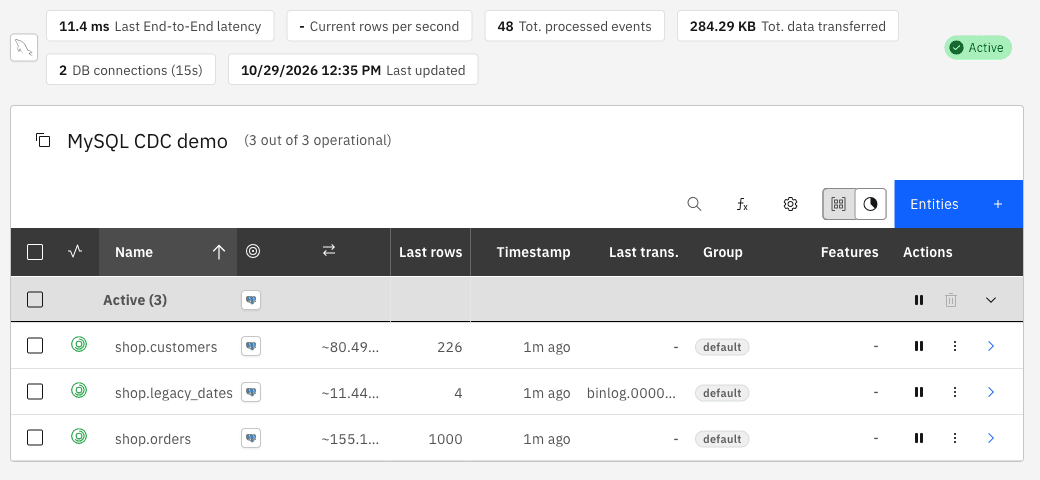
SQL
-
On the source, insert a row, update it and delete it, one statement at a time;
-
After each statement, wait a few seconds and run the query on the target.
-- source
INSERT INTO shop.customers (id, full_name, email, country, tier, status, credit_limit)
VALUES (1001, 'Cdc Insert', 'cdc1@example.com', 'IT', 'gold', 'active', 5000.50);

UPDATE shop.customers SET tier = 'platinum', credit_limit = 9999.99 WHERE id = 1001;

DELETE FROM shop.customers WHERE id = 1001;

-- target, after each statement
SELECT * FROM mysql_cdc.customers WHERE id = 1001;SQL
Do this on a test server. It shows what the two failures look like.
-
Stop the pipeline in the Control Plane;
-
On the source revoke
REPLICATION SLAVEfrom the user and start the pipeline again; -
Change a row on the source;
-
Grant the privilege again.
REVOKE REPLICATION SLAVE ON *.* FROM 'gluesync'@'%';
UPDATE shop.customers SET credit_limit = 4444.44 WHERE id = 9;
GRANT REPLICATION SLAVE, REPLICATION CLIENT ON *.* TO 'gluesync'@'%';
The entities start and show CDC started, but the change does not reach the target. The notification BinLog client communication failure reads Access denied; you need (at least one of) the REPLICATION SLAVE privilege(s) for this operation. About a minute after the GRANT, Gluesync reconnects without a restart and delivers the change that was made in the meantime.
On MariaDB, remove BINLOG MONITOR and then use Reset pipeline checkpoint (see Reset the pipeline checkpoint) and start the pipeline: it does not start, and the notification Fetch last read BinLog TransactionId error reads Access denied; you need (at least one of) the BINLOG MONITOR privilege(s) for this operation.
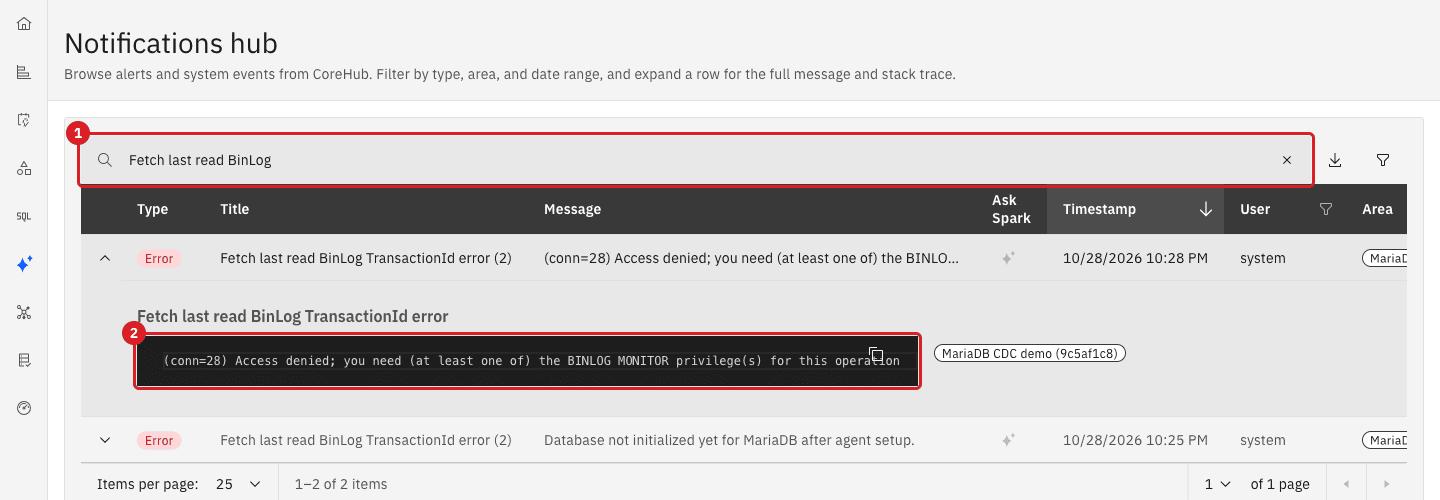
BINLOG MONITOR privilege. Annotation 1 is the notification and 2 the full message.A missing SELECT shows up differently. The snapshot of the entity fails and the notification is SQL Transient Connection with Connection is not available, request timed out after 30004ms: the text does not name the privilege. If a snapshot fails like this and the connection test passes, run SHOW GRANTS FOR 'gluesync'@'%' and grant SELECT on the database. Then run a Full copy of the entity.
SQL / UI
Gluesync resumes an entity from the file and the position of the last event it read. If that file is deleted while the entity is stopped, Gluesync cannot resume. This is the most common binlog error. It happens when the retention is shorter than the stop (binlog_expire_logs_seconds), when someone runs PURGE BINARY LOGS, RESET MASTER (RESET BINARY LOGS AND GTIDS on MySQL 8.4) or when the log base name changes.
-
Stop the pipeline in the Control Plane;
-
On the source, write a row, rotate the logs and purge all but the newest file, then write another row. This reproduces the failure;
-
Start the pipeline.
INSERT INTO shop.customers (id, full_name, email, country, tier, status, credit_limit)
VALUES (3001, 'Lost while stopped', 'l1@example.com', 'IT', 'gold', 'active', 100);
FLUSH BINARY LOGS;
FLUSH BINARY LOGS;
SHOW BINARY LOGS;                         -- note the newest file, for example binlog.000005
PURGE BINARY LOGS TO 'binlog.000005';
INSERT INTO shop.customers (id, full_name, email, country, tier, status, credit_limit)
VALUES (3003, 'After purge', 'l3@example.com', 'IT', 'gold', 'active', 100);|
|
The entities start, and the notification Binlog checkpoint outdated appears:
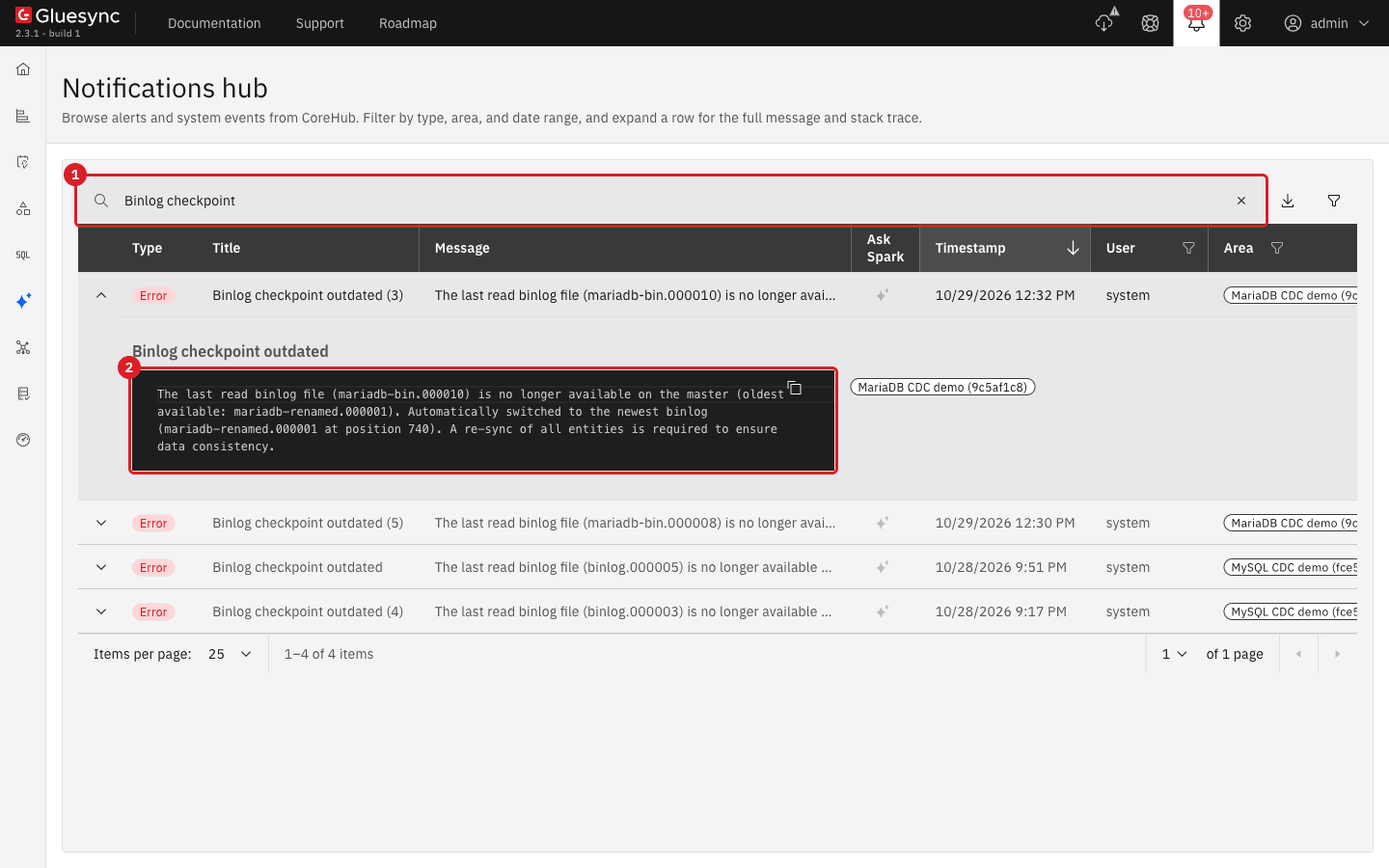
The message names the file that was lost, the oldest file that is available and the position that Gluesync picked instead: The last read binlog file (binlog.000003) is no longer available on the master (oldest available: binlog.000005). Automatically switched to the newest binlog (binlog.000005 at position 525). A re-sync of all entities is required to ensure data consistency. New changes flow from now on, but every change between the lost position and the new one is missing in the target, here the rows 3001 and 3003. Gluesync does not copy them for you.
-
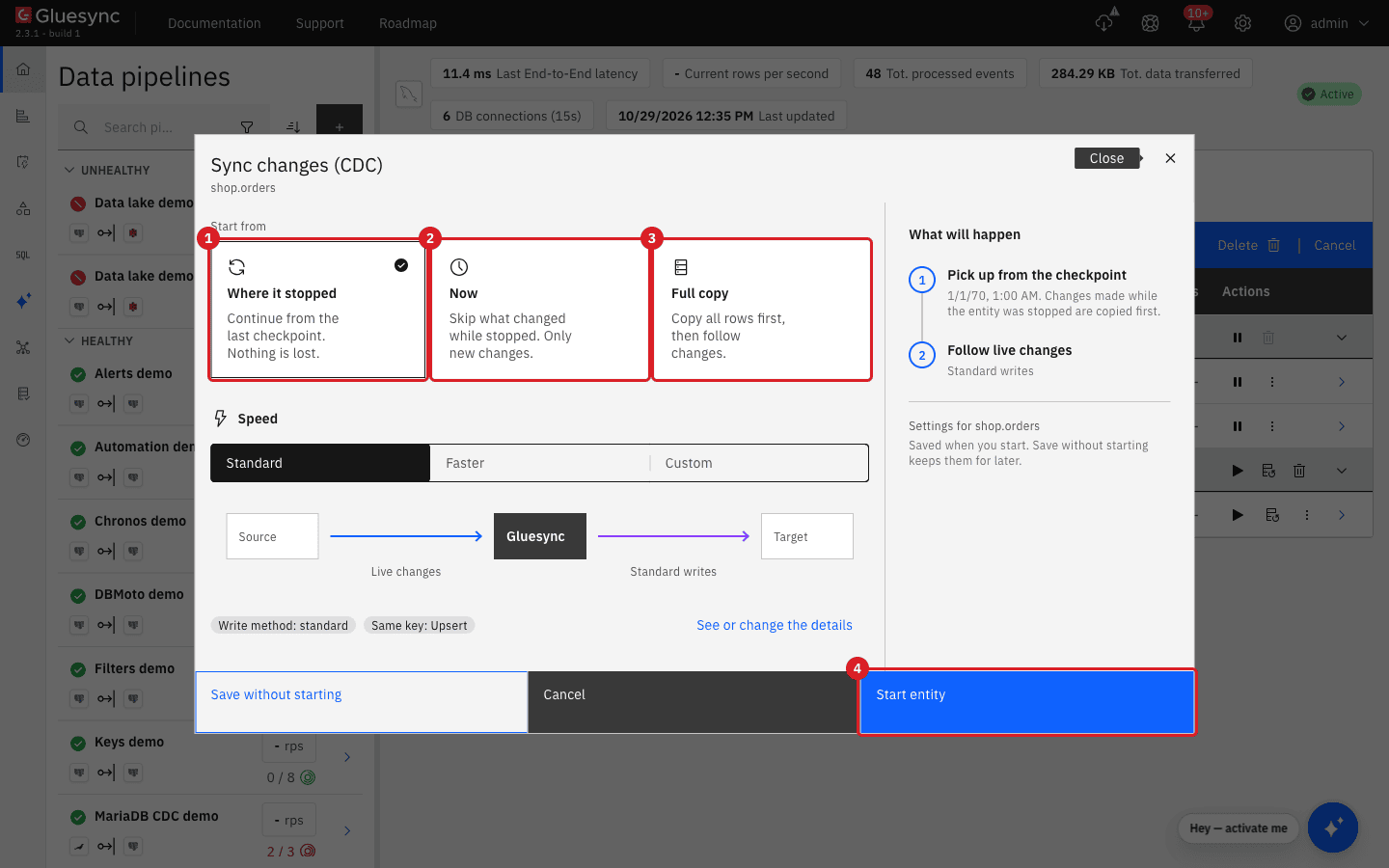
Select the play icon of each entity, choose Full copy with Keep and merge and select Start entity.
If the user has no REPLICATION CLIENT (MySQL), Gluesync cannot list the binlog files. It then does not switch automatically: the notification is BinLog client communication failure with Binlog position: binlog.000003:524 for the Entity: null, is no longer available on the master. Need to resync every entity of your Database, it repeats about every minute and the entities do not receive changes. The recovery is the same Full copy. A RESET MASTER while the entities are running gives the same two messages (and sometimes could not find next log).
If you do not need the lost changes, or if the message keeps coming back after a Full copy, reset the stored position of the whole pipeline:
-
Stop the pipeline;
-
Select the Settings (gear) icon in the header, then Danger zone;
-
Under Pipeline checkpoint reset select the pipeline and select Reset pipeline checkpoint;
-
Start the pipeline.
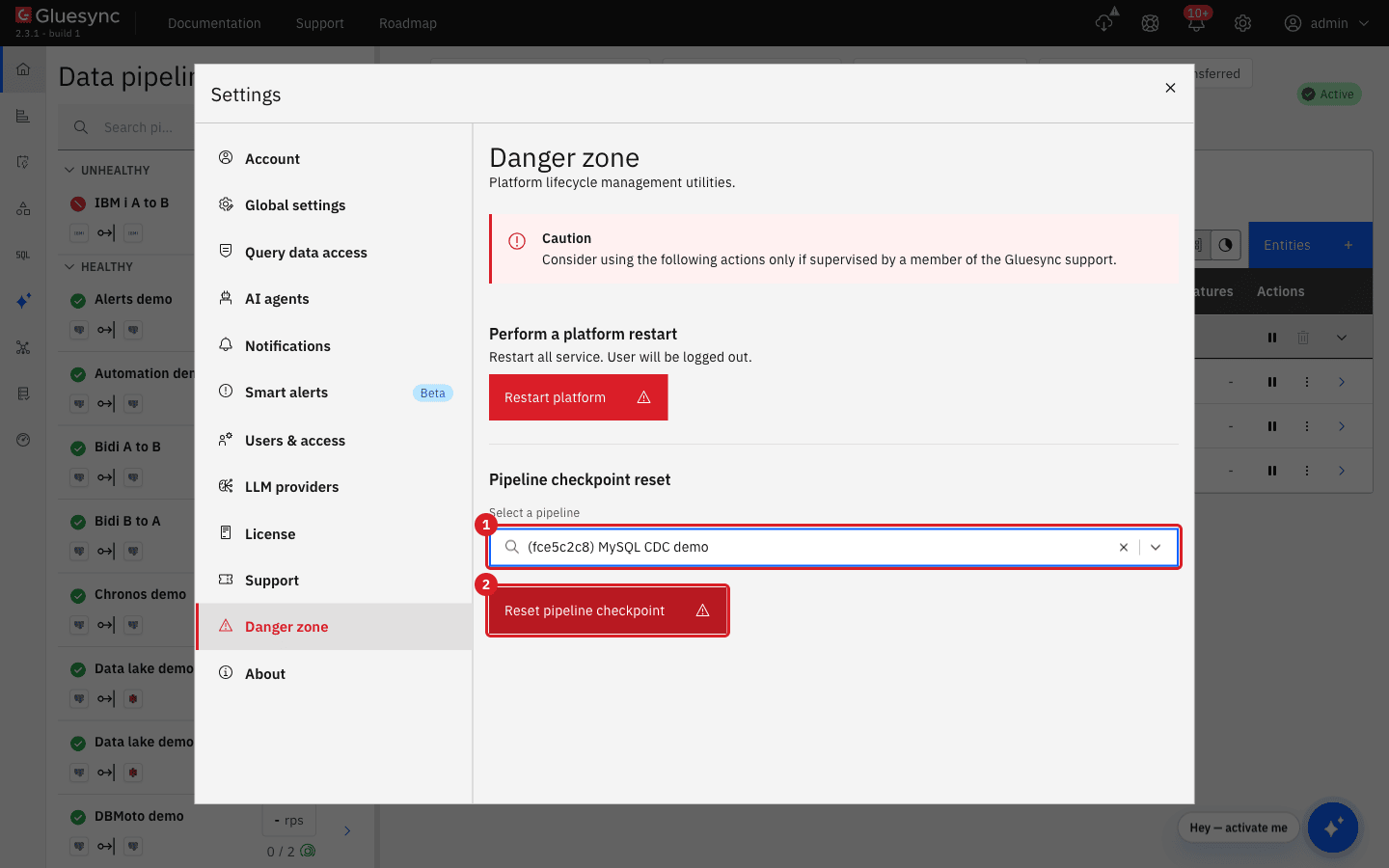
After the reset the entities follow only new changes. In the lab a row written before the start was lost and a row written after it arrived, so the source and the target differ by the rows written in between. Use Full copy when the target must match the source.
|
Reset the checkpoint only when you accept that the changes since the last position are not replicated, or when you follow it with a Full copy. See Diagnose a stalled pipeline or entity for the other start choices. |
SQL
-
On the source set the format to
MIXED(orSTATEMENT) and select Test and continue on the connection, or save it again; -
Restart the pipeline and change a row;
-
Set the format back to
ROW.
SET GLOBAL binlog_format = 'MIXED';
-- ... save the connection, restart the pipeline, change rows ...
UPDATE shop.customers SET tier = 'silver' WHERE id = 6;
SET GLOBAL binlog_format = 'ROW';
Saving the connection fails with BinLog format is not 'ROW'. A start of the pipeline does not check the format, so the entities show CDC started, but the insert and the update are not replicated and no error appears. After you set ROW again new changes arrive, and the rows written while the format was wrong are missing in the target. Run a Full copy to repair them.
|
|
SQL
-
Set
binlog_row_imagetoMINIMALon the source and update a row of a replicated table; -
Set it back to
FULL.
SET GLOBAL binlog_row_image = 'MINIMAL';
UPDATE shop.customers SET credit_limit = 1234.56 WHERE id = 6;
SET GLOBAL binlog_row_image = 'FULL';
The notification Error while processing BinLog event reads class java.math.BigDecimal cannot be cast to class java.lang.Integer: the event holds only the changed column, so the values do not match the columns of the entity. The entity stays Active, the change is not applied, and later updates made with FULL are replicated. Repair the row that was changed with MINIMAL by a Full copy or by updating it again.
SQL
-
Restart the source server (
docker restartorsystemctl restart) while the pipeline is running; -
Write a row after the server is back.
After a plain restart nothing needs to be done: the server opens a new binlog file, the connection of Gluesync drops (the notification BinLog client communication failure reads Connection reset) and Gluesync reconnects by itself. In the lab the row written after the restart arrived about a minute later and no change was lost.
Two other changes break the position and need the recovery above:
-
A new base name of the log (
log_bin=mariadb-renamedinstead ofmariadb-bin, even with a differentserver_id) gives Binlog checkpoint outdated, because the file with the stored name no longer exists; -
RESET MASTERrestarts the file numbering and gives could not find next log or no longer available on the master.
A schema change on the source while an entity is running has its own error: after ALTER TABLE shop.customers ADD COLUMN notes VARCHAR(50) the next change of that table fails with Error while processing BinLog event and Missing column at index 8 for table fullTableName: shop.customers, and changes of other tables continue. Stop and start the entity so that Gluesync reads the table definition again, then run a Full copy to repair the rows that were changed in the meantime (in the lab two updates were skipped). Changing the type of a column gives class java.lang.String cannot be cast to class java.math.BigDecimal: restore the type, or update the entity, and run a Full copy. See Unlock schema for source schema changes.
Zero dates and invalid dates
MySQL and MariaDB can store 0000-00-00, 2024-00-00 or 2023-02-30 when the sql_mode allows it (the default sql_mode of MySQL 8 refuses them with NO_ZERO_DATE and NO_ZERO_IN_DATE; the default of MariaDB 11.4 does not contain those flags; in the lab the session sql_mode was set to ALLOW_INVALID_DATES to insert them). PostgreSQL has no such dates. The source form has the field Zero date time behavior with three values:
| Value | What the snapshot of a MySQL source does in the lab |
|---|---|
|
All the three bad values become |
|
The three values become |
|
The snapshot fails with SQL Error: Code 0, State S1009, Message Zero date value prohibited and the entity stays in error until you change the value or the setting. |
To change the value, open the connection of the source, edit Zero date time behavior and save it, then run a Full copy of the affected entity.
Live changes (CDC) read the value from the binlog and do not follow the setting. In the lab a zero DATETIME or DATE became NULL, a zero TIMESTAMP became 1970-01-01 00:00:00, and 2023-02-30 became 2023-03-02. A snapshot and CDC can therefore give different values for the same bad date. The reliable fix is to correct the data on the source (UPDATE … SET shipped_on = NULL WHERE shipped_on = '0000-00-00') and to give the target column a default or accept NULL.
What is different on MariaDB
| Topic | MariaDB 11.4 compared with MySQL 8 |
|---|---|
Defaults |
|
Privilege name |
|
Authentication |
Allow public key retrieval is not needed. |
Retention |
|
GTID |
MariaDB always has GTIDs. Gluesync still keeps a file name and a position, so no GTID setting is needed. |
Dates |
The snapshot converts only the pure zero date |
Troubleshooting
| Symptom | Possible cause | What to do |
|---|---|---|
Entity does not start CDC: Cannot start CDC for entity … because BinLog is not enabled on your database |
|
Set |
Saving the connection fails: BinLog format is not 'ROW' |
|
Set |
Entities are Active but nothing reaches the target, with no error |
The format is |
Check |
Connection test fails: Public Key Retrieval is not allowed or Failed to initialize pool: Could not create connection to database server. Attempted reconnect 3 times. Giving up. |
MySQL 8 with |
Switch Allow public key retrieval on, or enable TLS. Check the user and host with |
BinLog client communication failure: Access denied; you need (at least one of) the REPLICATION SLAVE privilege(s) for this operation |
The user lacks |
Run |
Fetch last read BinLog TransactionId error: Access denied; you need (at least one of) the BINLOG MONITOR privilege(s) |
MariaDB user without |
Grant |
Snapshot fails: SQL Transient Connection with Connection is not available, request timed out after 30004ms |
Among other causes, the user has no |
Check |
Error while processing BinLog event: class java.math.BigDecimal cannot be cast to class java.lang.Integer |
|
Set |
Error while processing BinLog event: class java.lang.String cannot be cast to class java.math.BigDecimal (or the same with other types) |
The type of a column was changed on the source after the entity was created, or the entity holds another type than the binlog sends. |
Restore the column type or update the entity, stop and start the entity, then run a Full copy. If you saw this after upgrading Gluesync from an old version, update to the latest 2.3 build. |
Error while processing BinLog event: Missing column at index N for table fullTableName: … |
A column was added to the source table (or the table has columns that are not mapped) and the entity still holds the old definition. |
Stop and start the entity, then run a Full copy. See Unlock schema. |
Binlog checkpoint outdated |
The binlog file with the stored position was purged, expired, renamed or reset while the entities were stopped. |
Raise |
BinLog client communication failure: Binlog position … is no longer available on the master. Need to resync every entity of your Database, repeating every minute |
Same cause as above on a user without |
Grant |
BinLog client communication failure: Connection reset |
The server was restarted or the connection was killed. |
Nothing to do: Gluesync reconnects. Check that rows written after the restart arrive. |
Snapshot fails with Zero date value prohibited |
Zero date time behavior is |
Set |
Entity fails with Not null violation Error after |
The target column is |
Allow |
MariaDB snapshot fails with value '2024-00-00 00:00:00' cannot be decoded as LocalDateTime or Invalid date 'FEBRUARY 30' |
The source holds an invalid date that is not the pure zero date. |
Correct the value on the source ( |
Dates differ between the snapshot and CDC ( |
The snapshot and CDC convert invalid dates in different ways. |
Correct the data on the source so that no zero or invalid date remains. |
Related guides
Contact MOLO17 Support if you need assistance with MySQL or MariaDB change data capture.