Choose a key strategy for your tables: physical, logical, RRN or computed
Gluesync finds the target row of an update or a delete by the key of the entity, and it is the unique constraint or unique index on the target that stops a re-applied insert from creating a second copy of a row. When the source has no primary key, or when it has dozens of columns and no short unique set, you have four ways to define the key: the key that the source declares, columns that you choose, the IBM i RRN or the Oracle ROWID, and a computed column. This guide shows how to choose between them, how to build the matching index on SQL Server, and what happens to a re-applied insert for each kind of index.
In this guide
You will learn how to let Gluesync pick up a physical key, how to set a logical key and test it with Check keys, how to create the target table or index so that the target refuses duplicates, how Gluesync treats a unique constraint (SQL Server error 2627) and a unique index (error 2601), how to use _RRN on IBM i and _ROWID on Oracle as the key of a wide table, how to build a computed key with the Record ID function or a custom field function, and what happens to the key when a source field that feeds it changes. A decision table and a troubleshooting table are at the end.
Quick information
Goal |
Choose the key for each source table, create the matching key or unique index on the SQL Server target, and prove that a re-applied change does not create duplicates |
Audience |
Data engineers and database administrators who maintain pipelines from IBM i or Oracle to SQL Server |
Level |
Advanced |
Time required |
About 90 minutes |
Area |
Control Plane → pipeline → Entities → Field mapping; source → Edit source → Advanced settings; entity Settings → Fine tuning |
Applies to |
Gluesync 2.3 |
Before you begin
Make sure that:
-
A pipeline already has an IBM Db2 for IBM i source (or an Oracle LogMiner source) and a Microsoft SQL Server target that Core Hub can reach, and you can edit its entities. The examples use the pipeline Key strategy demo, the IBM i library
GSDOCSKY1and the SQL Server schemaks; -
The IBM i files are journaled with
IMAGES(*BOTH)(see Troubleshoot IBM i journals and receivers); -
You can create tables and indexes on the target database. The target login can create tables and has
ALTERon the schema (see Prepare a SQL Server target); -
You can run SQL on the source and on the target. Optional step 1 creates the example objects.
|
Changing the key of an entity that already replicates stops it and asks for a new copy of the data, so choose the key before the first snapshot. For the basics of a logical key, and for what NULL and duplicate key values do on a PostgreSQL target, read Choose keys for tables without a primary key. This guide does not repeat them. |
Guide steps
SQL
Skip this step if you use your own tables. Run the statements on the IBM i (for example with Run SQL Scripts) and on SQL Server.
-
On the IBM i, create the library, the journal and five files:
CUSTOMERhas a primary key,DDSPRODhas a DDS key,ORDHDRandORDLINEShave no declared key but their columnsBRANCH,ORDER_NO(andLINE_NO) are unique together, andORDHISTrepeatsBRANCHandORDER_NO;CALL QSYS2.QCMDEXC('CRTLIB LIB(GSDOCSKY1)'); CALL QSYS2.QCMDEXC('CRTJRNRCV JRNRCV(GSDOCSKY1/KYRCV0001)'); CALL QSYS2.QCMDEXC('CRTJRN JRN(GSDOCSKY1/KEYJRN) JRNRCV(GSDOCSKY1/KYRCV0001) MNGRCV(*USER) DLTRCV(*NO)'); CREATE TABLE GSDOCSKY1.CUSTOMER (CUST_ID INTEGER NOT NULL PRIMARY KEY, NAME VARCHAR(30) NOT NULL, CITY VARCHAR(20), CREDIT DECIMAL(9,2)); CREATE TABLE GSDOCSKY1.ORDHDR (BRANCH CHAR(3) NOT NULL, ORDER_NO INTEGER NOT NULL, CUST_ID INTEGER NOT NULL, ORDER_DATE DATE NOT NULL, TOTAL DECIMAL(11,2) NOT NULL); CREATE TABLE GSDOCSKY1.ORDLINES (BRANCH CHAR(3) NOT NULL, ORDER_NO INTEGER NOT NULL, LINE_NO INTEGER NOT NULL, SKU VARCHAR(20) NOT NULL, QTY INTEGER NOT NULL, AMOUNT DECIMAL(11,2) NOT NULL); CREATE TABLE GSDOCSKY1.ORDHIST (BRANCH CHAR(3) NOT NULL, ORDER_NO INTEGER NOT NULL, STATUS CHAR(1) NOT NULL, CHANGED_AT TIMESTAMP NOT NULL); INSERT INTO GSDOCSKY1.CUSTOMER VALUES (1,'Rossi Srl','Milano',5000),(2,'Bianchi SpA','Torino',12000); INSERT INTO GSDOCSKY1.ORDHDR VALUES ('MI1',5001,1,'2026-10-01',35.50),('MI1',5002,2,'2026-10-02',50.00), ('TO1',5001,2,'2026-10-03',19.90),('TO1',5002,4,'2026-10-04',120.00); INSERT INTO GSDOCSKY1.ORDLINES VALUES ('MI1',5001,1,'SKU-A',2,20.00),('MI1',5001,2,'SKU-B',1,15.50), ('MI1',5002,1,'SKU-A',5,50.00),('TO1',5001,1,'SKU-C',3,9.90),('TO1',5001,2,'SKU-A',1,10.00); INSERT INTO GSDOCSKY1.ORDHIST VALUES ('MI1',5001,'N','2026-10-01 09:00:00'),('MI1',5001,'P','2026-10-01 10:00:00'), ('MI1',5001,'S','2026-10-02 08:00:00'),('MI1',5002,'N','2026-10-02 09:00:00'),('TO1',5001,'N','2026-10-03 09:00:00'); -
Create the file with a DDS key. A DDS file is created from a source member, so the statements write the member first;
CALL QSYS2.QCMDEXC('CRTSRCPF FILE(GSDOCSKY1/QDDSSRC) RCDLEN(112)'); CALL QSYS2.QCMDEXC('ADDPFM FILE(GSDOCSKY1/QDDSSRC) MBR(DDSPROD) SRCTYPE(PF)'); CREATE ALIAS GSDOCSKY1.A_DDSPROD FOR GSDOCSKY1.QDDSSRC (DDSPROD); INSERT INTO GSDOCSKY1.A_DDSPROD (SRCSEQ, SRCDAT, SRCDTA) VALUES (1.00, 0, ' A R PRODREC'), (2.00, 0, ' A ITEM_NO 6S 0'), (3.00, 0, ' A DESCR 30A'), (4.00, 0, ' A PRICE 9P 2'), (5.00, 0, ' A K ITEM_NO'); CALL QSYS2.QCMDEXC('CRTPF FILE(GSDOCSKY1/DDSPROD) SRCFILE(GSDOCSKY1/QDDSSRC) SRCMBR(DDSPROD)'); INSERT INTO GSDOCSKY1.DDSPROD VALUES (100,'Hammer',12.50),(200,'Saw',18.00),(300,'Drill',99.90); -
Create the wide table
WIDEHIST: 40 columns, no key, and no short set of columns that is unique. It holds one template row and 40 copies, and every copy differs from the template in one column only, so each of the 40 columns is needed to tell the rows apart. The script prints the two statements to run on the IBM i;cols = [("BRANCH", "CHAR(3)", "'BR1'", "'BR2'"), ("ORDER_NO", "INTEGER", "1001", "1002"), ("LINE_NO", "INTEGER", "1", "2"), ("ITEM_NO", "INTEGER", "500", "501"), ("QTY", "INTEGER", "2", "3"), ("AMOUNT", "DECIMAL(11,2)", "19.90", "20.90"), ("STATUS", "CHAR(1)", "'A'", "'Z'"), ("CUST_ID", "INTEGER", "77", "78")] cols += [("ATTR%02d" % i, "VARCHAR(12)", "'x'", "'y'") for i in range(9, 41)] print("CREATE TABLE GSDOCSKY1.WIDEHIST (%s);" % ", ".join("%s %s NOT NULL" % (n, t) for n, t, _, _ in cols)) rows = [[v for _, _, v, _ in cols]] # the template row for i, (_, _, _, other) in enumerate(cols): # 40 copies, one column changed each row = [v for _, _, v, _ in cols] row[i] = other rows.append(row) print("INSERT INTO GSDOCSKY1.WIDEHIST VALUES %s;" % ", ".join("(%s)" % ", ".join(r) for r in rows)) -
Journal the files, so that changes reach the target;
CALL QSYS2.QCMDEXC('STRJRNPF FILE(GSDOCSKY1/CUSTOMER GSDOCSKY1/DDSPROD GSDOCSKY1/ORDHDR GSDOCSKY1/ORDHIST GSDOCSKY1/ORDLINES GSDOCSKY1/WIDEHIST) JRN(GSDOCSKY1/KEYJRN) IMAGES(*BOTH) OMTJRNE(*OPNCLO)'); -
On SQL Server, create the schema that holds the target tables.
CREATE SCHEMA ks;
SQL
The key strategy is shaped by two limits of SQL Server. Check them before you choose a key for a wide table: Gluesync cannot work around them.
-
Try a unique index on all 40 columns of a wide table, and on 32 of them;
-
Try a clustered primary key whose columns together are longer than 900 bytes.
-- a table with 40 varchar(12) NOT NULL columns c01 ... c40
CREATE UNIQUE INDEX ux_32 ON dbo.wide (c01, c02, /* ... */ c32);   -- works
CREATE UNIQUE INDEX ux_40 ON dbo.wide (c01, c02, /* ... */ c40);   -- fails

CREATE TABLE dbo.longkey (a varchar(500) NOT NULL, b varchar(500) NOT NULL, c varchar(500) NOT NULL);
ALTER TABLE dbo.longkey ADD CONSTRAINT pk_long PRIMARY KEY (a, b, c);
INSERT INTO dbo.longkey VALUES (replicate('a',400), replicate('b',400), replicate('c',400));|
If you select all 40 columns as the key of the entity, the same limit stops the target table at creation: Gluesync reports |
UI
A physical key is a primary key that the source table declares, or, on IBM i, a DDS key. Gluesync reads it and asks you for nothing.
-
Open the pipeline, then add or edit the entity for
CUSTOMER(SQL primary key) and forDDSPROD(DDS key); -
In the entity menu select Edit mapping to open Field mapping;
-
Look at the Key checkboxes. On
DDSPROD, Gluesync finds the key because the source connection property Enable DDS keys discovery is on (Edit source → Base settings → Advanced connection properties); with it off, a DDS file looks like a file without a key.
When the target table does not exist yet, the Create table dialog shows the same key: the statement for CUSTOMER ends with PRIMARY KEY ([CUST_ID]). Check it on the target after the first snapshot:
SELECT i.name, i.type_desc, i.is_primary_key
FROM sys.indexes i
WHERE i.object_id = OBJECT_ID('ks.customer');|
When the target table already has a primary key, Gluesync takes it as the key of the entity, and the key checkboxes are locked. The key of the source must then be the same columns. |
UI
A logical key is a set of columns that you declare as the key, for a table that has no primary key. Test the columns first.
-
In the object browser select
ORDHDR. Gluesync opens Field mapping and asks for the target schema and table; choose the schemaksand type the new table nameordhdr; -
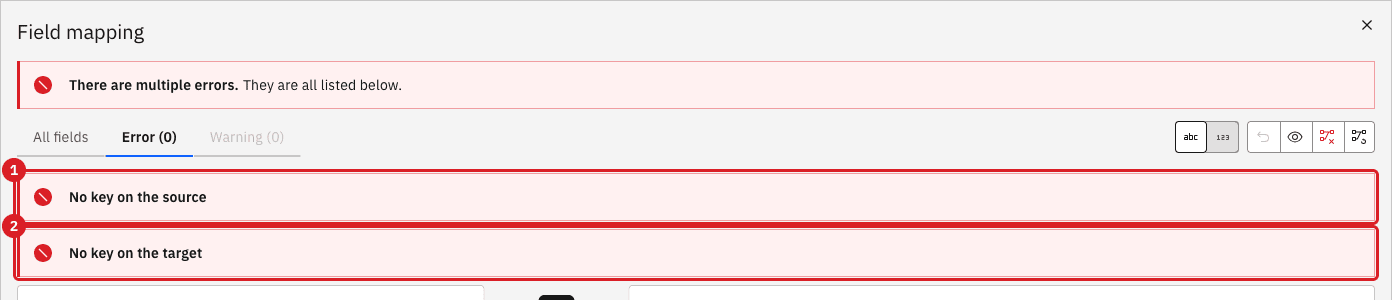
Select View errors. The dialog lists No key on the source and No key on the target, and Confirm stays disabled;
-
Select All fields, tick Key for
BRANCHandORDER_NOon the source. The target columns become keys too, and the errors disappear; -
Select Check keys.
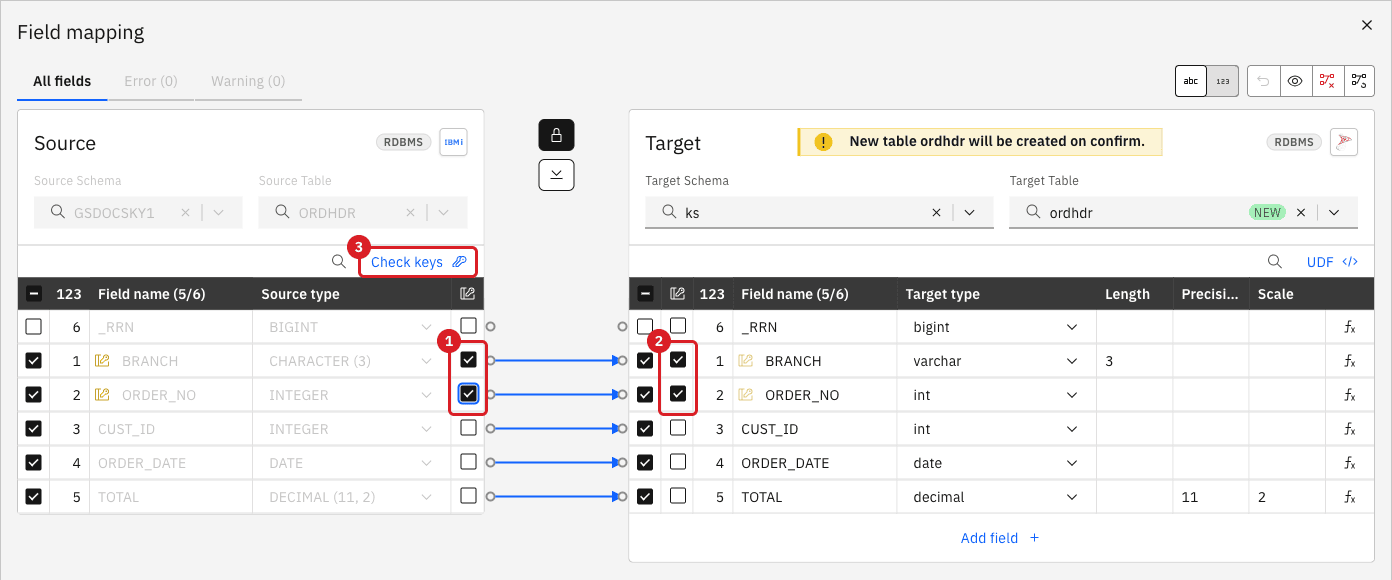
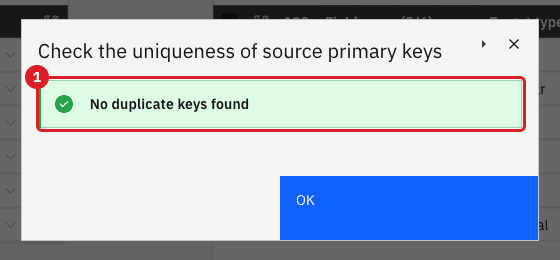
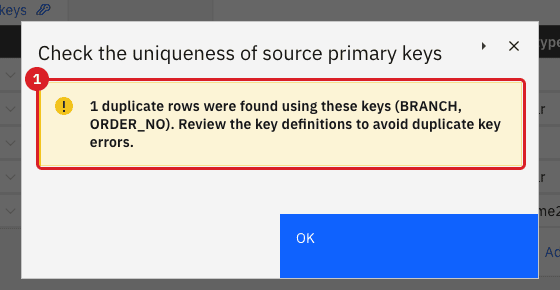
BRANCH and ORDER_NO of ORDHDR are unique.For ORDHIST the same columns repeat. Add the entity in the same way and select Check keys:
UI
A logical key is a Gluesync setting. It does not make the target refuse duplicates. When you let Gluesync create the target table, the default statement has no key at all, and a re-applied insert creates a second copy of the row.
-
Continue the entity of
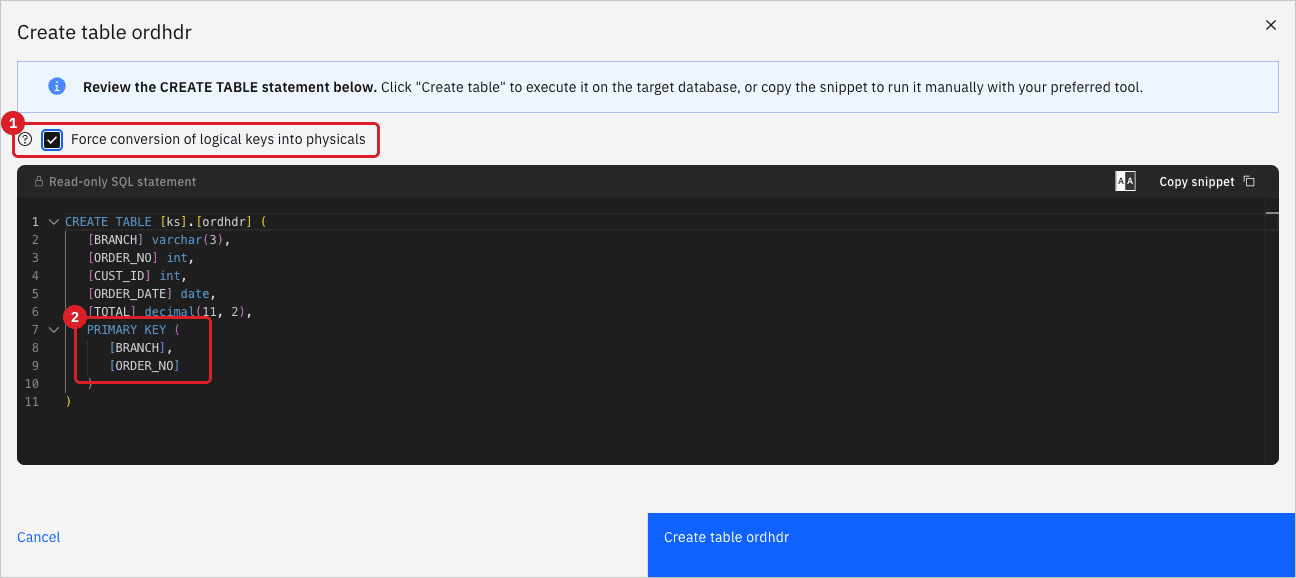
ORDHDR: select Confirm. The dialog Create table ordhdr shows theCREATE TABLEstatement. By default it ends after the last column, without a key; -
Tick Force conversion of logical keys into physicals. The statement now ends with
PRIMARY KEY ([BRANCH],[ORDER_NO]); -
Select Create table ordhdr, then Confirm and continue.
If the target table already exists without a key, add the key yourself. Use the same columns as the logical key. All three forms work, and they differ only in the error that SQL Server raises:
-- a primary key (error 2627 on a duplicate)
ALTER TABLE ks.ordlines ADD CONSTRAINT pk_ordlines PRIMARY KEY (BRANCH, ORDER_NO, LINE_NO);
-- or a unique constraint (error 2627)
ALTER TABLE ks.ordlines ADD CONSTRAINT uq_ordlines UNIQUE (BRANCH, ORDER_NO, LINE_NO);
-- or a unique index (error 2601)
CREATE UNIQUE INDEX ux_ordlines ON ks.ordlines (BRANCH, ORDER_NO, LINE_NO);
If the table already holds duplicates, the statement fails and you must remove the duplicates first:
SELECT BRANCH, ORDER_NO, LINE_NO, count(*) FROM ks.ordlines
GROUP BY BRANCH, ORDER_NO, LINE_NO HAVING count(*) > 1;SQL
A transaction that is applied twice, for example after a deadlock or a timeout on the target, inserts rows that the target already holds. You can reproduce it: insert the row on the target first, then insert the same key on the source.
-
Make sure the entity of
ORDHDRruns, with the keyBRANCHandORDER_NOand the primary key of the previous step; -
Run the statements. The first goes to the target, the second to the source, and you read the target after about 15 seconds.
-- on SQL Server: the row is already there, with other values
INSERT INTO ks.ordhdr VALUES ('MI1', 5003, 9, '2026-01-01', 1.00);

-- on the IBM i: the same key arrives from the source
INSERT INTO GSDOCSKY1.ORDHDR VALUES ('MI1', 5003, 3, '2026-10-05', 77.00);

-- on SQL Server
SELECT * FROM ks.ordhdr WHERE ORDER_NO = 5003;
The result depends on what the target enforces. To see each row of the table, drop the primary key of ks.ordhdr and add the next kind of key, or none, then repeat the statements with a new ORDER_NO:
| Target | On the re-applied insert | Result with Upsert (default) |
|---|---|---|
No key, no unique index |
Nothing refuses the row |
Two rows with the same key. A later update or delete on the source changes or removes both rows. |
Primary key or unique constraint |
SQL Server error 2627, |
One row, with the values of the source. The insert became an update. |
Unique index |
SQL Server error 2601, |
One row, with the values of the source. Gluesync treats error 2601 like error 2627. |
With Skip the target row is kept and Gluesync raises a warning that names the key. With Fail the entity stops with the SQL Server error and the same transaction is replayed when you start it again, so it stops again until you fix the row or the setting.
-
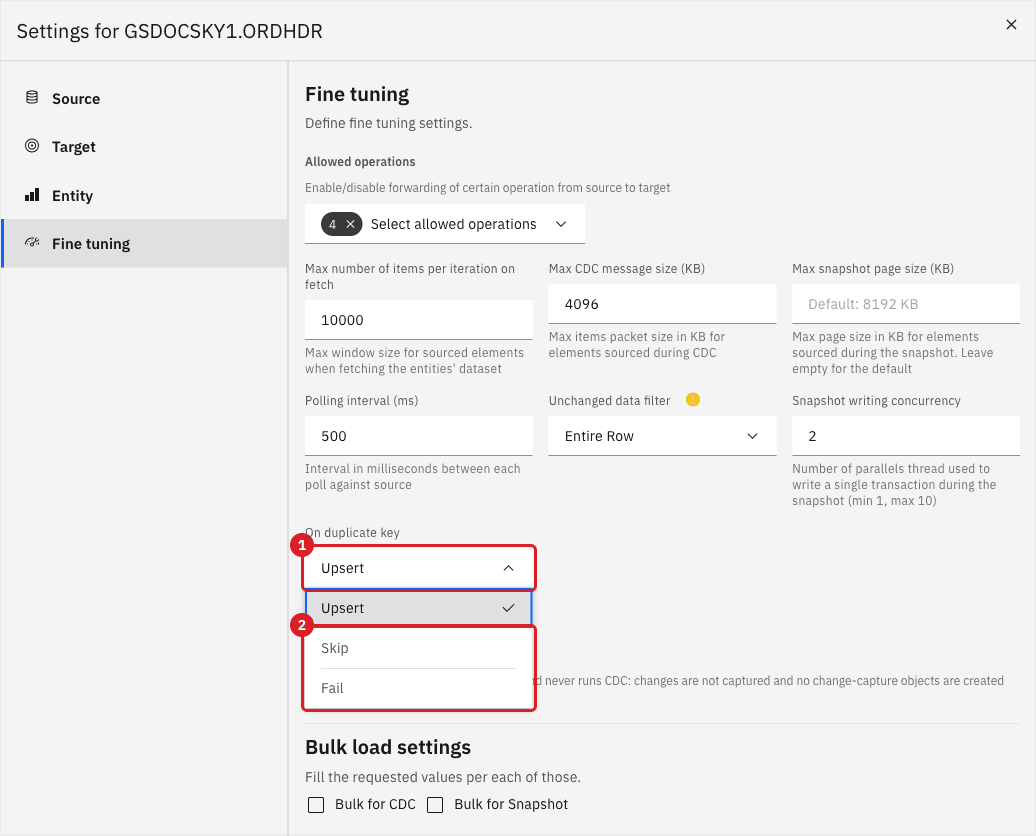
Open the entity Settings → Fine tuning and open the list On duplicate key;
-
Choose Skip, close the dialog and select Confirm and continue. Run the three statements again with
ORDER_NO5004.

Now choose Fail and run the statements once more with ORDER_NO 5005:

|
To recover from Fail, set On duplicate key back to Upsert, stop the entity and start it with Where it stopped. The transaction that failed is replayed and the row becomes an update. |
_RRN as the key of a wide table on IBM iUI
The relative record number (RRN) is the position of a row in an IBM i physical file. It is a supported key, it is one column, and it tells apart two rows that are identical in every column. For a table with 40 columns and no short unique set, it is the key to use: the target needs a unique index on one BIGINT, not on 40 columns.
-
In the pipeline, open the gear menu and select Edit source;
-
Open the Advanced settings tab. In the property Technical fields select
_RRN, then select Test and continue; -
Add the entity for
ORDHIST(orWIDEHIST). In Field mapping the field_RRNis on the source, and a target column_RRNof typebigintis proposed; -
Tick Key for
_RRNon the source; the target_RRNbecomes a key and the errors disappear. Select Confirm; -
In the Create table dialog tick Force conversion of logical keys into physicals: the statement ends with
PRIMARY KEY ([_RRN]). Create the table, then confirm and start the entity.
Once the technical field is on, Field mapping proposes the column _RRN for every IBM i table that you add. Clear its box on the tables that do not need it.
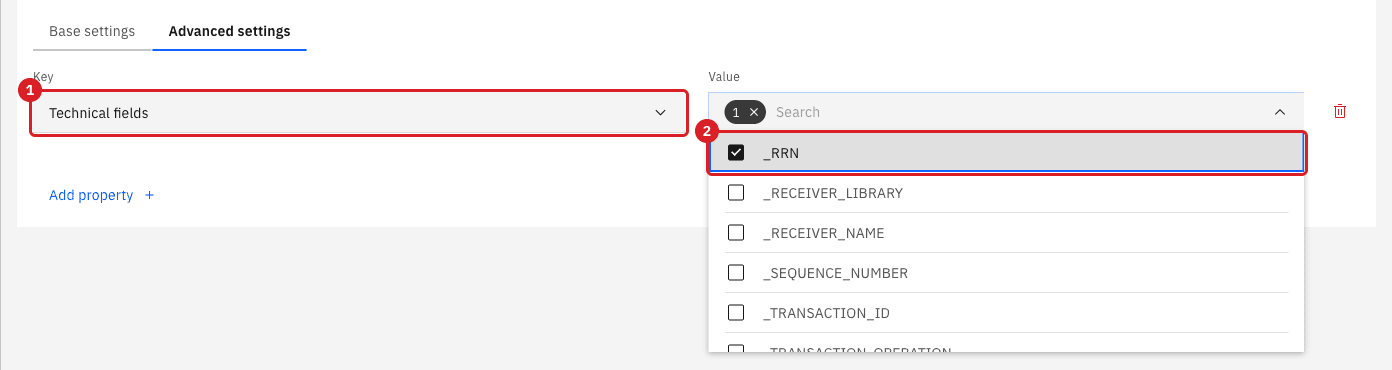
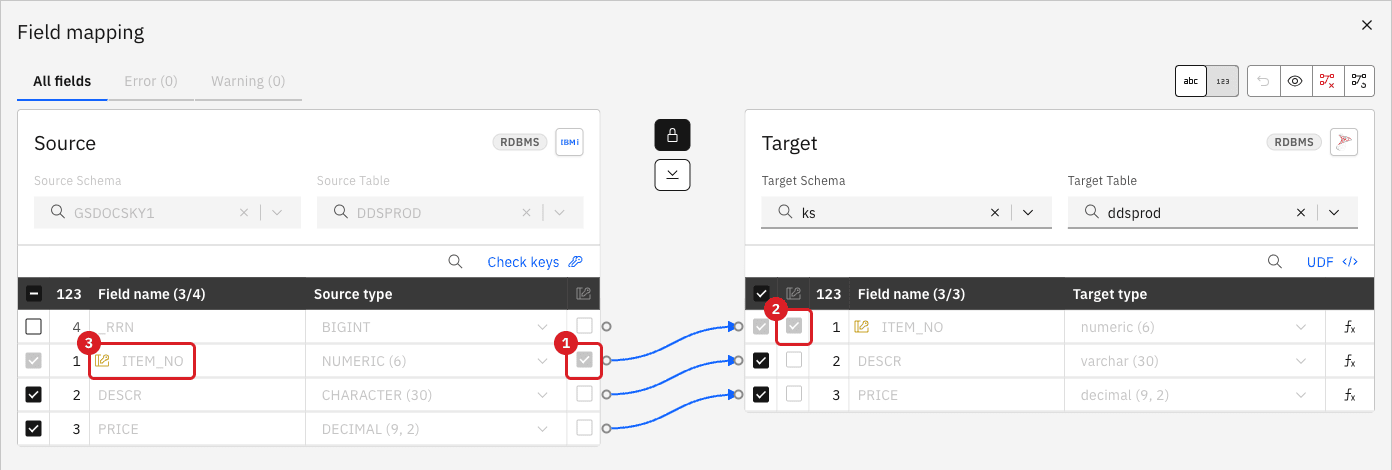
_RRN ticked (2).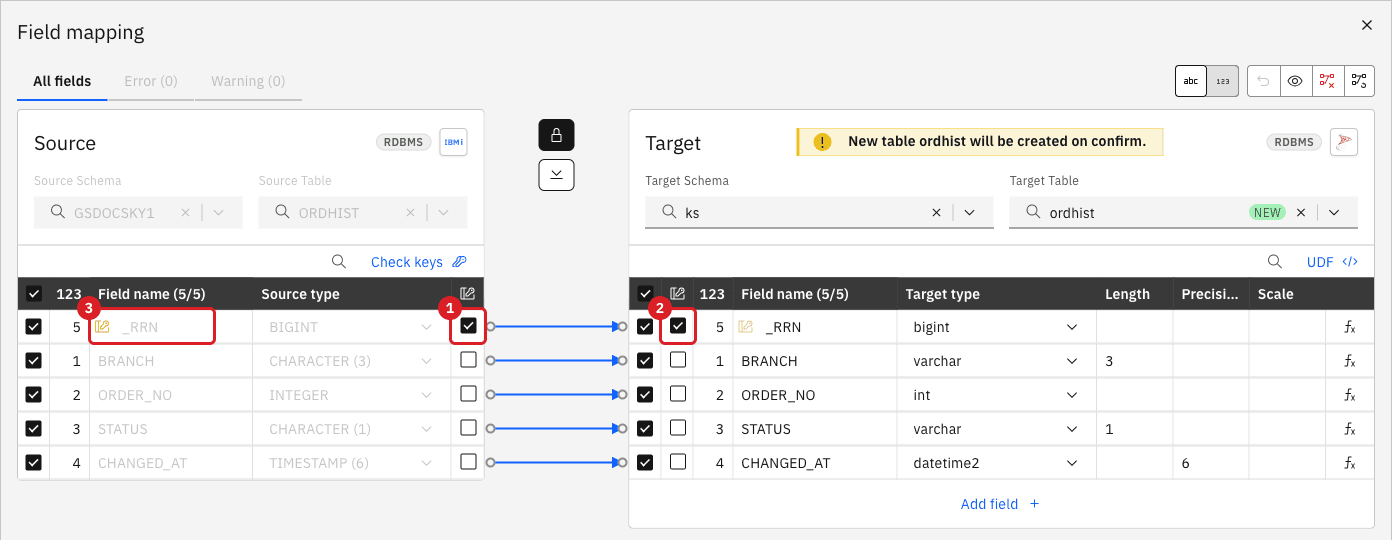
_RRN is the key on the source (1) and on the target (2). Its field name (3) carries the key icon.Prove that it separates identical rows. On WIDEHIST, insert a copy of an existing row and change, delete and update other rows:
-- on the IBM i
INSERT INTO GSDOCSKY1.WIDEHIST SELECT * FROM GSDOCSKY1.WIDEHIST w WHERE RRN(w) = 1;
UPDATE GSDOCSKY1.WIDEHIST w SET QTY = 99, ATTR20 = 'changed' WHERE RRN(w) = 5;
DELETE FROM GSDOCSKY1.WIDEHIST w WHERE RRN(w) = 7;
SELECT RRN(w) AS rrn, QTY, ATTR20 FROM GSDOCSKY1.WIDEHIST w WHERE RRN(w) IN (1, 5, 7, 42);

-- on SQL Server
SELECT _RRN, QTY, ATTR20 FROM ks.widehist WHERE _RRN IN (1, 5, 7, 42);|
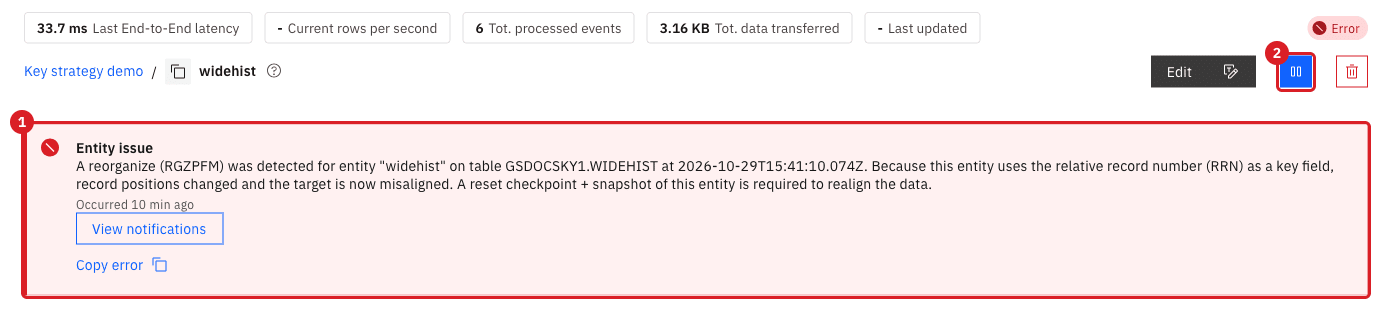
A reorganization of the file ( |
UI
-
Open the entity page. Select the pause button and then Pause entity;
-
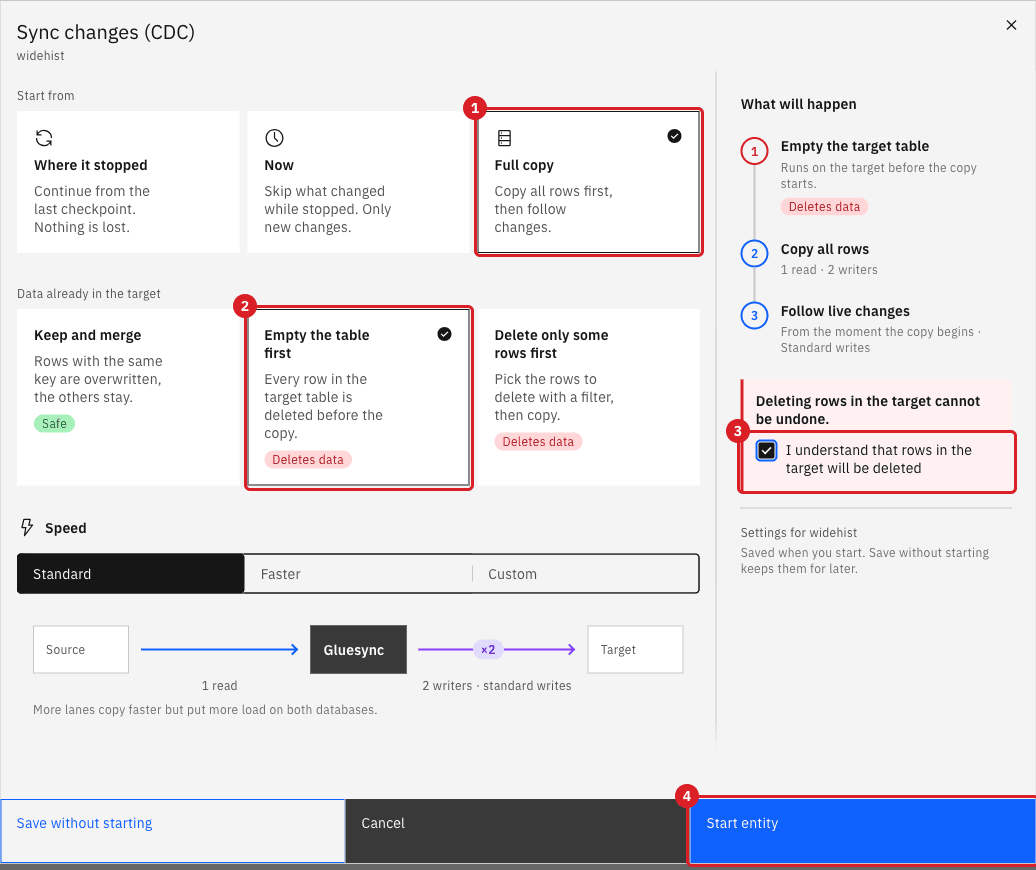
Select the start button. In Sync changes (CDC) choose Full copy, then Empty the table first;
-
Tick I understand that rows in the target will be deleted and select Start entity.
_ROWID as the key of a wide table on OracleUI
On an Oracle LogMiner source the technical field _ROWID plays the role of the RRN. The steps are the same as for _RRN: in Edit source → Advanced settings select _ROWID in Technical fields, add the entity, tick Key for _ROWID. The target column that receives it is a varchar(18). Create the target column with a binary or case-sensitive collation, because a ROWID has upper-case and lower-case letters that mean different values:
CREATE TABLE ks.wideora (
  ROW_ID varchar(18) COLLATE Latin1_General_100_BIN2 NOT NULL,
  BRANCH varchar(3), ORDER_NO int, LINE_NO int, QTY int
  /* ... the other columns ... */
);
CREATE UNIQUE INDEX ux_wideora_rowid ON ks.wideora (ROW_ID);
_ROWID is the key on the source (1) and on the target (2).Add the entity only when the column has the case-sensitive collation. Gluesync decides how to compare keys when the entity is created: with the default case-insensitive collation of SQL Server the snapshot copied 26 of 41 rows and reported no error, because two ROWIDs that differ only in the case of a letter were treated as one key.
-- on Oracle
INSERT INTO KS_OWNER.WIDEORA SELECT * FROM KS_OWNER.WIDEORA WHERE ROWNUM = 1;   -- a full duplicate
-- on SQL Server
SELECT count(*) AS n, count(DISTINCT ROW_ID COLLATE Latin1_General_100_CS_AS) AS ids FROM ks.wideora;UI
Use a computed key when you want one numeric or text column on the target that stands for the key. The function Record ID generates a 64-bit number from the values of the key columns of the entity, so it takes the logical key that you set in the earlier step.
-
Create the target table with a
bigint NOT NULLcolumn and a unique index on it;CREATE TABLE ks.ordlines_rid (ROW_ID bigint NULL, BRANCH varchar(3) NOT NULL, ORDER_NO int NOT NULL, LINE_NO int NOT NULL, SKU varchar(20), QTY int, AMOUNT decimal(11,2)); ALTER TABLE ks.ordlines_rid ALTER COLUMN ROW_ID bigint NOT NULL; CREATE UNIQUE INDEX ux_rid ON ks.ordlines_rid (ROW_ID); -
Add the entity of
ORDLINESwith the logical keyBRANCH,ORDER_NOandLINE_NO, and open Field mapping; -
Tick the column
ROW_IDon the target. It has no source column, so the dialog shows Field function is required or define a UDF; -
Select fx of
ROW_ID, open the list Functions collection and choose Record ID; -
Tick Key for
ROW_ID, select Confirm and Confirm and continue, and start the entity.
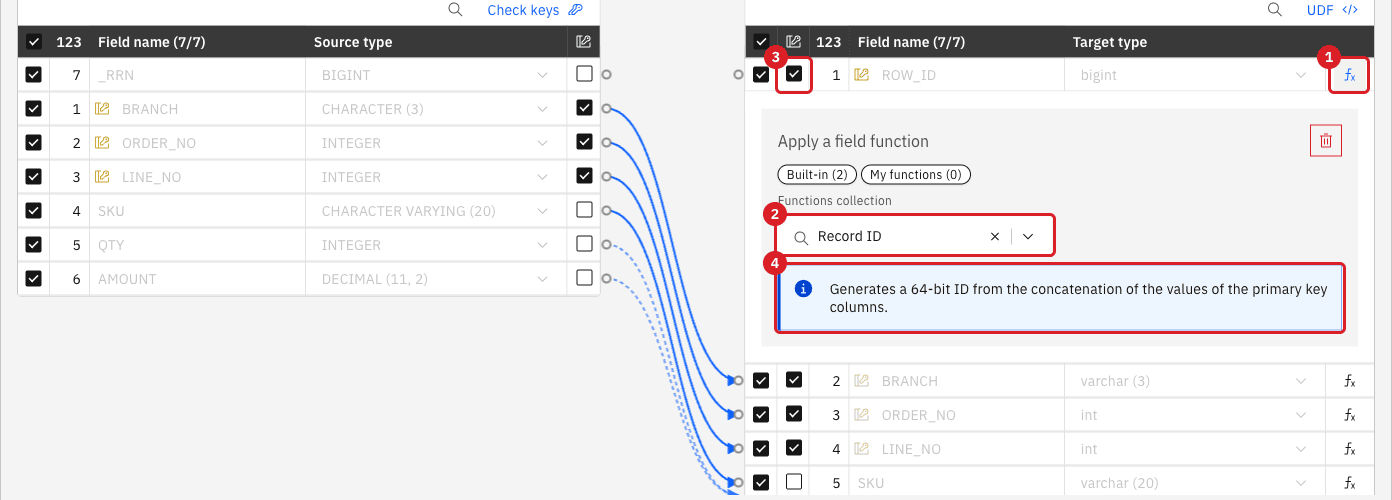
SELECT ROW_ID, BRANCH, ORDER_NO, LINE_NO, QTY FROM ks.ordlines_rid ORDER BY 2, 3, 4;Change a column of the key on the source and read the target again:
-- on the IBM i
UPDATE GSDOCSKY1.ORDLINES SET QTY = 22 WHERE BRANCH = 'MI1' AND ORDER_NO = 5001 AND LINE_NO = 1;
UPDATE GSDOCSKY1.ORDLINES SET LINE_NO = 3 WHERE ORDER_NO = 5002;|
Record ID is not collision-free. It is a 64-bit hash of the values of the key columns joined with no separator, so two different keys that concatenate to the same text get the same number. |
|
The columns of the logical key stay keys: the entity then has four key columns, |
UI
A custom field function is a Java method that builds one target column from several source columns. It lets you choose the columns, the separator, and the digest. The example returns the SHA-256 of BRANCH, ORDER_NO and LINE_NO as 64 hexadecimal characters.
-
In the pipeline page select the fx button (Open field functions). The dialog Custom functions collection opens;
-
In the editor, write the class below. The file is
com/molo17/gluesync/collections/RowKey.java, and the class isRowKey;package com.molo17.gluesync.collections; import java.nio.charset.StandardCharsets; import java.security.MessageDigest; import com.molo17.gluesync.commons.function.GsFunction; public class RowKey { @GsFunction( name = "row_key_sha256", description = "SHA-256 of the chosen columns, as 64 hex characters" ) public static String rowKeySha256(String branch, Integer orderNo, Integer lineNo) { return sha256(branch, orderNo, lineNo); } private static String sha256(Object... parts) { StringBuilder text = new StringBuilder(); for (Object part : parts) { // A separator keeps ("ab", "c") and ("a", "bc") apart; a marker keeps null apart from an empty text. text.append(part == null ? "\u0001" : part.toString()).append('|'); } try { byte[] digest = MessageDigest.getInstance("SHA-256").digest(text.toString().getBytes(StandardCharsets.UTF_8)); StringBuilder hex = new StringBuilder(); for (byte b : digest) { hex.append(String.format("%02x", b)); } return hex.toString(); } catch (Exception e) { throw new IllegalStateException(e); } } } -
Select the wrench button (Compile), then Publish. When no entity uses the functions yet, they become active at once;
-
Create the target column
ROW_KEY char(64) NOT NULLand a unique index on it;CREATE TABLE ks.ordlines_hash (ROW_KEY char(64) NULL, BRANCH varchar(3) NOT NULL, ORDER_NO int NOT NULL, LINE_NO int NOT NULL, SKU varchar(20), QTY int, AMOUNT decimal(11,2)); -
Add the entity of
ORDLINESwith the logical key, open Field mapping, tickROW_KEY, select its fx and chooserow_key_sha256in Functions collection; -
In Arguments leave Source column and pick
BRANCH,ORDER_NOandLINE_NO. Tick Key forROW_KEY, then Confirm and Confirm and continue; -
In SQL Server make the column
NOT NULL, add the unique index, and start the entity.ALTER TABLE ks.ordlines_hash ALTER COLUMN ROW_KEY char(64) NOT NULL; CREATE UNIQUE INDEX ux_ordlines_hash_key ON ks.ordlines_hash (ROW_KEY);
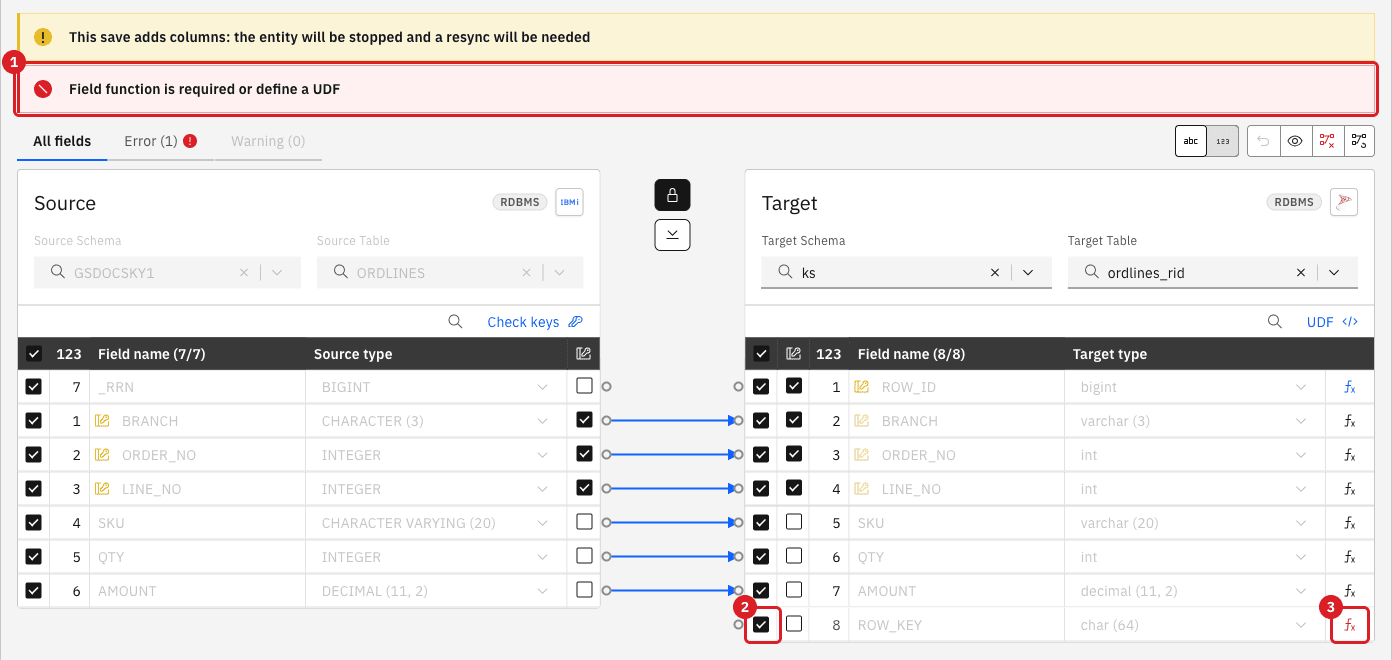
ROW_KEY has no source column (2): the dialog rejects it (1) until it has a function (3).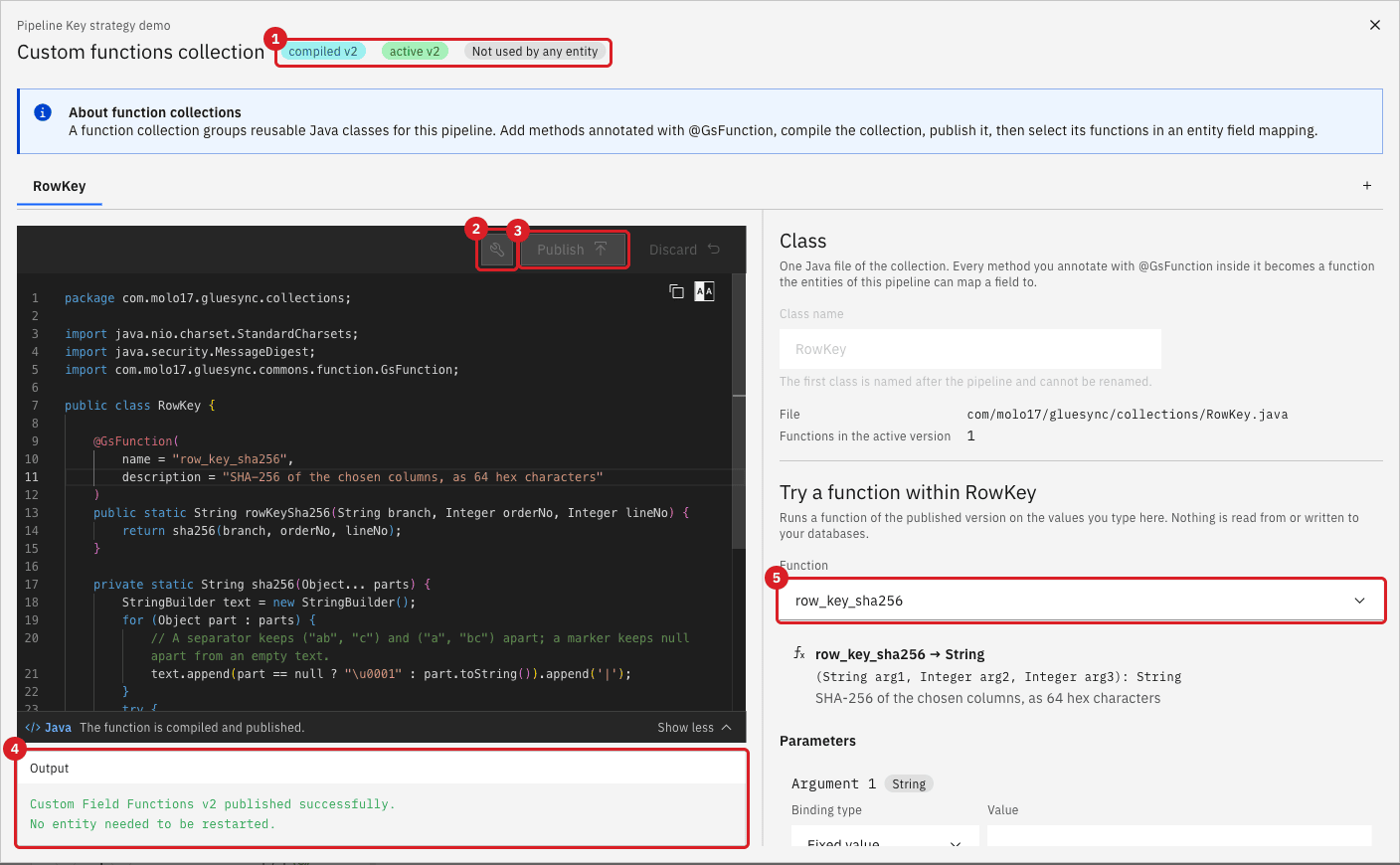
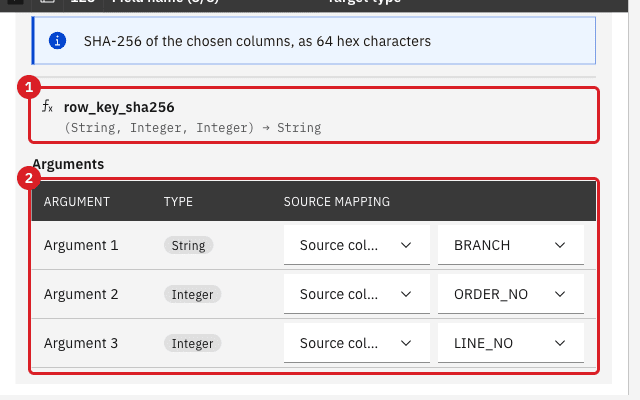
Check that the key that Gluesync wrote is the one you expect, and change a field that feeds the key:
SELECT ROW_KEY, BRANCH, ORDER_NO, LINE_NO,
  CASE WHEN ROW_KEY = lower(convert(char(64), hashbytes('SHA2_256', concat(BRANCH,'|',ORDER_NO,'|',LINE_NO,'|')), 2))
       THEN 'match' ELSE 'DIFF' END AS check_hash
FROM ks.ordlines_hash;

-- on the IBM i
UPDATE GSDOCSKY1.ORDLINES SET LINE_NO = 7 WHERE ORDER_NO = 5301;|
The function sees the old and the new values of the source columns, so a key that changes is found with the old hash and written with the new one. The SHA-256 is only as unique as the columns you feed it: if two source rows can have the same values in those columns, they get the same |
SQL
You can also add a persisted computed column on the target that hashes the columns, with a unique index. Gluesync does not write that column; it is a guard that makes SQL Server refuse a second copy of a row.
ALTER TABLE ks.widehist ADD ROW_HASH AS CONVERT(binary(32), HASHBYTES('SHA2_256',
  CONCAT_WS('|', BRANCH, ORDER_NO, LINE_NO, ITEM_NO, QTY, AMOUNT, STATUS, CUST_ID /* ... ATTR40 */))) PERSISTED;
CREATE UNIQUE INDEX ux_widehist_hash ON ks.widehist (ROW_HASH);
Run the statements from a session with SET QUOTED_IDENTIFIER ON (sqlcmd -I), as SQL Server requires for an index on a computed column. Then insert on the IBM i a copy of an existing row, in every column.
|
A hash index refuses a row that is identical to another row in every column, even when the source holds both. Do not add it when the source can hold such rows. SQL Server also refuses to write a computed column ( |
Choose the key for a table
| Your table | Key strategy | Target key or index | What to watch |
|---|---|---|---|
Source has a primary key, a unique constraint, or an IBM i DDS key |
Physical key. Gluesync reads it. |
The primary key that Gluesync creates on the same columns. |
The DDS key is found only with Enable DDS keys discovery on. The key checkboxes are locked. |
No declared key, a short set of columns is unique (up to 32 columns, 900 bytes for a clustered key, 1700 for a nonclustered key) |
Logical key on those columns. Test it with SQL and Check keys. |
Primary key, unique constraint or unique index on the same columns. Tick Force conversion of logical keys into physicals when Gluesync creates the table. |
Without a unique constraint or index on the target, a re-applied insert creates a second row. |
IBM i table with no declared key and no short unique set, or with more than 32 columns |
|
Primary key or unique index on one |
|
Oracle table with no declared key and no short unique set, or with more than 32 columns |
|
Unique index on a |
With the default case-insensitive collation the snapshot silently drops rows. |
You want one column on the target that stands for a key you already have |
Computed key: Record ID (64-bit number) or a custom field function (for example SHA-256 in |
Unique index on the computed column. The natural key columns stay keys of the entity. |
Record ID can collide. A hash is only as unique as its inputs. A computed key does not replace the columns it is computed from. |
The key is longer than 900 bytes (clustered) or 1700 bytes (nonclustered) |
A computed key ( |
Unique index on the computed column only. |
The insert fails at run time, not at creation, when the data is longer than the limit. |
All columns as the key |
Do not use |
A unique index cannot have more than 32 columns, and identical rows cannot be told apart. |
|
Troubleshooting
| Problem | Possible cause | What to do |
|---|---|---|
No key on the source and No key on the target |
The table has no primary key and no logical key is set |
Tick Key on the source columns of a logical key, or tick |
The target has two rows with the same key |
The target has no unique constraint or index, and a transaction was applied twice |
Find the duplicates with |
Target write failed with |
The target has a primary key or a unique constraint, and On duplicate key is Fail |
Choose Upsert or Skip, or fix the target row, then start the entity. |
Target write failed or Cannot insert duplicate key with |
The same, for a unique index. Gluesync handles error 2601 like error 2627. If Upsert does not help, the conflict is on columns that are not the key of the entity |
Drop or fix the index that is not on the key of the entity, or change the key. A hash index on all columns refuses identical rows. |
|
More than 32 columns in the key |
Use |
|
All columns are keys and Gluesync creates the target table with a primary key |
Remove the logical key from most columns, and use |
|
The key values are longer than the index allows |
Use a nonclustered unique index, or a computed key. |
Entity issue, A reorganize (RGZPFM) was detected |
The IBM i file was reorganized and the entity keys on |
Pause the entity and start it with Full copy and Empty the table first. |
The row counts match but rows are wrong |
|
Run Count both and a comparison (see Find and fix row differences), then copy the data again. |
The target has fewer rows than the source and there is no error (Oracle) |
The key column of |
Alter the column to a binary or case-sensitive collation, add the entity again, and copy the data. |
Two source rows end as one target row, or an update changes the wrong row |
The key is not unique. With Record ID, two keys concatenate to the same text |
Check the key with SQL, use a separator in your own function, or add the natural key columns to the key. |
Field function is required or define a UDF |
A target column with no source column is ticked |
Choose a function for it in fx: Record ID for a |
|
The session creates an index on a computed column without the required settings |
Run the statement with |
Related guides
Contact MOLO17 Support if you need assistance with the key strategy of your tables.