Run a disaster-recovery pair end to end
This guide follows a Gluesync disaster-recovery (DR) pair through its whole life: you set it up, check it, use it, hand the active role over and back, lose the active site and promote the standby, bring the old site back, deal with a network partition, move to automatic failover with a witness, and turn the pair off. Every step says what you see on screen and in the logs, and how long it takes.
In this guide
You will learn how the active role moves between the two sites and why a site never resumes as active after a failover, how to set up and check the pair, where users sign in and what runs where, how to switch over and switch back without losing a write, how to fail over when the active site is lost and how to tell that it is really lost, what happens when the old active site comes back and to the data it held, what a network partition does in manual mode and how the pair heals, how a witness changes each of these cases, how to fail back, and how to turn the pair off without running your pipelines twice.
Quick information
Goal |
Operate a DR pair from setup to shutdown, and handle every planned and unplanned change of the active site |
Audience |
Gluesync administrators who run a DR pair, with shell access to both hosts and the operator token of each site |
Level |
Advanced |
Time required |
About 15 minutes to set up and check a pair. A planned switchover takes about 10 seconds, a forced failover about 5 seconds, and a site that comes back follows again within a minute |
Area |
Control Plane → Settings → Disaster Recovery; the DR operator API on port 1719; the Docker host of each site |
Applies to |
Gluesync 2.3 |
Before you begin
Make sure that:
-
Both sites were installed with the installer on Docker Compose or Podman and run the same Gluesync version, and you are a Super Admin of both. For Kubernetes, Docker Swarm or a compose file of your own, set the pair up by hand as in Set up by hand with environment variables: everything after the setup in this guide is the same;
-
The two sites reach each other on ports 1718 and 1719 in both directions, and their clocks are synchronized;
-
You have a backup of both sites, see Back up, restore and move Core Hub;
-
You know which site will be active first: it keeps its data, and the other site’s pipelines and settings are moved aside when it joins;
-
You have decided who promotes the standby when the active site is lost, and how that person confirms that the active site is really down. For an automatic failover you also need a third host for the witness, see Move to automatic failover with a witness.
How the active role moves
The two sites of a pair are active and standby. Only the active site serves: it runs your pipelines and the Chronos schedules, and only its Control Plane opens. The standby follows a near-current copy of the six databases of the active site, about one second behind, and serves nothing.
Every change of the active site starts a new epoch, a number that only grows. A site that meets a peer at a newer epoch steps down. These rules decide every scenario in this guide:
-
A site that was active and finds that the other site took over at a newer epoch becomes the standby. It never resumes as active after a failover: its log says "Boot decision: STANDBY at epoch <N> (the peer is active at epoch <N>: a node never resumes as active after a failover)";
-
A site that becomes the standby moves the databases it had aside, into a
discarded-<time>folder, because they are not a copy of the active site, and then follows the active site; -
A site that is running as active and sees the other site active at a newer epoch stops at once: its log says "Fencing this node: the peer is active at the newer epoch <N>", Core Hub exits with code 75, restarts, and comes back as the standby;
-
In manual mode, the standby takes over only when an operator promotes it. In witness mode, it promotes itself when the active site stops renewing its lease, and an active site that loses both the other site and the witness stops serving by itself.
What happens in each case, as measured in the lab described in How this procedure is verified:
| Case | What happens | Time |
|---|---|---|
The active site stops writes, ships the last changes, and hands over. The new active site verifies all six databases before it takes over. No write is lost, and the old site keeps a rollback point |
New site serving after about 7 s |
|
You confirm the site is down and promote the standby with |
About 1.5 s after the promotion |
|
It becomes the standby at the new epoch, moves its databases aside and follows. It has no rollback point |
Following after about 30 s |
|
The active site keeps serving. If you promote the standby, both sites serve until they reach each other again, then the old site is fenced and its changes are moved aside |
Fenced 1 to 9 s after the network heals |
|
The standby promotes itself when the lease runs out |
Serving about 29 s after the loss, with a 30 s lease |
|
The cut-off site stops serving by itself, and the standby takes over. Never two active sites |
Stops after about 18 s; the other site serves after about 30 s |
Guide steps
Configure the pair
The guided setup edits the compose file of each site and restarts Core Hub and Chronos for you. The full description of each field, of what changes on the host and of the setup by hand is in Set up a disaster-recovery pair.
UI
-
Sign in to the Control Plane of the site that will be active, and open Settings → Disaster Recovery;
-
Select Set up disaster recovery, choose Start a new pair and select Continue;
-
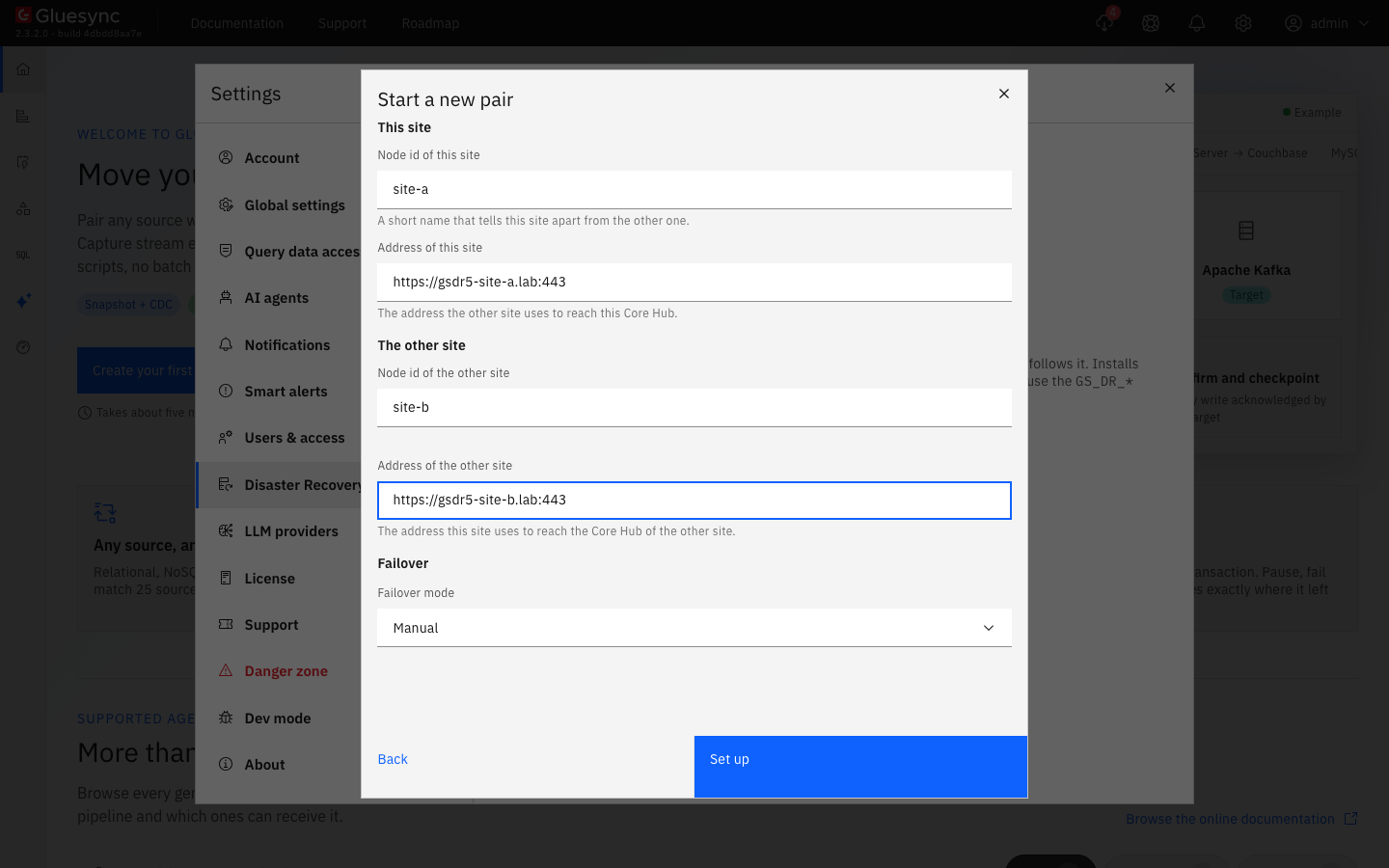
Fill in Node id of this site, Address of this site, Node id of the other site and Address of the other site. The address of this site is filled in with the address of your browser and port 1717: only its host is used, so check that it is the name the other site resolves for this host;
-
Leave Failover mode on Manual. For a witness, see Move to automatic failover with a witness first;
-
Select Set up, and copy the Pairing code and the Operator token to a password manager as soon as Pair started shows them;
-
Wait until the dialog says "Core Hub restarted, so you need to sign in again. Copy the pairing code first.", then select Sign in again.
UI
-
Sign in to the Control Plane of the other site, open Settings → Disaster Recovery and select Set up disaster recovery;
-
Choose Join a pair, paste the pairing code, tick the box that says that this site’s pipelines and settings are moved aside, and select Join;
-
Copy the Operator token of this site from Site joined, and select Done.
UI + API
-
On the active site, open Settings → Disaster Recovery;
-
Check that This site is Active and Serving, that Peer site is Standby and "Following <node id of the active site>", and that both show the same epoch and build;
-
Check that the Replication table lists six databases and says All in sync. With a pipeline writing, a database can show "1 transaction behind" for a second or two, and Planned switchover is disabled meanwhile with "Every database must be in sync.": that is the normal lag;
-
Read the status of each site on its control port with its operator token:
curl -k -H "Authorization: Bearer <operator token of site A>" https://<site A>:1719/dr/status curl -k -H "Authorization: Bearer <operator token of site B>" https://<site B>:1719/dr/status -
Read the health of each site without a token. Use it in your monitoring: it tells you the role of a site and whether it serves:
curl -k https://<site>:1719/health
Use the pair day to day
-
Users sign in on the active site. The standby answers
502 Bad Gatewayon its Control Plane and its API. Gluesync does not move an address for you: after a failover or a switchover, users open the address of the site that took over, with the same accounts. Put a name that you can move, or a load balancer that checks/healthon port 1719, in front of the two sites if you want one address; -
API tokens carry over, sessions do not. An API token created on one site works on the other after a takeover. A Control Plane session does not: after a takeover the new site asks users to sign in;
-
Chronos runs on the active site only. On the standby, Chronos is running but reports itself
unhealthy, and its log says "Waiting for Core Hub to be the serving active disaster-recovery node (role STANDBY)". That is normal. Its jobs appear on the site that takes over within about 15 seconds; -
Change things on the active site only. Pipelines, connections, users and schedules that you change on the active site reach the standby within about a second. There is nothing to change on the standby;
-
Keep the operator tokens of both sites where the person who promotes the standby can find them, and check the Replication table now and then. Try a planned switchover while nothing is wrong: it proves the path that you need in an emergency.
Switch over and switch back
A planned switchover hands the active role to the standby without losing a write, for maintenance on the active site or to test the pair. Switching back is the same operation from the other site.
UI or API
-
On the active site, open Settings → Disaster Recovery. Planned switchover is enabled only while the other site answers and every database is in sync; otherwise it says "The peer site must be reachable." or "Every database must be in sync.";
-
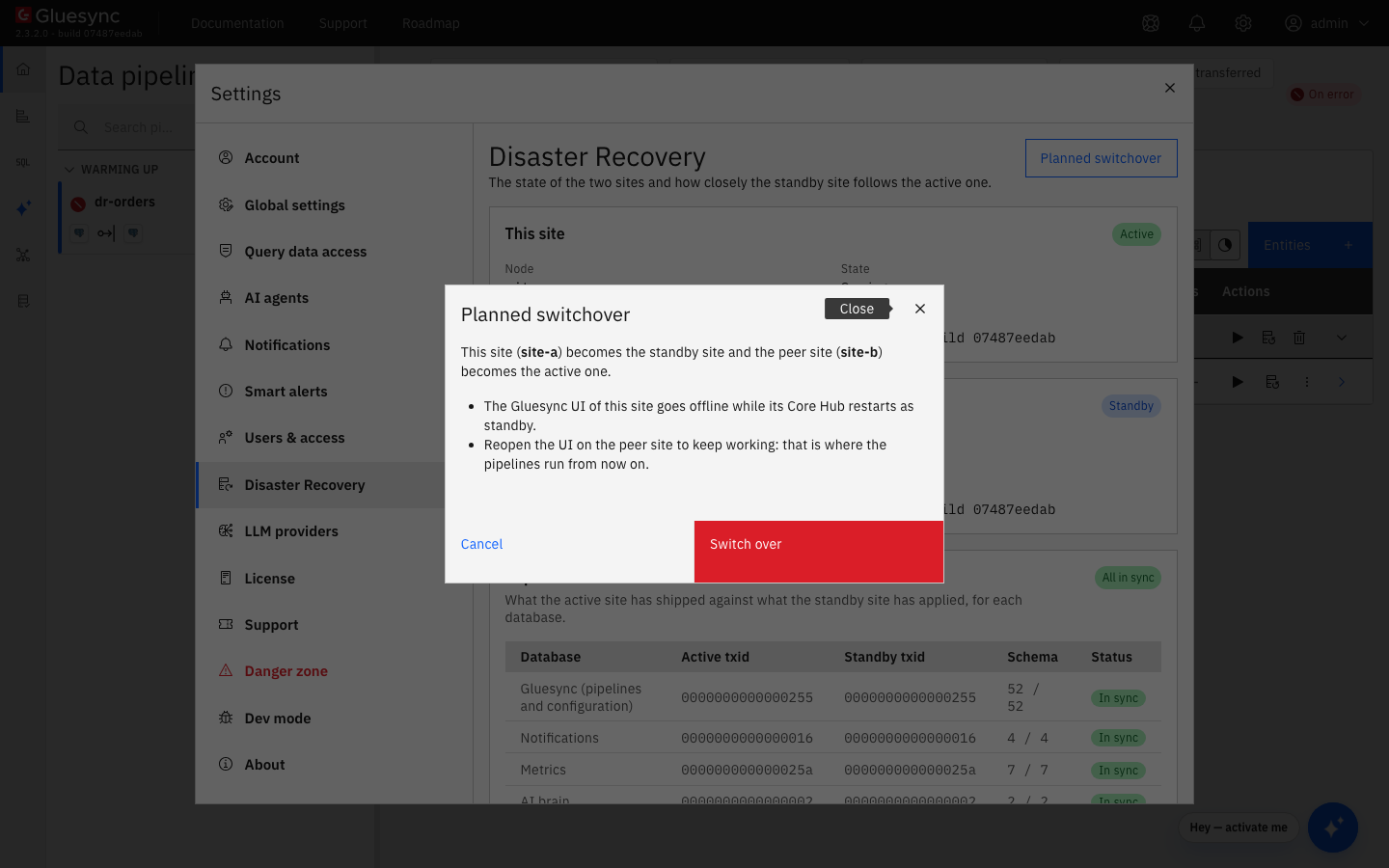
Select Planned switchover. The dialog says which site becomes the standby and which becomes active, and that the UI of this site goes offline;
-
Select Switch over.
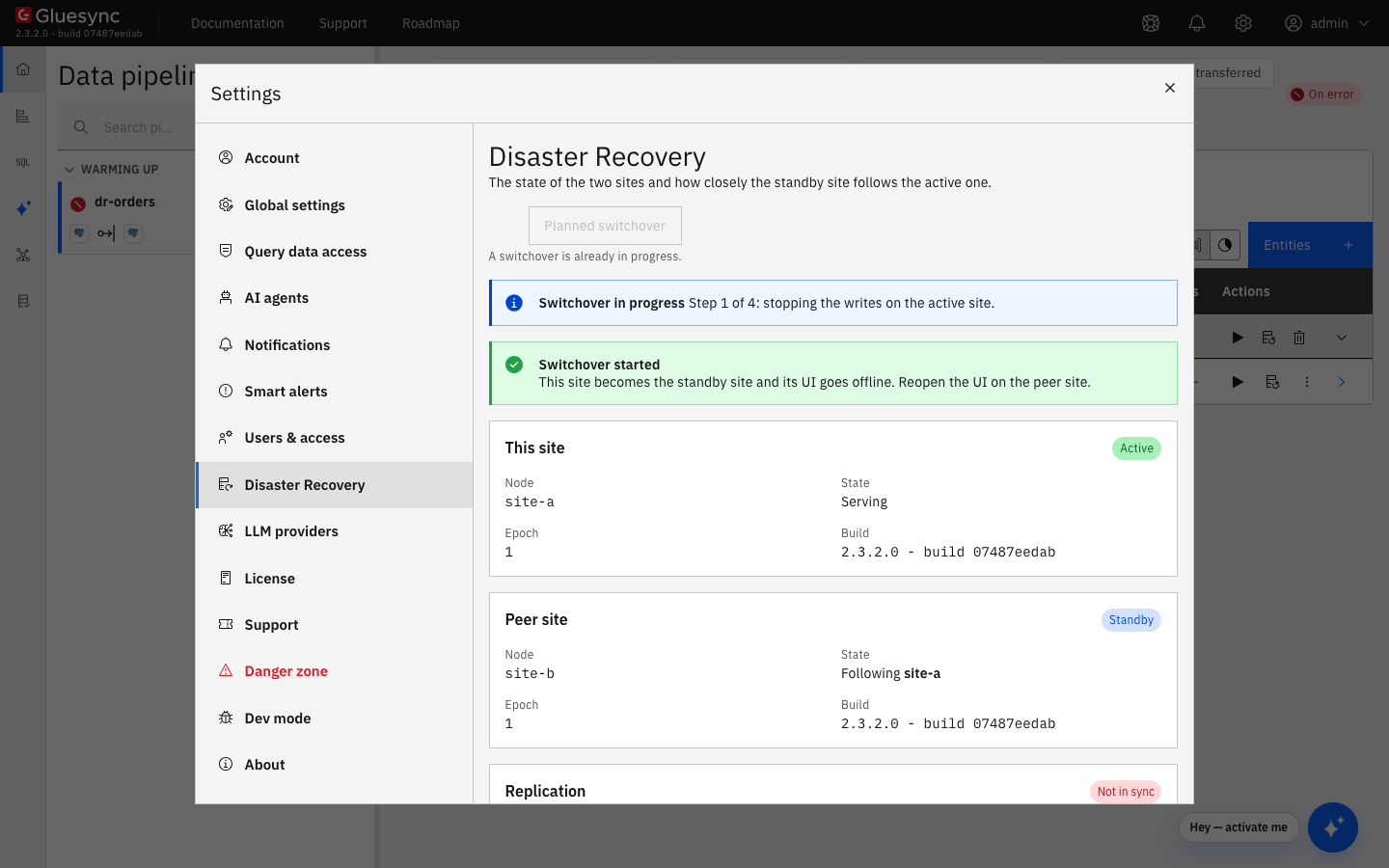
The tab shows Switchover in progress, "Step 1 of 4: stopping the writes on the active site." then "Step 2 of 4: replicating the last changes to the standby site.", and Switchover started. A few seconds later this site stops serving, and the tab shows "The status could not be refreshed" with "Request failed with status code 502": that is expected, the page stays as it is.
The same through the API, on the active site:
curl -k -X POST -H "Authorization: Bearer <operator token of the active site>" https://<active site>:1719/dr/switchoverIt answers 202 with "switchover": "STARTED".
UI
-
Open the Control Plane of the site that is now active, and sign in with the same account;
-
Open Settings → Disaster Recovery.
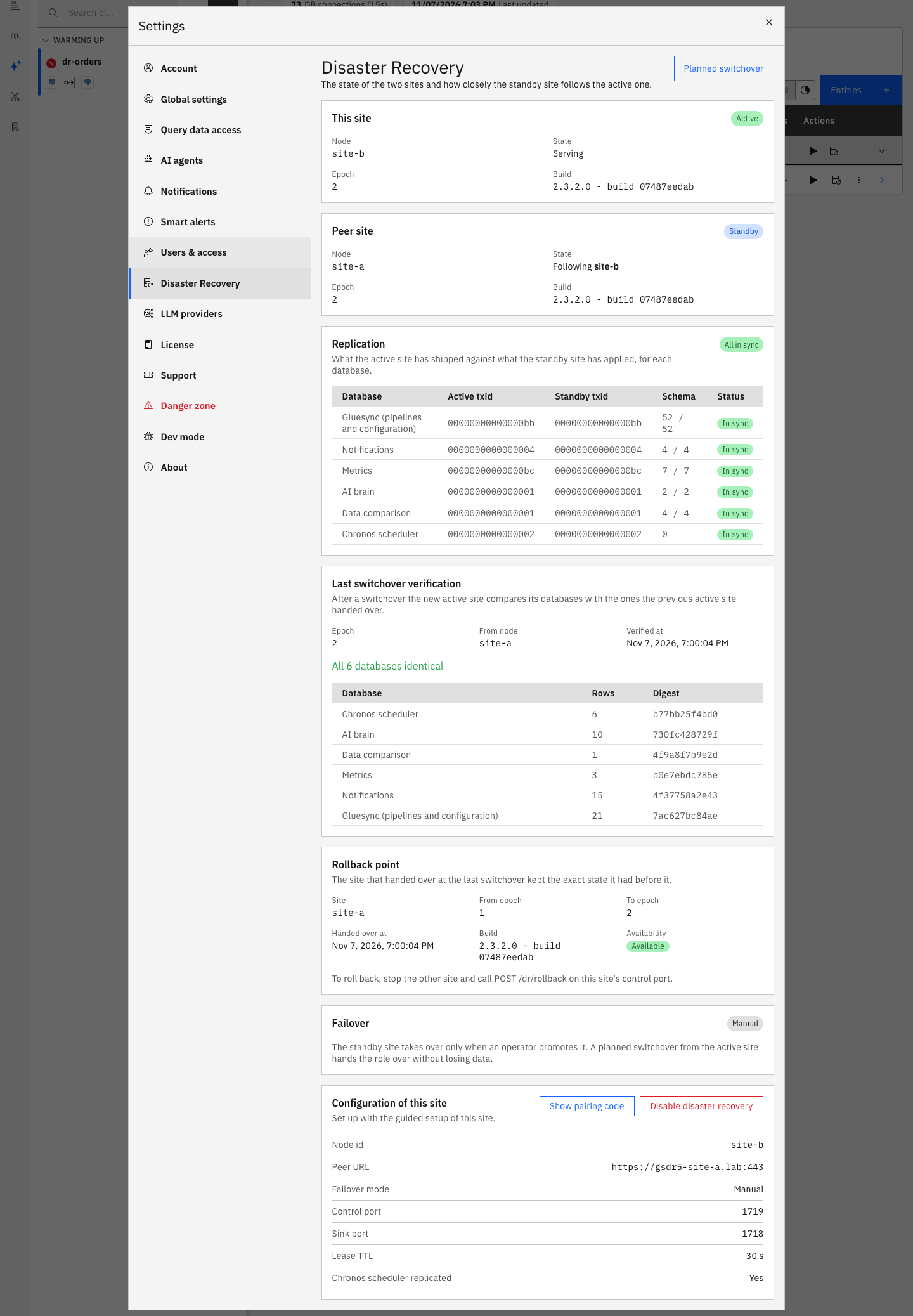
The rollback point lets you go back to the state before the switchover, for example after an upgrade, see Roll back during the soak. The old site keeps it in its newest discarded-<time> folder. It is no longer available after the next switchover or failover.
UI or API
Repeat the switchover from the site that is now active: Settings → Disaster Recovery → Planned switchover → Switch over, or POST /dr/switchover on its control port.
Fail over when the active site is lost
In manual mode the standby never takes over by itself. Before you promote it, you must know that the active site is down, because a promotion while the active site still runs gives you two active sites, see Understand a network partition in manual mode.
CLI
-
Check the health of the active site from where you can, and its host:
curl -k https://<active site>:1719/health -
If it answers
"role":"ACTIVE"and"serving":true, it is alive: do not promote the standby. Find out why your users cannot reach it; -
If it does not answer, check from another network that the host is really down, or stop it: power it off, or stop its Core Hub (
docker stopof the host or of the Core Hub container).
|
"The standby cannot reach the active site" is not the same as "the active site is down". If you are not sure, stop the active site before you promote the standby. A site that you stopped cannot serve when it comes back: it becomes the standby. |
API
-
Ask the standby to take over, without
forcefirst:curl -k -X POST -H "Authorization: Bearer <operator token of the standby>" "https://<standby>:1719/dr/promote"While the active site does not answer, it is refused with
409and{"reason": "peer unreachable: confirm the active site is down (force)"}. If the active site answers, it is refused with "the peer is active at epoch <N>: use a switchover instead of a promotion": use a switchover; -
Confirm with
force:curl -k -X POST -H "Authorization: Bearer <operator token of the standby>" "https://<standby>:1719/dr/promote?force=true"It answers
202with{"role": "PROMOTING", "epoch": <N>}; -
Tell your users to open the Control Plane of this site and sign in.
Bring the old active site back
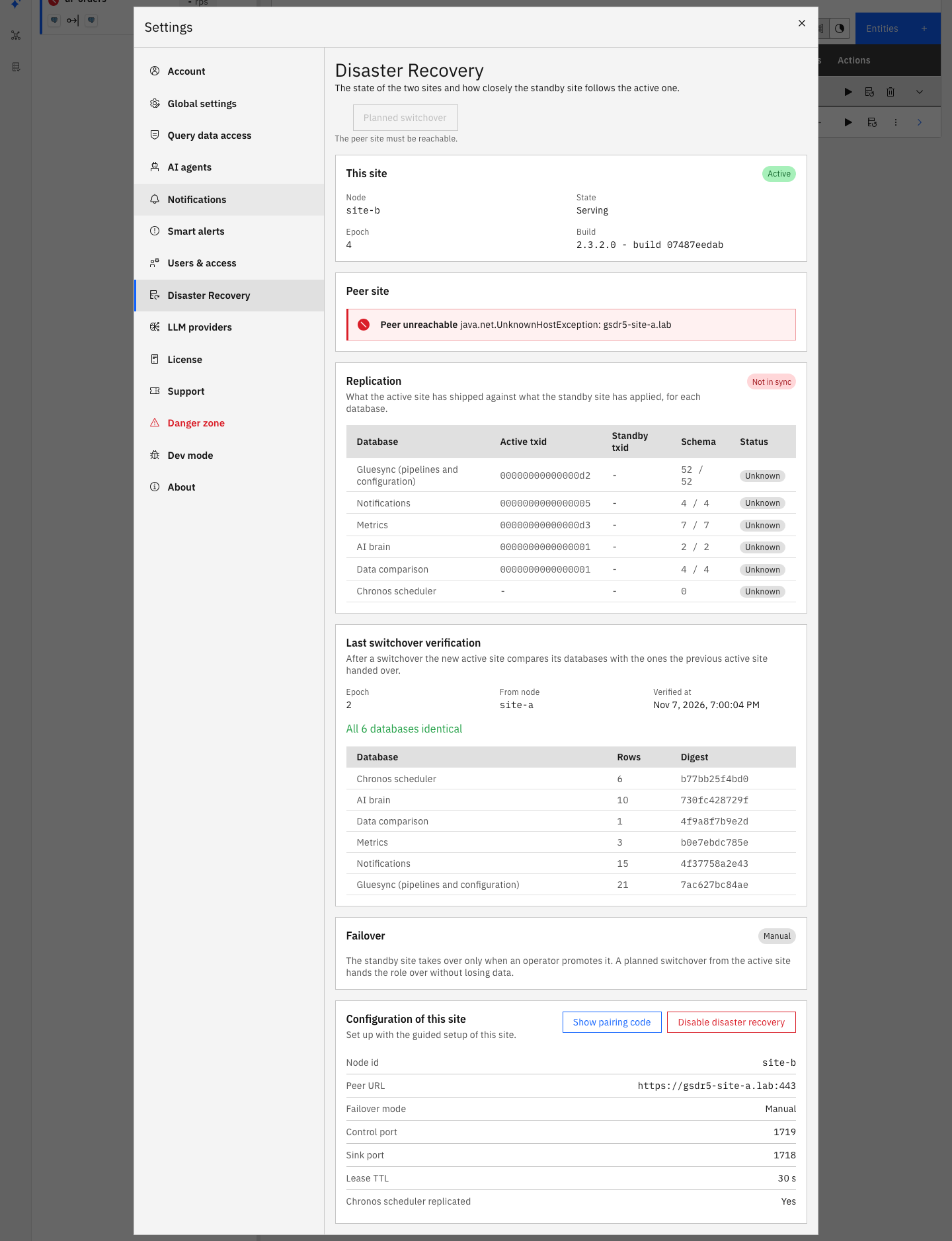
When the site that was lost starts again, for example after a repair, it finds the other site active at a newer epoch and becomes its standby. You do not need to do anything on either site.
CLI
-
Start the host or the Gluesync services of the old site. The kit restarts its services by itself;
-
Read its decision in the log of its Core Hub, and its status:
curl -k -H "Authorization: Bearer <operator token of the old site>" https://<old site>:1719/dr/status -
On the active site, open Settings → Disaster Recovery.
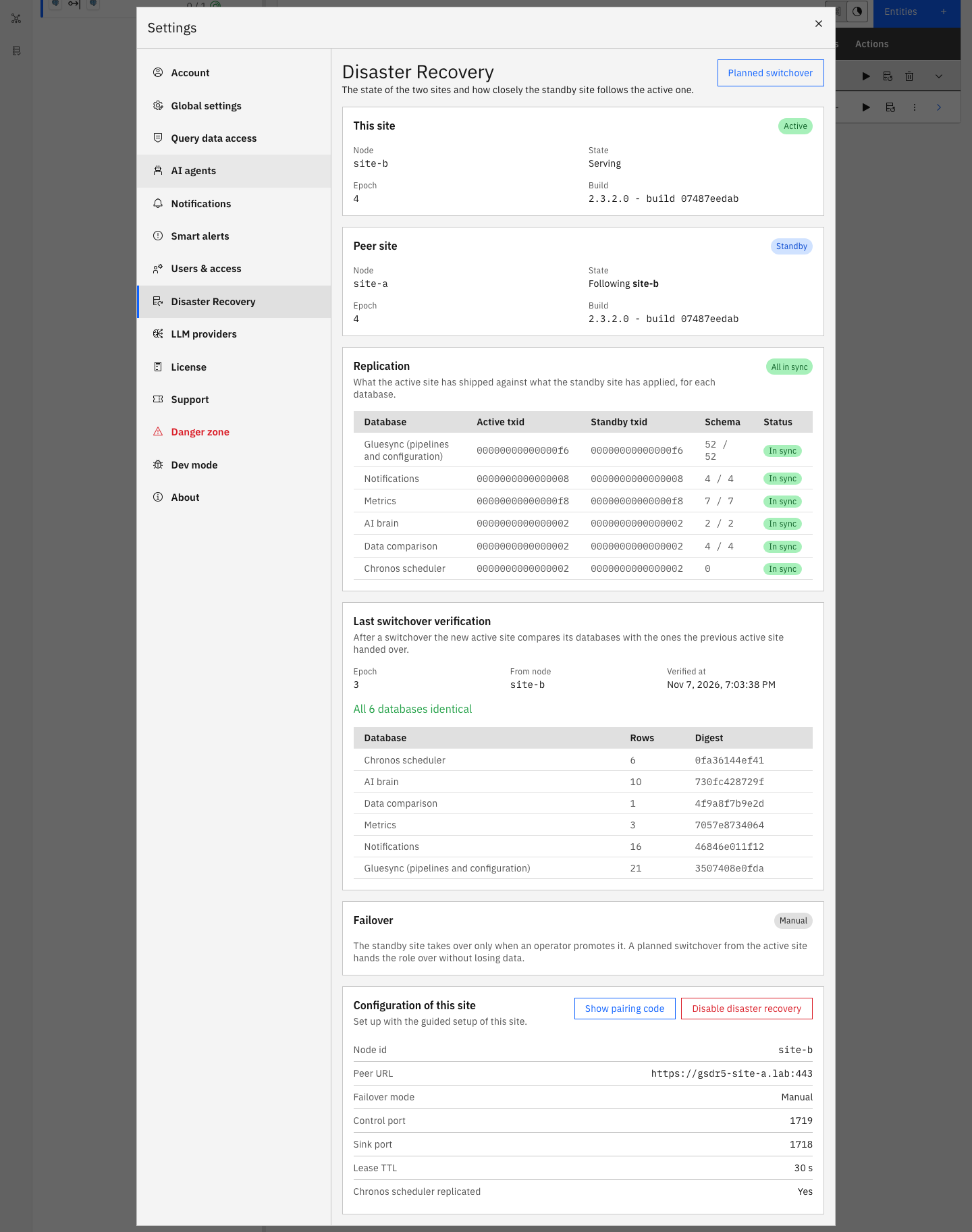
If the Replication table stays Not in sync and the standby txids do not move, see Troubleshooting.
What happens to the data of the old site
The old site does not merge anything back. What it held when it was lost stays in its discarded-<time> folder, under GS_DR_DIR, which is data/core-hub/dr/ in the folder of the kit. The folder holds its five Core Hub databases as they were, and a discarded.json that lists them with the time they were moved aside. It holds:
-
The last changes that it had not replicated yet, about the last second before it was lost. Pipeline positions are not lost: the pipelines read the source again from the replicated positions;
-
Any change that someone made on it while it was cut off from the other site, see Understand a network partition in manual mode.
A site keeps the latest GS_DR_DISCARDED_COPIES folders, two by default, and deletes the oldest one when a new one arrives, with the log line "Deleted the databases moved aside into 'discarded-<time>'". Each switchover, failover and return of a site makes a new one. This includes the databases that a site had before it joined the pair: they are deleted for good after two more moves. If you need one of these folders, copy it elsewhere before the next switchover.
The old site has no rollback point after a failover: rollback is null in the status of both sites. A rollback point exists only after a planned switchover.
UI or API
When the old site follows and the Replication table says All in sync, you can make it active again with a planned switchover from the site that is active now, as in Switch over and switch back.
Understand a network partition in manual mode
A partition is a cut between the two sites while both are running. The active site cannot tell a cut from a lost standby, so in manual mode it keeps serving and running the pipelines, and only shows Peer unreachable in its tab. Nothing goes wrong as long as nobody promotes the standby.
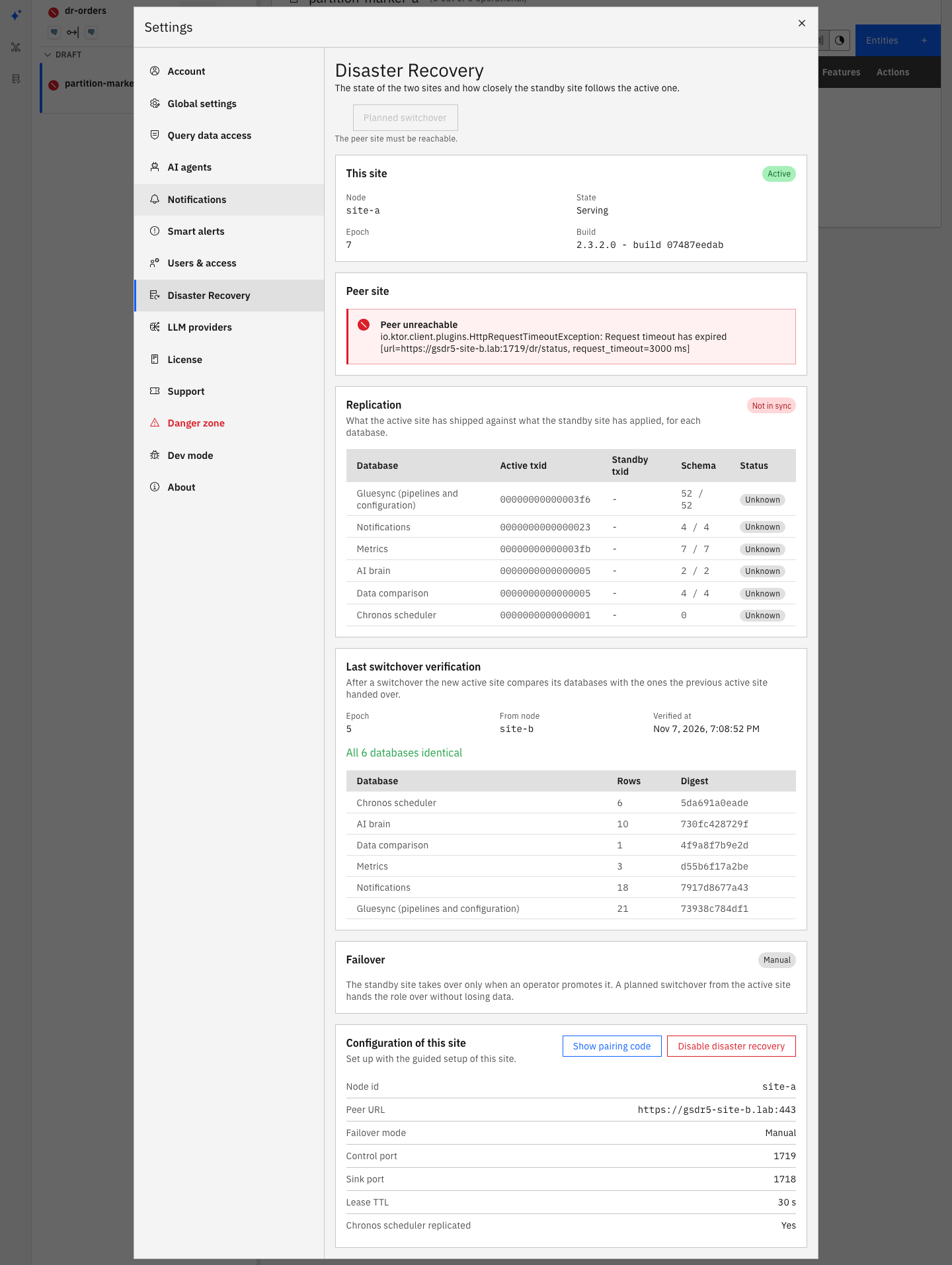
If the standby is promoted with force while the active site is alive, the two sites are both active, each at its own epoch, until they reach each other again. In the lab both served for more than a minute. During that time:
-
Both Control Planes open and accept changes. Changes made on the old site are lost for the pair: they end up in its
discarded-<time>folder; -
Both sites try to run the pipelines. Whether both can read the source depends on the source: in the lab the PostgreSQL replication slot was held by the old site, so the pipeline of the new site could not start ("replication slot … is active for PID …"), and the target received no duplicate. With other sources both sites can write to the same target;
-
A restart of the old site does not end it. Core Hub of the old site starts again as active, "Boot decision: ACTIVE at epoch <N> (still the active node of epoch <N>)", because it cannot see the newer epoch.
When the network heals, the old site sees the newer epoch, logs "Fencing this node: the peer is active at the newer epoch <N>", exits with code 75, restarts as the standby, moves its databases aside and follows. In the lab that took 1 to 9 seconds after the network healed, and the old site was following again within a minute.
CLI
-
Decide which site keeps the active role: normally the one that you promoted, which has the newer epoch;
-
Stop the other site at once: stop its Core Hub, or its host. It cannot be fenced while it does not reach the promoted site;
-
Repair the network;
-
Start the stopped site again. It comes back as the standby, as in Bring the old active site back;
-
Copy what you need from its newest
discarded-<time>folder, and redo on the active site the changes that were made on the old one during the partition.
If you cannot be sure who is down when a site goes silent, use a witness: in witness mode the cut-off active site stops by itself before the other one takes over.
Move to automatic failover with a witness
In witness mode a third process, the witness, holds a lease. The active site renews it, the standby takes over by itself when the lease runs out, and an active site that reaches neither the other site nor the witness stops serving before its lease runs out. The witness is a Core Hub container on a third host that both sites reach on port 1719 and that does not fail with either of them.
The failover mode of a paired site cannot be changed: the Configuration of this site panel has no field for it. Turn the pair off as in Turn the pair off, then set it up again with Witness. The sites keep their epoch, so the new pair continues at the epoch where the old one stopped.
UI
-
On the site that will be active, select Set up disaster recovery → Start a new pair, and fill in the form as before;
-
Set Failover mode to Witness;
-
Fill in Witness address, the
http://orhttps://address of the witness on port 1719, for examplehttp://dr-witness.example.com:1719, and Lease TTL (seconds), 30 by default, from 20 to 600; -
Select Set up, and copy the pairing code and the operator token.
CLI
-
On the first site, read
GS_DR_SHARED_SECRETingluesync-dr.env, next to the compose file of the kit. The setup created it; -
On the witness host, start a Core Hub container in the witness role, with the same shared secret, a node id of its own, a token of its own, the same lease time, and a volume for its state:
docker run -d --name gluesync-dr-witness --restart unless-stopped \ -p 1719:1719 \ -v gluesync-dr-witness:/opt/gluesync/data/dr \ -e GS_DR_ENABLED=true \ -e GS_DR_ROLE=witness \ -e GS_DR_NODE_ID=witness \ -e GS_DR_SHARED_SECRET=<shared secret of the pair> \ -e GS_DR_ADMIN_TOKEN=<a token of 32 characters or more> \ -e GS_DR_LEASE_TTL_SECONDS=30 \ <the Core Hub image of your sites> -
Check it:
curl http://<witness>:1719/health -
Join the second site with the pairing code, as in Configure the pair.
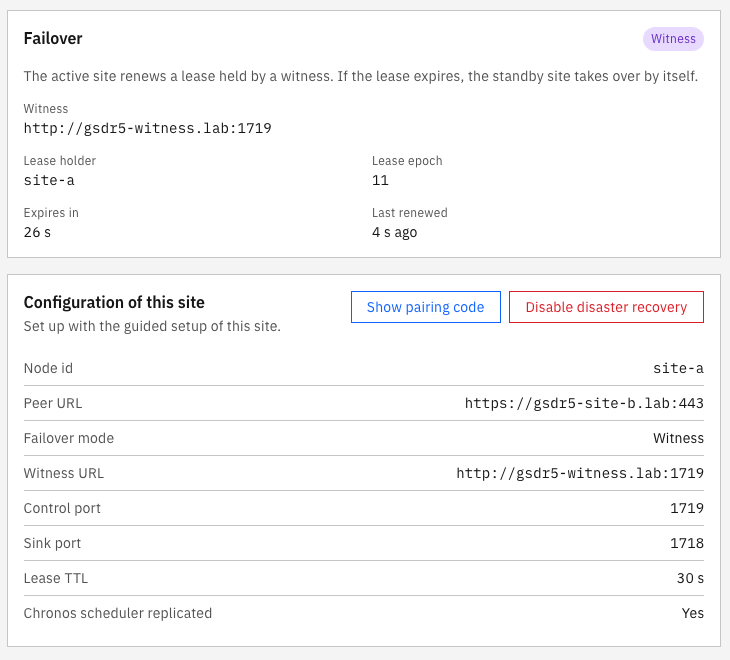
The witness keeps its state in witness.json in its volume, so a restart of the witness keeps the lease. The pairing creates a new shared secret each time: if you set the pair up again, start a new witness with the new secret and an empty volume, or both sites refuse to serve and their status says "the witness answered 401 Unauthorized: it refuses this node, check GS_DR_SHARED_SECRET and the clock of both".
The active site is lost
The standby promotes itself when it has not reached the active site for the lease time and the witness grants it the next epoch. Its log says "The peer was unreachable for more than 30s: promoting to epoch <N> with the witness lease", and the witness logs "<node id> acquired the lease at epoch <N>". With a 30-second lease, the standby served about 29 seconds after the active host was stopped in the lab. You do nothing. When the old site comes back it becomes the standby, as in Bring the old active site back.
The active site is cut off but alive
An active site that renews its lease neither with the witness nor with a standby that follows it stops serving by itself, before its lease runs out. Its log says "The lease was not renewed", then "Fencing this node: no lease and no standby for more than 30s minus 10.5s". Core Hub exits with code 75 and restarts as the standby. In the lab the cut-off site stopped 18 seconds after the cut, and the other site took over after about 30 seconds: for about 11 seconds no site served, and there were never two active sites. When the network heals, the cut-off site follows the new active site.
The witness is down
The pair keeps running while the witness is down, and nothing changes for your users. Two cases wait for it:
-
An active site whose Core Hub restarts while the witness is down waits 10 seconds for the witness, then starts as active if its standby follows it: "The witness does not answer, but the standby follows this node at epoch <N>: starting as active on that quorum". Without a following standby, for example a first site that is alone, it waits for the witness and does not serve;
-
A forced promotion waits for the lease of the old active site to run out, and is refused before that with "the witness did not grant the lease of epoch <N>: the lease of epoch <M> held by <node id> expires in <time> ms".
A planned switchover works as in manual mode: the old site releases the lease and the new one acquires it.
Turn the pair off
Disaster recovery is turned off one site at a time, from the active site first, because a standby has no Control Plane.
UI
-
In witness mode, stop the Core Hub of the standby first. Otherwise it takes the lease when the active site goes away and starts the pipelines, while the site that you disable still runs them;
-
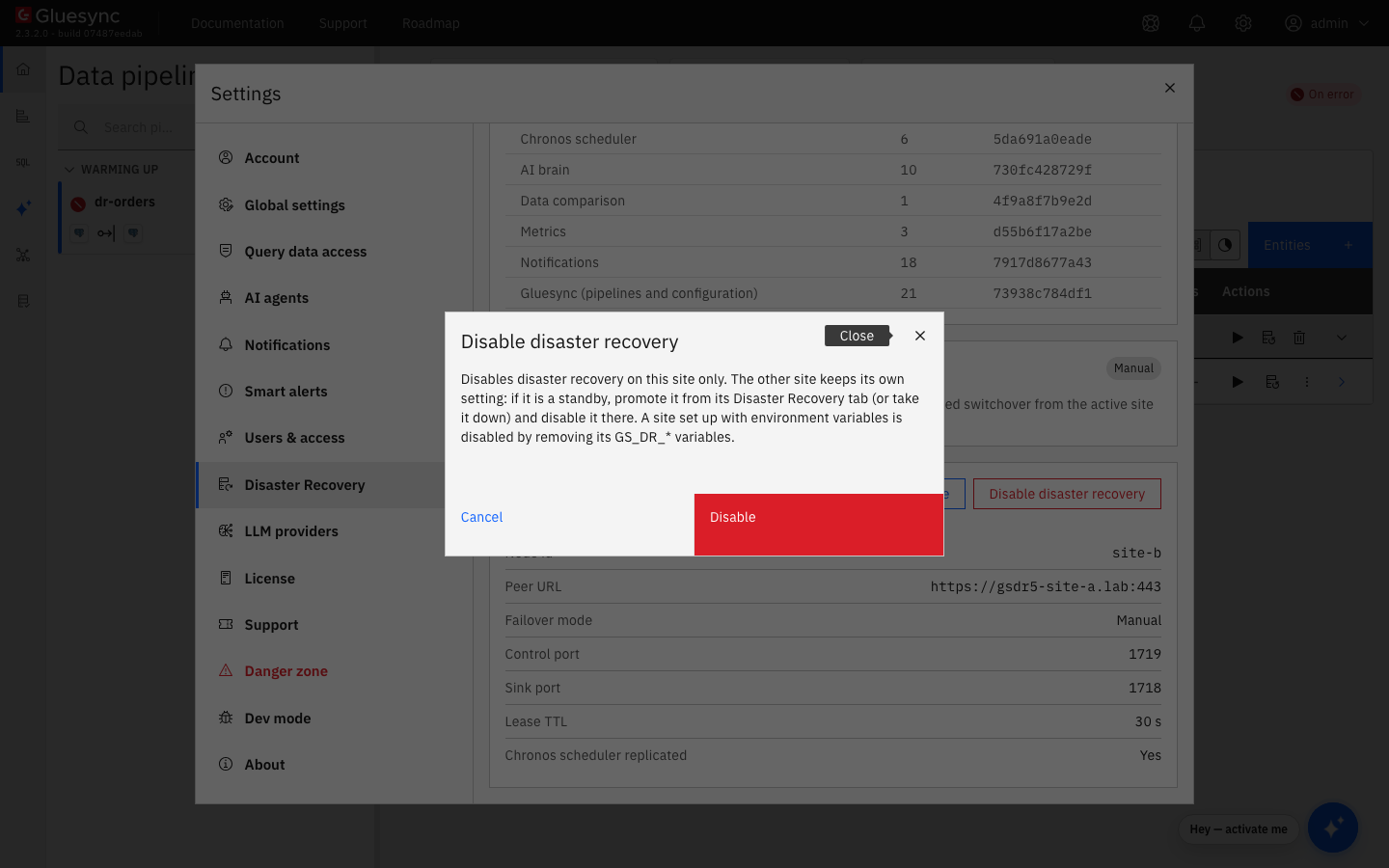
On the active site, open Settings → Disaster Recovery, and in Configuration of this site select Disable disaster recovery;
-
Select Disable;
-
Wait for "Core Hub restarted without disaster recovery, so you need to sign in again.", and select Sign in again.
CLI + UI
The dialog says "if it is a standby, promote it from its Disaster Recovery tab", but a standby has no Control Plane: promote it through its control port. Choose one:
-
Retire the standby: stop Gluesync on its host and remove the installation;
-
Reuse it as an independent installation:
-
Stop the pipelines on the site that you disabled, or decide which site runs them: once promoted, the standby runs every pipeline of the pair against the same sources and targets;
-
Wait until the control port of the disabled site no longer answers. Before that, a promotion is refused with "the peer is active at epoch <N>: use a switchover instead of a promotion";
-
In manual mode, promote the standby with
POST /dr/promote?force=trueon its control port. In witness mode, start its Core Hub again, with the witness running: it takes the lease and becomes active by itself after the lease time; -
Sign in to its Control Plane and select Settings → Disaster Recovery → Disable disaster recovery.
-
How this procedure is verified
Every step was run in a lab of two sites, each a Docker host of its own that ran the default kit with Core Hub on SSL, Chronos, the Conductor and the reverse proxy, with Core Hub, the Control Plane, Chronos and the Conductor built from their current sources. A PostgreSQL CDC pipeline ran under a continuous load of inserts, updates and deletes from before the setup to the end, with three Chronos jobs, and the target was counted against the source after every scenario. The runs covered the guided setup and the join, planned switchovers and switch backs in both directions, the loss of the active host and the forced promotion, the return of the old site as the standby with its databases moved aside, the failback, network partitions with a promotion while the active site was alive, cut both at the network level and between the two sites only, restarts during a partition, the change to witness mode, the automatic failover, the self-fencing of a cut-off active site, the witness down during restarts, the switchover in witness mode, and the shutdown of the pair in both modes. After each scenario the target converged with no missing, extra or changed row.
Troubleshooting
| Problem | Possible cause | What to do |
|---|---|---|
After a failover, the old site comes back as the standby and its Control Plane does not open |
Expected: a site never resumes as active after a failover |
Open the Control Plane of the active site. To make the old site active again, run a planned switchover |
The promotion is refused with "peer unreachable: confirm the active site is down (force)" |
The standby cannot reach the active site, and a promotion without |
Confirm that the active site is down, then promote with |
The promotion is refused with "the peer is active at epoch <N>: use a switchover instead of a promotion" |
The active site still answers |
Use a planned switchover. When you are turning the pair off, wait until the control port of the disabled site no longer answers |
Both sites serve after a promotion |
The active site was alive and cut off, see Understand a network partition in manual mode |
Stop the site that should not be active, repair the network, and start it again: it comes back as the standby |
The Replication table stays Not in sync after the old site came back, the standby txids do not move, Planned switchover says "Every database must be in sync.", and the log of the active site repeats "LTX file is missing" |
Replication from the new active site could not resume into the returning site. Seen in the lab after a promotion during a network partition |
Turn the pair off on both sites and set it up again, see Turn the pair off. Restarting either site does not clear it. Contact MOLO17 Support with the logs of both sites |
A planned switchover started through the API ends with "the peer refused the handover: replica behind: …", and the active site restarts and stays active |
A database of the standby was behind when the handover was verified |
Wait for the Replication table to say All in sync, and try again |
A site starts as the standby with "the peer may have taken over the handover of epoch <N> whose answer was lost and it is unreachable" |
A switchover was cut while the answer of the other site was on its way, and that site does not answer now |
Find out whether the other site is active. If it is down, promote this site with |
In witness mode, a site is |
The witness does not answer, and no standby follows this site |
Start the witness, or fix its address. The site serves within about 10 seconds of the witness answering |
In witness mode, the status says "the witness answered 401 Unauthorized: it refuses this node" |
The witness runs with the shared secret of an earlier pair, or the clocks differ |
Start a new witness with the |
In witness mode, the standby became active after you disabled the active site |
It took the lease when the active site went away |
Stop the pipelines on one of the two sites, and disable DR on the other one too. Next time, stop the standby first |
The dialog of a site that you are switching over stays on "The status could not be refreshed" |
Expected: the site became the standby and no longer serves |
Open the Control Plane of the other site |
Related guides
Contact MOLO17 Support if you need assistance with running a disaster-recovery pair.