Validate data with the Validator
Validator compares one replicated entity with the table it is written to. This guide walks through a whole validation: run it, read the result, narrow it with filters, tell a real difference from a conversion artefact, handle the awkward cases (NULL, padding, floats, keys, rows that change while you compare) and fix and re-check the rows. Every result shown here was captured on a MySQL to PostgreSQL pipeline, so the type and date conversions are real.
In this guide
You will learn how to run a comparison, choose between Count only and a full comparison, read the counters, the notices and the grid, write a source and a target WHERE condition for each database, slice a big table by key range, see how filters interact with the entity filter and with column selection, understand how Validator normalizes dates, times and timestamps, avoid the false differences that some options create, handle NULL and empty text, trailing spaces, case, numbers, floats, binary columns, keys, duplicates and rows that change during the run, then reconcile, re-check and schedule validation.
Quick information
Goal |
Prove that a target table matches its source, and explain every difference that Validator reports |
Audience |
Gluesync users who replicate between two different databases and have to trust the result |
Level |
Intermediate |
Time required |
About 60 minutes |
Area |
Control Plane → Validator, and an entity’s Validate action |
Applies to |
Gluesync 2.3 |
Before you begin
Make sure that:
-
A pipeline has a source agent, a target agent and at least one entity whose target table already holds data. Both connectors must be able to compare data. See Supported connectors;
-
You can sign in to the Control Plane with a role that can view differences. Only Managers and Super Admins can reconcile;
-
You can run SQL on both databases, for example with Query Studio, so that you can confirm what Validator reports.
This guide uses a MySQL 8 source and a PostgreSQL 16 target, three entities and the names below. Replace them with your own.
| Entity | Content |
|---|---|
|
Key |
|
Key |
|
Text key |
|
Run the repair steps on a practice copy first. Reconcile writes to the target. |
Guide steps
UI
-
Open the entity’s overflow menu and select Validate, or open Validator from the navigation and pick the pipeline and the entity. The page opens with the pipeline and entity already selected;
-
Select Validate. The Validator options dialog opens with two tabs, General and Columns & rules. A Matching tab with the comparison profile, float tolerance, temporal precision and NULL rules is on the same dialog in releases that have it;
-
Leave the defaults and select Start validation.
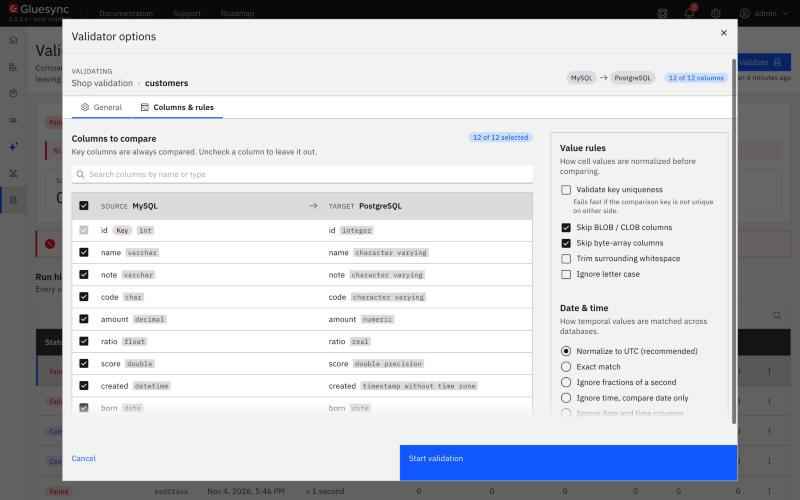
For the meaning of every counter, status and error code, read What the results mean. This guide does not repeat those tables.
UI
A full comparison reads every row of both tables, in key order. Count only reads no row. It counts both tables and compares the two numbers.
-
Select Validate, switch Count only on (General tab, Scope) and select Start validation;
-
If the counts match, the run ends as Completed. If they differ, it ends as Completed with warnings and the message names both counts and their difference. On
big_ordersthe message read:Source counts 20000 rows and target 19998 (difference 2): run a full comparison to find out which rows; -
Run again without Count only to list the rows.
Two limits of a count:
-
Equal counts do not mean equal data. A row missing on one side and an extra row on the other cancel out;
-
When the entity has a target filter or a UDF that drops rows, the counts differ even when the data matches. The message then says the count is not predictable. Run a full comparison.
UI
Select a run in Run history and read the grid. The Source table is on the left, the Target table on the right, and the cells that differ are marked in red.
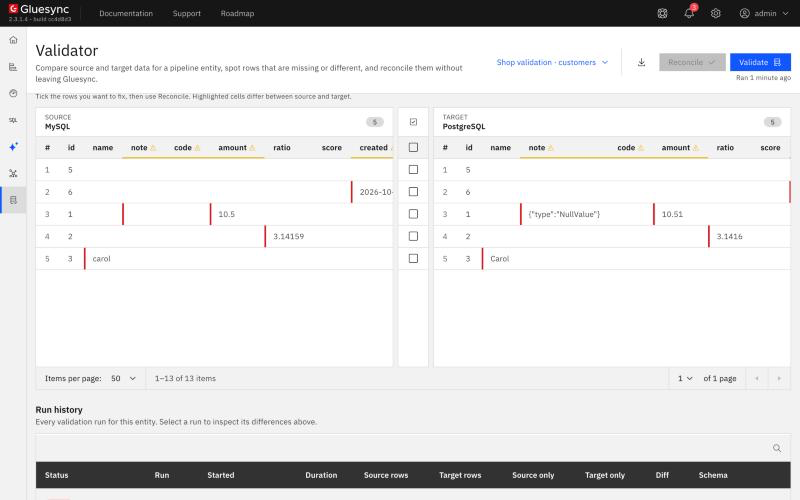
Every difference has a type, a key and the values of the columns that differ. The REST API returns the same data. Here is the difference for a row whose note was '' on the source and NULL on the target:
{ "column": "note",
  "sourceValue": { "type": "Text", "value": "" },
  "targetValue": { "type": "NullValue" } }
Besides differences, a run reports notices. A notice says how a column was compared, or why it was not, and it is not a difference. You will meet these in this guide:
| Notice | What it tells you |
|---|---|
|
The two types cannot hold the same values, so the column is compared as strictly as the narrower side. For example |
|
Values that are equal only because the lenient profile ignores trailing spaces or line endings, or float noise. The detail gives the number of values. |
|
An option of the run leaves the column out, for example Skip BLOB / CLOB columns. |
|
A text key is ordered with a forced binary collation, and the warning names an index that would speed the run up. |
See Notices for the full list. A run that finds only notices ends as Completed.
UI + SQL
Open Validate, then General → Advanced: query filters. Each side has its own WHERE condition.
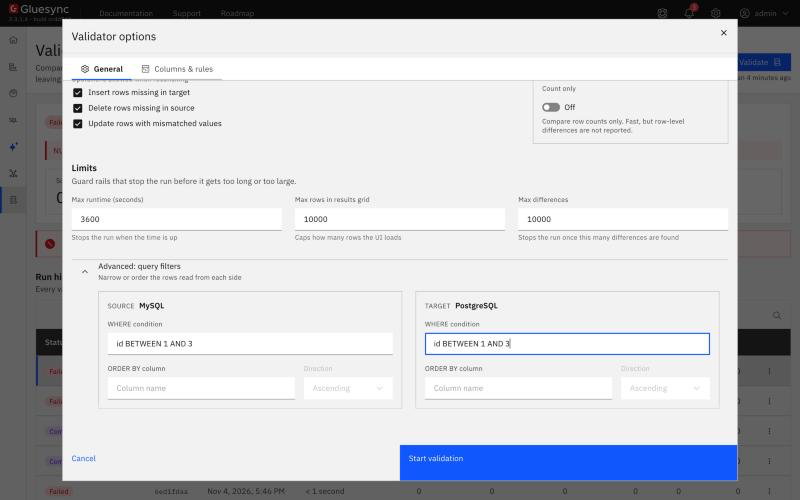
How the condition is used:
-
Validator adds it to its own query as
WHERE (your condition) AND (the key paging condition). You type only the condition. A leadingWHEREis removed if you type it; -
The text is SQL of that database, not Gluesync syntax. Quote identifiers the way the database does: backticks on MySQL (
+`status= 'PAID'`), double quotes on PostgreSQL (`"status" = 'PAID'+`). Plain lower-case names work on both; -
A condition with a semicolon, a comment (
--,/* */,#) or unbalanced parentheses is refused. A condition that names an unknown column fails the run with the message of the database, for exampleUnknown column 'nope' in 'where clause'; -
Subqueries run. Your data access policy still decides which tables you may read. A refused table fails the run with
PermissionDenied.
The two sides are independent. Validator does not copy the source condition to the target.
=== Slice a big table by key range
Validator reads a table in one pass and does not split it. To compare a big table in parts, give both sides the same key range and run once per range:
-- source (MySQL) and target (PostgreSQL), same text on both sides
id BETWEEN 1 AND 5000
id BETWEEN 5001 AND 10000
id BETWEEN 10001 AND 15000
id BETWEEN 15001 AND 20000
On big_orders the four runs reported, in turn: 1 source-only row, 1 row that differs, 1 source-only row and 1 row that differs, and a clean slice. Each run lists only its own range, so a slice is the unit you fix and re-check. Use a range on an indexed column, normally the key. Date ranges work too: created >= '2026-01-10' AND created < '2026-01-11' returned 1,440 rows on each side.
=== Keep the two conditions equal
A condition on one side only is the most common source of a flood of differences. With id ⇐ 5000 on the source and nothing on the target, the run compared 5,000 source rows with 19,998 target rows and stopped at the difference limit (DIFFERENCE_LIMIT_REACHED, after 10,000 differences) because 9,999 rows were target-only.
A condition on a column that has drifted hides the row instead of reporting it. With status = 'PAID' on both sides, a row whose target status had changed to another value was absent from the target slice, so it showed as Source only, not as a different value. Filter on the key or on a column that never changes.
=== How the conditions interact with the entity filter and the snapshot
-
Validator does not read the snapshot
WHEREof the entity. If a snapshot copied only some rows, type the same condition on the source side, or the other rows show as Source only; -
The entity’s target filter is replayed by default (Apply the entity filter on the Matching tab,
applyEntityFilter). A source row that the filter excludes is expected to be absent from the target and is not a difference. A target row that the filter would not have written is reported as Extra in target. In the example, a target filterstatus = 'PAID'was added after the data was copied. The run withid ⇐ 300reported 200 Extra in target rows, and with the option off it reported none. Reconcile deletes such rows only when you tick Delete target rows the entity filter excludes. See Filter rows with a snapshot WHERE clause and target filters; -
Your
WHEREconditions and the entity filter apply together. The first limits the rows read, the second decides which of them the pipeline would have written.
=== Include or exclude columns
Columns & rules lists every column with a Compare checkbox. Key columns are always compared. Clear a column to leave it out. A run on columns: ["name","amount"] over the REST API compared only those two. Use this to skip a column that you know differs on purpose, for example one that the target database fills. The Reset to pipeline mapping button restores the mapping of the entity. A column with a different target name can be mapped for this validation only.
UI + SQL
Validator does not compare the text of two date values. Each side is read as its type, brought to a common form and compared by value.
| Situation | What Validator does |
|---|---|
Two timestamps with different fractional digits ( |
Compares at the digits the target keeps, rounded or truncated, whichever the target did. A notice says |
A value that the target rounded across midnight |
Equal by default. |
|
Compared as instants. A naive timestamp is read as its wall clock. A target value one hour or two hours away from the source is a real difference. |
|
Compared as instants. To compare the date only, use Ignore time, compare date only. |
A time of day against a date, or a timestamp against a number |
Cannot be compared. The column is left out and a notice says why. Nothing in a number says it is an epoch, or in which unit. |
A date held as text |
Compared by instant when the text reads as a date, for example |
Oracle |
Read as a timestamp, because Oracle |
A timestamp without a time zone on Db2 LUW, Informix, GridGain, Sybase or Vertica |
Read as the text the server returns, so that a time inside a daylight-saving gap keeps its wall clock. |
=== Choose how to match
Open Validator options → Columns & rules → Date & time. The choice applies to every date and time column of the run:
| Choice | API value | Use it when |
|---|---|---|
Normalize to UTC (recommended) |
|
Default. Instants are compared at the temporal precision. |
Exact match |
|
You want offset-aware values compared as stored, without converting them to UTC. |
Ignore fractions of a second |
|
One side drops the fraction. See the warning below. |
Ignore time, compare date only |
|
Only the date matters. See the warning below. |
Ignore date and time columns |
|
You do not want date columns compared. In the example it also left out the |
On the Matching tab, Temporal precision sets the finest unit compared (NANOS, MICROS, MILLIS, SECONDS). The lenient profile compares at milliseconds unless you choose another unit, and it accepts a value truncated to fewer fractional digits.
|
Two choices create false differences when the target rounds. With Ignore fractions of a second the run truncated |
=== A time zone shift
By default, two timestamps hours apart differ, even in the lenient profile: Validator does not know the time zone of the agent, and it has to catch a shifted clock. On the example row, 02:30 against 04:30 was reported as a difference.
Tick Tolerate a whole time zone shift on the Matching tab (tolerateTimezoneShift) to treat two timestamps that are a zone offset apart as equal. An offset is any multiple of 15 minutes up to 14 hours. With it on, the +1 hour and +2 hours rows of the example were no longer reported.
|
The option cannot tell a zone shift from a wrong hour. A row that is really one hour off is hidden too. Use it to diagnose a zone problem, then fix the zone and switch it off. |
=== Dates written by a field function
When a field function such as Convert Date to String (Date2Str) writes the target column, comparing the raw source value would report a difference on every row. Validator replays the built-in functions by default (Apply the field functions on the Matching tab, applyFieldFunctions).
In the example, a DATE column was written to a varchar column with the pattern dd/MM/yyyy:
-
Default run: Completed, no difference;
-
A target value changed to
03/01/2026(day and month swapped): one row that differs, with the source2026-03-01and the target03/01/2026; -
The same entity with the option off: every row differed, and a notice said the column was
written by Convert Date to String, which this run did not replay.
Functions that read the clock (for example Local Timestamp) cannot be replayed. Those columns are left out and reported, unless you choose Compare the raw values anyway or Refuse the run for columns whose target value cannot be predicted.
UI
Text columns are compared exactly unless the run is told otherwise, with these exceptions.
=== NULL against an empty string
NULL and '' are different values. On the example, a source '' against a target NULL was reported as a difference.
NULL and empty text on the Matching tab (nullEqualsEmptyString) has three values:
-
Automatic (when a database stores '' as NULL): the default.
NULLequals''only for a side that is Oracle, because Oracle stores an empty string asNULL. A MySQL to PostgreSQL pair never equates them; -
Always equal: removed the
''againstNULLdifference in the example; -
Never equal: reports it, even for Oracle.
A target that is not nullable and receives NULL can store the default of the type. ClickHouse does this, and Validator takes that default as equal to NULL on such a target.
=== Trailing spaces and fixed-width text
The lenient profile treats two character values as equal when they differ only by trailing spaces or by \r\n against \n. Each such column gets a TOLERATED_VALUES notice with the number of values. A source trail␠␠ against a target trail, a CHAR(8) against a varchar, and line1\r\nline2 against line1\nline2 were all equal, and reported as notices. Leading spaces are always a difference.
The strict profile (Comparison profile → Strict) reports all of them as differences. On the example it listed the trailing-space value, the padded code and the line-ending value.
Two CHAR(n) columns compare without their padding. A CHAR key is read without its trailing spaces on databases that compare it that way, because two databases pad one value to different widths.
=== Case and surrounding whitespace
Case matters by default: carol against Carol is a difference. On Columns & rules, Ignore letter case and Trim surrounding whitespace apply to non-key text columns only (stringMode). With Ignore letter case on, the carol against Carol difference was removed.
Keys are never case-folded. A key carol on the source and Carol on the target is two rows: Source only and Target only. Fix the data or the key, not the option.
UI + SQL
-
Exact numbers are compared by value:
10.50equals10.5; -
A target column with a smaller scale is compared at that scale, rounded half up or truncated, and the run says so with a
LOSSY_COMPARISONnotice. On the example,99.9950stored as100.00and0.0049stored as0.00were equal.10.5against10.51was a difference, because the value really changed at the column’s scale; -
A column of the same or larger scale compares every digit;
-
A float is compared within the noise of its width in the lenient profile: a relative
1e-6for a 32-bit float and1e-11for a 64-bit float.21.21stored in arealcolumn and read back as21.209999was equal; -
A larger gap stays a difference.
3.14159against3.1416is a relative difference of about6e-6, and the default run reported it. Set Float relative tolerance (floatRelativeTolerance,|a − b| / max(|a|, |b|)) to0.0001on the Matching tab and it was no longer reported. Float absolute tolerance (floatAbsoluteTolerance,|a − b|) covers values near zero, where a relative tolerance says nothing.
UI
On Columns & rules, Skip BLOB / CLOB columns and Skip byte-array columns are on by default. The decision is made on the column type, never on its name. A skipped column gets a COLUMN_SKIPPED notice naming the option, so that a clean run does not read as a check of a column that was never compared.
-
Clear both options to compare those columns. On the example, a
BLOBthat readDEADBEEFon the source and00FEon the target was reported with both values in Base64; -
Keep them on for big tables. They keep the pages small, and a large object is compared by a digest, not byte by byte.
In the example, a TEXT column was compared with the options on, so the options follow the type that the connector reports, not the word text.
UI
Validator matches rows by key. It reads both tables in key order and walks them together, so the key decides everything.
-
Key order. A text key is ordered with a forced binary collation on both sides, so that
10,9,A1,a1,_xcome in the same order whatever each database’s default collation is. Each such run carries aREADER_WARNINGnotice. The notice is expected and names an index that makes the run faster. On the exampletext_keysentity, the run ended as Completed with that notice; -
Key types. Both sides need the same kind of key (numeric, text, temporal). A number on one side and a text on the other fails with
SchemaIncompatibleunless you give an ordering expression for each side. See Tables without a primary or logical key; -
Duplicate keys. If the target has the same key twice, Validator reports Duplicate key and compares one of the two rows with the source. In the example, a second
a1was added to the target: the run counted one duplicate and one row that differs, and Reconcile does not fix duplicates. Remove the extra row yourself. Tick Validate key uniqueness to fail the run at once (DuplicateComparisonKey) instead; -
NULL keys. The default is to refuse the run with
NullComparisonKey. NULL key values on the Matching tab (nullKeyMode) can sort `NULL`s first or last. Those rows are then reported as NULL key and cannot be matched or fixed; -
No key. A table with no primary key and no logical key cannot be validated. Give the entity a logical key first. See Choose keys for tables without a primary key;
-
Choose a key that does not change. A key written by a field function holds different values on the two sides, and Validator refuses it.
UI
A running pipeline keeps writing, so a row can differ for a moment. Validator guards against this in two ways.
-
Re-verify. After the scan, each difference is read again by key on both sides. A difference that is gone is discarded and counted in Transient, discarded. A row that is gone on both sides is dropped too. Re-verify is on by default (Re-verify differences before reporting them,
reverifyDifferences). A read that fails stops the pass and keeps the rest, with a notice, because a row that could not be read is not a row that matches; -
Run again. Re-verify reads once, right after the scan, so it cannot absorb a lag longer than that. In the example, 400 source rows were updated and a run started at once. The run reported 400 rows that differ, and a run a few seconds later, after CDC had delivered them, was clean.
For an exact answer, pause the entity, run, and start it again. See Start, pause and restart an entity. A difference that stays across two runs a minute apart is real.
UI
-
Run Count only first;
-
Slice the table with a key range on both sides (see the filter step);
-
Raise Max runtime (seconds) (General → Limits) before the first full run. A run that goes past it fails with
QUERY_TIMEOUTandJob timed out after <n>s. A failed run still shows the rows scanned so far, which are not a result; -
Index the key columns. The
READER_WARNINGnotice names an index for a text key; -
Do not start two runs of one entity: the second is refused with
A data comparison job is already running for entity …(HTTP 409). Core Hub also runs at most five comparison jobs at once.
Max differences (default 10,000) stops a run that finds more. Fix the first batch, or correct a filter that is not the same on both sides, and run again. Max rows in results grid caps what the page loads.
See Sizing for big tables for the limits.
UI
-
Tick the rows to fix in the grid, or select all, then select Reconcile. Reconcile re-reads each row, writes the source value to the target, and drops differences that no longer hold. The three Operations allowed when reconciling decide whether it inserts, deletes or updates;
-
Reconcile cannot fix duplicate keys, NULL keys or schema differences, and it refuses a table whose columns the pipeline transforms unless you tick Write predicted values to columns the pipeline transforms;
-
Start a new run. A run does not refresh after a fix.
On the example, a Reconcile of one run reported updatedCount: 5, skippedCount: 0, and the next run ended as Completed.
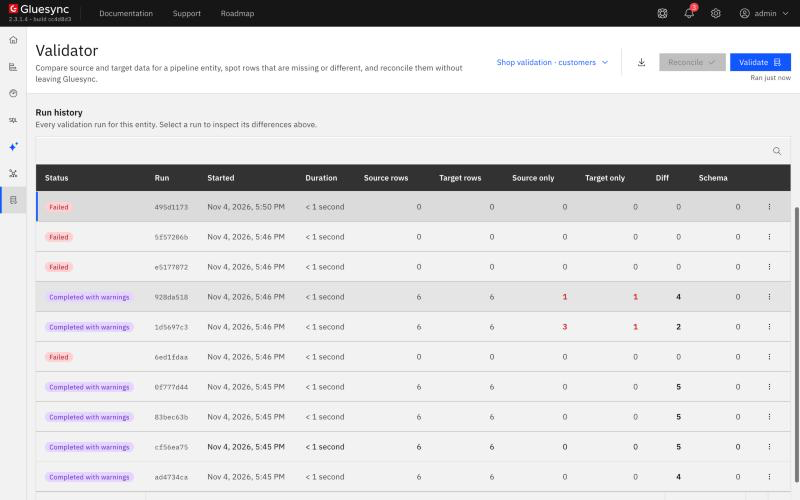
In Run history, every run of the entity is listed with its counters. Select one to read it again, or hover over a failed run to read its error.
UI
A Validate action on a schedule runs the same comparison for the entities you choose. See Schedule validation and Automate pipeline actions with schedules, chained events, and webhooks.
-
A scheduled run names only the pipeline and the entity. It uses the default options and no
WHEREcondition, so it compares the whole table with the lenient profile. To check a slice, run it from Validator; -
A scheduled run with Reconcile differences off fails when it finds a difference, and the job error lists the counts. With it on, it reconciles every difference;
-
Entities of one job run one after another, and the first failure stops the job. Do not start the same entity from Validator while the job runs.
Troubleshooting
| Problem | Possible cause | What to do |
|---|---|---|
Thousands of Target only rows and |
A |
Put the same condition on both sides, or on neither |
A row is Source only although it exists on the target |
A filter on a column that changed on the target, or a text key with different case |
Filter on the key, and compare the keys in SQL |
Rows that differ lists timestamps that are one second or one day apart |
Ignore fractions of a second or Ignore time, compare date only against a target that rounds |
Go back to Normalize to UTC. See the date and time step |
Timestamps differ by whole hours |
The two databases or sessions use different time zones, or the data is wrong |
Tick Tolerate a whole time zone shift to confirm, then fix the zone and clear it |
|
The target stores an empty string as |
Set NULL and empty text to Always equal if the pipeline is meant to do that |
A text value differs only by case |
A target with a case-insensitive collation or a normalizing UDF |
Tick Ignore letter case for non-key columns |
A float differs in the fifth digit |
A 32-bit target column |
Set Float relative tolerance to the precision the column keeps |
A clean run that did not look at a column |
|
Read the notices, and clear Skip BLOB / CLOB columns or Skip byte-array columns |
Run fails with |
A |
Change the key, or set NULL key values to sort `NULL`s first or last |
Run fails with |
The key has different types on the two sides |
Align the types, or give an ordering expression for each side |
|
A second run for the same entity |
Wait, or select Cancel run |
|
The run passed Max runtime (seconds) |
Raise it, or slice the table with key ranges |
|
The |
Fix the column name, quote it for that database, and remove the semicolon or the comment |
Related guides
Contact MOLO17 Support if you need assistance with Validator.