Query entities
A Query entity is an entity whose source is a SQL query. Gluesync writes one document for each root key of the result, with the columns of the query as its fields, and keeps the documents up to date as the tables the query reads change. A model with child levels builds nested documents: an order with its lines inside it.
| Available from Gluesync 2.3.2. For the overview of data modeling and of the reverse direction, see Data modeling. |
What you need
| Item | Requirement |
|---|---|
Source agent |
The MSSQL CDC agent (SQL Server with Change Data Capture). The MSSQL Change Tracking agent and the other SQL agents do not run Query entities. An agent that does not run them lists no |
Target agent |
Couchbase, for flat and for nested documents. SQL Server, for flat rows. Other targets that write documents or tables receive a flat result, but only these two are tested. A model with child levels needs a target that keeps nested values, which today is Couchbase ( |
SQL Server |
Change Data Capture enabled on the database and on every table the query reads, and SQL Server Agent running, because its capture job fills the change tables. Gluesync enables CDC by itself when Enable automatic Change Data Capture / Change Tracking activation is on and its login is allowed to. Otherwise describe shows the statement to run. |
Read isolation |
|
Source login |
|
Role |
A role that can create entities (Super Admin or Manager). Describe and preview also go through the data access policies of Query Studio: a table a policy hides cannot be read here either. |
Rules every query follows
Each level is one read-only SELECT. Gluesync analyses it before anything runs and refuses a model that breaks one of these rules, in every mode, snapshot-only included.
-
One statement, listed columns. A single
SELECT, with an explicit column list and a label (an alias) for every expression. ASELECT *, a statement withINTO, several statements, aWITHcommon table expression,APPLY, anOPTIONclause, a locking or isolation hint and a remote source (OPENQUERY, a four-part name) are refused. -
No top-level
ORDER BY. The order of an array is declared on the level (orderBy), and the database applies it. -
Deterministic. The result must depend on the data only. The current date or time, random values, session values, and functions or views SQL Server does not declare deterministic are refused (
NON_DETERMINISTIC_QUERY), and so is a row limit without a total order. Apply a time filter in the application that reads the documents, or through a flag or date column that you maintain in the source. -
Plain keys. Every key column and every parent link is a plain column of the table the level’s root key comes from, never an expression (
KEY_NOT_PLAIN_COLUMN). -
Sibling levels are separate queries. Each child level is its own statement, so two arrays never multiply each other.
Levels, keys and cardinality
A model is a root level plus child levels. Each child sits one step below the root: documents built from SQL Server go as deep as the root and its child levels, and any number of sibling child levels is allowed. A level below a child level is refused with DEPTH_EXCEEDED.
| Setting | Meaning |
|---|---|
|
Unique name of the level, letters, digits and |
|
The statement of the level: |
|
The labels of the full key of the level. For the root it is the root key, which names the document. For a child it is the labels of the parent link followed by the item key. |
|
For a child, the pairs |
|
For a child, the name of the field that holds the level in the parent document. |
|
|
|
The order of the items of an array, as columns and a direction. Without it the items are ordered by their item key. |
|
What a child with no rows becomes: |
Every column of a level’s statement becomes a field of its item, the key columns included. Within a level, identical rows with the same key collapse into one item. Different rows with the same key are a data error (KEY_NOT_UNIQUE).
Example: an order with its lines and its shipment
-- root: one document per order
SELECT o.ORDER_ID, o.ORDER_NO, c.NAME AS CUSTOMER_NAME
FROM dbo.ORDERS o
INNER JOIN dbo.CUSTOMERS c ON c.CUSTOMER_ID = o.CUSTOMER_ID

-- level "lines", MANY, ordered by LINE_NO
SELECT l.ORDER_ID, l.LINE_NO, l.SKU, l.QTY, l.UNIT_PRICE
FROM dbo.ORDER_LINES l

-- level "shipment", ONE
SELECT s.ORDER_ID, s.CARRIER, s.TRACKING_NO
FROM dbo.SHIPMENTS s
With the root key ORDER_ID, the item key LINE_NO for the lines, and ORDER_ID as the parent link of both child levels, the document of order 5001 is:
{
  "ORDER_ID": 5001,
  "ORDER_NO": "SO-5001",
  "CUSTOMER_NAME": "Anna Rossi",
  "lines": [
    { "ORDER_ID": 5001, "LINE_NO": 1, "SKU": "KB-100", "QTY": 2, "UNIT_PRICE": 24.9 },
    { "ORDER_ID": 5001, "LINE_NO": 2, "SKU": "MS-200", "QTY": 1, "UNIT_PRICE": 12.5 }
  ],
  "shipment": { "ORDER_ID": 5001, "CARRIER": "DHL", "TRACKING_NO": "TRK-77120" }
}
Create a Query entity in the Control Plane
The wizard builds a Query entity with a single level, so flat documents or rows. For child levels, use the REST API or the MCP server.
-
Open the pipeline and, in the entity toolbar, open + Entities and choose From SQL query. The item shows up only when the source agent runs Query entities.
-
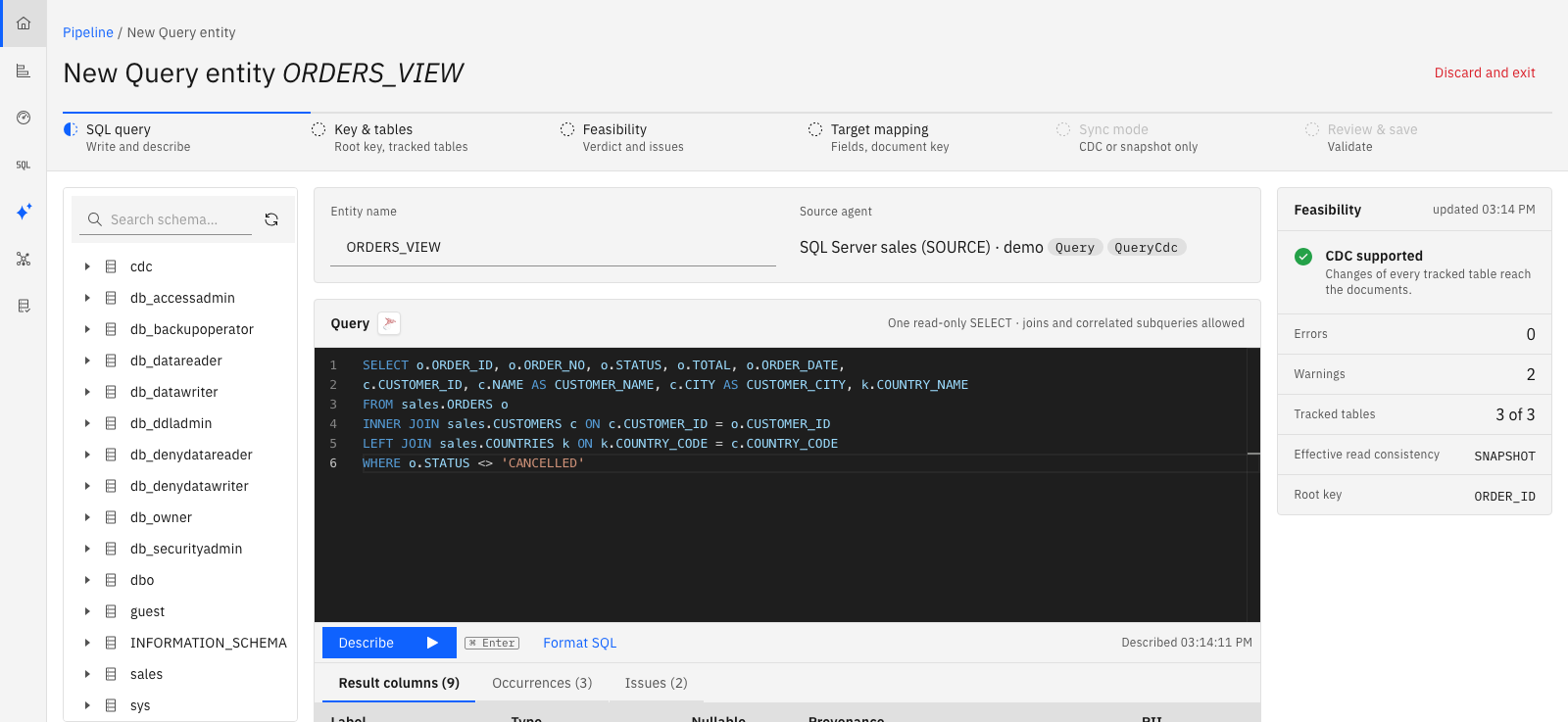
SQL query. Give the entity a name and write the statement. The source agent is shown by its logo, with its name in the tooltip, next to the editor. Select Describe (Ctrl+Enter). Describe reads the catalog of the source and does not run the statement. It fills three tabs: the typed result columns with their provenance and a flag for personal data, the tables the statement reads, and the issues, each with its code and hint. Errors are listed first and block the next step.
-
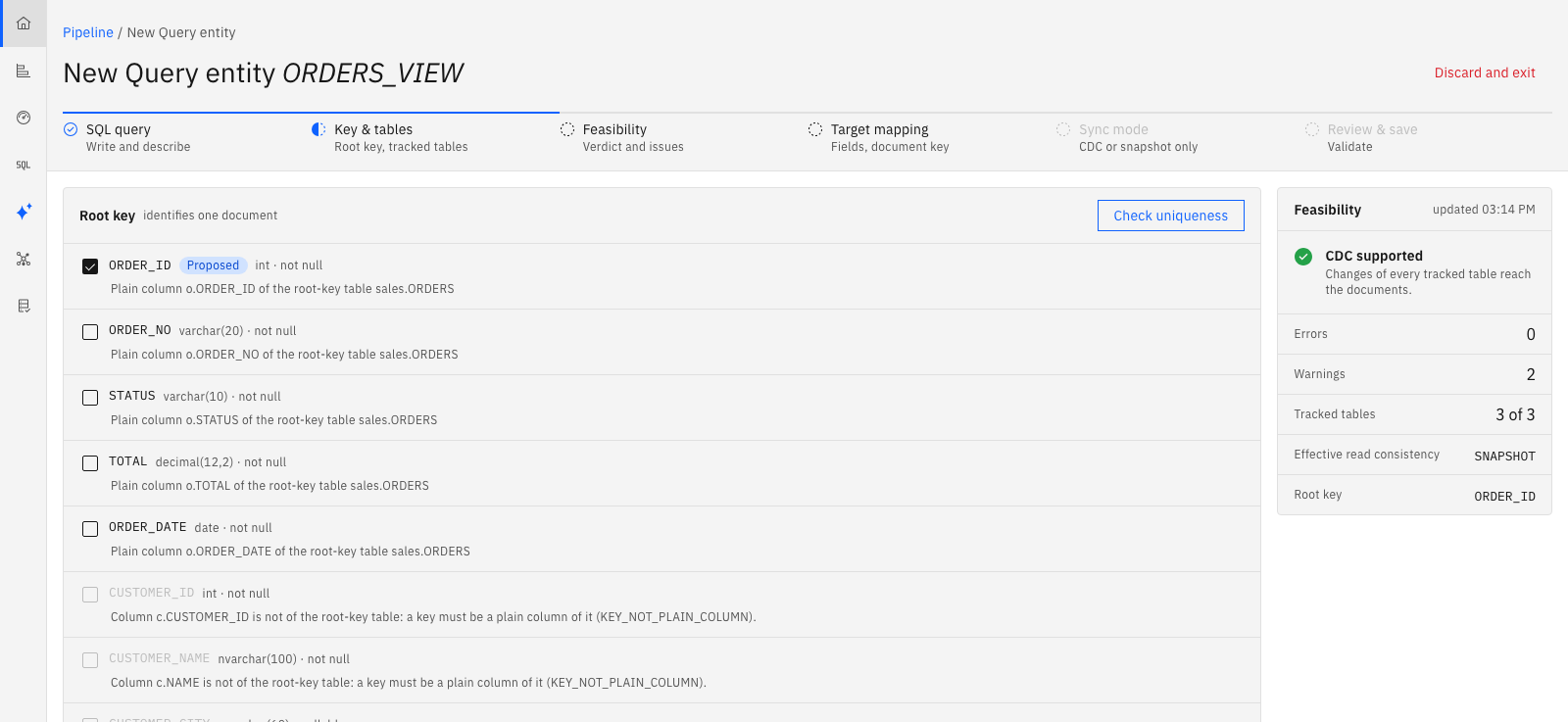
Key & tables. Pick the root key among the plain columns of the root table. If you pick none, describe proposes the primary key of the first table. Select Check uniqueness to have the source confirm that the key identifies one row. Every table the statement reads is tracked by default. Switch a lookup to untracked when its changes need not rewrite the documents (see Tracked and untracked tables).
-
Feasibility. The verdict is one of three. CDC supported: changes of every tracked table reach the documents. Snapshot only: the statement cannot follow its changes, and the reasons are listed. Rejected: errors block the entity in every mode. For a snapshot-only verdict you choose to run snapshot-only, to mark the blocking tables untracked and keep CDC, or to fix the statement and describe again.
-
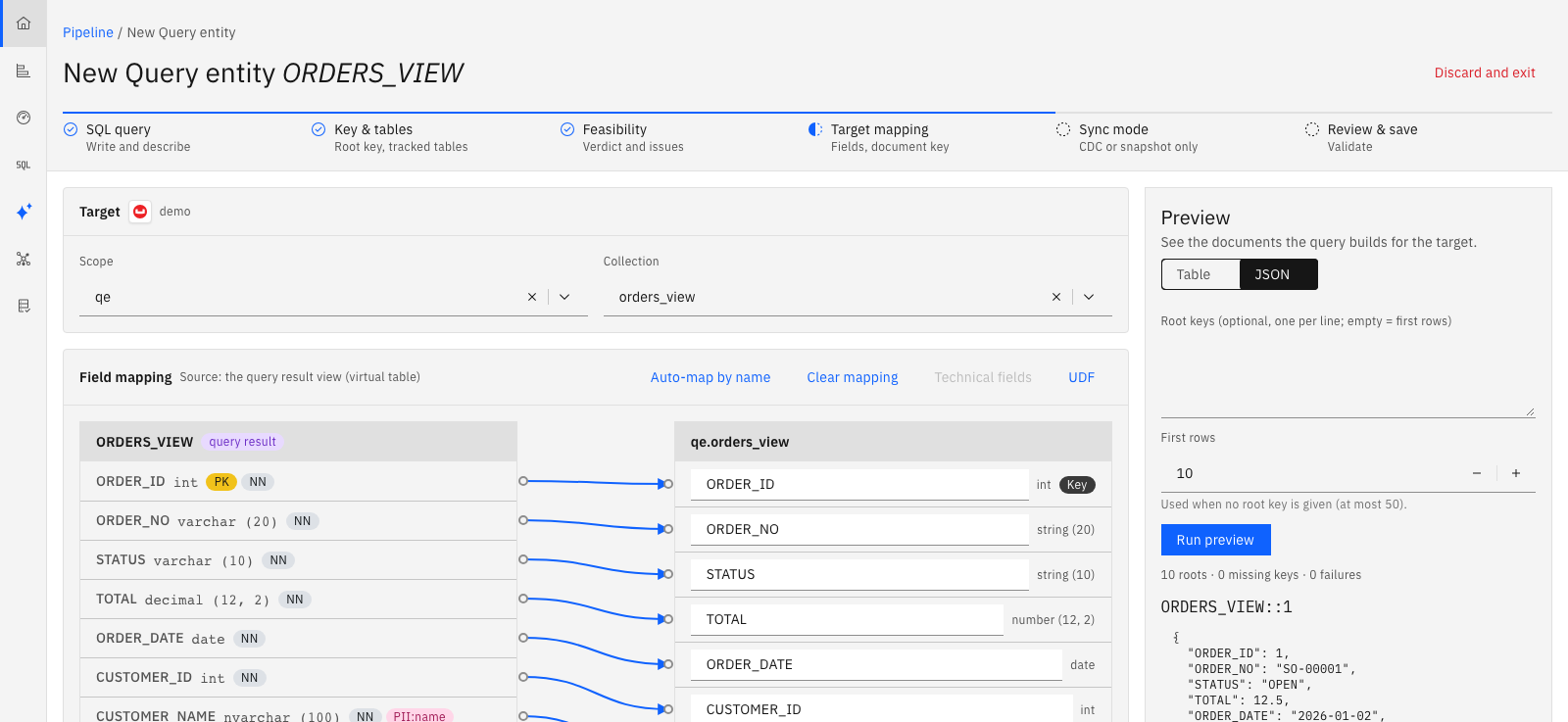
Target mapping. Choose the target collection or table. Map the result columns to its fields, or select Auto-map by name. For a document target, the Document key card sets the custom document key, as in Custom document keys, and the value rendering of the key values when the target supports it. It shows an example id after a preview. Use Run preview to see up to 50 documents as the snapshot would write them, as a table or as JSON. Give root keys, one per line, to look at specific documents, or leave the box empty to see the first rows.
-
Sync mode. Choose CDC + initial snapshot or Snapshot only. CDC is offered only when the agent supports it and the verdict allows it.
-
Review & save. Check the summary, pick the group, and select Save entity. Gluesync validates the entity first and saves nothing if validation finds errors.
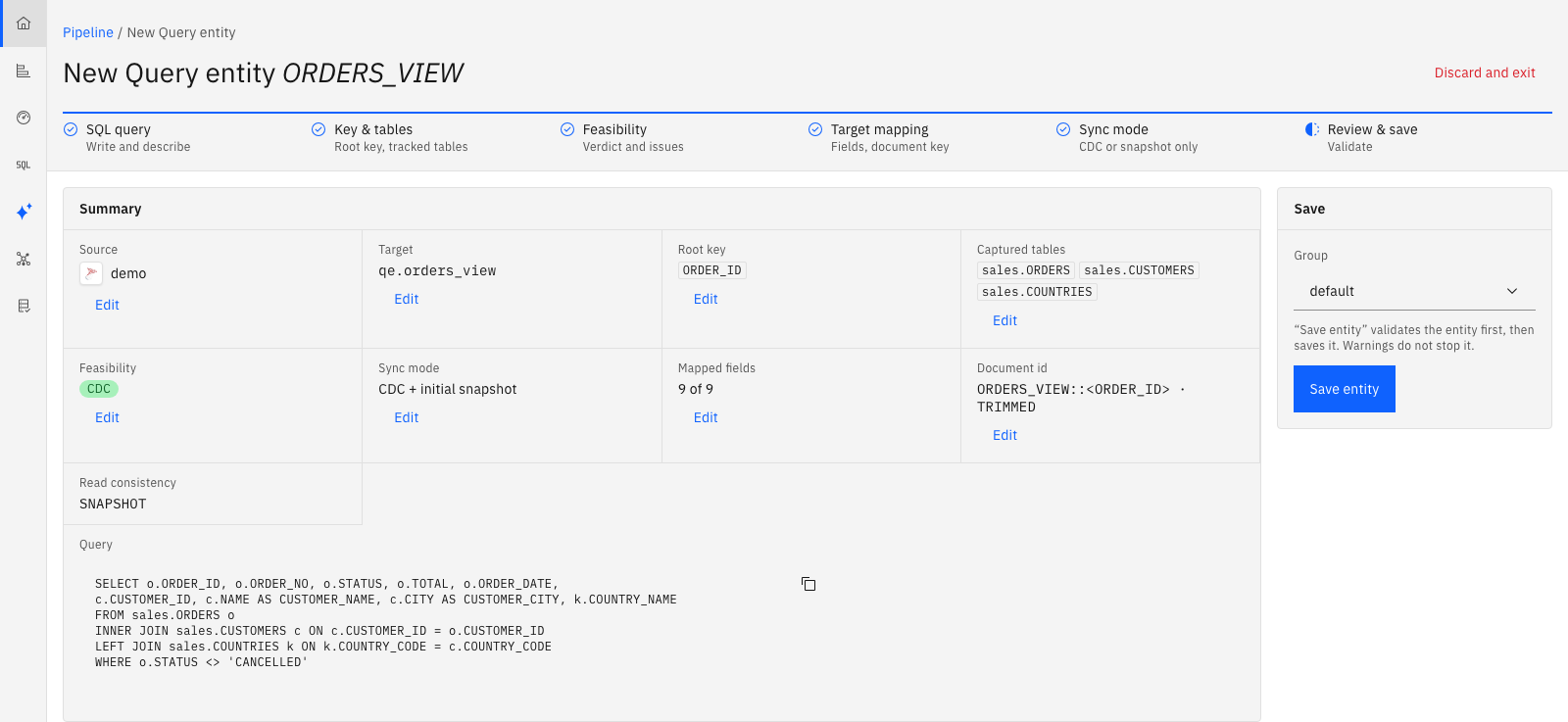
To change an entity later, open it and choose Edit Query entity. A change of the statement, the key or the tracked tables may ask for a resync: saving does not rebuild the documents already written.
Create a Query entity with the REST API
The calls below are the ones the wizard makes. They need the permission to create entities, and a Bearer token as in Core Hub REST API.
| Step | Request | Answer |
|---|---|---|
Describe |
|
The model with typed columns and proposed keys, the tables read with their capture state, the verdict ( |
Preview |
|
Up to 50 documents as the snapshot would write them, with their ids. |
Validate |
|
The issues of the entity, against the model, the source and the target. Nothing is saved. |
Save |
|
The entity saved, or |
Start |
|
The first snapshot, then CDC. A snapshot-only entity is refreshed with |
Describe
The request holds the model and two optional settings. The level columns can stay empty: describe fills them.
{
  "model": {
    "root": {
      "name": "root",
      "columns": [],
      "key": ["ORDER_ID"],
      "source": {
        "type": "Sql",
        "query": "SELECT o.ORDER_ID, o.ORDER_NO, c.NAME AS CUSTOMER_NAME FROM dbo.ORDERS o INNER JOIN dbo.CUSTOMERS c ON c.CUSTOMER_ID = o.CUSTOMER_ID"
      },
      "children": [
        {
          "name": "lines",
          "path": "lines",
          "cardinality": "MANY",
          "columns": [],
          "key": ["ORDER_ID", "LINE_NO"],
          "parentLink": [{ "childColumn": "ORDER_ID", "parentColumn": "ORDER_ID" }],
          "orderBy": [{ "column": "LINE_NO" }],
          "source": {
            "type": "Sql",
            "query": "SELECT l.ORDER_ID, l.LINE_NO, l.SKU, l.QTY, l.UNIT_PRICE FROM dbo.ORDER_LINES l"
          }
        },
        {
          "name": "shipment",
          "path": "shipment",
          "cardinality": "ONE",
          "columns": [],
          "key": ["ORDER_ID"],
          "parentLink": [{ "childColumn": "ORDER_ID", "parentColumn": "ORDER_ID" }],
          "source": {
            "type": "Sql",
            "query": "SELECT s.ORDER_ID, s.CARRIER, s.TRACKING_NO FROM dbo.SHIPMENTS s"
          }
        }
      ]
    },
    "options": { "emptyArray": "OMIT" }
  },
  "checkKeyUniqueness": true,
  "untrackedTables": []
}
checkKeyUniqueness runs a bounded check that each level’s key is unique. untrackedTables lists tables as schema.table that you mark untracked. Leave key empty on the root to get the primary key of the first table proposed.
Describe never runs the statement. The source agent asks SQL Server for the result columns of each level. A statement that is not a single read-only SELECT never reaches the database: describe answers 200 with the structure issues. A SQL error answers 400 with the driver message, the SQLState and the vendor code.
Preview
Send the entity (source Query and, to see document ids, the target side) and optionally the root keys and a limit.
{
  "entity": { "entityName": "ORDERS_DOC", "agentEntities": [ "..." ] },
  "rootKeys": [["5001"], ["9999"]],
  "limit": 10
}
The answer holds documents (the root key, the document id, the body, its size in bytes and the list of masked paths), missingRootKeys (keys that no root matched) and failures (the roots that would be skipped, or that would stop the entity, with their issue code). Without rootKeys you get the first limit roots in root-key order, at most 50. Values of columns that hold personal data are masked as in Query Studio, and a masked root key comes back as sha256: followed by 12 hexadecimal characters. Through MCP the values are always masked.
Save
A payload for PUT /pipelines/{pipelineId}/config/entities carries two sides in agentEntities: the source Query entity and the target entity (a NoSqlEntity for Couchbase, a SingleTable for SQL Server) with its columnsMappingMatrix. The numeric ids in it are not random: a label’s id, the id of a level’s result view and the id of a collection or a table come from a hash of their names, so a client can compute them before it calls anything.
| Id of | Hash of the text |
|---|---|
A column or a field label |
The label, for example |
The result view of a level, the source side of the mapping |
|
A Couchbase collection |
|
A SQL Server table |
|
The id is the first 8 bytes of the SHA-256 digest of the text, read as a signed big-endian 64-bit integer. These values exceed 253: build the payload with a tool that keeps 64-bit integers. The easiest way to get a complete payload is the MCP tool draft_data_model_entity, which builds it from a described model and types the target columns in the target agent’s own types. Each child level of a model becomes one array or object field of the target: the target column is typed array or object, and mapped from the container column of the level.
{
  "entities": [
    {
      "entityName": "ORDERS_DOC",
      "agentEntities": [
        {
          "type": "Query",
          "entityName": "ORDERS_DOC",
          "agentId": "<source agent id>",
          "entityType": { "type": "Source", "snapshotOnly": false },
          "model": { "root": { "...": "the model that describe returned" } }
        },
        {
          "type": "NoSqlEntity",
          "entityName": "ORDERS_DOC",
          "agentId": "<Couchbase agent id>",
          "entityType": { "type": "Target", "insertConflictStrategy": "UPSERT", "columnsMappingMatrix": [ "..." ] },
          "entityObject": { "id": 0, "scope": "sales", "collection": "orders" },
          "keyMapping": { "prefix": "ORDER", "suffix": "", "separator": "::", "keys": [ 0 ], "valueRendering": "TRIMMED" },
          "columns": [ "..." ]
        }
      ]
    }
  ]
}
The id fields shown as 0 stand for the hashed ids described above. Validation returns {"valid": true, "issues": […]}. On a refusal, save answers 400 with notificationId and the list of issues. When the source agent cannot be reached at save time, the entity is saved with the warning DESCRIBE_UNAVAILABLE, and the catalog checks run at the next describe and at every setup of the agent.
To update an entity, send the same payload with the entityId and the agentEntityId of each side from GET /pipelines/{pipelineId}/entities. A blank agentEntityId adds a second agent entity instead of replacing the first.
Create a Query entity with MCP
The same flow is available as tools of the MCP server, so an AI Studio agent or any MCP client can design and check a Query entity. The tools take snake case arguments and a personal API token.
| Step | Tool | What it does |
|---|---|---|
Describe |
|
As the REST describe. Arguments: |
Draft |
|
Builds the complete entity payload from a described model: the source |
Preview |
|
As the REST preview, always masked. Arguments: |
Validate and save |
|
The generic entity tools, with the drafted entity. |
Run |
|
The usual sync commands. |
Describe, preview and validate
Three checks tell you what Gluesync will do before it does anything.
-
Describe returns the typed columns of each level, the proposed key, the base tables the model reads with their keys and capture state, how each table takes part (root key source, lookup, filter, subquery), the SQL constructs found, the effective read consistency, the verdict and the issues. When an issue can be cured by rewriting the statement, for example by dropping a top-level
ORDER BY, the level carries the rewritten statement assuggestedSql, and the wizard offers it as Apply suggestion. -
Preview assembles real documents, with the ids the target would give them, without writing.
-
Validate checks the whole entity, including the match between the model and the target, and reports every issue at once.
The verdict
The verdict says how the entity can run.
| Verdict | Meaning |
|---|---|
|
Each change of a tracked table finds the documents it touches through the joins of the model, reads them again from the source and writes them whole. Before and after values both count, so a row that moves from one document to another refreshes both. |
|
The model can only be refreshed by a snapshot, started by hand or on a schedule (see Schedule jobs). Each reason has a code. Typical reasons: a set operation ( |
Not assessed |
A statement with structure errors never reaches the database, so no catalog check ran. The errors refuse the model in every mode. |
A CDC entity whose verdict is SNAPSHOT_ONLY is refused, and its reasons become errors. A snapshot-only entity keeps the reasons as warnings.
At every setup of the source agent each Query entity is described again. If a CDC entity can no longer follow its changes, because capture was disabled or a capture instance was recreated without a column the model reads, its sync does not start (MODEL_NO_LONGER_DERIVABLE) and a notification names the cause. The other entities of the agent are not affected.
Tracked and untracked tables
Every base table a model reads is tracked by default: its changes decide which documents are read again. You can mark a table untracked, for a lookup that rarely changes or that has no change capture. An untracked table is still read, but a change in it alone rewrites nothing. The change reaches a document with the next change of a tracked table that touches it, or with the next snapshot (warning UNTRACKED_TABLE_DRIFT). A scheduled reconcile sweep, described below, repairs the drift.
How a Query entity runs
Snapshot and CDC
The snapshot reads the roots in pages ordered by the root key and, for each page, the children of those roots. CDC then reads the SQL Server change tables of every tracked table in windows and applies the changes after the position the snapshot started from.
-
A window reads at most 50,000 changes and never ends inside a source transaction. A larger transaction is read alone.
-
An update of a column the model never reads writes nothing.
-
A change of a root key deletes the old document and writes the new one.
-
A document whose root row left the result is deleted.
-
A window that touches more than 200,000 documents reads them in pages, logs a warning and raises a
DATA_MODEL_FANOUT_LARGEnotification. -
A crash or a restart in the middle of a window replays the whole window. It writes the same documents again, and the Couchbase target does not rewrite a document whose stored body is already equal.
Safeguards
| Situation | What Gluesync does |
|---|---|
The change history was cleaned up before Gluesync read it |
The entity stops with |
A truncate of a tracked table, or one source transaction with more than 1,000,000 change rows |
The entity stops with |
A window would delete more documents than |
Nothing of the window is deleted, and the entity stops with |
A root cannot be built as one document |
A data error of that root: |
A root key holds |
No document is written for that root. |
Options of a model
The options sit next to the root in model.options. Changing an option only restarts the entity.
| Option | Default | Meaning |
|---|---|---|
|
|
The isolation of the reads: |
|
300 |
The timeout of every statement. Describe and preview cap it at 120 seconds. |
|
10,000 |
The mass-delete guard. |
|
10,000 |
The most items one child level may hold in one document. |
|
none |
A document above this estimated size is a data error ( |
|
|
|
|
none |
Schedules a reconcile sweep every so many minutes. |
Targets
Couchbase
The id of a document is the keyMapping of the target entity: the prefix, the values of the root key in the order of keys, the suffix, joined with the separator (::, -, _, / or none). valueRendering says how a key value becomes text.
| Value rendering | Result |
|---|---|
|
The text of the value, trimmed. A |
|
The id Gluesync 1.x gave the same row: strings trimmed, a decimal with no fractional part written as an integer, a |
|
As |
The GS1 renderings are accepted by the Couchbase target only, and refused (GS1_ID_KEY_TYPE_NOT_SUPPORTED) for a key from a date-time, time or binary column, where the ids could not be the same. A nullable key column under a GS1 rendering raises the warning ROOT_KEY_NULLABLE.
Two entities that write one collection need distinct, non-empty prefixes (DOCUMENT_KEYSPACE_SHARED). A Query entity’s collection must not be read back by a Couchbase source entity (BIDIRECTIONAL_NOT_SUPPORTED).
The Couchbase target neither truncates nor deletes on a snapshot. The documents of roots that left the result stay after a snapshot-only refresh or a resync, and a snapshot-only entity warns about it (TARGET_KEEPS_REMOVED_DOCUMENTS). A reconcile sweep removes them, as described next.
Reconcile sweep
A reconcile sweep repairs a target that drifted from its source. It has two passes: TARGET_IDS lists the document ids under the entity’s prefix and deletes every document that no live root renders, and SOURCE_MEMBERS reads the roots of the query and writes each one again. FULL runs both.
# Dry run: reports what would be written and deleted
curl -X POST "https://your-gluesync.com/pipelines/$PIPELINE/commands/sync/reconcile?entityId=$ENTITY&mode=TARGET_IDS&dryRun=true" \
  -H "Authorization: Bearer <your-token>"

# Where the sweep stands: RUNNING, COMPLETED, HELD, INTERRUPTED or NONE
curl "https://your-gluesync.com/pipelines/$PIPELINE/commands/sync/reconcile?entityId=$ENTITY" \
  -H "Authorization: Bearer <your-token>"
The MCP tool is reconcile_sync, a dry run unless dry_run is false.
-
TARGET_IDSneeds a target that can list its document ids, which Couchbase does with an index onMETA().idof the collection. Without one, the sweep is refused withRECONCILE_INDEX_MISSINGand the exactCREATE INDEXstatement to run. A primary index also works. It also needs akeyMappingwhose keys come from root-key labels, so that an id decomposes into a root key. -
A sweep also runs after a completed snapshot on a target that does not delete on snapshot, on the schedule
reconcileEveryMinutes, and as an escalation afterREBUILD_REQUIRED. Those sweeps obeymaxDeletesPerWindow: a page that would exceed it deletes nothing and the sweep endsHELD. A sweep you start yourself is not guarded, so run a dry run first. -
A sweep lives in the memory of Core Hub. After a restart a started sweep reads
INTERRUPTED.
Issue codes
Every issue has a stable code, a message and a hint. Treat the code as an open text: new codes are added, none is renamed.
| Group | Effect and main codes |
|---|---|
Structure |
Errors: the save is refused in every mode. |
Feasibility |
The verdict is |
Warning |
Accepted, shown on describe and validate. |
Between model and target |
Errors: the save is refused. |
Data error |
One root, handled per the write strategy. |
System |
The entity stops, the other entities go on. |
Technical fields other than a static value, and field functions on key columns, are not supported on a Query entity, because a document is assembled from several rows and has no single transaction, time or operation.
Monitor a Query entity
-
Notifications.
DATA_MODEL_ROOTS_SKIPPED,DATA_MODEL_FANOUT_LARGE,DATA_MODEL_NO_LONGER_DERIVABLE, and the entity errors titled with a system code. -
Metrics of the agent, tagged with
pipelineandentity:gluesync_datamodel_window_changes_total,gluesync_datamodel_affected_roots_total,gluesync_datamodel_missing_roots_total,gluesync_datamodel_irrelevant_updates_total,gluesync_datamodel_fanout_roots,gluesync_datamodel_escalations_total,gluesync_datamodel_derivation_seconds,gluesync_datamodel_reread_seconds,gluesync_datamodel_dropped_rows_totalandgluesync_datamodel_skipped_roots_total. The usual lag probe of each entity covers Query entities too. See Metrics and insights. -
Support bundle. The log archive holds, for each Query entity, its levels with the string and number literals of the SQL replaced by
?, the tables read with their tracked flag, the verdict, the last skipped roots by hashed key and the last windows. Key values and bind values never appear.
Limits
-
Query entities run on the MSSQL CDC agent. Nested documents need a Couchbase target.
-
The wizard builds single-level models. Child levels are written through the REST API or the MCP server.
-
A model goes as deep as the root and its child levels.
-
The Validator does not compare Query entities.
-
SQL Server rejects
TRUNCATEon a table with CDC enabled, so a truncate in practice follows a capture that was dropped and created again. -
Rows moved by
ALTER TABLE … SWITCHon a partitioned table reach no change table. Describe warns withPARTITION_SWITCH_NOT_CAPTUREDwhen its login can readcdc.change_tables. -
A change of an untracked table alone rewrites no document.