Set up a PostgreSQL source with WAL change data capture
The PostgreSQL agent reads changes from the write-ahead log (WAL) through logical decoding. It creates one replication slot for each entity and decodes it with the wal2json output plugin. This guide prepares the server, the user and the tables, creates the source connection, runs a snapshot and live changes into a MySQL target, and shows the checks and the failures you are most likely to meet: a wrong wal_level, a user without the REPLICATION attribute, no free replication slot, a table with no replica identity, and a slot that was dropped while the entity was paused.
In this guide
You will check and set wal_level, max_replication_slots and max_wal_senders, make sure the wal2json plugin is available, and create a user with only the privileges Gluesync needs. You will decide the REPLICA IDENTITY of your tables, create the PostgreSQL source connection in the Control Plane, add an entity, and start it with a full copy followed by live changes. You will read the replication slot on the server to see what Gluesync created, and you will recover from the failures that stop CDC.
Quick information
Goal |
Replicate a PostgreSQL table with a snapshot followed by change data capture (CDC), and know how to keep the replication slot healthy |
Audience |
Data engineers and database administrators who own a PostgreSQL server |
Level |
Intermediate |
Time required |
About 45 minutes |
Area |
PostgreSQL → logical replication; Control Plane → Pipelines → PostgreSQL CDC agent → Base settings; entity → start dialog |
Applies to |
Gluesync 2.3 |
Before you begin
Make sure that:
-
You have a PostgreSQL server, version 10 or later, and you can run SQL on it as a superuser. This guide was tested with PostgreSQL 16;
-
You can restart the PostgreSQL service. A change of
wal_levelneeds a restart; -
The
wal2jsonplugin is installed on the server. Step 1 shows how to check it; -
Core Hub can open a connection to the server, and
pg_hba.confallows the Core Hub host to connect with the Gluesync user; -
You have a target to write to. This guide uses a MySQL database and its connection details: any target works, and the steps for the source are the same;
-
You can sign in to the Control Plane with a role that can create pipelines;
-
You have a source table with a primary key. This guide uses
public.orderswith 100,000 rows (id bigintprimary key,customer varchar(50),status varchar(20),amount numeric(10,2),created_at timestamp).
|
The messages quoted in this guide were captured in the Control Plane and in the Core Hub log with PostgreSQL 16.4 as the source and MySQL 8.0 as the target. The options of the agent are listed in the PostgreSQL CDC reference. |
Guide steps
SQL
Connect to the source database as a superuser and read the three settings that logical replication depends on:
SHOW wal_level;
SHOW max_replication_slots;
SHOW max_wal_senders;
SELECT version();-
wal_levelmust belogical. If it is not, set it and restart the PostgreSQL service. The valuereplicais the default of many distributions:ALTER SYSTEM SET wal_level = logical; -
Gluesync creates one replication slot for each entity that follows changes. Set
max_replication_slotsto at least the number of entities, plus the slots that other tools use. Keepmax_wal_sendersa little above the number of slots, so that orphan connections do not use them all. Both defaults are10. Both changes need a restart:ALTER SYSTEM SET max_replication_slots = 20; ALTER SYSTEM SET max_wal_senders = 25; -
Restart PostgreSQL, then read the settings again;
-
Check that the plugin is installed. On a Linux host, look for the library:
find / -name "wal2json.so" 2>/dev/nullInstall it with your package manager if it is missing, for example
postgresql-<version>-wal2jsonon Debian and Ubuntu. For an easier check, create and drop a test slot as a user that can replicate (the user of step 2 can do it):SELECT pg_create_logical_replication_slot('gs_probe', 'wal2json'); SELECT pg_drop_replication_slot('gs_probe');
|
On the PostgreSQL releases that restrict output plugins, the test slot fails with |
SQL
Gluesync does not need a superuser. It needs the REPLICATION attribute to read the WAL, and SELECT on the tables it copies. Replace the password:
CREATE USER gluesync WITH REPLICATION LOGIN PASSWORD '<a strong password>';
GRANT USAGE ON SCHEMA public TO gluesync;
GRANT SELECT ON ALL TABLES IN SCHEMA public TO gluesync;
ALTER DEFAULT PRIVILEGES IN SCHEMA public GRANT SELECT ON TABLES TO gluesync;
The last statement gives the user SELECT on the tables you create later too. It applies to tables created by the role that runs it. Repeat the grants for every other schema you replicate.
Check the user from the machine where Core Hub runs, or from any host that the same pg_hba.conf rule covers:
psql "postgresql://gluesync@<host>:5432/<database>" -c "SELECT rolreplication FROM pg_roles WHERE rolname = current_user"|
|
SQL
The replica identity decides which columns of the old row PostgreSQL writes to the WAL for an UPDATE or a DELETE. Check it for each table you replicate:
SELECT c.relname, c.relreplident
FROM pg_class c
JOIN pg_namespace n ON n.oid = c.relnamespace
WHERE n.nspname = 'public' AND c.relkind = 'r'
ORDER BY c.relname;
d is DEFAULT, f is FULL, n is NOTHING, and i is an index.
-
A table with a primary key works with
DEFAULT. ADELETEcarries the key, and Gluesync deletes the row on the target. Change nothing; -
A table without a primary key has no old row in the WAL with
DEFAULT. SetFULLon it:ALTER TABLE public.<table> REPLICA IDENTITY FULL; -
If you want the before image of every changed row, for example to see the old values in a change, set
FULLon that table too. The table owner or a superuser runs the statement. It writes more WAL for each update.
To see the difference, decode a few changes yourself with a test slot, then drop it:
SELECT pg_create_logical_replication_slot('gs_probe', 'wal2json');
-- change a row of a keyless table, then read:
SELECT data FROM pg_logical_slot_get_changes('gs_probe', NULL, NULL, 'format-version', '1');
SELECT pg_drop_replication_slot('gs_probe');| Gluesync does not change the replica identity of your tables. Set it yourself, before you start the entity. For tables without a primary key, also choose the keys that Gluesync uses on the target, see Choose keys for tables without a primary key. |
UI
-
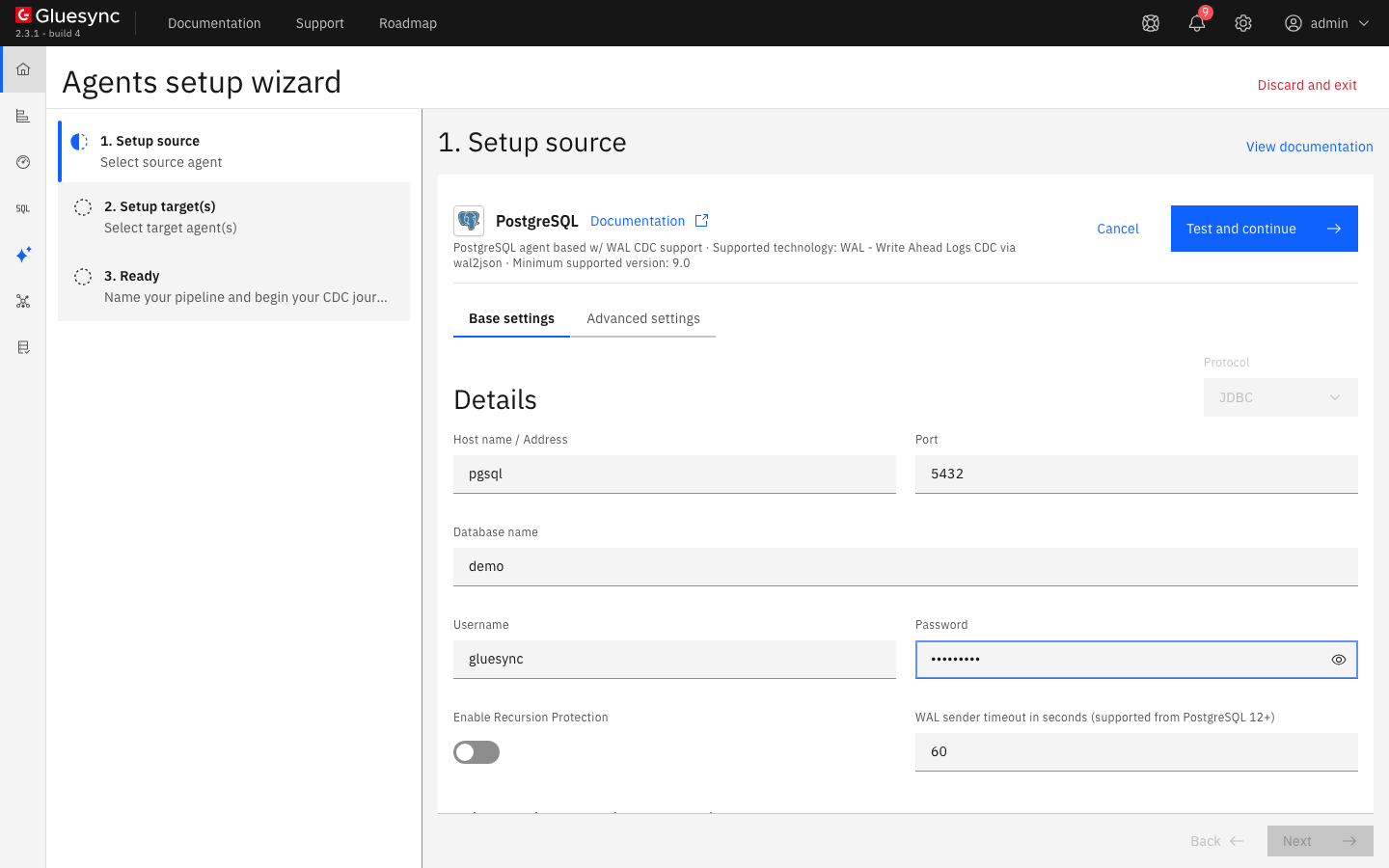
In the Control Plane, select Create your first pipeline, or the + button of the pipeline list if you already have pipelines. The Agents setup wizard opens;
-
In 1. Setup source, choose the PostgreSQL CDC agent tile and fill Base settings:
-
Host name / Address: the DNS name or address of the server, as Core Hub sees it;
-
Port:
5432, or the port of your server; -
Database name: the database that holds the tables. A slot reads one database;
-
Username and Password: the user of step 2;
-
-
Keep Enable Recursion Protection off, unless the same database is also a target of a bidirectional setup, see Set up bidirectional replication with recursion protection. Keep WAL sender timeout in seconds (supported from PostgreSQL 12+) at
60; -
Select Test and continue. The source appears with a green check mark. Select Next.
-
In 2. Setup target(s), choose your target agent and fill its connection. For the MySQL target of this guide, enter the host,
3306, the database, the user and the password, then turn on Allow public key retrieval and Trust server certificate if your lab server uses the default self-signed certificate. Select Test and continue, then Next; -
Enter a Pipeline name and select Finish.
| When you point a second pipeline at the same host, port and database, the Control Plane shows the notice Connection shared between pipelines: a change made to the connection applies to all the pipelines that use it. |
UI
-
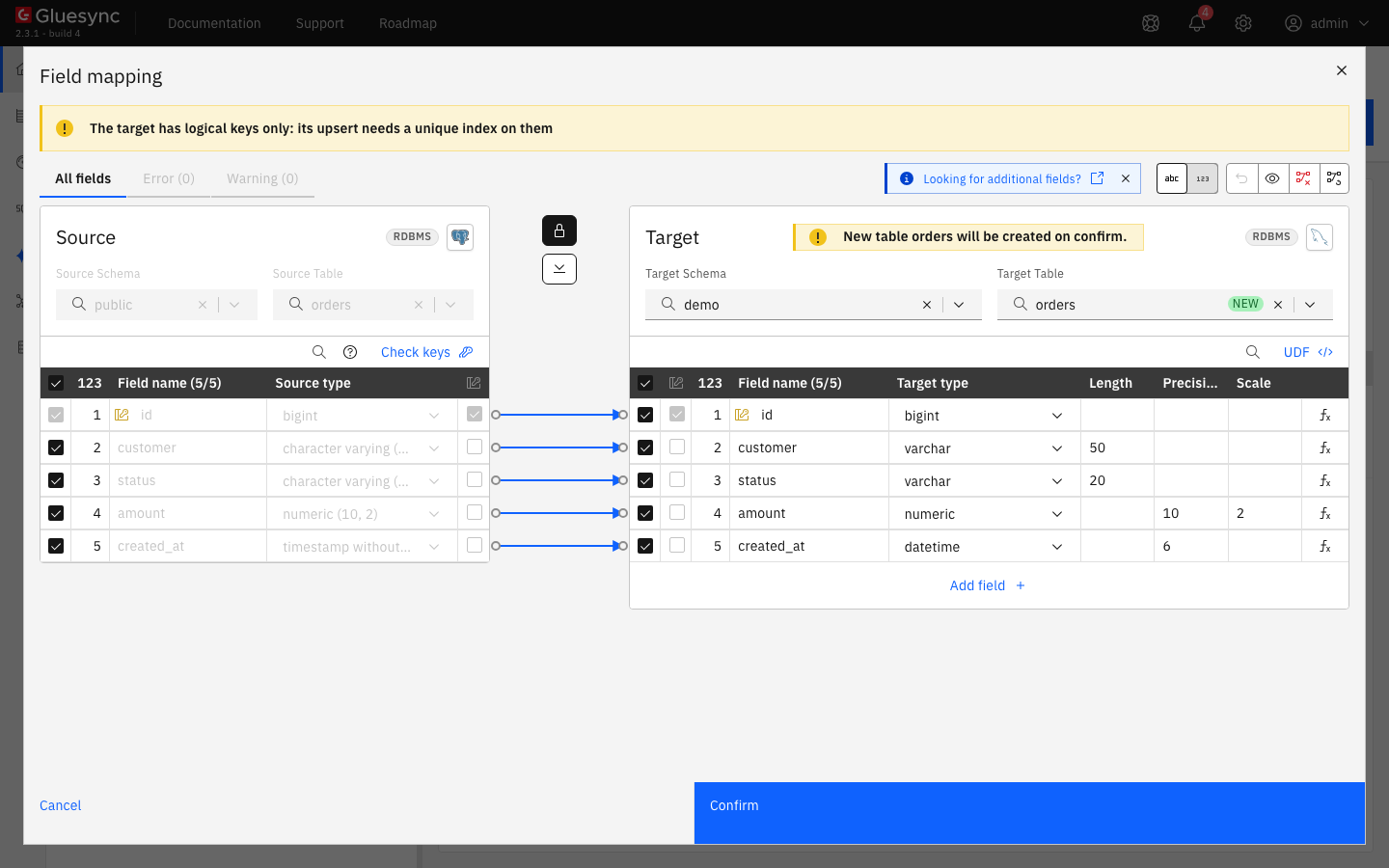
In the pipeline, select Entities. The Add entities page opens with the Object browser. Expand the schema
publicand tick the tableorders. The Field mapping dialog opens. The browser lists every table and view the user can read. PostGIS helper tables show up too; -
Under Target, choose the Target Schema, then type
ordersin Target Table and choose Create table "orders". The dialog shows New table orders will be created on confirm. and the proposed target types; -
Select Confirm. The Create table orders dialog shows the read-only SQL statement. Read it, then select Create table orders to run it on the target;
-
Back on the Add entities page, select Confirm and continue.
|
Data types follow the target. The agent reads |
UI + SQL
-
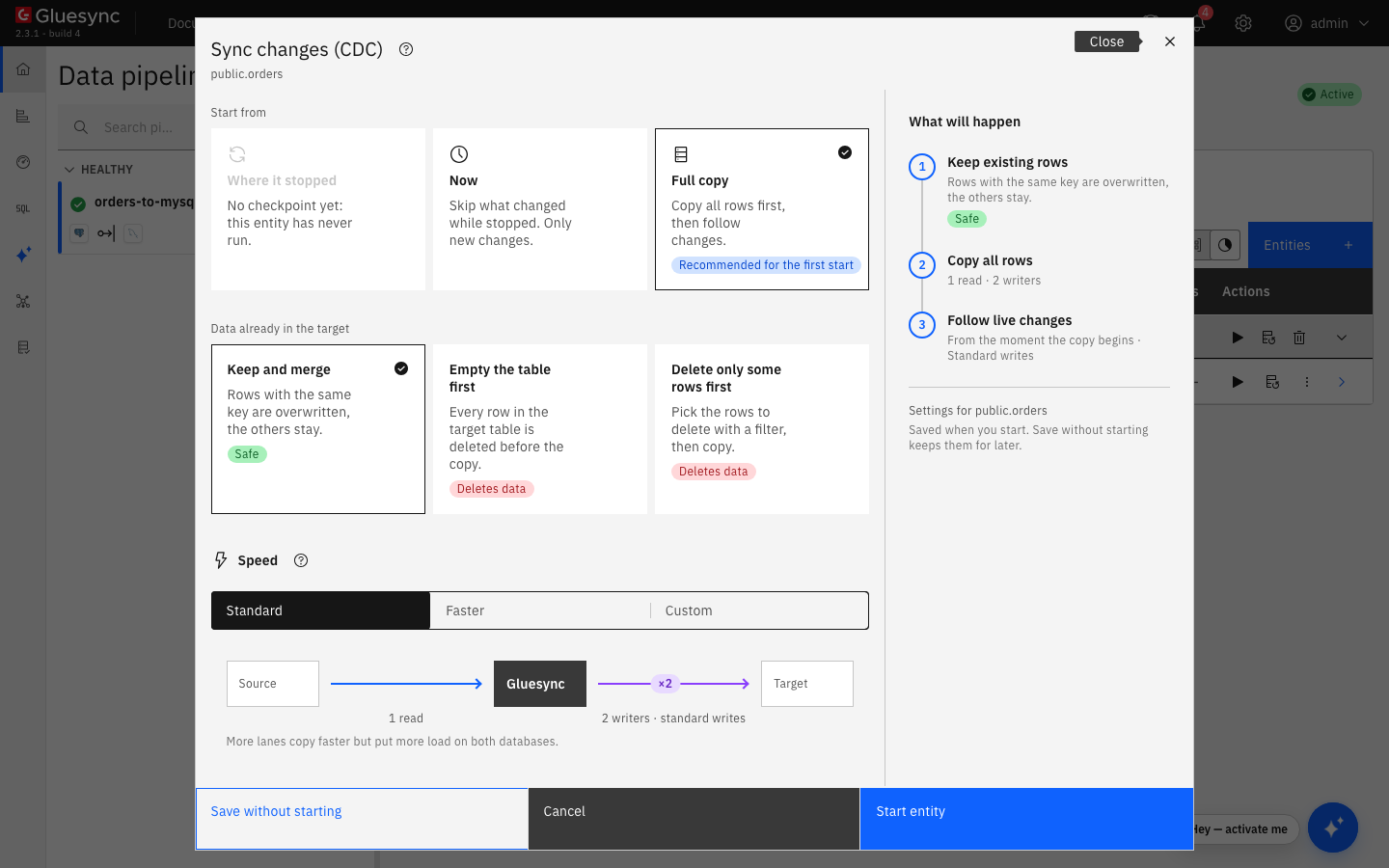
On the row of the entity, select the play button. The Sync changes (CDC) dialog opens;
-
Under Start from keep Full copy, Recommended for the first start. It copies all the rows, then follows the changes. The other choices are Where it stopped, which is not available before the first run, and Now, which skips what changed before the start;
-
Under Data already in the target keep Keep and merge, and under Speed keep Standard;
-
Select Start entity.
While the copy runs, read the replication slot on the source and the row count on the target:
SELECT slot_name, plugin, active, wal_status FROM pg_replication_slots;
SELECT slot_name,
       pg_size_pretty(pg_wal_lsn_diff(pg_current_wal_lsn(), confirmed_flush_lsn)) AS lag
FROM pg_replication_slots;
-- on the target
SELECT count(*) FROM demo.orders;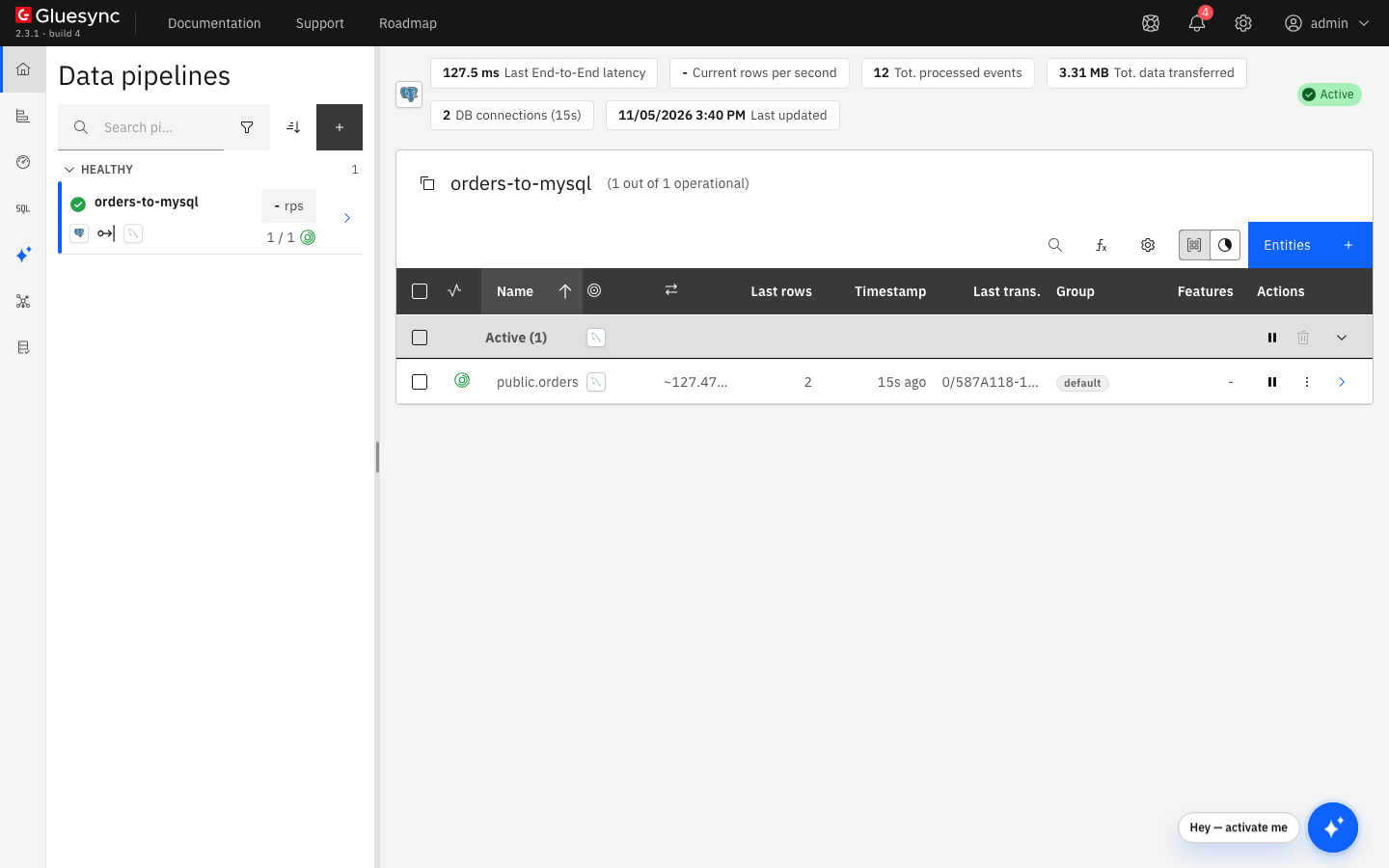
An entity that is snapshot-only never gets a slot, and a slot that an entity does not use is dropped when you delete the entity. A slot that nothing reads keeps WAL on the source server, so drop the slots of the entities you no longer use.
SQL
On the source, insert, update and delete one row each:
INSERT INTO public.orders VALUES (100001, 'customer-new', 'new', 19.90, now());
UPDATE public.orders SET status = 'paid', amount = 25.00 WHERE id = 1;
DELETE FROM public.orders WHERE id = 2;
After a few seconds, read the three keys on the target:
SELECT id, customer, status, amount FROM demo.orders WHERE id IN (1, 2, 100001) ORDER BY id;
SELECT count(*) FROM demo.orders;UI + SQL
Pausing an entity keeps its replication slot, so the source keeps the WAL that the entity has not read. Resuming with Where it stopped continues from the last checkpoint and loses nothing.
-
Select the pause button of the entity, then Pause entity;
-
Check the slot. It stays, with
activeset tof:SELECT slot_name, active, wal_status FROM pg_replication_slots; -
Change a row on the source. Select the play button, choose Where it stopped and select Start entity.
|
If somebody drops the slot while the entity is paused, Where it stopped does not warn you. Gluesync creates a new slot at the start, and the changes written to the source in the meantime are never replicated. In the test, a row inserted during the pause was missing on the target after the resume, and no error appeared in the Control Plane or in the Core Hub log. Start the entity again with Full copy and Keep and merge to realign the target: the row appeared and the count matched the source again. Check the slots before you resume if you share the server with other tools. |
UI
-
In the start dialog, under Speed select Faster or Custom to raise the number of readers and of writers. More lanes copy faster and put more load on both databases. The dialog shows the lanes between Source, Gluesync and Target;
-
For the source, the number of parallel queries of the snapshot is the Query parallelism setting,
4by default. Open the source from the pipeline list, select Advanced settings and add the property if you want another value, see PostgreSQL source advanced settings; -
For live changes, the agent merges the consecutive commits that are already waiting in the stream, so many small transactions cost less than one emission each. Truncates and chunked transactions are never merged;
-
If the target supports bulk operations, select Custom and switch the Writing method to Bulk load for the copy and for live changes. See Tune replication throughput and Bulk load.
The slot is confirmed only up to the last commit that the target has stored, so a slow target shows as lag on the slot. If the lag keeps growing, the target is the bottleneck.
Troubleshooting
| Symptom or message | Cause | Fix |
|---|---|---|
|
The Gluesync user has no |
Run |
|
|
Run |
PostgreSQL does not start and its log shows |
|
Set |
|
The server has no free slot for a new entity. |
List the slots with |
|
The user cannot read the table. The snapshot reads it with a normal query. |
Run |
|
The server restricts the output plugins and |
See PostgreSQL Troubleshooting. Extend the list, do not replace it. |
Updates and deletes of a table do not reach the target, and no error appears. Inserts do. |
The table has no primary key and its replica identity is |
Run |
Changes written while an entity was paused are missing after the resume |
The slot was dropped during the pause. Gluesync created a new one at the start, from the current position. |
Start the entity with Full copy and Keep and merge. Check |
The disk of the source server fills up and |
A slot is not advancing: the entity is paused, in error, or the target is slow, or a slot is left from a deleted pipeline. |
Check |
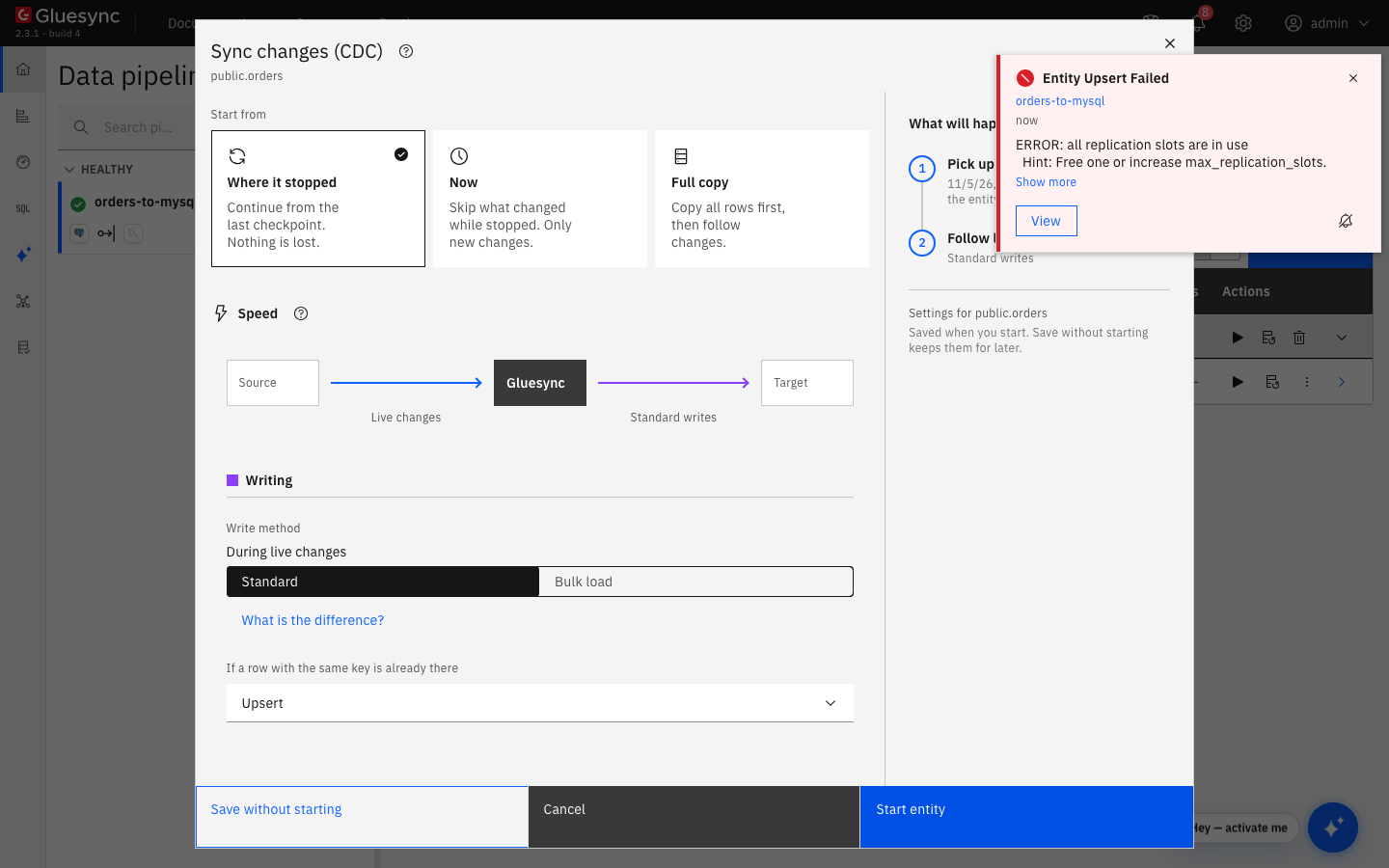
REPLICATION attribute: the dialog stays open and the notification shows the server message.