Set up a SAP ASE log reader source without triggers
The SAP (Sybase) ASE Log Reader agent reads the transaction log of your database, so it adds no triggers and no helper tables to your schema. ASE does the decoding with its own Replication Agent (RepAgent) thread and pushes the changes to Gluesync, which is why the network path runs from ASE to Core Hub and why ASE keeps its log until Gluesync confirms it. This guide prepares the login, opens that path, creates the source connection, runs a snapshot and live changes to PostgreSQL, and shows what to check in ASE and in the Core Hub log when something goes wrong.
In this guide
You will learn how to create the ASE login that the automatic setup needs, how to let ASE reach the Core Hub log reader port, and how to fill in the log reader fields of the source connection. You will add an entity and see which statements Gluesync runs on ASE, start a snapshot with live changes, and check inserts, updates, deletes and a rolled back transaction on the target. You will also check how much log ASE retains for Gluesync, and recover from a login without a role, a database that another Replication Agent already uses, and a wrong advertised host.
Quick information
Goal |
Replicate a SAP (Sybase) ASE table to PostgreSQL with the log reader: a snapshot first, then live changes read from the ASE transaction log |
Audience |
Database administrators and data engineers who own an ASE server and want change data capture without triggers |
Level |
Intermediate |
Time required |
About 45 minutes |
Area |
SAP ASE → SQL and |
Applies to |
Gluesync 2.3 |
Before you begin
Make sure that:
-
You have SAP ASE 15.7 or later, Developer or Enterprise edition, and you can run SQL on it as
sa. This guide was tested on ASE 16.0 SP02 PL02; -
ASE can open a connection to the Core Hub host on one TCP port (the log reader port,
5500by default). This is the opposite direction of the database connection, and step 2 shows how to prepare it; -
You can sign in to the Control Plane with a role that can create pipelines;
-
You have a PostgreSQL database as the target, and a login that can create tables in it. The log reader is a source only;
-
You know that one ASE database has one RepAgent. A database that SAP Replication Server already replicates cannot also be read by the log reader, unless you take it over on purpose (see the troubleshooting table).
This guide uses the database demo and the table dbo.orders, which has 50,000 rows:
create table dbo.orders (
    id int not null,
    customer varchar(50) not null,
    status varchar(20) null,
    amount numeric(12,2) null,
    created datetime null,
    notes text null,
    primary key (id)
)
go|
The messages quoted in this guide were captured in the Control Plane, in the Core Hub log and in the ASE error log of a lab with ASE 16.0 SP02 PL02, PostgreSQL 16 and Gluesync 2.3. ASE and Core Hub ran as containers on the same Docker network, so the lab did not need a published port. |
Guide steps
SQL
When you add the first entity, Gluesync configures ASE for you: it enables the RepAgent threads, points the RepAgent of the database at Core Hub, marks the table for replication and starts the RepAgent. The login that you put in the connection runs these statements, so it needs sa_role. Connect to ASE as sa and run the statements below. Replace the password.
-
Create the login and give it the role:
sp_addlogin gluesync_admin, <a strong password> go grant role sa_role to gluesync_admin go -
Add the login as a user of the source database:
use demo go sp_adduser gluesync_admin, gluesync_admin go -
Check the version and the state of the RepAgent threads:
select @@version
go
sp_configure 'enable rep agent threads'
go
If your DBA does not allow sa_role for Gluesync, the same page of the reference describes a split of duties (replication_role plus ownership of the table) and the manual setup, where Gluesync only writes the statements to the Core Hub log. See the manual setup.
CLI
With the log reader, ASE is the client of the log stream. The RepAgent of your database opens a connection to Core Hub, to the host name and port that you enter in the connection. Core Hub listens on that port. Gluesync also keeps its usual JDBC connection to ASE for the snapshot, the setup and the table metadata.
-
Choose the LTL listen port. The default is
5500. Open it in the firewall between the ASE host and Core Hub, in that direction; -
Choose the name that ASE uses to reach Core Hub. It becomes the LTL advertised host and it is written into ASE. It must resolve from the ASE host, and it must be a bare host name or address: no port, no spaces;
-
If Core Hub runs in Docker, publish the port and use the address of the Docker host as the advertised host:
services: gluesync-core-hub: ports: - "5500:5500" -
From the ASE host, check that the name resolves and the port answers. Replace
<core hub host>:getent hosts <core hub host> nc -zv <core hub host> 5500
|
In a lab where ASE and Core Hub share a Docker network, the name of the Core Hub service is enough as the advertised host, and nothing needs publishing. The lab behind this guide used |
UI
-
In the Control Plane, select Create your first pipeline, or the + button of the pipeline list if you already have pipelines. The Agents setup wizard opens;
-
In 1. Setup source, search for
sybaseand select the SAP (Sybase) ASE tile. It offers two connectors. Select SAP (Sybase) ASE Log Reader agent, not the Triggers agent; -
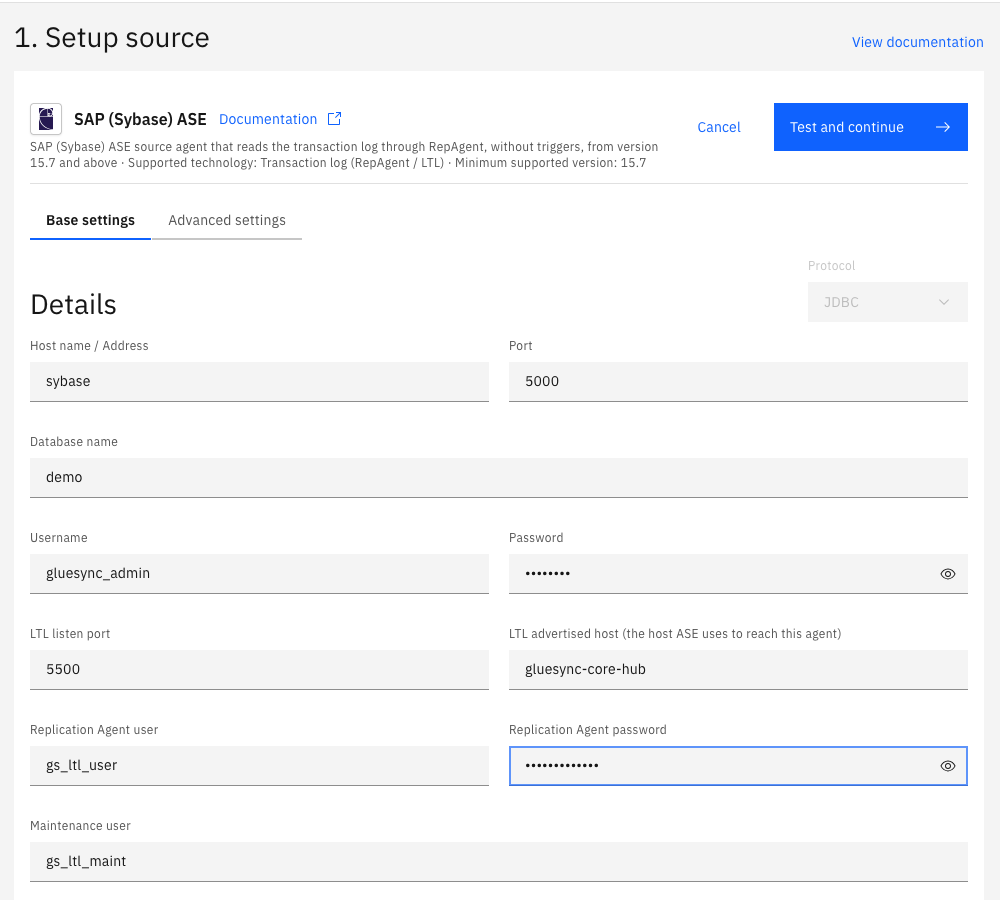
In Base settings, fill in the connection:
-
Host name / Address and Port: your ASE server and its port,
5000by default; -
Database name: the database whose log you read, here
demo. The agent reads one database; -
Username and Password: the login of step 1;
-
-
Fill in the log reader fields in the same tab:
-
LTL listen port:
5500, or the port you opened in step 2; -
LTL advertised host (the host ASE uses to reach this agent): the name from step 2. It has no default and the connection cannot be saved without it;
-
Replication Agent user:
gs_ltl_userby default. The RepAgent logs in to Gluesync with this name. It is not an ASE login and does not need to exist in ASE; -
Replication Agent password: a password of your choice, used only between the RepAgent and Gluesync. Use one that you use nowhere else;
-
Maintenance user:
gs_ltl_maintby default. ASE does not capture the transactions of this login, so choose a name that no application uses;
-
-
Select Test and continue. The source appears with a green check mark. Select Next.
|
Do not leave an empty row under Advanced settings. A row that you added with Add property and left on Other property key (optional) blocks the form: Test and continue does nothing and shows no message. Delete the row with the trash icon. |
UI
-
In 2. Setup target(s), search for
postgres, choose the PostgreSQL CDC agent tile and fill Base settings: Host name / Address, Port (5432), Database name, Username and Password. Select Test and continue. The target appears with a green check mark. Select Next; -
In 3. Ready, enter a Pipeline name, for example
ASE to PostgreSQL, and select Finish.
UI
-
In the pipeline, select Entities. The Add entities page opens with the Object browser. Expand the schema
dboand select the tableorders. The Field mapping dialog opens; -
Under Target, open Target Schema and select
public. In Target Table typeordersand choose Create table "orders". The dialog shows New table orders will be created on confirm. and proposes the target types; -
Two fields show a red error and Missing required field appears at the top: the Precision of the
datetimecolumn (created) and the Length of thetextcolumn (notes). Enter6as the precision ofcreated. Enter a length fornotes, for example1000000. PostgreSQL stores the column as plaintextwhatever the length is. The Confirm button turns blue; -
Select Confirm. The Create table orders dialog shows the read-only SQL statement. Read it, then select Create table orders to run it on PostgreSQL;
-
Back on the Add entities page, select Confirm and continue.
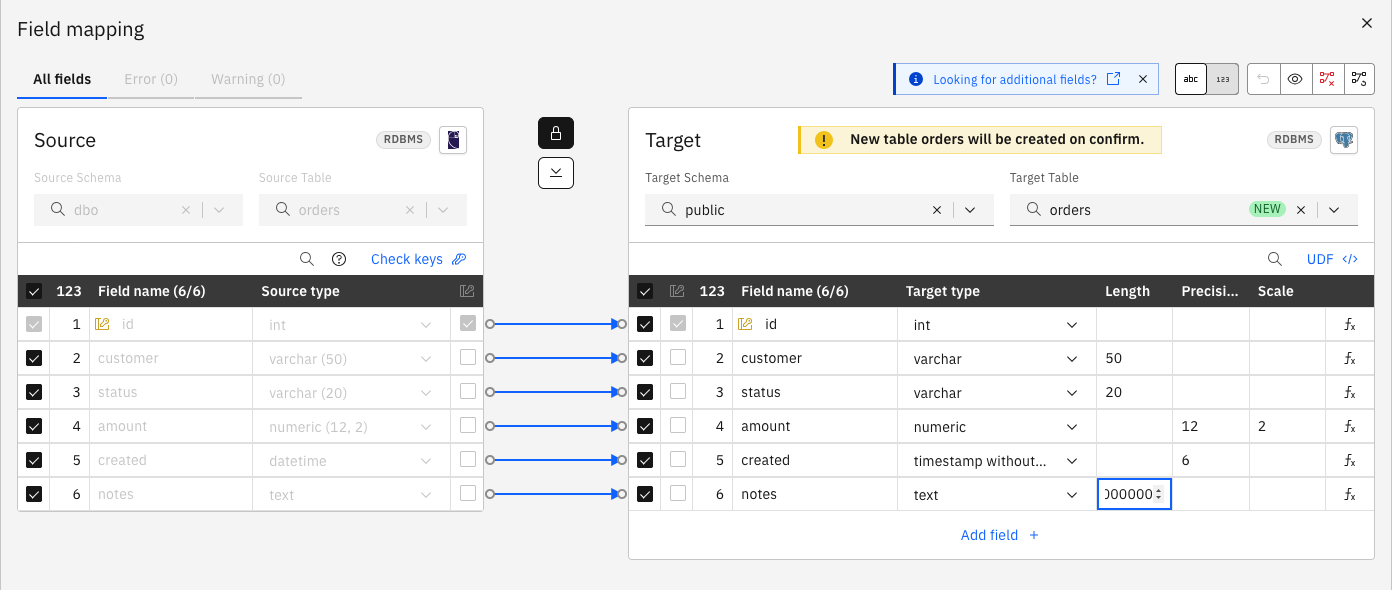
The statement that Gluesync proposes is:
CREATE TABLE "public"."orders" (
   "id" int,
   "customer" varchar(50),
   "status" varchar(20),
   "amount" numeric(12, 2),
   "created" timestamp(6) without time zone,
   "notes" text,
   PRIMARY KEY (
      "id"
   )
)
When you select Confirm and continue, Gluesync configures ASE. The Core Hub log shows each step:
RepAgentComponentSetup INFO - Enabling the Replication Agent threads of the server
RepAgentComponentSetup INFO - Enabling the Replication Agent of database demo towards gluesync-core-hub:5500
RepAgentComponentSetup INFO - Table dbo.orders is marked for replication
Check the result in ASE:
sp_help_rep_agent demo
goSee Target table creation for the dialog.
UI + SQL
-
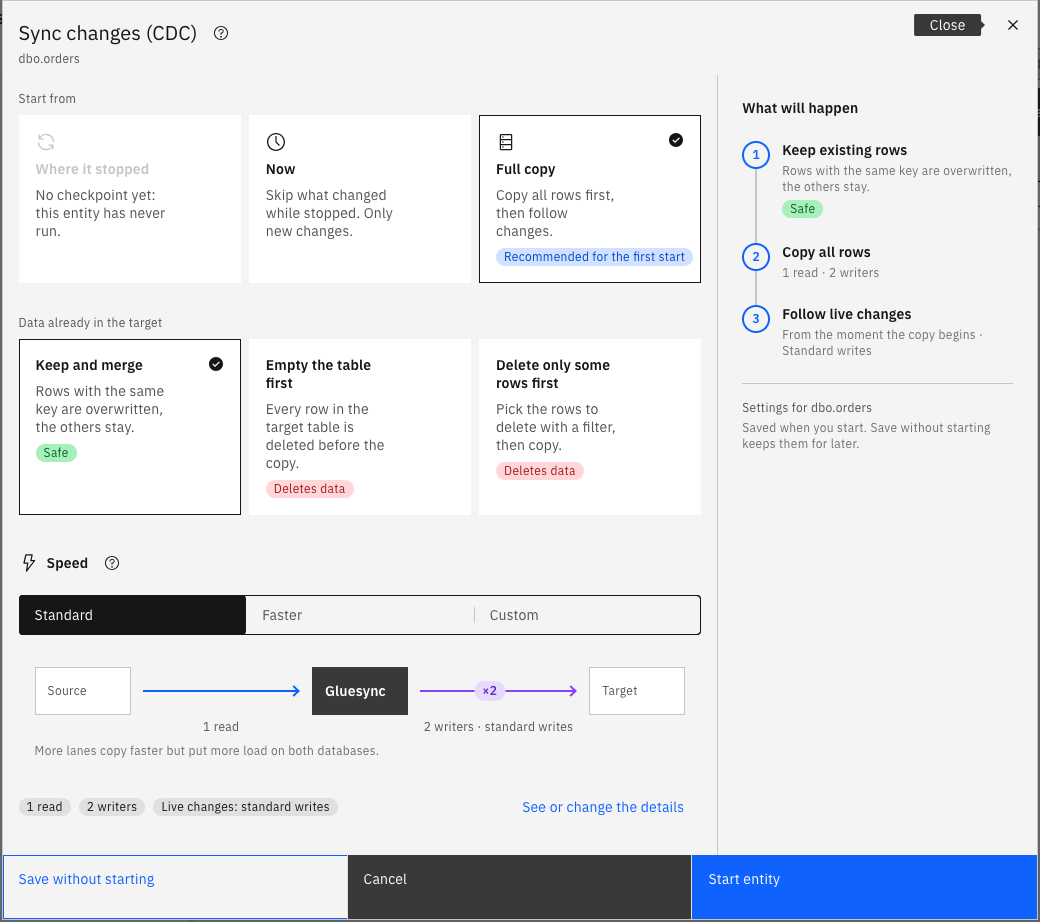
In the pipeline, select the play button of the entity. The Sync changes (CDC) dialog opens;
-
Under Start from keep Full copy, recommended for the first start: it copies all rows, then follows the changes. Under Data already in the target keep Keep and merge;
-
Select Start entity.
Check the row count on PostgreSQL:
SELECT count(*) FROM public.orders;The Core Hub log shows when the log stream starts and when ASE connects:
LtlCaptureManager INFO - Listening for the Replication Agent of <server>.demo on port 5500
LtlCaptureManager INFO - Replication Agent of <server>.demo connected, LTL version 760
The snapshot and the log stream start together. The agent records the log position before it reads the first row, so a change made while the copy runs is not lost. A row that both the copy and the log carry is written once, as an upsert.
SQL
Run the statements on ASE, in the source database, as any application login. Try an insert, an update, a delete, a rolled back transaction and a bigger update:
insert dbo.orders (id, customer, status, amount, created, notes)
    values (900001, 'Acme', 'new', 99.50, getdate(), 'first order')
go
update dbo.orders set status = 'paid', amount = 120.00 where id = 5
go
delete from dbo.orders where id = 6
go
begin tran
insert dbo.orders (id, customer, status, amount, created)
    values (900002, 'Rolled back', 'new', 1, getdate())
rollback tran
go
update dbo.orders set amount = amount + 1 where id between 100 and 3099
go
After a few seconds, read the rows on PostgreSQL:
SELECT id, customer, status, amount, notes FROM public.orders
WHERE id IN (5, 6, 900001, 900002) ORDER BY id;
SELECT count(*) FROM public.orders;
SELECT id, amount FROM public.orders WHERE id IN (99, 100, 3099, 3100) ORDER BY id;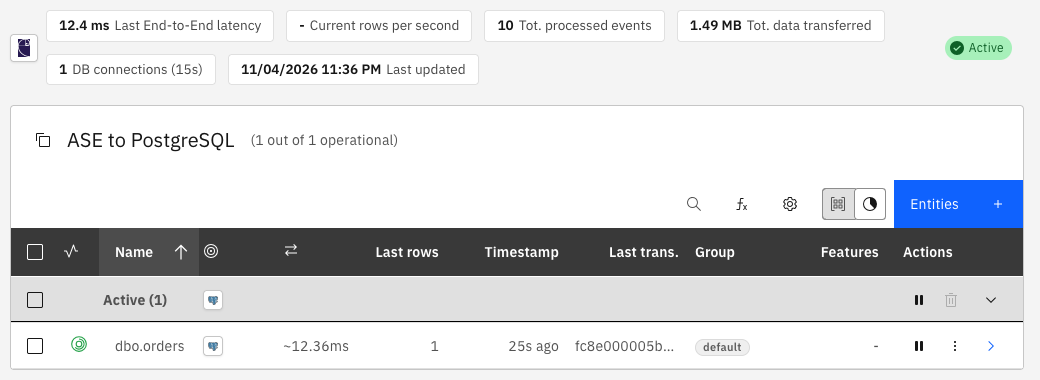
An update of a text, unitext or image column, or a writetext, arrives as an update of the row. A large object column that is not null is always sent with the row, also when only another column changed.
SQL
The RepAgent holds a secondary truncation point in the log of the database. Gluesync moves it forward only after the changes are stored, so ASE keeps the unconfirmed part of the log. While Core Hub is stopped, the pipeline is paused or ASE cannot reach Core Hub, the log grows.
-
Look at the log space and at the truncation point:
use demo go sp_spaceused syslogs go dbcc gettrunc go -
Decide how long an outage you accept. Multiply the log volume per hour at peak by that time, and size the log device for it;
-
Set an alert on the log space, so that you act before ASE refuses writes. Gluesync also posts a warning when a stopped stream keeps more of the log than Warn when a stopped stream keeps more of the log than (MB) allows (1024 by default,
0switches it off).
To stop retaining the log when you retire the pipeline, remove the last entity. Gluesync then stops the RepAgent, unmarks the table and disables the RepAgent, which drops the secondary truncation point. If the setup was manual or Core Hub is gone, a DBA runs the statements of the log retention section. Disabling the RepAgent starts a new history of the log: take a new snapshot afterwards.
SQL + UI
Each error below was reproduced on the lab. The first two appear when you add an entity.
-
Create a login that has no role and can only read the table, and use it as the Username of the source:
sp_addlogin gluesync_ro, <password>
go
use demo
go
sp_adduser gluesync_ro, gluesync_ro
go
grant select on dbo.orders to gluesync_ro
go
The connection test succeeds, because it only reads. Adding the entity fails: the page shows The entity could not be saved. with
Login 'gluesync_ro' has neither the sa_role nor the replication_role: it cannot set the Replication Agent of database 'demo' up (sp_config_rep_agent, sp_setreptable, sp_start_rep_agent). Fix: grantsa_role, or use the manual setup; -
Create a second pipeline on the same database with another LTL listen port, such as
5501, and add an entity. The page showsThe Replication Agent of database 'demo' already sends to 'gluesync-core-hub:5500', not to this agent ('gluesync-core-hub:5501'). Another Replication Server may depend on it: set 'forceRepAgentTakeover' to point it at this agent instead. Gluesync refuses to change the RepAgent. Fix: use the triggers agent for this database, or remove the other replication and set Force Replication Agent takeover totrue; -
Change the LTL advertised host of a pipeline that runs to a name that does not exist, and select Test and continue. The Core Hub log shows
Pointing the Replication Agent of database demo from gluesync-core-hub:5500 to corehub-wrong:5500as a warning: ASE now sends to the wrong host. The ASE error log showsRepAgent(4): The Rep Agent Thread will retry the connection to the Replication Server every 10 second(s). (RepSvr = corehub-wrong:5500).and, for a name that does not resolve,Protocol driver call to parse connection information failed. The RepAgent cannot connect, so no change is delivered while the name is wrong. Fix: enter the right name and select Test and continue again. The log showsPointing the Replication Agent of database demo from corehub-wrong:5500 to gluesync-core-hub:5500, the nextReplication Agent of … connectedline follows, and a row that you insert afterwards reaches the target.

|
Editing the connection of a running pipeline changes the ASE setting immediately. Change the advertised host, the port or the Replication Agent password only when you mean it, and read the Core Hub log afterwards. |
Data types
The agent decodes each value with the type of the column in the ASE catalog, and a user-defined type is read by its base type. The Gluesync type of each ASE type is the same as for the triggers agent. The table lists what the Field mapping dialog proposed for PostgreSQL in the lab. The reference has the whole list.
| ASE type | PostgreSQL type proposed | Note |
|---|---|---|
|
|
|
|
|
The length is kept |
|
|
The precision and the scale are kept |
|
|
The dialog requires the precision. ASE logs the fraction of a |
|
|
The dialog requires a length. |
|
|
|
|
|
|
|
|
Precision 20, scale 0 |
A table needs a primary key for a log reader pipeline. Follow Choose keys for tables without a primary key if yours has none.
Throughput and concurrency settings
The log reader reads the log inside ASE, so there is no polling interval to tune. The settings that matter are the speed of the snapshot and how many entities run at once.
| Setting | Default | When to change it |
|---|---|---|
Speed in the start dialog (Standard, Faster, Custom) |
Standard: 1 read, 2 writers |
Choose Faster or Custom for a large table, when ASE and the target can take more load. See Speed up snapshots and explain row count differences |
Max Concurrency (Specific configuration) |
|
Limit how many entities run at once, to protect ASE or the target |
Max Snapshot Concurrency (Specific configuration) |
|
Limit how many snapshots run at the same time |
Warn when a stopped stream keeps more of the log than (MB) |
|
Lower it when the log device is small. |
Read Tune replication throughput for the settings that apply to every target.
Troubleshooting
| Problem | Possible cause | What to do |
|---|---|---|
Test and continue does nothing and shows no message |
An empty property row under Advanced settings, or a required field is empty |
Delete the empty row with the trash icon and fill in every field, including LTL advertised host and Replication Agent password |
The entity could not be saved. |
The login of the connection cannot run |
Grant |
|
The RepAgent of the database points at another Replication Server, or at another pipeline of Gluesync |
Use the triggers agent for this database, or remove the other replication and set Force Replication Agent takeover to |
ASE error log: |
ASE cannot reach that host and port: a wrong advertised host, a closed firewall port, or an entity that is not started so that Core Hub does not listen |
Check |
The Core Hub log shows |
The Replication Agent user or password that ASE presents does not match the connection |
Correct Replication Agent user or Replication Agent password and select Test and continue. With the automatic setup, Gluesync updates the RepAgent and restarts it. ASE stops a refused RepAgent and does not retry on its own |
The log reader port cannot be opened: |
The port is in use, for example by another pipeline of the same Core Hub |
Give each pipeline its own LTL listen port, and publish each port from the Core Hub container |
ASE refuses writes with error 1105 on |
ASE keeps the log because Gluesync has not confirmed it: the pipeline is stopped or ASE cannot reach Core Hub |
Start the pipeline and check the connection so that the log is released. If it cannot wait, extend the log device with |
An update of another column of a table with a |
The large object column is set to replicate only when it changes ( |
|
The changes of a database that was disabled and enabled again are missing |
Disabling the RepAgent starts a new history of the log |
Take a new snapshot of the entities |
Related guides
Contact MOLO17 Support if you need assistance with the SAP ASE log reader.