Set up a Redis Streams target for CDC events
A Redis stream is an append-only log. The Redis Streams target does not keep a copy of your tables in Redis: it appends one entry for every change it receives, so a consumer can read the history of the table in order. This guide creates a Redis user that can only append to your streams, creates the target, copies a PostgreSQL table and follows its live changes, shows you what an insert, an update, a delete and a truncate look like in the stream, and covers the settings that decide the shape and the size of the entries.
In this guide
You will learn how to create a Redis ACL user with the three commands the agent needs, how to create the Redis Streams target in the Control Plane, and how a source table becomes a stream key. You will run a snapshot and live changes, read the entries with XLEN and XRANGE, and check how every operation is written. You will switch on the before image, choose the flat or the JSON layout, and cap the length of a stream. You will also reproduce the errors that are most likely on a new setup and read how to fix them.
Quick information
Goal |
Append the snapshot and the change events of a PostgreSQL table to a Redis stream, and read them back |
Audience |
Data engineers and Redis administrators who feed a stream consumer |
Level |
Intermediate |
Time required |
About 40 minutes |
Area |
Redis → ACL; Control Plane → Pipelines → Redis Streams target → Base settings and Advanced settings; entity → Field mapping → Target Stream |
Applies to |
Gluesync 2.3 |
Before you begin
Make sure that:
-
You have a Redis 7.4 or later server (Community or Enterprise) and you can run
redis-clias an administrator. Redis Streams is a target only: you need another database as the source. This guide was tested with Redis 7.4 and a PostgreSQL 16 source; -
Core Hub can open a connection to the Redis host and port;
-
You can sign in to the Control Plane with a role that can create pipelines;
-
You have a source table with a primary key. This guide uses the PostgreSQL table
public.customers(idinteger primary key, and the text columnsname,surname,address,gender,phoneandemail) with 20 rows; -
The source database is ready for change data capture. For PostgreSQL that means
wal_levelset tological, a user with theREPLICATIONattribute that can read the table, and thewal2jsonplug-in. See the PostgreSQL CDC reference for the exact statements.
|
The streams do not have to exist. Redis creates a stream the first time the agent appends to it, and the agent never runs a data definition command. |
Guide steps
CLI
The agent needs XADD to write, PING to test the connection, and INFO to read the server version. Give it only those commands, on only the keys it will write. This guide puts every stream under the prefix gs, so the key pattern is gs:*.
-
Create the user. Replace the password. The
resetkeyword starts from a user with no commands, no keys and no password:redis-cli ACL SETUSER gluesync reset on '>change-me-strong' '~gs:*' +xadd +ping +info -
Check what the user can and cannot do:
redis-cli --user gluesync --pass change-me-strong --no-auth-warning PING redis-cli --user gluesync --pass change-me-strong --no-auth-warning XADD gs:probe '*' a 1 redis-cli --user gluesync --pass change-me-strong --no-auth-warning XADD other:probe '*' a 1 -
Remove the probe stream with an administrator account:
redis-cli DEL gs:probe
|
Redis writes an entry to its ACL log when the agent connects and Redis refuses the optional |
The agent also accepts a Redis server without a password. In that case switch on Disable auth in step 3 and skip the user.
SQL
Run this on the PostgreSQL source. It is optional, but it makes the before image of step 7 complete. With the default replica identity, PostgreSQL sends only the key of the old row, so the before image of an update would carry the key and not the other columns.
ALTER TABLE public.customers REPLICA IDENTITY FULL;UI
-
In the Control Plane, select Create your first pipeline, or the + button of the pipeline list if you already have pipelines. The Agents setup wizard opens;
-
In 1. Setup source, choose the PostgreSQL CDC agent tile and fill Base settings: Host name / Address, Port, Database name, Username and Password. Select Test and continue. The source appears with a green check mark. Select Next;
-
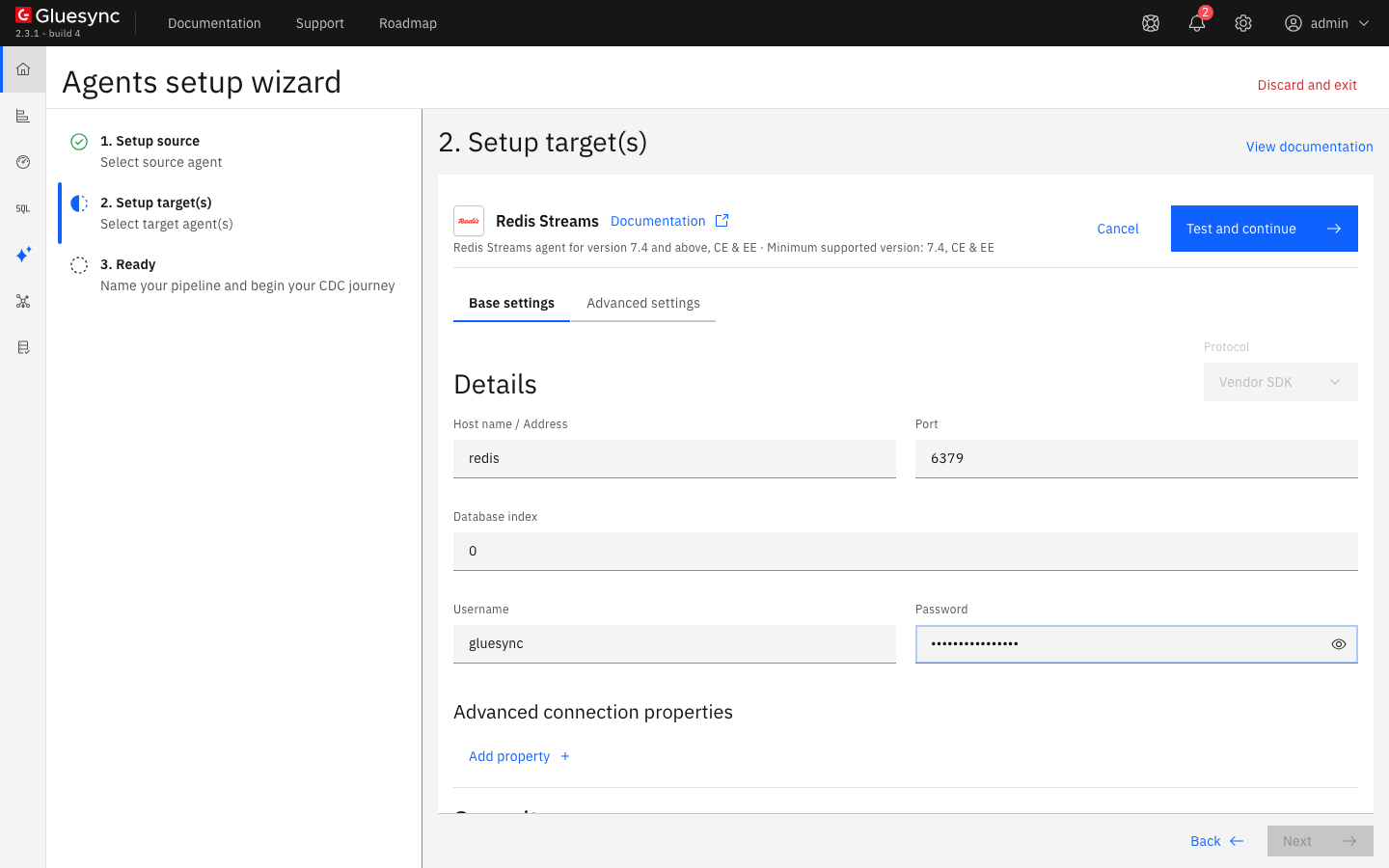
In 2. Setup target(s), choose the Redis Streams tile under Event streaming. In Base settings fill:
-
Host name / Address: your Redis host;
-
Port:
6379, or the port of your server; -
Database index:
0, or the logical database you want. Redis Cluster ignores it; -
Username and Password: the user of step 1;
-
-
Open Advanced settings, select Add property, choose the key Stream key prefix and enter
gsas the value; -
Select Test and continue. The target appears with a green check mark. Select Next, enter a Pipeline name and select Finish.
The Advanced settings tab lists every setting of the agent. The Redis Streams target reference describes each one, and the REST call for the same setup.
UI
-
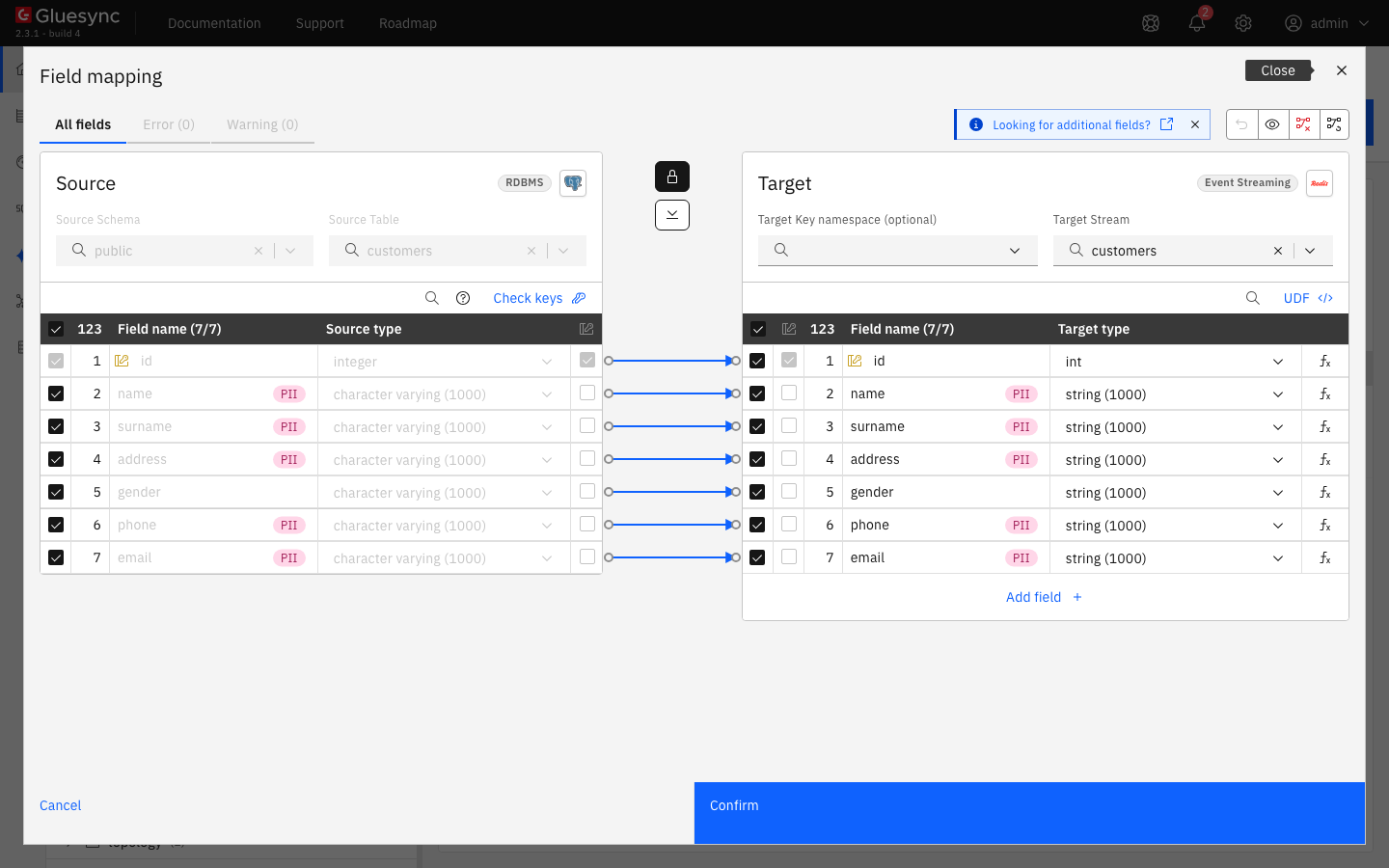
In the pipeline, select Entities. The Add entities page opens with the Object browser. Expand the source schema
publicand select the tablecustomers. The Field mapping dialog opens; -
Look at the Target side. Target Stream is the name of the stream and it starts as the table name,
customers. Target Key namespace (optional) is a scope that goes into the stream key. Leave both as they are; -
Select Confirm, then Confirm and continue.
The agent builds the Redis key for each entity in this order:
-
The entity Stream key override, if you set one, exactly as written;
-
The Stream key template, if you set one, with
{prefix},{scope},{collection}and{entity}replaced; -
Otherwise
<prefix>:<scope>:<collection>, skipping every part that is empty.
With the prefix gs, no key namespace and the stream customers, the key is gs:customers. The ACL pattern of step 1 must match every key you build this way.
UI + CLI
-
In the pipeline, select the play button of the entity. The Sync changes (CDC) dialog opens. Start from offers Where it stopped, Now and Full copy. Keep Full copy: it copies all rows first and then follows the changes. The Speed section shows Standard, and its Writing part says that this target has no bulk load, so the agent writes with the pipelined
XADDbatches of step 8; -
Select Start entity. The entity becomes Active and Last rows shows
20; -
Read the stream:
redis-cli TYPE gs:customers
redis-cli XLEN gs:customers
redis-cli XRANGE gs:customers - + COUNT 1
|
A stream keeps every entry. If you start the snapshot again with Full copy, the agent appends the 20 rows again and |
SQL + CLI
The entity is now Active and follows the source. Change the source, then read the end of the stream.
-
Insert, update and delete one row, with a few seconds between the statements:
INSERT INTO customers (id, name, surname, address, gender, phone, email) VALUES (1001, 'CDC', 'Insert', '1 Stream Lane', 'Female', NULL, 'cdc@example.com'); UPDATE customers SET name = 'UpdatedName' WHERE id = 1001; DELETE FROM customers WHERE id = 1001; -
Read the three newest entries, newest first:
redis-cli XREVRANGE gs:customers + - COUNT 3 -
Remove every row, then read the last entry:
TRUNCATE customers;redis-cli XREVRANGE gs:customers + - COUNT 1
Nothing removes a stream entry except the trim setting of step 7. A delete is an event, not an erase.
UI
These settings change the entries of the next change. They are saved with the target connection, and the entity does not need to restart.
-
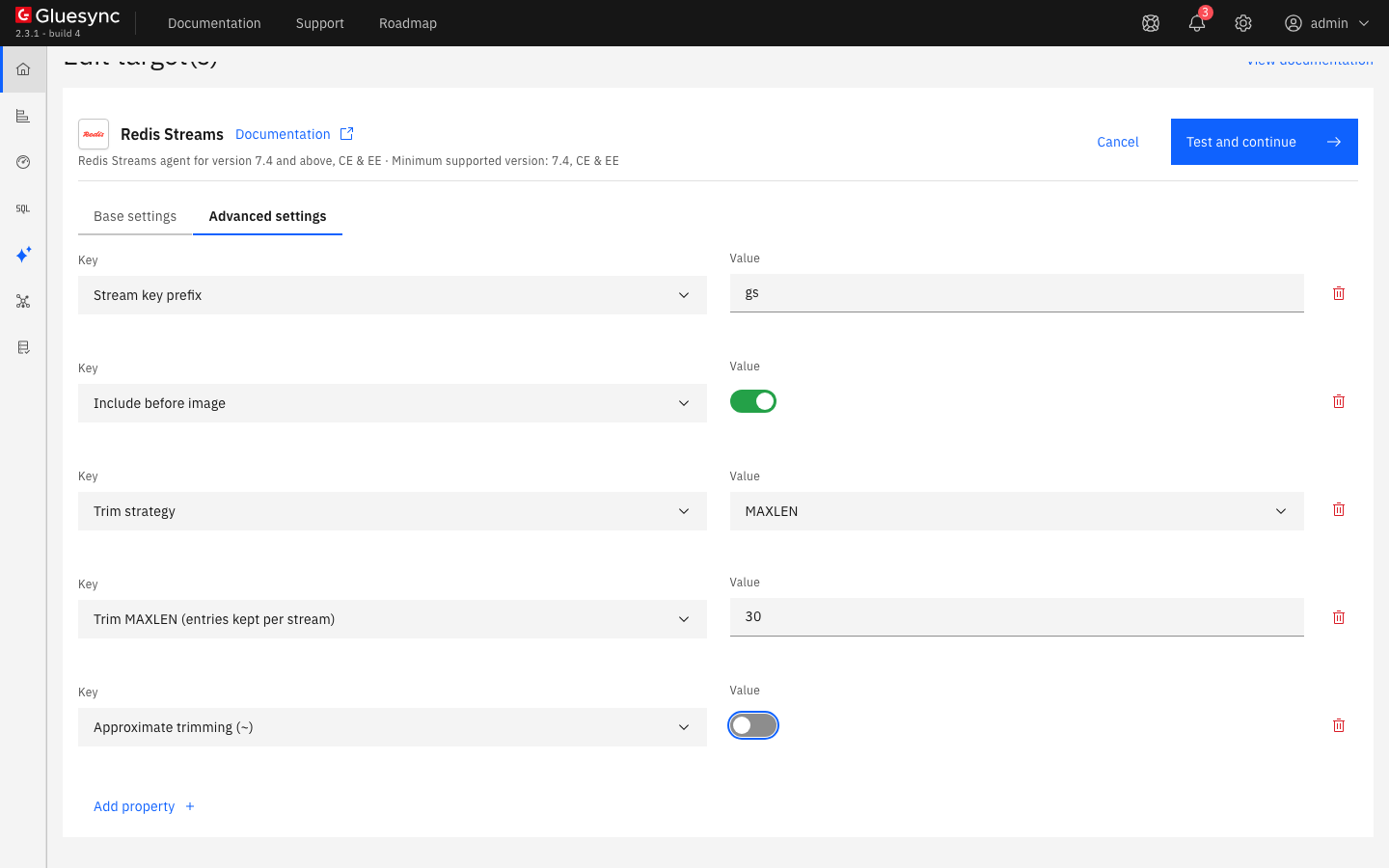
In the pipeline list, select the Redis icon of the pipeline. The Edit target(s) page opens. Select Advanced settings;
-
Select Add property and add Include before image. Switch it on. An update entry then carries the old column values, and a delete entry carries the row the source sent;
-
Select Add property and add Trim strategy. Choose
MAXLEN. Add Trim MAXLEN (entries kept per stream) with the value30. Add Approximate trimming (~) and switch it off, so Redis keeps exactly 30 entries and does not wait to trim in whole blocks; -
Select Test and continue;
-
Insert 40 rows and update one of them on the source, then read the length and the last entry:
INSERT INTO customers
SELECT n, 'N' || n, 'S' || n, 'A' || n, 'Male', '+39-' || n, 'e' || n || '@example.com'
FROM generate_series(1, 40) AS n;
UPDATE customers SET phone = '+39-555-9999' WHERE id = 2;
redis-cli XLEN gs:customers redis-cli XREVRANGE gs:customers + - COUNT 1
To change the shape of the entry, add Payload layout and choose JSON. The agent then writes one field, payload, whose value is one JSON document:
{"op":"update","snapshot":false,"entity":"customers","key":"customers::5","ts_ms":1793832140234,"source_ts_ms":1793832140231,"transaction":"{\"type\":\"HexTransactionId\",\"value\":\"0/4848070\",\"timestamp\":1793832140231}","keys":{"id":5},"after":{"id":5,"name":"N5","surname":"S5","address":"A5","gender":"Male","phone":"+39-555-7777","email":"e5@example.com"},"before":{"id":5,"name":"N5","surname":"S5","address":"A5","gender":"Male","phone":"+39-5","email":"e5@example.com"}}Choose FLAT when a consumer reads fields one by one. Choose JSON when it parses a document, and when it needs real numbers and booleans and null values in the row.
CLI + UI
Each error below was reproduced on the pipeline of this guide.
-
Enter a wrong password and select Test and continue. The page shows Failed to save with
Unable to connect to redis/<unresolved>:6379(with your host name and port). The text does not say why. The Core Hub log has the cause:RedisCommandExecutionException: WRONGPASS invalid username-password pair or user is disabled.Fix: enter the password of the Redis user; -
Enter a host that does not exist. The page shows
Unable to connect to <name>/<unresolved>:6379, and the log showsUnknownHostException: Failed to resolve '<name>'. Fix: enter a name that Core Hub resolves. Core Hub has to resolve it, not the machine of your browser; -
Enter a port with no Redis behind it. The same message appears, and the log shows
Connection refused. Fix: enter the port of your server; -
Set the stream key prefix to
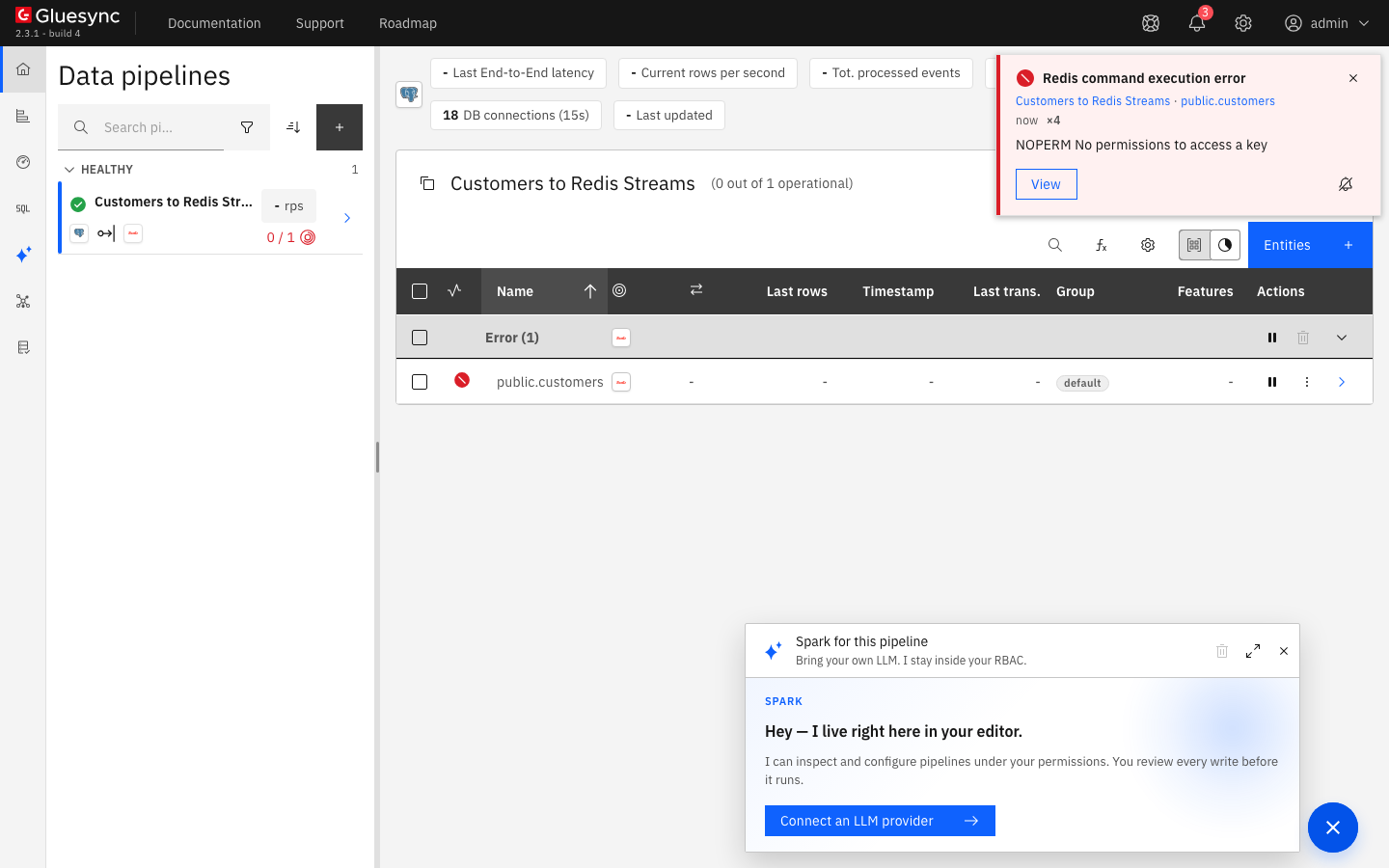
gswhile the user is limited to a different pattern, for example~stream:*, and start the entity. The connection test passes, then the entity goes to Error and the notification Redis command execution error showsNOPERM No permissions to access a key. Fix: let the user write the key, for exampleredis-cli ACL SETUSER gluesync resetkeys '~gs:*'; -
Set Trim strategy to
MAXLENand Trim MAXLEN (entries kept per stream) to0, and change a row on the source. The entity goes to Error withTrim MAXLEN must be greater than zero when the trim strategy is MAXLEN, got 0. Fix: enter a value greater than zero.
Data types
The agent accepts all Gluesync data types. The target type shown in the Field mapping dialog is only a label: nothing is created in Redis, and every value is written as text. These are the entries for a PostgreSQL table with many types, from the flat layout:
| Source type | Target type in the dialog | Value written in the flat layout |
|---|---|---|
|
|
Decimal text, such as |
|
|
Plain decimal text without trailing zeros of the scale: |
|
|
Every digit, with no exponent: |
|
|
|
|
|
|
|
|
Lowercase hex, |
|
|
|
|
|
|
|
|
ISO-8601 without an offset: |
|
|
ISO-8601 with the offset: |
|
|
|
|
|
JSON text: |
|
|
The JSON text as PostgreSQL prints it: |
|
|
Text: |
A NULL column is not written. Its name is listed in _nulls (_nulls ["nil"] in the test above). If a consumer must see every column, add Null values (flat layout) with the value SENTINEL: the agent then writes the text __NULL__, which you can change with Null sentinel (flat layout, SENTINEL mode). The JSON layout always writes null.
The agent reference lists the rules for each Gluesync type in both layouts.
Performance and size settings
This target has no bulk load: the start dialog says so. The agent sends the XADD commands in batches and waits for each batch. These settings matter most:
| Setting | Default | When to change it |
|---|---|---|
Pipeline batch size (XADD per round trip) |
|
The number of |
Trim strategy |
|
A stream grows without limit with |
Approximate trimming (~) |
On |
Redis trims in whole blocks and keeps a little more than the limit, at a lower cost. Switch it off for an exact limit, as in step 7 |
Command timeout (seconds) |
|
The time |
Read Tune replication throughput for the settings that apply to every target. Every setting, TLS and Redis Cluster mode (Additional hosts) are in the agent reference.
Troubleshooting
| Problem | Possible cause | What to do |
|---|---|---|
Failed to save with |
Wrong password or user, an unknown host, or nothing listening on the port. The message is the same for all three |
Read the Core Hub log: |
The entity goes to Error with |
The key pattern of the Redis user does not match the stream key, for example after you changed the prefix |
Add the key pattern: |
|
The user lacks |
Grant them: |
The entity goes to Error with |
Trim strategy is |
Enter a length greater than zero, or set Trim strategy to |
|
The snapshot ran twice: you chose Full copy again, or the entity restarted after an error |
Expected. A stream never rejects a duplicate. Remove the stream with |
A delete or update entry has no old column values |
Include before image is off, or the table has the default replica identity |
Switch on Include before image and run |
A column does not appear in the entry |
The value is |
Read |
The write fails because a column has the same name as a metadata field |
A source column is named |
Change Metadata field prefix (flat layout), for example to |
Related guides
Contact MOLO17 Support if you need assistance with a Redis Streams target.