Set up an Oracle triggers source
The Oracle Triggers agent captures changes with a database trigger on each source table. It needs no ARCHIVELOG mode, no supplemental logging and no restart, so it fits Standard Edition, Express Edition and any database where you cannot change the logging settings. The price is that Gluesync adds objects to your database and the trigger writes one extra row for every row that changes. This guide creates the user, shows every object that Gluesync adds, runs a snapshot and live changes into PostgreSQL, explains retention and cleanup, and shows how to choose between triggers and LogMiner.
In this guide
You will create a dedicated Gluesync user with the grants the agent needs, create the Oracle Triggers source and a PostgreSQL target in the Control Plane, and add a table as an entity. You will then read the trigger, the CDC table, the sequence and the indexes that Gluesync created, watch the raw rows that the trigger writes, start a snapshot followed by live changes, check inserts, updates, deletes and a primary key change, pause and resume, and remove the entity together with its objects. The last sections cover data types, speed settings, the choice between triggers and LogMiner, and the failures you are most likely to meet.
Quick information
Goal |
Replicate an Oracle table with a snapshot followed by trigger-based change data capture (CDC), and know what the agent adds to your database |
Audience |
Oracle DBAs and data engineers, in particular on Standard Edition and Express Edition |
Level |
Intermediate |
Time required |
About 60 minutes |
Area |
Oracle database → Control Plane → Data pipelines → Oracle Triggers agent → Base settings; entity → start dialog |
Applies to |
Gluesync 2.3 |
Before you begin
Make sure that:
-
You have an Oracle Database 19c or later, any edition, and you can connect to it as
SYSDBA. This guide was tested with Oracle 19c Enterprise Edition with a pluggable database (PDB) namedORCL. On Oracle 11.2g up to 18c, use the tile Oracle Triggers agent from 11.2g up to 19c of the wizard instead: it adds the same objects; -
The Oracle listener accepts connections from the host that runs Core Hub;
-
You have a source table with a primary key. This guide uses
SALES.ORDERSwith 10,000 rows (ID NUMBER(12)primary key,CUSTOMER VARCHAR2(50),STATUS VARCHAR2(20),AMOUNT NUMBER(10,2),CREATED_AT TIMESTAMP). The first step creates it; -
You have a target to write to. This guide uses a PostgreSQL database and its connection details: any target works, and the steps for the source are the same;
-
You can sign in to the Control Plane with a role that can create pipelines;
-
You can run SQL on the Oracle database and on the target, for example with SQL*Plus and
psql.
|
A trigger runs inside every transaction that changes the table. A problem with the objects that Gluesync adds can make your application statements fail, see the troubleshooting table. Try the guide on a test database first, and tell the owners of the application before you add a trigger to a production table. |
|
The messages and screens in this guide were captured in the Control Plane and in SQL*Plus with Oracle 19c Enterprise Edition as the source and PostgreSQL 16 as the target. The options of the agent are listed in the Oracle triggers agent reference and in Oracle Triggers Setup Guide. Where the names in the reference differ from the names in the Control Plane, this guide uses the Control Plane names. |
Triggers or LogMiner
Gluesync can read an Oracle database through triggers or through LogMiner. Both work on every edition. Pick the one whose cost you can accept.
| Question | Oracle Triggers agent | Oracle LogMiner agent |
|---|---|---|
What must the database owner change? |
Nothing at database level. In the test, the database was in |
Enable ARCHIVELOG mode, which needs a restart, enable supplemental logging, and create users with the LogMiner grants. See Set up Oracle LogMiner CDC end to end. |
What does Gluesync add to the database? |
For each source table: one trigger, one CDC table, one sequence and three indexes, all in the schema of the Gluesync user. |
No trigger and no CDC table. |
What does a change cost the source? |
The trigger writes one extra row to the CDC table, in the same transaction, for every row that changes. |
Oracle writes the redo log anyway. The agent reads it. |
What happens if the objects break? |
Your application statements on the table can fail, for example with |
Application statements are not affected. A lost redo log makes a gap in the changes. |
Can it read a |
No. |
Yes. The stream detects |
Pick triggers when you cannot enable ARCHIVELOG mode or supplemental logging, cannot restart the database, or run an edition or a managed service where you keep control of one schema only, and when the tables change at a rate that an extra insert per row can carry. Pick LogMiner when the tables change very often, when nothing may be added to the application tables, or when a failed trigger would be unacceptable.
Guide steps
SQL
Connect as SYSDBA to the database that holds the data. In a multitenant database, connect to the PDB or switch to it first. Skip this step if you replicate your own table.
ALTER SESSION SET CONTAINER = ORCL;

CREATE USER SALES IDENTIFIED BY "<a strong password>" QUOTA UNLIMITED ON USERS;
GRANT CREATE SESSION, CREATE TABLE TO SALES;

CREATE TABLE SALES.ORDERS (
  ID NUMBER(12) PRIMARY KEY,
  CUSTOMER VARCHAR2(50),
  STATUS VARCHAR2(20),
  AMOUNT NUMBER(10,2),
  CREATED_AT TIMESTAMP
);

INSERT INTO SALES.ORDERS
  SELECT LEVEL, 'customer-' || LEVEL, 'new', ROUND(DBMS_RANDOM.VALUE(1, 500), 2), SYSTIMESTAMP
  FROM DUAL CONNECT BY LEVEL <= 10000;
COMMIT;SQL
Create one user for Gluesync. Every object the agent adds lives in the schema of this user, so a dedicated user keeps them together and easy to find. Replace the password:
ALTER SESSION SET CONTAINER = ORCL;

CREATE USER GLUESYNC IDENTIFIED BY "<a strong password>" QUOTA UNLIMITED ON USERS;
GRANT CREATE SESSION TO GLUESYNC;
GRANT CREATE TABLE TO GLUESYNC;
GRANT CREATE ANY SEQUENCE TO GLUESYNC;
GRANT CREATE ANY TRIGGER TO GLUESYNC;
GRANT SELECT ANY TABLE TO GLUESYNC;-
CREATE TABLElets the agent create the CDC tables and their indexes in the schema of the Gluesync user; -
CREATE ANY SEQUENCElets it create the sequence that numbers the transactions; -
CREATE ANY TRIGGERlets it create the trigger on a table of another schema. The trigger itself belongs to the Gluesync user. Without this grant, the entity cannot be saved; -
SELECT ANY TABLElets the agent list and read the tables for the snapshot. You can replace it withGRANT SELECT ON <schema>.<table> TO GLUESYNC;for each table you replicate. In the test, a user with onlySELECTonSALES.ORDERSsaved the entity and copied the table, and the Object browser listed only that table; -
The quota is not optional. The CDC table is created without a segment, so Oracle fails on the first change, not at creation, if the user has no quota on its tablespace. See the troubleshooting table.
Check the user from the machine where Core Hub runs, or from any host that can reach the listener:
sqlplus 'GLUESYNC/"<a strong password>"@//<host>:1521/ORCL'
For a database that is not multitenant, leave out ALTER SESSION SET CONTAINER. Use the service name or SID of the database in step 4.
|
UI
-
In the Control Plane, select Create your first pipeline, or the + button of the pipeline list if you already have pipelines. The Agents setup wizard opens;
-
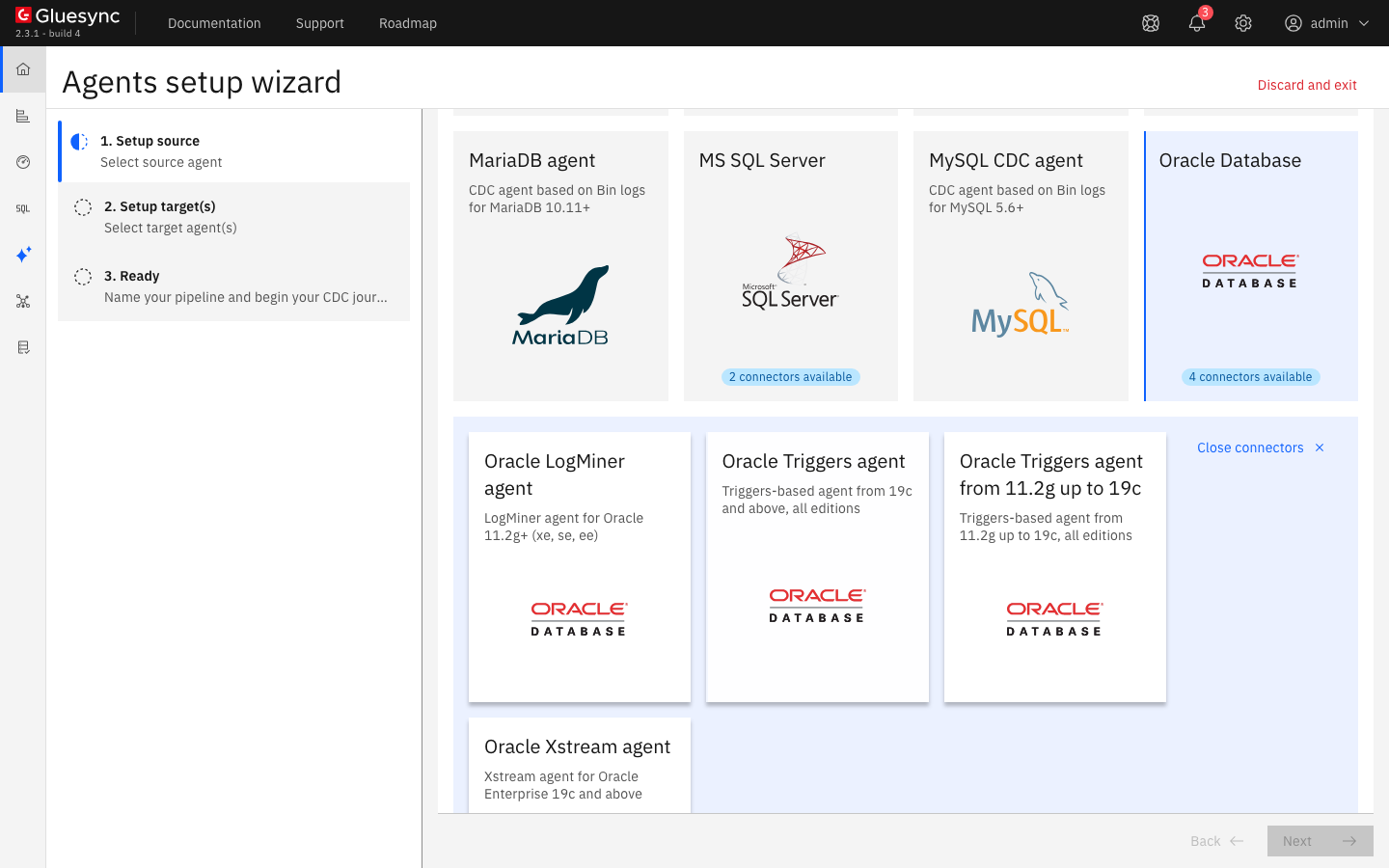
In 1. Setup source, select the Oracle Database tile. The tile says 4 connectors available and opens the list of Oracle agents;
-
Select Oracle Triggers agent, described as Triggers-based agent from 19c and above, all editions. The other triggers tile, Oracle Triggers agent from 11.2g up to 19c, is for older databases.
UI
-
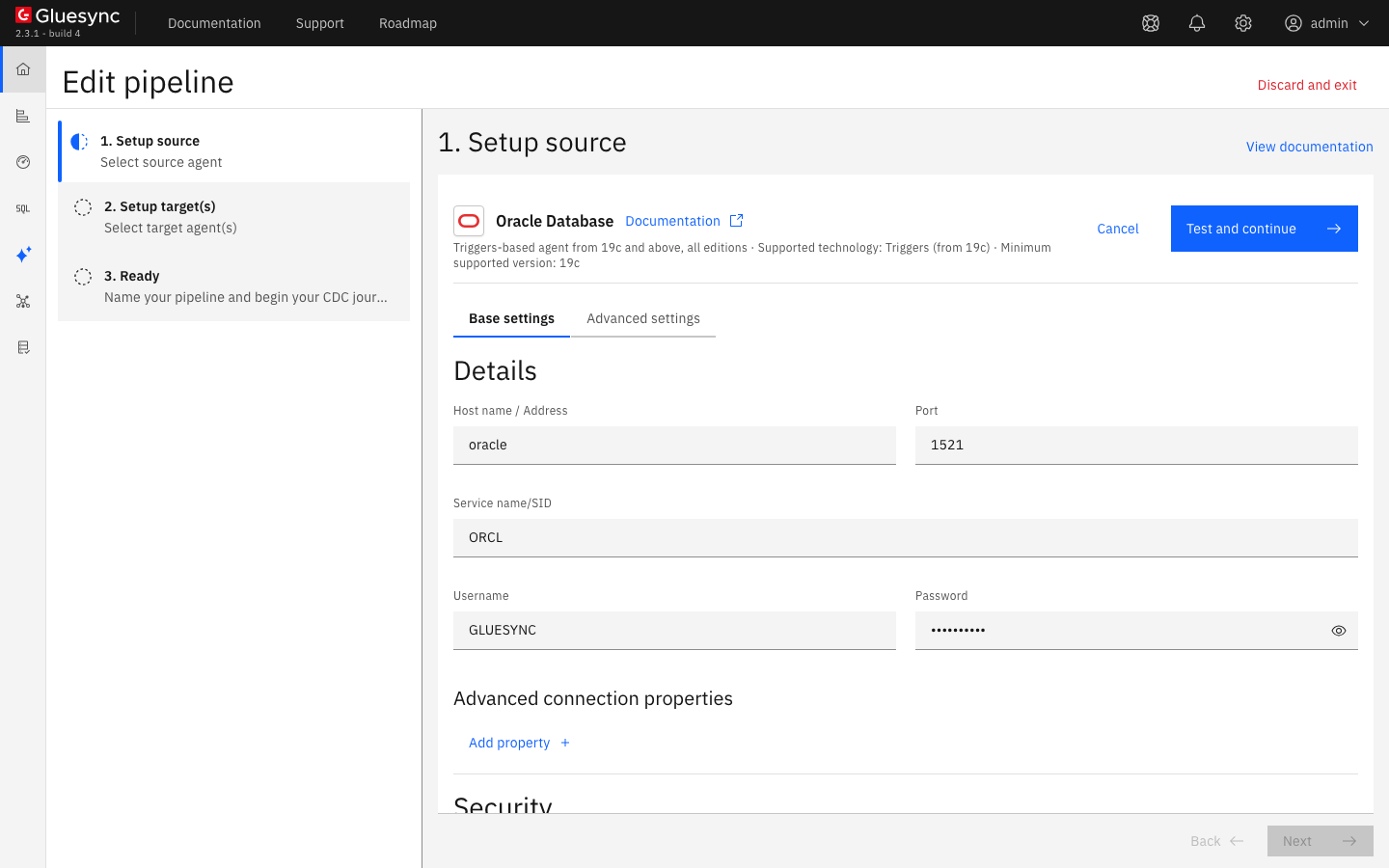
In Base settings, fill the form:
-
Host name / Address: the DNS name or address of the Oracle server, as Core Hub sees it;
-
Port:
1521, or the port of your listener; -
Service name/SID: the service name of the database or PDB,
ORCLin this guide; -
Username and Password: the user of step 2;
-
-
Leave the other settings as they are. Advanced settings lists the properties you can add, see the speed section;
-
Select Test and continue. The source appears with a green check mark.
UI
-
Select Next. In 2. Setup target(s), choose the PostgreSQL CDC agent tile and fill its connection: Host name / Address, Port (
5432), Database name, Username and Password; -
Select Test and continue, then Next;
-
Enter a Pipeline name, for example
oracle-triggers-to-postgres, and select Finish.
UI
-
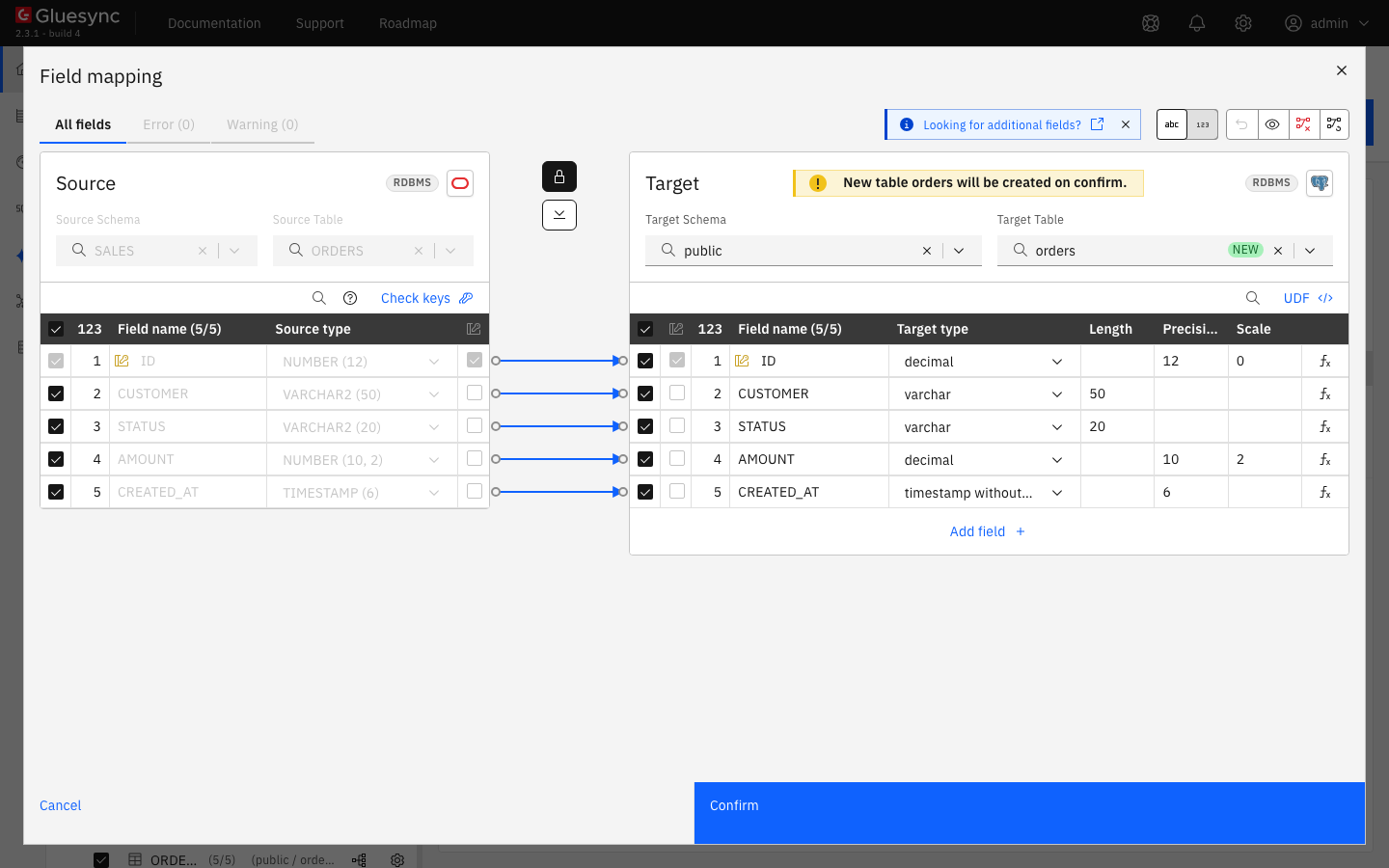
In the pipeline, select Entities. The Add entities page opens with the Object browser. Expand the schema
SALESand tickORDERS. The Field mapping dialog opens. The browser lists every schema and table that the user can read. WithSELECT ANY TABLE, that includes the CDC tables of Gluesync, which you never select; -
Under Target, choose the Target Schema
public, typeordersin Target Table and choose Create table "orders"; -
Select Confirm. The Create table orders dialog shows the read-only SQL statement. Read it, then select Create table orders to run it on the target;
-
Back on the Add entities page, select Confirm and continue.
SQL
Saving the entity is the moment Gluesync adds the objects. Connect as GLUESYNC and list them:
SELECT object_type, object_name, status FROM user_objects ORDER BY 1, 2;
DESC SALES_ORDERS_CDC
The trigger copies every column except LONG, LONG RAW and BFILE. For those, the agent reads the source row by its key when it sends the change.
|
SQL
The trigger already records changes, although the entity has not started. Connect as SALES and change some rows:
INSERT INTO SALES.ORDERS VALUES (10001, 'customer-new', 'new', 19.90, SYSTIMESTAMP);
UPDATE SALES.ORDERS SET STATUS = 'paid', AMOUNT = 25 WHERE ID = 1;
DELETE FROM SALES.ORDERS WHERE ID = 2;
UPDATE SALES.ORDERS SET STATUS = 'shipped' WHERE ID <= 3;
COMMIT;
Connect as GLUESYNC and read the CDC table:
SELECT gs_transaction_id, gs_row_id, gs_session_user_name, gs_operation, id, status, amount
FROM SALES_ORDERS_CDC
ORDER BY 1, 2;| While the entity is on hold, paused or stopped, the trigger keeps writing and nothing reads the rows. The CDC table grows with every change. Do not leave an entity stopped for long on a table with many changes. |
UI + SQL
-
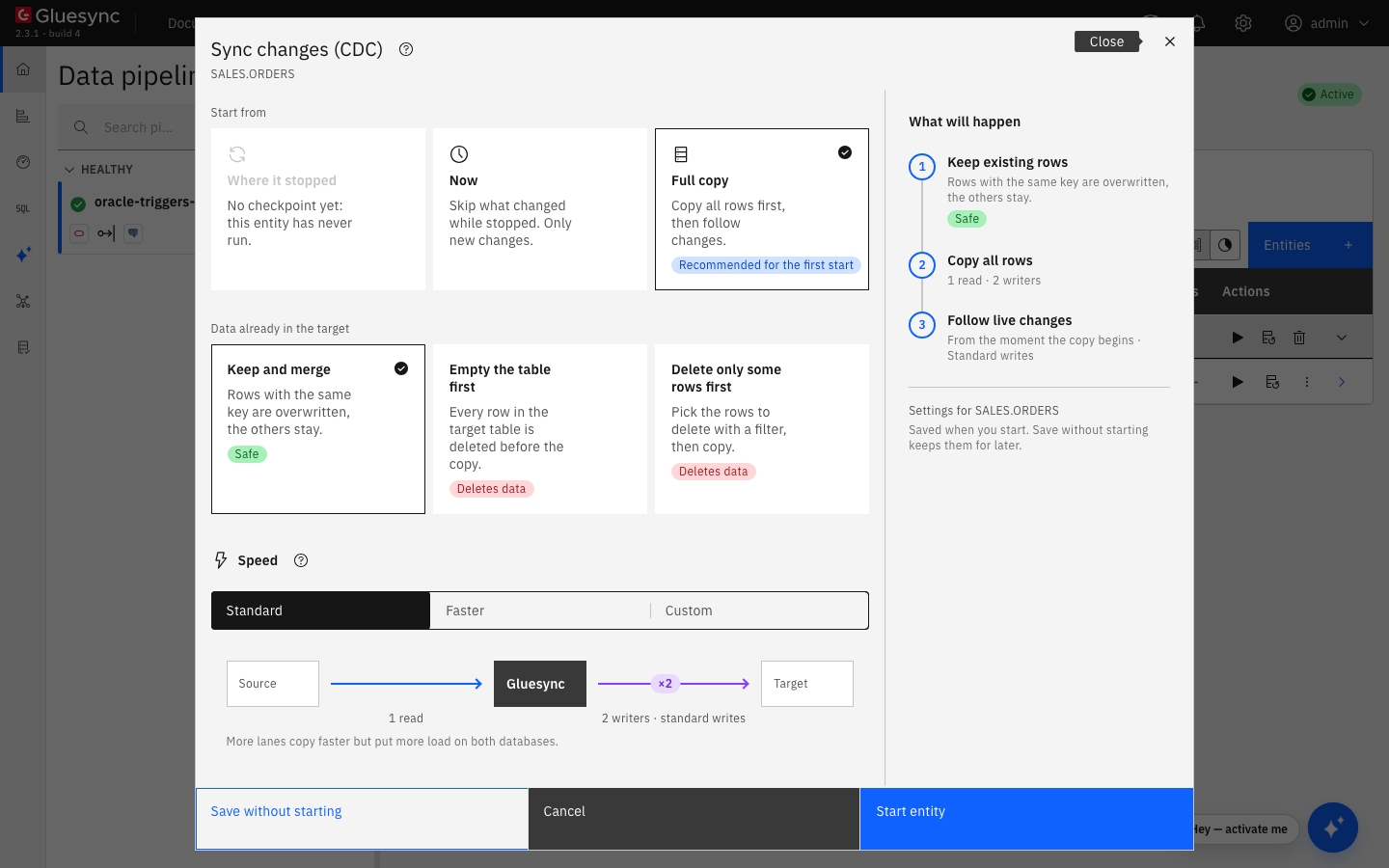
On the row of the entity, select the play button. The Sync changes (CDC) dialog opens;
-
Under Start from keep Full copy, Recommended for the first start. It copies all the rows, then follows the changes. Where it stopped is not available before the first run, and Now skips what changed before the start;
-
Under Data already in the target keep Keep and merge, and under Speed keep Standard;
-
Select Start entity.
Compare the two sides and read the CDC table again:
-- on the source, as SALES
SELECT COUNT(*) FROM SALES.ORDERS;
-- on the source, as GLUESYNC
SELECT COUNT(*) FROM SALES_ORDERS_CDC;
-- on the target
SELECT count(*) FROM public.orders;
SELECT "ID", "STATUS", "AMOUNT" FROM public.orders WHERE "ID" IN (1, 2, 3, 10001) ORDER BY 1;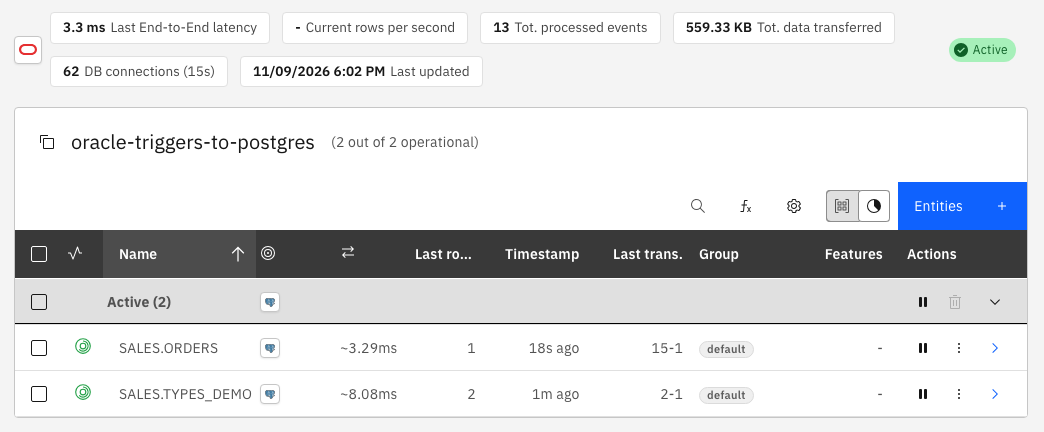
SQL
On the source, as SALES, insert, update and delete one row each, then change a primary key:
INSERT INTO SALES.ORDERS VALUES (10002, 'customer-live', 'new', 5, SYSTIMESTAMP);
UPDATE SALES.ORDERS SET STATUS = 'paid', AMOUNT = 30 WHERE ID = 10;
DELETE FROM SALES.ORDERS WHERE ID = 11;
UPDATE SALES.ORDERS SET ID = 20000 WHERE ID = 5;
COMMIT;
After a few seconds, read the keys on the target:
SELECT "ID", "STATUS", "AMOUNT" FROM public.orders WHERE "ID" IN (5, 10, 11, 10002, 20000) ORDER BY 1;
SELECT count(*) FROM public.orders;
An update that changes a primary key column is written by the trigger as two rows: a delete with the old key, then an insert with the new key. That is why row 5 disappeared from the target.
|
UI + SQL
Pausing an entity keeps its position. The trigger goes on recording, so nothing is lost, and the CDC table grows until you resume.
-
Select the pause button of the entity, then Pause entity;
-
On the source, change some rows:
UPDATE SALES.ORDERS SET STATUS = 'paused-change' WHERE ID BETWEEN 100 AND 104; INSERT INTO SALES.ORDERS VALUES (10003, 'while-paused', 'new', 7, SYSTIMESTAMP); COMMIT; -
Count the rows that wait in the CDC table, as
GLUESYNC:SELECT gs_transaction_id, gs_row_id, gs_operation, id, status FROM SALES_ORDERS_CDC ORDER BY 1, 2; -
Select the play button, choose Where it stopped and select Start entity.
UI + SQL
Deleting an entity removes what Gluesync added for its table, unless another entity still reads the same table.
-
Pause the entity. Open it from the pipeline, select the trash button and confirm with Delete;
-
Connect as
GLUESYNCand list the objects again:SELECT object_type, object_name FROM user_objects; SELECT trigger_name FROM all_triggers WHERE owner = 'GLUESYNC';
| Delete the entity from the Control Plane to remove the objects. If you drop them by hand, the trigger of a table that is still replicated fails your statements, see the troubleshooting table. |
Retention and cleanup
Two settings and one behavior decide how long changes stay in your database.
-
The CDC table is emptied by the agent. The Oracle Triggers agent reads a batch of rows, saves it in its own cache, then deletes the rows from the CDC table. In the test, the CDC table held
0rows a few seconds after every change. What stays in the CDC table is the backlog, so a table that keeps rows means that nothing is reading it: the entity is on hold, paused, stopped or in error; -
The cache has its own retention. Source change retention in hours is a source property,
24by default. It sets how long the agent keeps the changes it has read in its local cache, which gives you a window to replay them. It does not purge the CDC table. See Source-side cache; -
The agent for 11.2g up to 19c keeps the rows. With the tile Oracle Triggers agent from 11.2g up to 19c, the rows stay in the CDC table after they are read, and a cleaner that runs every hour deletes the rows older than Source change retention in hours. In the test, the rows were still there after they reached the target;
-
Partitions. Use partitions for CDC table is off by default. Turn it on only if your edition includes Oracle Partitioning, which Standard Edition does not. See the agent reference;
-
Delete the entity to remove the objects. Gluesync does not drop its objects when you stop or pause an entity, only when you delete it.
Data type notes
The agent maps the types as they are listed in the Field mapping dialog. This table was captured with a PostgreSQL target:
| Oracle type | Proposed PostgreSQL type | Note |
|---|---|---|
|
|
Keeps precision and scale. |
|
|
The dialog shows Missing required field. Enter a precision and a scale, for example |
|
|
|
|
|
No fractional seconds, like an Oracle |
|
|
|
|
|
The instant is kept. PostgreSQL shows it in the session time zone, not with the original offset. |
|
|
|
|
|
The proposed length is |
|
|
|
|
|
The length is |
A target that cannot hold a type shows it in the Field mapping dialog, where you change the target type or add a conversion. See Fix target length and truncation errors. For tables without a primary key, also choose the keys that Gluesync uses on the target, see Choose keys for tables without a primary key.
Speed and bulk settings
-
For the snapshot and for the live writes, start the entity with Faster or Custom under Speed. If the target supports bulk operations, switch the Write method to Bulk load. See Tune replication throughput and Bulk load;
-
The trigger buffers the changed rows of a statement in memory and writes them to the CDC table in pages. The page is the largest fetch size that the entities of the table ask for. A statement that changed 10,000 rows was read as one batch of
10000rows in the test; -
Open the source from the pipeline list, select Advanced settings and use Add property to change the reader. The GA list is: Source change retention in hours, Enable Recursion Protection, Query parallelism, Enable JDBC row prefetch for snapshots, Snapshot batch processing multiplier, CDC batch processing multiplier, Enable CDC direct-path reads, Use partitions for CDC table, Read CDC table data fetch size, Trim text values and Technical fields. The defaults and the meaning of each are in Oracle Triggers source advanced settings;
-
Query parallelism (
4by default) is written as aPARALLELhint on the queries. Parallel query is an Enterprise Edition feature, so on Standard Edition and Express Edition expect no gain from it; -
Keep Enable Recursion Protection off, unless the same database is also a target of a bidirectional setup. When it is on, the reader skips the rows that the Gluesync user itself wrote, see Set up bidirectional replication with recursion protection.
Troubleshooting
| Symptom or message | Cause | Fix |
|---|---|---|
The entity cannot be saved. The Control Plane shows Entity Upsert Failed, The entity could not be saved. and |
The Gluesync user cannot create the trigger. The connection test passed, because it signs in only. The failed save leaves no object behind: the tables and the sequence it created are removed again. |
Run |
Your application gets |
The Gluesync user has no quota on its tablespace. The entity was saved, because Oracle creates the CDC table without a segment. The trigger fails on its first insert, and the failure reaches the application statement. |
Run |
Your application gets |
The CDC table was renamed or dropped, so the trigger cannot compile. |
Rename the CDC table back, for example |
The field mapping shows Missing required field on a column that is a |
The type has no precision and no scale, and the target type needs them. |
Enter a precision and a scale in the target column, see the data type notes. |
The field mapping shows the Error tab and a length of |
The target type needs a length and the source type has none. |
Enter a length in the target column. |
The CDC table keeps growing |
Nothing reads it: the entity is on hold, paused, stopped or in error, or a pipeline was deleted from the Control Plane while the objects were left behind. |
Resume the entity, or delete it to remove the objects. Run |
Statements on a replicated table cost more than you expect, and the table has two triggers of Gluesync, in two schemas |
Two Gluesync users, for example from two pipelines, each added a trigger to the same table. Both triggers run on every change and each writes its own CDC table. |
Use one Gluesync user for a table. Put the entities of the table in one pipeline. Delete the entity of the second user to remove its trigger. |
The Object browser lists a schema with the name of the Gluesync user and tables ending in |
The user has |
Do not select them. Or replace |
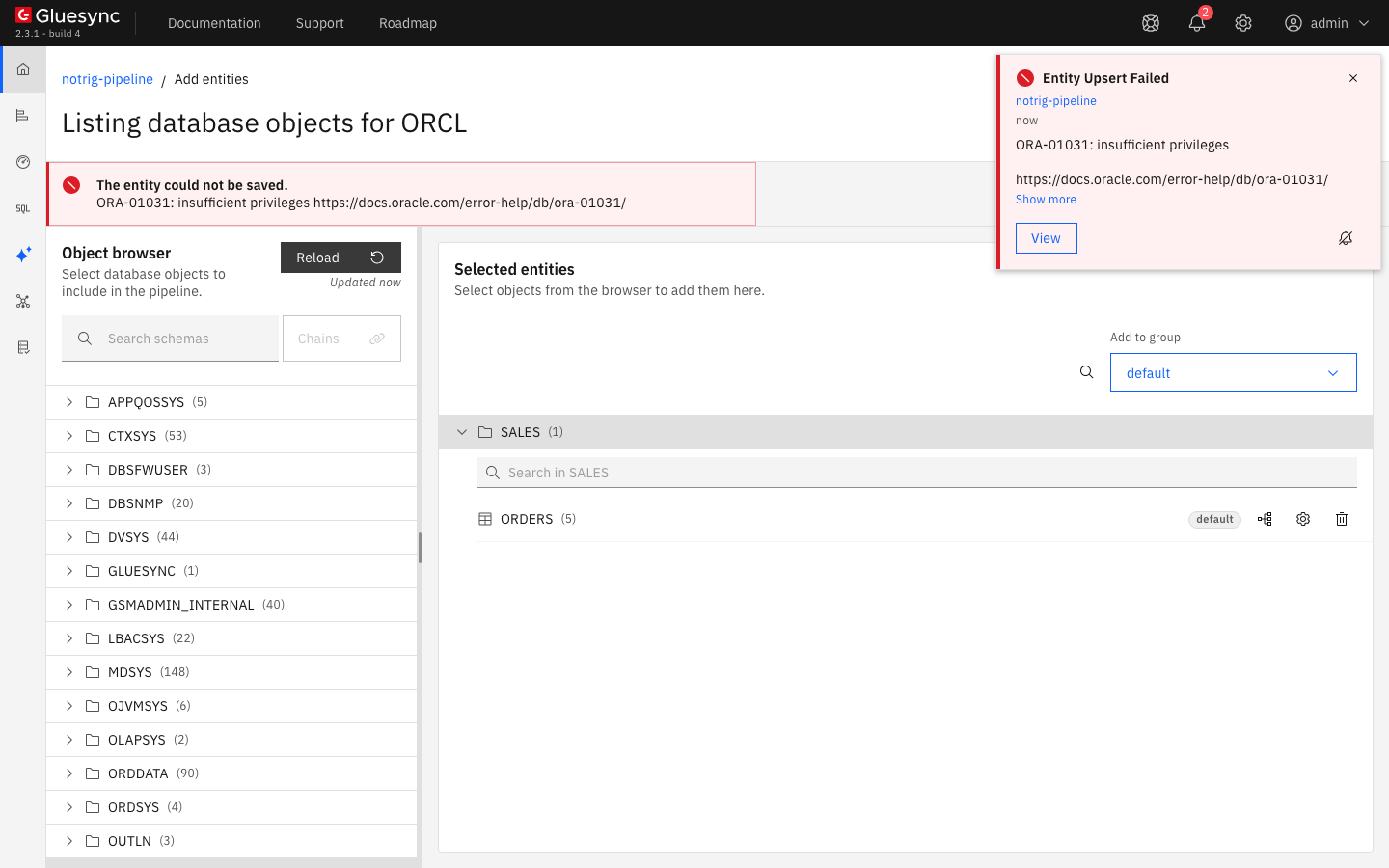
CREATE ANY TRIGGER: the page shows the Oracle message and the notification names the pipeline.