Set up an IBM Db2 LUW triggers source
The Db2 LUW triggers-based agent captures changes with three triggers on each source table, one for inserts, one for updates and one for deletes. It needs no archive logging, no backup, no instance restart and no file on the Db2 server, so it fits a database where you cannot change the logging settings. The price is that Gluesync adds objects to your database and the triggers write one extra row for every row that changes. This guide creates the user, shows every object that Gluesync adds, runs a snapshot and live changes into PostgreSQL, explains retention and cleanup, and shows how to choose between triggers and the log-based agent.
In this guide
You will create a dedicated Gluesync user with the authorities the agent needs, create the Db2 LUW triggers source and a PostgreSQL target in the Control Plane, and add a table as an entity. You will then read the triggers, the CDC table, the sequence and the index that Gluesync created, start a snapshot followed by live changes, check inserts, updates, deletes, a primary key change and a rolled-back transaction, and remove the entity together with its objects. The last sections cover retention, data types, speed settings, the choice between triggers and the log-based agent, and the failures you are most likely to meet.
Quick information
Goal |
Replicate a Db2 LUW table with a snapshot followed by trigger-based change data capture (CDC), and know what the agent adds to your database |
Audience |
Db2 administrators and data engineers |
Level |
Intermediate |
Time required |
About 45 minutes |
Area |
Db2 database → Control Plane → Data pipelines → IBM Db2 for LUW → Triggers-based CDC agent → Base settings; entity → start dialog |
Applies to |
Gluesync 2.3 |
Before you begin
Make sure that:
-
You have an IBM Db2 for LUW database, version 11.5 or later. This guide was tested with Db2 11.5.8.0 on Linux;
-
You can run commands as the instance owner (here
db2inst1) on the Db2 server and you can connect to the database with an authority that can create users and grant privileges, for exampleSECADMorDBADM; -
Core Hub can reach the Db2 port,
50000by default; -
You have a source table with a primary key. This guide uses
SALES.ORDERSwith 1,000 rows (ID INTEGERprimary key,CUSTOMER VARCHAR(50),STATUS VARCHAR(20),AMOUNT DECIMAL(10,2),CREATED_AT TIMESTAMP). The first step creates it; -
You have a target to write to. This guide uses a PostgreSQL database and its connection details: any target works, and the steps for the source are the same;
-
You can sign in to the Control Plane with a role that can create pipelines;
-
You can run SQL on the target, for example with
psql.
|
A trigger runs inside every transaction that changes the table. A problem with the objects that Gluesync adds can make your application statements fail, see the troubleshooting table. Try the guide on a test database first, and tell the owners of the application before you add triggers to a production table. |
|
The messages and screens in this guide were captured in the Control Plane and in the Db2 command line processor with Db2 11.5.8.0 as the source and PostgreSQL 16 as the target. The options of the agent are listed in the Db2 LUW triggers setup page and in the agent overview. Where the names in the reference differ from the names in the Control Plane, this guide uses the Control Plane names. |
Triggers or the log-based agent
Gluesync has two source agents for Db2 LUW. Both work with a Linux Db2 database. Pick the one whose cost you can accept. The log-based agent is described in Set up an IBM Db2 LUW source with log-based CDC.
| Question | Triggers-based CDC agent | Transaction logs-based CDC agent |
|---|---|---|
What must the database owner change? |
Nothing at database level. In the test, the database used circular logging ( |
Turn on archive logging, which needs an offline backup and an instance restart, create a log reader user, and install a native library on the Db2 server. |
Which Db2 version? |
11.5 or later. |
11.5.8.0 or later. |
What does Gluesync add to the database? |
For each source table: three triggers, one CDC table, one sequence and one index. |
No trigger. A stored procedure, and one CDC table for each source table in the |
What does a change cost the source? |
The triggers write one extra row to the CDC table, in the same transaction, for every row that changes. |
Db2 writes the log anyway. The agent reads it. |
What happens if the objects break? |
Your application statements on the table can fail, for example with |
Application statements are not affected. |
Pick triggers when you cannot turn on archive logging, cannot restart the instance or install a file on the server, or run a managed service where you control one schema only, and when the tables change at a rate that an extra insert per row can carry. Pick the log-based agent when the tables change very often, when nothing may be added to the application tables, or when a failed trigger would be unacceptable.
Guide steps
CLI
Sign in as the instance owner on the Db2 server. Skip this step if you replicate your own table.
su - db2inst1
db2 connect to DEMO
CREATE SCHEMA SALES;
CREATE TABLE SALES.ORDERS (
ID INTEGER NOT NULL PRIMARY KEY,
CUSTOMER VARCHAR(50),
STATUS VARCHAR(20),
AMOUNT DECIMAL(10,2),
CREATED_AT TIMESTAMP
);
INSERT INTO SALES.ORDERS
WITH T(N) AS (SELECT 1 FROM SYSIBM.SYSDUMMY1 UNION ALL SELECT N+1 FROM T WHERE N < 1000)
SELECT N, 'Customer ' || CHAR(N),
CASE MOD(N,3) WHEN 0 THEN 'NEW' WHEN 1 THEN 'PAID' ELSE 'SHIPPED' END,
DECIMAL(N*1.25,10,2), CURRENT TIMESTAMP
FROM T;
COMMIT;CLI
The triggers agent does not read the log, so it does not care how the database logs. Check the setting to know where you stand:
db2 get db cfg for DEMO | grep -E "LOGARCHMETH1|Backup pending"| Do not change the logging mode for Gluesync. The log-based agent needs archive logging, the triggers agent does not. |
CLI + SQL
Db2 LUW checks users against the operating system by default, so create an operating system user first. Use a group that is not the SYSADM group of the instance, because a member of that group does not need any grant. Replace the password:
sudo useradd -m gluesync
sudo passwd gluesync
Then grant the user the least that the agent needs. Create the schema of the user yourself, because the agent adds its sequence and its triggers to the schema that has the name of the user:
CREATE SCHEMA GLUESYNC AUTHORIZATION GLUESYNC;

GRANT CONNECT ON DATABASE TO USER GLUESYNC;
GRANT SELECT ON TABLE SALES.ORDERS TO USER GLUESYNC;
GRANT CREATEIN, ALTERIN, DROPIN ON SCHEMA SALES TO USER GLUESYNC;-
CONNECTlets the user sign in; -
SELECTon each table you replicate lets the agent list it and read it for the snapshot. Repeat the grant for every table. In the Object browser, the user sees only the tables it can read; -
CREATEINlets the agent create the CDC table and its index in the schema of the source table.ALTERINlets it create the triggers on the tables of that schema.DROPINlets it remove the CDC table when you delete the entity; -
The
GLUESYNCschema holds the sequence and the three triggers of each table. The triggers are defined onSALES.ORDERS, but they belong to the schema of the user. If the schema does not exist, Db2 creates it on first use for a user who holds theIMPLICIT_SCHEMAauthority, which every user has by default. Creating it yourself keeps the owner clear; -
The user needs no
DBADM,DATAACCESSorCREATE_EXTERNAL_ROUTINE. In the test, a user with only these grants saved the entity, copied the table and followed the changes. The users and the applications that write toSALES.ORDERSneed no grant on the Gluesync objects: a change made by another user was captured too.
UI
-
In the Control Plane, select Create your first pipeline, or the + button of the pipeline list if you already have pipelines. The Agents setup wizard opens;
-
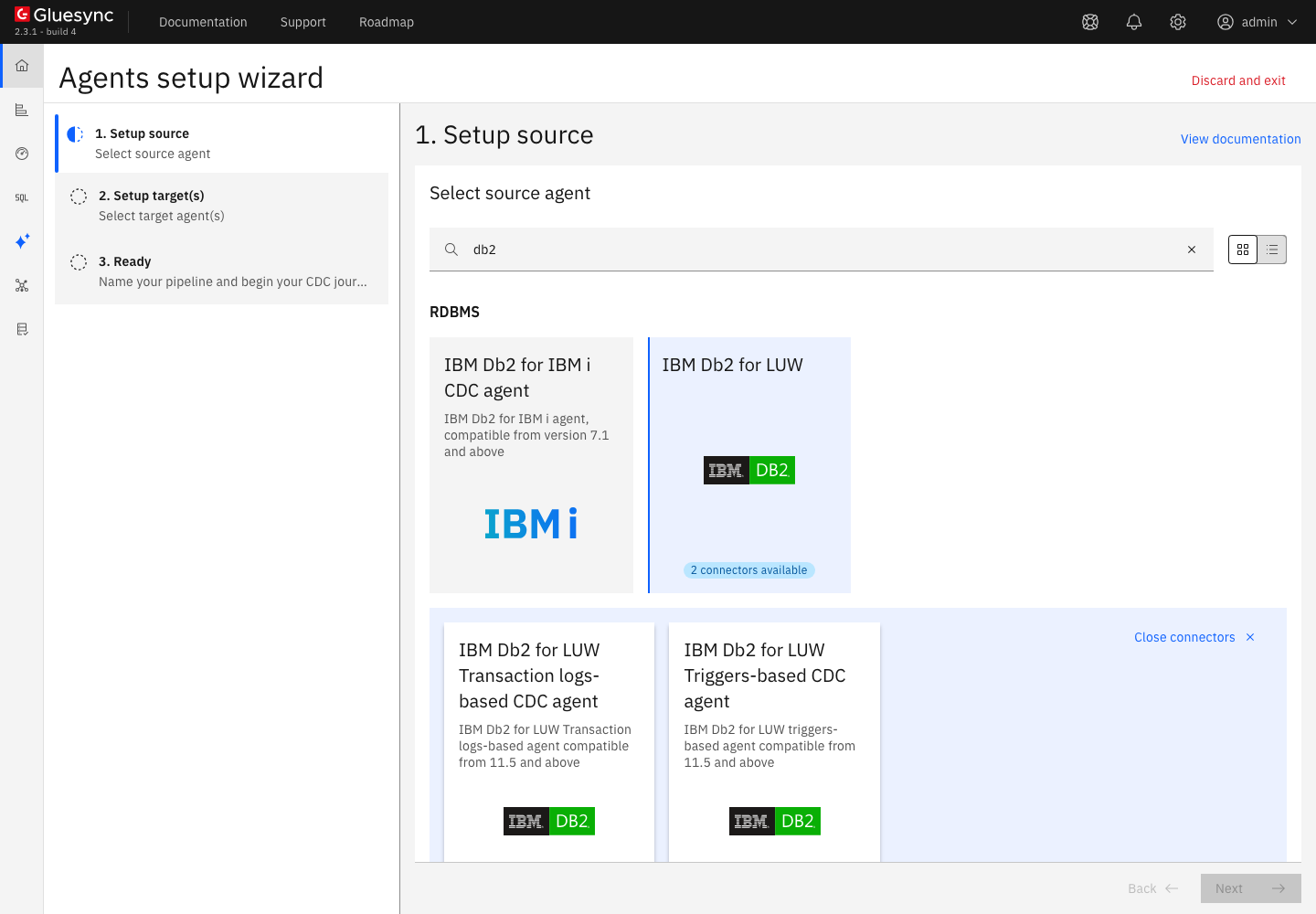
In 1. Setup source, search for
db2and select the IBM Db2 for LUW tile. The tile says 2 connectors available and opens the list of Db2 LUW agents; -
Select IBM Db2 for LUW Triggers-based CDC agent, described as IBM Db2 for LUW triggers-based agent compatible from 11.5 and above.
UI
-
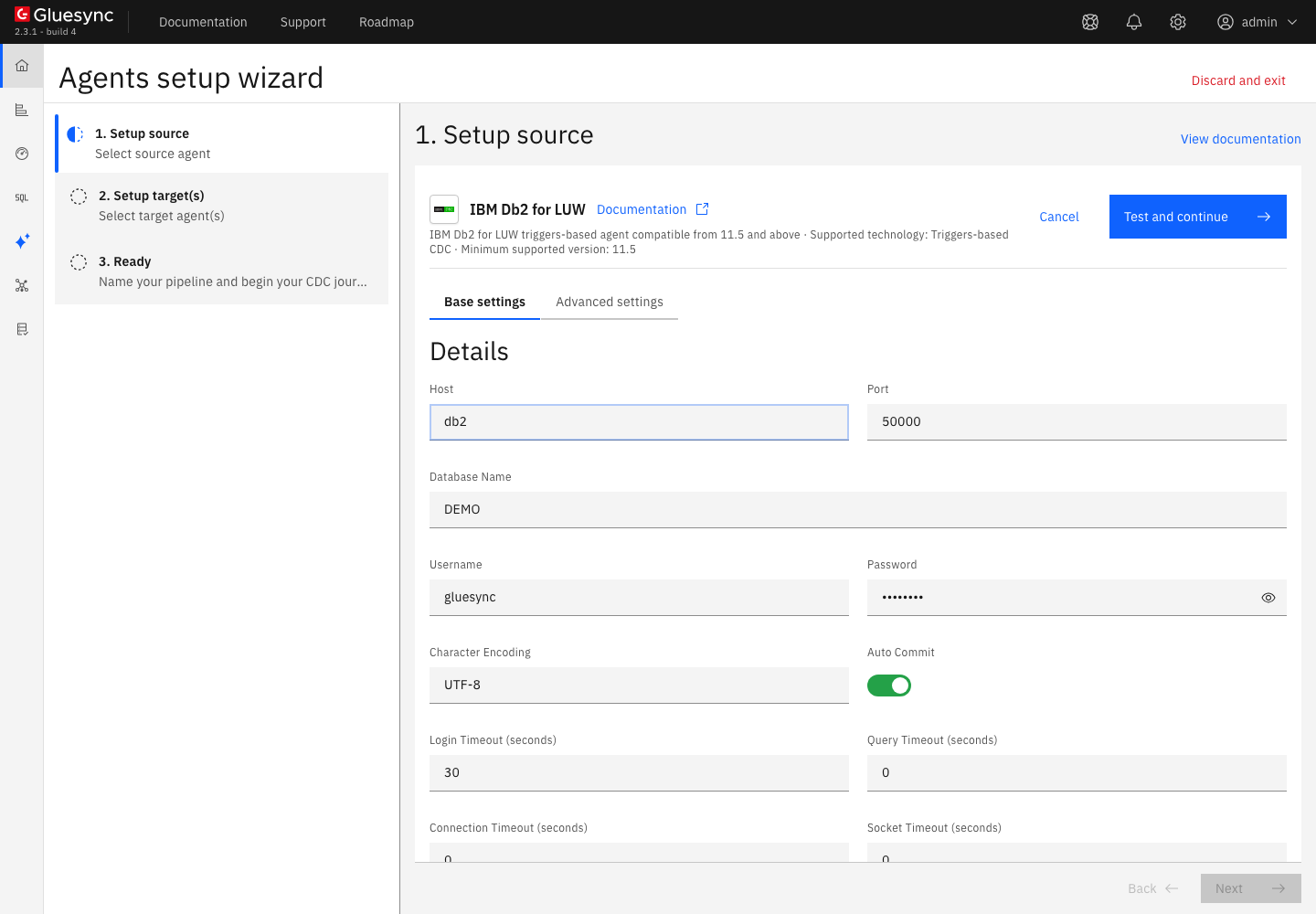
In Base settings, fill the form:
-
Host: the DNS name or address of the Db2 server, as Core Hub sees it;
-
Port:
50000, or the port of your instance; -
Database Name:
DEMOin this guide; -
Username and Password: the user of step 3;
-
Character Encoding: keep
UTF-8, unless your data uses another encoding;
-
-
Leave the other settings as they are. Advanced settings lists the properties you can add, see the retention and the speed sections;
-
Select Test and continue. The source appears with a green check mark.
UI
-
Select Next. In 2. Setup target(s), choose the PostgreSQL CDC agent tile and fill its connection: Host name / Address, Port (
5432), Database name, Username and Password; -
Select Test and continue, then Next;
-
Enter a Pipeline name, for example
db2-triggers-to-postgres, and select Finish.
UI
-
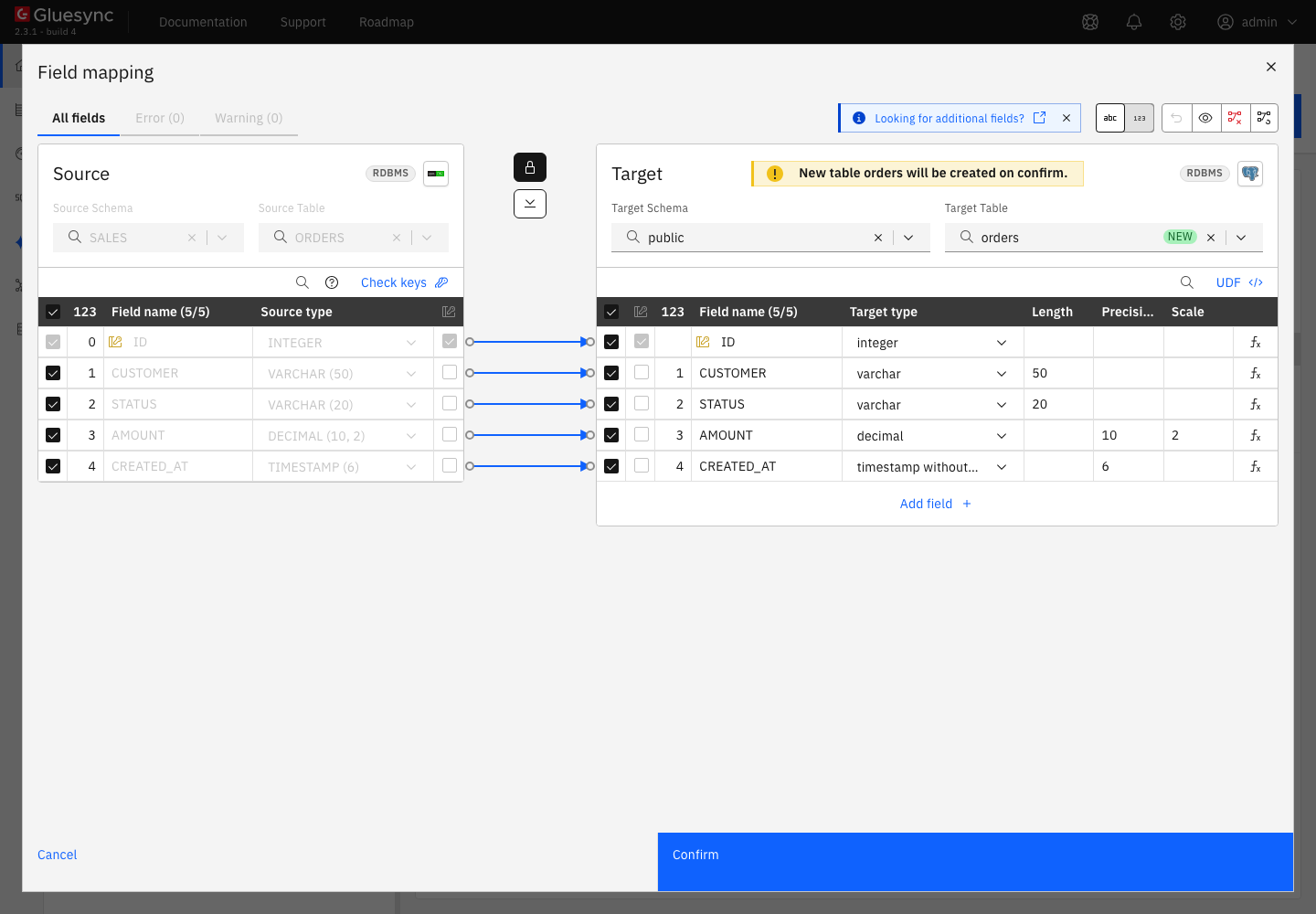
In the pipeline, select Entities. The Add entities page opens with the Object browser. Expand the schema
SALESand tickORDERS. The Field mapping dialog opens. The browser also lists the CDC tables of Gluesync once they exist, for exampleSALES_ORDERS_CDC, which you never select; -
Under Target, choose the Target Schema
public, typeordersin Target Table and choose Create table "orders"; -
Select Confirm. The Create table orders dialog shows the read-only SQL statement. Read it, then select Create table orders to run it on the target;
-
Back on the Add entities page, select Confirm and continue.
CLI
Saving the entity is the moment Gluesync adds the objects, before you start it. As the instance owner, list them:
SELECT TRIGSCHEMA, TRIGNAME, TABSCHEMA, TABNAME, TRIGEVENT FROM SYSCAT.TRIGGERS WHERE TABNAME = 'ORDERS';
SELECT SEQSCHEMA, SEQNAME FROM SYSCAT.SEQUENCES WHERE SEQSCHEMA = 'GLUESYNC';
SELECT TABNAME, INDNAME FROM SYSCAT.INDEXES WHERE TABSCHEMA = 'SALES' AND TABNAME = 'SALES_ORDERS_CDC';
SELECT COLNAME, TYPENAME FROM SYSCAT.COLUMNS WHERE TABNAME = 'SALES_ORDERS_CDC' ORDER BY COLNO;
The CDC table has no column for XML values. For those, the agent reads the source row by its key when it sends the change, see the data type notes.
|
UI + CLI
-
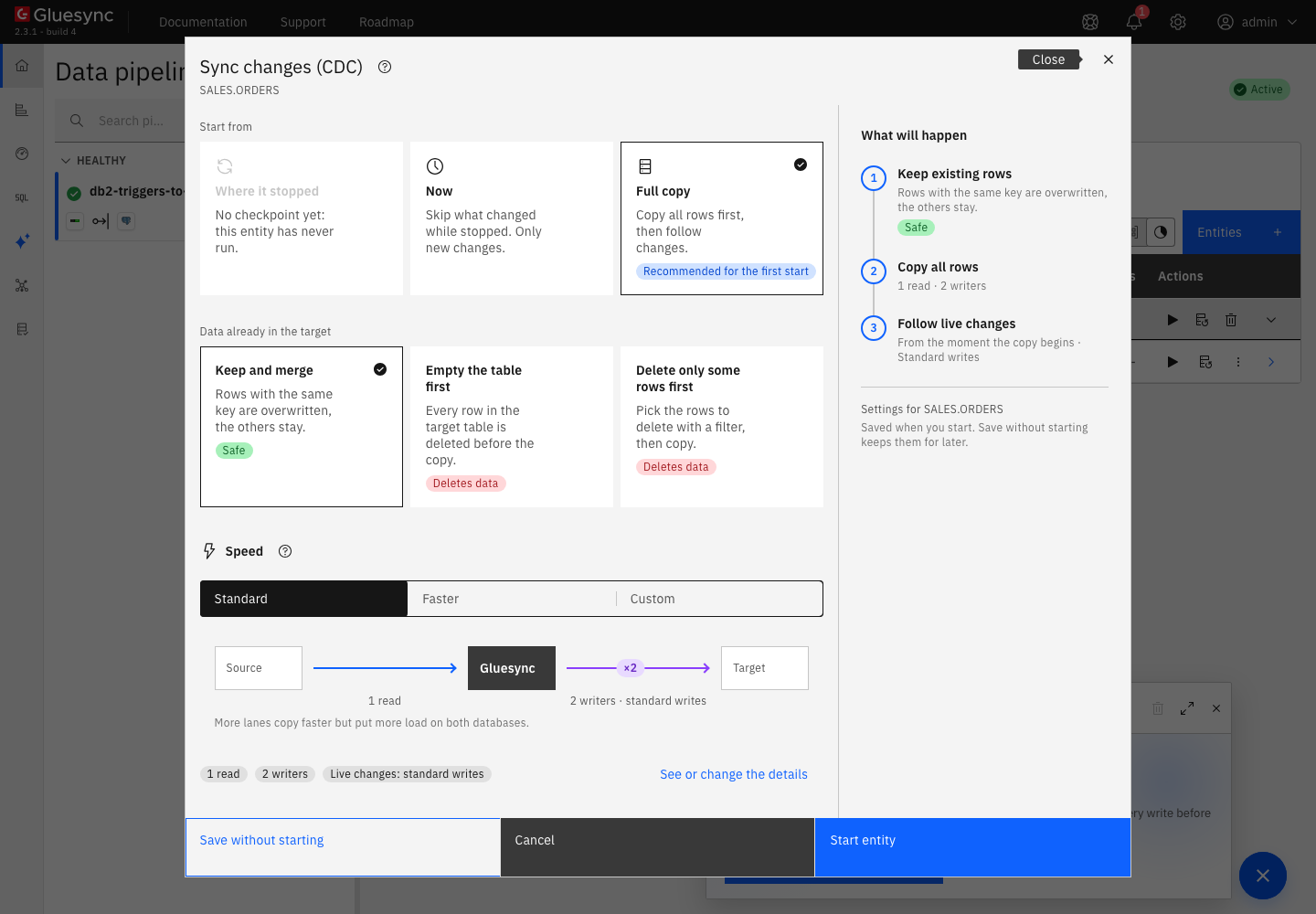
On the row of the entity, select the play button. The Sync changes (CDC) dialog opens;
-
Under Start from keep Full copy, Recommended for the first start. It copies all the rows, then follows the changes. Where it stopped is not available before the first run, and Now skips what changed before the start;
-
Under Data already in the target keep Keep and merge, and under Speed keep Standard;
-
Select Start entity.
Compare the two sides:
-- on the source
SELECT COUNT(*) FROM SALES.ORDERS;
SELECT COUNT(*) FROM SALES.SALES_ORDERS_CDC;
-- on the target
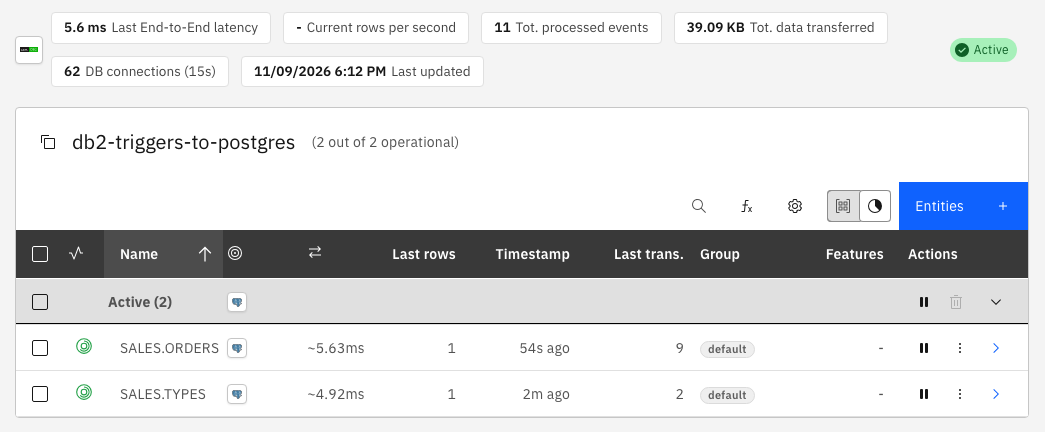
SELECT count(*) FROM public.orders;The source and the target both count 1000. The CDC table is empty: 0. The copy does not write to it.
CLI + SQL
On the source, as any user that can write to the table, insert, update and delete one row each:
INSERT INTO SALES.ORDERS VALUES (1001, 'Acme', 'NEW', 99.90, CURRENT TIMESTAMP);
UPDATE SALES.ORDERS SET STATUS = 'PAID', AMOUNT = 120.00 WHERE ID = 1001;
DELETE FROM SALES.ORDERS WHERE ID = 1000;
After a few seconds, read the raw changes on the source and the result on the target:
-- on the source
SELECT GS_TRANSACTION_ID, GS_OPERATION, GS_SESSION_USER_NAME, GS_TRANSACTION_READ, GS_TRANSACTION_CONSUMED, ID, STATUS
FROM SALES.SALES_ORDERS_CDC ORDER BY GS_TRANSACTION_ID;
-- on the target
SELECT count(*) FROM public.orders;
SELECT * FROM public.orders WHERE "ID" IN (1000, 1001);Now change a primary key, and then roll back a transaction:
UPDATE SALES.ORDERS SET ID = 2001 WHERE ID = 1001;db2 +c "INSERT INTO SALES.ORDERS VALUES (4001, 'Rolled', 'NEW', 5.00, CURRENT TIMESTAMP)"
db2 rollback
The READ flag turns to 1 when the agent has taken the row. Gluesync does not delete the row at that moment, see the retention section.
|
UI + CLI
Deleting an entity removes what Gluesync added for its table. The Delete entity action is not available while the entity is active.
-
Select the pause button of the entity, then Pause entity;
-
Select the three-dot menu of the entity, then Delete entity, and confirm with Delete;
-
As the instance owner, list the objects again, here for a table named
ITEMS:SELECT TABNAME FROM SYSCAT.TABLES WHERE TABNAME = 'SALES_ITEMS_CDC'; SELECT TRIGNAME FROM SYSCAT.TRIGGERS WHERE TABNAME = 'ITEMS'; SELECT SEQNAME FROM SYSCAT.SEQUENCES WHERE SEQNAME = 'ITEMS_SEQ';
| Delete the entity from the Control Plane to remove the objects. If you drop them by hand, the triggers of a table that is still replicated fail your statements, see the troubleshooting table. |
Retention and cleanup
The triggers keep writing while an entity is on hold, paused or stopped, and nothing reads the rows. Watch the size of the CDC tables, and know how the cleanup works.
-
Rows stay after they are read. The agent flags a row as read, then as consumed after the change reached the target, and keeps the row. In the test, every row that reached the target was flagged
READ = 1and stayed in the table; -
A cleaner deletes old rows. It runs when the agent starts and then every hour, for every table of every entity, also for stopped entities. It deletes the rows that have
GS_TRANSACTION_CONSUMED = 1and are older than Source change retention in hours. The setting is a source property,24by default, and0turns the cleaner off. In the test, with rows that were made old and flagged consumed by hand, the cleaner deleted exactly those rows and left an old row that was not consumed. See Source change retention in hours; -
Check that the flag moves in your database. In the test, the consumed flag stayed
0for every row that was delivered, so the cleaner had nothing to delete. Until you seeGS_TRANSACTION_CONSUMEDturn to1in your own CDC table, plan your own purge; -
Purge by hand. While the entity is running and keeps up, you can delete the rows that the agent has read and that are older than the longest outage you want to survive. In the test, the entity went on with the next change after this statement:
DELETE FROM SALES.SALES_ORDERS_CDC
WHERE GS_TRANSACTION_READ = 1
  AND GS_CDC_TABLE_INSERT_TIMESTAMP < CURRENT TIMESTAMP - 2 DAYS;
Never delete rows with
GS_TRANSACTION_READ = 0: the agent has not taken them yet; -
Delete the entity to remove the objects. Gluesync does not drop its objects when you stop or pause an entity, only when you delete it;
-
The objects are yours to watch. A table that keeps growing means that nothing reads it: the entity is on hold, paused, stopped or in error.
To set the retention, open the source, select Advanced settings, select Add property and choose Source change retention in hours.
Data type notes
The agent maps the types as they are listed in the Field mapping dialog. This table was captured with a PostgreSQL target, with one row of each type copied and then changed:
| Db2 type | Proposed PostgreSQL type | Note |
|---|---|---|
|
|
|
|
|
Keeps precision and scale. |
|
|
|
|
|
The value keeps its trailing blanks, `ab `. |
|
|
|
|
|
|
|
|
Microseconds are kept. |
|
|
The length is the declared size of the |
|
|
|
|
|
|
|
|
The length is |
The CDC table has no XML column. When a change arrives, the agent reads the XML value from the source row by its key. In the test, an update of an XML column reached the target, so the value is the one that the row has at the time of the read.
A target that cannot hold a type shows it in the Field mapping dialog, where you change the target type or add a conversion. See Fix target length and truncation errors. For tables without a primary key, also choose the keys that Gluesync uses on the target, see Choose keys for tables without a primary key.
Speed and bulk settings
-
For the snapshot and for the live writes, start the entity with Faster or Custom under Speed. If the target supports bulk operations, switch the Write method to Bulk load. See Tune replication throughput and Bulk load;
-
Open the source, select Advanced settings and use Add property to change the agent. The list in the Control Plane is: Source change retention in hours, Disable truncate on target table before snapshot inserts, Trim text values and Technical fields. The meaning of each is in DB2 LUW source advanced settings;
-
The connection form lists Login Timeout, Query Timeout, Min connections count and Max connections count, among others. Keep the defaults until you have a reason to change them;
-
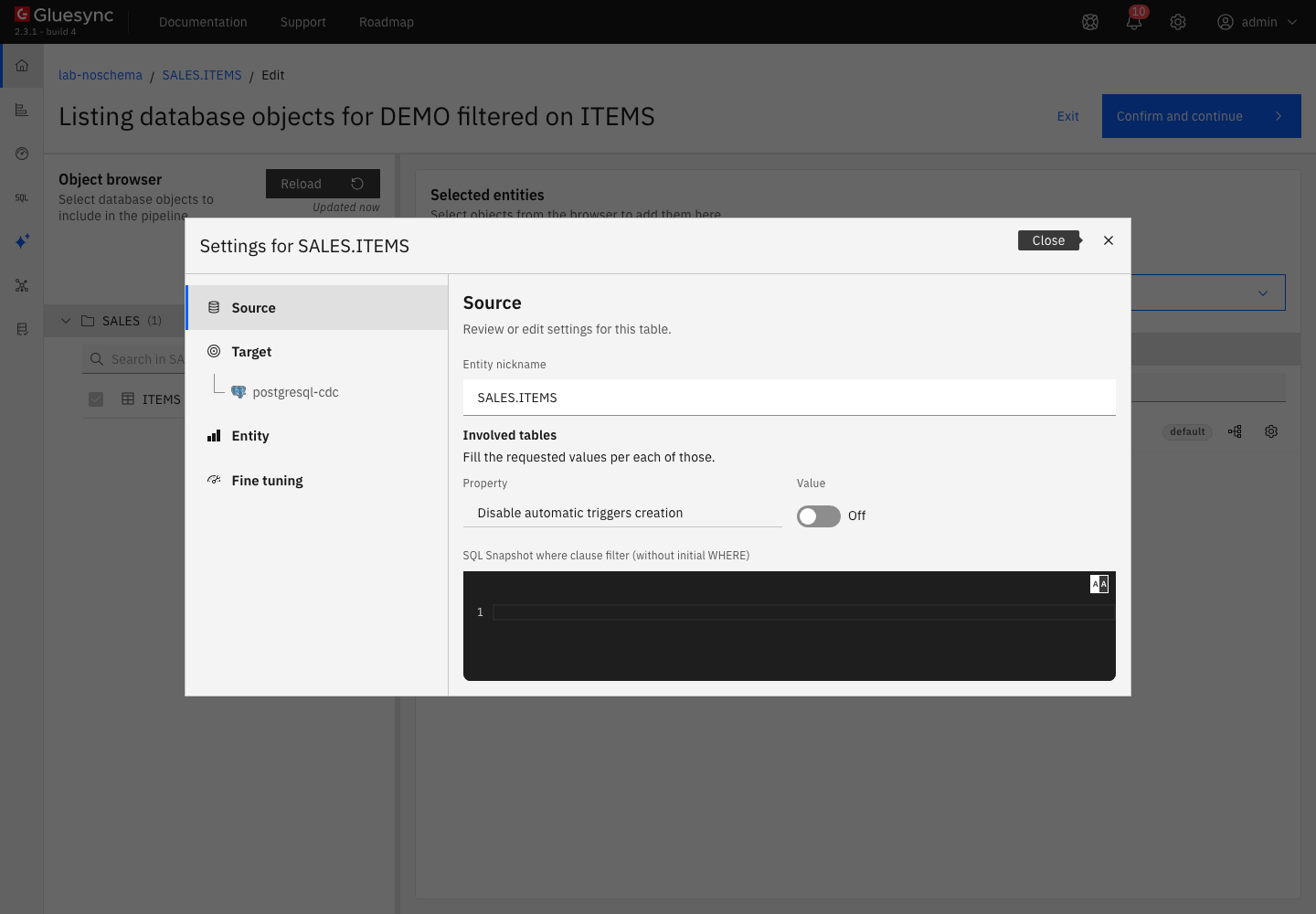
In the settings of the entity, under Source, the table option Disable automatic triggers creation is off by default. Turn it on only when your database owner creates the triggers for you, see Disable automatic triggers creation.
Troubleshooting
| Symptom or message | Cause | Fix |
|---|---|---|
The entity cannot be saved. The Control Plane shows The entity could not be saved. and |
The Gluesync user cannot create objects in the schema of the source table. The connection test passed, because it signs in only. Nothing was added to the database. |
Run |
Your application gets |
The CDC table was renamed or dropped, so the triggers cannot write to it. In the test, the triggers stayed valid and the statement failed until the table had its name back. |
Rename the CDC table back, for example |
The connection test shows |
The user does not exist on the Db2 server, or the password is wrong. |
Create or reset the operating system user on the server, then edit the source connection. |
The connection test shows |
The Database Name does not exist on the server. |
Check the name with |
The connection test shows |
Core Hub cannot resolve the Host. |
Use a name or an address that the Core Hub host can resolve. |
The field mapping shows Missing required field and a length of |
The target type needs a length and the source type has none. |
Enter a length in the target column, see the data type notes. |
The CDC table keeps growing |
Nothing reads it: the entity is on hold, paused, stopped or in error. Or the cleaner does not delete the rows, because their consumed flag is |
Resume the entity, or delete it to remove the objects. Run |
The Object browser lists tables ending in |
They are the CDC tables of Gluesync, in the schema of your source table. |
Do not select them. |