Keep foreign keys intact with a chain on SQL Server
Foreign keys on the target make the order of the writes matter: a child row cannot land before its parent row. A chain turns a set of SQL Server tables into one entity that copies and writes the tables in a fixed order. The Auto sort wizard works out that order from the foreign keys. This guide builds a small order-management model with 13 tables linked by foreign keys, replicates it from SQL Server CDC to SQL Server, and shows what the chain order protects and what it does not. It covers the first copy, an insert of parents and children in one transaction, deletes, the error you get with a wrong order, and how to change or re-sort the order later.
In this guide
You will create the same 13 tables, with the same foreign keys, on a source and a target database. You will load sample rows and enable CDC on the source. You will select all the tables in the Object browser, create a chain, let the Auto sort wizard put the parents before the children and start the first copy. You will insert and delete linked rows in single transactions and read the result on the target. You will see the foreign key error that a wrong order gives, and you will re-sort a chain that already exists.
For what chains are and which agents support them, see Groups and chains. This guide does not repeat it.
Quick information
Goal |
Replicate tables that reference each other through foreign keys to a target that enforces the same foreign keys, without constraint errors |
Audience |
Data engineers and database administrators who replicate relational models from SQL Server |
Level |
Intermediate |
Time required |
About 60 minutes |
Area |
Control Plane → Pipelines → Entities → Add entities → Object browser → Chains → Auto sort wizard; entity list → Edit entity; SQL Server → T-SQL |
Applies to |
Gluesync 2.3 |
Before you begin
Make sure that:
-
You have a SQL Server instance with SQL Server Agent that you can reach with the
sysadminserver role. This guide was tested with SQL Server 2022 Developer on Linux, with the source and the target as two databases,srcandtgt, on one instance. Two instances work the same way; -
Core Hub can open a connection to the instance on the SQL Server port,
1433by default; -
You can sign in to the Control Plane with a role that can create pipelines;
-
You know how to set up the source and the target connections. This guide repeats only the choices that matter for the chain. For the source, see Set up a SQL Server CDC source. For the target, see Prepare a SQL Server target.
|
The screens and messages in this guide were captured in the Control Plane and in |
Guide steps
SQL
The foreign keys on the target are the reason for the chain, so create them before the pipeline. Create two databases, src and tgt, and run the script below in both. The model has 13 tables:
-
Six levels deep:
Regions→Countries→Customers→Addresses→Orders→OrderLines; -
One table with two parents:
ProductsreferencesCategoriesandSuppliers.Ordershas four parents; -
One self-reference:
Employees.ManagerIdpoints toEmployees.EmployeeId.
Name the constraints. The error messages quote the constraint name, and a name tells you which pair of tables is wrong.
Schema script for the source and the target
CREATE TABLE dbo.Regions (
    RegionId    int           NOT NULL PRIMARY KEY,
    Name        nvarchar(60)  NOT NULL
);
CREATE TABLE dbo.Countries (
    CountryId   int           NOT NULL PRIMARY KEY,
    RegionId    int           NOT NULL,
    Name        nvarchar(60)  NOT NULL,
    CONSTRAINT FK_Countries_Regions FOREIGN KEY (RegionId) REFERENCES dbo.Regions (RegionId)
);
CREATE TABLE dbo.Categories (
    CategoryId  int           NOT NULL PRIMARY KEY,
    Name        nvarchar(60)  NOT NULL
);
CREATE TABLE dbo.Suppliers (
    SupplierId  int           NOT NULL PRIMARY KEY,
    Name        nvarchar(60)  NOT NULL
);
CREATE TABLE dbo.Employees (
    EmployeeId  int           NOT NULL PRIMARY KEY,
    ManagerId   int           NULL,
    Name        nvarchar(60)  NOT NULL,
    CONSTRAINT FK_Employees_Manager FOREIGN KEY (ManagerId) REFERENCES dbo.Employees (EmployeeId)
);
CREATE TABLE dbo.Customers (
    CustomerId  int           NOT NULL PRIMARY KEY,
    CountryId   int           NOT NULL,
    Name        nvarchar(60)  NOT NULL,
    Email       nvarchar(100) NULL,
    CONSTRAINT FK_Customers_Countries FOREIGN KEY (CountryId) REFERENCES dbo.Countries (CountryId)
);
CREATE TABLE dbo.Addresses (
    AddressId   int           NOT NULL PRIMARY KEY,
    CustomerId  int           NOT NULL,
    Street      nvarchar(100) NOT NULL,
    City        nvarchar(60)  NOT NULL,
    CONSTRAINT FK_Addresses_Customers FOREIGN KEY (CustomerId) REFERENCES dbo.Customers (CustomerId)
);
CREATE TABLE dbo.Products (
    ProductId   int           NOT NULL PRIMARY KEY,
    CategoryId  int           NOT NULL,
    SupplierId  int           NOT NULL,
    Name        nvarchar(80)  NOT NULL,
    CONSTRAINT FK_Products_Categories FOREIGN KEY (CategoryId) REFERENCES dbo.Categories (CategoryId),
    CONSTRAINT FK_Products_Suppliers  FOREIGN KEY (SupplierId) REFERENCES dbo.Suppliers (SupplierId)
);
CREATE TABLE dbo.ProductPrices (
    PriceId     int           NOT NULL PRIMARY KEY,
    ProductId   int           NOT NULL,
    Amount      decimal(10,2) NOT NULL,
    CONSTRAINT FK_ProductPrices_Products FOREIGN KEY (ProductId) REFERENCES dbo.Products (ProductId)
);
CREATE TABLE dbo.Payments (
    PaymentId   int           NOT NULL PRIMARY KEY,
    CustomerId  int           NOT NULL,
    Amount      decimal(10,2) NOT NULL,
    CONSTRAINT FK_Payments_Customers FOREIGN KEY (CustomerId) REFERENCES dbo.Customers (CustomerId)
);
CREATE TABLE dbo.Orders (
    OrderId     int           NOT NULL PRIMARY KEY,
    CustomerId  int           NOT NULL,
    AddressId   int           NOT NULL,
    EmployeeId  int           NOT NULL,
    PaymentId   int           NOT NULL,
    OrderDate   datetime2(0)  NOT NULL,
    CONSTRAINT FK_Orders_Customers FOREIGN KEY (CustomerId) REFERENCES dbo.Customers (CustomerId),
    CONSTRAINT FK_Orders_Addresses FOREIGN KEY (AddressId)  REFERENCES dbo.Addresses (AddressId),
    CONSTRAINT FK_Orders_Employees FOREIGN KEY (EmployeeId) REFERENCES dbo.Employees (EmployeeId),
    CONSTRAINT FK_Orders_Payments  FOREIGN KEY (PaymentId)  REFERENCES dbo.Payments (PaymentId)
);
CREATE TABLE dbo.OrderLines (
    OrderLineId int           NOT NULL PRIMARY KEY,
    OrderId     int           NOT NULL,
    ProductId   int           NOT NULL,
    Quantity    int           NOT NULL,
    CONSTRAINT FK_OrderLines_Orders   FOREIGN KEY (OrderId)   REFERENCES dbo.Orders (OrderId),
    CONSTRAINT FK_OrderLines_Products FOREIGN KEY (ProductId) REFERENCES dbo.Products (ProductId)
);
CREATE TABLE dbo.Shipments (
    ShipmentId  int           NOT NULL PRIMARY KEY,
    OrderId     int           NOT NULL,
    Carrier     nvarchar(40)  NOT NULL,
    ShippedAt   datetime2(0)  NULL,
    CONSTRAINT FK_Shipments_Orders FOREIGN KEY (OrderId) REFERENCES dbo.Orders (OrderId)
);SQL
Load a few hundred rows into src only. The target stays empty. The script fills the parent tables first, so that every foreign key holds:
Sample data script for the source
INSERT INTO dbo.Regions (RegionId, Name)
SELECT value, CONCAT(N'Region ', value) FROM GENERATE_SERIES(1, 5);

INSERT INTO dbo.Countries (CountryId, RegionId, Name)
SELECT value, (value - 1) % 5 + 1, CONCAT(N'Country ', value) FROM GENERATE_SERIES(1, 20);

INSERT INTO dbo.Categories (CategoryId, Name)
SELECT value, CONCAT(N'Category ', value) FROM GENERATE_SERIES(1, 8);

INSERT INTO dbo.Suppliers (SupplierId, Name)
SELECT value, CONCAT(N'Supplier ', value) FROM GENERATE_SERIES(1, 10);

INSERT INTO dbo.Employees (EmployeeId, ManagerId, Name)
SELECT value, CASE WHEN value = 1 THEN NULL ELSE (value - 2) / 3 + 1 END, CONCAT(N'Employee ', value)
FROM GENERATE_SERIES(1, 15);

INSERT INTO dbo.Customers (CustomerId, CountryId, Name, Email)
SELECT value, (value - 1) % 20 + 1, CONCAT(N'Customer ', value), CONCAT(N'customer', value, N'@example.com')
FROM GENERATE_SERIES(1, 60);

INSERT INTO dbo.Addresses (AddressId, CustomerId, Street, City)
SELECT value, (value - 1) % 60 + 1, CONCAT(value, N' Main Street'), CONCAT(N'City ', value % 12)
FROM GENERATE_SERIES(1, 90);

INSERT INTO dbo.Products (ProductId, CategoryId, SupplierId, Name)
SELECT value, (value - 1) % 8 + 1, (value - 1) % 10 + 1, CONCAT(N'Product ', value)
FROM GENERATE_SERIES(1, 40);

INSERT INTO dbo.ProductPrices (PriceId, ProductId, Amount)
SELECT value, (value - 1) % 40 + 1, 10 + value * 1.5 FROM GENERATE_SERIES(1, 60);

INSERT INTO dbo.Payments (PaymentId, CustomerId, Amount)
SELECT value, (value - 1) % 60 + 1, 50 + value * 3.25 FROM GENERATE_SERIES(1, 100);

INSERT INTO dbo.Orders (OrderId, CustomerId, AddressId, EmployeeId, PaymentId, OrderDate)
SELECT value, (value - 1) % 60 + 1, (value - 1) % 60 + 1, (value - 1) % 15 + 1, value,
       DATEADD(DAY, value % 28, '2026-10-01T10:00:00')
FROM GENERATE_SERIES(1, 100);

INSERT INTO dbo.OrderLines (OrderLineId, OrderId, ProductId, Quantity)
SELECT value, (value - 1) % 100 + 1, (value * 7) % 40 + 1, value % 5 + 1 FROM GENERATE_SERIES(1, 200);

INSERT INTO dbo.Shipments (ShipmentId, OrderId, Carrier, ShippedAt)
SELECT value, value, CONCAT(N'Carrier ', value % 3 + 1), DATEADD(DAY, value % 28, '2026-10-01T15:00:00')
FROM GENERATE_SERIES(1, 80);
Then enable CDC on the source database and on the 13 tables, and create a login for Gluesync. Replace the password. The steps and the privileges are explained in Set up a SQL Server CDC source.
-- on the source database, as sysadmin
USE src;
EXEC sys.sp_cdc_enable_db;

EXEC sys.sp_cdc_enable_table @source_schema = N'dbo', @source_name = N'Regions',       @role_name = NULL, @supports_net_changes = 0;
EXEC sys.sp_cdc_enable_table @source_schema = N'dbo', @source_name = N'Countries',     @role_name = NULL, @supports_net_changes = 0;
EXEC sys.sp_cdc_enable_table @source_schema = N'dbo', @source_name = N'Categories',    @role_name = NULL, @supports_net_changes = 0;
EXEC sys.sp_cdc_enable_table @source_schema = N'dbo', @source_name = N'Suppliers',     @role_name = NULL, @supports_net_changes = 0;
EXEC sys.sp_cdc_enable_table @source_schema = N'dbo', @source_name = N'Employees',     @role_name = NULL, @supports_net_changes = 0;
EXEC sys.sp_cdc_enable_table @source_schema = N'dbo', @source_name = N'Customers',     @role_name = NULL, @supports_net_changes = 0;
EXEC sys.sp_cdc_enable_table @source_schema = N'dbo', @source_name = N'Addresses',     @role_name = NULL, @supports_net_changes = 0;
EXEC sys.sp_cdc_enable_table @source_schema = N'dbo', @source_name = N'Products',      @role_name = NULL, @supports_net_changes = 0;
EXEC sys.sp_cdc_enable_table @source_schema = N'dbo', @source_name = N'ProductPrices', @role_name = NULL, @supports_net_changes = 0;
EXEC sys.sp_cdc_enable_table @source_schema = N'dbo', @source_name = N'Payments',      @role_name = NULL, @supports_net_changes = 0;
EXEC sys.sp_cdc_enable_table @source_schema = N'dbo', @source_name = N'Orders',        @role_name = NULL, @supports_net_changes = 0;
EXEC sys.sp_cdc_enable_table @source_schema = N'dbo', @source_name = N'OrderLines',    @role_name = NULL, @supports_net_changes = 0;
EXEC sys.sp_cdc_enable_table @source_schema = N'dbo', @source_name = N'Shipments',     @role_name = NULL, @supports_net_changes = 0;

CREATE LOGIN gluesync WITH PASSWORD = '<a strong password>';
CREATE USER gluesync FOR LOGIN gluesync;
ALTER ROLE db_datareader ADD MEMBER gluesync;

-- on the target database
USE tgt;
CREATE USER gluesync FOR LOGIN gluesync;
ALTER ROLE db_datareader ADD MEMBER gluesync;
ALTER ROLE db_datawriter ADD MEMBER gluesync;UI
-
In the Control Plane, select Create your first pipeline on the home page, or the plus button in Data pipelines. The Agents setup wizard opens;
-
In 1. Setup source, select MS SQL Server, then the tile MS SQL Server CDC agent. Enter the host, the port, the database
src, and the usergluesyncwith its password. Select Test and continue, then Next; -
In 2. Setup target(s), search for
SQL Serverand select the tile MS SQL Server agent. Enter the host, the port, the databasetgt, and the same user. Select Test and continue, then Next; -
In 3. Ready, enter a Pipeline name, for example
Orders chain, and select Finish.
UI
-
In the pipeline, select Entities. The Add entities page opens with the Object browser. Expand the schema
dboand tick the 13 tables. Do not ticksystranschemas, which SQL Server creates for replication. Each tick maps the table to the target table with the same name. The mapping shows(4/4)next to a table with four columns, so the dialog does not ask you to confirm anything; -
Over the Object browser, select Chains. The button stays grey until you select at least one table. The Chain settings dialog opens with the tabs Chain, Advanced and Fine tuning;
-
In Chain name, replace the suggested name with
orders-chain. The suggestion is the first table names joined with hyphens; -
Under Chain order, the dialog lists the tables in alphabetical order,
Addressesfirst. Select Auto sort wizard. The Auto sort wizard dialog reads the foreign keys and proposes an order in which every table comes after the tables it references. Check the proposal, then select Apply order; -
Open the Fine tuning tab. Set Snapshot writing concurrency to
1. The note below the field explains why; -
Select Create chain. The button over the Object browser now reads Chained, and the list on the right shows
orders-chain (13); -
Select Confirm and continue.
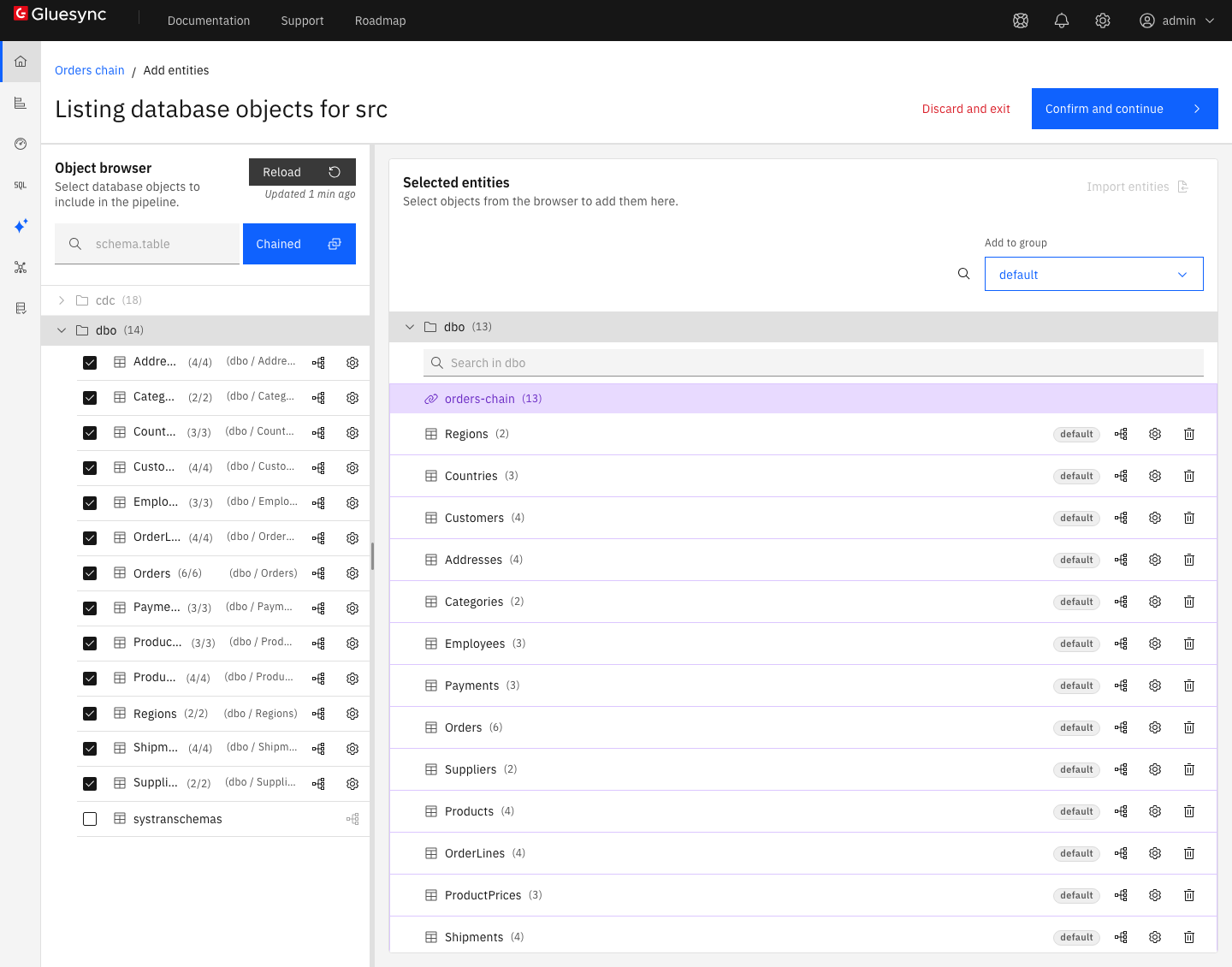
orders-chain, in the order that the wizard proposed.The Auto sort wizard works on the tables of the chain as they are when you open it. It does not change anything until you select Apply order, and Cancel leaves the order as it was. For each table, the proposal shows:
-
its new position, and the source and the target table names;
-
one line for each table that it references, in the form
after Customers · CustomerId · source + target: the parent table, the key column, and where the foreign key was read, here on the source and on the target; -
a blue tag, for example Moved up 10 positions or Moved down 3 positions, when the table changes place. A table that keeps its place has no tag.
A foreign key from a table to itself does not change the order. The wizard says so under the list: Employees references itself, which does not affect the order.
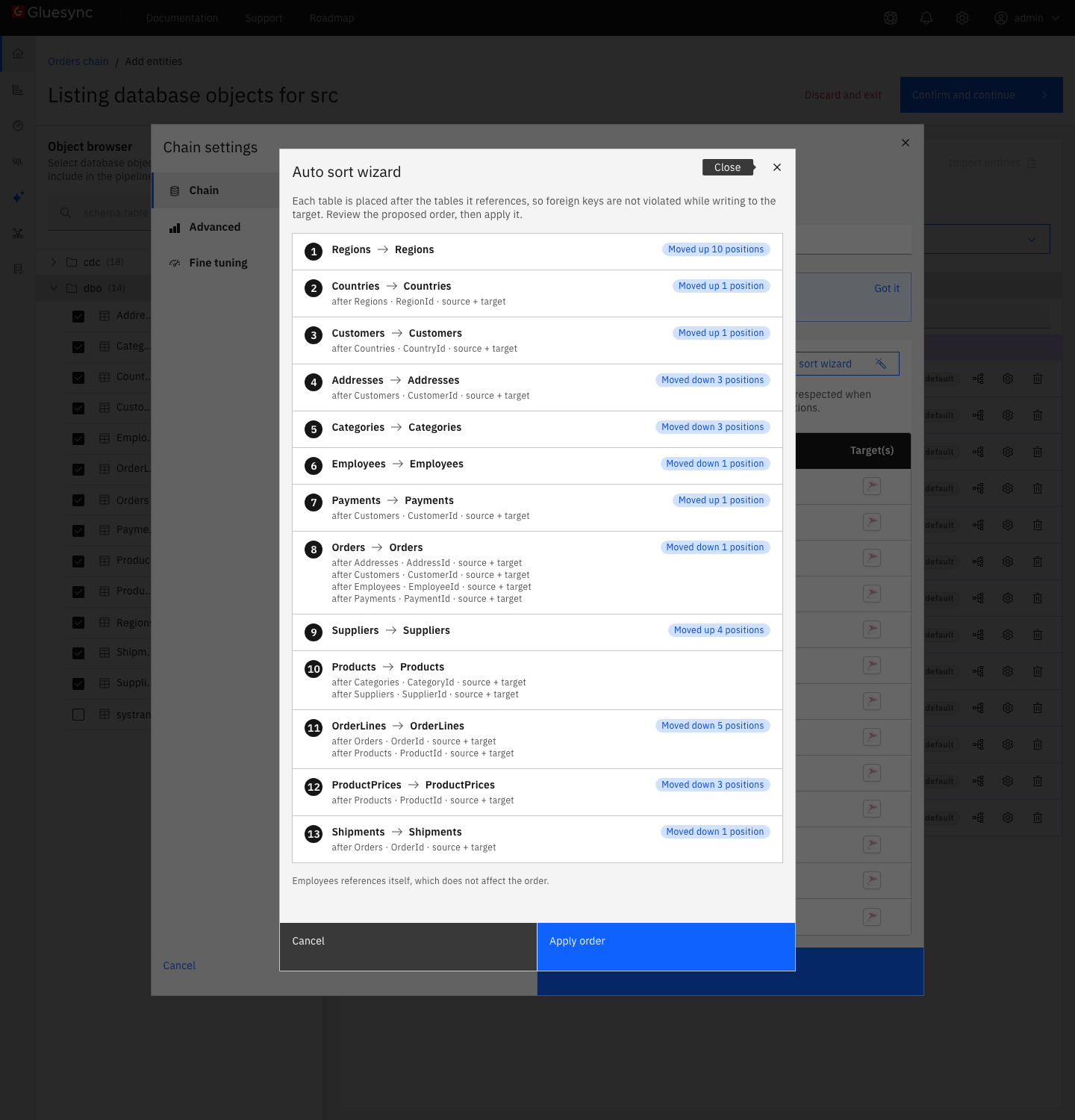
Regions moves up 10 positions, Orders comes after its four parents, and OrderLines and Shipments come last.After Apply order, the dialog shows the message Chain order applied and Each table now comes after the tables it references. The Priority column holds the new order:
| Priority | Tables |
|---|---|
1 to 3 |
|
4 to 6 |
|
7 and 8 |
|
9 and 10 |
|
11 to 13 |
|
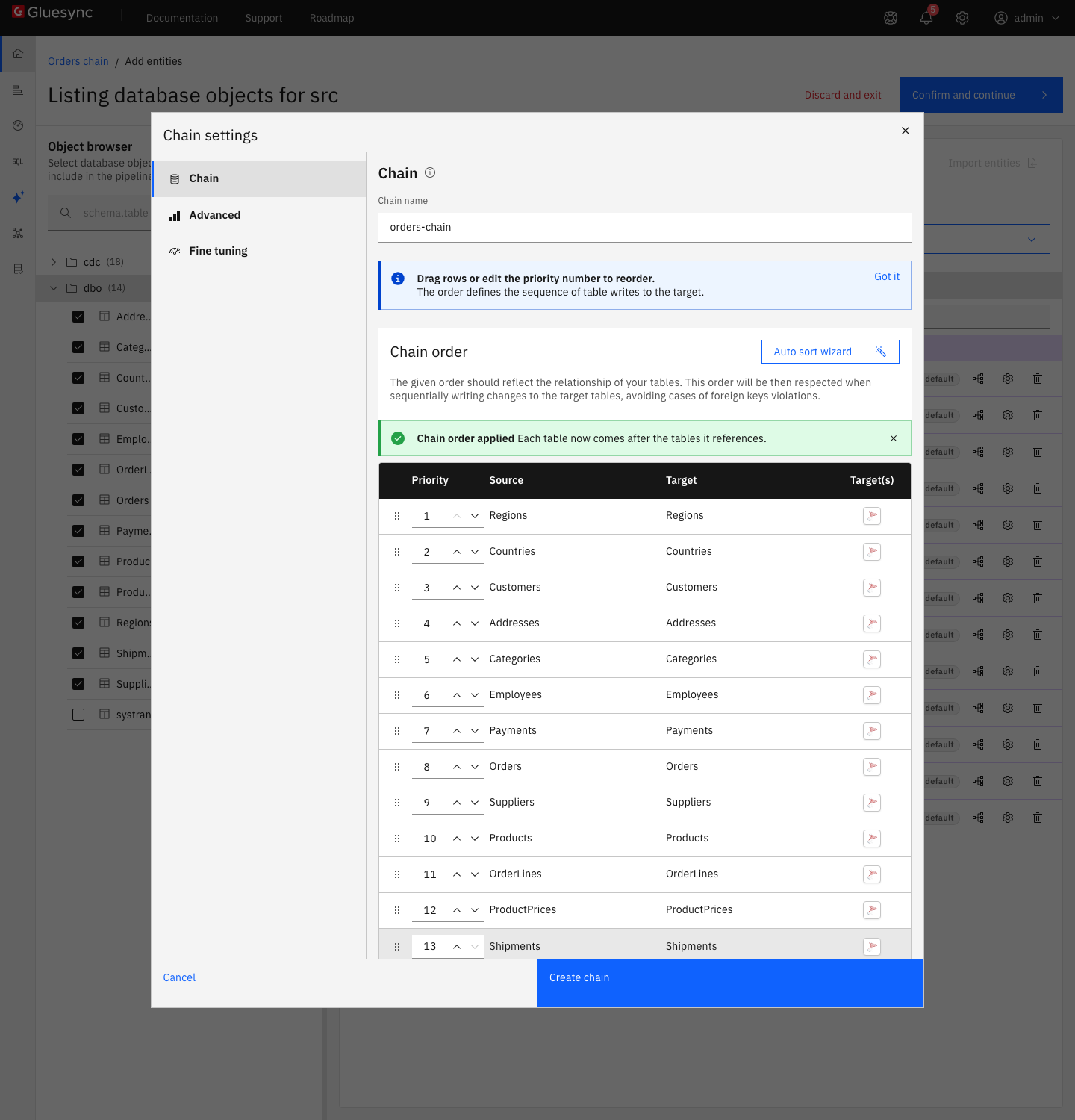
The wizard is a proposal, not a lock. To change the order yourself, select Move up or Move down on a row, drag the row, or edit its priority number. Select Auto sort wizard again at any time. If the order already respects every foreign key, the wizard says Nothing to change.
The order is the only thing that you choose for the tables. Core Hub applies it in two places:
-
In the snapshot, it copies the tables one after another, in this order.
-
In CDC, each poll reads the changes of the first table, then of the second, and so on, and writes them in that order. Inside one table, the changes keep the order in which SQL Server committed them.
Two things you set in the dialog apply to the whole chain: the Advanced tab has the batch sizes and the SQL commands that run before and after the snapshot and CDC, and the Fine tuning tab has the allowed operations, the polling interval and the Snapshot writing concurrency.
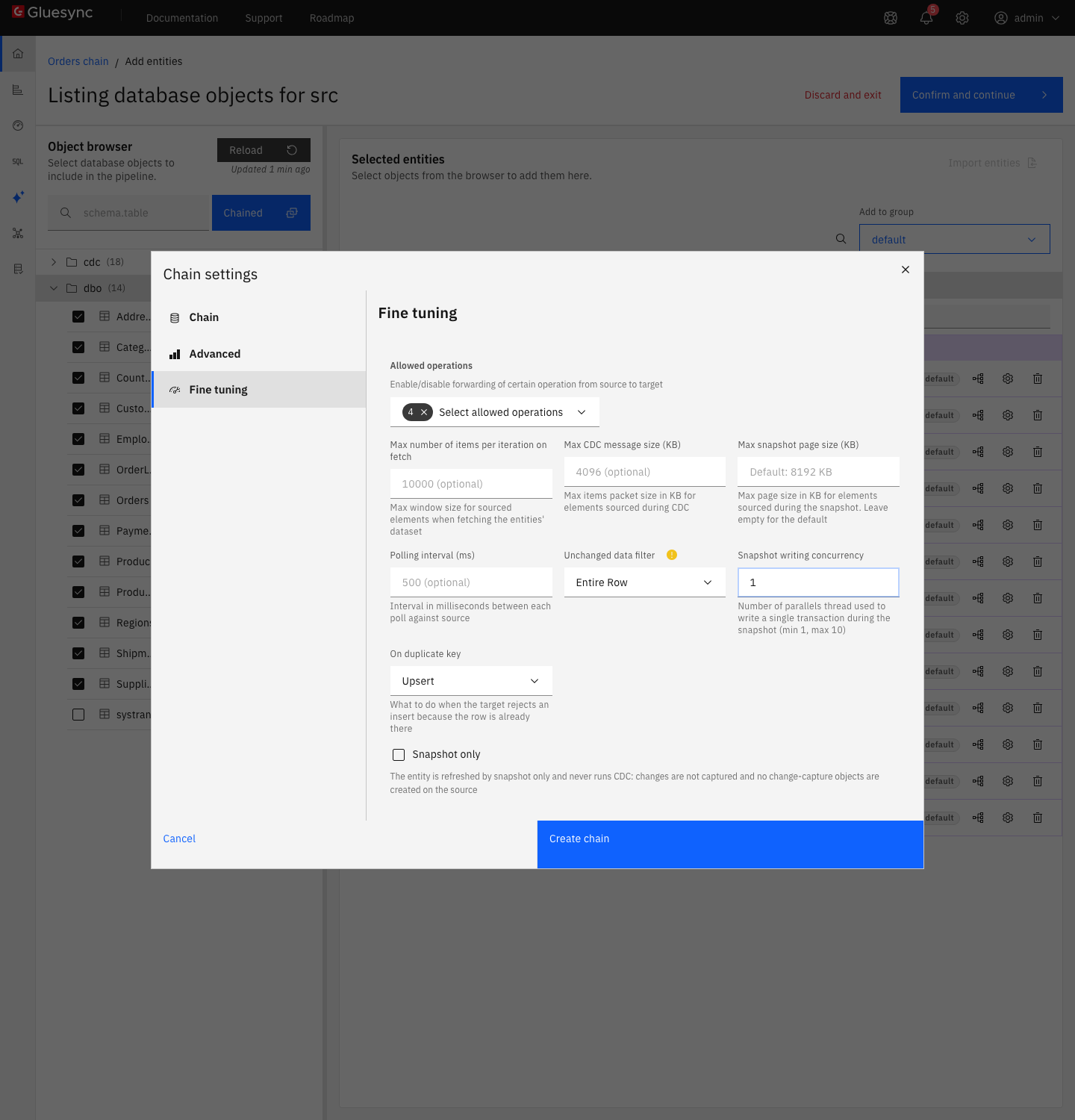
1.|
Snapshot writing concurrency is the number of threads that write one batch of rows at the same time during the snapshot. The field says
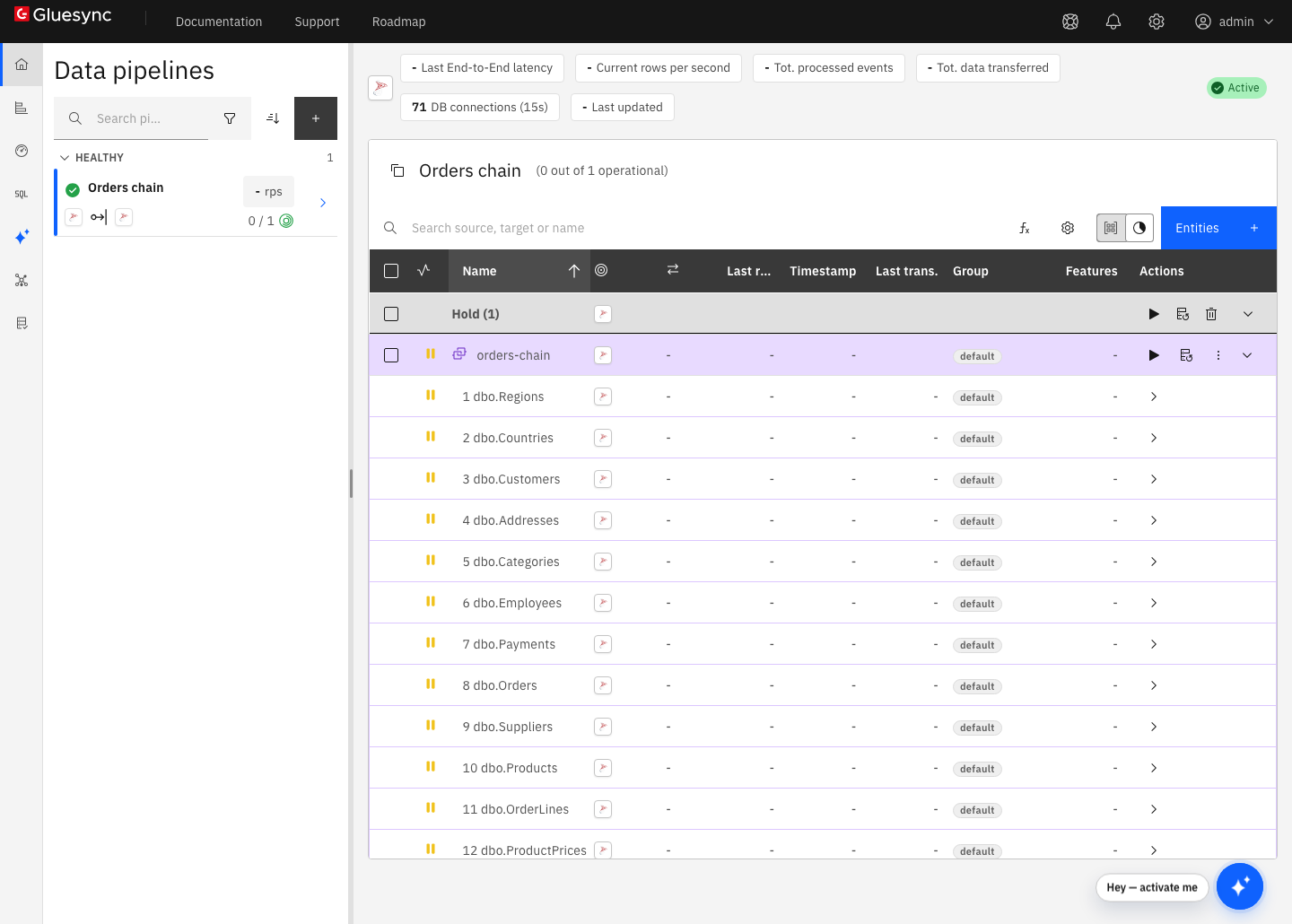
Core Hub then retried the copy by itself. The entity stayed in the Snapshot group, the number on the notification went up with every try, and the message changed to a foreign key error on another table, |
|
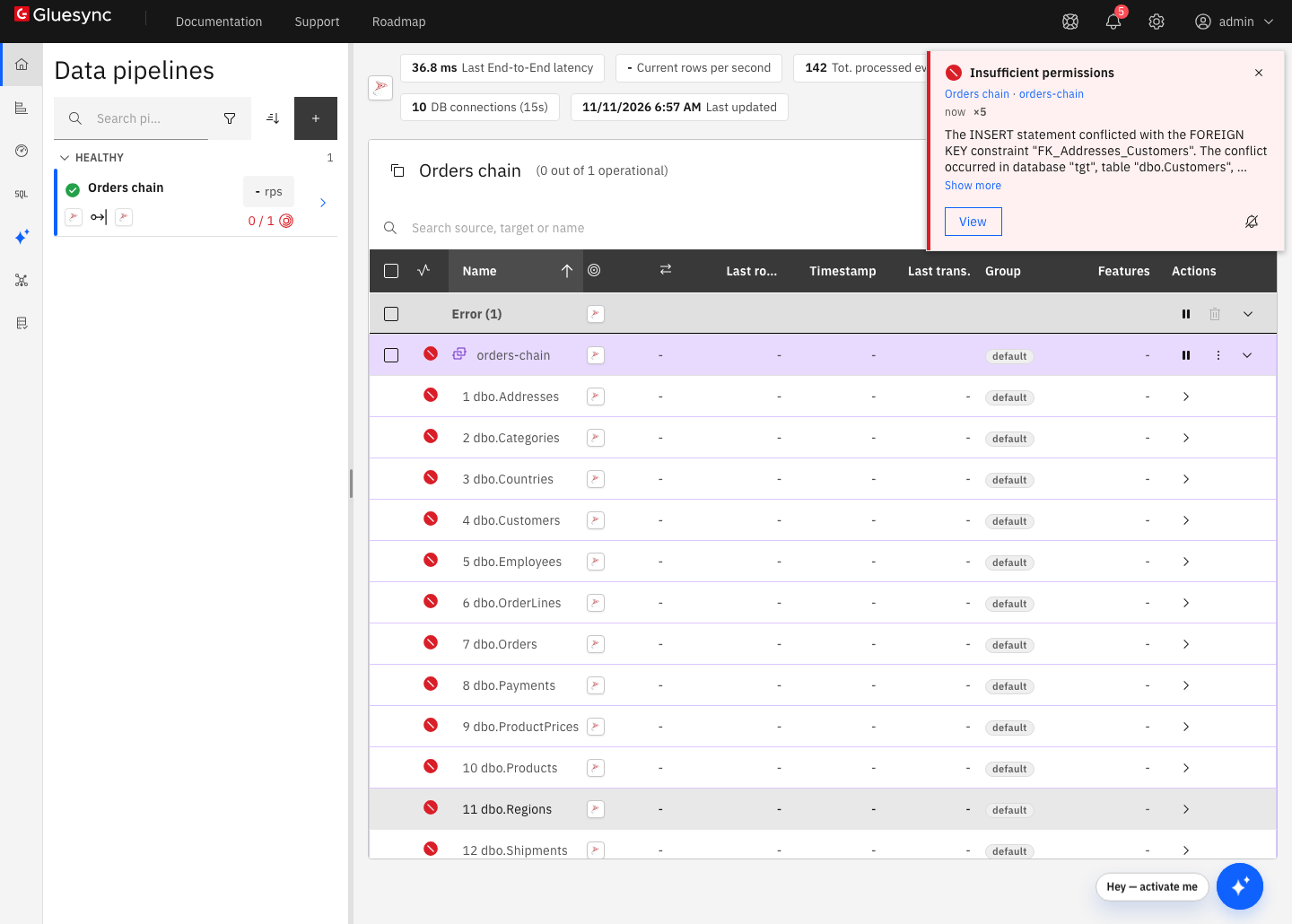
If you keep the alphabetical order, the first copy fails. In the test, the chain stopped on the first table,
The title is not about permissions. It is the title that the Control Plane gives to this error. Run the Auto sort wizard as in step 4. |
UI + SQL
-
On the row of
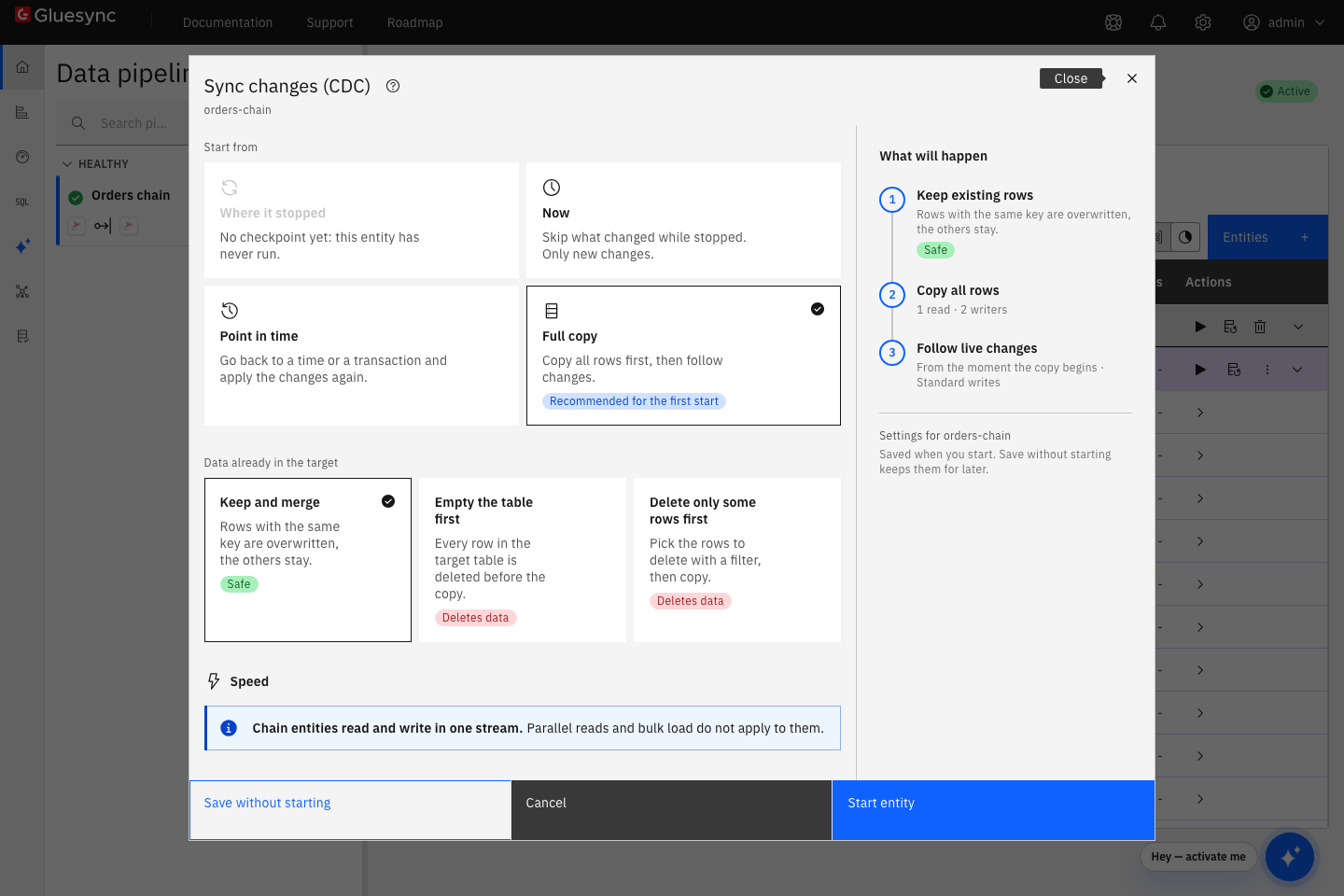
orders-chain, select the play button. The Sync changes (CDC) dialog opens; -
Under Start from, keep Full copy, Recommended for the first start. The other choices are Where it stopped, which is not available before the first run, Now and Point in time. Under Data already in the target, keep Keep and merge. The dialog says Chain entities read and write in one stream. Parallel reads and bulk load do not apply to them., so there is no Speed choice to make;
-
Select Start entity.
After about 30 seconds, count the rows on the target:
-- on the target database
SELECT t.name AS table_name, SUM(p.row_count) AS row_count
FROM sys.tables t
JOIN sys.dm_db_partition_stats p ON p.object_id = t.object_id AND p.index_id IN (0, 1)
GROUP BY t.name
ORDER BY t.name;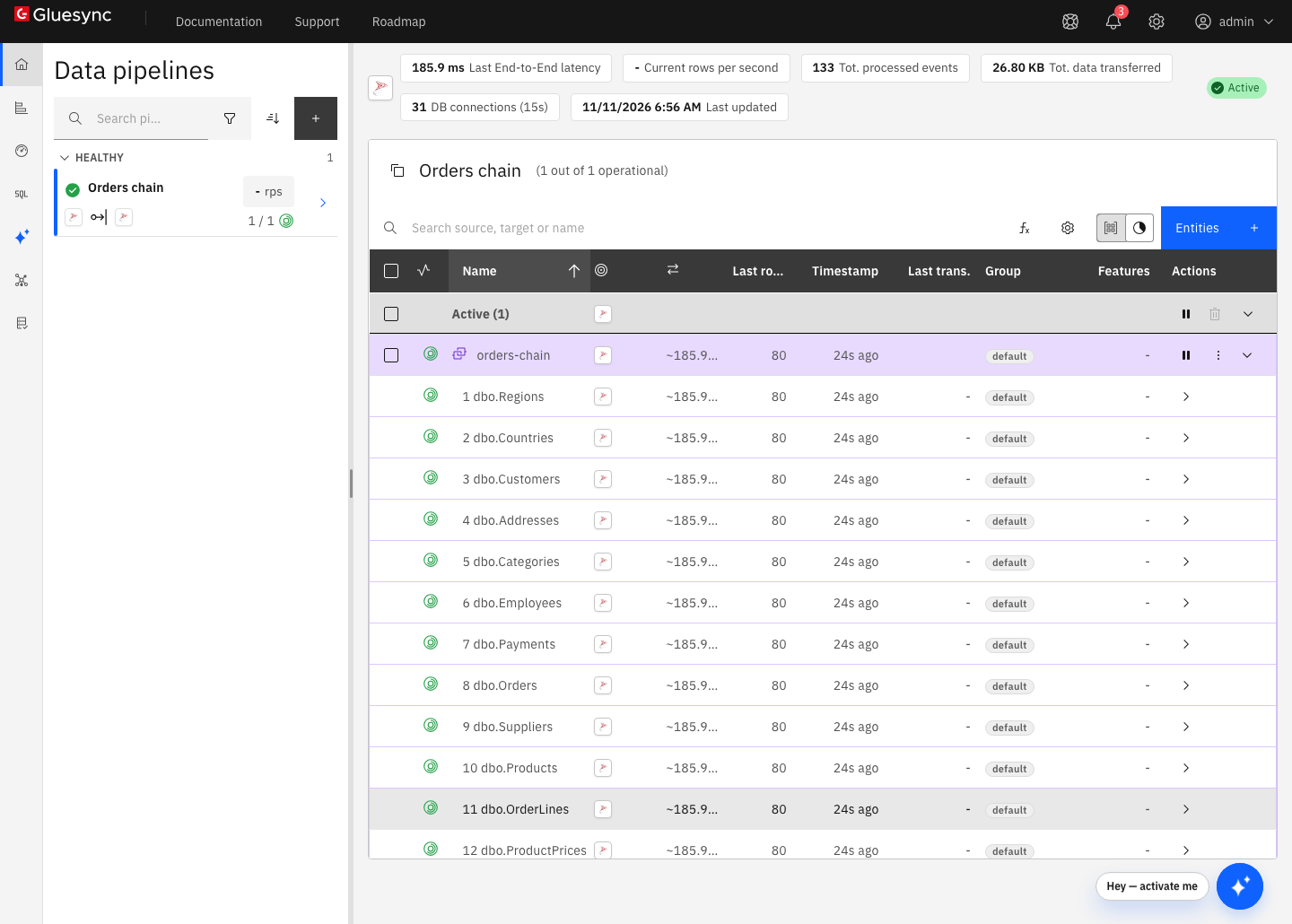
SQL
On the source, insert a new region, a country in it, a customer, an address, two employees where the second reports to the first, a payment, an order that points to all of them, two order lines and a shipment. Do it in one transaction. The rows come in an order that the target accepts only because the chain keeps it:
-- on the source database
BEGIN TRANSACTION;
INSERT INTO dbo.Regions (RegionId, Name) VALUES (6, N'Antarctica');
INSERT INTO dbo.Countries (CountryId, RegionId, Name) VALUES (21, 6, N'Country 21');
INSERT INTO dbo.Customers (CustomerId, CountryId, Name, Email) VALUES (61, 21, N'Customer 61', N'customer61@example.com');
INSERT INTO dbo.Addresses (AddressId, CustomerId, Street, City) VALUES (91, 61, N'91 Main Street', N'City 7');
INSERT INTO dbo.Employees (EmployeeId, ManagerId, Name) VALUES (16, 1, N'Employee 16');
INSERT INTO dbo.Employees (EmployeeId, ManagerId, Name) VALUES (17, 16, N'Employee 17');
INSERT INTO dbo.Payments (PaymentId, CustomerId, Amount) VALUES (101, 61, 149.90);
INSERT INTO dbo.Orders (OrderId, CustomerId, AddressId, EmployeeId, PaymentId, OrderDate)
VALUES (101, 61, 91, 17, 101, '2026-11-10T09:30:00');
INSERT INTO dbo.OrderLines (OrderLineId, OrderId, ProductId, Quantity) VALUES (201, 101, 3, 2), (202, 101, 5, 1);
INSERT INTO dbo.Shipments (ShipmentId, OrderId, Carrier, ShippedAt) VALUES (81, 101, N'Carrier 1', '2026-11-10T15:00:00');
COMMIT;
After a few seconds, run the count query of step 5 on the target.
SQL
The chain order also decides the order of the deletes. Core Hub writes the changes of the first table, then of the second, so it deletes a parent row before it deletes the child rows of the same poll. If one poll holds the delete of a parent and of a child that references it, the target refuses the parent delete.
You can see it. Delete all the rows that step 6 inserted, children first, in one transaction:
-- on the source database
BEGIN TRANSACTION;
DELETE FROM dbo.Shipments   WHERE ShipmentId = 81;
DELETE FROM dbo.OrderLines  WHERE OrderLineId IN (201, 202);
DELETE FROM dbo.Orders      WHERE OrderId = 101;
DELETE FROM dbo.Payments    WHERE PaymentId = 101;
DELETE FROM dbo.Addresses   WHERE AddressId = 91;
DELETE FROM dbo.Customers   WHERE CustomerId = 61;
DELETE FROM dbo.Countries   WHERE CountryId = 21;
DELETE FROM dbo.Regions     WHERE RegionId = 6;
DELETE FROM dbo.Employees   WHERE EmployeeId = 17;
DELETE FROM dbo.Employees   WHERE EmployeeId = 16;
COMMIT;
On the target, nothing is deleted. The entity goes to the Error group, and the log of Core Hub has this message:
The DELETE statement conflicted with the REFERENCE constraint "FK_Countries_Regions". The conflict occurred in database "tgt", table "dbo.Countries", column 'RegionId'.
The source order does not help, because the chain writes the changes in chain order, not in the order of the transaction. To recover, follow the fix in the troubleshooting table: delete the same rows on the target, children first, and start the entity from Where it stopped.
To avoid it, delete one level of the tree at a time, and wait until the target has caught up before the next one. Run the next six transactions one after the other, about 10 seconds apart. Rows that do not reference each other can share a transaction:
-- on the source database, one transaction at a time
BEGIN TRAN; DELETE dbo.Shipments WHERE ShipmentId = 81; DELETE dbo.OrderLines WHERE OrderLineId IN (201, 202); COMMIT;
BEGIN TRAN; DELETE dbo.Orders WHERE OrderId = 101; COMMIT;
BEGIN TRAN; DELETE dbo.Payments WHERE PaymentId = 101; DELETE dbo.Addresses WHERE AddressId = 91; COMMIT;
BEGIN TRAN; DELETE dbo.Customers WHERE CustomerId = 61; DELETE dbo.Employees WHERE EmployeeId = 17; DELETE dbo.Employees WHERE EmployeeId = 16; COMMIT;
BEGIN TRAN; DELETE dbo.Countries WHERE CountryId = 21; COMMIT;
BEGIN TRAN; DELETE dbo.Regions WHERE RegionId = 6; COMMIT;UI
You do not need to delete the chain to change its order. The Auto sort wizard works on an existing chain too.
-
Pause the entity: select the pause button on its row, then Pause entity;
-
On the row of the chain, open the three-dot menu and select Edit entity. The Add entities page opens with the chain, under the title Listing database objects for src filtered on and the name of a table of the chain;
-
Over the Object browser, select Chained. Select Auto sort wizard and Apply order to let Core Hub re-sort the chain. Or use Move up or Move down on the rows. Then select Save chain;
-
Open the field mapping of every table: select the mapping icon on the row of the table, and select Confirm in the Field mapping dialog. Do it for all 13 tables. Confirm and continue stays grey until every table has been opened once;
-
Select Confirm and continue;
-
Start the entity again. With Where it stopped, it continues from its last checkpoint. After a failed first copy, start it with Full copy and Keep and merge.
Troubleshooting
| Symptom or message | Cause | Fix |
|---|---|---|
The first copy stops. The notification is titled Insufficient permissions and says |
The chain still has the default alphabetical order, so a child table is written before its parent. |
Pause the entity. Run the Auto sort wizard as in step 8, then start the entity again, with Full copy and Keep and merge. |
The entity goes to Error after a delete. The log says |
One poll contained the delete of a parent row and of a child row that references it. The chain deletes the parent first. |
Pause the entity. On the target, delete the rows that the failed poll holds, children first. Start the entity from Where it stopped. In the test, the entity went back to Active and the counts matched. Next time, delete one level at a time, as in step 7. |
Chains is grey in the Object browser |
No table is selected. |
Tick at least one table. The button turns active after the first tick. |
Confirm and continue is grey when you edit a chain |
The page enables the button only when every table of the chain has been opened. Moving rows and selecting Save chain does not count. |
Open the Field mapping of every table and select Confirm, as in step 8. |
The tables of the chain are in alphabetical order after you create it |
The dialog lists the tables you ticked in alphabetical order. It does not sort them by itself. |
Select Auto sort wizard and Apply order. To order the rows yourself, a parent must come before every table that references it. For a table with several parents, such as |
The first copy stops with the right order. The log says |
Snapshot writing concurrency is above |
Pause the entity. Set Snapshot writing concurrency to |
You start a second chain with tables that are already in a chain |
The Object browser does not mark the tables that an entity already uses, and the wizard saved a second chain over the same tables. |
Keep each table in one entity. Delete the extra entity from its three-dot menu, Delete entity. |