Set up a Redis target for snapshots and CDC
The Redis target keeps a current copy of your tables in Redis. Each source row becomes one Redis hash, the key of the hash is built from the table and the primary key, and a delete removes the key. This guide shows you how to give Gluesync a Redis account with only the commands it needs, how to create the target, how to copy a PostgreSQL table and follow its live changes, how the keys and the values look in Redis, and how to fix the errors that you are most likely to meet. To append every change to a log instead, use Set up a Redis Streams target for CDC events.
In this guide
You will restrict the Redis default user to three commands and to the keys that Gluesync writes, create the Redis target in the Control Plane, and map two PostgreSQL tables to hashes with the default key and with a custom key. You will run a snapshot, follow an insert, an update, a delete and a truncate, and read the hashes with redis-cli. You will see how each data type is written, which settings change the write speed, and the errors that were reproduced for this guide.
Quick information
Goal |
Replicate PostgreSQL tables into Redis hashes with a snapshot, keep them in sync with change data capture (CDC), and read the keys |
Audience |
Data engineers and Redis administrators who use Redis as a cache or a fast lookup copy of a database |
Level |
Intermediate |
Time required |
About 35 minutes |
Area |
Redis → ACL; Control Plane → Pipelines → Redis target → Base settings; entity → Field mapping → Document key |
Applies to |
Gluesync 2.3 |
Before you begin
Make sure that:
-
You have a Redis server that Core Hub can reach, and you can run
redis-clion it as an administrator. The Control Plane shows 7.4 as the minimum supported version, for Community and Enterprise editions. This guide was tested with Redis 7.4. Redis is a target only: you need another database as the source; -
You have a source that Core Hub can read with CDC. This guide uses PostgreSQL 16 with
wal_level = logical, set up as in Set up a PostgreSQL WAL source; -
You can sign in to the Control Plane with a role that can create pipelines;
-
You have source tables with a primary key. This guide uses
public.customers(idinteger primary key and the text columnsname,surname,address,gender,phoneandemail) with 20 rows, and a small tablepublic.driverswith an integer keyid.
|
The statements and the messages quoted in this guide were run and captured against Redis 7.4 and the Control Plane that ships with Gluesync 2.3. |
Guide steps
CLI
The target signs in with the password only. The Username field of the form is required, but the agent does not send it, so Redis always authenticates the connection as the default user. A named user with its own password does not work for this target. Instead, give the default user a password and take away everything that Gluesync does not need.
Do this in the right order, because the next command locks the default user and your own tools use it too. First create an administrator for yourself and for the other applications of this Redis, then restrict default:
-
Create an administrator. Replace the password:
redis-cli ACL SETUSER admin on '>change-me-admin' '~*' '&*' +@all -
Restrict the
defaultuser, with your own password and the key patterns of your tables. This guide writes the keyspublic::customers::<id>anddriver-<id>, so it allowspublic::*anddriver-*. Theresetkeyword starts from a user with no commands, no keys and no password:redis-cli --user admin --pass change-me-admin --no-auth-warning \ ACL SETUSER default reset on '>change-me-strong' '~public::*' '~driver-*' +hset +hsetnx +del -
Check what the user can and cannot do:
redis-cli --user default --pass change-me-strong --no-auth-warning HSET public::probe a 1
redis-cli --user default --pass change-me-strong --no-auth-warning HSET other::probe a 1
redis-cli --user default --pass change-me-strong --no-auth-warning DEL public::probe
The three commands are all the agent needs when the Database name is 0. If you write to another logical database, add the command SELECT to the ACL SETUSER line (step 7 shows why). Redis also refuses the optional command CLIENT SETINFO, which the client sends when it connects, and writes it to ACL LOG. The agent works without it.
If your Redis has no password, skip this step and switch on Disable auth in the next step.
UI
-
In the Control Plane, select Create your first pipeline, or the + button of the pipeline list if you already have pipelines. The Agents setup wizard opens;
-
In 1. Setup source, choose the PostgreSQL CDC agent tile and fill Base settings: Host name / Address, Port, Database name, Username and Password of your source database. Select Test and continue, then Next;
-
In 2. Setup target(s), choose the Redis agent tile and fill Base settings:
-
Host name / Address: your Redis host;
-
Port:
6379, or the port of your server; -
Database name: the number of the logical database,
0by default. It must be a number; -
Username:
default. The field is required, and the agent ignores the value; -
Password: the password of step 1;
-
-
Select Test and continue. The target appears with the user and the address. Select Next, enter a Pipeline name and select Finish.
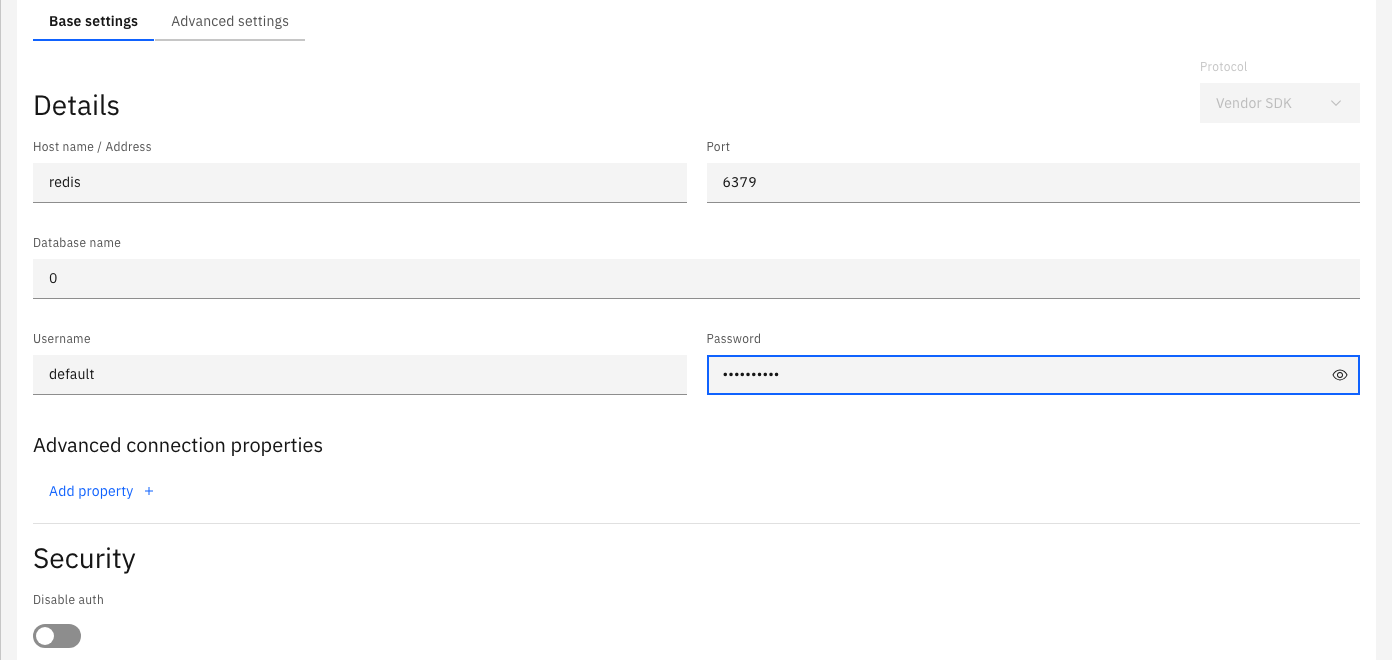
The Advanced settings tab and the key list of Advanced connection properties show names such as Topic Prefix, Use Transactions, SASL Mechanism and Security Protocol. The Redis agent does not read them, so leave both lists empty. The Control Plane has no Enable TLS switch for this target in Gluesync 2.3. Step 7 shows what happens when Redis accepts only TLS connections.
UI
-
In the pipeline, select Entities. The Add entities page opens with the Object browser. Expand the schema
publicand select the check boxes ofcustomersanddrivers. The Selected entities list shows both; -
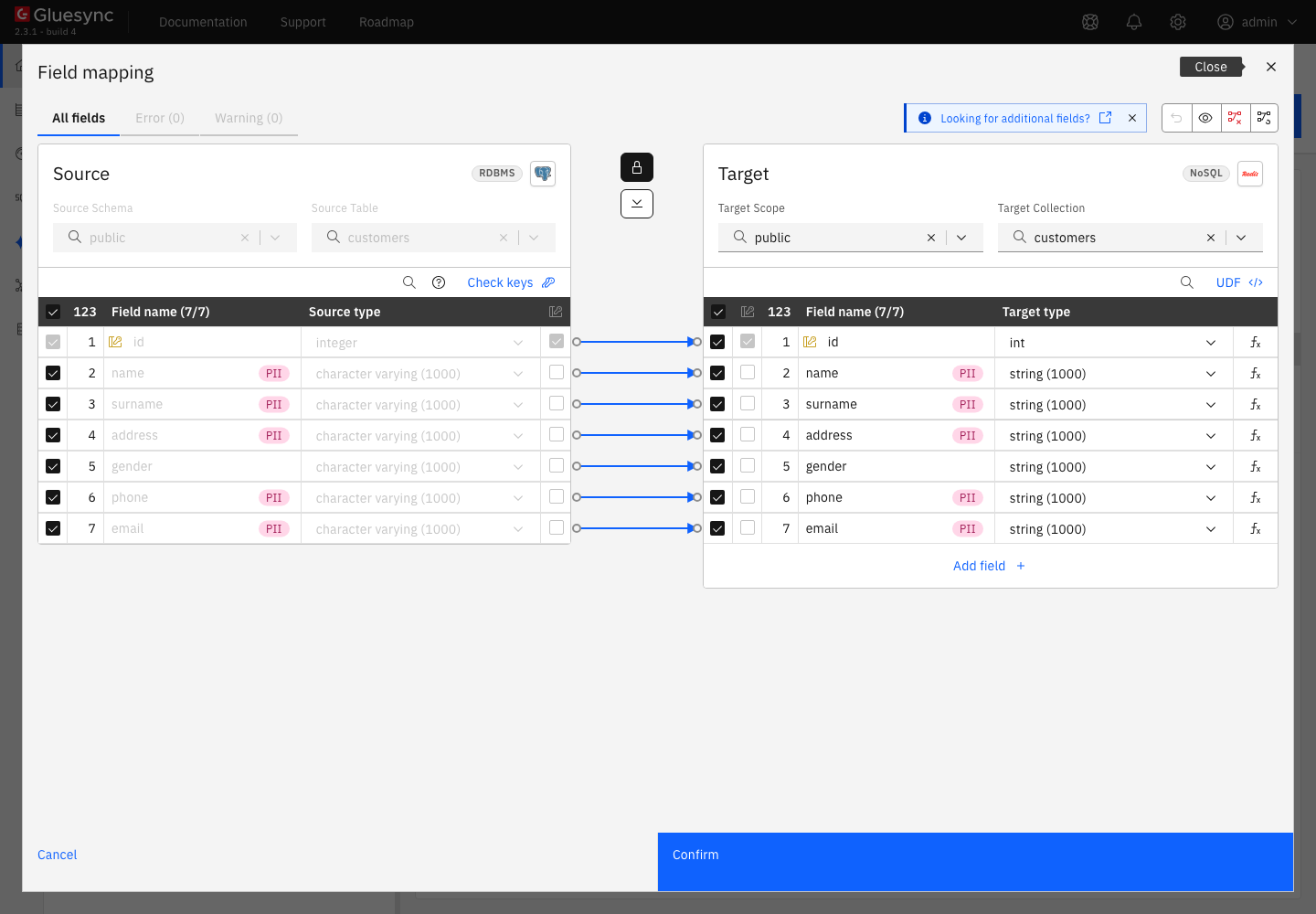
Select the tree icon of
customersto open the Field mapping dialog. Target Scope ispublicand Target Collection iscustomers: they start as the source schema and table. The arrows copy every column. Select Confirm; -
Select the gear icon of
customers, then Target, then redis. Under Document key, the Preview showspublic :: customers :: id. That is the key of every hash of this entity. Leave Default key as it is; -
Select the gear icon of
drivers, then Target, then redis. Switch on Customize document key. Enter the Prefixdriver, choose the Separator-, and leave Suffix empty. The Fields list holdsid, so the Preview showsdriver - id; -
Close the dialog and select Confirm and continue.
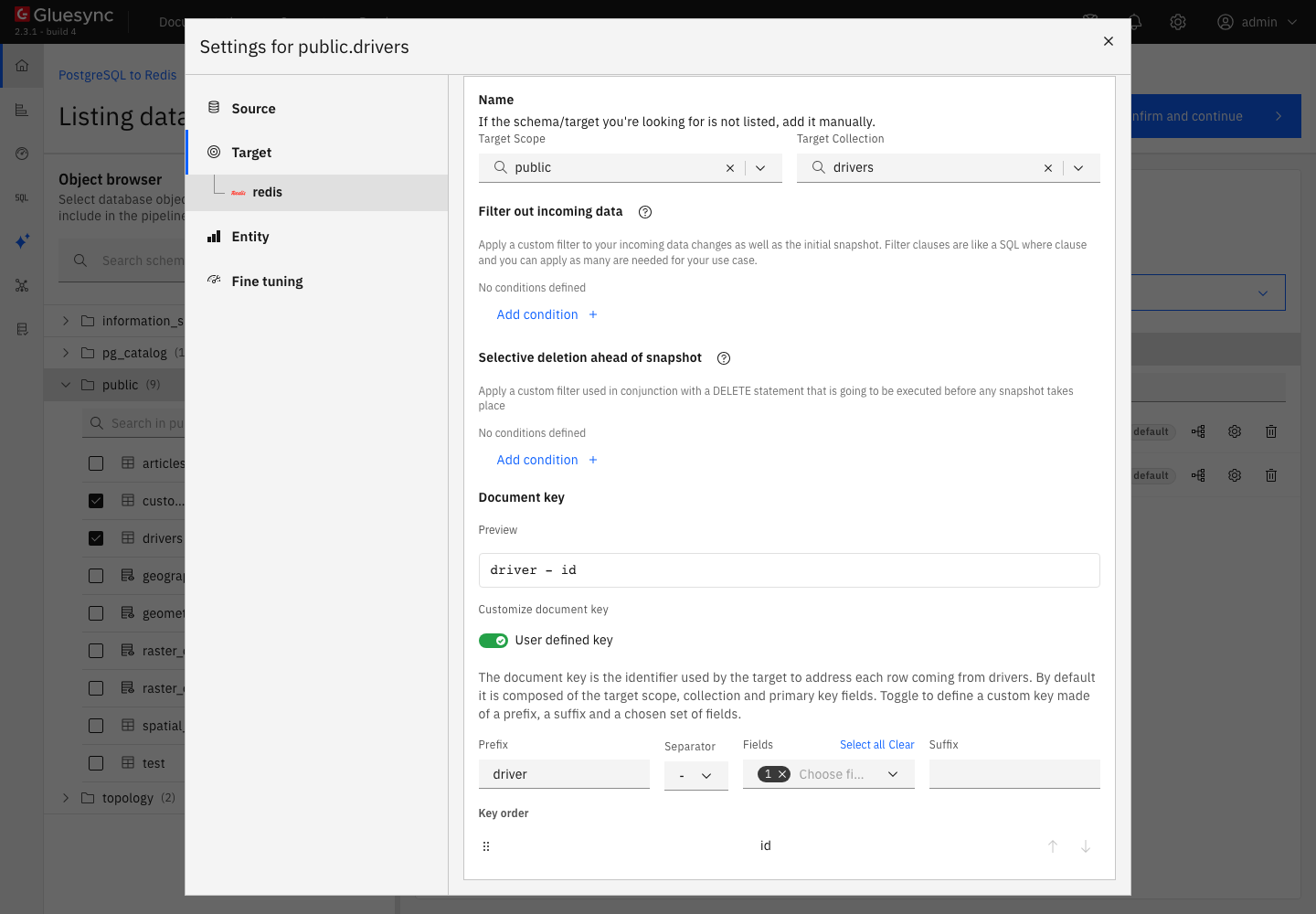
driver, the separator - and the field id.The Separator list offers ::, -, _, / and None. With the default key, Gluesync joins the scope, the collection and the values of the key columns with ::, for example public::customers::1. With a custom key, the prefix replaces the scope and the collection. Key order sets the order of the fields when the key has more than one.
UI + CLI
-
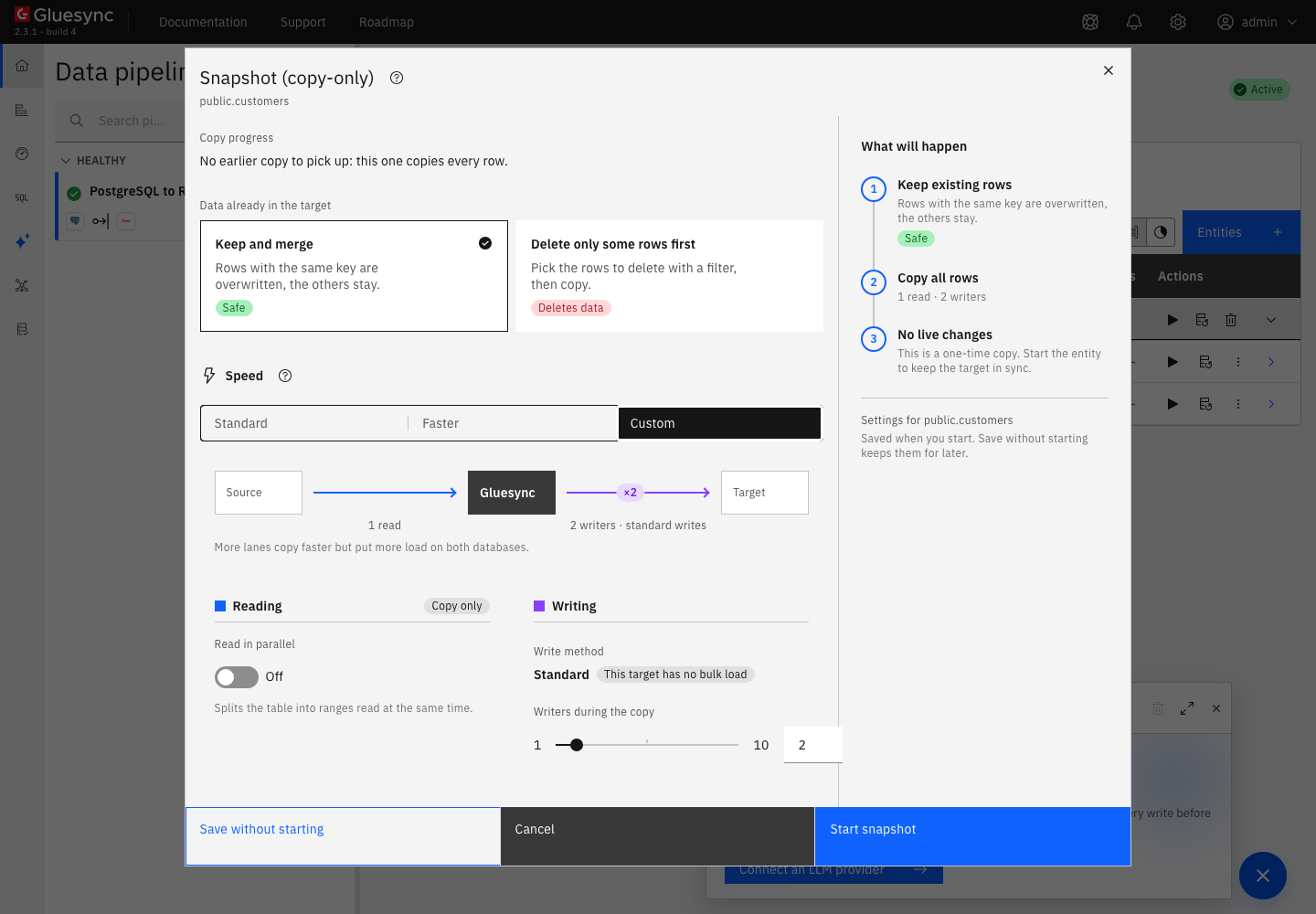
On Hold, select the start options button of
customers, the one next to the play button. The Snapshot (copy-only) dialog opens; -
Keep Keep and merge under Data already in the target. It overwrites the hashes that have the same key and leaves the other keys alone. Under Speed, select Custom to see the write settings: Write method is Standard with the label This target has no bulk load, and you can set the number of Writers during the copy;
-
Select Start snapshot. When the entity is back on Hold, do the same for
drivers; -
Read the data. Use the administrator of step 1:
redis-cli --user admin --pass change-me-admin --no-auth-warning DBSIZE
redis-cli --user admin --pass change-me-admin --no-auth-warning TYPE public::customers::1
redis-cli --user admin --pass change-me-admin --no-auth-warning TTL public::customers::1
redis-cli --user admin --pass change-me-admin --no-auth-warning HGETALL public::customers::1
redis-cli --user admin --pass change-me-admin --no-auth-warning --scan --pattern 'driver-*'
The hash holds only the columns that you mapped. Redis stores every value as a string, so the types of the Field mapping dialog (int, string) decide how Gluesync reads the value and not how Redis stores it.
The snapshot dialog also offers Delete only some rows first. On the Redis target it deletes nothing: in the test, a key that matched the condition was still in Redis after the snapshot. Remove old keys yourself with DEL or UNLINK before a snapshot if you need a clean start.
UI + SQL
-
In the pipeline, select the play button of
customers. The Sync changes (CDC) dialog opens. Keep Where it stopped and select Start entity. Do the same fordrivers. Both become Active; -
On the source, insert a row with a null phone, update one phone and delete one row:
INSERT INTO customers VALUES (21, 'Ada', 'Lovelace', '12 Analytical Way', 'Female', NULL, 'ada@example.com'); UPDATE customers SET phone = '+39-555-9999' WHERE id = 2; DELETE FROM customers WHERE id = 3; -
Truncate the drivers table:
TRUNCATE drivers; -
After a few seconds, read the keys:
redis-cli --user admin --pass change-me-admin --no-auth-warning HGETALL public::customers::21
redis-cli --user admin --pass change-me-admin --no-auth-warning HGET public::customers::2 phone
redis-cli --user admin --pass change-me-admin --no-auth-warning EXISTS public::customers::3
redis-cli --user admin --pass change-me-admin --no-auth-warning EXISTS driver-2
In short:
-
an insert and an update both run
HSETwith the whole row, so a missing key is created and an existing key is overwritten field by field; -
a delete runs
DELfor the key of the row; -
a truncate on the source is skipped. Core Hub logs the warning
Received a transaction message with a truncate operation. This operation is not supported by Redis. Skipped.and no key is removed.
UI
The Redis target has no bulk load. Each batch is a set of HSET commands sent together, and Gluesync waits for all of them before it takes the next batch. You can tune two things, both in the entity:
-
Writers. In the Snapshot (copy-only) dialog, under Speed and Custom, set Writers during the copy (1 to 10,
2by default). The entity tab Fine tuning has the same setting under the name Snapshot writing concurrency; -
Batch size at the source. In the entity settings, open Fine tuning. Max number of items per iteration on fetch and Max snapshot page size (KB) set how many rows Core Hub reads for one batch. The Polling interval (ms) sets how often CDC asks the source for changes.
CLI + UI
Each error below was reproduced by changing one setting.
-
Start a snapshot of an entity whose keys do not match the key patterns of the user. In this guide, remove
~driver-*from thedefaultuser and start a snapshot ofdrivers. The entity goes to Error and the notification Redis command execution error showsNOPERM No permissions to access a key. Redis shows the key in its log:ACL LOGlistsreasonkeyand theobjectdriver-2. Fix: add the pattern withACL SETUSER default '~driver-*'. The entity retries by itself and finishes the snapshot, with no restart; -
Save the target with a wrong password. The page shows Failed to save:
The connection was saved, but agent <id> of pipeline <id> did not accept the new credentials: Unable to connect to redis/<unresolved>:6379. The message does not say that the password is wrong.ACL LOGshowsreasonauthand theobjectHELLO. The wrong values are saved, and the pipeline shows On error withError: Unknown error. Please check agent redis (<id>) logs in order to find more details. Fix: save the right values with Test and continue, and the pipeline becomes healthy again; -
Save a Database name other than
0for a user that has noSELECTcommand. The message is the same Unable to connect error, andACL LOGshowsreasoncommandand theobjectselect. Fix:ACL SETUSER default +select. With it, the keys go to that logical database; -
Switch on Disable auth while Redis has a password. The agent sends no password and Redis refuses it, so the message is again
Unable to connect to <host>/<unresolved>:<port>. Fix: switch the setting off and enter the password; -
Use the port of a Redis that accepts only TLS connections. The Control Plane sends no TLS setting for this target, even when you upload a certificate store file, so the agent connects in clear text. The message is
Unable to connect to <host>/<unresolved>:<port>, and the Core Hub log showsjava.net.SocketException: Connection reset. Keep the Redis server on a private network that Core Hub reaches, or contact support to plan TLS.
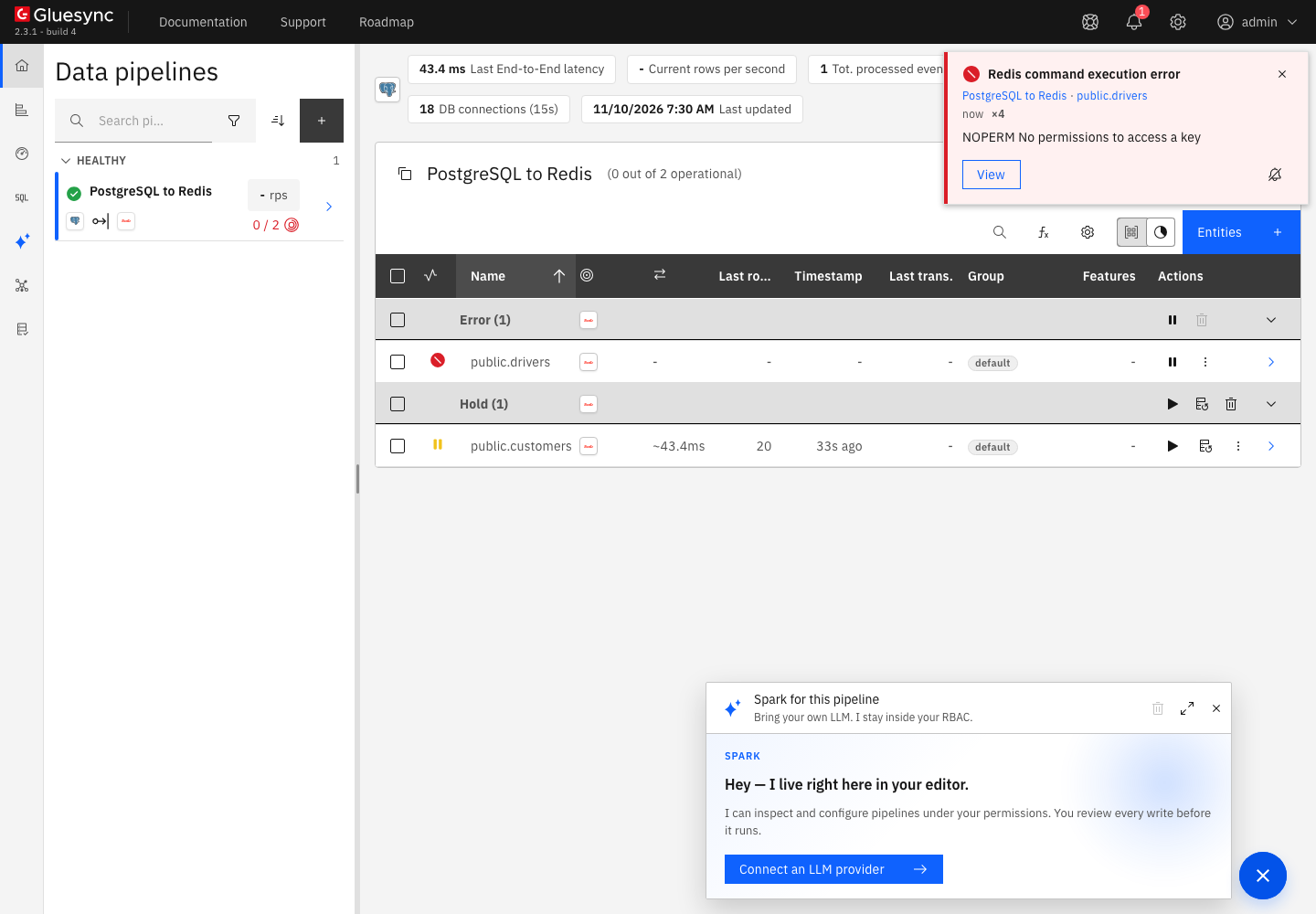
public.drivers is in Error and the notification names the Redis answer.Data types
Redis stores strings, so Gluesync converts each value to text before it runs HSET. These are the values as they were written to the hash and read back with HGETALL, from a PostgreSQL table with one column of each type, copied with a snapshot, and a session time zone of UTC:
| Source type | Value in the hash | Note |
|---|---|---|
|
|
Plain digits |
|
|
Exact. The scale of the source is kept, and a 30-digit value is not rounded |
|
|
Plain digits |
|
|
|
|
The text |
Written as is |
|
|
The JSON text that PostgreSQL returns, with its own spacing |
|
|
ISO date |
|
|
ISO local date and time |
|
|
ISO date and time with the offset of the session |
|
|
ISO time |
|
|
Text |
|
An empty string |
The field is in the hash with no characters |
|
|
Not usable. Clear the column in the Field mapping dialog |
|
|
Not usable. Clear the column in the Field mapping dialog |
Numbers, booleans, text, dates and times arrive as readable text. Binary columns and arrays are the exception: they arrive as the text of a Java object, which carries no data and changes from one run to the next. Clear the check box of such a column in the Field mapping dialog, so the hash does not hold a meaningless value.
The Redis target reference lists the connection fields and the REST API setup.
Bulk and throughput settings
| Setting | Default | When to change it |
|---|---|---|
Writers during the copy (snapshot) |
2 |
Try more writers when the source and Core Hub are not the limit. In the test, 1, 2 and 8 writers copied 200,000 rows in about the same time |
Max number of items per iteration on fetch (entity) |
Core Hub default |
Raise it for narrow rows, lower it for wide rows |
Max snapshot page size (KB) (entity) |
Core Hub default |
Lower it when a batch is too large for your memory |
Database name |
|
Use another logical database to keep the keys apart. The user then needs the command |
Write method |
Standard |
Fixed. The Redis target has no bulk load |
Read Tune replication throughput for the settings that apply to every target.
Troubleshooting
| Problem | Possible cause | What to do |
|---|---|---|
Entity in Error, notification Redis command execution error with |
The user has no key pattern that matches the keys of the entity |
|
Failed to save with |
Wrong host or port, a wrong password, Disable auth on a Redis that has a password, a Database name without the command |
Check |
Pipeline On error with |
The saved connection values are wrong. They are saved even when the test fails |
Enter the right values and select Test and continue |
A named Redis user with a password cannot sign in |
The agent sends the password only, so Redis authenticates it as the |
Give the |
The Username field shows Required |
The form needs a value, but the agent ignores it |
Enter |
A hash value looks like |
A |
Clear the column in the Field mapping dialog |
A field of a hash is empty although the source column is not |
The source value is null |
A null column is written as an empty string. The field has no characters |
Keys stay in Redis after |
The target skips a truncate |
Delete the keys yourself with |
Old keys stay after a snapshot with Delete only some rows first |
The Redis target does not run that deletion |
Delete the keys yourself before the snapshot |
Related guides
Contact MOLO17 Support if you need assistance with a Redis target.