Set up a SAP (Sybase) ASE triggers source
The SAP (Sybase) ASE Triggers agent captures changes with three triggers on each table that you replicate. Every trigger writes a copy of the changed row into a CDC table that Gluesync creates next to your data, and the agent reads that table in order. The agent needs only one connection, from Core Hub to ASE, and it works on every ASE version from 15.7. This guide creates the login, runs a snapshot and live changes to PostgreSQL, shows every object that Gluesync adds, explains how long changes stay in your database, and helps you choose between the triggers agent and the log reader.
In this guide
You will create the ASE login that the automatic setup needs, create the source connection in the Control Plane, and add an entity. You will list the objects that Gluesync adds to ASE and read the raw changes while the entity is on hold. You will start a snapshot with live changes, check inserts, updates, deletes and a rolled back transaction on the target, and see what a change of the primary key does. You will set the retention of the CDC table, create the triggers by hand when your DBA does not allow automatic ones, and remove an entity with its objects.
Quick information
Goal |
Replicate a SAP (Sybase) ASE table to PostgreSQL with a snapshot followed by trigger-based change data capture (CDC), and know what the agent adds to your database |
Audience |
Database administrators and data engineers who own an ASE server and cannot, or do not want to, let ASE connect to Core Hub |
Level |
Intermediate |
Time required |
About 60 minutes |
Area |
SAP ASE → SQL and |
Applies to |
Gluesync 2.3 |
Before you begin
Make sure that:
-
You have SAP ASE 15.7 or later and you can run SQL on it as
sa. This guide was tested on ASE 16.0 SP02 PL02; -
Core Hub can open a connection to the ASE port (
5000by default). ASE does not need to open any connection to Core Hub; -
You have a source table with a primary key. This guide uses
dbo.orderswith 5,000 rows. The first step creates it; -
You have a PostgreSQL database as the target, and a login that can create tables in it. The target can be any other agent: the steps for the source are the same;
-
You can sign in to the Control Plane with a role that can create pipelines;
-
The transaction log of your database has free space. The triggers write each change twice inside the same transaction, once in your table and once in the CDC table, so the log grows faster.
|
A trigger runs inside every transaction that changes the table. Try this guide on a test database first, and tell the owners of the application before you add triggers to a production table. |
|
The messages and screens in this guide were captured in the Control Plane, in the Core Hub log and in |
Triggers or log reader
Gluesync has two source agents for SAP ASE. Both read the same tables and deliver the same events to the same targets. They differ in how they see the changes.
| Triggers agent (this guide) | Log reader | |
|---|---|---|
Capture |
Insert, update and delete triggers write each change to a CDC table |
ASE reads its own transaction log and pushes the changes to Gluesync |
Network path |
Core Hub opens a connection to ASE |
Core Hub opens a connection to ASE, and ASE opens a connection to Core Hub on a TCP port |
Objects in your database |
One CDC table and three triggers for each table |
None. The setup marks the table for replication and configures the Replication Agent of the database |
Load on your application |
One more insert inside every insert, update and delete of an audited table |
Nothing runs inside your transactions |
Tables that already have triggers |
The triggers run side by side on the lab server, see Existing triggers on the table |
No conflict |
Database already replicated by SAP Replication Server |
Works: it does not use the Replication Agent |
One database has one Replication Agent, so you cannot share it unless you take it over |
Before images and truncate events |
Not captured |
Captured |
Pick the triggers agent when ASE cannot reach Core Hub (firewall, network address translation, a separate network), when SAP Replication Server already reads the database, or when you cannot give the Replication Agent to Gluesync. Pick the log reader when you do not want to add objects to your schema, when you need before images or truncate events, or when the cost of a trigger inside every write is too high. Follow Set up a SAP ASE log reader source to use the log reader.
Guide steps
SQL
This step is optional. Skip it if you have your own table with a primary key. Connect to ASE as sa and create a table with 5,000 rows. The notes column is filled for every 500th row only, because ASE keeps each text value on its own page and a small test database fills up quickly.
use demo
go
create table dbo.orders (
    id int not null,
    customer varchar(50) not null,
    status varchar(20) null,
    amount numeric(12,2) null,
    created datetime null,
    notes text null,
    primary key (id)
)
go
set nocount on
go
declare @i int
select @i = 1
while @i <= 5000
begin
    insert dbo.orders (id, customer, status, amount, created, notes)
    values (@i, 'customer-' + convert(varchar(10), @i), 'new', @i * 1.5, getdate(),
            case when @i % 500 = 0 then 'note ' + convert(varchar(10), @i) else null end)
    select @i = @i + 1
end
go
set nocount off
go
select count(*) from dbo.orders
goSQL
When you add an entity, Gluesync creates the CDC table and the triggers with the login that you put in the connection. That login needs sa_role, and it must be a user of the source database. Replace the password.
-
Create the login, add it as a user of the source database and give it the role:
sp_addlogin gluesync_admin, <a strong password> go use demo go sp_adduser gluesync_admin, gluesync_admin go use master go grant role sa_role to gluesync_admin go -
Check the login:
sp_displaylogin gluesync_admin
go
The user name matters. Gluesync creates each CDC table with the login name as the owner, so gluesync_admin owns gluesync_admin.dbo_orders_CDC. A login that is only an alias of dbo does not work, and neither does a login with SELECT and CREATE TABLE only. Step 5 shows the error of each case, and the troubleshooting table lists them.
UI
-
In the Control Plane, select Create your first pipeline, or the + button of the pipeline list if you already have pipelines. The Agents setup wizard opens;
-
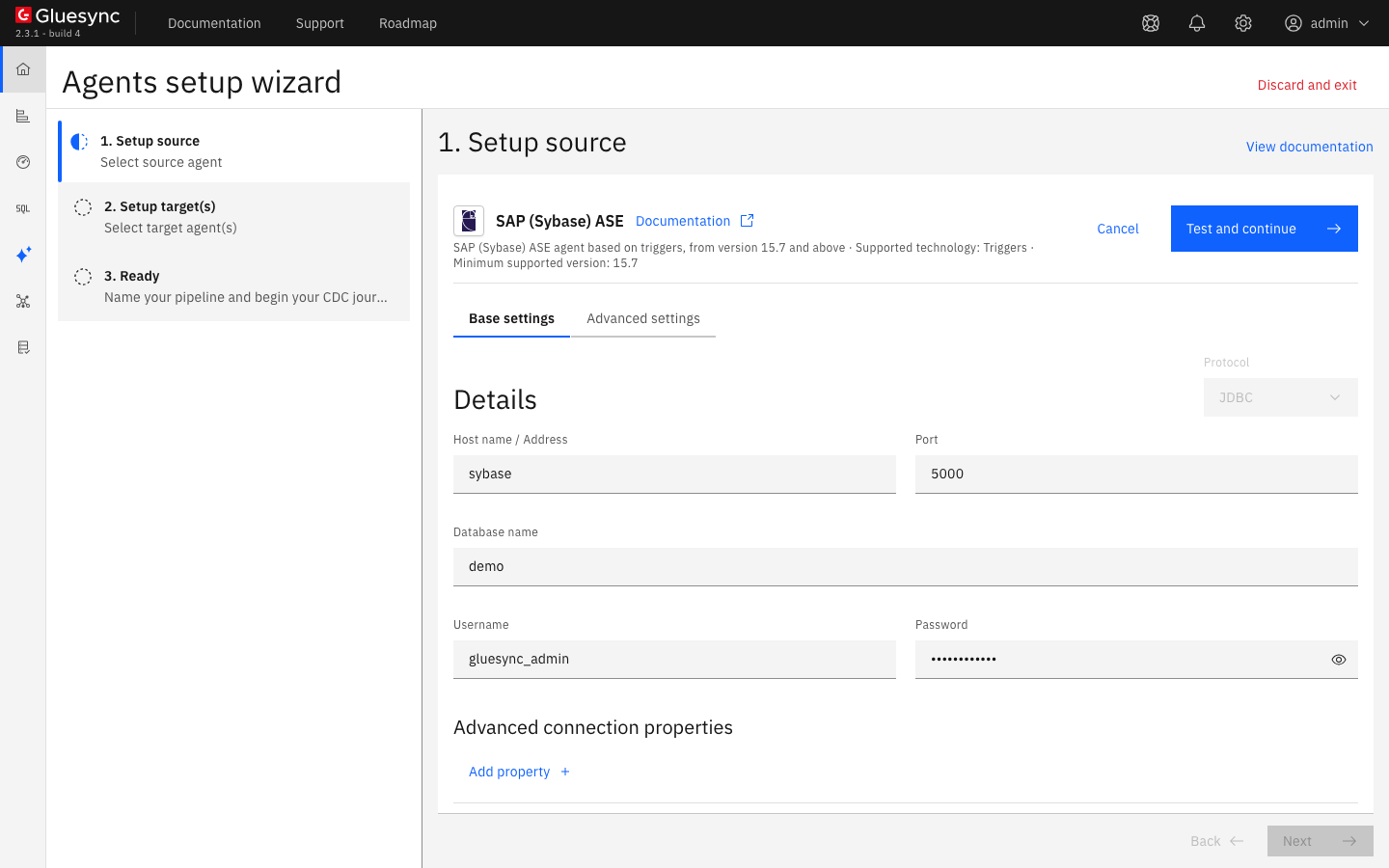
In 1. Setup source, search for
sybaseand select the SAP (Sybase) ASE tile. It offers two connectors: select SAP (Sybase) ASE Triggers agent, not the Log Reader agent; -
In Base settings, fill in the connection:
-
Host name / Address and Port: your ASE server and its port,
5000by default; -
Database name: the database that you replicate, here
demo. The agent reads one database; -
Username and Password: the login of step 2;
-
-
Leave Max connections count at its default of
25for now, and select Test and continue. The source appears with a green check mark. Select Next.
To use TLS between Core Hub and ASE, follow Enable HTTPS and TLS to databases.
UI
-
In 2. Setup target(s), search for
postgres, choose the PostgreSQL CDC agent tile and fill in Base settings: Host name / Address, Port (5432), Database name, Username and Password. Select Test and continue. The target appears with a green check mark. Select Next; -
In 3. Ready, enter a Pipeline name, for example
ASE triggers to PostgreSQL, and select Finish.
UI + SQL
-
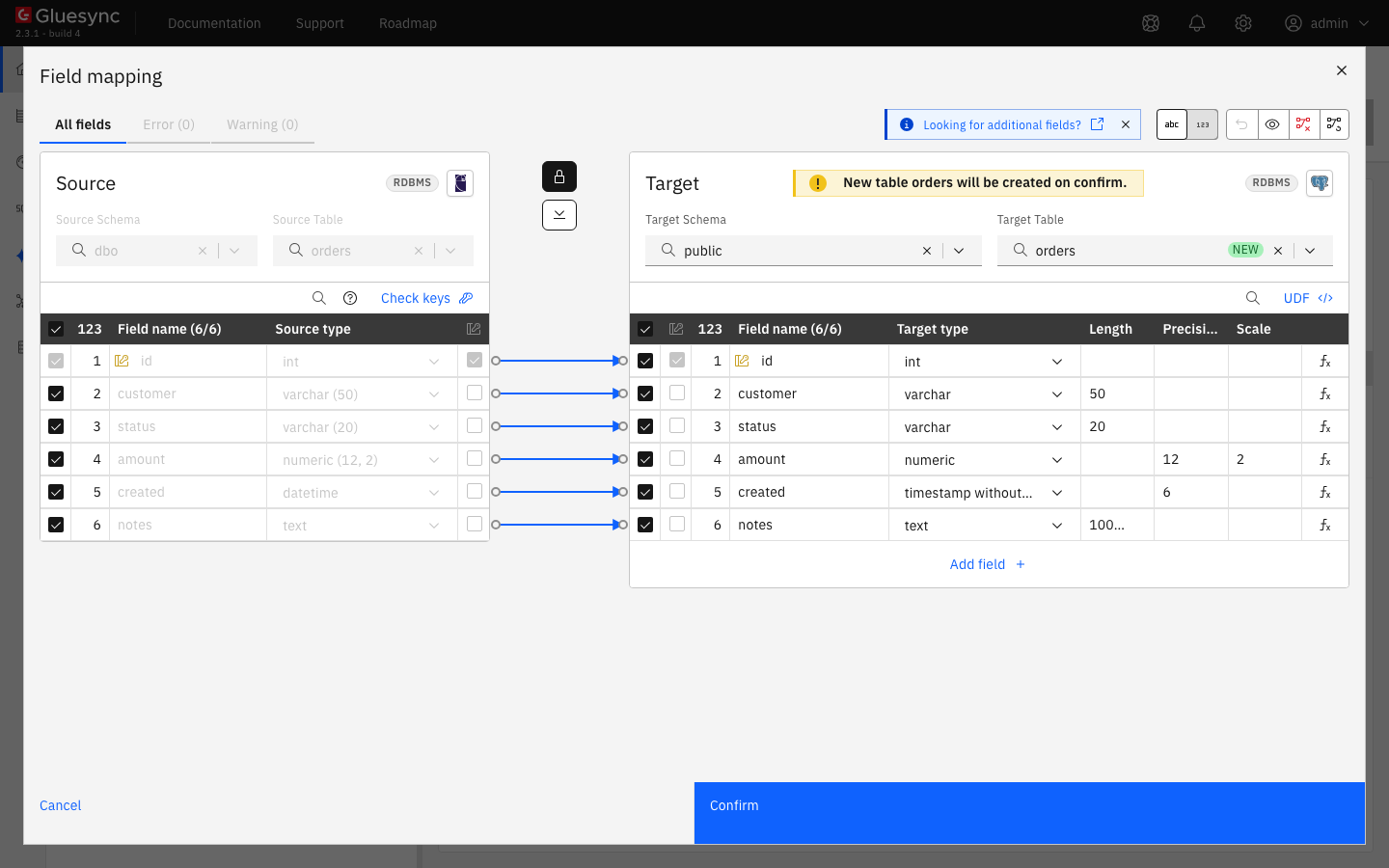
In the pipeline, select Entities. The Add entities page opens with the Object browser. Expand the schema
dboand select the tableorders. The Field mapping dialog opens; -
Under Target, open Target Schema and select
public. In Target Table typeordersand choose Create table "orders"; -
Two fields show a red error and Missing required field appears at the top: the Precision of the
datetimecolumn (created) and the Length of thetextcolumn (notes). Enter6as the precision ofcreated. Enter a length fornotes, for example1000000. PostgreSQL stores the column as plaintextwhatever the length is. The Confirm button turns blue; -
Select Confirm. The Create table orders dialog shows the read-only SQL statement. Read it, then select Create table orders to run it on PostgreSQL;
-
Back on the Add entities page, select Confirm and continue.
The entity appears on Hold. Gluesync has now added its objects to ASE. List them as sa:
use demo
go
select u.name as owner, o.name, o.type
from sysobjects o, sysusers u
where o.uid = u.uid and o.type in ('U', 'TR')
order by o.name
go
select * from gluesync_admin.dbo_orders_CDC where 1 = 0
go
sp_helptext trigger_dbo_orders_update
goThe CDC table has GS_ID, a bigint identity that is also its primary key (ASE creates a unique clustered index on it), the capture time in TIMESTAMP and OPERATION, one of I, U or D.
|
In the Control Plane, the Object browser now lists the schema Right after the first entity you can see a notification such as |
To see the errors of an under-privileged login, create gluesync_ro as a user of the database with grant create table and grant select on dbo.items, put it in a second pipeline and add dbo.items (a table that you create with two columns, id int and name varchar(30)). The entity is refused, and the page shows the message of ASE:
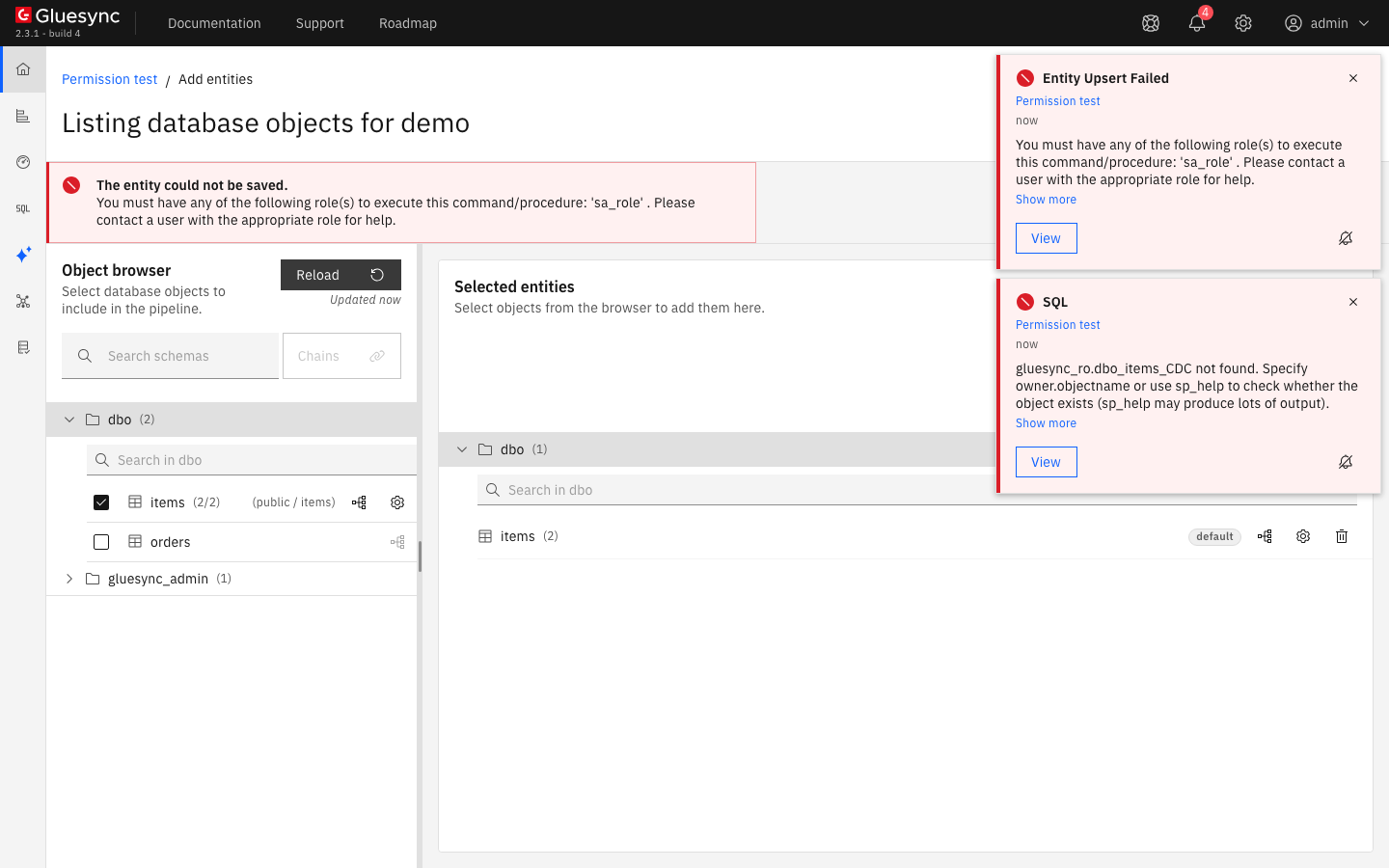
SELECT and CREATE TABLE but no sa_role.If the login is an alias of dbo (sp_addalias gluesync_ro, dbo), the message is User name gluesync_ro does not exist in sysusers. In both cases, give the login sa_role and add it as a user, as in step 2.
SQL
The triggers record every change from the moment the entity is saved, also while it is on hold. As sa, change four rows, then read the CDC table:
insert dbo.orders (id, customer, status, amount, created, notes)
    values (900001, 'Acme', 'new', 99.50, getdate(), 'first order')
go
update dbo.orders set status = 'paid', amount = 120.00 where id = 5
go
delete from dbo.orders where id = 6
go
update dbo.orders set id = 7000 where id = 7
go
select GS_ID, OPERATION, id, status, amount from gluesync_admin.dbo_orders_CDC order by GS_ID
go
The trigger copies inserted for an insert and an update, and deleted for a delete. It records the new image only: the agent has no before image. See Working with Before & After images.
|
UI + SQL
-
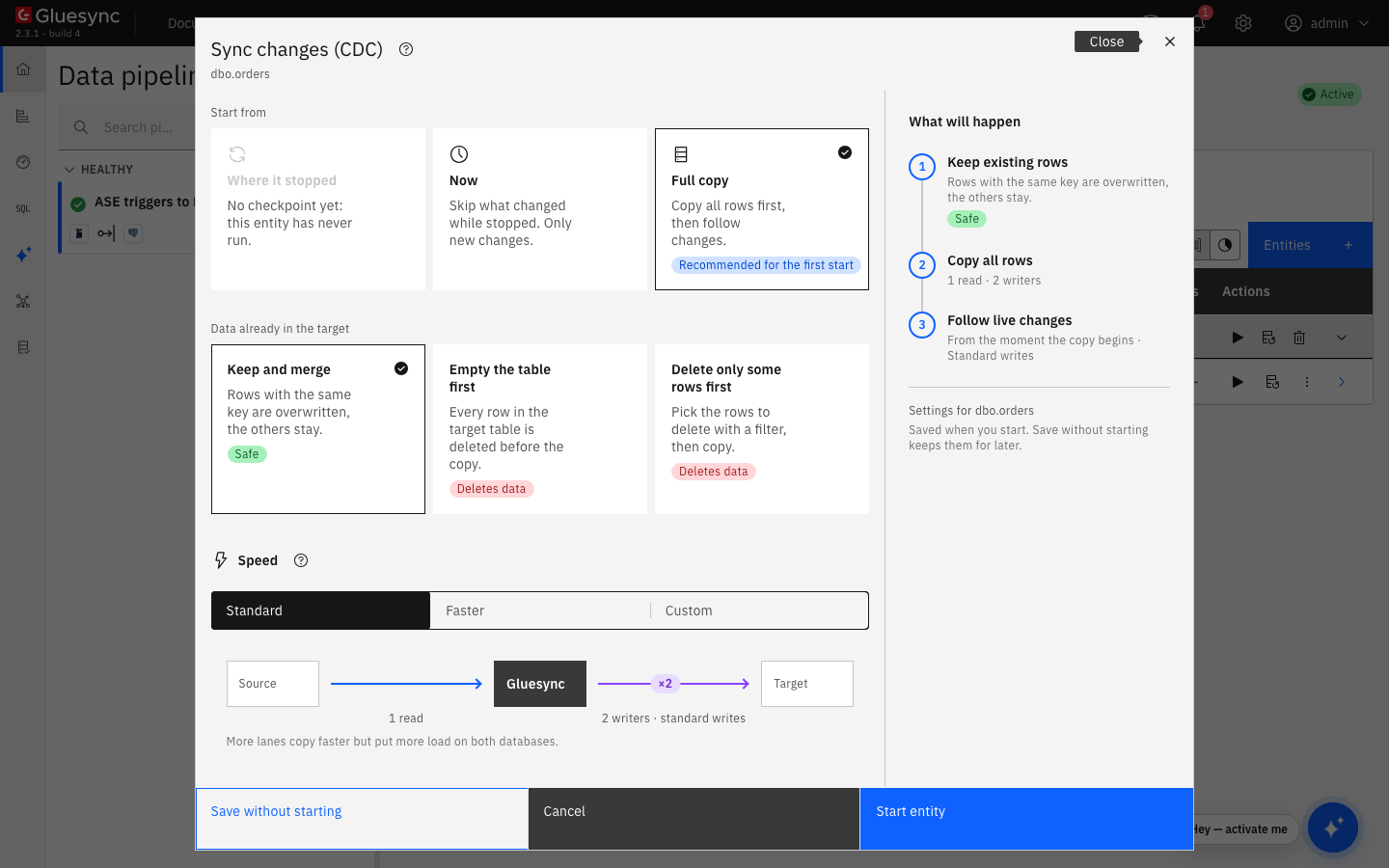
On the row of the entity, select the play button. The Sync changes (CDC) dialog opens;
-
Under Start from keep Full copy, Recommended for the first start. It copies all the rows, then follows the changes. Where it stopped is not available before the first run, and Now skips what changed before the start;
-
Under Data already in the target keep Keep and merge, and under Speed keep Standard;
-
Select Start entity.
Compare the two sides and read the CDC table again:
-- on the source
select count(*) from dbo.orders
select GS_ID, OPERATION, id from gluesync_admin.dbo_orders_CDC order by GS_ID
-- on the target
SELECT count(*) FROM public.orders;
SELECT id, status, amount FROM public.orders WHERE id IN (5, 6, 7, 7000, 900001) ORDER BY id;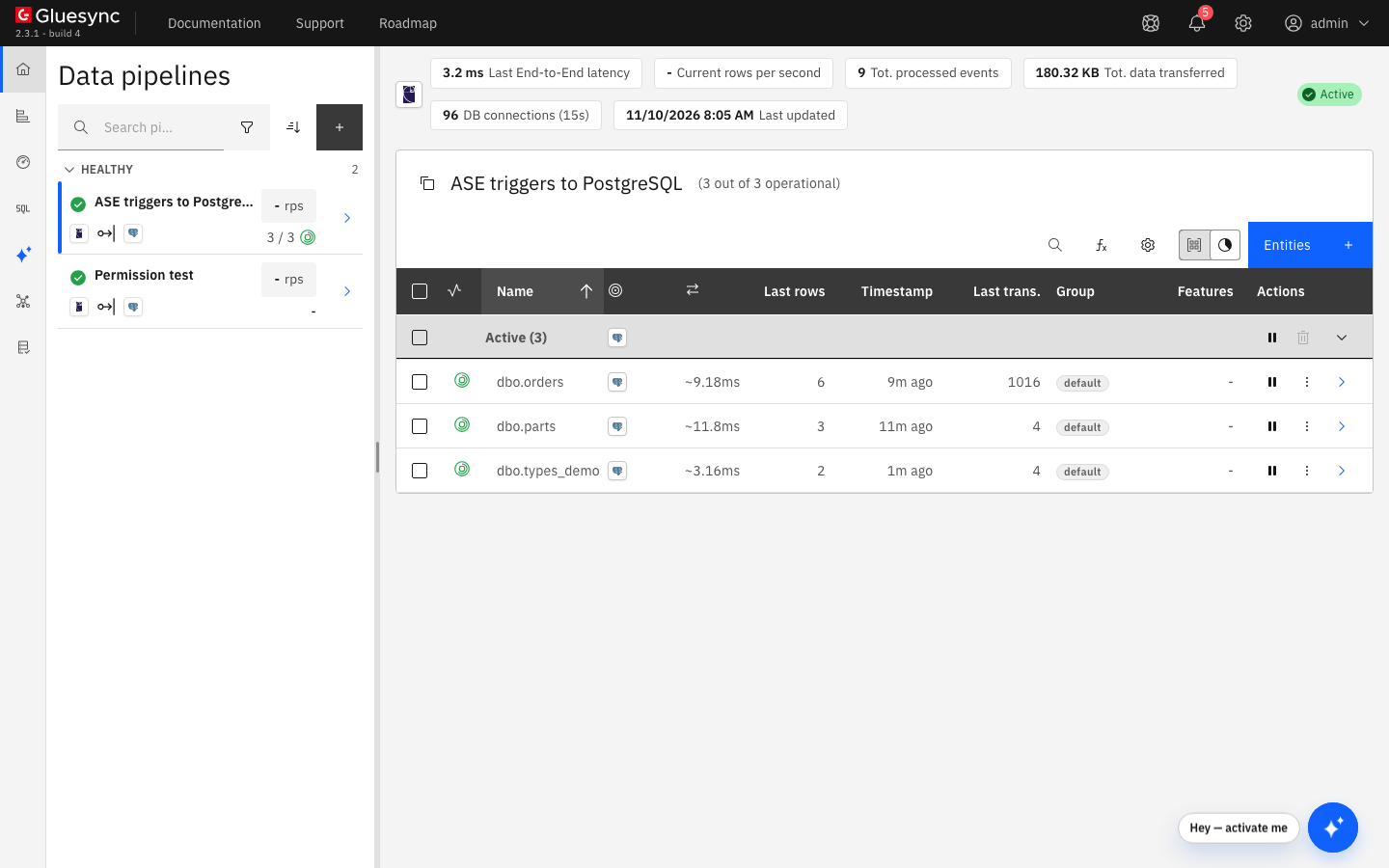
SQL
On the source, run an insert, an update, a delete, a rolled back transaction, a change of a primary key, a change of the text column and a bigger update:
insert dbo.orders (id, customer, status, amount, created, notes)
    values (900002, 'Live', 'new', 5, getdate(), 'live note')
go
update dbo.orders set status = 'paid', amount = 30 where id = 10
go
delete from dbo.orders where id = 11
go
begin tran
insert dbo.orders (id, customer, status, amount, created)
    values (900003, 'Rolled back', 'new', 1, getdate())
rollback tran
go
update dbo.orders set id = 8000 where id = 8
go
update dbo.orders set notes = 'changed note' where id = 900001
go
update dbo.orders set amount = amount + 1 where id between 100 and 1099
go
After a few seconds, read the rows on the target:
SELECT count(*) FROM public.orders;
SELECT id, status, amount, left(notes, 20) AS notes FROM public.orders
WHERE id IN (8, 10, 11, 8000, 900001, 900002, 900003) ORDER BY id;
SELECT id, amount FROM public.orders WHERE id IN (99, 100, 1099, 1100) ORDER BY id;|
An update that changes a primary key reaches the target as an update of the new key. The row with the old key stays on the target. Do not change primary keys of replicated tables, or delete the old key on the target after you change one. To find such rows, follow Find and fix row differences between source and target. For the same reason, |
A text, unitext or image column is not in the CDC table. The agent reads it from the table when it processes the change, so an update of notes alone still reaches the target, as the row 900001 shows.
UI + SQL
The agent does not delete the rows of the CDC table when it has read them. A cleaner deletes the rows that are older than Source change retention in hours. The default is 24 hours. The cleaner runs when the agent starts and then every hour, and it purges the CDC table of every entity of the pipeline, also when the entity is paused.
-
Count the rows, as
gluesync_admin:select count(*), min(GS_ID) from gluesync_admin.dbo_orders_CDC go -
In a test database only, age the 600 oldest rows by hand, so that you can see the cleaner work. Do not edit the CDC table of a pipeline that you run for real:
update gluesync_admin.dbo_orders_CDC set TIMESTAMP = dateadd(hour, -48, TIMESTAMP) where GS_ID <= 600 go -
In the pipeline, select the gear icon next to Entities, then Edit source. Open the Advanced settings tab and select Add property. In Key choose Source change retention in hours, enter
12as the Value and select Test and continue; -
To see the cleaner work now in a test environment, restart Core Hub. The cleaner purges right away when it starts. Count the rows again.
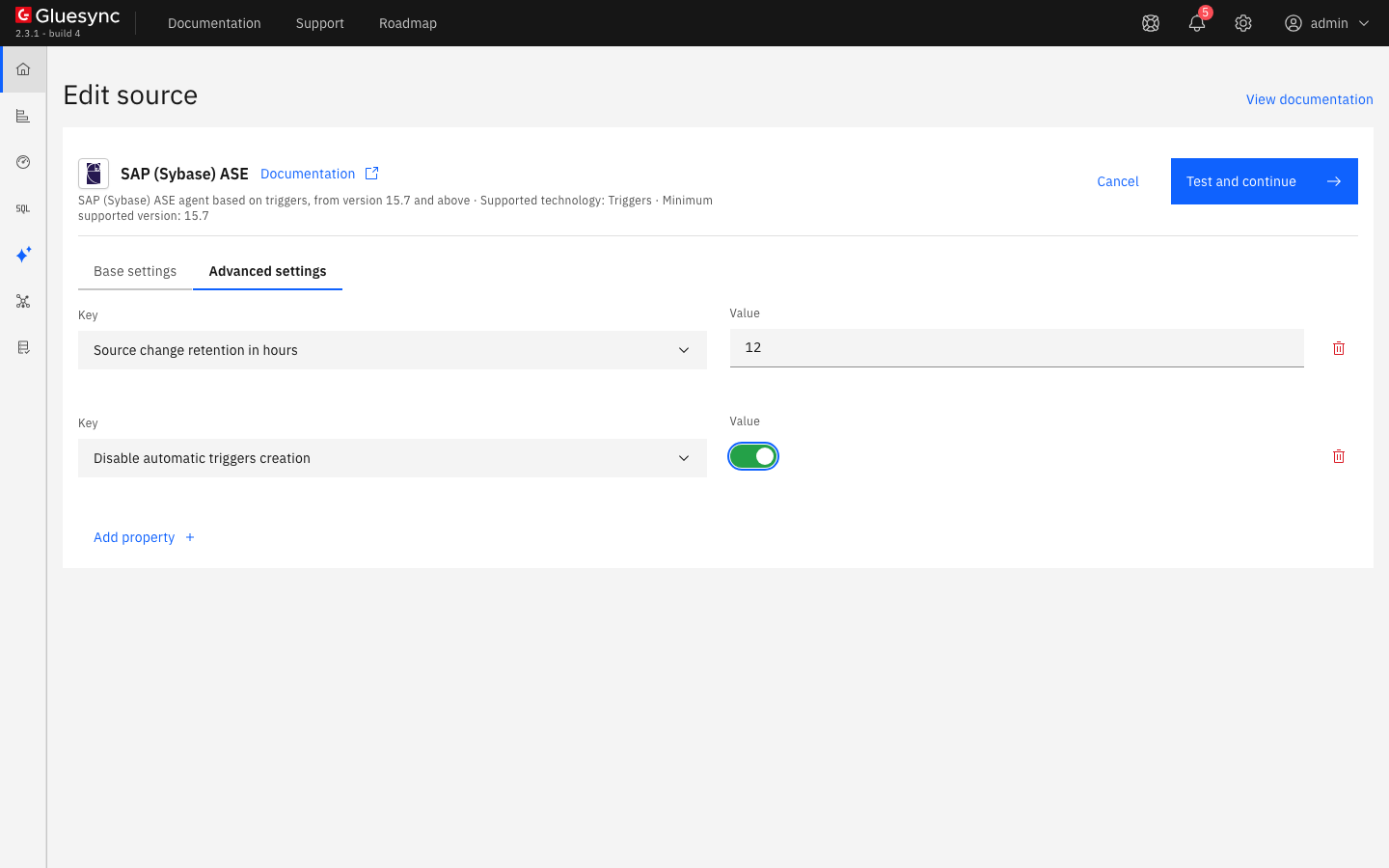
12 hours and Disable automatic triggers creation is on (see step 11).What the retention means in practice:
-
Only unread rows are needed. The agent keeps its position by
GS_ID, so a row that was already delivered is safe to delete. A row that is not delivered yet is lost if the cleaner deletes it. Do not set a retention shorter than the longest time that an entity can stay paused, on hold or in error; -
A value of
0switches the cleaner off. The log then saysPurge CDC data for table: <table> is set to 0and the CDC table grows until you delete rows yourself; -
A paused entity keeps recording. The triggers go on writing to the CDC table, and the cleaner purges the table as usual. The next step shows it.
UI + SQL
Pausing an entity keeps its position. The triggers go on recording, so nothing is lost until the retention deletes the rows.
-
Select the pause button of the entity, then Pause entity;
-
On the source, change some rows:
update dbo.orders set status = 'paused-change' where id between 200 and 204 go insert dbo.orders (id, customer, status, amount, created) values (900010, 'while-paused', 'new', 7, getdate()) go -
Count the rows that wait in the CDC table:
select count(*), max(GS_ID) from gluesync_admin.dbo_orders_CDC go -
Select the play button. Where it stopped is now selected: keep it and select Start entity.
UI + SQL
Use this step when your DBA must review every statement before it runs, or when you do not want Gluesync to create triggers. Gluesync still creates the CDC table, and you create the three triggers.
-
In the pipeline, select the gear icon next to Entities, then Edit source. In Advanced settings select Add property, choose Disable automatic triggers creation, switch it on and select Test and continue. The setting applies to the whole pipeline;
-
Create a small table, then add it as an entity as in step 5. Name it
parts:create table dbo.parts (id int not null primary key, label varchar(30) null) go insert dbo.parts values (1, 'bolt') go -
The CDC table is created and no trigger is. Gluesync writes the statements that you must run to the Core Hub log at
DEBUGlevel, after the lineAutomatic triggers creation disabled, trigger definition will be logged for each table. Each statement follows a line such asTrigger statement for table dbo.parts and INSERT operation:. Run all three on ASE, as a login that owns the table or hassa_role:CREATE TRIGGER trigger_dbo_parts_insert ON dbo.parts FOR INSERT AS BEGIN INSERT INTO gluesync_admin.dbo_parts_CDC (TIMESTAMP, OPERATION, id, label) SELECT GETDATE(), 'I', id, label FROM inserted END go CREATE TRIGGER trigger_dbo_parts_update ON dbo.parts FOR UPDATE AS BEGIN INSERT INTO gluesync_admin.dbo_parts_CDC (TIMESTAMP, OPERATION, id, label) SELECT GETDATE(), 'U', id, label FROM inserted END go CREATE TRIGGER trigger_dbo_parts_delete ON dbo.parts FOR DELETE AS BEGIN INSERT INTO gluesync_admin.dbo_parts_CDC (TIMESTAMP, OPERATION, id, label) SELECT GETDATE(), 'D', id, label FROM deleted END go -
Start the entity with Full copy, then change the table:
insert dbo.parts values (3, 'screw')
go
update dbo.parts set label = 'bolt-m6' where id = 1
go
delete dbo.parts where id = 2
go
|
Keep the names The statements list every column of the table except |
When you switch Disable automatic triggers creation off again, Gluesync creates the triggers that are missing for every entity of the pipeline and leaves the existing ones alone.
UI + SQL
Deleting an entity removes what Gluesync added for its table. Pausing it does not.
-
Pause the entity. On its row, open the menu and select Delete entity, then Delete;
-
List the objects of the table again:
select o.name, o.type from sysobjects o where o.name like '%parts%'
go
Gluesync drops only the triggers named trigger_<schema>_<table>_<operation>. A trigger of your own on the same table stays and keeps firing.
Existing triggers on the table
The reference says that ASE allows only one trigger for each operation on a table. The lab server did not enforce that. On ASE 16.0 SP02 PL02, a table dbo.customers with its own insert trigger (customers_audit) got the three triggers of Gluesync, and sp_helptrigger listed both insert triggers:
use demo
go
sp_helptrigger 'dbo.customers'
go
Trigger Name Firing Action Firing Order Enabled Status trigger_dbo_customers_delete delete no order enabled customers_audit insert no order enabled trigger_dbo_customers_insert insert no order enabled trigger_dbo_customers_update update no order enabled
An insert fired both: the audit table of the customer trigger got a row, and so did the CDC table. Run sp_helptrigger on your own server before you add an entity to a table that has triggers. If your version replaces the existing trigger of the same operation, create the Gluesync triggers by hand as in step 11 and merge the statements with yours.
Retention and cleanup
-
The CDC table is a ledger. The agent reads it in order of
GS_IDand never deletes what it reads. Only the cleaner deletes rows; -
The cleaner deletes by age. It runs when the agent starts and every hour, and it deletes the rows older than Source change retention in hours (
24by default) in every CDC table of the pipeline. The reference describes this setting in days: in the Control Plane, and in the cleaner, the unit is hours; -
The size of the table is your backlog plus the retention. A table that keeps growing means that nothing reads it (an entity on hold, paused or in error) or that the retention is long or
0. Check the state of the entity with Diagnose a stalled pipeline or entity; -
Stopping an entity does not remove anything. The triggers go on writing to the CDC table until you delete the entity;
-
Retire the pipeline from the Control Plane. Delete the entities, as in step 12. If you drop the objects by hand, drop the triggers first, because they refer to the CDC table: a trigger whose CDC table is gone makes every insert, update or delete on the source table fail;
-
Size the log. Every change is written twice in the transaction log of the database. If you meet error
1105onsyslogs, see the troubleshooting table.
Data types
The agent maps the types as the Field mapping dialog lists them. This table was captured with a PostgreSQL target, from a table with these columns, and every value was checked on the target after a snapshot and after a live insert.
| ASE type | PostgreSQL type proposed | Note |
|---|---|---|
|
|
|
|
|
The precision and the scale are kept |
|
|
|
|
|
Read as a 32-bit float: |
|
|
The length is kept. A |
|
|
|
|
|
|
|
|
|
|
|
The dialog requires a precision |
|
|
The dialog requires a precision |
|
|
The dialog requires a length for |
The tables that you replicate need a primary key. If yours has none, follow Choose keys for tables without a primary key.
Speed and concurrency settings
The agent reads the CDC table with one query ordered by GS_ID, which the clustered index of the table serves, so there is no polling interval to tune. The settings that matter are the speed of the snapshot, the size of the connection pool and how many entities run at once.
| Setting | Default | When to change it |
|---|---|---|
Speed in the start dialog (Standard, Faster, Custom) |
Standard: 1 read, 2 writers |
Choose Faster or Custom for a large table, when ASE and the target can take more load. See Speed up snapshots and explain row count differences |
Max connections count (Base settings) |
|
Raise it when many entities run at once. Each connection is a session on ASE |
Max Concurrency (0 means no limitation) (Advanced settings) |
|
Limit how many entities run at once, to protect ASE or the target |
Max Snapshot Concurrency (0 means no limitation) (Advanced settings) |
|
Limit how many snapshots run at the same time |
Trim text values (Advanced settings) |
Off |
Remove trailing spaces of |
The ASE agent does not support bulk load. Read Tune replication throughput for the settings that apply to every target.
Troubleshooting
| Problem | Possible cause | What to do |
|---|---|---|
The entity could not be saved. |
The login of the connection has no |
Run |
|
The login is an alias of |
Drop the alias ( |
ASE answers |
The login exists on the server, but it is not a user of the source database |
Run |
|
The login cannot create the CDC table |
Give the login |
A notification |
The cleaner ran once before Gluesync created the CDC table |
Check that the CDC table exists with the query of step 5. If it does, ignore the notification: the next pass purges the table. If the table is missing, delete the entity and add it again |
ASE refuses writes with error 1105: |
The transaction log is full. The triggers add a second insert to every change, and the CDC tables grow until the cleaner runs |
Dump the transaction log, as the message says, or extend the database with |
The target keeps a row after its primary key was changed on the source |
A trigger records an update of the key as one |
Delete the old row on the target, or start the entity again with Full copy and Empty the table first. Avoid changing keys |
The target keeps its rows after |
ASE runs no delete trigger for a truncate |
Empty the target table yourself, or start the entity again with Full copy and Empty the table first |
Inserts, updates or deletes on a replicated table fail with |
Someone dropped the CDC table by hand. The triggers still refer to it, so every change of the source table fails |
Drop the three triggers of the table. To keep replicating, delete the entity in the Control Plane (it drops what is left), add it again and start it with Full copy |
Changes are missing for a table with hand-made triggers |
The triggers did not exist yet, have other names than |
Compare them with the statements of the Core Hub log, then start the entity with Full copy |
The CDC table keeps growing |
Nothing reads it: the entity is on hold, paused or in error. Or the retention is long or |
Start the entity, check its error, and set Source change retention in hours to a value that fits your backlog. See Diagnose a stalled pipeline or entity |
The log shows |
Source change retention in hours is |
Set a value of 1 hour or more, or delete the rows yourself |
|
The agent reads an ASE |
Use |
|
ASE pads a |
Turn on Trim text values in Advanced settings, or use |
Related guides
Contact MOLO17 Support if you need assistance with the SAP ASE triggers agent.