Set up a MongoDB target for snapshots and CDC
MongoDB stores documents, not rows. Gluesync turns each source row into one document, builds a string _id from the table and the key of the row, and writes it with an upsert. A delete removes the document with that _id. This guide creates a MongoDB user with only the roles Gluesync needs, copies two PostgreSQL tables with a snapshot, follows inserts, updates and deletes with CDC, shows the documents that result, changes the _id, tunes the writes and lists the errors you are most likely to meet.
In this guide
You will create a role and a user in MongoDB, connect the MongoDB target, map two source tables to collections and read the documents with mongosh. You will run a snapshot, follow an insert, an update and a delete, and see that every update replaces the whole document. You will define your own document key, tune the writers, and see what happens on a unique index conflict, on a missing role and on a TRUNCATE. A table at the end lists the errors that were reproduced for this guide.
Quick information
Goal |
Replicate PostgreSQL tables to MongoDB collections with a snapshot, keep them in sync with change data capture (CDC), and know what the documents and their |
Audience |
Data engineers and MongoDB administrators |
Level |
Intermediate |
Time required |
About 40 minutes |
Area |
|
Applies to |
Gluesync 2.3 |
Before you begin
Make sure that:
-
You have a MongoDB server that Core Hub can reach, and you can run
mongoshon it as a user who can create roles and users. The Control Plane shows 3.6 as the minimum version, for Atlas, Enterprise and Community. This guide was tested with MongoDB 8.0. A standalone server is enough for a target: Gluesync does not need a replica set to write. A replica set is needed only when MongoDB is a source, see Set up a MongoDB change streams source; -
You have a source that Core Hub can read with CDC. This guide uses PostgreSQL 16 with
wal_level = logical, set up as in Set up a PostgreSQL WAL source; -
You can sign in to the Control Plane with a role that can create pipelines;
-
You have two source tables. The guide uses
public.orders, with 20,000 rows, andpublic.order_lines, with 300 rows.ordershasid bigintas primary key,customer varchar(50),amount numeric(12,2),status varchar(20),created_at timestamp,ship_date date,paid boolean,tags text[]andnote text.order_lineshas the composite primary key(order_id bigint, line_no int), plusskuandqty.
|
The statements and the messages quoted in this guide were run and captured against MongoDB 8.0 and the Control Plane that ships with Gluesync 2.3. In the lab, the database is |
Guide steps
CLI
Gluesync does not need an administrator. It needs a user that can read the collection names, find, insert, update and delete documents in one database. Run the commands in mongosh, connected as an administrator. Replace the password.
-
The simplest choice is the built-in role
readWriteon the target database:use shop_mirror db.createUser({ user: "gluesync", pwd: "<a strong password>", roles: [ { role: "readWrite", db: "shop_mirror" } ] }) -
If you want fewer rights, create a role with only the actions that the writes use, and give it to the user. This role was tested end to end, with snapshot, insert, update and delete:
db.getSiblingDB("admin").createRole({
  role: "GluesyncTargetWriter",
  privileges: [ {
    resource: { db: "shop_mirror", collection: "" },
    actions: [ "find", "insert", "update", "remove", "listCollections" ]
  } ],
  roles: []
})
db.getSiblingDB("shop_mirror").createUser({
  user: "gluesync",
  pwd: "<a strong password>",
  roles: [ { role: "GluesyncTargetWriter", db: "admin" } ]
})
With this role, the user can create a collection by writing the first document into it, and it cannot create an index. A new collection therefore has only the
_idindex. -
Check the user:
db.getSiblingDB("shop_mirror").getUser("gluesync")
|
The role |
UI
-
In the Control Plane, select Create your first pipeline, or the + button of the pipeline list if you already have pipelines. The Agents setup wizard opens;
-
In 1. Setup source, choose the PostgreSQL CDC agent tile and fill Base settings with the Host name / Address, Port, Database name, Username and Password of your source. Select Test and continue, then Next;
-
In 2. Setup target(s), search for
mongoand choose the MongoDB CDC agent tile. The tile is the same for a source and for a target; -
Fill Base settings:
-
Host name / Address: your MongoDB server;
-
Port:
27017is the default; -
Database name:
shop_mirror. This is the database that receives the collections; -
Username and Password: the user of step 1;
-
-
Select Test and continue. The target appears as
<user>@<host>:27017with a green check mark. Select Next, enter a Pipeline name, and select Finish.
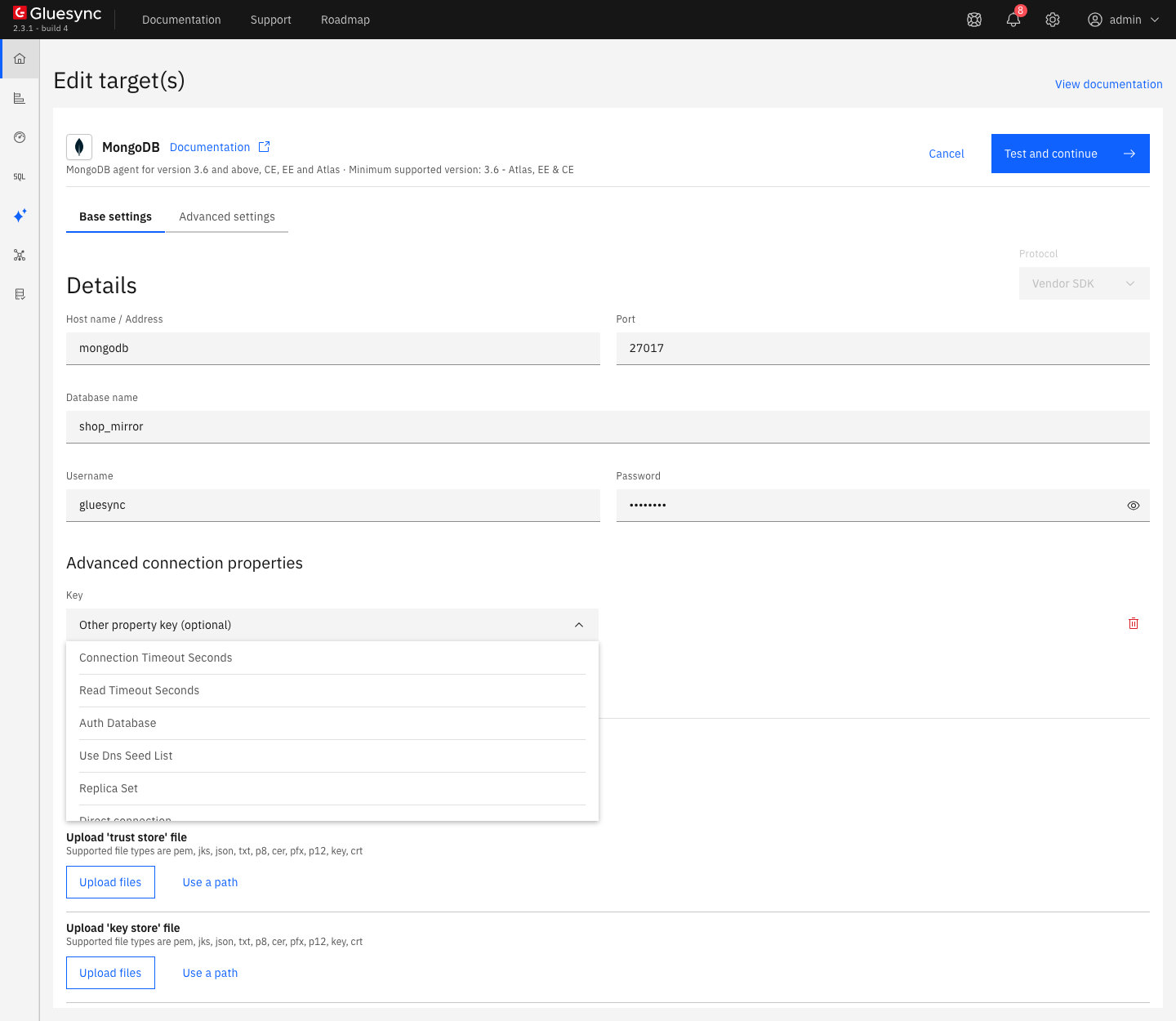
The properties you are most likely to need:
-
Auth Database, when the user was created in a database other than the one you write to, usuallyadmin. Select Add property, pickAuth Databasein Key and enteradminin Value; -
Use Dns Seed List, for an Atlas address that uses an SRV record; -
Replica SetandDirect connection, to talk to one node of a replica set. In the test, the connection to a standalone server worked with none of them; -
the Security section, for TLS. See Enable HTTPS and TLS to databases.
The MongoDB target reference lists every option, the Atlas notes and the REST API setup.
UI
-
In the pipeline, select Entities. The Add entities page opens with the Object browser of the source. Expand the schema
publicand selectordersandorder_lines. Each table gets a check mark and a gear icon; -
Select Confirm and continue. Both entities appear in the pipeline on Hold;
-
Open
public.ordersand select Edit, then the mapping icon next to the table. The Field mapping dialog opens.
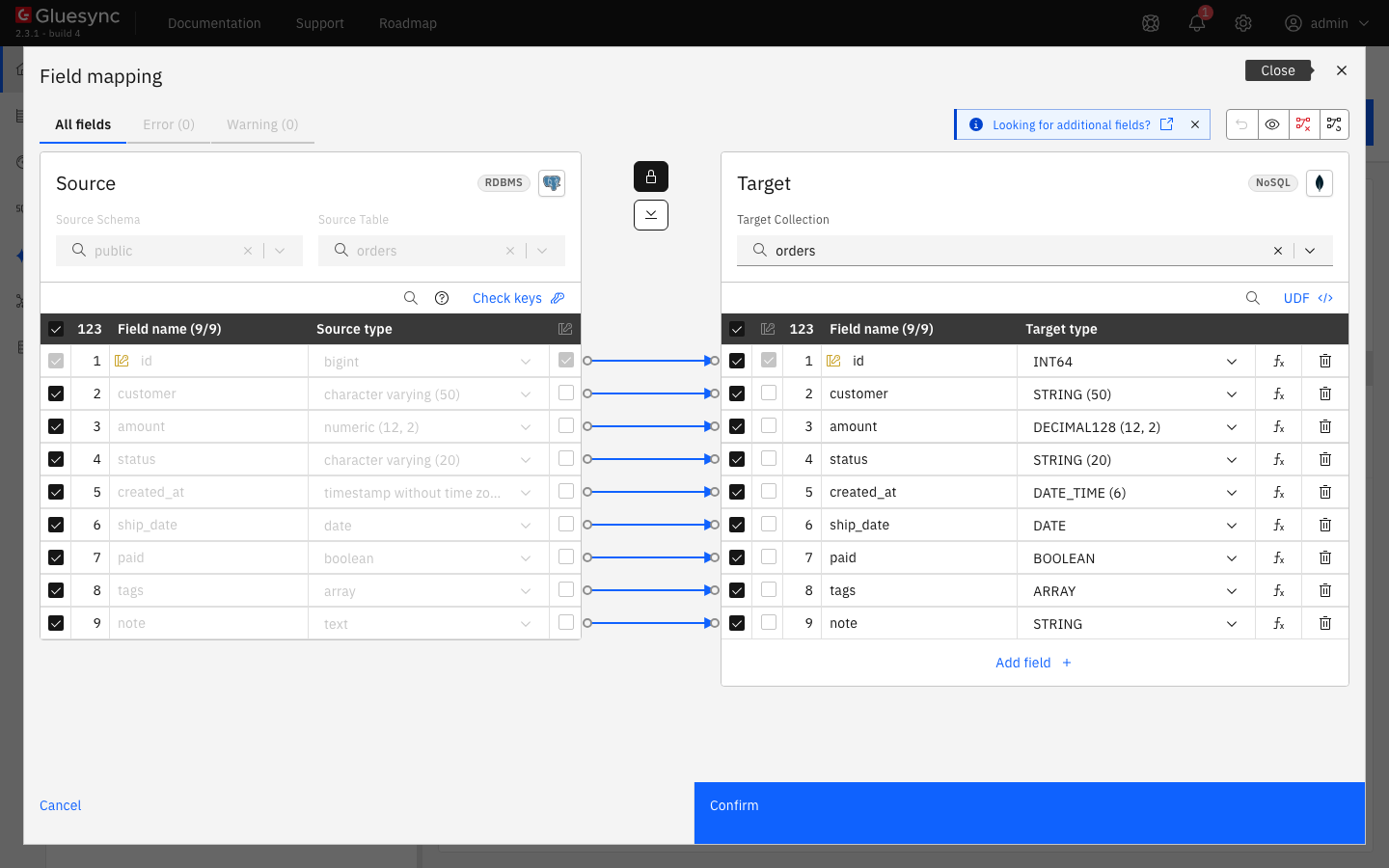
orders. The Target Collection is orders, with no schema in front of it, and the key column id is marked in both tables.Read three things in the dialog and on the entity page:
-
the Target Collection. Gluesync proposes the name of the table, here
orders, without the schema. You can type another name. The collection does not need to exist: the first write creates it; -
the target types. They follow the source, for example
bigintbecomesINT64andnumeric(12, 2)becomesDECIMAL128 (12, 2). See Data types; -
the Document Key Preview on the entity page,
public :: orders :: id. This is how the_idis built, see step 5.
Every entity needs a key. A table without a primary key is rejected, and the dialog shows No key on the source and No key on the target, with the Confirm and continue button disabled. Tick the key columns in the key column of the source side of the dialog, and the target inherits them. In the test, ticking a in a table nopk(a int, b text) fixed both errors.
UI + CLI
-
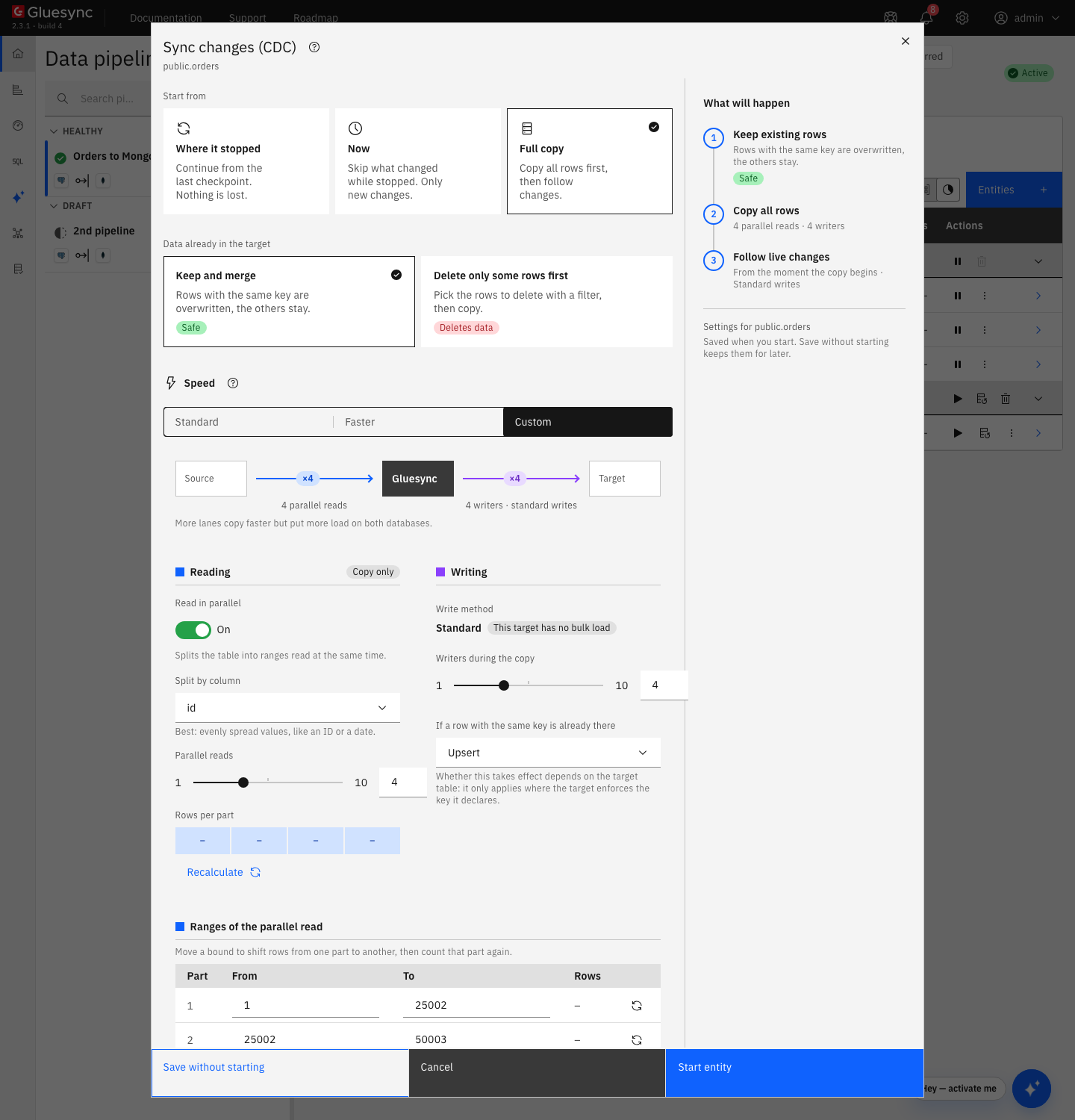
Select the play button of
public.orders. The Sync changes (CDC) dialog opens; -
Keep Full copy under Start from and Keep and merge under Data already in the target. Rows with the same key are overwritten and the others stay. This is the choice that never deletes a document;
-
Select Start entity. Do the same for
public.order_lines.
When the snapshot ends, read the collections in mongosh:
use shop_mirror
db.orders.countDocuments()
db.order_lines.countDocuments()
db.orders.findOne({ id: 1 })
db.order_lines.findOne({ order_id: 51, line_no: 1 })CLI
To see what an update does to a document, first add a field in MongoDB that does not exist in the source:
db.orders.updateOne({ _id: "public::orders::1" }, { $set: { review_score: 5 } })Then, on the source, insert, update and delete one row each in orders, and update one row of order_lines:
INSERT INTO public.orders VALUES (100001, 'customer-new', 19.90, 'new', now(), current_date, false, '{x}', 'hello');
UPDATE public.orders SET status = 'paid', amount = 25.00 WHERE id = 1;
DELETE FROM public.orders WHERE id = 2;
UPDATE public.order_lines SET qty = 99 WHERE order_id = 1 AND line_no = 1;
After a few seconds, read the result:
db.orders.countDocuments()
db.orders.findOne({ _id: "public::orders::1" })
db.orders.countDocuments({ _id: "public::orders::2" })
db.order_lines.findOne({ _id: "public::order_lines::1::1" })In short:
-
an insert or an update replaces the whole document with the current image of the row, and creates it if it does not exist (an upsert). Fields that Gluesync does not map, like
review_score, do not survive an update. Keep your own fields in another collection; -
a delete removes the document with that
_id, and nothing else; -
a second run of the snapshot with Keep and merge writes every row again and leaves the count unchanged. In the test it ran in 214 ms with the Faster speed;
-
a
TRUNCATEon the source does not clear the collection. The Core Hub log showsReceived a transaction message with a truncate operation. This operation is not supported by MongoDB. Skipped.. Delete the documents yourself if you need an empty collection.
UI
The _id is the identifier that Gluesync uses to find the document for every insert, update and delete. By default it is the scope, the collection and the key values, joined with ::. You can change it for an entity.
-
Open the entity and select Edit. Select the gear icon of the table, then the tab with the name of the MongoDB target. You can do this while the entity runs, and the entity then stops;
-
Under Document key, turn on Customize document key. The switch reads User defined key;
-
Set a Prefix, a Separator (
::,-,_,/or none), the Fields and the Suffix. Key order sets the order of the key fields. The Preview shows the result; -
Close the dialog and select Confirm and continue. The entity shows a Warning. Select its play button and keep Where it stopped, which continues from the last checkpoint.
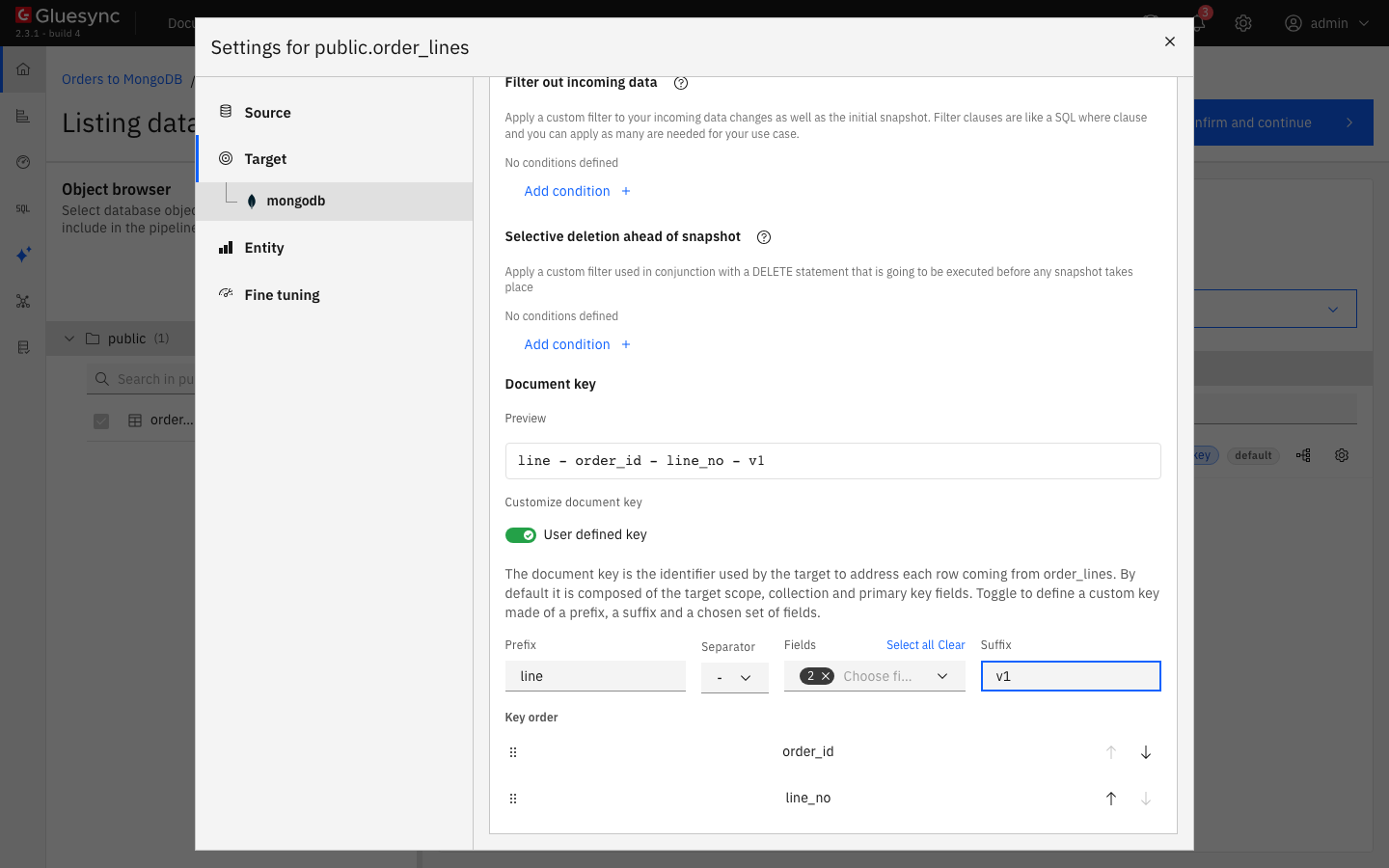
order_lines. The prefix is line, the separator is a hyphen and the suffix is v1.Update a row and read the collection:
UPDATE public.order_lines SET qty = 7 WHERE order_id = 2 AND line_no = 2;db.order_lines.countDocuments()
db.order_lines.find({ qty: 7 })The new key applies from the next write of each row. Gluesync does not rename or delete the documents it wrote with the old key. Run a Full copy so that every row has a document with the new _id, then remove the old ones, for example:
db.order_lines.deleteMany({ _id: /^public::order_lines::/ })Two rows that give the same _id write the same document, and the last one wins. Choose key fields that identify a row.
UI
This target has no bulk loader. Gluesync sends the rows of a transaction to MongoDB with one bulkWrite of upserts, and one of deletes for a delete transaction, with the write concern majority. The settings that change the speed are on the entity and in the start dialog:
-
Writers. In the start dialog, under Speed, choose Faster, or choose Custom and set Writers during the copy (1 to 10) and Parallel reads (1 to 10, split by a column such as the key). The entity setting Snapshot writing concurrency (the Fine tuning tab) has the same range and a default of 2;
-
Batch size. In Fine tuning, Max items per iteration on fetch (
10000by default) is the window of rows that the source reads and sends. Max CDC message size (KB) (4096) and Max snapshot page size (KB) (8192) cap the size of a message; -
Indexes. Every secondary index you add on the collection makes each upsert slower. Create only the indexes that your queries need, and see step 8 for the unique ones.
The Advanced settings tab of the target offers three properties after Add property: Enable Recursion Protection, Query Studio maxTimeMS and Schema discovery sample size. Enable Recursion Protection is for two-way setups on the same collection. The MongoDB target settings list the connection properties.
CLI + UI
Each error below was reproduced on purpose.
-
A unique index on the collection. Create a unique index on a field that the documents carry, then insert a source row with a value that already exists:
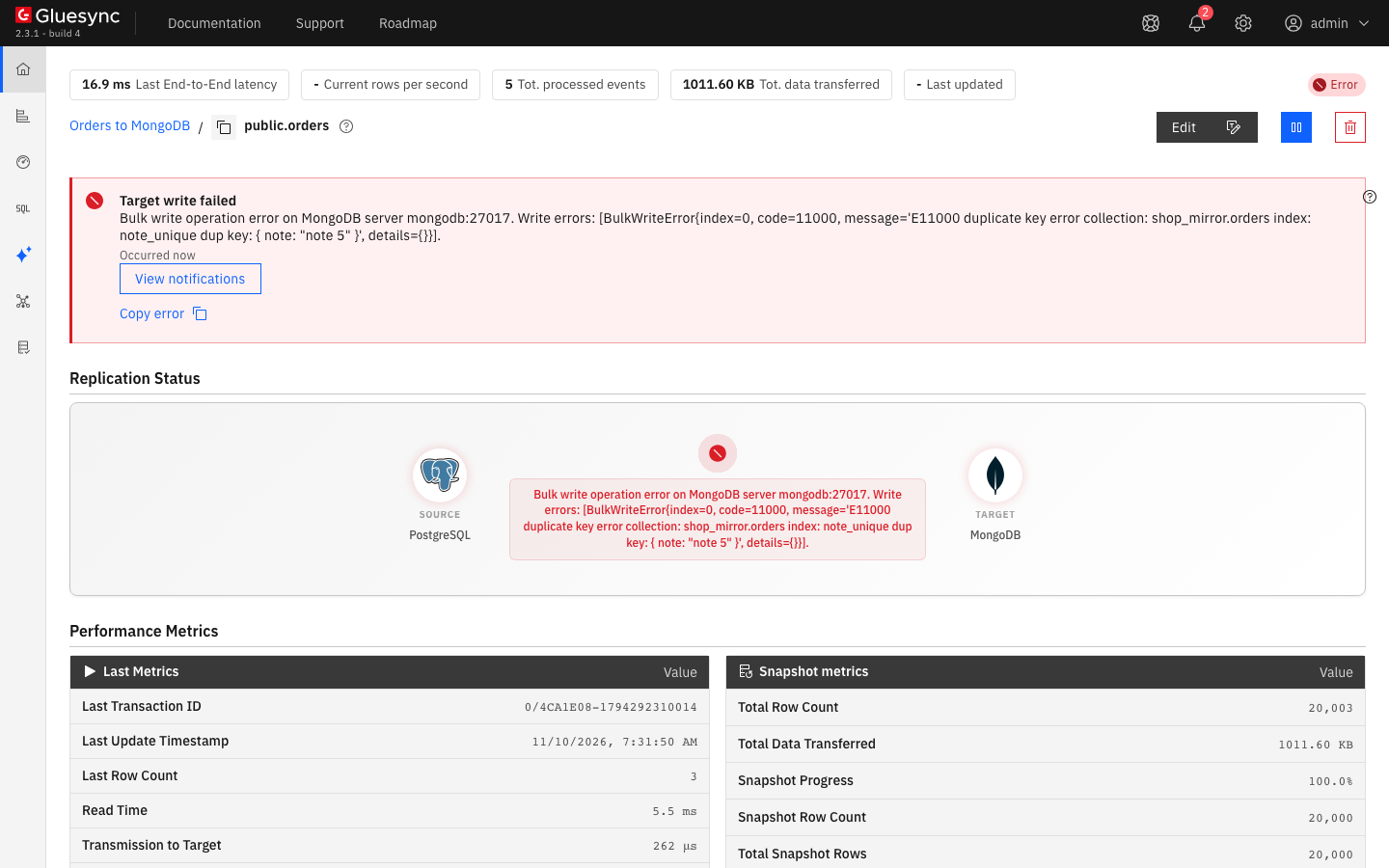
db.orders.createIndex({ note: 1 }, { unique: true, name: "note_unique" })INSERT INTO public.orders VALUES (100002, 'dup', 1.00, 'new', now(), current_date, false, '{x}', 'note 5');The entity goes to Error with Target write failed:
Bulk write operation error on MongoDB server mongodb:27017. Write errors: [BulkWriteError{index=0, code=11000, message='E11000 duplicate key error collection: shop_mirror.orders index: note_unique dup key: { note: "note 5" }', details={}}].The
_idcannot collide, because a replace overwrites the document with the same_id. A conflict with another document’s unique index can, and an upsert cannot solve it. The setting On duplicate key (Upsert, Skip, Fail) does not change this: with Skip the entity stopped in the same way. Drop the index, or fix the data, and the entity writes again. Core Hub retries the transaction every few seconds, and in the test the row arrived without a restart; -
A user that cannot write. Give the user the role
readinstead ofreadWrite, and insert a row on the source. The entity goes to Error, and the Core Hub log showsCommand execution failed on MongoDB server with error 13 (Unauthorized): 'not authorized on shop_mirror to execute command { update: "orders", ordered: true, writeConcern: { w: "majority" }, .... GrantreadWrite, or a role withfind,insert,updateandremove, as in step 1; -
A user in another database. A user created in
adminfails in the target form withException authenticating MongoCredential{mechanism=SCRAM-SHA-1, userName='gs_admin_scope', source='shop_mirror', ...}. Add the propertyAuth Databasewith the valueadmin, and Test and continue passes.
Data types
What the target wrote for the PostgreSQL types of this guide, read back with mongosh:
| Source type | BSON type | Note |
|---|---|---|
|
|
|
|
|
|
|
|
|
|
|
|
|
|
|
|
|
|
|
|
Midnight UTC of that day, |
|
|
On |
|
|
Read as UTC, with milliseconds |
|
|
ISO 8601 text of the UTC instant, |
|
|
|
|
|
The JSON text, not a subdocument |
|
|
|
|
|
|
|
|
The field is present with the value |
The MongoDB target reference and the Target type list of the Field mapping dialog show the types you can pick for each column.
Bulk and throughput settings
| Setting | Default | When to change it |
|---|---|---|
Writers during the copy (start dialog) or Snapshot writing concurrency (entity) |
2 |
Raise it for a large snapshot when the source and Core Hub are not the limit |
Parallel reads (start dialog, Custom) |
1, or 4 with Faster |
Raise it when the read of the source is the limit. Choose a column with evenly spread values |
Max items per iteration on fetch (entity) |
10000 |
The size of the window of rows that the source reads and sends. Change it only while you measure |
Max CDC message size (KB) (entity) |
4096 |
The size limit of the items that the source packs into one message during CDC. Change it only if a transaction does not fit |
On duplicate key (entity) |
Upsert |
Leave it. It does not help with a unique index conflict |
Enable Recursion Protection (target, Advanced settings) |
Off |
Turn it on only when two pipelines write the same collection in two directions |
Read Tune replication throughput for the settings that apply to every target.
Troubleshooting
| Problem | Possible cause | What to do |
|---|---|---|
Failed to save with |
Wrong password, or the user was created in another database than the one in |
Correct the password. If the user lives in |
The entity is in Error with |
The role of the user has no |
Grant |
The entity is in Error with |
A unique secondary index on the collection rejects a document whose value exists in another document |
Drop the index or fix the value. On duplicate key does not apply to this case |
No key on the source and No key on the target |
The source table has no primary key |
Tick the key columns in the Field mapping dialog, or add a primary key to the source |
The Port field shows |
The form of a connection that failed its first test does not keep the default port |
Enter the port again, |
A field you added in MongoDB disappears |
Every insert and update replaces the whole document |
Keep your own fields in another collection, or in another database |
A |
MongoDB has no truncate in this connector. The Core Hub log says |
Delete the documents with |
After you changed the document key, the collection has the old and the new documents |
Gluesync does not remove the documents of the old key |
Run a Full copy, then delete the old documents by their |
A |
The connector writes both as text |
Parse the string in your application |
Related guides
Contact MOLO17 Support if you need assistance with a MongoDB target.