Set up a SAP HANA source with trigger-based CDC
The SAP HANA agent reads changes with triggers. For each table it follows, Gluesync creates three row-level triggers, a CDC table and a sequence. The triggers copy every insert, update and delete into the CDC table, and the agent reads that table. This guide prepares the user, creates the connection, runs a snapshot and live changes, and shows which objects Gluesync adds to your database and how to remove them.
In this guide
You will create a database user with the privileges that trigger-based CDC needs. You will connect to the tenant database, not to the SYSTEMDB, create the SAP HANA source connection in the Control Plane, add an entity, and start it with a full copy followed by live changes. You will list the objects Gluesync created, set the retention of the CDC table, and recover from the errors you are most likely to meet.
The steps were run on SAP HANA 2.0 (HANA Express, tenant database) with a PostgreSQL target.
Quick information
Goal |
Replicate a SAP HANA table with a snapshot followed by change data capture (CDC), and know which objects Gluesync adds to your database |
Audience |
Data engineers and SAP HANA administrators |
Level |
Intermediate |
Time required |
About 45 minutes |
Area |
SAP HANA → user and privileges; Control Plane → Pipelines → SAP HANA agent → Base settings; entity → start dialog |
Applies to |
Gluesync 2.3 |
Before you begin
Make sure that:
-
You have a SAP HANA 2.0 tenant database and you can run SQL on it with a user that can create users and grant privileges;
-
You know the SQL port of the tenant database. Step 1 shows how to read it;
-
Core Hub can open a connection to that host and port;
-
You have a target to write to. Any target works, and the steps for the source are the same;
-
You can sign in to the Control Plane with a role that can create pipelines;
-
You have a source table with a primary key.
|
The options of the agent are listed in the SAP HANA source reference. For the write side, see SAP HANA target. |
Guide steps
SQL
A SAP HANA system with multitenant database containers has one system database, called SYSTEMDB, and one or more tenant databases. Your data lives in a tenant. The Control Plane form has no field that selects a tenant: the tenant is the one that owns the port you enter. Use the SQL port of the tenant.
Connect to the tenant and read its SQL port:
SELECT SERVICE_NAME, SQL_PORT FROM M_SERVICES WHERE SERVICE_NAME = 'indexserver';SQL
Connect to the tenant as an administrator. Create the user and give it the privileges that the agent needs. Replace the password and the source schema name. SAP HANA wants the password in double quotes:
CREATE USER GLUESYNC_USER PASSWORD "<a strong password>" NO FORCE_FIRST_PASSWORD_CHANGE;
GRANT SELECT ON SCHEMA <SOURCE_SCHEMA> TO GLUESYNC_USER;
GRANT TRIGGER ON SCHEMA <SOURCE_SCHEMA> TO GLUESYNC_USER;
GRANT CREATE ANY ON SCHEMA <SOURCE_SCHEMA> TO GLUESYNC_USER;|
A password in single quotes fails with |
Gluesync stores the CDC table and the sequence in the schema that has the name of the connection user. In SAP HANA, creating a user creates a schema with the same name, and the user owns it. For GLUESYNC_USER the schema is GLUESYNC_USER. You need no other schema and no extra grant for it.
The grants have these jobs:
| Privilege | Why Gluesync needs it |
|---|---|
|
The snapshot reads the tables, and the agent reads their columns and keys. |
|
Gluesync creates the insert, update and delete triggers in the schema of the source table. |
|
Gluesync drops the triggers when you delete the entity. In the test, |
Ownership of its own schema |
The CDC table and the sequence of each table are created there. |
Grant the same two privileges on every source schema you follow. The object browser of the Control Plane lists only the schemas the user can see.
If you do not want Gluesync to create triggers, turn on the table option Disable automatic triggers creation in step 4 and create them yourself.
UI
-
In the Control Plane, select Create your first pipeline, or the + button of the pipeline list if you already have pipelines. The Agents setup wizard opens;
-
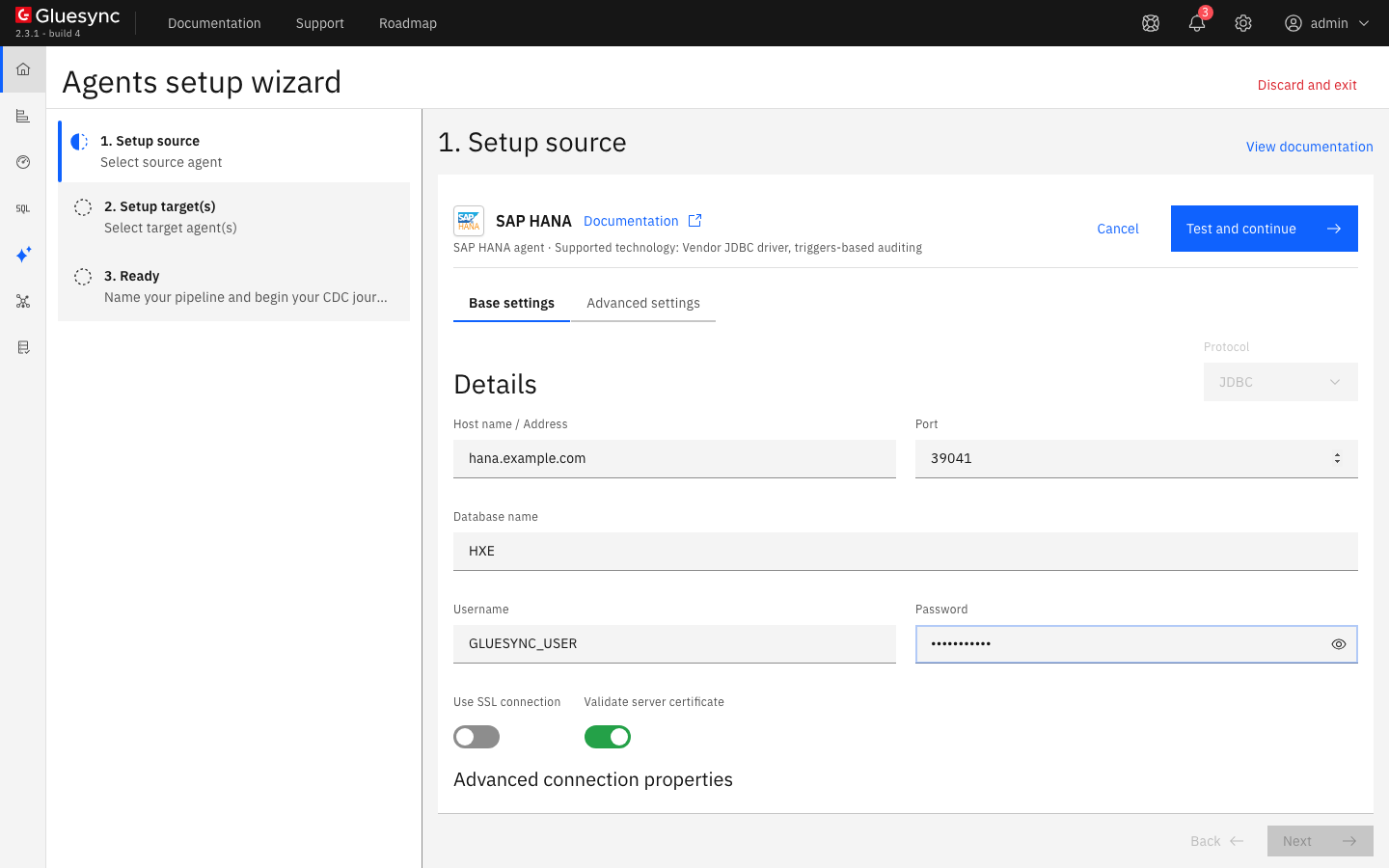
In 1. Setup source, choose the SAP HANA tile and fill Base settings:
-
Host name / Address: the host of the SAP HANA server, as Core Hub sees it;
-
Port: the SQL port of the tenant, from step 1. The default is
30015; -
Database name: the tenant name, for example
HXE. The field is required. Gluesync shows the name in the object browser, but the port decides which database you reach, see the note below; -
Username and Password: the user of step 2;
-
-
Leave Use SSL connection off, unless your server needs TLS. Validate server certificate is on by default;
-
Select Test and continue. The source appears with a green check mark. Select Next.
-
In 2. Setup target(s), choose your target agent and fill its connection. Select Test and continue, then Next;
-
Enter a Pipeline name and select Finish.
|
In the test, a wrong Database name (a tenant that does not exist) with the correct tenant port still passed Test and continue. The connection went to the database behind the port. Check the port, not the name. |
UI
-
In the pipeline, select Entities. The Add entities page opens with the Object browser. Expand the source schema and tick the table. The browser shows the schemas that the user can see, and no others;
-
In the Field mapping dialog, under Target, choose the Target Schema, then type the name in Target Table and choose Create table "<name>". The dialog shows New table <name> will be created on confirm. and the proposed target types;
-
Check the types. For a SAP HANA
TIMESTAMPcolumn and a PostgreSQL target, the Precision oftimestamp without time zoneis empty, the row is marked as an error and the dialog says Missing required field. Type a precision, for example6;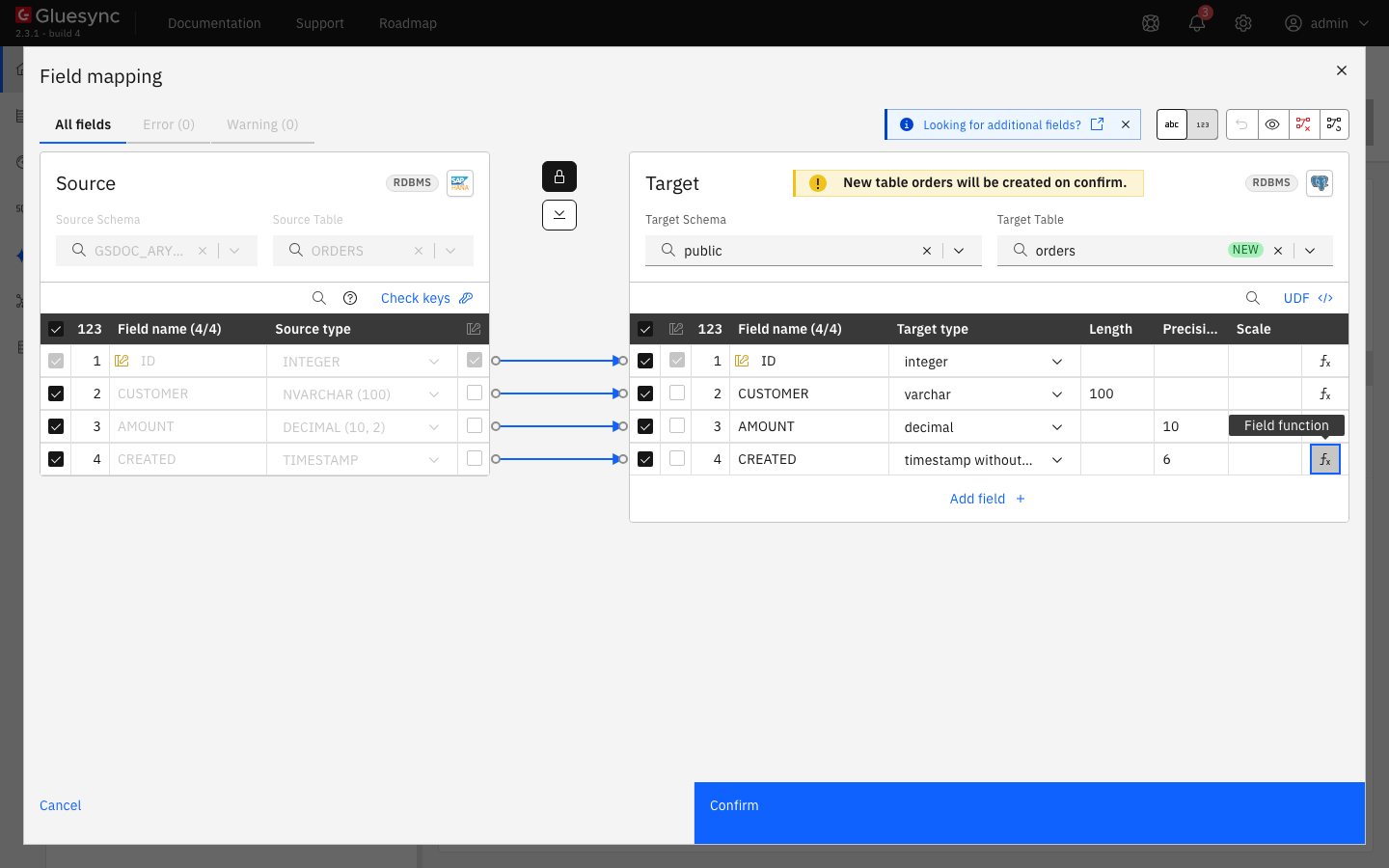 Figure 2. The field mapping of a table: SAP HANA types on the left, the proposed PostgreSQL types on the right, with the precision of the timestamp set.
-
Select Confirm. The Create table dialog shows the read-only SQL statement. Select Create table <name> to run it on the target;
-
Back on the Add entities page, select Confirm and continue.
|
When you confirm the first entity, a red notification titled JDBC Driver can appear with the text |
In the entity settings (Edit settings in the entity menu) the Source page has two options for the table: Disable automatic triggers creation and SQL Snapshot where clause filter (without initial WHERE). Leave the first off and the second empty to copy the whole table.
UI
-
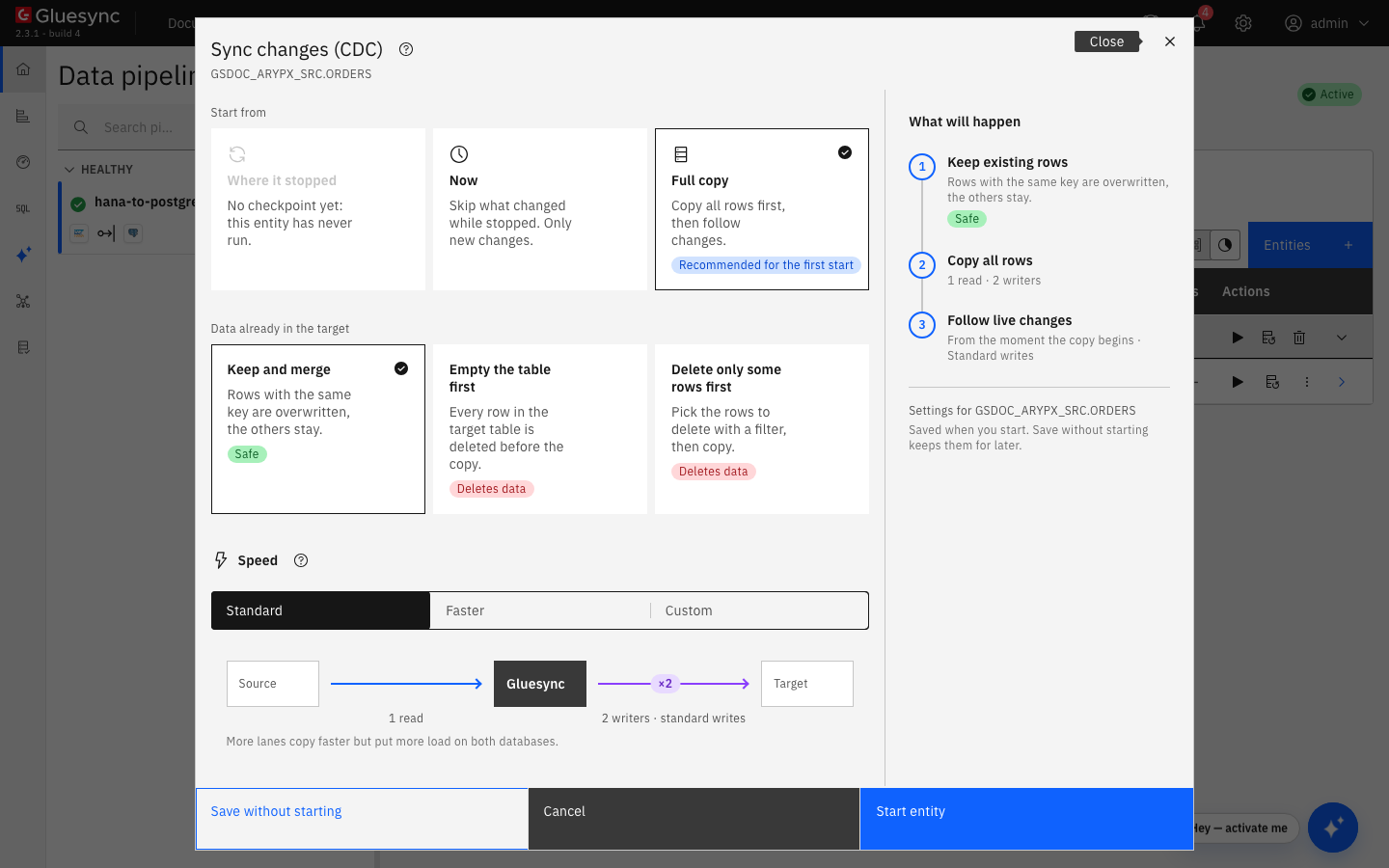
On the row of the entity, select the play button. The Sync changes (CDC) dialog opens;
-
Under Start from keep Full copy, Recommended for the first start. Under Data already in the target keep Keep and merge, and under Speed keep Standard;
-
Select Start entity.
Check the target. For three source rows, the target has the same three rows. Then change the source with the owner of the source schema:
INSERT INTO <SOURCE_SCHEMA>.ORDERS VALUES (4, 'Dave', 40.00, CURRENT_TIMESTAMP);
UPDATE <SOURCE_SCHEMA>.ORDERS SET CUSTOMER = 'Alice B', AMOUNT = 11.00 WHERE ID = 1;
DELETE FROM <SOURCE_SCHEMA>.ORDERS WHERE ID = 2;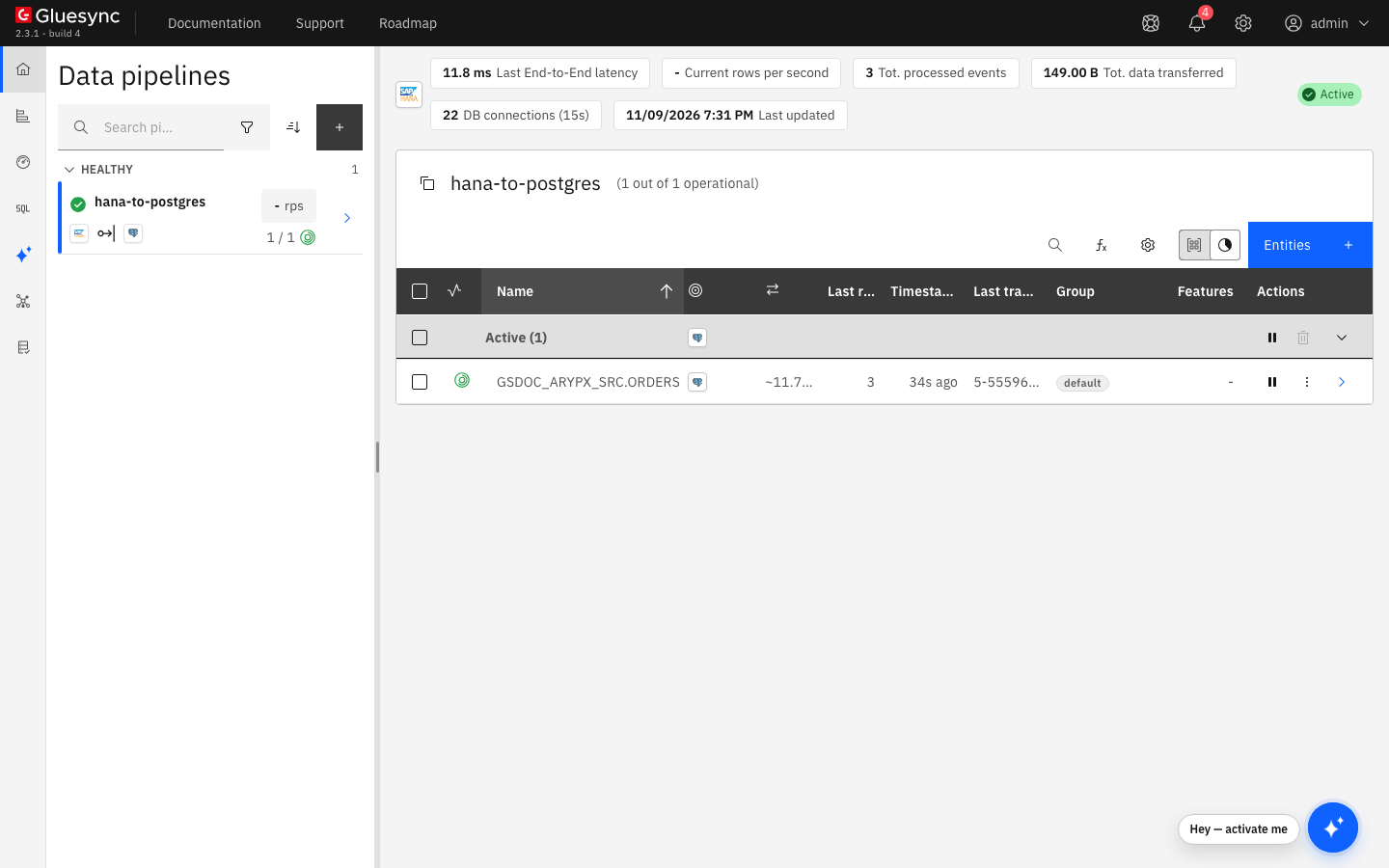
SQL
Connect to the tenant. For a table <SOURCE_SCHEMA>.ORDERS, read the objects from the catalog:
SELECT SCHEMA_NAME, TABLE_NAME FROM TABLES WHERE SCHEMA_NAME = 'GLUESYNC_USER';
SELECT SCHEMA_NAME, TRIGGER_NAME, TRIGGER_EVENT FROM TRIGGERS WHERE SUBJECT_TABLE_NAME = 'ORDERS';
SELECT SEQUENCE_NAME FROM SEQUENCES WHERE SCHEMA_NAME = 'GLUESYNC_USER';
SELECT INDEX_NAME FROM INDEXES WHERE SCHEMA_NAME = 'GLUESYNC_USER';
To read the rows of the CDC table, connect as GLUESYNC_USER. An administrator such as SYSTEM gets insufficient privilege on it, because the table belongs to the Gluesync user:
SELECT GS_OPERATION, ID, GS_TRANSACTION_ID FROM GLUESYNC_USER.<SOURCE_SCHEMA>_ORDERS_CDC ORDER BY GS_TRANSACTION_ID;You find, for each followed table:
| Object | Name and role |
|---|---|
CDC table |
A column table named |
Triggers |
Three |
Sequence |
|
Indexes |
Three indexes on the CDC table, named |
|
Older reference text describes an |
UI + SQL
The triggers keep writing while an entity is not running. Pause the entity with the pause button of its row, then change the source:
INSERT INTO <SOURCE_SCHEMA>.ORDERS VALUES (5, 'Eve', 50.00, CURRENT_TIMESTAMP);
UPDATE <SOURCE_SCHEMA>.ORDERS SET AMOUNT = 44.00 WHERE ID = 4;
Read the CDC table as GLUESYNC_USER: the two changes are there with GS_TRANSACTION_READ at 0, and the target did not change. Start the entity again, keep Where it stopped in the start dialog and select Start entity.
|
The retention purge deletes by age, not by what Gluesync has read, and it also covers the CDC tables of stopped entities. If an entity stays stopped for longer than the retention, the changes of the stopped period are deleted. Realign the target with a full copy after such a stop. |
UI + SQL
The agent purges every CDC table once an hour, starting when the agent starts. For each table it deletes the rows older than the retention, by GS_OPERATION_TS. The default is 5 days.
To change it, open the pipeline menu, select Edit source, open Advanced settings, select Add property, choose Source change retention in days and enter the number of days.
To see the purge work, look at the oldest row of the CDC table as GLUESYNC_USER:
SELECT MIN(GS_OPERATION_TS), COUNT(*) FROM GLUESYNC_USER.<SOURCE_SCHEMA>_ORDERS_CDC;UI + SQL
In the entity menu, select Delete entity and confirm. Gluesync drops the three triggers, the CDC table and the sequence of the table. The Core Hub log shows Dropped CDC table <USER>.<SOURCE_SCHEMA>_<TABLE>_CDC and Dropped CDC sequence for table <SOURCE_SCHEMA>.<TABLE>.
If the user cannot drop them, for example because TRIGGER is missing, the entity is deleted and the objects stay. The Core Hub log shows Failed to drop the CDC objects of table <SOURCE_SCHEMA>.<TABLE>. The triggers keep writing into <USER>.<SOURCE_SCHEMA>_<TABLE>_CDC until they are dropped manually. Drop them yourself as an administrator, triggers first:
DROP TRIGGER <SOURCE_SCHEMA>.<trigger name>;
DROP TABLE GLUESYNC_USER.<SOURCE_SCHEMA>_<TABLE>_CDC;
DROP SEQUENCE GLUESYNC_USER.GS_SEQUENCE_<SOURCE_SCHEMA>_<TABLE>_CDC;
Data type notes
-
The CDC table is created with the data types of the source columns, so long text and binary columns are copied into it too. Plan disk for tables with large
NCLOBorBLOBcolumns. -
With a PostgreSQL target, the Precision of a
TIMESTAMPcolumn is not filled in. Set it in the Field mapping dialog, see step 4. -
See the agent reference for the full type mapping.
Performance
-
The triggers run in the transaction of each change, so each write to a followed table also writes one row (two for a primary key change) to its CDC table. Follow only the tables you need.
-
For the general method, see Tune replication throughput.
Troubleshooting
| Symptom | Cause | Fix |
|---|---|---|
Test and continue shows |
The user or password is wrong, or the user is locked. |
Check the credentials with a SQL client on the same host and port. |
Test and continue shows |
Nothing listens on that port, or the port is not reachable from Core Hub. |
Use the SQL port of the tenant (step 1) and check the network path. |
The entity could not be saved. |
The user cannot create the triggers on the source schema, because the grants of step 2 are missing. In the test, a CDC table and a sequence stayed in the schema of the user after the failure. |
Run the grants of step 2 as an administrator and add the entity again. Drop the leftover CDC table and sequence of that table if you do not need them. |
|
The password is in single quotes. |
Put the password in double quotes. |
|
The CDC table belongs to the Gluesync user. |
Connect as the Gluesync user, or grant |
CDC objects are left after you delete an entity |
The user could not drop a trigger, the CDC table or the sequence. The log shows |
Drop them yourself, see step 9. |
The CDC table keeps growing |
The purge failed for that table, or the retention is long. The log shows |
Read the log, fix the privilege or the lock, and lower Source change retention in days. |