Query the Parquet, CSV, and JSON files of a data lake with SQL
A Gluesync target that writes to a bucket leaves you with files, not a table. You do not need another tool to look at them: a SQL engine embedded in Core Hub reads the Parquet, CSV, and JSON files of the file agents in place, with the connection the agent already has. Query Studio uses it in the Control Plane, and Query Forge gives the same tables to JDBC clients and BI tools. This guide queries the files of an S3 target, from the first count to the current state of each row.
In this guide
You will learn how to open the files of a target in Query Studio, read an entity as a table, see the inserts, updates, and deletes it holds, read a single file or a folder with parquet(), list a folder with files(), and rebuild the current state of the table. You will then query the same files from a JDBC client through Query Forge, and compare them with the source table. You will also see what Query Studio refuses on a data lake, and why.
The guide starts where Replicate a database to a data lake ends. That guide explains how the files are written and reads them with an external engine. This guide reads the same files from Gluesync itself. The full list of rules and settings is in the Query Studio reference.
Quick information
Goal |
Query the files that a Gluesync file target writes, without a second connection or tool |
Audience |
Data engineers and analysts who check what a data lake target wrote |
Level |
Intermediate |
Time required |
About 25 minutes |
Area |
Control Plane → Query Studio, and Query Forge for JDBC clients |
Applies to |
Gluesync 2.3.2.0 and later: AWS S3 and S3-compatible stores, Universal File Store over WebDAV, WebDAVS, or NFS |
Before you begin
Make sure that:
-
A pipeline has a file target that Query Studio can read: the AWS S3 & S3-like agent or the Universal File Store agent over WebDAV, WebDAVS, or NFS;
-
At least one entity of that target has written files, for example after a full copy. An entity without files cannot be read yet;
-
You can sign in to the Control Plane with a user that can open Query Studio. Every role can run read-only queries, and lake queries are always read-only;
-
Core Hub can reach the store from its own network;
-
For the Query Forge step only: a JDBC client such as DBeaver, the Gluesync JDBC driver, and a Personal API Token. See Connecting to Query Forge.
|
The examples use a pipeline called Sales lake. Its PostgreSQL source replicates the table Replace the names with yours. Nothing in this guide changes a file or the pipeline. |
Guide steps
UI
-
Select Query Studio (the SQL icon) in the left sidebar;
-
Select the + next to the session tabs to open a new session;
-
Open the SQL-capable Agent list, select the pipeline Sales lake, and then select its target agent, Lake bucket (TARGET).
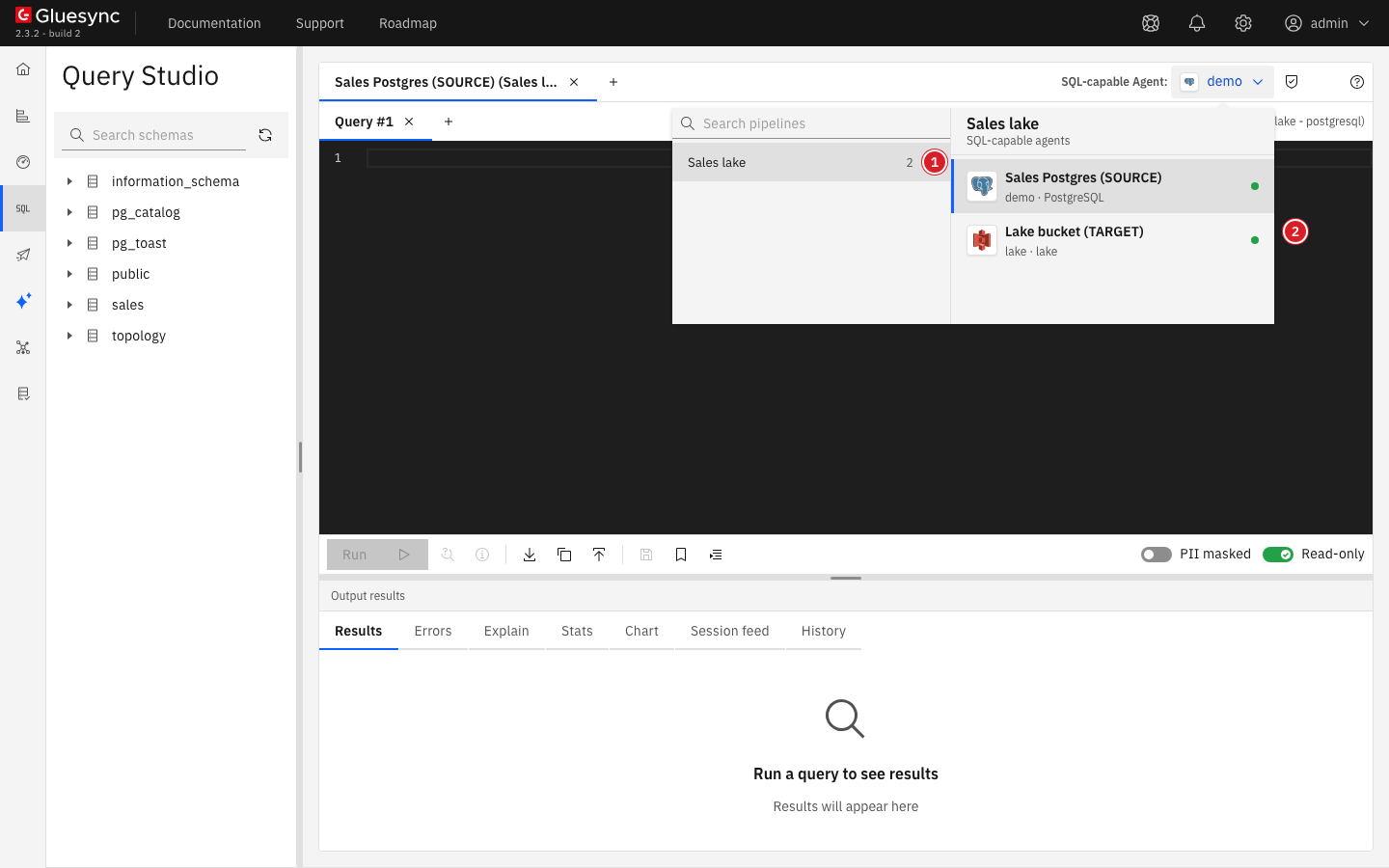
lake · lake: the bucket, then the dialect.The agent is not listed when Query Studio cannot read its store:
-
The store is Google Cloud Storage, Azure Data Lake Storage Gen2, or the Universal File Store over FTP, FTPS, SFTP, SMB, or CIFS. These stores are not read;
-
The agent has no bucket, or no access key and secret key, in its connection;
-
A Universal File Store over NFS points at the root of the disk, or at a folder that Core Hub keeps for itself. Core Hub logs the reason with the prefix
[Lake].
UI
-
In the schema browser, expand
default; -
Expand
sales.ordersto see its columns.
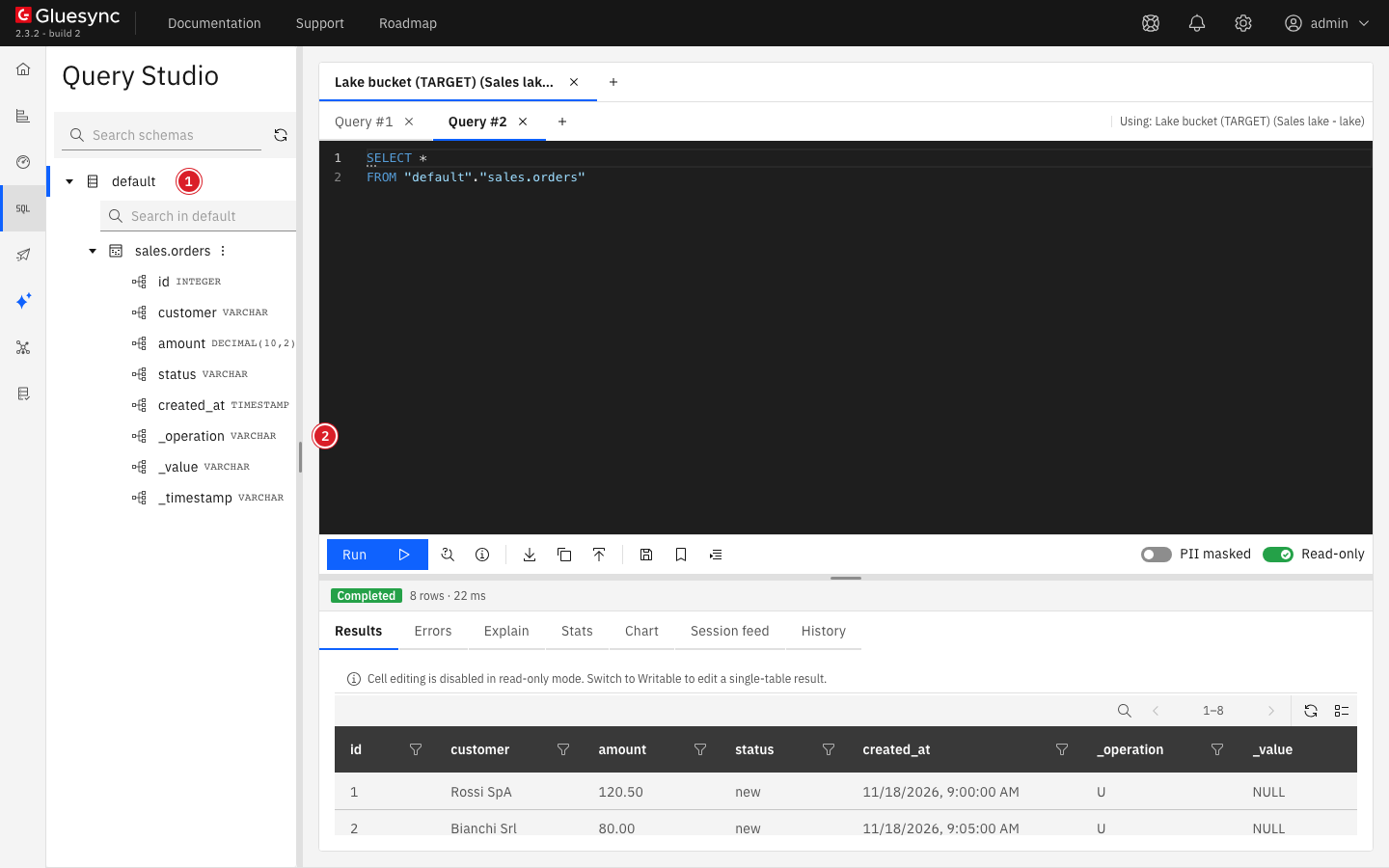
default (1) holds one table per entity. The columns the agent adds to every file follow the entity’s own columns (2).|
A Parquet or CSV entity’s columns come from its files, so an entity with no files yet shows no columns. Query Studio keeps the columns it read for two minutes. Other sources write other checkpoint fields: the target does not know them until it reads the files. |
SQL
Run a query on the entity. Put its name in double quotes, because it holds a dot:
SELECT id AS order_id, customer, amount, status, _operation
FROM "sales.orders"
ORDER BY order_id;|
In Gluesync 2.3.2, the result grid of Query Studio shows the rows that share the value of a column named |
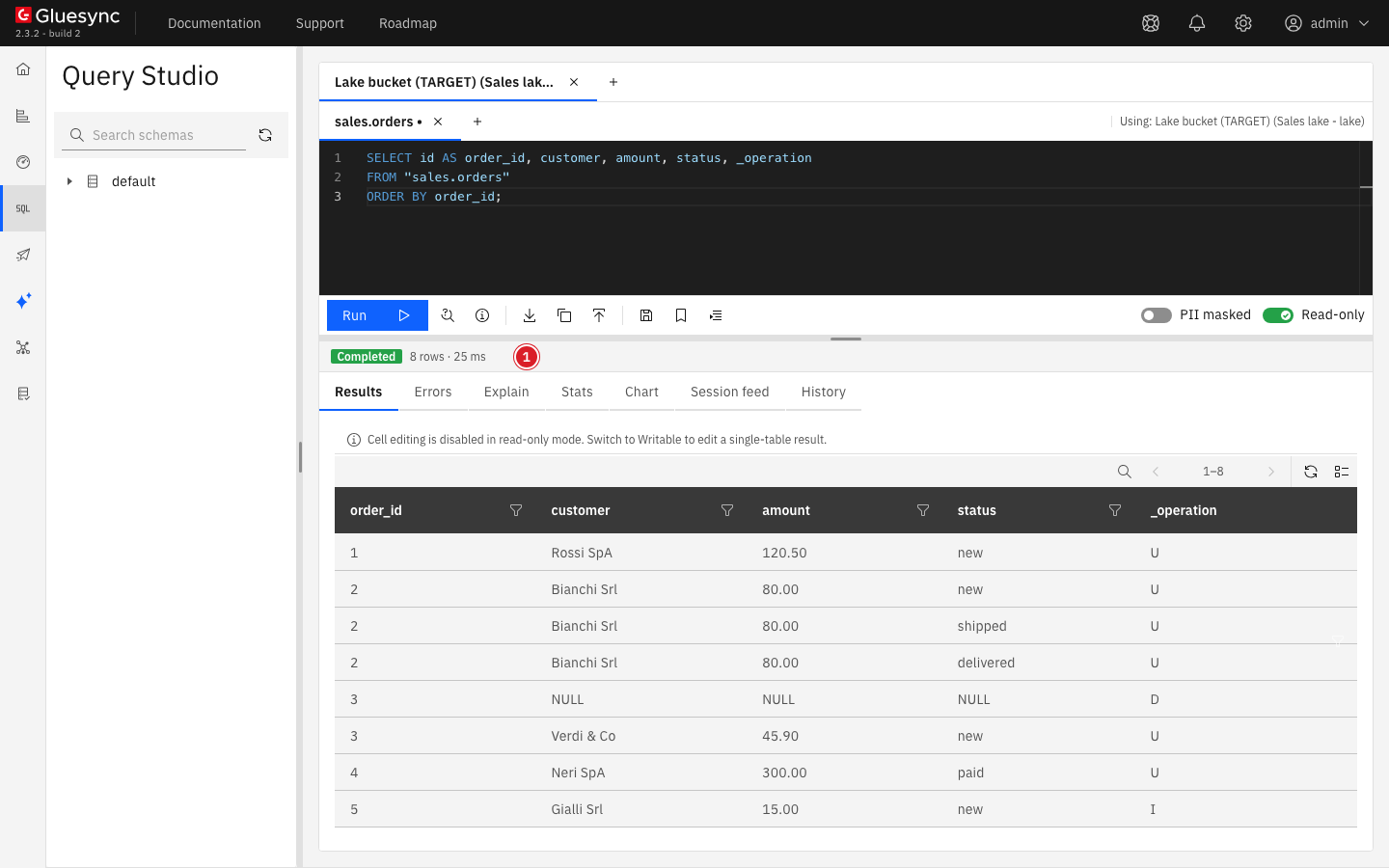
_operation.The table is every file the agent wrote for the entity, snapshot and changes together: a log, not a copy of the source table. The four rows of the full copy are written with U, the insert with I, each update is a new row with U, and the delete is a row with D that holds the key. The name can also be written default."sales.orders", as the schema browser does.
|
Query Studio prompts for |
SQL
Count the rows of each operation:
SELECT _operation, count(*) AS row_count
FROM "sales.orders"
GROUP BY _operation
ORDER BY _operation;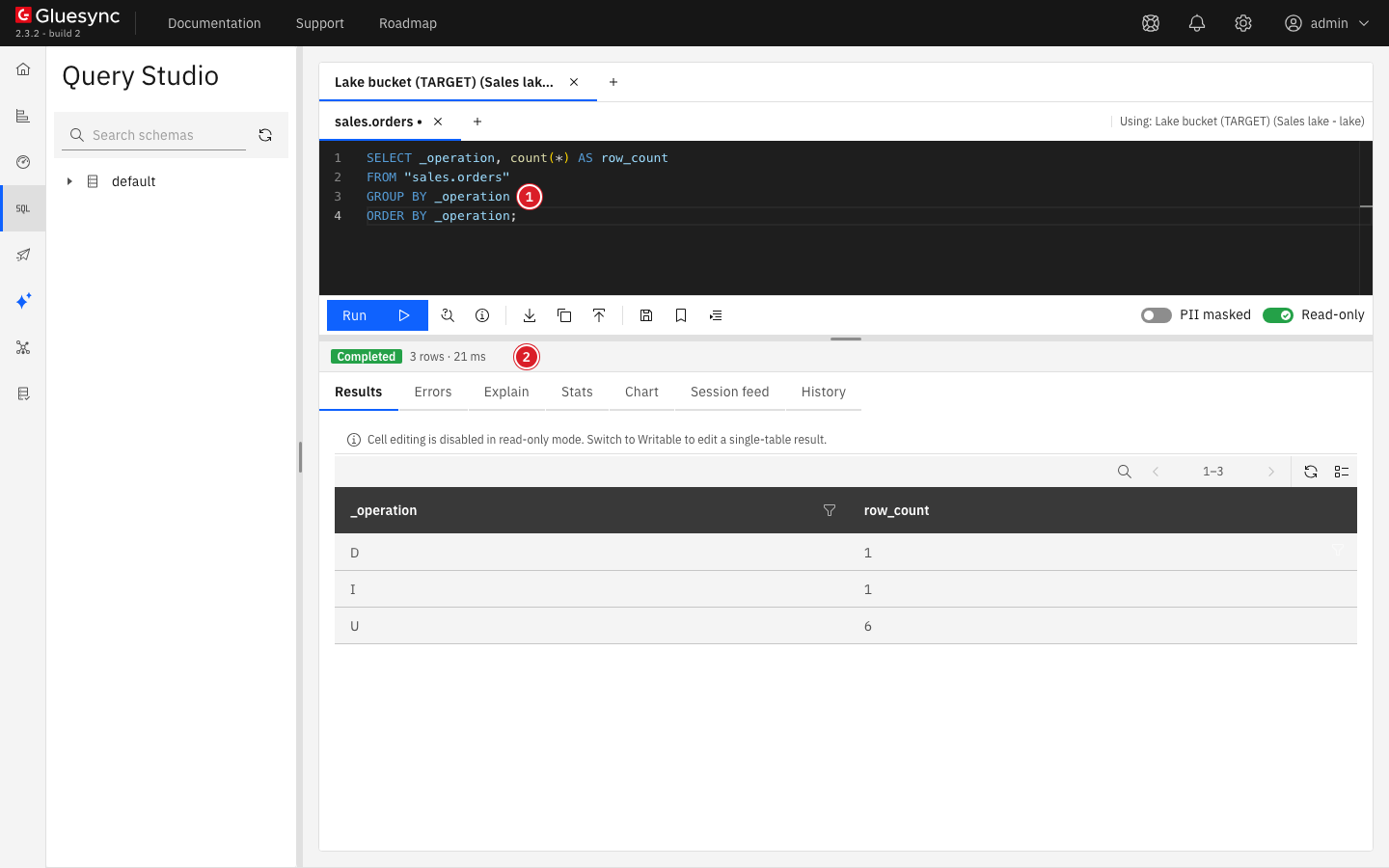
To see when each change happened, convert the checkpoint time. With a PostgreSQL source, _timestamp is the time of the change in milliseconds since 1970, written as text, and it is empty in snapshot rows:
SELECT id AS order_id, status, _operation, epoch_ms(_timestamp::BIGINT) AS changed_at
FROM parquet('sales_orders/*.chng')
ORDER BY changed_at, order_id;This query reads the change files only, with parquet(), which the next step explains. Other sources write other checkpoint fields: check the column list in the schema browser before you convert one.
parquet()SQL
parquet('path'), csv('path'), and json('path') read files by their path in the store. The path is relative to the store, which is the bucket under the custom root path: sales_orders/… here, not gluesync/sales_orders/… and not s3://lake/…. A path can hold the globs *, **, ?, and [...].
Read the change files and count the deletes:
SELECT count(*) AS deletes
FROM parquet('sales_orders/*.chng')
WHERE _operation = 'D';
Read one file. The file names hold colons (2026-11-19T08:35:14.783529.snap), which a path cannot hold: write a * in place of each colon:
SELECT count(*) FROM parquet('sales_orders/2026-11-19T08*35*14.783529.snap');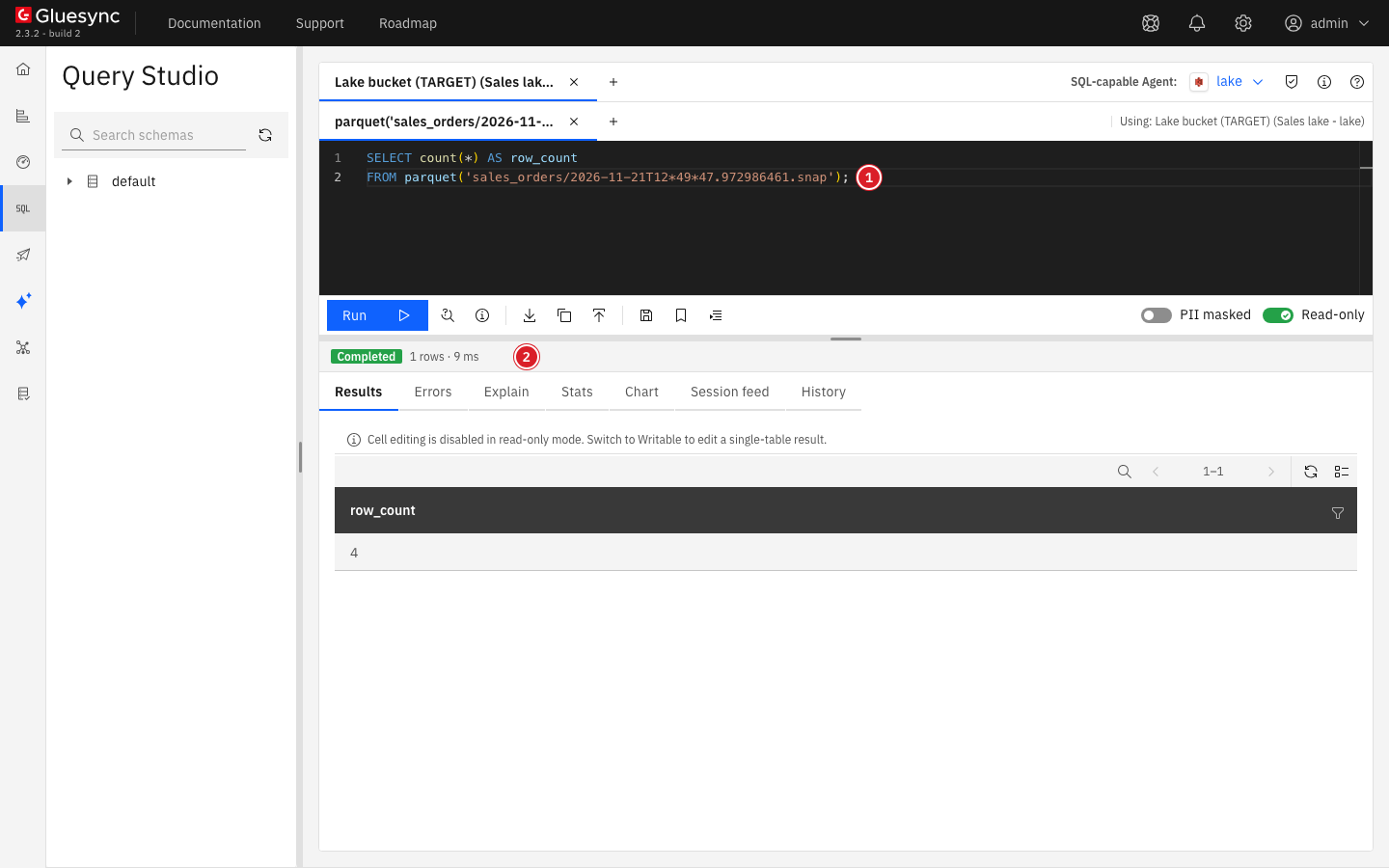
* in place of each colon (1): the four rows of the snapshot (2).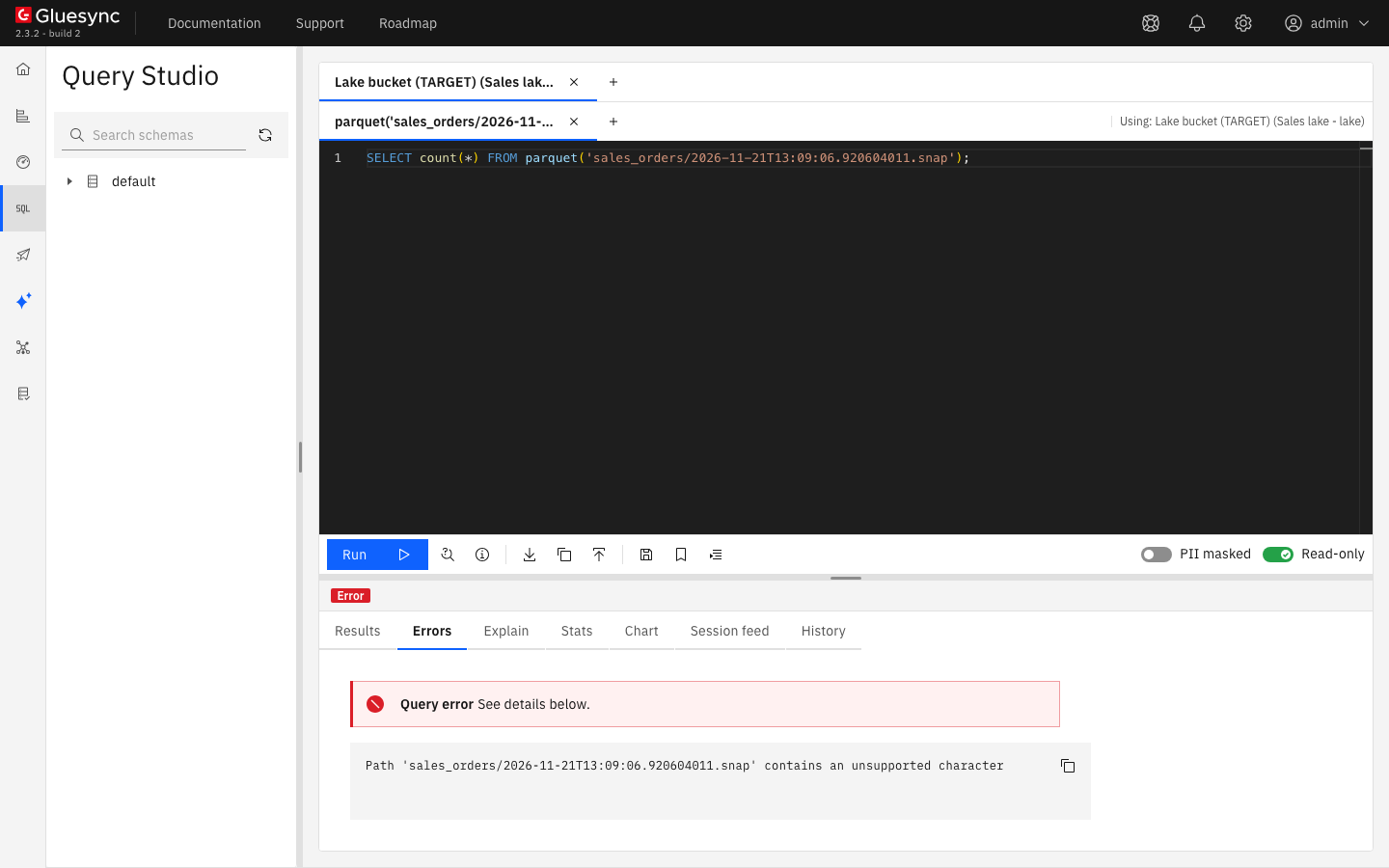
* in their place.|
Do not write |
Choose the pattern from the layout of the target:
| Layout | Pattern of an entity’s files |
|---|---|
Default |
|
Use relative timestamp paths on |
|
|
Do not read |
A file read with parquet() has the types the file holds. Reading the entity by name casts every column to the type of the target entity instead, and works even when old and new files do not have the same columns.
SQL
files('folder') lists the files directly inside a folder, with their filename and their path in the store:
SELECT filename, path
FROM files('sales_orders');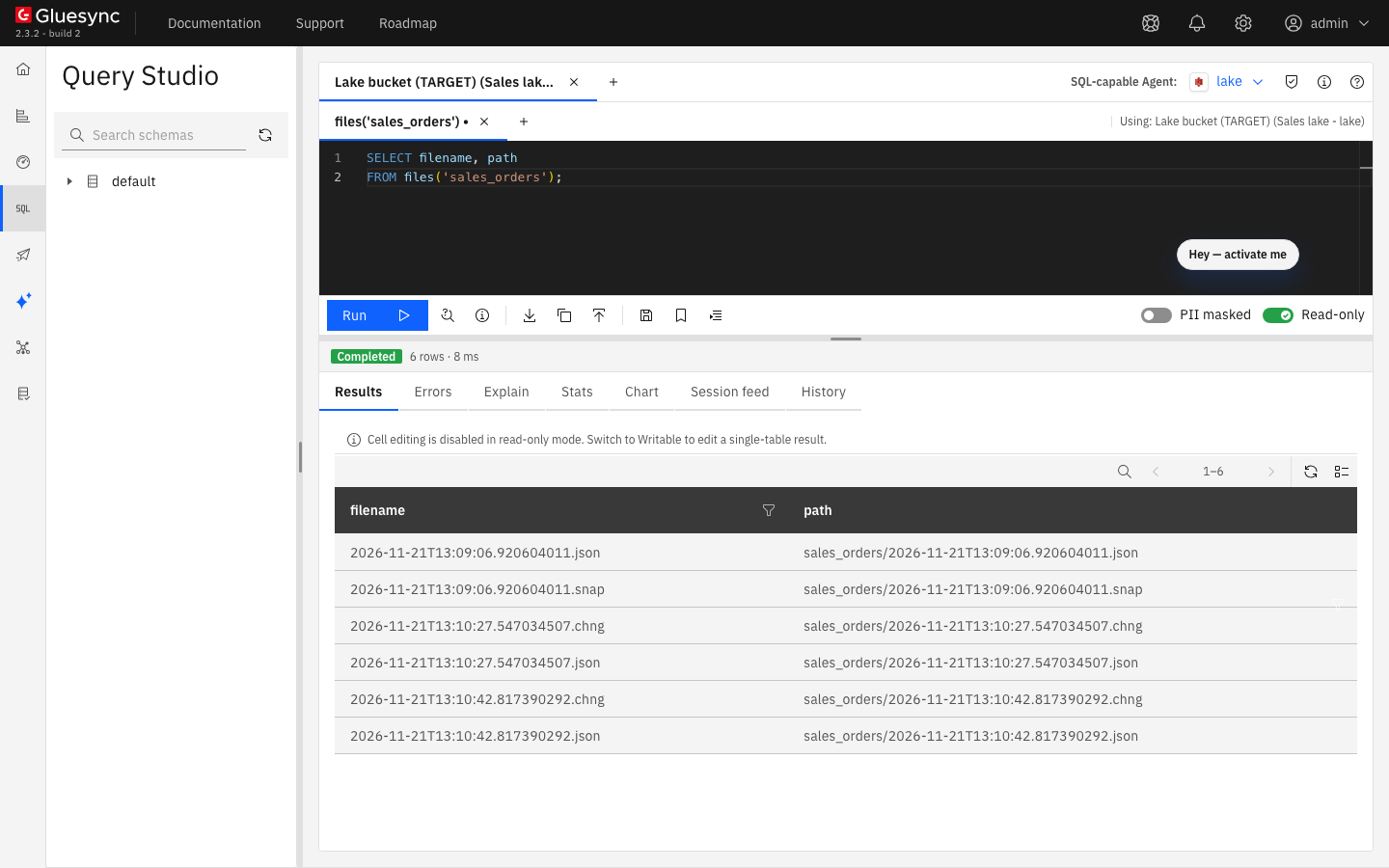
files() lists the data files and their sidecars, with the path to use in parquet().files('folder') does not go into subfolders: with the timestamp layout, files('raw/changes/sales_orders') returns no row. End the path with ** to list every file below a folder, at any depth:
SELECT path
FROM files('raw/*/sales_orders/**');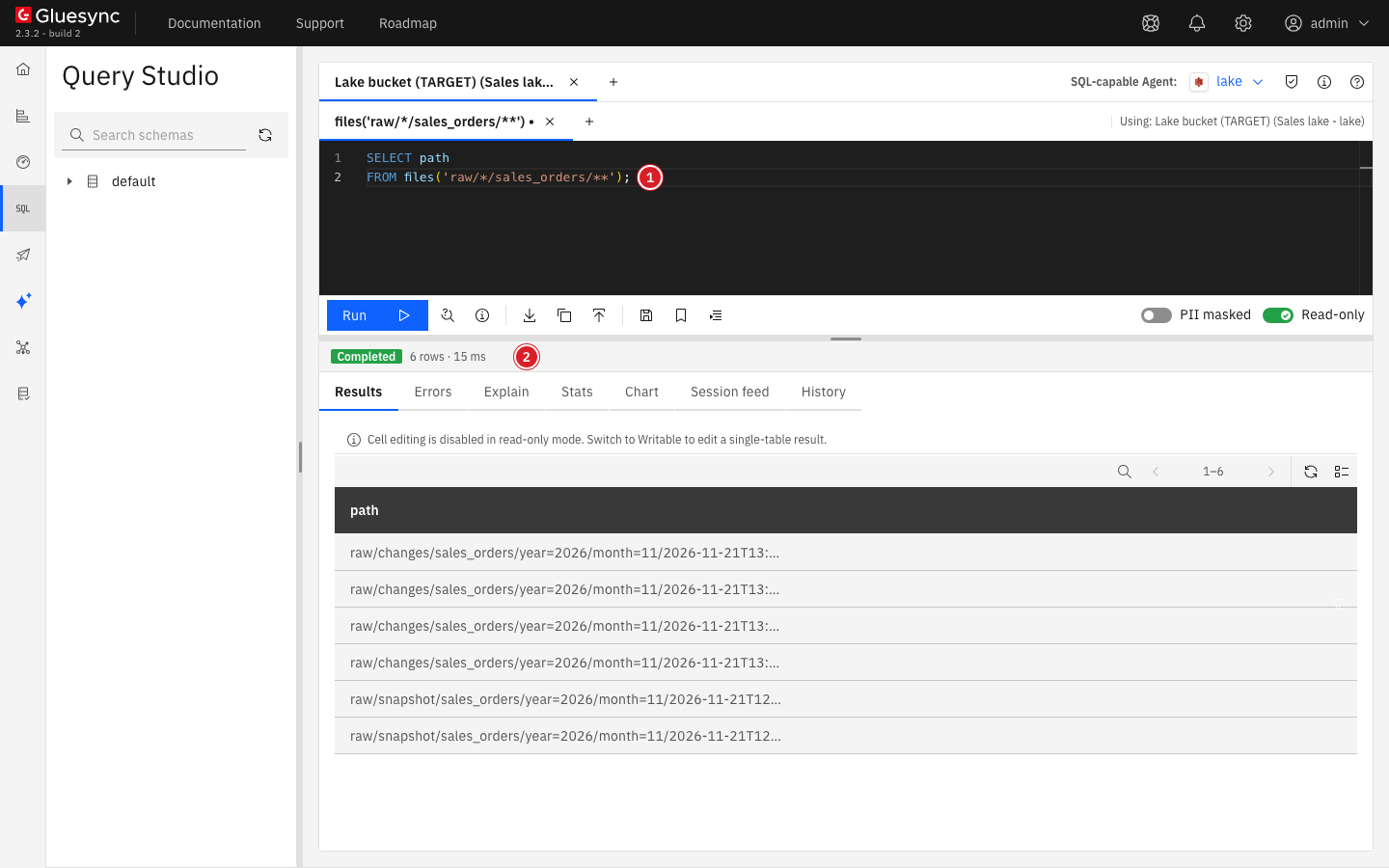
files() with ** (1) lists the files of both folders of the entity (2).SQL
Keep the newest row of each key and drop the keys whose newest row is a delete. Read the files with parquet(), which gives each row its filename and its file_row_number. The file name is the time the file was written, so it sorts the files in write order, and the row number sorts the rows of one file in the order of the transaction:
SELECT id, customer, amount, status
FROM (
  SELECT *, row_number() OVER (
           PARTITION BY id
           ORDER BY regexp_extract(filename, '[^/]+$') DESC, file_row_number DESC) AS rn
  FROM parquet('sales_orders/*.[sc]*')
)
WHERE rn = 1 AND _operation <> 'D'
ORDER BY id;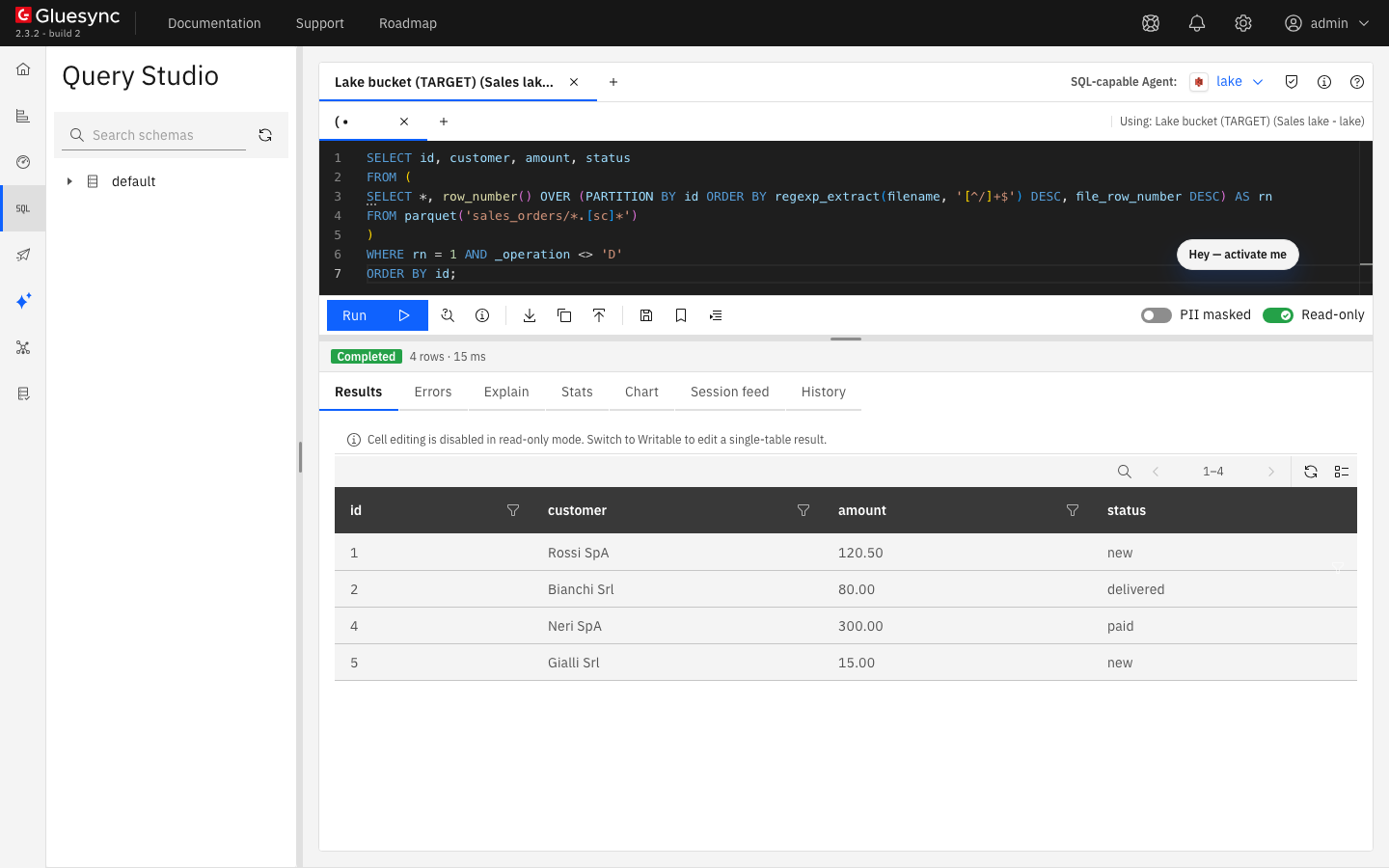
delivered.-
With the timestamp layout, read
parquet('raw/*/sales_orders/**/*.parquet'). The query is the same:regexp_extractkeeps only the name of the file, so theraw/snapshotandraw/changesfolders do not change the order. -
PARTITION BYmust list every column of the key of the entity. -
filenameandfile_row_numberexist only in aparquet()read. On the entity read by name the query fails with Referenced column "filename" not found. -
A second full copy writes new snapshot files that are newer than the changes before it, which is correct: the copy is the state at that time.
When you cannot use parquet(), as in Query Forge, read the entity by name and sort on the checkpoint time instead. With a PostgreSQL source:
SELECT id, customer, amount, status
FROM "sales.orders"
QUALIFY row_number() OVER (PARTITION BY id ORDER BY CAST(_timestamp AS BIGINT) DESC NULLS LAST) = 1
AND _operation <> 'D'
ORDER BY id;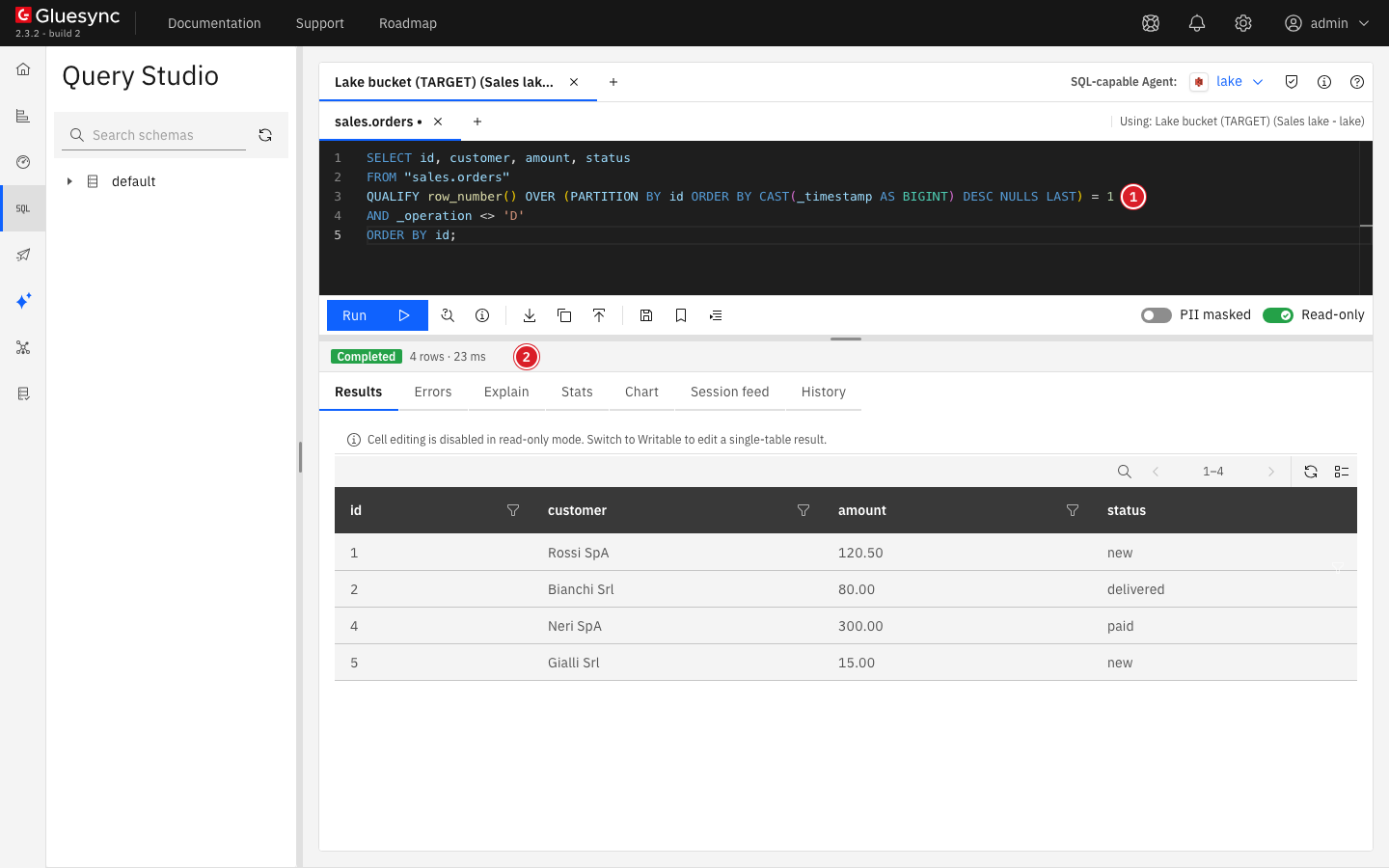
QUALIFY returns the same four orders (2).It returns the same four rows. NULLS LAST puts the snapshot rows, which have no _timestamp, behind every change. Two changes of the same key in one transaction can have the same _timestamp, see Summarize the changes: when that can happen, use the parquet() query above, which follows the order of the file.
What Query Studio refuses on a data lake
A lake query reads files in place and can never change them. These limits hold for every user and every agent:
| Limit | What happens |
|---|---|
One |
Anything else is refused: A lake query must start with SELECT or WITH. Writable changes nothing. |
Paths stay inside the store |
A path that starts with |
Files are read with |
A quoted path in |
A whole bucket is limited to the entity folders |
When the custom root path is empty or |
A JSON target is read by entity name only |
The S3 agent writes JSON documents from the root of the bucket, so |
Result and time |
10,000 rows and 8 MB per result, 5 minutes per query. Core Hub opens at most 10,000 remote files per minute. |
One agent per session |
A query reads the files of one agent. To join the files with another agent, use Query Forge, see Query the same files from Query Forge. |
Access rules apply to files too: a Query Data Access rule that hides an entity also hides a parquet() path or a files() listing that can reach its files.
Query the same files from Query Forge
Query Forge is the read-only JDBC endpoint of Core Hub for SQL clients and BI tools. It reads the entities of a lake agent with the same engine and the same rules, and it can join them with the tables of another agent of the pipeline, such as the source.
JDBC
-
Connect your JDBC client to
jdbc:gluesync://<core-hub-host>:8765with your Core Hub username and a Personal API Token as the password. See Connecting; -
Open the catalog of the lake agent in the client’s schema browser.
A pipeline with one SQL-capable agent uses the pipeline name alone, for example sales_lake. Names are not case-sensitive.
SQL
Name the table with its catalog, the schema default in double quotes (it is a reserved word), and the entity in double quotes:
SELECT _operation, COUNT(*) AS row_count
FROM sales_lake__lake_bucket_target."default"."sales.orders"
GROUP BY _operation
ORDER BY _operation;Query Forge reads the entities only. parquet(), csv(), json(), and files() do not exist there and fail with No match found for function signature: read files by path in Query Studio. To get the current state, use the QUALIFY form of Rebuild the current state of the table or, in standard SQL, a subquery:
SELECT id, customer, amount, status
FROM (
  SELECT o.*, ROW_NUMBER() OVER (
           PARTITION BY id
           ORDER BY CAST(_timestamp AS BIGINT) DESC NULLS LAST) AS rn
  FROM sales_lake__lake_bucket_target."default"."sales.orders" o
) latest
WHERE rn = 1 AND _operation <> 'D'
ORDER BY id;SQL
Join the current state of the lake with the source table, and keep the rows that differ:
WITH lake AS (
  SELECT id, status
  FROM (
    SELECT o.*, ROW_NUMBER() OVER (
             PARTITION BY id
             ORDER BY CAST(_timestamp AS BIGINT) DESC NULLS LAST) AS rn
    FROM sales_lake__lake_bucket_target."default"."sales.orders" o
  ) latest
  WHERE rn = 1 AND _operation <> 'D'
)
SELECT COALESCE(s.id, l.id) AS id, s.status AS source_status, l.status AS lake_status
FROM sales_lake__sales_postgres_source.sales.orders s
FULL JOIN lake l ON l.id = s.id
WHERE s.id IS NULL OR l.id IS NULL OR s.status <> l.status
ORDER BY 1;Join the current state, not the entity itself. The entity holds a row for each change, so sales.orders joined with the entity returns 6 rows for 4 orders: order 2 three times.
How Query Forge runs a lake query
-
The lake agent runs the column list and the simple filters of a query. Query Forge runs the rest itself: aggregates, sorts, window functions, and joins. Every row the lake returns counts against the read limit of Query Forge, so filter on the entity’s columns to read less. See How Query Forge runs a query.
-
Query Forge runs each read through Query Studio, so a Query Data Access rule that hides an entity hides it in Query Forge too.
-
A Personal API Token limited to some pipelines and agents shows only their catalogs.
Size the lake engine
Lake queries run inside Core Hub and use its memory, threads, and disk. By default each query has 512 MB of memory and 2 threads, may spill 4 GB to disk, and two lake queries run at the same time. Raise or lower these values with the GLUESYNC_LAKE_* variables of Core Hub listed in Limits and settings.
Troubleshooting
| Problem | Possible cause | What to do |
|---|---|---|
The target is not in the SQL-capable Agent list |
The store is not read (Google Cloud Storage, Azure Data Lake Storage Gen2, FTP, SFTP, SMB, CIFS), or the connection has no credentials |
Check the store against Before you begin, and search the Core Hub log for |
No files found that match the pattern "sales_returns/*/.[sc]*" |
The entity has not written a file yet |
Start the entity, or wait for its first file, then run the query again |
Table 'sales_orders' is not an entity of this agent |
The query names the folder, not the entity |
Use the entity name in double quotes: |
Path '…' contains an unsupported character |
The path holds a colon, as every file name written by the agent does |
Write |
HTTP HEAD error checking '…' (HTTP 404 Not Found) on a path with |
|
Write |
Syntax error at or near "default" |
The schema and the entity are not quoted: |
Write |
No magic bytes found at end of file '….json' |
The pattern also matched the |
Use |
This agent’s store is the whole bucket or share: a path to read or list must be inside the folder of one of its entities |
The custom root path is empty or |
Start the path with an entity’s folder, such as |
This agent’s store holds files that are not its entities: read an entity by name, not a path of the store |
The agent writes JSON files |
Read the entity by name |
Referenced column "filename" not found |
|
Read the files with |
|
The folder only holds subfolders, as with the timestamp layout |
End the path with |
Object 'sales_orders' not found in Query Forge |
The table is named after the folder, or the entity is not quoted |
Write the catalog, |
No match found for function signature parquet(<CHARACTER>) in Query Forge |
Query Forge reads entities only |
Read the entity by name, or read the files with |
The same row appears several times |
The entity is a log of the snapshot and every change |
Use the current-state query |
Frequently asked questions
Can I query a bucket that Gluesync did not write?
Only the store of a file agent is read, and only through that agent. A Parquet or CSV agent with a custom root path can read any Parquet, CSV, or JSON file under that path with parquet(), csv(), or json(). Without a custom root path the reads stay inside the folders of its entities.
Does Query Studio merge updates and deletes for me?
No. Reading an entity returns every row the agent wrote. Use the current-state query to get one row per key.
Which SQL can I use?
Analytical SQL with joins, subqueries, WITH, window functions, GROUP BY, and the usual string, date, and number functions, for example regexp_extract and epoch_ms. Functions that reach the engine’s settings, catalog, or files other than through parquet(), csv(), json(), and files() are refused.
Can a BI tool read the lake?
Yes, through Query Forge, with the Gluesync JDBC driver and a Personal API Token. The tool sees each entity as a table, see Query the same files from Query Forge. Point a dashboard at the current state, not at the entity, or each change is counted as a row.
Related guides
Contact MOLO17 Support if you need assistance with querying a data lake.