Gluesync Architecture
Gluesync’s architecture is built on a flexible, agent-based system centered around the Core Hub, with extensibility through SDKs and modules. This design enables real-time data integration across diverse platforms while ensuring scalability, reliability, and security.
Architecture Overview
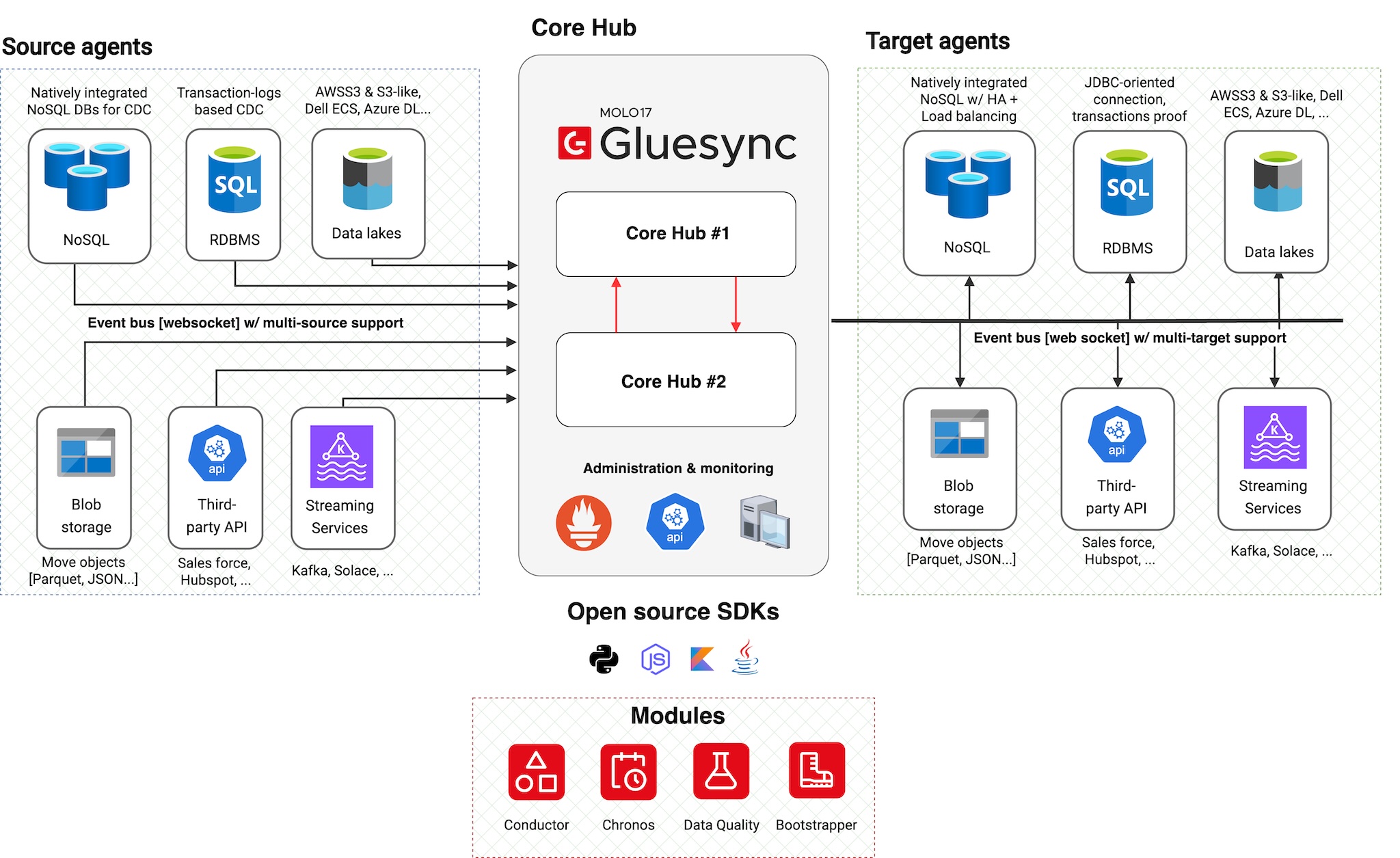
The architecture consists of five main components:
-
Source Agents: Handle data extraction and change capture
-
Core Hub: Orchestrates data flow and system operations
-
Target Agents: Manage data loading and transformation
-
SDKs: Enable developer integration with Core Hub
-
Modules: Extend platform functionality through SDK-based components
Cloud-native containerized platform
Gluesync is shipped as Docker containers and designed as a cloud-native platform:
-
Container-based deployment
-
All components distributed as Docker images
-
Consistent deployment across environments
-
Easy version management and updates
-
-
Multi-platform support
-
Linux: Full support for all major distributions
-
Windows Server: Native support using Windows nanoserver images (no WSL required)
-
Cross-platform compatibility ensures flexibility in deployment choices
-
-
No-brainer installation and lifecycle management
-
Simplified installation process with pre-configured kits
-
Built-in update mechanism through the Control Plane UI
-
Complete platform lifecycle managed via web interface
-
Automated agent deployment and configuration
-
-
Built-in monitoring stack
-
Prometheus for metrics collection and storage
-
Grafana dashboards for historical performance visualization
-
Pre-configured monitoring for pipelines, latencies, and data transfer volumes
-
Control Plane UI for immediate visibility into system health and management
-
Source agent caching layer
Overview
Starting from Gluesync 2.1.9, supported source agents include an embedded, persistent caching layer. Instead of streaming changes directly from the source database to the Core Hub, agents first write inbound changes to a local, append-only queue built on top of Chronicle Queue.
At a high level, this caching layer:
-
Decouples the source database from the Core Hub consumer
-
Reduces load on the source system by minimizing long-lived cursors and connections
-
Stores changes durably on disk, allowing for safe pause/resume of pipelines
-
Provides a replayable history window (configurable retention) for recovery scenarios
Chronicle Queue is a high-performance, append-only log implementation designed for low-latency systems. It stores data in memory-mapped files on disk, organizing entries into sequential segments. This makes it a good fit for Gluesync’s caching layer, where agents continuously append new change events and readers consume them in order without incurring heavy garbage collection or complex locking.
How it fits in the architecture
From an architectural perspective, the Chronicle Queue–based cache sits inside the source agent process:
-
The source agent ingests changes from the database (e.g. journal, transaction logs, CDC API) and appends them to the local queue.
-
A separate internal worker within the agent reads from the queue and forwards events to the Core Hub over the usual WebSocket connection.
-
If the Core Hub or network is temporarily unavailable, the agent continues to cache new changes locally until the connection is restored, then drains the backlog.
This design keeps the Core Hub stateless with respect to source-side buffering while giving operators a predictable and tunable buffer at the edge of each source system.
Benefits
Key benefits of the source agent caching layer include:
-
Lower source footprint – fewer active connections and reduced dependency on database-side caching artifacts.
-
Operational resilience – short outages or maintenance windows on the Core Hub side do not force resynchronizations, as changes remain in the agent cache.
-
Configurable retention – cache retention can be tuned to balance disk usage and recovery window length.
-
Simplified scaling – agents handle local buffering, allowing Core Hub instances to scale independently for processing and routing (coming soon).
Advanced Features
SDKs and Developer Integration
Open Source SDKs
Gluesync provides open source SDKs that enable developers to build custom integrations and extensions:
| SDK | Features |
|---|---|
Python SDK |
* Core Hub handshake protocol implementation * Authentication and authorization * Event handling and processing * Available at GitLab |
Node.js SDK |
* JavaScript-based Core Hub integration * Real-time event processing * Promise-based API design * Available at GitLab |
Coming Soon |
* Java SDK * Kotlin SDK |
Modules
Platform Extensions
Modules are platform extensions built on top of Gluesync SDKs that enhance system capabilities:
| Module | Functionality |
|---|---|
Chronos |
* Advanced scheduling capabilities * Time-based job orchestration * Recurring task management * Available at GitLab |
Bootstrapper |
* System initialization * Configuration management * Deployment automation * Available at GitLab |
Conductor |
* Automated agent deployment * Resource allocation policies * Container lifecycle orchestration * See Conductor documentation |
Whisperer |
* Automated database operations * Multi-database connectivity * Load testing and PillowFight tooling * Available at GitLab |
Automator |
* Web-based Bootstrapper execution * Graphical configuration management * Cross-platform packaged executable * See Automator documentation |
Convert DBMoto Metadata XML |
* Syniti metadata.xml conversion * Bootstrapper template generation * Migration workflow guidance * See Conversion guide |
Monitoring & Administration
Built-in Monitoring
-
Real-time metrics collection
-
Performance monitoring
-
Resource utilization tracking
-
Alert management
Administration Tools
-
Web-based admin interface
-
REST API access
-
Configuration management
-
System health monitoring
|
For detailed deployment instructions, see our Deployment Guide for Docker Compose and Kubernetes. |
Resilience and disaster recovery
-
Configuration portability – Core Hub, agents, and pipelines can be snapshotted via Automator backups, making it easy to rehydrate the platform in a new cluster or region.
-
Environment cloning – Export configs from staging or QA and restore them into production-like sandboxes to validate releases.
-
Disaster recovery workflows – Pair Automator backups with infrastructure-as-code and database snapshots so you can rebuild a standby Core Hub with predictable results.
|
Backups contain configuration data, not live replication offsets. Combine Automator exports with database or message-queue checkpoints for full recovery coverage. |