Control Plane Monitoring
The Control Plane UI provides comprehensive monitoring capabilities directly from your browser. This page describes pipeline and agent status.
|
Metrics and insights (gauge icon, left menu) is a different Control Plane item. It opens the Grafana included in the default installation kit. The default Grafana login is On Windows, Gluesync itself is under |
Pipeline Status Monitoring
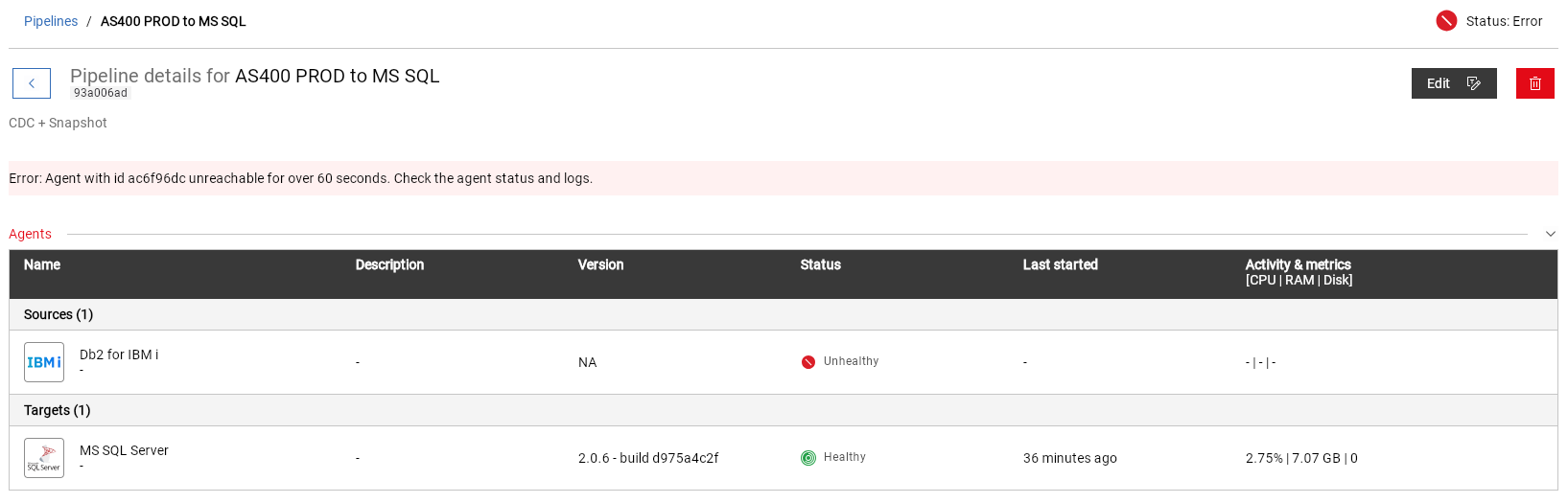
The pipeline monitoring dashboard provides real-time visibility into your pipeline’s health and performance:
-
Pipeline Health Indicators:
-
Status: Shows if the pipeline is active, on hold, or in error state
-
Source Agent Status: Indicates the health of the source agent (healthy/unhealthy)
-
Target Agent Status: Shows the status of the target agent
-
Last Activity: Displays the timestamp of the most recent activity
-
-
Performance Metrics:
-
Activity & Metrics: Shows throughput and RAM usage
-
Error tracking: Displays any issues that need attention
-
Entity Details Monitoring
For each entity within a pipeline, you can access detailed performance metrics and insights:
Replication Status Overview
| Metric | Description | Example |
|---|---|---|
CDC Status |
Current replication status |
Idle/Active |
End-to-End Latency |
Actual processing time |
-319.31 ms |
Transactions per Second |
Real-time throughput |
10 |
Total Processed Events |
Event count |
13 |
Avg. Items per Event |
Items processed per event |
1 |
Total Data Transferred |
Volume of transferred data |
277.73 kB |
Performance Metrics & Insights
Time-based Metrics
| Metric | Description |
|---|---|
Read time |
Time taken to read from source (e.g., 11.3 ms) |
Transmission time (source to target) |
Time for data transmission between source and target (e.g., 308.33 ms) |
Write time |
Time taken to write to target (e.g., 9.86 ms) |
Transmission to storage time |
Time for data to be stored after transmission (e.g., 2.27 ms) |
Storage time |
Time spent in storage operations (e.g., 0.58 ms) |
End-to-end time |
Total processing duration (e.g., 319.31 ms) |
| Values are in milliseconds and indicate average values over the operation completed in the past relative to the current time. |
Data Metrics
| Metric | Description |
|---|---|
Row count |
Total number of rows processed |
Total data transferred |
Volume of data moved (e.g., 177.73 kB) |
Last transaction ID |
Identifier of the most recent transaction |
Snapshot progress |
Percentage of snapshot completion (e.g., 0.0%) |
Snapshot row count |
Number of rows in current snapshot |
Snapshot time |
Time taken for snapshot processing (e.g., 0 ms) |
Agent Monitoring
Each agent’s status is clearly displayed with:
-
Health Status Indicators:
-
[GREEN] Agent is healthy and operating normally
-
[RED] Agent requires attention
-
-
Version Information:
-
Build version (e.g., 2.0.6-build.0575e4c2f)
-
Last connection time
-
The default kit already includes Prometheus and Grafana. See Monitoring. A Prometheus you run yourself is optional and is described in Prometheus integration.