What is Gluesync?
Gluesync is a powerful middleware platform for real-time data integration, designed to seamlessly connect and synchronize data across multiple systems. Built with cloud-native principles, it enables efficient data replication and transformation through a flexible, agent-based architecture.
Quick Links
Platform Overview
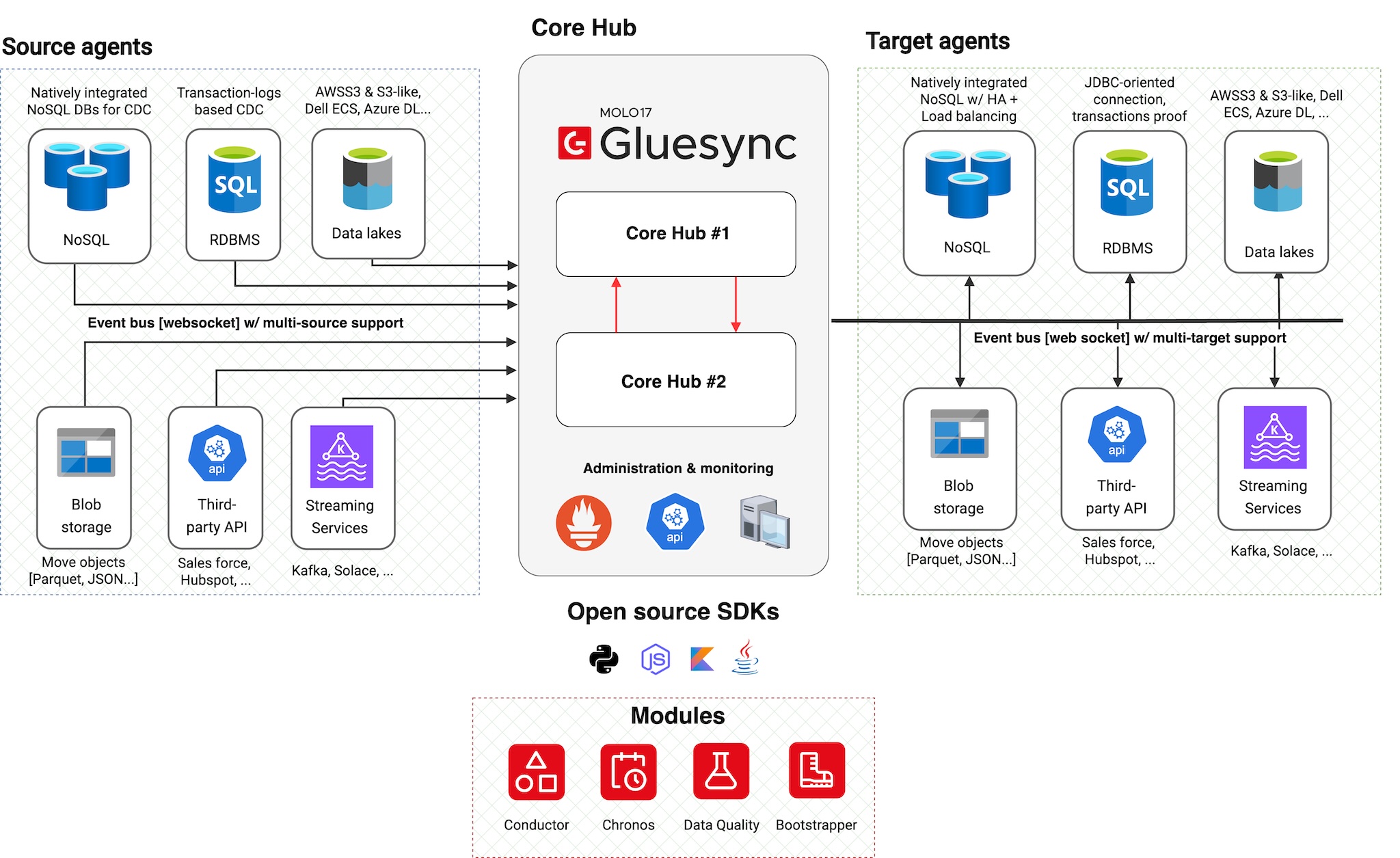
Gluesync 2.0 has been completely redesigned from the ground up, featuring:
-
Hybrid Deployment Model: Mix cloud and on-premises components
-
Agent-based Architecture: Distributed, scalable system
-
Core Hub Orchestration: Central coordination and management
-
Modern Web Interface: Streamlined setup and monitoring
Key Components
Core Hub: The Brain
|
Gluesync ships with Automator, a UI front end for the Bootstrapper that lets you export/import pipeline configurations. See Backup and restore to understand how this keeps Core Hub setups portable across environments and simplifies disaster recovery drills. |
Management Interfaces
| Interface | Description |
|---|---|
Web UI |
Access the control plane via port * Pipeline configuration * Agent management * Monitoring and alerts * Task administration |
REST APIs |
JSON-based interface for: * Programmatic control * Platform administration * Monitoring and metrics * Integration automation |
Gluesync Glossary (Quick Reference)
New to the platform? Here is a quick cheat-sheet of Gluesync’s proprietary terminology:
-
Core Hub: The central orchestrator ("the brain"). It hosts the Web UI, manages the APIs, and routes data between agents.
-
Agent: A lightweight, specialized container deployed near your database. Source Agents read data; Target Agents write data.
-
Entity: A specific replication task. Usually represents a single table or collection mapped from source to target.
-
Pipeline: A logical container that groups together a Source Agent, a Target Agent, and multiple Entities.
-
Conductor: A module that allows you to deploy and update Agents directly from the Web UI.
-
Automator: A standalone desktop app used to backup, restore, and duplicate your Core Hub configurations (Disaster Recovery).