Core Hub Overview
The Core Hub is the central nervous system of Gluesync 2, orchestrating communication, managing connections, and ensuring secure data flow across all components.
Architecture Overview
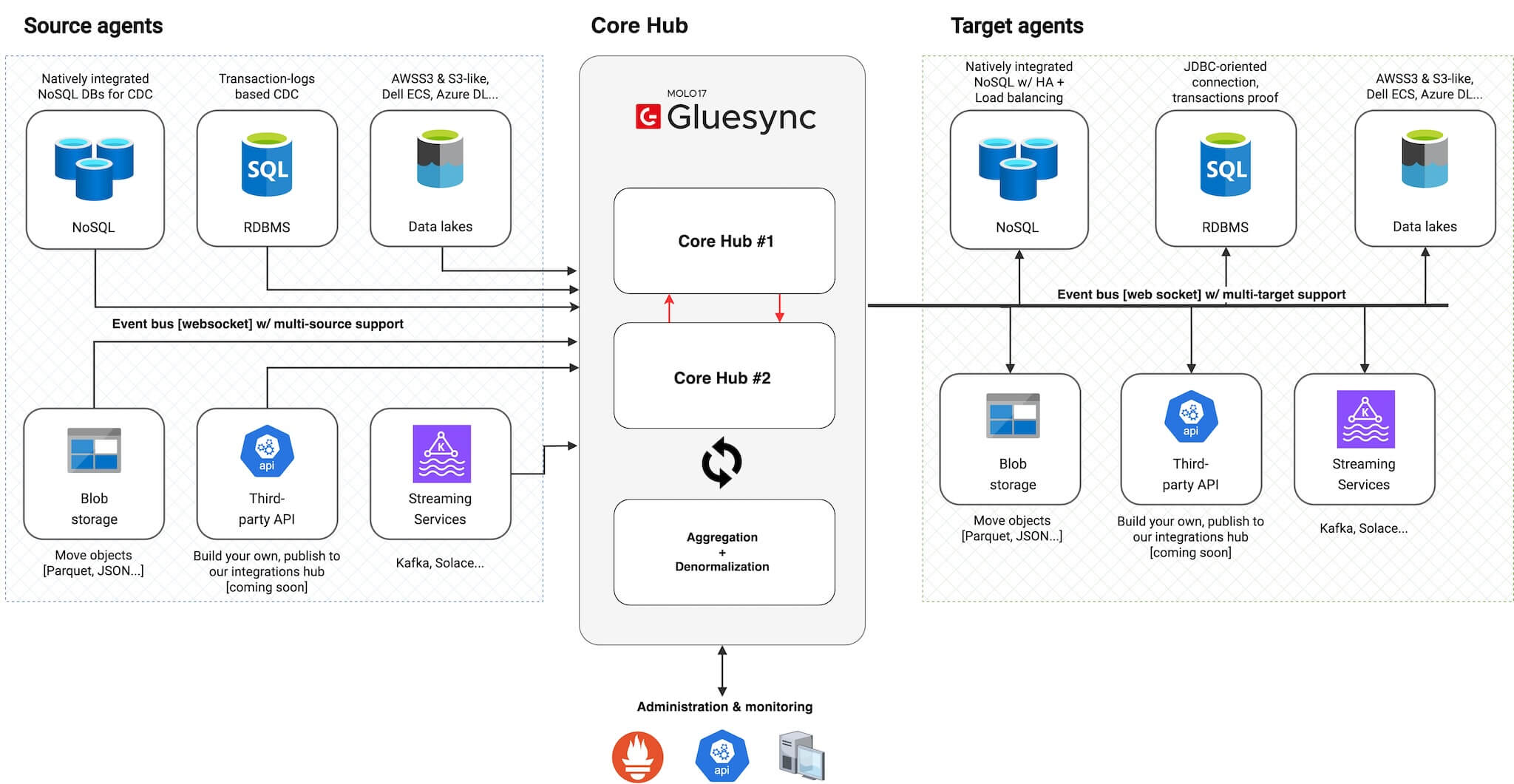
| Component | Function |
|---|---|
Message Router |
Manages platform-wide message distribution and pipeline orchestration |
API Gateway |
Serves admin & monitoring APIs and Web UI interfaces |
Metrics Engine |
Provides Prometheus metrics for monitoring and analytics |
Load Balancer |
Ensures high availability and optimal traffic distribution |
Key Features
Message Routing
| Feature | Description |
|---|---|
WebSocket Connections |
Real-time, bidirectional communication channels |
Optimized Paths |
Intelligent routing to minimize latency |
Congestion Control |
Advanced traffic management to prevent bottlenecks |
Load Distribution |
Balanced message handling across components |
|
Messages are routed through optimized paths to ensure: * Minimal latency * Reduced network congestion * Efficient resource utilization |
Integration Points
API Services
-
Administrative endpoints
-
Monitoring interfaces
-
Configuration management
-
Status reporting
Monitoring & Metrics
-
Real-time performance metrics
-
Resource utilization tracking
-
System health monitoring
-
Prometheus integration
|
For detailed metrics configuration, see the Monitoring Setup Guide. |
High Availability Features [coming soon]
Resilience and backups
Core Hub configurations are fully portable. Use Gluesync Automator backups to:
-
Capture pipeline, agent, and UDF metadata before major changes
-
Replicate a stable setup into new environments or regions
-
Keep a disaster recovery snapshot that can be restored on a standby Core Hub
|
Automator exports configuration artifacts. Pair them with credential rotation policies and database snapshots for complete recovery coverage. |