User Defined Functions (UDFs)
Overview
User Defined Functions (UDFs) allow you to write custom code scripts that are executed during the data replication process happening in the Core Hub. These scripts are checked and compiled by the platform, enabling you to implement custom business logic on incoming data during replication.
With UDFs, you can hook into the three main events that occur during data replication:
-
Insert operations
-
Update operations
-
Delete operations
This powerful feature gives you fine-grained control over how data is transformed and processed before it reaches the target destination.
Supported languages
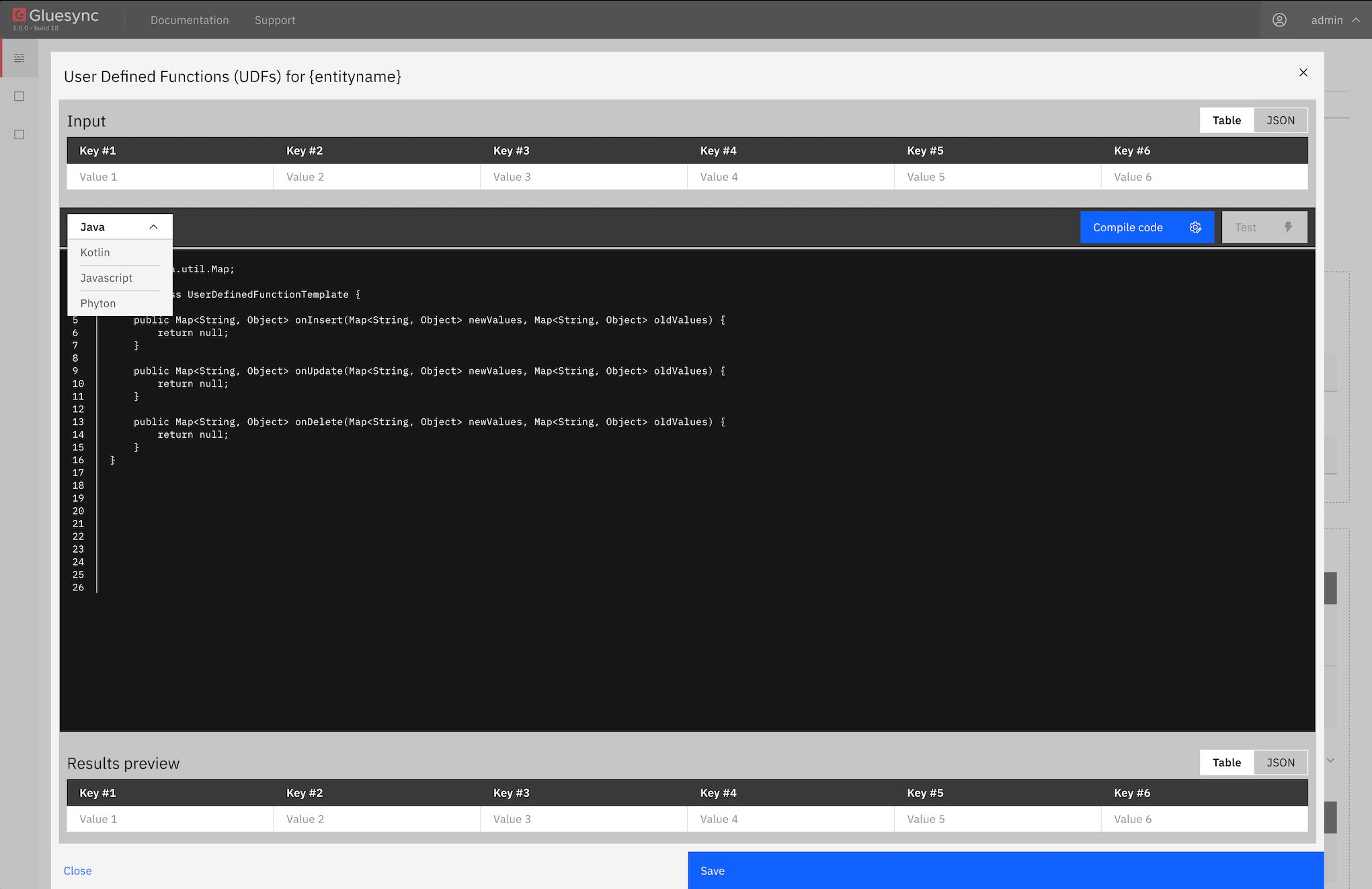
Core Hub’s UDF feature supports writing custom scripts in multiple programming languages:
-
Java
-
Kotlin (available soon)
-
JavaScript (available soon)
-
Python (available soon)
Select the language that best fits your team’s expertise and use case requirements.
How UDFs work
Event-based execution model
UDFs operate on an event-based model, with a single function triggered for each operation type that acts as an entry point for the custom logic:
| Event type | Description |
|---|---|
Insert |
Triggered when new records are created in the source |
Update |
Triggered when existing records are modified in the source |
Delete |
Triggered when records are removed from the source |
For each event type, you can implement your custom logic in a single function that receives the relevant data, processes it according to your business requirements, and returns a modified dataset that will be propagated to the target.
Data access
When an event occurs, your UDF receives:
-
For insert operations: the values for the new record
-
For update operations: both the before and after values, allowing comparison (before values are available only on supported databases)
-
For delete operations: the values of the record being deleted
This complete access to data context enables sophisticated transformation, validation, and business logic implementation.
Implementation examples
Below are simplified examples of how to implement UDFs for each language.
| Looking for real-world UDF snippets used in integration testing? Check out the public repository containing concrete examples: Gluesync Integration Tests UDF Snippets. |
Java example
import java.util.Map;
import kotlin.Pair;
import com.molo17.gluesync.commons.model.api.MappingFunctionOperation;

public class UDF_xyz {
    public Pair<MappingFunctionOperation, Map<String, Object>> onChange(Map<String, Object> newValues, Map<String, Object> oldValues, MappingFunctionOperation operation, Logger logger) {

        if (operation == MappingFunctionOperation.Insert) {
            //Do what you need
            logger.debug("That's an insert operation");
        }

        if (operation == MappingFunctionOperation.Update) {
            //Do what you need
            logger.debug("That's an update operation");
        }

        if (operation == MappingFunctionOperation.Delete) {
            //Do what you need
            logger.debug("That's a delete operation");
        }

        logger.info("Processing record: " + newValues);

        newValues.put("CITY", newValues.get("CITY").toString().toUpperCase()); // example of transformation of a string column to uppercase
        return new Pair<>(operation, newValues);
    }
}
Python example
def onChange(new_values, old_values, operation):
    """
    Handle all operations (insert, update, delete) in a single function

    Args:
        new_values: The new values (or None for delete)
        old_values: The old values (or None for insert)
        operation: The type of operation (insert, update, delete)

    Returns:
        A tuple containing the operation and the modified values
    """
    modified_values = new_values.copy() if new_values else None

    if operation == "insert":
        # Insert operation logic
        if "price" in modified_values and modified_values["price"] < 0:
            modified_values["price"] = 0
        modified_values["processed_timestamp"] = current_timestamp()

    elif operation == "update":
        # Update operation logic
        if "status" in old_values and "status" in modified_values:
            if old_values["status"] == "pending" and modified_values["status"] == "completed":
                modified_values["completion_audit"] = f"Status changed at {current_timestamp()}"

    elif operation == "delete":
        # Delete operation logic
        # Convert delete to soft delete
        modified_values["is_deleted"] = True
        modified_values["deletion_timestamp"] = current_timestamp()

    return new Pair<>(operation, modified_values);
JavaScript example
function onChange(newValues, oldValues, operation) {
    // Handle all operations in a single function
    let modifiedValues = { ...newValues };

    switch(operation) {
        case 'insert':
            // Insert operation logic
            if (newValues.category === 'electronics') {
                modifiedValues.tax_rate = 0.07;
            }
            break;

        case 'update':
            // Update operation logic
            if (oldValues && oldValues.price !== newValues.price) {
                modifiedValues.price_changed = true;
                modifiedValues.previous_price = oldValues.price;
            }
            break;

        case 'delete':
            // Delete operation logic
            // Convert to soft delete
            modifiedValues.is_deleted = true;
            modifiedValues.deletion_timestamp = new Date().toISOString();
            break;
    }

    return new Pair<>(operation, modifiedValues);
}
Return values
The return value from each UDF determines what happens to the data in the target:
-
Returning a modified map of values: The modified data will be propagated to the target
-
Returning
null: The operation will be skipped entirely (useful for filtering out unwanted data) -
Throwing an exception: The operation will be marked as failed and handled according to your error handling configuration
Security and validation
All UDF code is:
-
Checked for security vulnerabilities
-
Compiled before execution
-
Run in a sandboxed environment to prevent system access
-
Subject to execution timeouts to prevent performance issues
Best practices
When implementing UDFs, follow these best practices:
-
Keep your code efficient and focused on the specific transformation needed
-
Implement proper error handling within your functions
-
Test your UDFs thoroughly with representative data before deploying to production
-
Document your UDFs' purpose and behavior for team knowledge sharing (place comments in the code)
-
Avoid overly complex logic that could impact replication performance
-
Use version control for your UDF scripts to track changes over time (e.g., Git)