Best Practices for Gluesync
This guide outlines best practices for configuring and using Gluesync effectively, based on real-world experience and customer deployments.
Connection Management
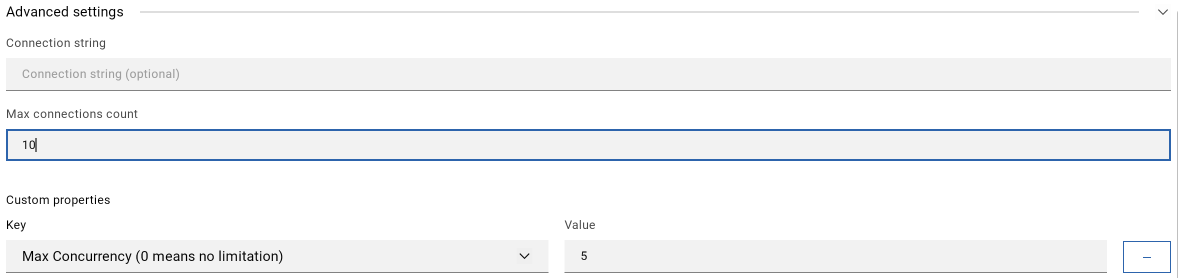
Connection Pooling
-
Default maximum of 100 connections per agent
-
One connection per entity (table/mapping) by default
-
For deployments with:
-
< 100 entities: Default settings work well
-
> 100 entities: Consider connection grouping
-
Large deployments: Adjust max concurrency settings
-
For detailed guidance on connection pool sizing and optimization, refer to our Connection Pool Management Guide.
|
Monitor source database load when using many connections. Adjust settings if needed to prevent overload. |
Performance Optimization
Polling Intervals
| Setting | Use Case | Impact |
|---|---|---|
15ms |
Ultra-low latency (banking, telecom) |
Highest resource usage |
100ms |
Default - good balance |
Recommended for most cases |
1000ms+ |
Low priority updates |
Minimal resource impact |
|
Start with default 100ms polling and adjust based on: * Business requirements * Source system capacity * Network latency |

Deployment Patterns
Monitoring and Maintenance
Regular Checks
-
Monitor notification hub for:
-
System status
-
Error messages
-
Performance issues
-
-
Review connection status
-
Check resource usage
Error Handling
-
Synchronous errors:
-
Appear immediately
-
Allow retry
-
Usually configuration-related
-
-
Asynchronous errors:
-
Appear in notification hub
-
May require investigation
-
Often runtime-related
-
Automatic recovery
Gluesync continuously monitors the connections between your Core Hub and each source or target that relies on logical keys. When a network hiccup or database maintenance window interrupts a link, the platform automatically:
-
detects the broken channel and pauses only the affected pipelines;
-
retries the database handshake using exponential backoff; each attempt increases the wait time so transient issues can settle without overwhelming the remote system;
-
refreshes credentials and cursors so the agent can resume exactly from the last acknowledged transaction once the connection is healthy again.
These self-healing routines cover both source capture (change data capture streams, snapshots, bulk loads) and target delivery (streaming writers, bulk loaders, object storage writers). No manual action is required unless the upstream system keeps failing beyond the configured retry window; in that case the run is marked as degraded and you receive an alert in the UI/logs so you can intervene. This way you can safely rely on logical keys even in less stable network environments.
Backup discipline
Follow these guidelines to keep your configuration recoverable:
-
Schedule regular Automator backups for every Core Hub, especially before schema migrations or pipeline changes.
-
Store YAML or ZIP artifacts together with your infrastructure-as-code repository so you can recreate identical environments on demand.
-
Test restores in lower environments to confirm disaster recovery runbooks, and refresh warm standby clusters with the latest backups.
-
Track secrets separately through your secret manager; Automator backups only include configuration skeletons.
Related topics
For more detailed information on operating and managing Gluesync, see these related guides:
-
Administration - Comprehensive guide for managing and operating Gluesync deployments
-
Connection pool management - In-depth coverage of connection pooling strategies and optimization
-
Security - Detailed security configuration and hardening guidelines
-
Troubleshooting - Common issues, diagnostic procedures, and solutions