Restart CDC from a point in time
When a target is restored from a backup, or loses changes for another reason, the entity does not know: it resumes from its last checkpoint, and every change written between the backup and that checkpoint is missing. A full copy fixes it, but copies every row again. A restart from a point in time rewinds the entity to the moment of the backup and replays only the changes made since then. This guide restores a SQL Server target from a backup and brings it back in step with an IBM i source, first from a date and time, then from a journal entry.
In this guide
You will learn how to find the point to restart from on IBM i, pause the entity, restart its change data capture (CDC) from a date and time or from a journal entry, read the preview the Control Plane shows before anything changes, recognise the messages for a point the source no longer holds or a journal entry that does not exist, and check the target with SQL.
The steps were run on IBM i 7.4 as the source and SQL Server 2022 as the target.
Quick information
Goal |
Bring a target back in step with its source after it was restored or lost changes, without copying every row again |
Audience |
Data engineers and operators who run pipelines in the Control Plane |
Level |
Intermediate |
Time required |
About 20 minutes |
Area |
Control Plane → Pipelines → entity → Start → Point in time |
Applies to |
Gluesync 2.3 |
Before you begin
Make sure that:
-
The entity has run at least once, so it has a checkpoint, and you can pause and start it;
-
The source supports a restart from a point in time. IBM i, SQL Server, MySQL, MariaDB and Oracle LogMiner do; PostgreSQL does not, because a replication slot cannot go back. See the Point-in-time restart column of Supported integrations;
-
The source still holds the changes from the point you want: on IBM i, the journal receivers of that period are still on the system;
-
You know the point: the time the target backup was taken, or the last journal entry the target still has;
-
You can run SQL on the source and the target.
When to use it
| Situation | Choose in Start |
|---|---|
The target was restored from a backup, or changes written after a moment are missing on the target |
Point in time, at the moment of the backup |
The entity was stopped and must continue |
Where it stopped |
Changes made while the entity was stopped must be skipped |
Now |
Rows were changed or deleted only on the target, or the source no longer holds the changes you need |
Full copy. See Start a snapshot and CDC replication. |
|
A restart from a point in time writes again only the rows changed at the source after that point. A row changed or deleted only on the target, and not changed at the source since then, stays as it is. |
Guide steps
SQL
Skip this step if you use your own table. On IBM i, create a library with a journaled table. CREATE SCHEMA creates the journal QSQJRN in the library and journals the tables you create there; the agent needs both images of each change:
CREATE SCHEMA GSPITSRC;

CREATE TABLE GSPITSRC.ORDERS (
  ORDER_ID  INTEGER NOT NULL PRIMARY KEY,
  CUSTOMER  VARCHAR(60) NOT NULL,
  STATUS    VARCHAR(20) NOT NULL,
  AMOUNT    DECIMAL(12,2) NOT NULL
);

CALL QSYS2.QCMDEXC('CHGJRNOBJ OBJ((GSPITSRC/ORDERS *FILE)) ATR(*IMAGES) IMAGES(*BOTH)');

INSERT INTO GSPITSRC.ORDERS VALUES
 (1001,'Rossi Costruzioni','shipped',1250.00),
 (1002,'Bianchi Srl','shipped',480.50),
 (1003,'Acme Corp','open',2300.00),
 (1004,'Verdi Logistica','open',99.90),
 (1005,'Globex','open',760.00);
Add the table to a pipeline with a SQL Server target and start it with Full copy. See Start a snapshot and CDC replication.
SQL
To try the guide without a real incident, take a backup of the target table, change the source, then put the backup back.
-
On SQL Server, copy the target table:
SELECT * INTO dbo.ORDERS_BACKUP FROM dbo.ORDERS; -
On IBM i, note the time. It is the point you will restart from:
SELECT CURRENT_TIMESTAMP FROM SYSIBM.SYSDUMMY1; -
On IBM i, change the source:
INSERT INTO GSPITSRC.ORDERS VALUES (1006,'Initech','open',1410.25),(1007,'Umbrella Ltd','open',5200.00); UPDATE GSPITSRC.ORDERS SET STATUS = 'shipped' WHERE ORDER_ID = 1003; DELETE FROM GSPITSRC.ORDERS WHERE ORDER_ID = 1004; -
Wait until the changes are on SQL Server, then put the backup back:
BEGIN TRAN;
DELETE FROM dbo.ORDERS;
INSERT INTO dbo.ORDERS SELECT * FROM dbo.ORDERS_BACKUP;
COMMIT;
SQL
You can restart from a date and time, or from a journal entry.
-
Date and time: use the time the target backup was taken, on the clock of the IBM i. The entity restarts from the first change on the journal at or after it.
-
Journal entry: use the last entry the target already has. The entity restarts after it. List the entries of the journal around the time of the backup:
SELECT ENTRY_TIMESTAMP, SEQUENCE_NUMBER, RECEIVER_NAME, JOURNAL_CODE, JOURNAL_ENTRY_TYPE
FROM TABLE(QSYS2.DISPLAY_JOURNAL('GSPITSRC', 'QSQJRN',
     STARTING_TIMESTAMP => CURRENT_TIMESTAMP - 2 HOURS)) X
WHERE JOURNAL_CODE = 'R'
ORDER BY SEQUENCE_NUMBER;
UI
-
Open the pipeline and the entity, select Pause, then Pause entity. The entity is On hold;
-
Select Start. In Start from, select Point in time;
-
In Restart from, keep Date and time;
-
In Time zone, keep IBM i system time. The list also offers the time zone of your browser (yours) and UTC;
-
In Date and Time, type the point, here
26/11/2026and15:35:52; -
Read Where each entity restarts and What will happen.
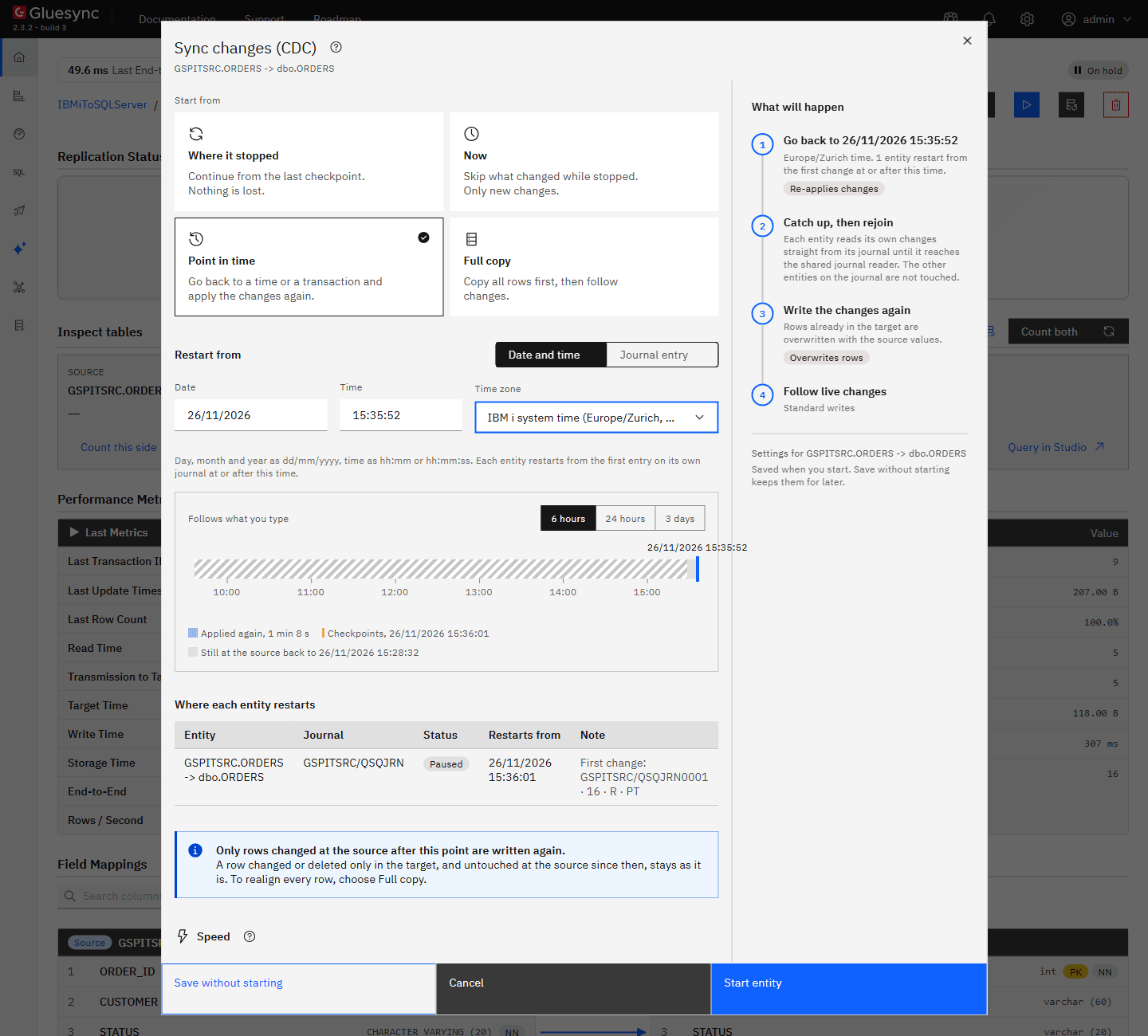
QSQJRN0001, entry 16. What will happen says the rows already on the target are overwritten with the source values.|
The dialog fills in a time one hour before now. If that time, or the one you type, is before the oldest change the IBM i still holds, Time shows 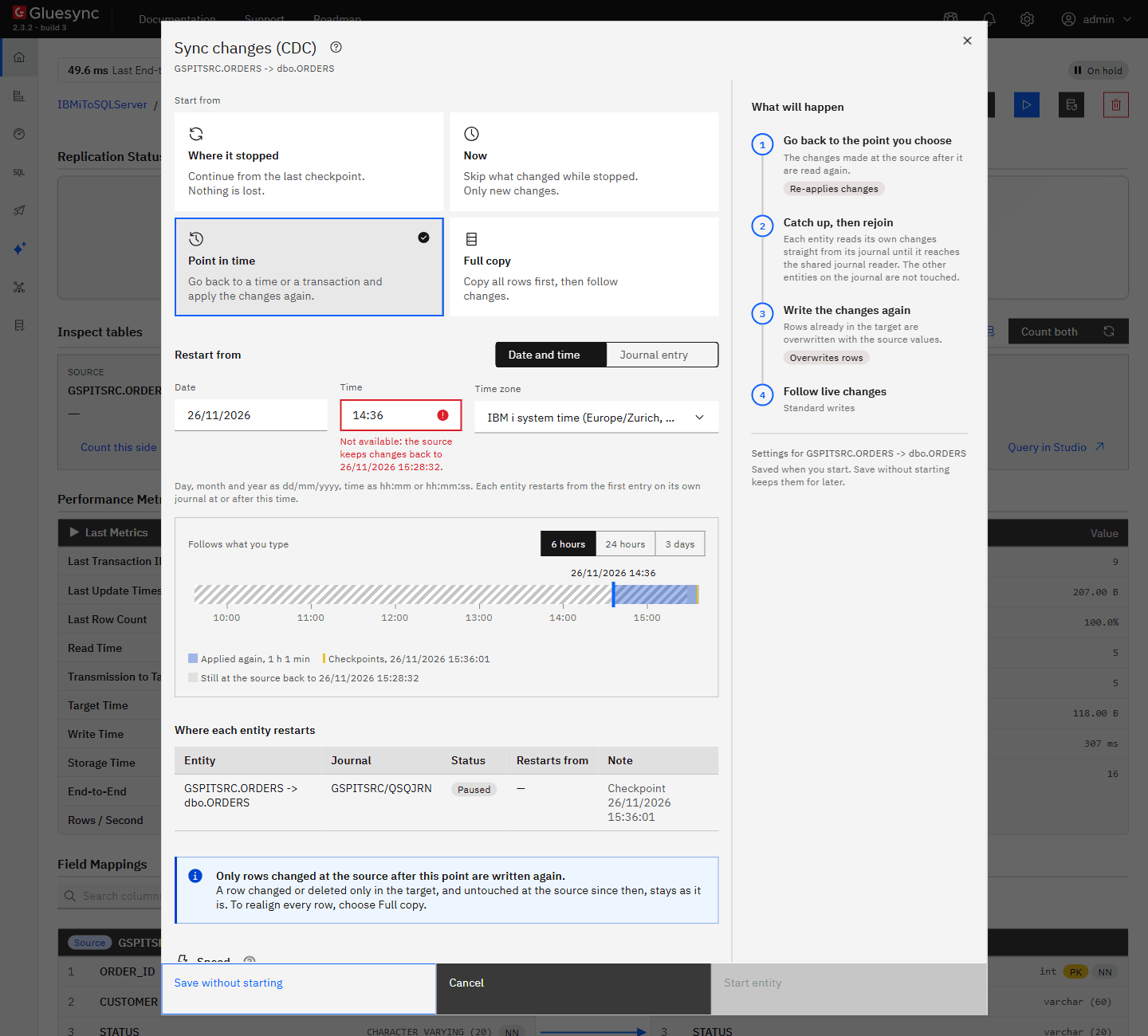
Figure 2. A time before the oldest journal receiver on the system is refused before anything changes.
|
-
Select Start entity.
What will happen lists the steps of the restart:
| Step | What it means |
|---|---|
Go back to the point |
The entity reads again the changes made at the source after the point. |
Catch up, then rejoin |
On IBM i, each restarted entity reads its own changes straight from its journal until it reaches the shared journal reader. The other entities on the journal are not touched. |
Write the changes again |
Rows already on the target are overwritten with the source values, so replaying a change the target already has is harmless. |
Follow live changes |
After the replay, the entity continues with live changes as usual. |
SQL
-
On SQL Server, read the table:
SELECT * FROM dbo.ORDERS ORDER BY ORDER_ID; -
On IBM i, insert one more row and read the target again, to check that live changes flow:
INSERT INTO GSPITSRC.ORDERS VALUES (1008,'Stark Industries','open',8800.00);
UI
Use a journal entry when you know exactly which change the target has last.
-
Pause the entity and select Start, then Point in time;
-
In Restart from, select Journal entry. Journal shows the journal of the entity, here
GSPITSRC/QSQJRN; -
In Receiver, type
QSQJRN0001. In Sequence number, type15, the last entry the target already has; -
Read the box under the fields.
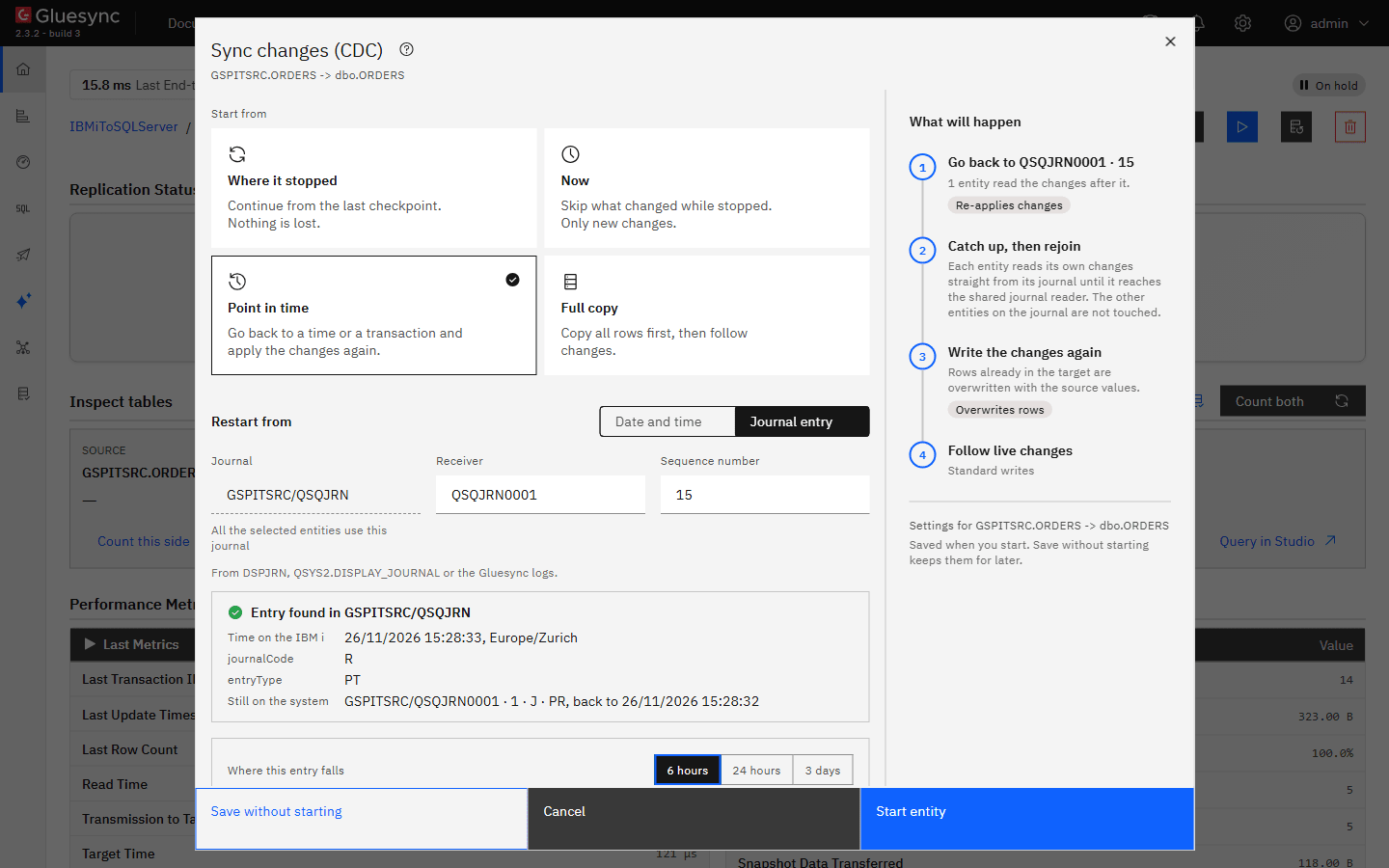
-
Select Start entity.
|
Date and time restarts from the first change at or after the time. Journal entry restarts after the entry you type. To replay entry |
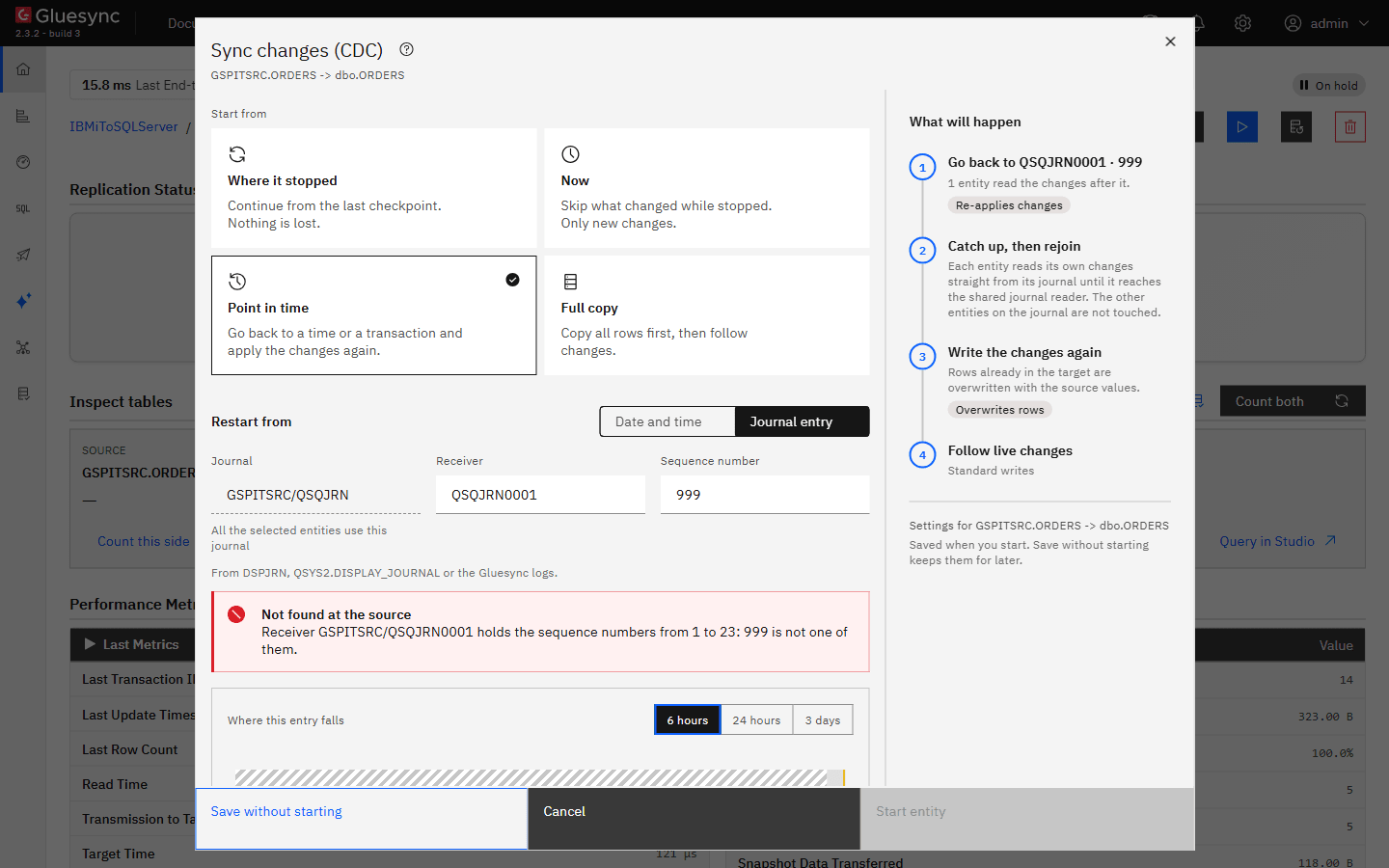
A sequence number that the receiver does not hold is refused before anything changes, and the box lists the numbers it holds.
Troubleshooting
| Problem | Possible cause | What to do |
|---|---|---|
|
The time is before the oldest journal receiver still on the system. The dialog fills in a time one hour before now, which can already be too old |
Type a later time. If you need older changes, restore the receivers of that period on the IBM i, or use Full copy |
Not found at the source: |
The sequence number is not in that receiver |
List the entries with |
The target has the rows again, but a row changed only on the target is still wrong |
A restart replays only the rows changed at the source after the point |
Run a Full copy, or fix the row by hand. See Find and fix row differences |
The restart replayed too many changes, or too few |
The time was read in another time zone, or the journal entry was off by one |
Check Time zone. Remember that Journal entry restarts after the entry you type |
Point in time is greyed out, with a note on the source |
The source cannot go back, for example a PostgreSQL replication slot |
Use Full copy |
The notification time differs by one hour or more from the dialog |
The notification writes the time in UTC ( |
Nothing to do |
|
Optional, for advanced users
The point can also be previewed and applied with the Core Hub MCP tools |