Transform columns with field functions
Source and target tables rarely match column for column. A target may need a masked copy of personal data, a date written as text, a flag instead of a boolean, a constant that tells where the row came from, or one name built from two columns. Field functions do this in the Fields Editor, with no code, and a custom field function covers what the catalog does not. This guide maps one table to another with all of them and checks the result after a snapshot and live changes.
In this guide
You will learn how to map source columns to target columns with arrows, read the errors the Fields Editor reports, apply the built-in field functions that mask, convert, trim and truncate values, fill target columns that have no source, join two source columns into one with a custom field function, and verify the target with SQL after a snapshot and change data capture (CDC).
The steps were run on PostgreSQL 16 for both the source and the target.
Quick information
Goal |
Fill every target column of an entity with the right value: masked, converted, cleaned, constant, or composed from several source columns |
Audience |
Data engineers who configure pipelines in the Control Plane |
Level |
Beginner to intermediate; the custom field function step needs basic Java |
Time required |
About 30 minutes |
Area |
Control Plane → Pipelines → entity → Field mapping → fx |
Applies to |
Gluesync 2.3 |
Before you begin
Make sure that:
-
A pipeline has a source and a target that Core Hub can read, and you can add or edit its entities. In this guide the pipeline is CRM sync, from PostgreSQL to PostgreSQL;
-
The target table already exists with the columns you want to fill. The demo tables are in the optional first step;
-
The entity is not started, or you accept that saving its mapping stops it;
-
You can run SQL on the target database, in Query Studio or any SQL client.
Choose the right tool
Pick the lightest tool that does the job:
| Tool | Use it when | In this guide |
|---|---|---|
One source column feeds one target column (1:1), or a target column has no source, and the transformation is in the catalog. |
Mask an email, a phone number and a card number; write a boolean as |
|
Several source columns feed one target column (N:1), or you need your own logic for one column, shared by the entities of the pipeline. |
Join |
|
You need the whole record: split one value into several columns, skip a row, or decide by operation type. |
Not needed. The guide Write and test a UDF for conversions covers it. |
Guide steps
SQL
Skip this step if you use your own tables. Otherwise create a source table with personal data, a boolean, a date and free text, and a target table that expects masked, converted and extra columns.
-
In the source database, run:
CREATE TABLE public.customers ( customer_id integer PRIMARY KEY, first_name varchar(50), last_name varchar(50), email varchar(120), phone varchar(30), card_number varchar(25), is_active boolean, signup_date date, credit_limit numeric(12,2), notes varchar(200), company varchar(80) ); INSERT INTO public.customers VALUES (1, 'Anna', 'Rossi', 'anna.rossi@example.com', '+39 02 1234 5678', '4111-1111-1111-1111', true, '2024-03-15', 2500.00, ' VIP customer ', 'Rossi Costruzioni S.p.A.'), (2, 'Marco', 'Bianchi', 'marco.bianchi@example.com', '+39 06 9876 5432', '5500 0000 0000 0004', false, '2023-11-02', 800.50, ' ', 'Bianchi'), (3, 'Giulia', 'Verdi', 'giulia.verdi@example.org', '3331234567', '340000000000009', true, '2025-07-30', 12000.00, 'Prefers email ', 'Verdi Logistica e Trasporti S.r.l.'); -
In the target database, run:
CREATE TABLE public.crm_customers (
  customer_id    integer PRIMARY KEY,
  full_name      varchar(120),
  email_masked   varchar(120),
  phone_masked   varchar(30),
  card_masked    varchar(25),
  active_flag    char(1),
  signup_date    varchar(10),
  credit_limit   numeric(12,2),
  notes          varchar(200),
  company_short  varchar(12),
  source_system  varchar(20),
  replicated_at  timestamp
);
What each target column receives in this guide:
| Source column | Target column | How |
|---|---|---|
|
|
Copied as they are |
|
|
Custom field function |
|
|
Mask Email |
|
|
Mask Phone Number |
|
|
Mask Credit Card |
|
|
Convert Boolean to String (Y/N) |
|
|
Convert Date to String, pattern |
|
|
Trim String |
|
|
Truncate String, 12 characters |
none |
|
Fixed string |
none |
|
Local Timestamp |
UI
-
Open the pipeline, and select Entities +;
-
In the Object browser, expand the schema and check the source table, here
publicandcustomers. The Field mapping dialog, the Fields Editor, opens; -
Under Target, select the Target Table, here
crm_customers.
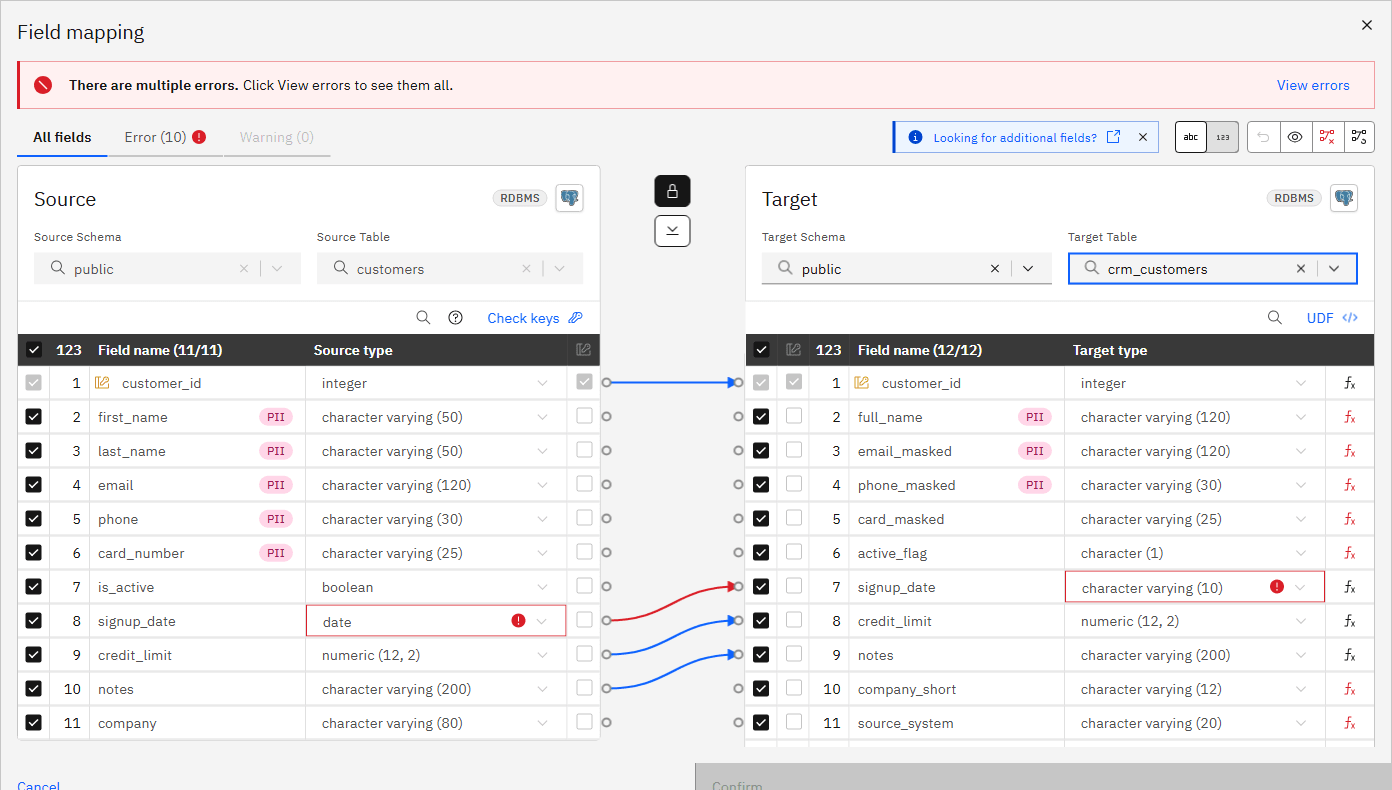
signup_date is in error because a date cannot go into a varchar as it is.|
The PII tags on |
UI
Drag from the dot at the right of each source column to the dot at the left of its target column:
-
emailtoemail_masked; -
phonetophone_masked; -
card_numbertocard_masked; -
is_activetoactive_flag; -
companytocompany_short.
To remove an arrow drawn by mistake, point at it and select its trash button.
UI
-
In the target table, select the fx button at the end of the row
email_masked. The panel Apply a field function opens, with the chips Built-in (7) and My functions (0); -
Open Functions collection and select Mask Email. Select map to expression shows
*, the mask character; keep it or type another one; -
Select the fx button of
email_maskedagain to close the panel; -
Repeat for
phone_maskedwith Mask Phone Number, and forcard_maskedwith Mask Credit Card.
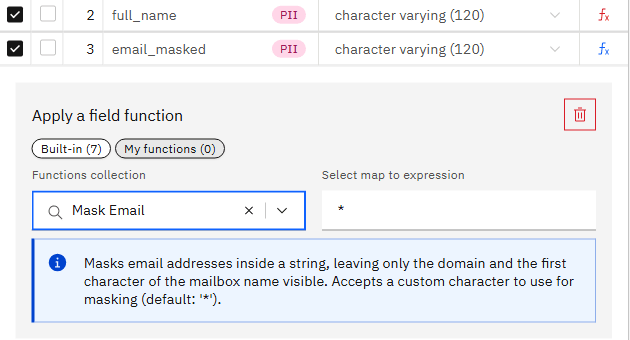
email_masked. The panel describes what the function keeps visible.What each mask keeps visible, as seen in the target after the snapshot (source value, then target value):
Mask Email         anna.rossi@example.com   ->  a*********@example.com
Mask Phone Number  +39 02 1234 5678         ->  +39 ** **** 5678
                   3331234567               ->  ******4567
Mask Credit Card   4111-1111-1111-1111      ->  ****-****-****-1111
5500 0000 0000 0004 -> **** **** **** 0004|
Mask Credit Card masks numbers of 16 digits, in four groups of four with or without separators, and keeps the last four digits. A number of another length, such as the 15-digit |
UI
-
Select the fx button of
active_flag, open Functions collection, and select Convert Boolean to String (Y/N); -
Select the fx button of
signup_date, select Convert Date to String, then open Select map to expression and selectdd/MM/yyyy; -
Select the fx button of
notesand select Trim String; -
Select the fx button of
company_shortand select Truncate String. Select map to expression is filled with12, the length of the target column; keep it.
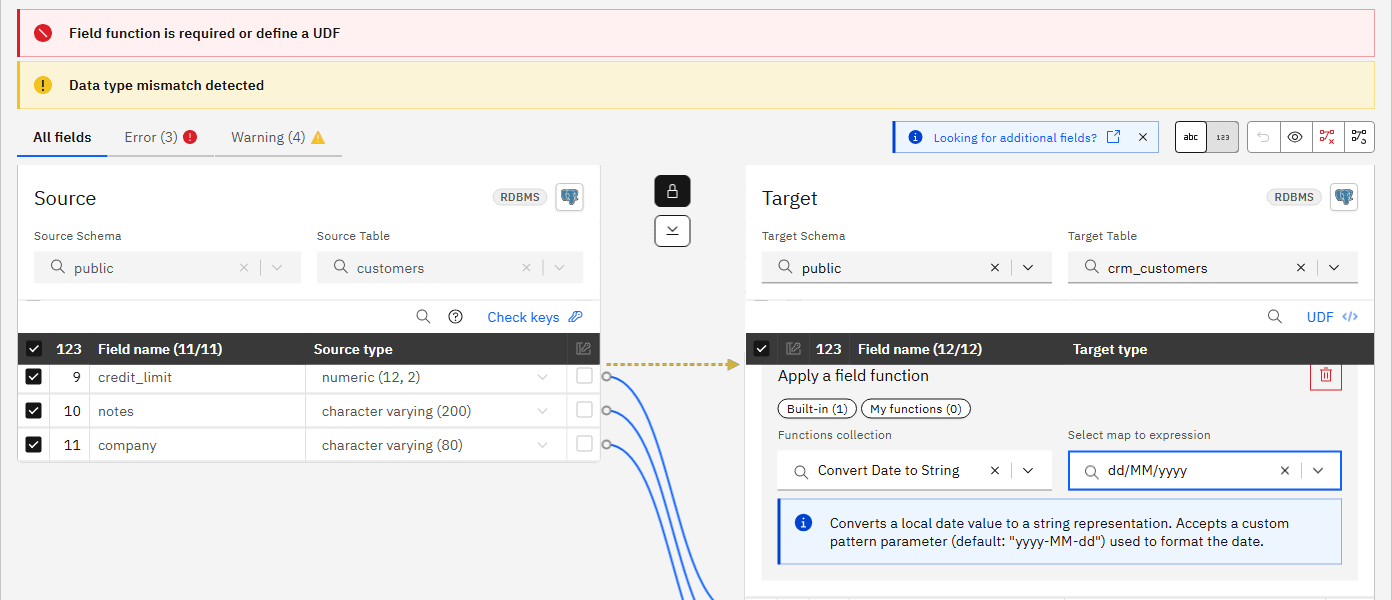
dd/MM/yyyy. The banners now say a field function is still required somewhere, and that the data types differ.The patterns offered for a date are yyyy-MM-dd, dd-MM-yyyy, dd/MM/yyyy, yyyy/MM/dd, yyyyMMdd, ddMM, yyyy-MM, yyyy/MM, MM/dd/yyyy, MM-dd-yyyy, dd MMM yyyy and dd MMMM yyyy. Choose one whose result fits the target column: dd MMMM yyyy does not fit in 10 characters.
UI
source_system and replicated_at exist only in the target, so no arrow reaches them.
-
Select the fx button of
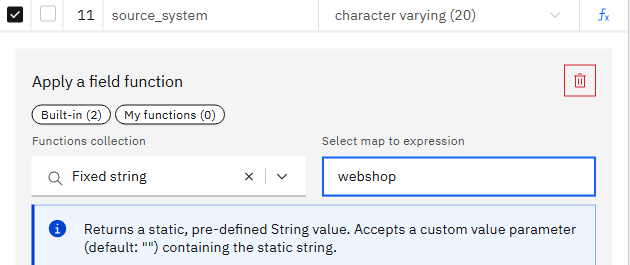
source_system, select Fixed string, and typewebshopin Select map to expression; -
Select the fx button of
replicated_atand select Local Timestamp.
|
Local Timestamp is the time of the machine that runs Core Hub when it writes the row, without a time zone. In a container that runs on UTC, the value is in UTC. To keep a time zone, use a |
UI
-
Draw an arrow from
first_nametofull_name, then a second arrow fromlast_nametofull_name; -
Read the banner, which now says A custom field function is required for this relation, or define a UDF;
-
Select the fx button of
full_name. The panel reads No field function found: built-in functions take one source column. Select Add a custom field function.
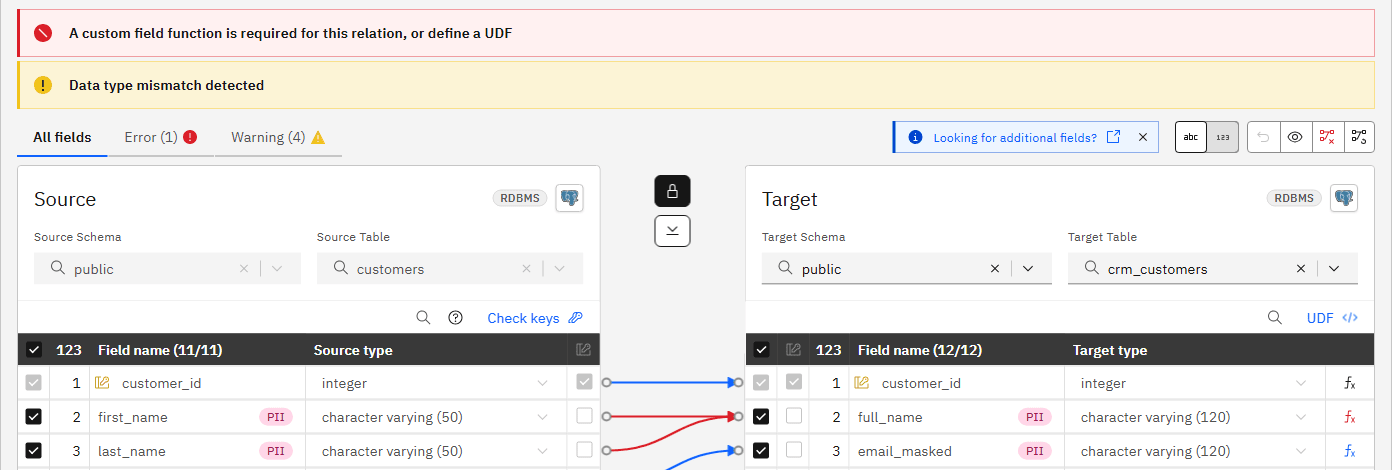
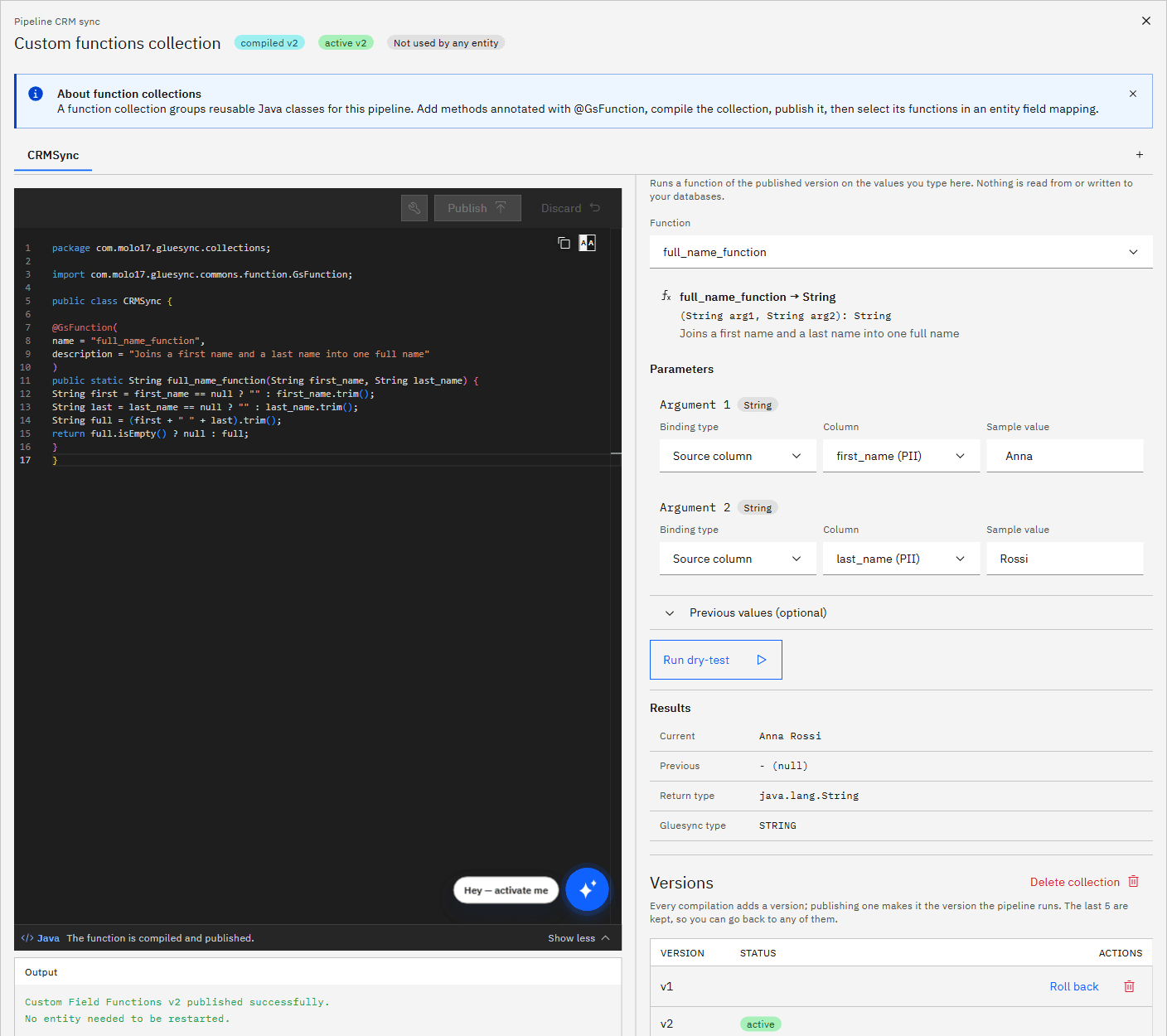
full_name (N:1) need a function that takes both values.The dialog Custom functions collection opens, for the whole pipeline. It holds one Java class named after the pipeline, here CRMSync, with a function already declared for full_name: full_name_function(String first_name, String last_name), which only throws Not implemented yet.
-
Replace the code in the editor with:
package com.molo17.gluesync.collections; import com.molo17.gluesync.commons.function.GsFunction; public class CRMSync { @GsFunction( name = "full_name_function", description = "Joins a first name and a last name into one full name" ) public static String full_name_function(String first_name, String last_name) { String first = first_name == null ? "" : first_name.trim(); String last = last_name == null ? "" : last_name.trim(); String full = (first + " " + last).trim().replaceAll("\\s+", " "); return full.isEmpty() ? null : full; } } -
Select the compile button (the wrench) at the top of the editor. Output reads
Compiled as v1andFunction exported: full_name_function(String arg1, String arg2): String; -
Select Publish. The dialog Publish v1? says that nothing uses these functions yet, so no entity is stopped; select Publish;
-
Under Try a function within CRMSync, type
AnnaandRossiin the two Sample value boxes, and select Run dry-test.
-
Close the dialog with the X at the top right.
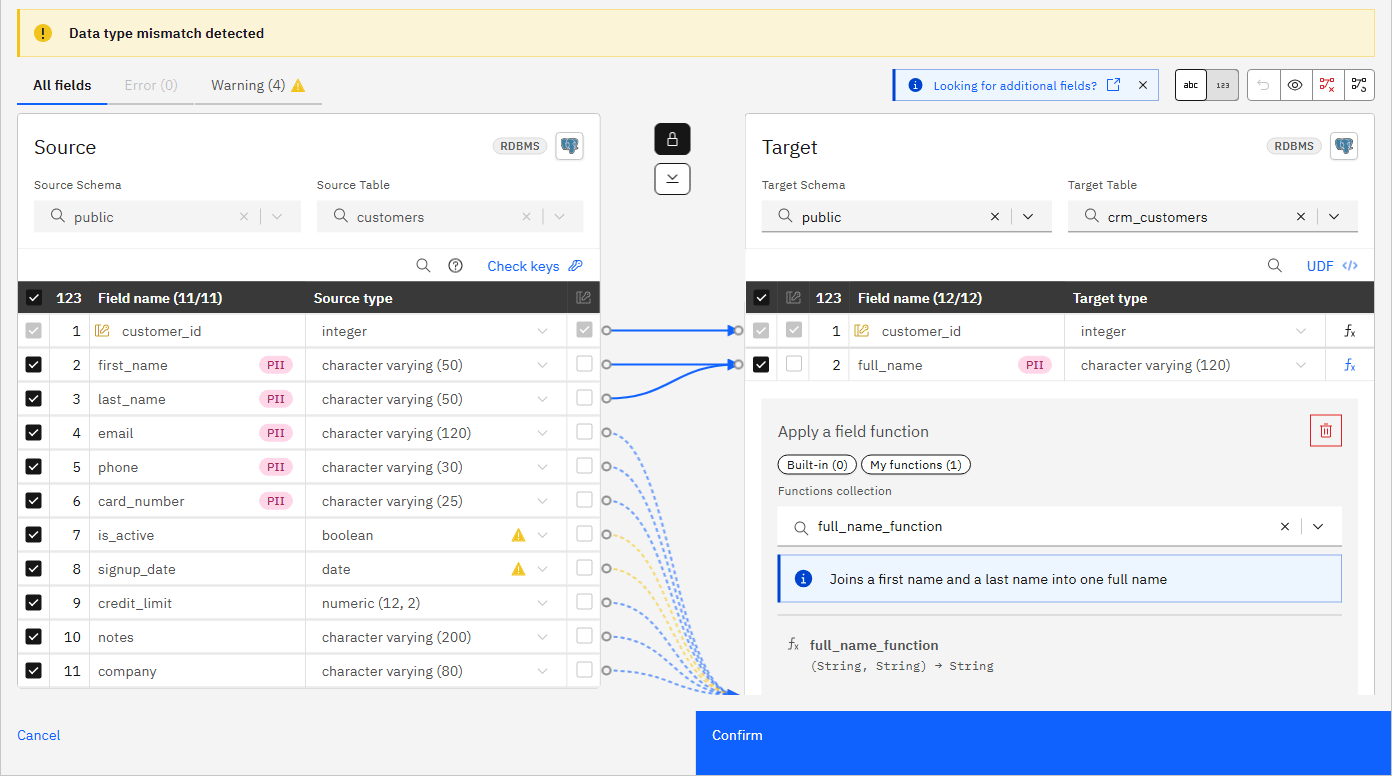
full_name uses the new function, My functions counts one, and Error is 0.|
The version number grows at every compile, published or not, so your first published version may be |
UI
-
In Field mapping, select Confirm. The entity shows the tag FF;
-
Select Confirm and continue;
-
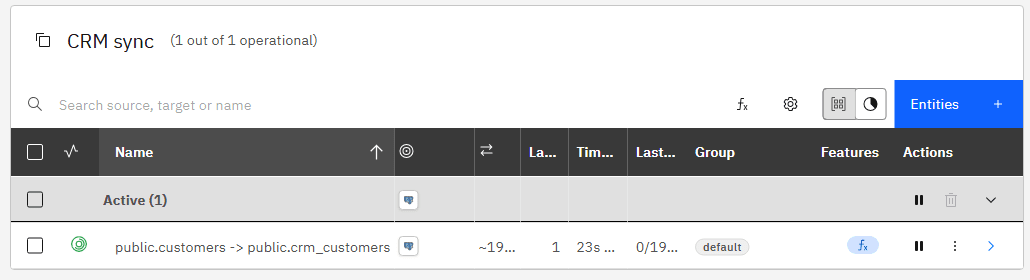
On the pipeline page, select the start button of the entity. The dialog Sync changes (CDC) opens;
-
Keep Full copy and Keep and merge, and select Start entity.
SQL
In the target database, run:
SELECT customer_id, full_name, email_masked, phone_masked, card_masked,
       active_flag, signup_date, '[' || notes || ']' AS notes,
       company_short, source_system, replicated_at
FROM public.crm_customers
ORDER BY customer_id;SQL
-
In the source database, run an insert, an update and a delete:
INSERT INTO public.customers VALUES (4, 'Luca', NULL, 'luca@example.net', '+44 20 7946 0958', '5105 1051 0510 5100', true, '2026-11-20', 300.00, ' new ', 'Neri Consulting Group'); UPDATE public.customers SET is_active = false, email = 'a.rossi@example.it' WHERE customer_id = 1; DELETE FROM public.customers WHERE customer_id = 2; -
Run the query of the previous step again.
UI
-
On the pipeline page, select the fx button of the toolbar. The dialog shows the tag used by 1 entity;
-
Edit the code, select the compile button, then Publish.
A compile error keeps Publish disabled. Output names the file and the line, for example:
com/molo17/gluesync/collections/CRMSync.java:15 cannot find symbol
  symbol:   variable length
location: variable full of type java.lang.StringTroubleshooting
| Problem | Possible cause | What to do |
|---|---|---|
Field function is required or define a UDF, and Confirm is disabled |
A checked target column has no arrow and no field function |
Draw an arrow to it, give it a field function such as Fixed string, or uncheck it |
A custom field function is required for this relation, or define a UDF |
Two or more arrows end on the same target column (N:1), and built-in functions take one column |
Select Add a custom field function in its fx panel, or remove the extra arrows |
A red arrow and a type error on a column, for example |
The types cannot be converted without a function |
Apply a conversion function from the fx panel; the error becomes a warning |
Data type mismatch detected stays after the functions are applied |
It is a warning: the source and target types still differ, and the functions convert them |
Nothing to do; Confirm is enabled |
The function you want is not in the list |
The list shows only the functions that fit the source and target types. A target column fed by one source column that also feeds another column (1:N) gets no built-in function |
Check the target type, or use a custom field function or a UDF |
Output: |
The Java code does not compile |
Fix the line named in the message and compile again |
My functions (0) in the fx panel |
No custom field function version is published yet |
Open the custom functions from the toolbar fx button, compile and select Publish |
A card number is written unmasked |
Mask Credit Card masks 16-digit numbers only |
Use Mask String, or a custom field function, for other lengths |
|
Local Timestamp uses the clock of the machine that runs Core Hub, often UTC in a container |
Use a |
The target refuses a value that is too long |
The target column is shorter than the source values |
Apply Truncate String with the target length, or make the target column wider |
Related guides
Contact MOLO17 Support if you need assistance with field functions.