Control how data lands on the target
By default an entity makes the target a copy of the source: every insert, update and delete is applied, and a row that is already on the target is overwritten. Many targets need something else. An archive must keep the rows deleted on the source, a reporting table must not be overwritten by a colliding row, and a damaged part of a table must be reloaded without touching the rest. This guide builds an order archive that does all of that and checks every effect with SQL.
In this guide
You will learn how to create the target table from the source, leave deletes out of the operations an entity writes, choose what happens when an insert meets a row that is already on the target (Upsert, Skip or Fail), read the warning and the error each choice raises, and delete only some target rows before a snapshot reloads them.
The steps were run on PostgreSQL 16 for both the source and the target.
Quick information
Goal |
Decide what an entity writes to the target, what it keeps there, and what it does with a row the target already holds |
Audience |
Data engineers who configure pipelines in the Control Plane |
Level |
Intermediate |
Time required |
About 30 minutes |
Area |
Control Plane → Pipelines → entity → Field mapping and Edit settings → Fine tuning |
Applies to |
Gluesync 2.3 |
Before you begin
Make sure that:
-
A pipeline has a source and a relational target that Core Hub can read, and you can add and edit its entities. In this guide the pipeline is OrdersArchive, from PostgreSQL to PostgreSQL;
-
The database user of the target can create tables, if you want Gluesync to create the target table;
-
You can run SQL on the source and the target, in Query Studio or any SQL client;
-
You try the deleting steps on a copy of the target first. A deletion on the target cannot be undone.
Choose the right setting
Each question has its own setting. You can combine them on one entity.
| What you need | Setting | In this guide |
|---|---|---|
The target table does not exist yet |
Create table "<name>" in Field mapping. See Target table creation. |
Create |
Rows deleted on the source must stay on the target |
Allowed operations in Fine tuning. See Allowed operations. |
Leave out Delete and Truncate. |
An insert meets a row that is already on the target |
On duplicate key in Fine tuning: Upsert, Skip or Fail. See On duplicate key. |
Use Skip, then try Fail. |
Part of the target must be reloaded |
Delete only some rows first when you start the entity. See Selective deletion ahead of snapshot. |
Reload the rows of one region. |
The whole target must match the source again |
Empty the table first when you start the entity |
Not needed. See Start a snapshot and CDC replication. |
Only some rows may reach the target |
Target filters |
Not needed. See Filter rows with a snapshot WHERE clause and target filters. |
Large volumes must load faster |
Bulk load settings in Fine tuning |
Not needed. See Tune replication throughput. Rows written in bulk do not use On duplicate key. |
Records must expire on the target |
TTL in the Entity section, on targets with native expiry |
Not needed. See TTL tagging. |
Guide steps
SQL
Skip this step if you use your own table. On the source, create an orders table with a few rows in three regions:
CREATE TABLE public.orders (
  order_id    integer PRIMARY KEY,
  customer    varchar(60) NOT NULL,
  region      varchar(10) NOT NULL,
  status      varchar(20) NOT NULL,
  amount      numeric(12,2) NOT NULL,
  order_date  date NOT NULL
);
ALTER TABLE public.orders REPLICA IDENTITY FULL;

INSERT INTO public.orders VALUES
 (1001,'Rossi Costruzioni','EU','shipped', 1250.00,'2026-10-02'),
 (1002,'Bianchi Srl','EU','shipped',  480.50,'2026-10-05'),
 (1003,'Acme Corp','US','open',     2300.00,'2026-10-11'),
 (1004,'Verdi Logistica','EU','open', 99.90,'2026-10-18'),
 (1005,'Globex','US','cancelled',    760.00,'2026-10-21'),
 (1006,'Initech','US','shipped',    1410.25,'2026-11-03'),
 (1007,'Neri Consulting','EU','open', 315.00,'2026-11-09'),
 (1008,'Umbrella Ltd','APAC','open', 5200.00,'2026-11-14');
Do not create anything on the target: the next step creates the table.
UI
-
Open the pipeline, and select Entities +;
-
In the Object browser, expand the schema and check the source table, here
publicandorders. The Field mapping dialog opens; -
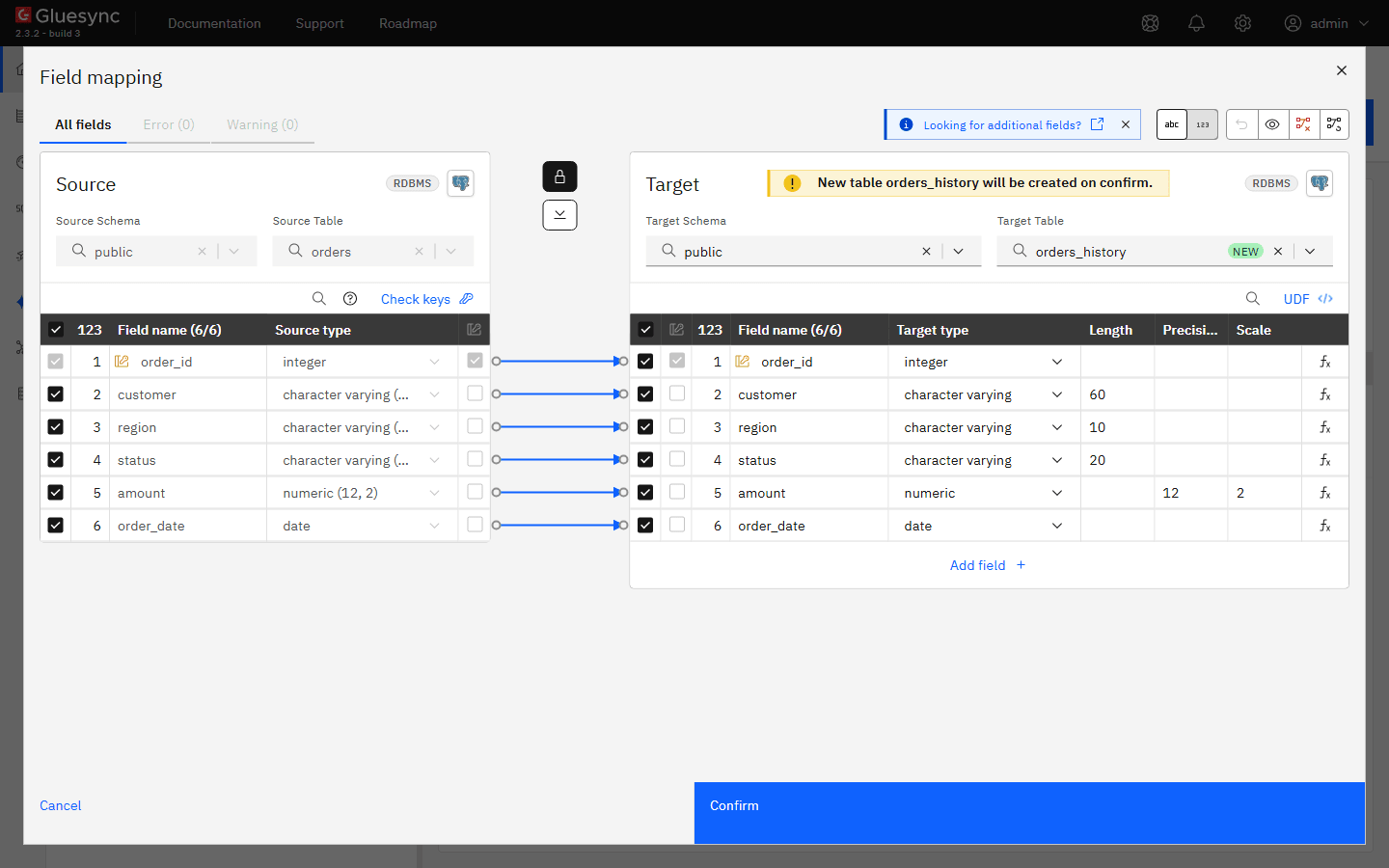
Under Target, keep the Target Schema, here
public. In Target Table, type the name of the new table,orders_history, and select Create table "orders_history".
-
Check the target types and lengths. Change a type in Target type if you need to;
-
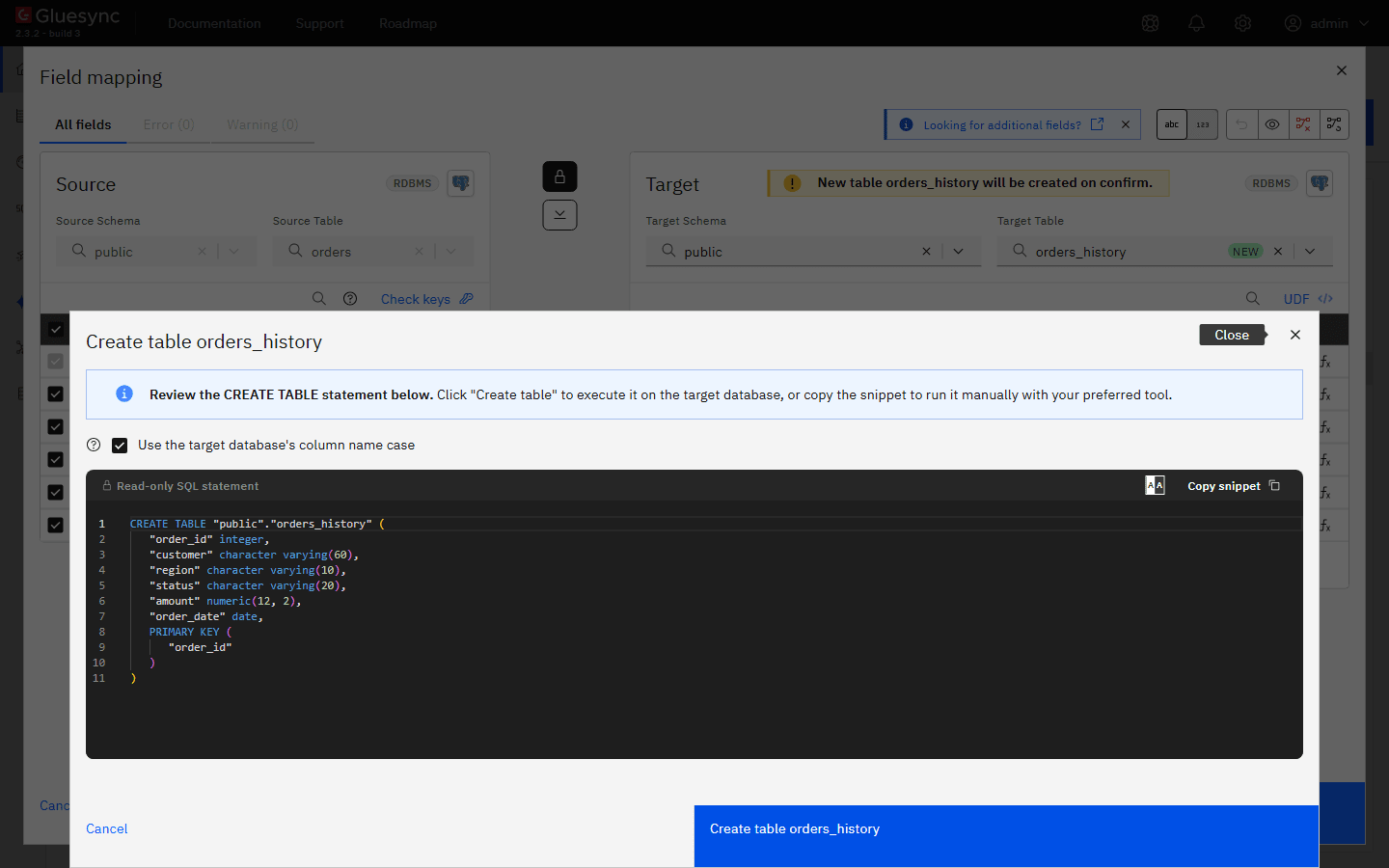
Select Confirm. The Create table orders_history dialog shows the statement Gluesync runs on the target;
-
Select Create table orders_history.
|
To change the statement, copy it, run your own version on the target, then select the table in Target Table. The statement leaves out foreign keys. See Target table creation. |
UI
-
In Selected entities, select Entity settings (the gear icon) on the row of the entity;
-
Select Fine tuning;
-
Open Allowed operations and clear Delete and Truncate. Keep Insert and Update.
|
Allowed operations also applies to the snapshot. A Keep and merge snapshot writes updates, and an Empty the table first or Delete only some rows first snapshot writes inserts: keep both Insert and Update. It does not stop the deletion that Empty the table first and Delete only some rows first run before the copy. See the last step. |
UI
-
In the same Fine tuning section, open On duplicate key and select Skip.
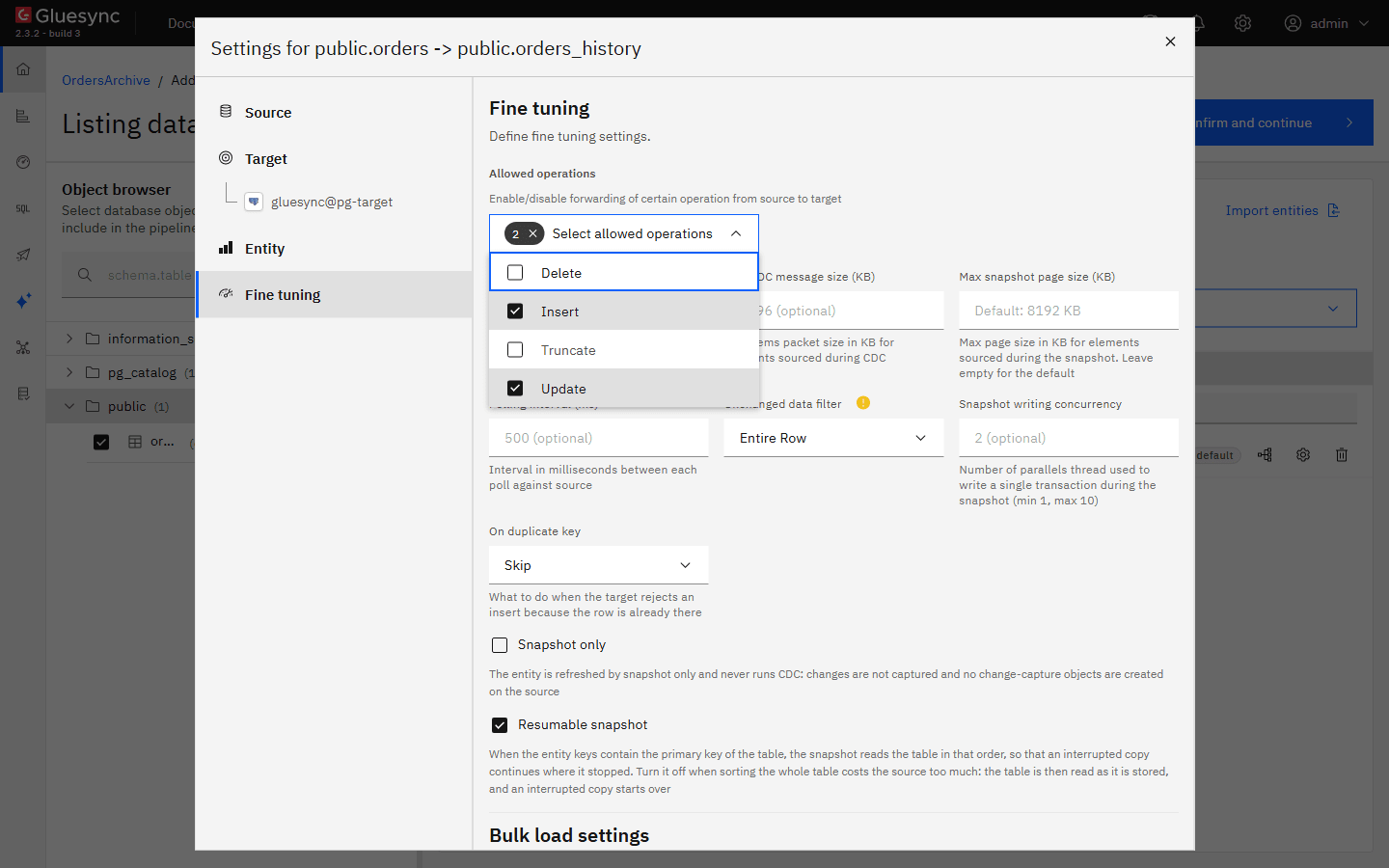
The three choices:
| Choice | When an insert meets a row with the same key |
|---|---|
Upsert (default) |
The target row is overwritten with the incoming one. |
Skip |
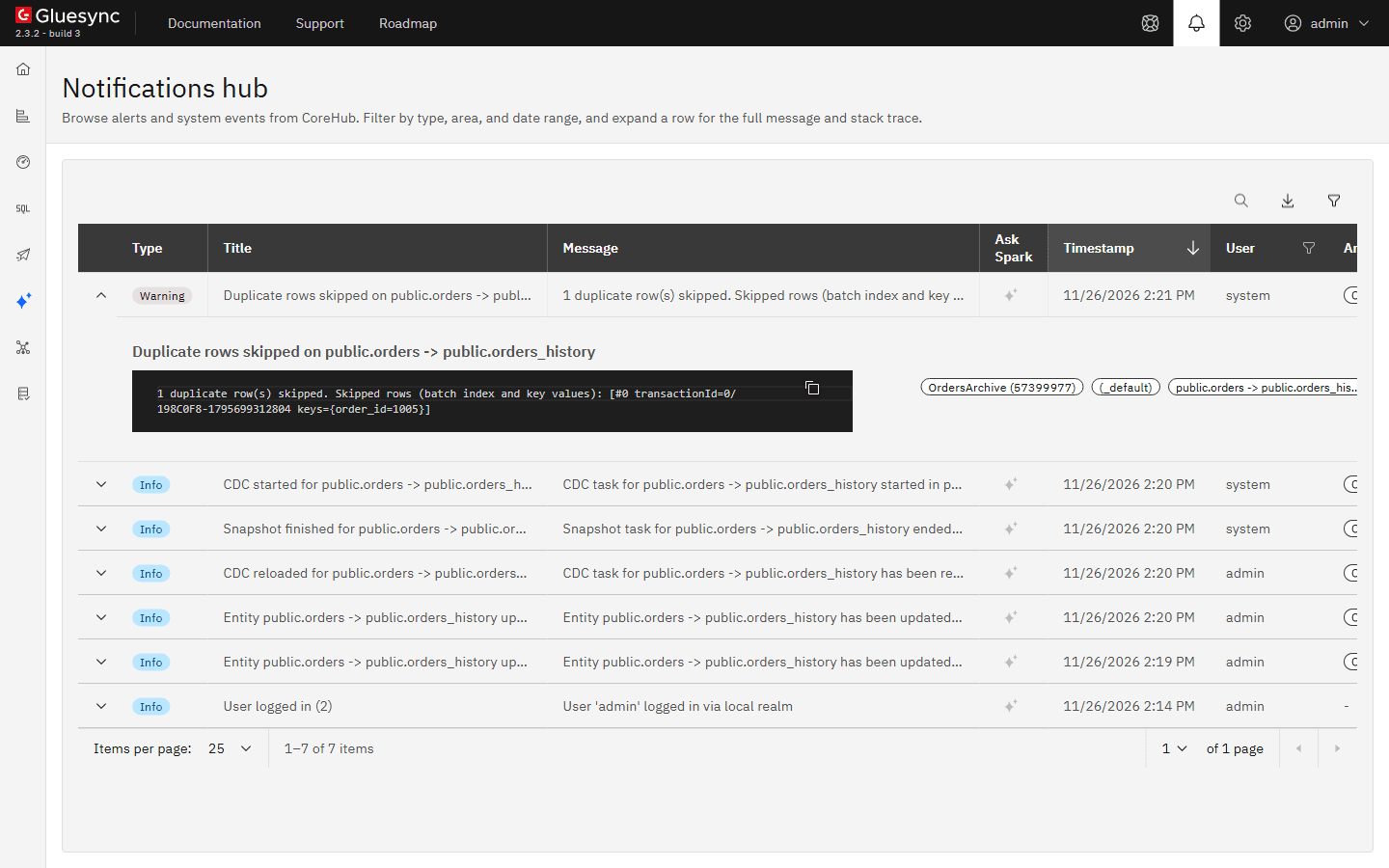
The target row is kept, the incoming row is discarded, and a warning lists its key. Replication continues. |
Fail |
The entity stops with an error and nothing more is written until you act. |
-
Close the dialog and select Confirm and continue.
UI
-
Open the entity and select Start;
-
In Start from, keep Full copy. In Data already in the target, keep Keep and merge;
-
Select Start entity.
SQL
-
On the source, insert an order, update one and delete one:
INSERT INTO orders VALUES (1009,'Stark Industries','US','open',8800.00,'2026-11-20'); UPDATE orders SET status = 'shipped' WHERE order_id = 1003; DELETE FROM orders WHERE order_id = 1005; -
After a few seconds, read the target:
SELECT order_id, customer, region, status, amount FROM orders_history ORDER BY order_id;
UI + SQL
An archive that keeps deleted rows meets a duplicate key as soon as the source reuses a key.
-
On the source, insert a new order with the key of the deleted one:
INSERT INTO orders VALUES (1005,'Hooli','US','open',640.00,'2026-11-25'); -
On the target, read order
1005:SELECT order_id, customer, status, amount FROM orders_history WHERE order_id = 1005; -
In the Control Plane, select Notifications, then the warning Duplicate rows skipped on public.orders → public.orders_history.
|
Skip acts on inserts only. A later update of the new source row is applied to the target row with the same key. In the test, |
UI + SQL
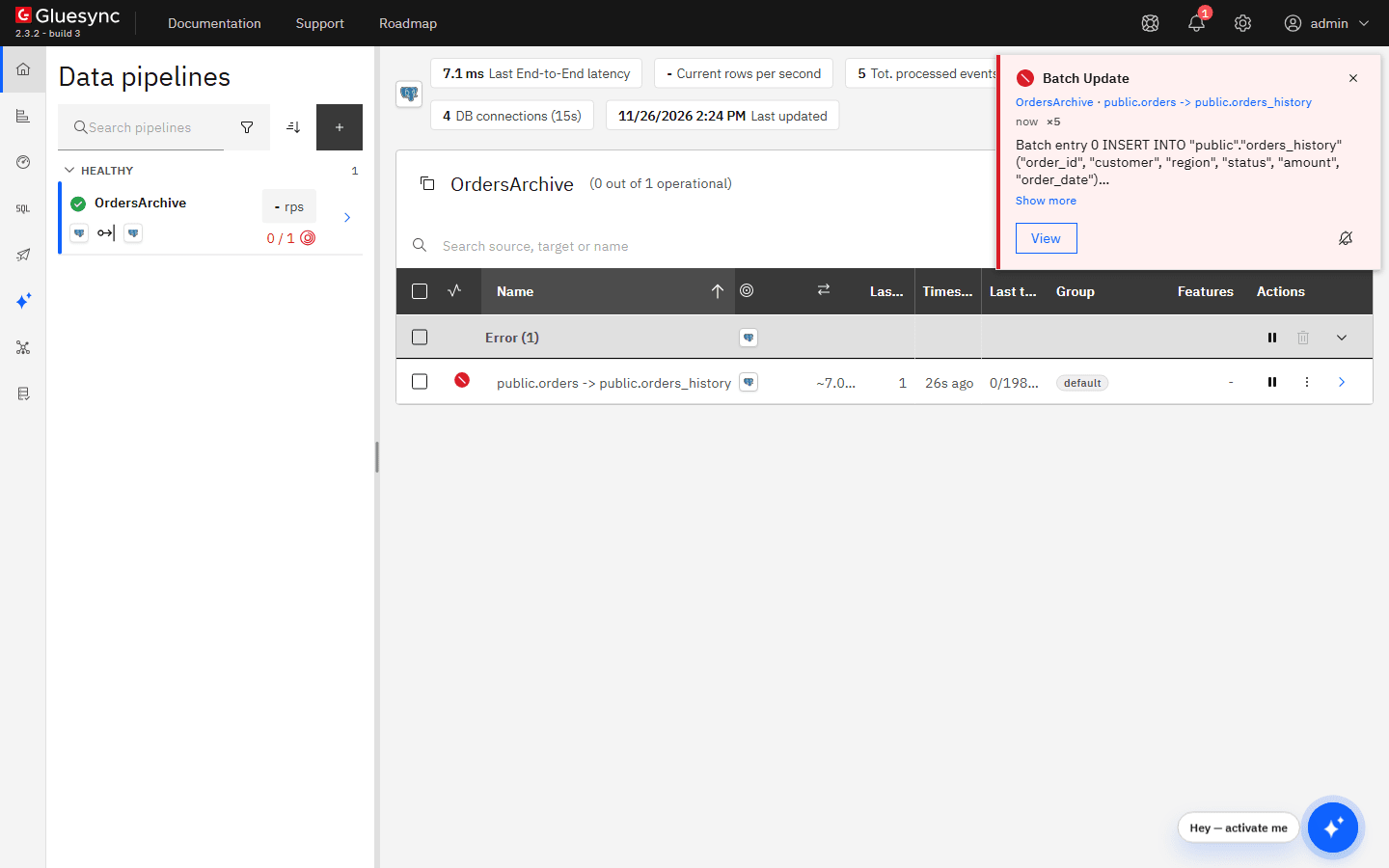
Use Fail when no data may move past a collision until someone looks at it.
-
On the pipeline page, open Options (the three-dot icon) on the row of the entity and select Edit settings;
-
Select Fine tuning, set On duplicate key to Fail, close the dialog and select Confirm and continue. The entity stays Active;
-
On the source, delete an order, then insert it again with other values, and add one more order:
DELETE FROM orders WHERE order_id = 1006;
INSERT INTO orders VALUES (1006,'Wayne Enterprises','US','open',990.00,'2026-11-26');
INSERT INTO orders VALUES (1010,'Soylent','EU','open',150.00,'2026-11-26');
-
To let the data move again, decide what to do with the target row, then set On duplicate key back to Skip (or Upsert) in Edit settings and select Confirm and continue.
|
Restarting with Fail still set replays the same change and stops again, as long as the row is on the target. See Fail: what stopping means. |
UI + SQL
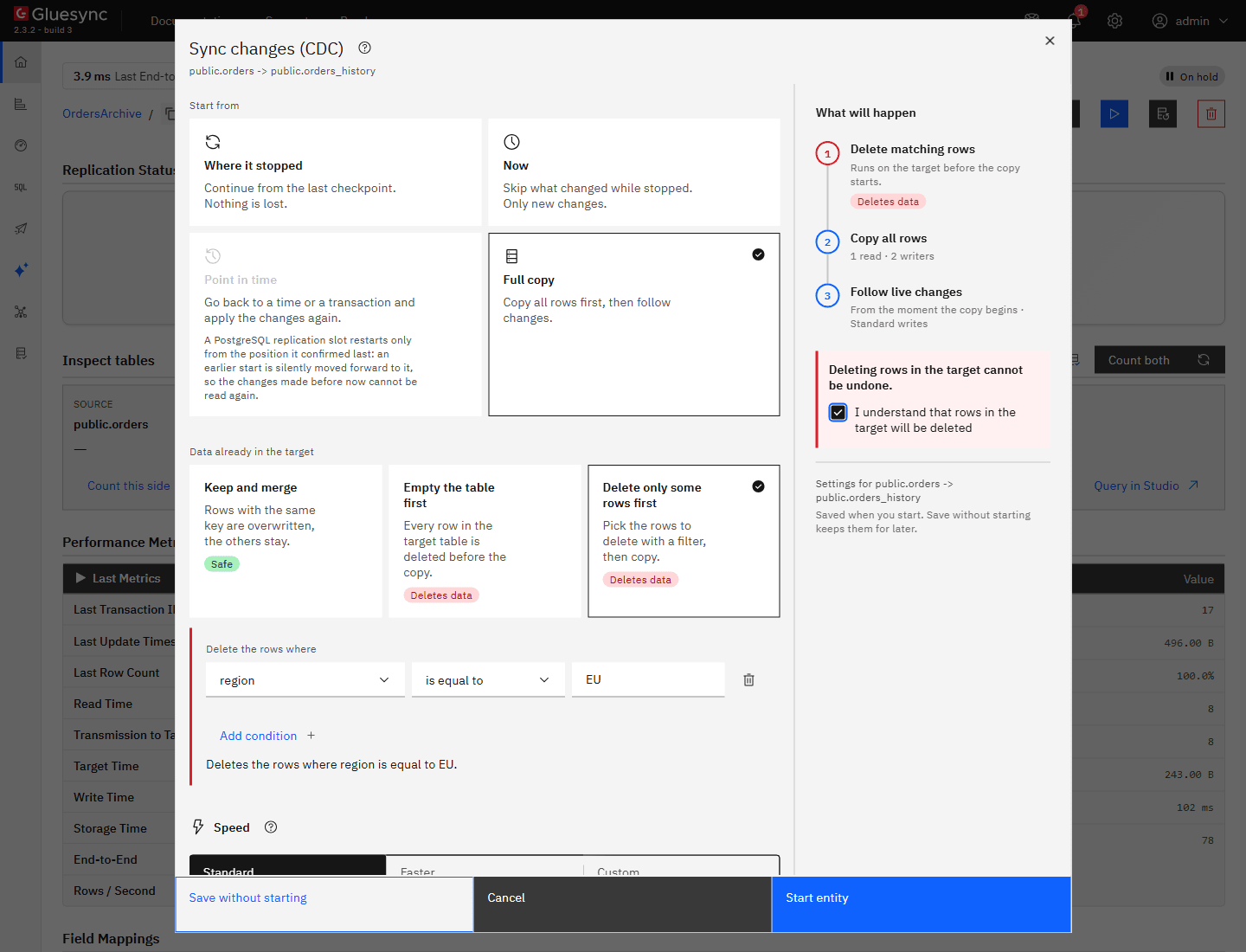
Suppose the rows of one region were damaged on the target. You can delete just those rows and copy them again, without emptying the table.
-
To have something to repair, damage the EU rows on the target, and delete one EU order on the source:
-- on the target UPDATE orders_history SET amount = 0 WHERE region = 'EU'; -- on the source DELETE FROM orders WHERE order_id = 1002; -
Open the entity and select Pause, then Pause entity;
-
Select Start. In Start from, select Full copy. In Data already in the target, select Delete only some rows first;
-
Under Delete the rows where, set the condition:
region, is equal to,EU; -
Select I understand that rows in the target will be deleted.
-
Select Start entity;
-
Read the target:
SELECT order_id, customer, region, status, amount FROM orders_history ORDER BY order_id;
|
The condition is saved on the entity, in Edit settings → Target → Selective deletion ahead of snapshot. It runs only when a snapshot starts with Delete only some rows first: in the test, a later Keep and merge snapshot deleted nothing.
Troubleshooting
| Problem | Possible cause | What to do |
|---|---|---|
Batch Update: |
On duplicate key is Fail, and an insert met a row with the same key |
Decide what to keep, then set On duplicate key to Skip or Upsert in Edit settings, or delete the target row and start the entity again |
Duplicate rows skipped on <entity> warnings |
On duplicate key is Skip, and inserts met rows with the same key. A snapshot with Delete only some rows first raises them for every row it did not delete |
Nothing to do if that is what you want. Compare the listed keys with the source to reconcile them |
A row deleted on the source is still on the target |
Delete is not in Allowed operations |
Expected for an archive. Select Delete again if the target must match the source |
An archived row was overwritten by new values |
The source reused the key and then updated the new row. Skip acts on inserts only |
Also clear Update in Allowed operations, or use a target key the source cannot reuse |
Archived rows disappeared after a snapshot |
The snapshot started with Empty the table first or Delete only some rows first. Allowed operations does not stop that deletion |
Use Keep and merge on an archive, or narrow the condition to rows the source still has |
Start entity is disabled with Delete only some rows first |
The confirmation box is not selected, or a condition has no value |
Select I understand that rows in the target will be deleted and complete the condition |
Snapshot is not on the entity page |
The entity is Active |
Select Pause, then Start with Full copy |
Nothing is written to the target |
Insert or Update is missing from Allowed operations, and the snapshot or the live changes use it |
Select Insert and Update again |