Set up an IBM i CDC source from scratch
Gluesync reads the changes of an IBM i table from its journal. This guide takes a table that is not journaled yet to a running pipeline: it creates the journal, journals the table with both images, creates a Gluesync user with only the authorities it needs, connects it in the Control Plane, and copies the table to SQL Server with a snapshot followed by live changes.
In this guide
You will learn how to create a journal receiver and a journal, start journaling a table with IMAGES(*BOTH), create a user profile without special authorities, grant it the authorities on the journal, the receivers, the library and the table, create the IBM i source connection with its own Gluesync library, add the entity, run a snapshot and change data capture (CDC), and check the result with SQL.
The steps were run on IBM i 7.4 as the source and SQL Server 2022 as the target.
Quick information
Goal |
Replicate an IBM i table with a snapshot and journal-based CDC, using a Gluesync user that has only the authorities it needs |
Audience |
IBM i administrators and data engineers who set up pipelines |
Level |
Intermediate; the IBM i steps need a user with |
Time required |
About 30 minutes |
Area |
IBM i command line or Run SQL Scripts; Control Plane → Pipelines |
Applies to |
Gluesync 2.3 |
Before you begin
Make sure that:
-
Core Hub can reach the IBM i host servers. The agent uses the database host server (port 8471) and the remote command server (port 8475), and the server mapper (port 449);
-
You can sign on to the IBM i with a user that can create user profiles and grant authorities, for example a security officer, to run the IBM i steps;
-
You can run SQL on the IBM i, from Run SQL Scripts or any SQL client, and run CL commands. In SQL, wrap a CL command in
CALL QSYS2.QCMDEXC('…'); -
A pipeline target exists or can be created. In this guide it is SQL Server.
|
A table created with |
Guide steps
SQL
Skip this step if you use your own table.
CALL QSYS2.QCMDEXC('CRTLIB LIB(GSGSRC) TEXT(''Gluesync guide source'')');

CREATE TABLE GSGSRC.CUSTOMERS (
  CUSTOMER_ID  INTEGER NOT NULL PRIMARY KEY,
  NAME         VARCHAR(60) NOT NULL,
  CITY         VARCHAR(40),
  CREDIT_LIMIT DECIMAL(11,2) NOT NULL DEFAULT 0
);

INSERT INTO GSGSRC.CUSTOMERS VALUES
  (1,'Rossi Costruzioni','Milano',25000),
  (2,'Bianchi Srl','Roma',8000),
(3,'Verdi Logistica','Torino',12000);CLI + SQL
Gluesync needs the before image and the after image of every change. Create a journal receiver and a journal, then start journaling the table with IMAGES(*BOTH):
CRTJRNRCV JRNRCV(GSGSRC/GSGRCV0001) TEXT('Gluesync guide receiver')
CRTJRN    JRN(GSGSRC/GSGJRN) JRNRCV(GSGSRC/GSGRCV0001) MNGRCV(*SYSTEM) DLTRCV(*NO) TEXT('Gluesync guide journal')
STRJRNPF  FILE(GSGSRC/CUSTOMERS) JRN(GSGSRC/GSGJRN) IMAGES(*BOTH) OMTJRNE(*OPNCLO)
To change a table that is journaled already with after images only, run CHGJRNOBJ OBJ((<library>/<table> *FILE)) ATR(*IMAGES) IMAGES(*BOTH).
Check the result:
SELECT OBJNAME, JOURNALED, JOURNAL_LIBRARY, JOURNAL_NAME, JOURNAL_IMAGES
FROM TABLE(QSYS2.OBJECT_STATISTICS('GSGSRC', '*FILE')) X;|
|
CLI + SQL
-
Create a user profile with no special authorities and no interactive sign-on:
CRTUSRPRF USRPRF(GSGUIDE) PASSWORD(<password>) USRCLS(*USER) SPCAUT(*NONE) INLMNU(*SIGNOFF) LMTCPB(*YES) TEXT('Gluesync CDC user') -
Grant the authorities. The journal needs two commands, because
*USEcannot be combined with another value in oneGRTOBJAUT:GRTOBJAUT OBJ(GSGSRC) OBJTYPE(*LIB) USER(GSGUIDE) AUT(*EXECUTE) GRTOBJAUT OBJ(GSGSRC/CUSTOMERS) OBJTYPE(*FILE) USER(GSGUIDE) AUT(*USE) GRTOBJAUT OBJ(GSGSRC/CUSTOMERS) OBJTYPE(*FILE) USER(GSGUIDE) AUT(*OBJREF) GRTOBJAUT OBJ(GSGSRC/GSGJRN) OBJTYPE(*JRN) USER(GSGUIDE) AUT(*USE) GRTOBJAUT OBJ(GSGSRC/GSGJRN) OBJTYPE(*JRN) USER(GSGUIDE) AUT(*OBJEXIST) GRTOBJAUT OBJ(GSGSRC/*ALL) OBJTYPE(*JRNRCV) USER(GSGUIDE) AUT(*USE)When the journal and its receivers are in other libraries than the table, also grant
*EXECUTEon those libraries. -
Check the grants:
SELECT SYSTEM_OBJECT_SCHEMA, SYSTEM_OBJECT_NAME, OBJECT_TYPE, OBJECT_AUTHORITY, OBJECT_EXISTENCE, OBJECT_REFERENCE
FROM QSYS2.OBJECT_PRIVILEGES
WHERE AUTHORIZATION_NAME = 'GSGUIDE'
  AND (SYSTEM_OBJECT_SCHEMA = 'GSGSRC' OR (SYSTEM_OBJECT_SCHEMA = 'QSYS' AND SYSTEM_OBJECT_NAME = 'GSGSRC'))
ORDER BY OBJECT_TYPE;
What each authority is for:
| Object | Authority | Why |
|---|---|---|
The table |
|
Read the rows during the snapshot and the journal entries of the table. |
The table |
|
Let the agent see the primary key of the table. Without it, Field mapping reports No key on the source (see step 5). |
The journal |
|
Read the journal; |
The receivers |
|
Read the entries in each receiver. A receiver that |
The libraries of the table, the journal and the receivers |
|
Reach the objects in them. |
UI
-
In the Control Plane, select Create pipeline (or Create your first pipeline);
-
In Select source agent, search for
IBM iand select IBM Db2 for IBM i CDC agent; -
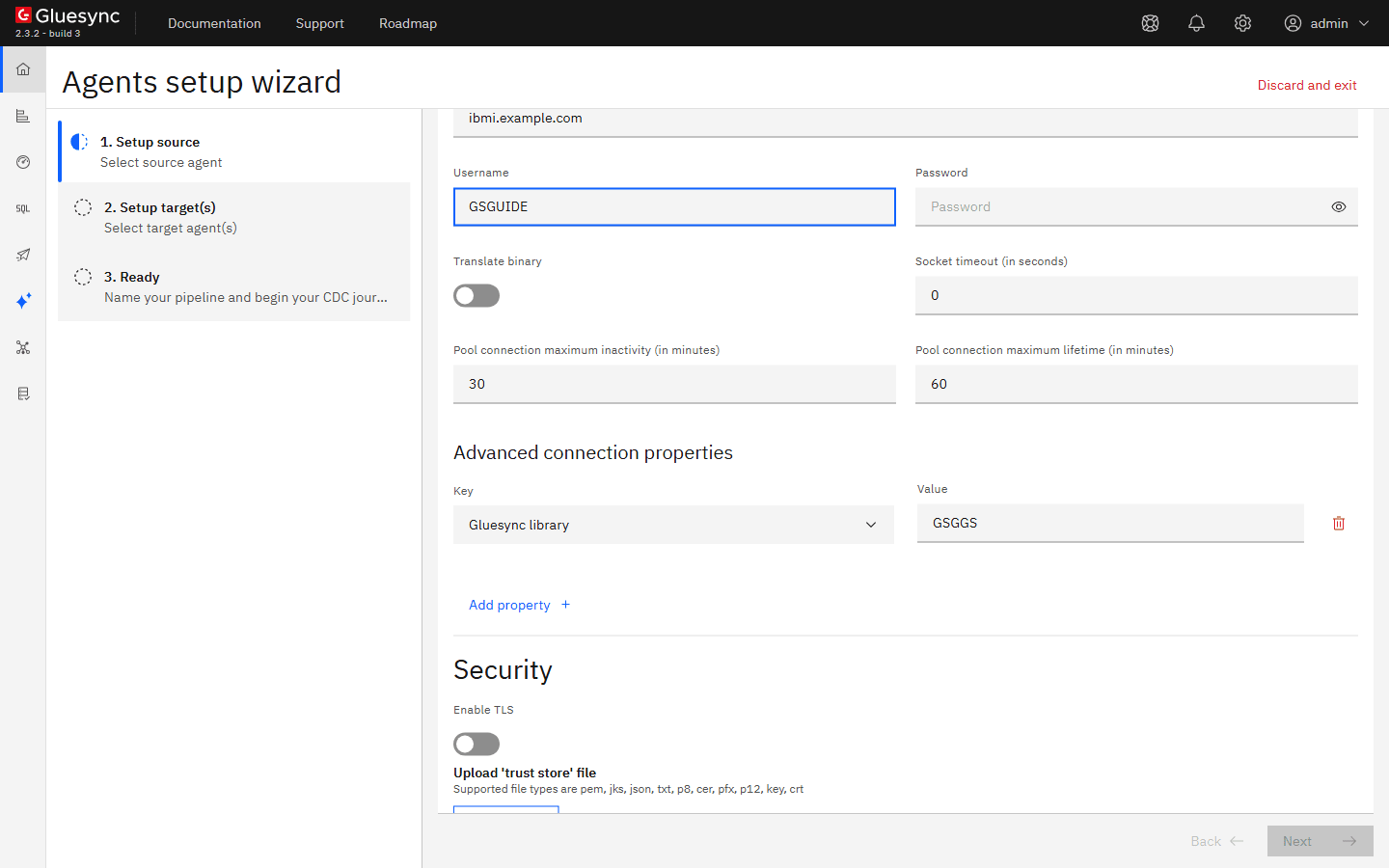
In Base settings, fill in Host name / Address, Username (
GSGUIDE) and Password; -
Under Advanced connection properties, select Add property, choose the key Gluesync library and type its name, here
GSGGS. Each Gluesync agent that reads the same IBM i needs its own library; -
Select Test and continue.
-
Select Next, set up the target (here MS SQL Server agent), name the pipeline and select Finish.
UI
-
Open the pipeline and select Entities +;
-
In the Object browser, type the library name,
GSGSRC+, and select Open schema GSGSRC directly. Check the table +CUSTOMERS; -
In Field mapping, choose the target schema and table. To have Gluesync create the table, type a new name and select Create table "<name>";
-
Check that the key column has the key icon, then select Confirm, then Confirm and continue.
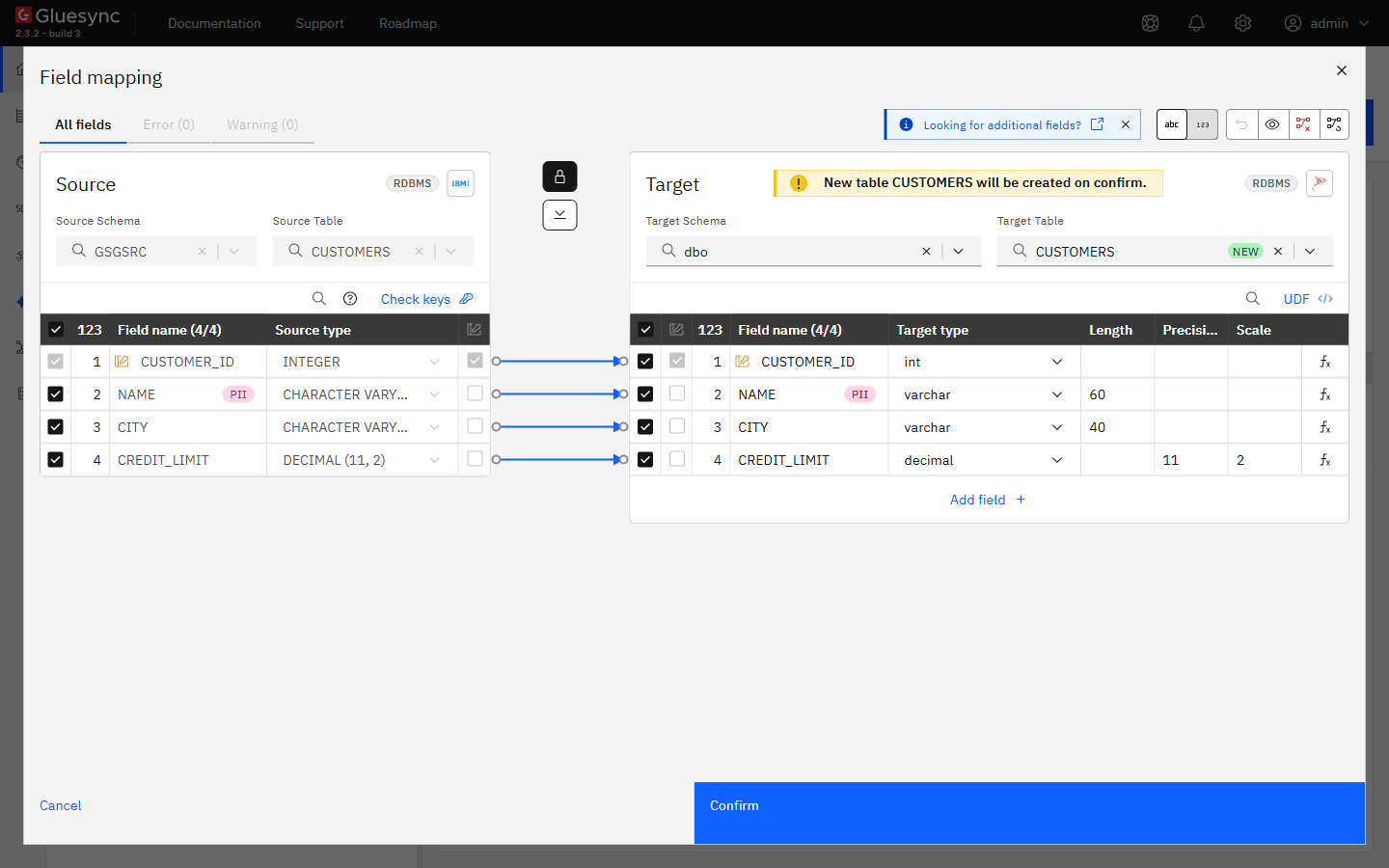
*OBJREF on the table, the primary key CUSTOMER_ID is recognised on both sides and Confirm is enabled.|
Without 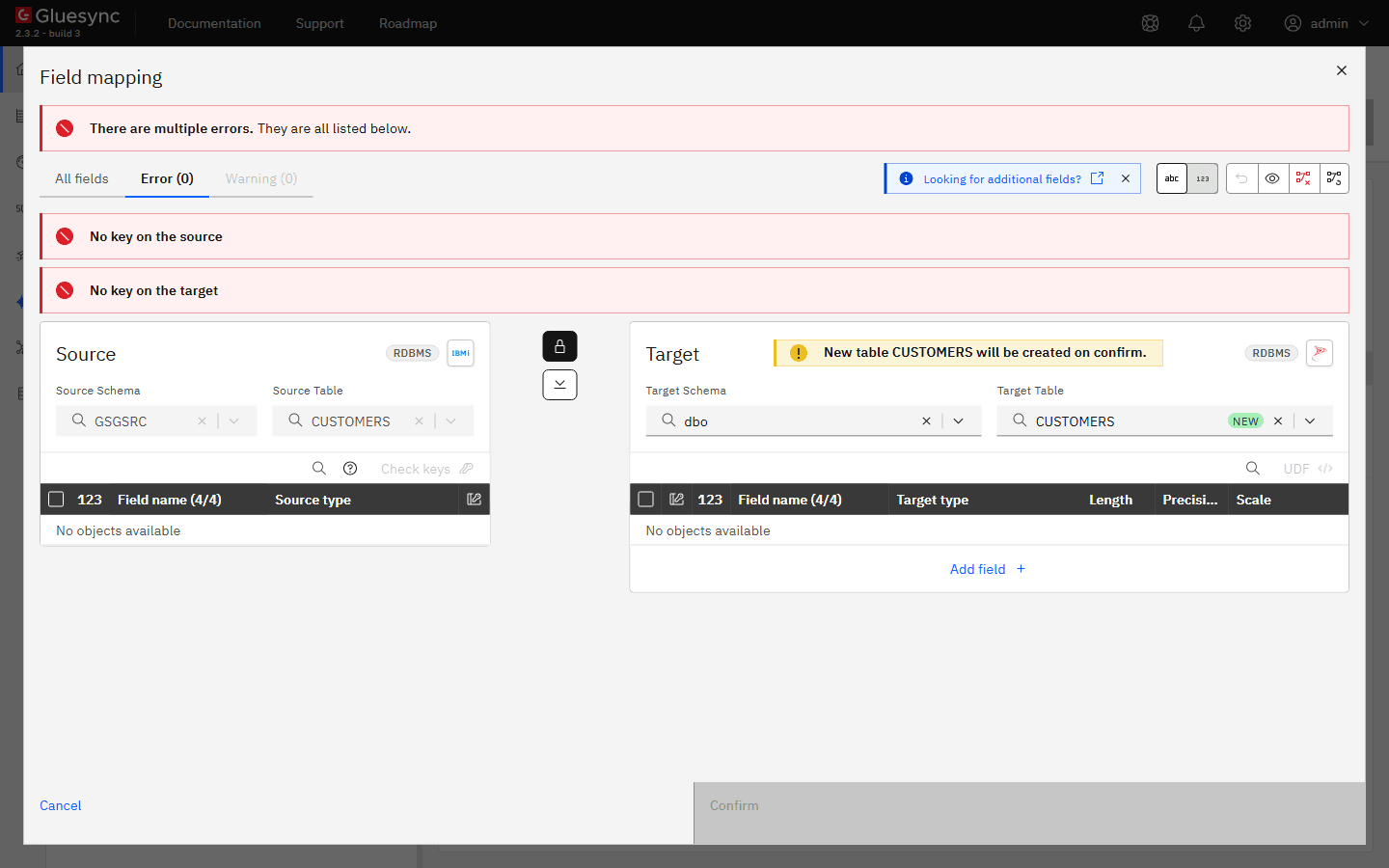
Figure 3. The errors when the Gluesync user cannot see the primary key.
Grant |
UI
-
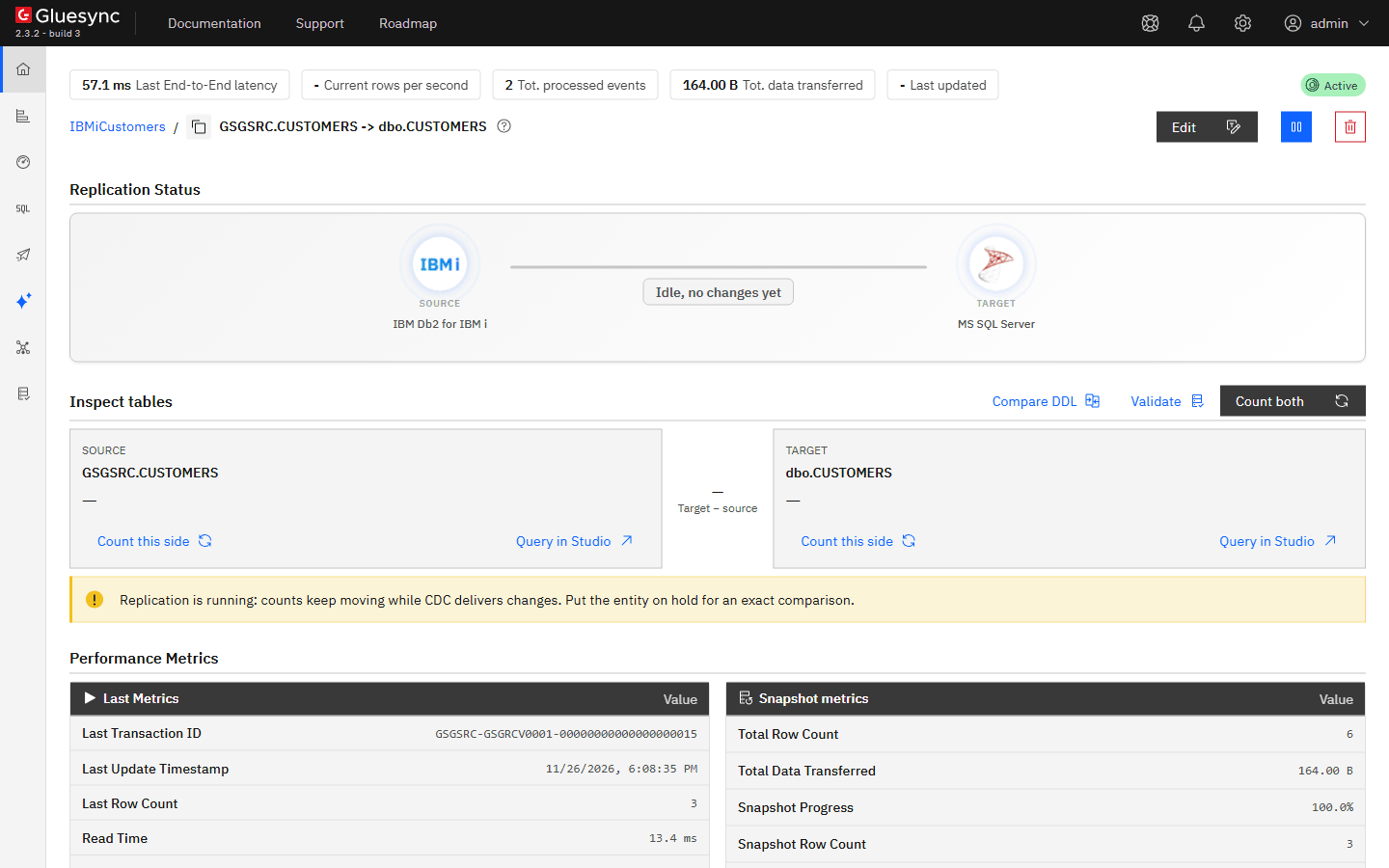
Open the entity and select Start;
-
Keep Full copy and Keep and merge, then select Start entity.
SQL
-
On the IBM i, insert, update and delete a row:
INSERT INTO GSGSRC.CUSTOMERS VALUES (4,'Neri Consulting','Bologna',5000); UPDATE GSGSRC.CUSTOMERS SET CREDIT_LIMIT = 30000 WHERE CUSTOMER_ID = 1; DELETE FROM GSGSRC.CUSTOMERS WHERE CUSTOMER_ID = 2; -
After a few seconds, read the target:
SELECT * FROM dbo.CUSTOMERS ORDER BY CUSTOMER_ID;
Data type notes
Character columns are read in their CCSID and written as text. Columns FOR BIT DATA are copied as binary unless Translate binary is on. For the full mapping and the CCSID options, see Map IBM i data types.
Troubleshooting
| Problem | Possible cause | What to do |
|---|---|---|
Failed to save and |
Wrong password, or the profile is disabled |
Type the password again, and check the status of the profile with |
No key on the source and No key on the target in Field mapping, though the table has a primary key |
The Gluesync user has no |
|
|
|
Run two |
|
A journal authority is missing |
|
The start fails because the table is not journaled, or is journaled with after images only |
Journaling was not started with |
Clean up
To remove what this guide created on the IBM i, stop and delete the entity first, then:
DLTUSRPRF USRPRF(GSGUIDE) OWNOBJOPT(*DLT)
DLTLIB    LIB(GSGSRC)
OWNOBJOPT(*DLT) also deletes the Gluesync library, which the user owns.
Run DLTLIB from an IBM i command line rather than through QSYS2.QCMDEXC in SQL. In the test, DLTLIB of the library holding the journal and its receiver did not return to the SQL session, although the library was deleted.