Chronos Scheduler 

The Chronos Scheduler is a backend service that provides a set of REST APIs for scheduling and managing cron jobs to automate Gluesync tasks, including starting/stopping entities and pipelines, running snapshots, and executing Query Studio queries.
 This project is Open Source
Overview
Chronos provides a comprehensive set of REST APIs for creating, managing, and monitoring scheduled cron jobs that integrate with the Core Hub. It enables automation of routine tasks such as starting or stopping entities and pipelines, scheduling recurring snapshots, running Query Studio SQL (query_studio) against a selected pipeline agent, and starting published AI agents (ai_agent_run).
Key Features
-
Comprehensive REST API
-
Full CRUD operations for scheduled jobs
-
Detailed job status monitoring
-
Error handling and reporting
-
-
Flexible Job Scheduling
-
User-friendly schedule format option
-
Standard cron expressions support
-
Multiple scheduling patterns
-
-
Multiple Task Types
-
Start/stop entities
-
Start/stop entire pipelines
-
Schedule snapshots for entities
-
Run saved Query Studio queries or custom SQL with the
query_studiotask type -
Run published AI agents with the
ai_agent_runtask type -
Extensible framework for adding new task types
-
-
Job Management
-
View, create, update, disable/enable, and delete scheduled jobs
-
Job execution history tracking
-
-
Containerized Deployment
-
Docker support for easy deployment
-
Environment variable configuration
-
-
Core Hub Integration
-
Direct SDK integration with Gluesync Core Hub
-
Secure authentication and communication
-
Automatic discovery of Core Hub URL
-
Configuration
Chronos is configured primarily through environment variables:
| Variable | Description | Default |
|---|---|---|
|
URL of the Gluesync Core Hub (dynamically updated from SDK discovery if available) |
|
|
Host to bind the API server |
|
|
Port to bind the API server |
|
|
Enable debug mode |
|
|
Database connection URL |
|
|
Directory for storing application data |
|
|
Timeout in seconds for entity start operations |
|
|
Timeout in seconds for waiting until affected entities reach Hold after a pause before issuing a redo |
|
|
Interval in seconds between entity-status polls while waiting for Hold during a redo |
|
|
Whether the periodic Core Hub connection health check is enabled |
|
|
Seconds between Core Hub health check calls ( |
|
|
HTTP timeout in seconds for each health check call |
|
|
Whether to automatically refresh the SDK token on 401 Unauthorized and retry outbound Core Hub calls exactly once |
|
|
Timeout in seconds for internal HTTP calls from the job runner to the Chronos API |
|
|
Application logging level (DEBUG, INFO, WARNING, ERROR) |
|
|
CORS allowed origins (comma-separated) |
|
|
User for crontab operations (None for current user) |
|
|
Timezone value to be used when storing/retrieving dates in IANA format (e.g., |
|
|
Preferred timezone environment variable for job scheduling. If set, it takes precedence over |
|
Gluesync SDK Configuration
Additional environment variables for the Gluesync SDK integration:
| Variable | Description | Default |
|---|---|---|
|
Path to the Gluesync license file |
|
|
Whether to use SSL for Core Hub connection |
|
|
Skip SSL certificate verification |
|
|
Path to security configuration file |
|
|
Path to JKS keystore file for SSL |
|
|
Password for JKS keystore |
|
The module identifier (GLUESYNC_MODULE_TAG) is hardcoded as scheduler-module and cannot be changed externally.
|
API Documentation
Once the application is running, the Swagger UI is exposed locally on localhost:1717/docs (accessed through your machine).
Docker Compose Configuration
Chronos can be easily deployed using Docker Compose. Below is a standard service definition that can be included in your docker-compose.yml file:
gluesync-chronos:
    image: molo17/gluesync-chronos:latest
    volumes:
      - ../../../commons/gluesync/gs-license.dat:/opt/gluesync/data/gs-license.dat:ro
      - ../../../commons/gluesync/security-config.json:/opt/gluesync/data/security-config.json:ro
      - ../../../commons/gluesync/gluesync.com.jks:/opt/gluesync/data/gluesync.com.jks:ro
      - ./chronos-data:/app/data
      # - /etc/timezone:/etc/timezone:ro # optional pass host's timezone
    # ports:
    #   - "1717:1717"
    environment:
      - ENTITY_START_TIMEOUT=2
      - PORT=1717
      - GLUESYNC_LICENSE_FILE=/opt/gluesync/data/gs-license.dat
      - SSL_ENABLED=True
      - GLUESYNC_SECURITY_CONFIG=/opt/gluesync/data/security-config.json
      - SSL_SKIP_VERIFY=True
      - TIMEZONE=Asia/Singapore # optionally hardcode timezone value in IANA format (e.g., Europe/Rome)
Volume Mounts
-
gs-license.dat: Gluesync license file (read-only) -
security-config.json: Security configuration for Gluesync (read-only) -
gluesync.com.jks: Java KeyStore for SSL (read-only) -
chronos-data: Directory for persistent data storage -
/etc/timezone: Optional mount to use the host’s timezone (commented out by default)
Environment Variables
The Docker Compose configuration includes the essential environment variables needed for Chronos to operate. Refer to the Configuration section above for details on each variable.
The TIMEZONE environment variable allows you to explicitly set the timezone for the Chronos scheduler. This ensures that all scheduled jobs run at the correct local time according to the specified timezone, regardless of the server’s physical location. If not specified, UTC will be used as the default timezone.
|
Core Hub Integration
Chronos integrates directly with the Gluesync Core Hub using the official gluesync_sdk. The SDK provides:
-
Secure WebSocket connection to the Core Hub
-
Automatic handshake and authentication
-
JWT token management for API calls
-
Proper error handling for connection issues
The integration uses only the SDK-provided authentication token for all Core Hub API calls, eliminating the need for manual authentication with username/password and making the module more secure and streamlined.
The module automatically retrieves the Core Hub URL from the SDK after discovery, ensuring that the correct URL is used even when the Core Hub is discovered dynamically through UDP broadcast.
Use Chronos from the UI
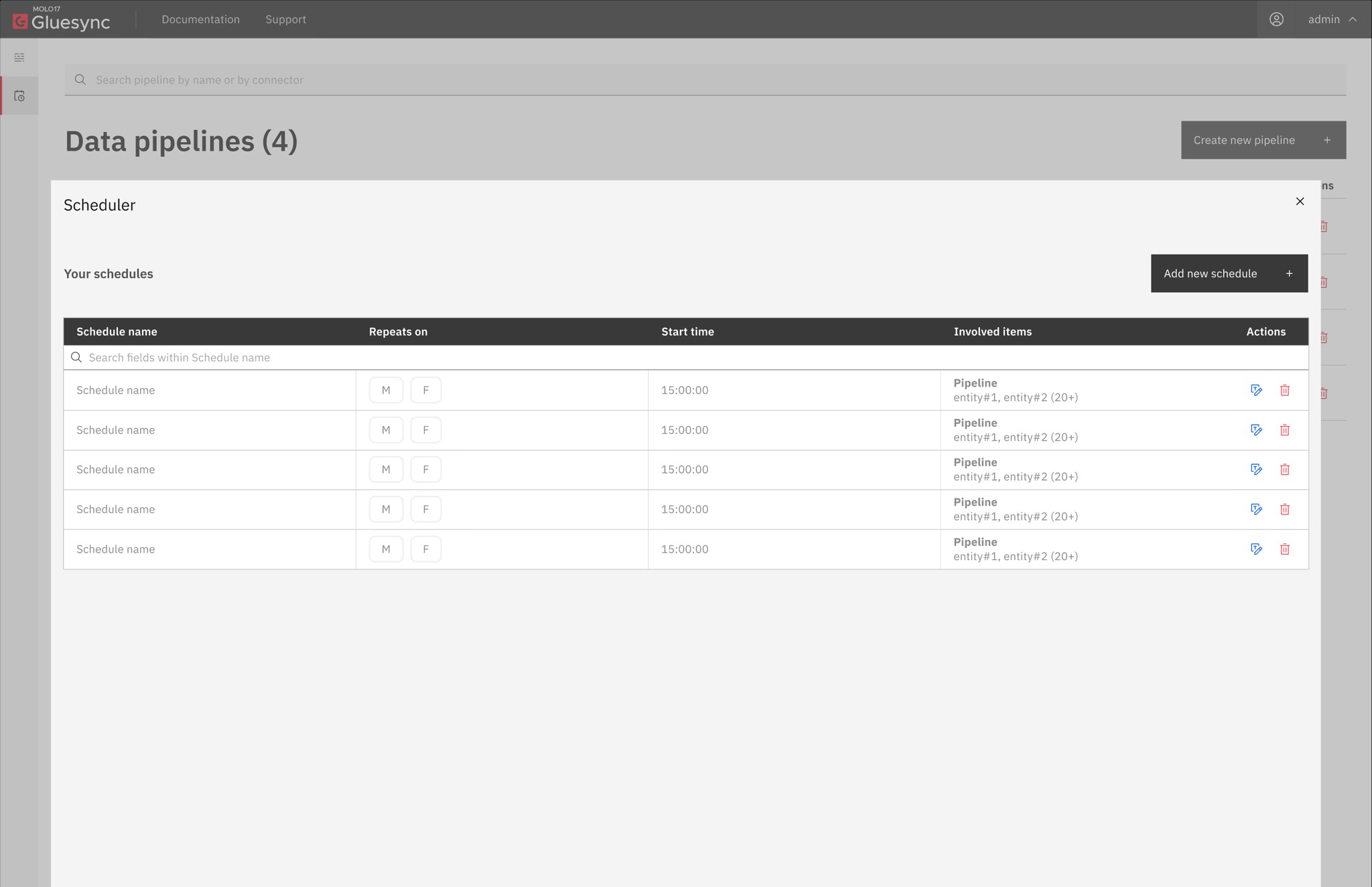
You can also use Chronos from the Gluesync UI. Go to the "Scheduler" section from the left menu and click on "Add new schedule" to create a new job.
Select Query Studio to run SQL from a schedule, platform event, webhook-triggered event, or chained event. See Query Studio actions.
Chronos can also start a published AI agent from each of those trigger paths. See AI agent runs for the supported API fields, payload interpolation, and loop safeguards.
Connection health check
Chronos runs a background task that periodically calls Core Hub’s GET /authentication/me using the SDK client’s JWT token. This proactively detects stale connections — for example when Core Hub has been restarted or a network blip invalidated the WebSocket session — before a scheduled job fails.
When the health check receives a 401 (token rejected) or cannot reach Core Hub at all, it automatically triggers a force-reconnect of the SDK client, which disconnects the old WebSocket, creates a fresh client, and performs a new login handshake. This is the same mechanism used by the 401-retry path in outbound Core Hub API calls.
A 5xx response from Core Hub is treated as a transient server-side issue and does not trigger a reconnect — the token is likely still valid and Core Hub will recover on its own.
The health check starts after the SDK client initializes (during FastAPI startup) and stops cleanly during shutdown. If the SDK client is not yet initialized, the health check skips that tick and waits for the next one.
| Variable | Default | Description |
|---|---|---|
|
|
Set to |
|
|
Seconds between health check calls (5 minutes by default). |
|
|
HTTP timeout for each |
Authorization
Chronos protects its /api/jobs/ and /api/settings/ endpoints by resolving the caller’s identity via Core Hub’s GET /auth/me on each request (with a short-lived cache) and rejecting requests that do not carry a valid gs-auth session cookie or Authorization: Bearer JWT.
Browsers reach Chronos through the same origin as Core Hub (Traefik), so the gs-auth cookie set at login is forwarded automatically. CLI / script callers must send Authorization: Bearer <jwt> themselves.
| Variable | Description | Default |
|---|---|---|
|
TTL in seconds for cached |
|
|
httpx timeout in milliseconds for outbound |
|
|
Force the base URL used for |
(unset) |
|
DEBUG ONLY. When |
|
Permission matrix (mirrors Core Hub UserRole):
| Guard | SUPER_ADMIN | MANAGER | MONITOR | VIEWER | EXTERNAL_MODULE |
|---|---|---|---|---|---|
Read jobs / read settings |
✅ |
✅ |
✅ |
✅ |
✅ |
Run / enable / disable schedule |
✅ |
✅ |
✅ |
❌ |
❌ |
Create / edit / delete schedule |
✅ |
✅ |
❌ |
❌ |
❌ |
Change chronos configuration |
✅ |
✅ |
❌ |
❌ |
❌ |
Deployment
Docker Deployment
# Build the Docker image
docker build -t gluesync-scheduler-module:latest .

# Run the container
docker run -p 1717:1717 -e CORE_HUB_URL=http://your-core-hub:1717 gluesync-scheduler-module:latest
Environment Configuration
Create a .env file in the root of your project directory with the following content:
GLUESYNC_LICENSE_FILE=gs-license.dat
GLUESYNC_MODULE_TAG=scheduler-module
SSL_ENABLED=False
GLUESYNC_SECURITY_CONFIG=/path/to/security-config.json
DB_URL=sqlite:///./data/test_scheduler.db
DEBUG=True
CORE_HUB_URL=localhost:8080
CRONTAB_USER=$USER
HOST=0.0.0.0
Installation
Local Development
# Clone the repository
git clone https://gitlab.com/molo17-public/gluesync/gluesync-scheduler-module.git
cd gluesync-scheduler-module

# Create a virtual environment and activate it
python -m venv venv
source venv/bin/activate  # On Windows, use `venv\Scripts\activate`

# Install dependencies
pip install -r requirements.txt

# Initialize the database
python init_db.py

# Run the application
uvicorn app:app --reload
Best Practices
-
Use descriptive job names that clearly indicate their purpose
-
Schedule resource-intensive jobs during off-peak hours
-
Use the user-friendly schedule format for simple scheduling needs
-
Use standard cron expressions for more complex scheduling requirements
-
Implement proper error handling for critical jobs
-
Monitor job execution history for failures
-
Set appropriate retry mechanisms for jobs that interact with external systems
-
Regularly backup the scheduler database
Troubleshooting
Common Issues
| Issue | Possible Cause | Resolution |
|---|---|---|
Jobs not executing |
Scheduler service not running or incorrect cron expression |
Verify service status and check cron expression format |
Authentication failures |
Invalid or expired token |
Generate a new authentication token |
Core Hub connectivity issues |
Network configuration or firewall problems |
Check network settings and firewall rules |
Database errors |
SQLite database corruption or permission issues |
Check database permissions and consider using a more robust database for production |
Testing with Postman
You can test the API endpoints using Postman:
-
Open Postman and create a new request
-
Set the request URL to
localhost:1717/api/jobs(loopback) -
Choose the appropriate HTTP method and set required headers/body data
-
Send the request and check the response
-
Verify logs in the terminal to ensure proper operation
License
This project is dual-licensed under the following licenses:
-
GNU Affero General Public License (AGPL) v3
-
This is a free, copyleft license that allows you to use, modify, and distribute this software.
-
If you choose this option, any derivative works must also be licensed under AGPL v3.
-
-
MOLO17 Commercial License
-
For those who want to use this software in proprietary applications without the copyleft requirements of AGPL.
-
This option includes a warranty and permits proprietary use.
-
Contact MOLO17 at info@molo17.com for licensing terms and conditions.
-