Custom Field Functions
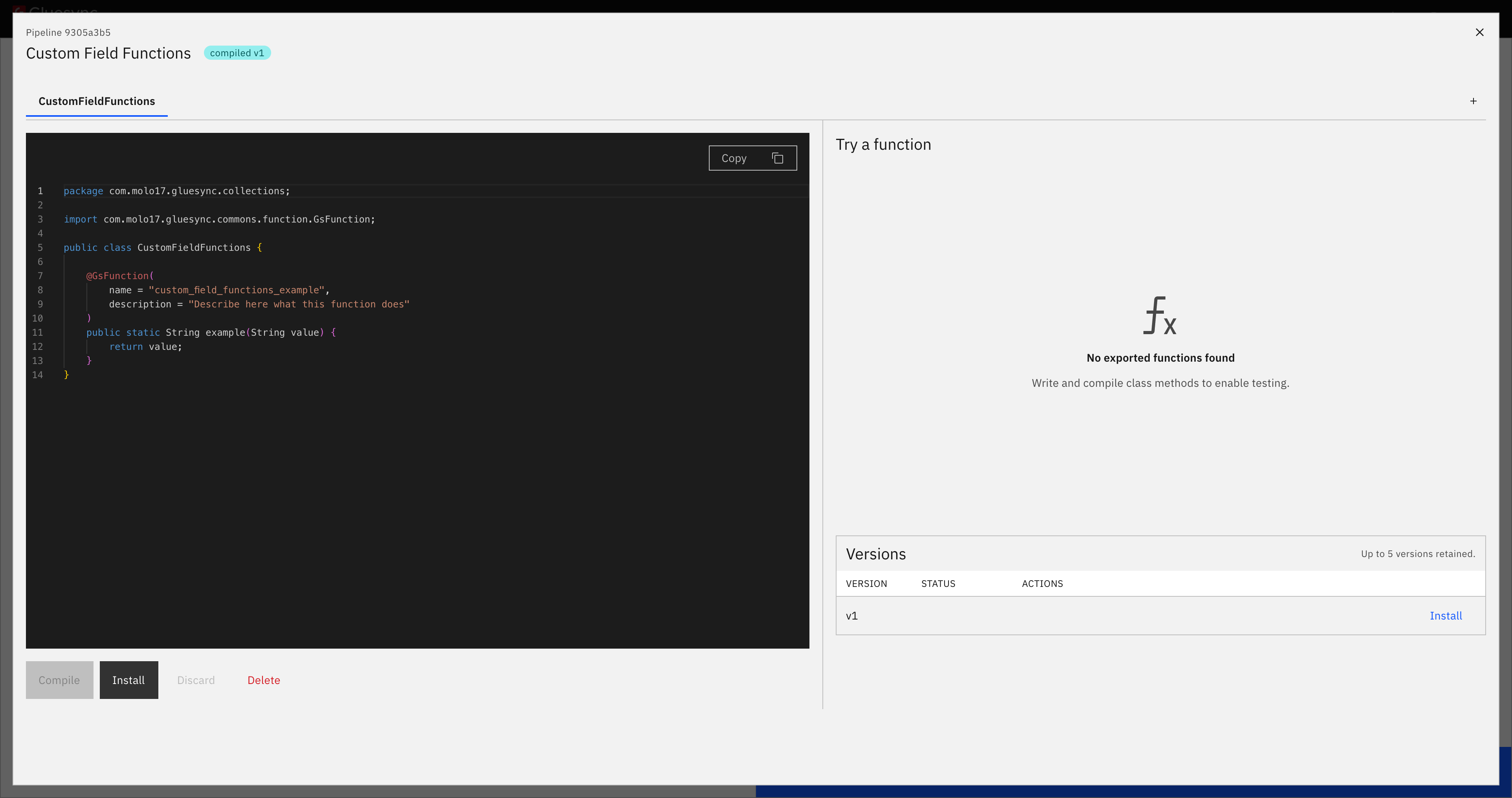
Custom Field Functions let you write Java functions once and reuse them throughout a pipeline. A function can fill one target column from several source columns, be called by any entity or UDF in the pipeline, and be tested before it processes replicated data.
Overview
Field functions provide ready-made conversions, but they are limited to the transformations in the catalog. A UDF gives you full access to a record, but belongs to one entity.
Custom Field Functions cover the space between them. They provide pipeline-level custom logic that can be shared by many entities. When the logic changes, you update it once instead of maintaining a copy for every entity.
A typical example
Your source stores a date in one column and a time in another, while the target expects one timestamp in the plant’s timezone. Many entities need the same rule.
Write the function once:
package com.molo17.gluesync.collections;

import java.time.*;
import com.molo17.gluesync.commons.function.GsFunction;

public class Format {

    @GsFunction(
        name = "compose_timestamp",
        description = "A date column and a time column into one timestamp"
    )
    public static OffsetDateTime composeTimestamp(
            LocalDate date,
            LocalTime time,
            String zone) {
        if (date == null) {
            return null;
        }
        LocalTime effective = (time == null) ? LocalTime.MIDNIGHT : time;
        return date.atTime(effective)
                .atZone(ZoneId.of(zone))
                .toOffsetDateTime();
    }
}
On each entity, bind the target column to compose_timestamp and choose the source columns or fixed values that feed its parameters. Different entities can use the same function with different inputs and timezones.
When to use what
| Use | When | Example |
|---|---|---|
The transformation is already in the catalog. |
Format a date as text, trim a string, or mask an email. |
|
Custom Field Function |
You need your own logic for one target column, particularly when the logic is reused or takes several inputs. |
Combine several source columns into one target column. |
You need to work on the whole record: add or remove fields, skip an operation, or react to the operation type. |
Turn a delete into a soft delete, filter records, or enrich several columns at once. |
| A UDF can call a Custom Field Function like any other Java method. Keep shared logic in Custom Field Functions and entity-specific record handling in the UDF. |
Key capabilities
-
Write once, reuse throughout the pipeline: every entity and UDF in the pipeline can call the same function.
-
Several columns in, one column out: a function can accept as many parameters as needed.
-
Safe publishing: Gluesync recompiles every pipeline UDF and re-checks every bound column before accepting a new version.
-
Versioning: each successful publication creates a version that can be restored.
-
Testing: run an installed function on sample values before binding it to a column.
-
Failure protection: repeatedly failing functions are suspended so they cannot fail on every record indefinitely.
Authoring functions
One set per pipeline
Custom Field Functions belong to a pipeline, not to an individual entity. A pipeline has one set of Custom Field Functions, which can contain multiple Java classes. The classes are compiled together and can call one another.
Exporting a function
A class can contain supporting code, but only functions explicitly exported with @GsFunction can be selected in the Fields Editor or called as exported functions. An exported method must be public static:
@GsFunction(name = "shout", description = "Uppercases a value")
public static String shout(String value) {
    return value == null ? null : value.toUpperCase();
}| Rule | Why |
|---|---|
The method must be |
The function is shared by every entity in the pipeline and can be called concurrently. |
|
This is the name shown in the Fields Editor and used by UDFs. |
|
It helps users choose the correct function. |
If name is omitted, Gluesync uses the Java method name.
Working with several classes
Use New class to add a Java file. All classes are compiled together, while only annotated functions are exported.
-
A file is named after its declared class.
-
Two classes cannot have the same name.
-
The backend package is
com.molo17.gluesync.collections. Keep the generated package declaration unless your deployment requires a different package.
Logging
Functions can write to the Core Hub log:
import org.slf4j.Logger;
import com.molo17.gluesync.commons.function.GsLog;

public class Format {

    private static final Logger LOG = GsLog.logger("Format");

    @GsFunction(name = "compose_timestamp")
    public static String composeTimestamp(String date, String time) {
        if (date == null) {
            LOG.warn("no date to compose from");
            return null;
        }
        return date + "T" + time;
    }
}
Log lines are attributed to the pipeline, agent, and entity that produced them. See Logging.
Publishing and installing
Publishing and installing are separate steps:
| Step | What it does |
|---|---|
Compile and publish |
Checks the code and its consumers, then stores a new version. The running pipeline is not changed. |
Install |
Makes the published version the version executed by the pipeline. |
In the editor, the Compile action starts publication. Installing stops the pipeline’s entities, replaces the executable code, and starts the entities again. Gluesync reports which entities were restarted. If the pipeline is idle, no running replication is interrupted.
| Publishing alone does not change pipeline behavior. Until you select Install, the pipeline continues to run the previously installed version. |
Publication checks
Gluesync publishes only when all of these checks pass:
-
All Custom Field Function classes compile.
-
Every UDF in the pipeline recompiles against the proposed version.
-
Every target column bound to a Custom Field Function remains valid.
The UDF check catches removed functions and incompatible signatures before they can fail for every record. The column check validates configuration that the Java compiler cannot inspect, such as parameter counts and target types.
On a pipeline with many UDFs, publication can take minutes. Progress remains available if you leave the page and return. Only one publication can run for a pipeline at a time.
If publication is refused
Nothing changes when a publication is refused. The response identifies the affected code or configuration:
| Reported as | Meaning |
|---|---|
Compilation errors |
The Java code does not compile. Gluesync reports the file, line, and column. |
UDFs that no longer compile |
A UDF calls code that the proposed version removed or changed incompatibly. |
Columns that would break |
A bound target column no longer matches its function, for example because the parameter count changed. |
Versions and rollback
Every successful publication creates a numbered version containing both the compiled result and its source code. The most recent versions are retained.
From the versions panel you can:
-
Roll back to a previous version, restoring its code to the editor and making it the published version.
-
Delete a version that is no longer needed.
A rollback runs the same compatibility checks as a publication. It can be refused if, for example, a newer UDF depends on a function absent from the older version. The installed version cannot be deleted.
After a rollback, install the restored version when you are ready for the pipeline to execute it.
Configuring a target column
Before you start
The pipeline must have a published and installed Custom Field Functions version. If it has never been installed, its functions do not appear in the Fields Editor.
-
Open the replication task in the Objects Browser and go to the Fields tab.
-
Locate the target column to fill. If it does not exist, unlock the schema and add it.
-
Open Select Expression and choose the required Custom Field Function.
-
Bind each parameter to a source column or fixed value.
-
Save the entity.
Only functions whose declared result type fits the target column are offered.
Binding arguments
Arguments are bound by position: the first argument feeds the first parameter, the second argument feeds the second parameter, and so on. The function signature determines the number of arguments.
| Type | Meaning |
|---|---|
Source column |
The value held by that column in the current record. If the column is absent from the change, the function receives |
Fixed value |
A constant used for every record, such as a timezone or country code. |
|
A fixed value reaches the function as a For a non- |
Missing and previous values
A source change does not always contain every column. Handle null explicitly:
@GsFunction(name = "compose_timestamp")
public static String composeTimestamp(String date, String time) {
    if (date == null) {
        return null;
    }
    return date + "T" + (time == null ? "00:00:00" : time);
}
On databases that provide before-images, Gluesync also composes the previous target value from the previous values of the bound columns. If none of those columns has a previous value, as with an insert, the composed previous value is null and the function is not called. See Before and after images.
Column validation
Gluesync validates a binding when you save the entity and whenever a new Custom Field Functions version is published.
| Check | What it means |
|---|---|
Function and parameter count |
The selected function exists and the configured argument count matches its signature. |
Result type |
The declared return type fits the target column. Compatible types in the same family are accepted, such as |
Writable result |
A function returning |
Not a key column |
A Custom Field Function cannot fill a primary-key column because a calculated key cannot be reconstructed reliably for updates and deletes. |
Testing a function
Select an exported function in Try a function, enter one sample value for each parameter, and run it to inspect the result. The test uses the same execution path as replication.
|
Testing requires an installed version because tests run against the code the pipeline can execute. After publishing a new version, install it before testing that version. |
Sample text is parsed according to each declared parameter type:
| Parameter type | Sample |
|---|---|
|
The text itself |
|
|
|
|
|
|
|
|
|
|
|
|
|
|
|
|
|
A base64-encoded value |
Empty |
|
If a parameter type cannot be entered as text, test the function from a UDF with a value of that type.
Monitoring
For each called function, Gluesync records failure counts, unusually slow calls, and whether the function is suspended.
A function is suspended automatically after repeated failures. While suspended, it is not called and the target columns it composes are left untouched. Fix the function, publish a new version, and install it to restore processing.
Suspensions are also reported in the Notifications Hub. Function log messages are available in the Core Hub logs.
Removing Custom Field Functions
You can remove Custom Field Functions from a pipeline only when no target column uses them. If bindings remain, Gluesync refuses the removal and lists each entity, column, and function to update first.
Permissions
| Action | Who can do it |
|---|---|
View code and versions |
Anyone who can view the pipeline. |
Publish, install, roll back, delete versions, or remove all Custom Field Functions |
Users with permission to manage pipeline-level custom functions. The |
Test a function or bind it to a column |
Users who can modify an entity. |
REST APIs
The REST API retains function-collection in endpoint paths for backend compatibility:
| Operation | Endpoint |
|---|---|
Read Custom Field Functions |
|
Publish a new version |
|
Follow a publication |
|
List versions |
|
Roll back to a version |
|
Install the published version |
|
Test a function |
|
Delete a version |
|
Remove all Custom Field Functions |
|
Publishing and rollback are asynchronous. Each request returns a job that you follow until completion. See Core Hub APIs for authentication and Open APIs for request and response schemas.
Troubleshooting
| What you see | What to check |
|---|---|
No custom functions in the expression list |
The pipeline has no installed version. Publish and install one first. |
The required function is not offered |
Its declared result type does not fit the target column. |
Saving is refused because the column is part of a key |
Use a non-key or target-only column. Custom Field Functions cannot fill key columns. |
Publication lists affected entities and columns |
The proposed version changed or removed a function used by those bindings. Preserve the signature or update the bindings first. |
A fixed value fails at runtime |
Fixed values are strings and are not converted. Bind a source column for a non-string parameter. |
A target column stops being written |
Check whether the function was suspended after repeated failures. Review logs and notifications, then publish and install a fix. |
Limitations and considerations
-
Functions are written in Java.
-
Custom Field Functions are scoped to one pipeline and are not shared between pipelines.
-
Only the most recent versions are retained.
-
Installing a version restarts the pipeline’s entities.
-
Publication can take several minutes because every UDF and bound column is checked.