Parquet Files Support
Overview
Gluesync supports storing replicated data in Apache Parquet file format at the target data store level, providing enhanced performance, compression, and compatibility with analytics tools. This file format comes by default on the support agents and joins the previous support for JSON files stored in a folder-to-table manner.
Users can select the data storage format on a per-entity basis. Parquet is the default format, offering significant advantages over JSON for large-scale data processing.
| Parquet support is designed for scenarios where file-based storage in object stores is preferred over traditional database tables. |
Powered by MOLO17 ParquetKt
Starting from version 2.1.10, Gluesync’s Parquet workflows are powered by the MOLO17 ParquetKt library, a pure Kotlin implementation derived from parquet-dotnet. Replacing the previous Apache Parquet Java dependency grants up to a 100x speed-up and unlocks the following capabilities for every supported agent:
-
Type-safe serialization: Native support for Kotlin data classes preserves the source field order and automatically handles nullable columns, aligning perfectly with Gluesync’s schema-first approach.
-
High-throughput readers and writers: Internal benchmarks show sustained performance above 287k rows/s on wide datasets, scaling to 1.9M rows/s on narrow datasets thanks to optimized Arrow-based batching and zero-copy buffers.
-
Dual APIs: Gluesync uses the library’s high-level API for standard tasks and falls back to the low-level API for fine-grained CDC batching, ensuring deterministic
_operationmetadata. -
Coroutines and streaming support: Suspendable I/O and Flow-based streaming allow Gluesync agents to keep memory usage flat even when building very large snapshot chunks.
-
Codec flexibility: Native implementations for SNAPPY, ZSTD, GZIP, and uncompressed outputs make it easy to balance file size and CPU consumption per entity.
Performance profile
Real-world throughput measurements inherited from ParquetKt guide the Core Hub defaults:
| Operation | Throughput | Details |
|---|---|---|
Write (100 columns, 500k rows) |
287k rows/s |
Produces ~22 MB Parquet files with SNAPPY compression. |
Read (100 columns, 500k rows) |
310k rows/s |
Processes ~5 million cells per batch. |
Write (20 columns, 100k rows) |
1.9M rows/s |
Ideal for CDC bursts or entity-level fan-out. |
These figures translate into faster checkpoint flushes, fewer object store PUT operations, and overall lower replication latency.
Compression guidance
Use the following codec recommendations when tuning entity settings:
| Codec | File size (100k rows, 20 columns) | When to use |
|---|---|---|
UNCOMPRESSED |
~15.6 MB |
Best for debugging or when downstream systems demand raw blocks. |
SNAPPY (default) |
~8.9 MB |
Balanced compression and CPU usage; ideal for continuous CDC. |
ZSTD |
~6.9 MB |
Great size reduction with ~1.2M rows/s throughput for large archives. |
GZIP |
~7.0 MB |
Maximum compression at the cost of ~240k rows/s; reserve for cold storage. |
These numbers assume buffered batches of 100k records; actual values depend on column cardinality and data types.
Supported data stores
Gluesync supports Parquet file storage in the following data stores:
-
AWS S3 (and any S3-compatible storage)
-
Google Cloud Storage
-
Azure Data Lake Gen 2
How it works
When Parquet is selected as the storage format:
-
The Agent leverages Apache Arrow to perform batched data processing and compression to target Parquet files.
-
Incremental data is stored in Parquet files, with each file containing a batch of changes.
-
Batch of changes can be grouped by highering the agent’s polling interval.
-
This buffering mechanism optimizes network usage and file sizes for better performance. In the following sections, the snapshot and CDC implementation details are described.
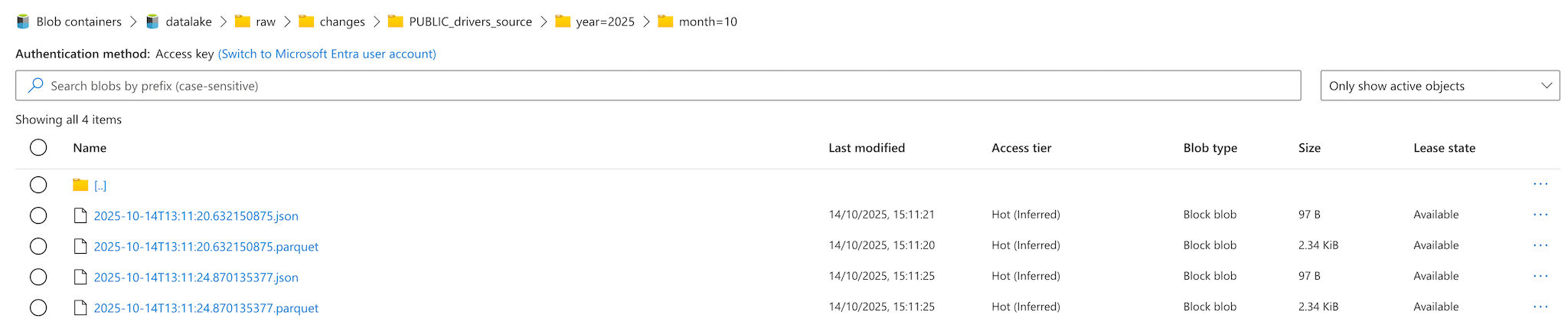
Here below an example of the folder structure created by Gluesync when Parquet is selected as the storage format:
Snapshot implementation
Snapshot operations store data in a structured folder hierarchy with the following naming convention:
/bucket_name/raw/snapshots/entity_name/year=2025/month=09/snapshot.parquet
entity_name is the name of the entity being replicated, this is configured in the Core Hub from the Objects browser.
|
By default, Gluesync now emits files using relative timestamp segments (/schema_table/timestamp.snap for snapshots and /schema_table/timestamp.chng for CDC). You can revert to the legacy absolute path style (raw/snapshot || changes/schema_table/timestamp.parquet) via the agent configuration flag Use relative timestamp paths (Advanced settings → default: false).
File size optimization
For further optimization, files are compressed based on a buffer of batched data cached in an Avro file with a maximum size of 250 MB. This file size is configurable through the target agent configuration.
CDC implementation
Change Data Capture (CDC) operations efficiently handle inserts, updates, and deletes events in Parquet format.
Each change is stored in a single file that includes an additional column named _operation which contains a single uppercase character indicating the type of operation performed:
-
I Insert
-
U Update
-
D Delete
Transaction identifiers
Starting from version 2.1.10, transaction identifiers are now stored within the destination Parquet files. These are dynamic fields that are added to the Parquet file based on the source checkpoint schema, such as:
-
_timestamp -
_transaction_id -
Other source-specific checkpoint fields
This enhancement provides better data lineage and traceability for each transaction.
Technical fields
All technical fields are now stored within the destination Parquet files prefixed with _ to distinguish them from business data. Examples include:
-
_transaction_id -
_timestamp -
Other Gluesync-managed metadata fields
This naming convention ensures clear separation between user data and system metadata.
Unified transaction storage
As of version 2.1.10, all transactions are now stored within the same Parquet file irrespectively of the transaction type (Update, Delete, Insert). This represents a significant change from the previous implementation where each transaction type was stored in a separate file.
This unified approach:
-
Simplifies file management and reduces the number of files
-
Improves query performance by reducing file scanning overhead
-
Maintains transaction type information through the
_operationcolumn
Inserts
New rows are appended to batch files, creating multiple files per batch for optimal parallel processing.
Updates and Deletes
Both Updates and Deletes include the full updated row with the additional operation type indicator, explained before.
Direct file modifications are avoided; instead, merge logic is handled downstream (e.g., via Spark jobs).
File storage
CDC files are stored following the path structure defined in the agent configuration. Depending on the selected output format, files are generated with one of the following extensions:
-
.chng
-
.parquet
Truncate Operation
When a TRUNCATE operation is detected on the source database, a dedicated Parquet file is generated with the .trunc extension. This file contains a minimal schema composed of three columns:
-
_operationwith value T (indicating a truncate event) -
The columns that define the transaction identifier, as previously described
No row-level data is included, as the truncate operation applies to the entire table.
Metadata
By default, each Parquet file includes a sidecar manifest JSON file containing:
-
Timestamp of the snapshot
-
Row count
-
Operation (Insert, Update, Delete)
-
Schema version
-
Originating transaction identifier
-
Transaction identifiers from the source checkpoint schema
This behavior can be disabled via configuration. The relevant setting is available in the agent configuration under Create sidecar JSON companion file flag (Advanced settings → default: true).
| Starting from version 2.1.10, the sidecar JSON file has been updated to reflect the unified transaction storage model and includes enhanced transaction metadata. |
Configuration
-
Parquet file format are selected as default file compression in the Core Hub entity configuration.
-
Adjust polling intervals as needed (default: 100 milliseconds, consider to increase it to decrease the number of files).
Best practices
-
Use the metadata sidecar files for data lineage and validation.
-
Leverage transaction identifiers and technical fields (prefixed with
_) for advanced data tracking and auditing. -
Implement downstream merge logic for handling updates and deletes in analytics workloads.
-
Take advantage of the unified transaction storage model to simplify query logic.
-
Test with sample data to validate compression ratios and read performance.
Limitations and considerations
-
Parquet files are immutable; changes require new file versions.
-
Network bandwidth may impact upload performance for large batches.
Troubleshooting
-
File size issues: Adjust polling intervals or batch sizes.
-
Read performance: Verify file sizes and compression settings.
See also
-
Snapshot Tasks — Configure snapshot tasks.
-
User Defined Functions — Transform data during replication.