Bidirectional Synchronization
Gluesync supports complex data integration patterns, including bidirectional synchronization, where data flows seamlessly back and forth between two databases. Setting up a bidirectional architecture requires a specific pipeline design to ensure data consistency and prevent infinite loops. Most importantly, it requires the creation of two completely separate pipelines.
Pipeline Architecture
To achieve bidirectional synchronization in Gluesync, you cannot configure a single "two-way" pipeline.
Instead, the architecture strictly requires you to build two separate pipelines, one for each direction of the data flow. If you need to keep two databases fully synchronized (Database A <> Database B), you must configure the following:
-
Pipeline 1: Configured to read changes from Database A (Source) and write them to Database B (Target).
-
Pipeline 2: Configured to read changes from Database B (Source) and write them back to Database A (Target).
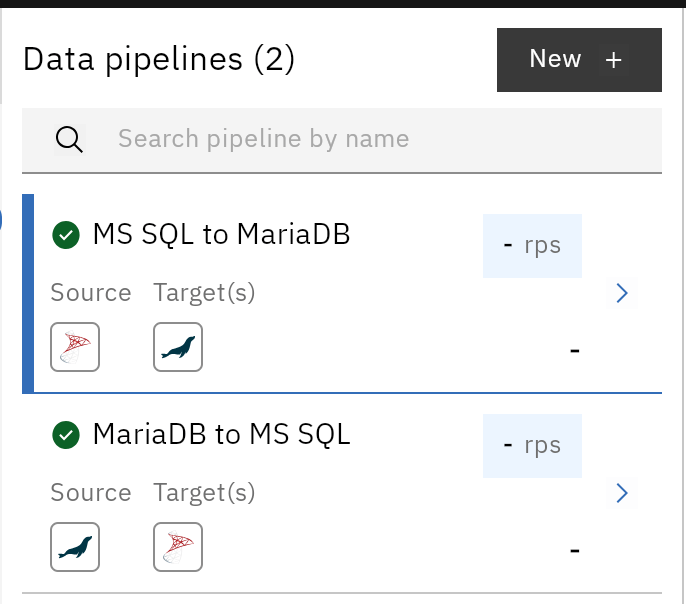
This decoupled approach is a design choice that grants you fine-grained control over the entities, field mappings, transformations, and filtering rules applied in each specific direction.
Conflict Resolution Policy
In an active-active architecture, it is common for the exact same record to be modified on both Database A and Database B at roughly the same time.
Gluesync handles data conflicts using a strict "last write wins" policy. This means that the last change that arrives and is processed by the target database will overwrite the existing data for that specific record. The engine relies on the temporal arrival of the transaction; the latest applied modification always prevails.
Preventing Infinite Loops
When bidirectional synchronization is configured on the same table between two datastores, there is a severe risk of creating infinite loops. This happens when a change in Database A is replicated to Database B, which the CDC engine of Database B then sees as a "new" change and replicates back to Database A, and so on indefinitely.
To safely implement this architecture, Gluesync provides a mandatory safety feature called Recursion Protection.
|
Whenever you design a bidirectional architecture, you must enable Recursion Protection on both the source and target endpoints within your pipelines. |
Configuration Rules and Best Practices
Because bidirectional synchronization heavily relies on Recursion Protection, its success depends on strict rules regarding database credentials, user permissions, and agent-specific configurations.
For instance, the system requires you to use the exact same database username across specific connection endpoints to properly identify and filter out its own operations, preventing loops. Furthermore, specific agents (like MS SQL Server) require elevated privileges to manage the underlying protection tables.
To view the mandatory prerequisites, user management rules, and instructions on how to enable the feature, please read the dedicated guide carefully: Recursion Protection setup and best practices.
Operation Symmetry and Initial Snapshot
Beyond the Recursion Protection, when designing your bidirectional pipelines, keep these two architectural guidelines in mind:
-
Operation Symmetry: Ensure that the Allowed Operations (INSERT, UPDATE, DELETE, TRUNCATE) are properly aligned in both pipelines. For a true mirror setup, you typically want to allow all operations in both directions. Learn more in the Allowed Operations guide.
-
Initial Snapshot: When starting a bidirectional sync between two databases that already contain data, carefully plan your initial snapshot strategy (using INSERT or UPSERT) to avoid generating conflicts before the real-time Change Data Capture (CDC) begins.