Advanced data modelling from NoSQL
In this chapter you will understand the principles of the newly introduced feature available starting from this version 1.4 specifically designed for a wide range of data modelling / data transformation applications: we named this feature Advanced data modelling. All of the operations involved in that features are all performed on-the-fly without involving local caches or any form of persistence inside Gluesync, this makes the overall process faster, secure and consistent.
Data modelling in Gluesync makes use of what we called virtual entities, if you’re not familiar with it we suggest to have a look at this page, it will take less than 1 min of reading.
Advanced data modelling
When we designed the new data modelling feature we took in consideration few main aspects, like:
-
freedom to define relationships between tables;
-
choose either data should be represented nested in different level of deep or just flat;
-
compatibility across multiple sources: not only RDBMS but also NoSQL databases;
-
easyness to hand-write but also future-proof when it will be managed via an API / GUI;
-
fast to compute;
-
no new language to learn: SQL-like statements easy to recall;
-
easy to extend in the future;
Taking these as main principles we come-up with a meta description language that is now the core foundation of that functionality.
See it in action here in this video:
The meta description language
The description language helps you define what will be the content of your virtual entity that will than become tables-rows-columns objects.
Here following is the list of available commands and their description:
| Key | Description | Accepted values | ||||||||||||||||||||||||
|---|---|---|---|---|---|---|---|---|---|---|---|---|---|---|---|---|---|---|---|---|---|---|---|---|---|---|
|
Level of deep of parenthood for JSON objects |
|
||||||||||||||||||||||||
|
Defines the name of the entity |
string |
||||||||||||||||||||||||
|
Array of tables that are involved in a |
|
Bring everything together
Following a virtual entity defined using the above keys:
"order": [
{
"level": 1,
"name": "orders",
"tables":
[
{
"table": "orders_headers",
"fields":
{
  "id": "id",
  "order_number": "order_number",
  "notes": "notes"
},
"alias": "oh",
"where": "status = 1",
"fromTable": true
},
{
"table": "customers",
"fields":
{
"name": "name",
"surname": "surname",
"phone": "phone"
},
"alias": "c",
"join":
{
  "with": "orders_headers"
}
}
]
},
{
"level": 1,
"name": "address",
"tables":
[
{
"table": "addresses",
"fields":
{
"street": "street",
"street_number": "street_number",
"city": "city",
"postal_code": "postal_code"
},
"alias": "ad",
"join":
{
"with": "orders_headers"
}
}
]
},
{
"level": 2,
"name": "order_rows",
"tables":
[
{
"table": "orders_rows",
"fields":
{
"id": "row_id",
"order_id": "order_id",
"quantity": "quantity",
"notes": "row_notes"
},
"alias": "o",
"join":
{
"with": "orders_headers"
}
},
{
"table": "articles",
"fields":
{
"article_name": "article_name",
"description": "description"
},
"alias": "a",
"join":
{
"with": "orders_rows"
}
}
]
}
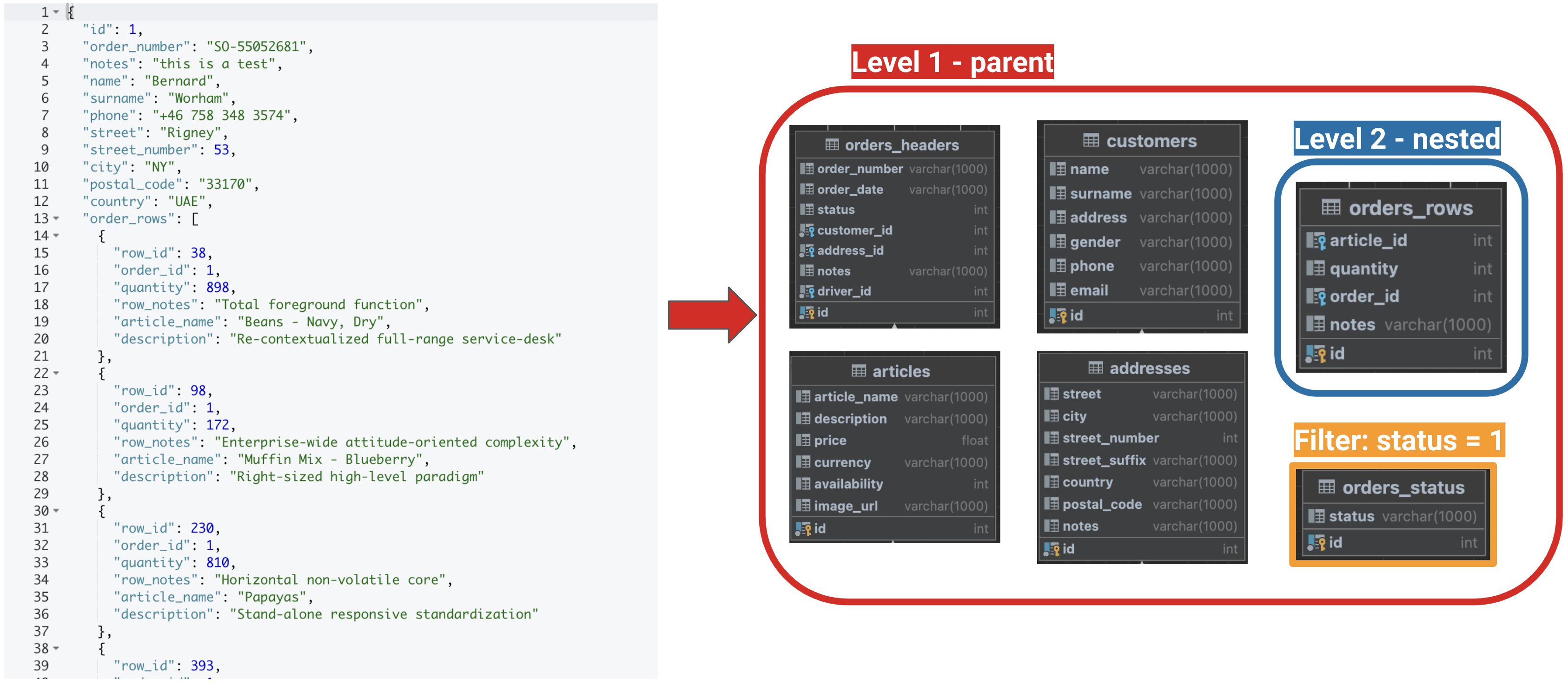
]As a result in your RDBMS database you’ll have:
Compatibiliy matrix
| NoSQL | Gluesync compatibility |
|---|---|
Aerospike |
⏱ launching as soon as source support for Aerospike will be introduced |
Couchbase |
✅ |
MongoDB |
✅ |
| As per our product roadmap NoSQL databases are being added on monthly basis so expect to have Advanced data modelling support on more databases soon after the initial launch. |